使用 Python 从零开始构建 Qwen - 3 MoE(不使用 OOP)
阿里巴巴推出的Qwen 3是继DeepSeek之后当前最优秀的开源混合专家(MoE)AI模型,在推理、编程、数学和语言处理方面表现卓越。本文章将从零理解和构建Qwen-3 MoE,让读者能够更加清晰理解,若读者对LLM知识储备不多,但是又想短时间想了解MOE全貌,这篇文章最适合入门阅读和体会。
阿里巴巴推出的Qwen 3是继DeepSeek之后当前最优秀的开源混合专家(MoE)AI模型,在推理、编程、数学和语言处理方面表现卓越。其顶级版本在MMLU-Pro、LiveCodeBench和AIME等关键基准测试中名列前茅。若读者对LLM知识储备不多,但是又想短时间想了解MOE全貌,这篇文章最适合入门阅读和体会。
本文章将从零理解和构建Qwen-3 MoE,让读者能够更加清晰理解,来源:
Building Qwen-3 MoE from Scratch Without OOP in Python
Owner avatar qwen3-MoE-from-scratch
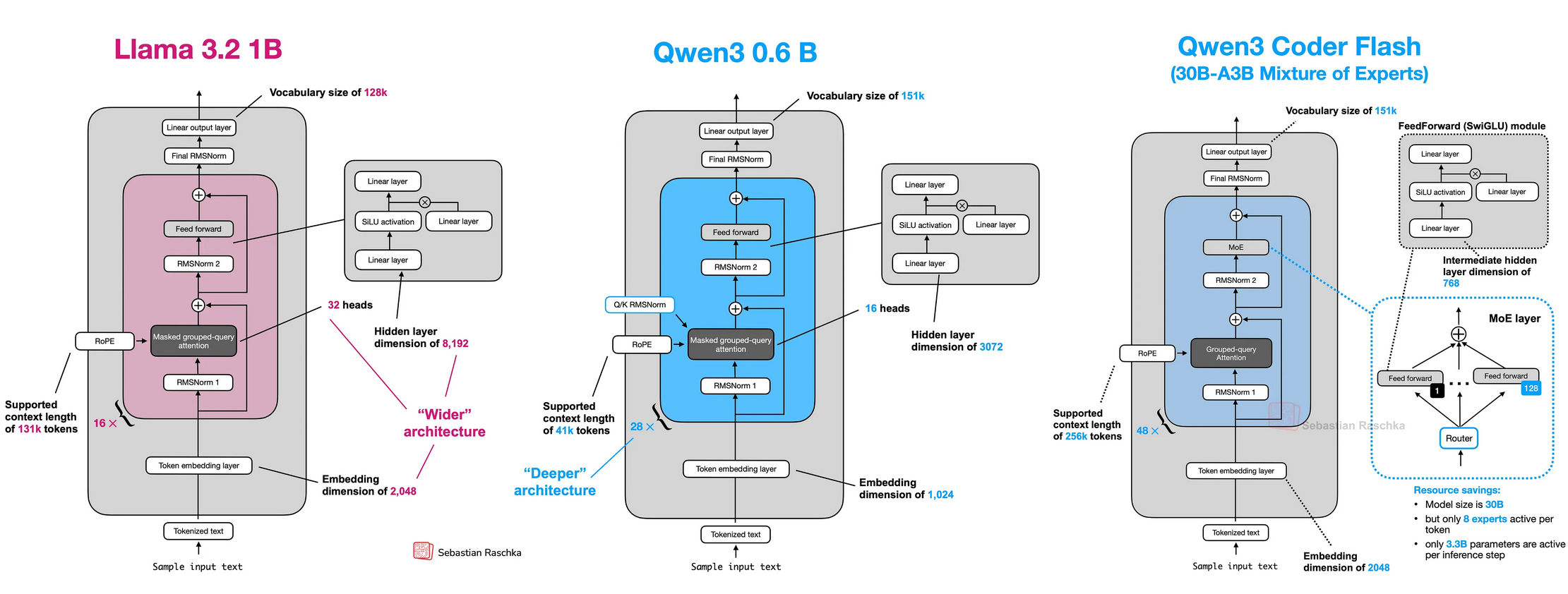
Qwen 3采用混合专家(MoE)架构构建,每次查询仅激活其2350亿参数中的一个子集,在保证质量的同时实现高效运行。该模型还支持高达128K token的上下文长度,兼容119种语言,并引入了双模式设计——"思考模式"与"非思考模式",在深度推理与快速响应之间实现平衡。
1 理解Qwen 3混合专家(MoE)架构
首先,让我们以具备一定技术基础的学习者视角来理解Qwen的MoE架构,然后通过"the cat sat"(猫坐着)这个具体示例,追踪其在该架构中的处理流程,从而获得清晰认知。
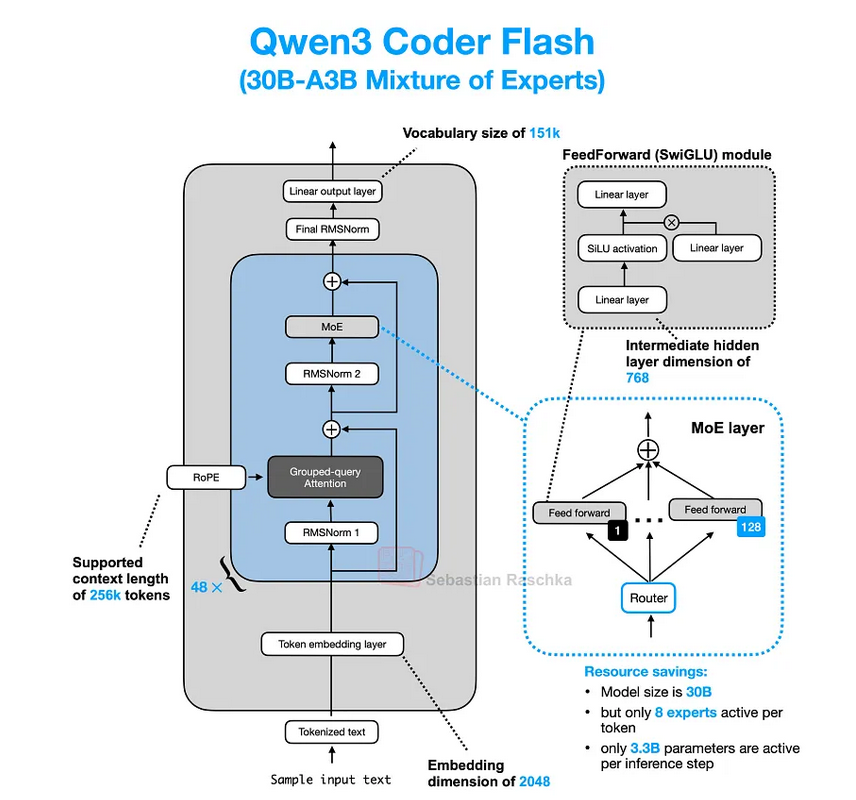
想象你接手了一项极其艰巨的工作。与其雇一个样样都懂一点的全能型员工,不如组建一支专家团队——每位专家都精通某个特定领域(比如电工、水管工、油漆工)。你还会聘请一位经理,由他根据当前任务指派合适的专家来处理。
AI模型中的MoE(混合专家)机制正是基于这个理念。不同于让一个庞大的神经网络试图学习所有知识,MoE层采用以下结构:
- A Team of “Experts”: 由多个小型专业化神经网络组成(通常是简单的前馈网络或MLP多层感知机)。每个专家可能擅长处理某类特定信息或模式。
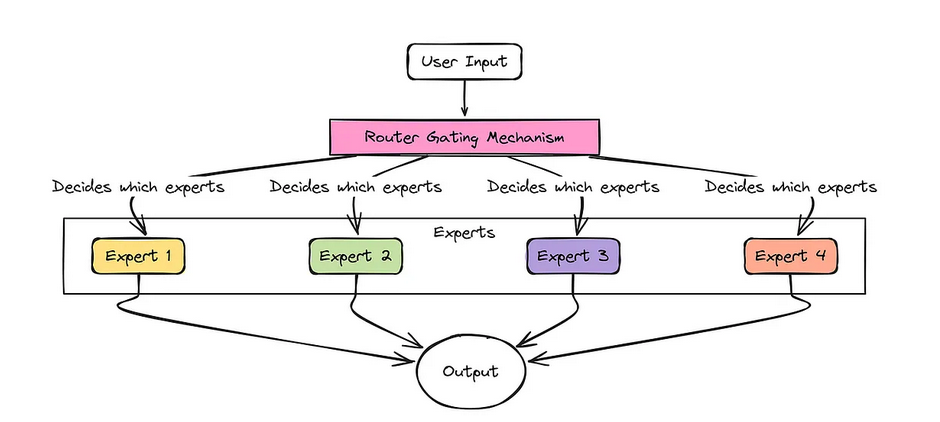
- A “Router” (The Manager): 这是另一个小型网络,其职责是分析输入数据(比如某个单词或词片段),并判断当前最适合处理该数据的专家组合。
#########假设我们的模型正在处理句子:"The cat sat."
(2)分词处理:首先,我们将句子拆分为若干片段(即标记/token):"The"、"cat"、"sat"。
(3)Router 收标记:MoE 层接收到标记 "cat"(它会被表示为一组数字,即嵌入向量/embedding vector)。此时,Router 会分析这个 "cat" 向量。
(4)Router做出选择:假设有 4 个专家(E1、E2、E3、E4)。路由会判断哪些专家最适合处理 "cat"。
(5)可能的决策:比如,它认为 E2(或许擅长处理名词?)和 E4(或许擅长处理动物相关概念?)是最合适的选择。于是,它会为这些专家分配分数或"权重"(例如,E2 得 70% 权重,E4 得 30% 权重)。"cat" 向量仅被发送给专家 E2 和 E4。专家 E1 和 E3 在处理这个标记时无需工作,从而节省了计算资源!
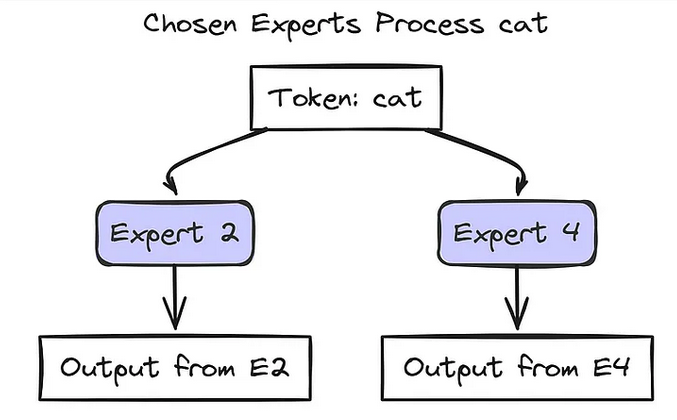
我们通过路由分配的权重合并所选专家的输出结果:最终输出 = (0.7 × Output_E2) + (0.3 × Output_E4);这个 Final_Output 就是 MoE 层针对标记 "cat" 最终传递的结果。而序列中的每个标记都会经历这样的处理流程!不同标记可能会被路由到不同的专家组合。
因此,当模型处理类似 "The cat sat." 这样的文本时,整体处理流程如下:
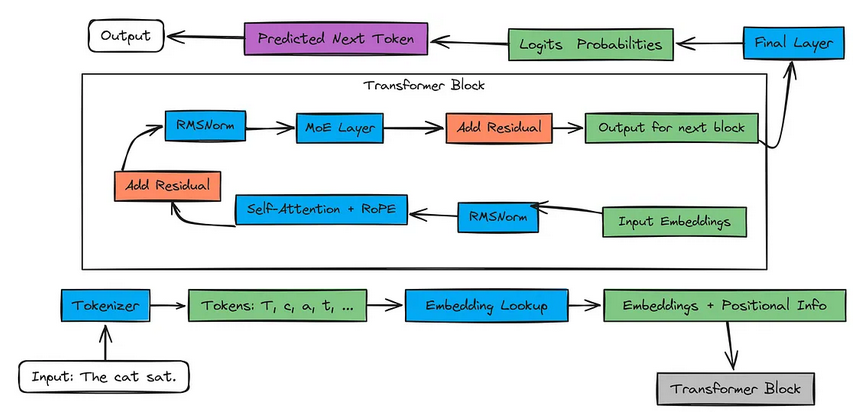
输入文本进入分词器(常用有BPE)。分词器生成数字形式的标记ID。嵌入层将这些ID转换为有意义的数字向量(即嵌入向量),并添加位置信息(后续在注意力机制中通过RoPE实现)。
这些向量会经过多个Transformer模块。每个模块包含:(a)自注意力机制;(b)Router 分配,混合专家层;(c)归一化(RMSNorm)和残差连接有助于模型学习;
最后一个模块的输出会传入最终层。该层为词汇表中每一个可能的下一个标记生成对数几率(即得分)。我们将这些对数几率转换为概率,并预测下一个标记。
现在我们已经了解了混合专家(MoE)在整个流程中的位置,接下来让我们深入探究每个AI模型的更小组成部分。
1.1 采用RMSNorm进行预归一化
在每个Transformer子层(注意力层或前馈层)之前应用RMSNorm(均方根归一化)。它根据输入的均方根进行缩放,但不减去均值(与LayerNorm不同)。这有助于稳定训练,并在早期保持重要信号的强度,就像在深入学习教科书之前先复习关键章节一样,相关参考论文《Root Mean Square Layer Normalization》。
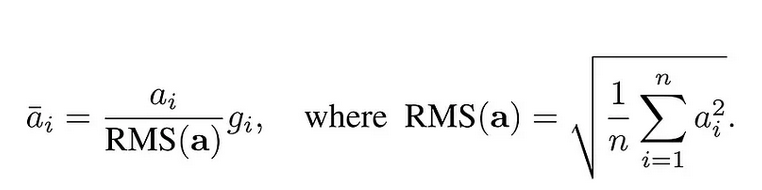
对比:层归一化(layernorm)在计算均值和方差时只考虑单个样本的所有特征:
这里 是参数,
是单个样本的均值,
是单个样本的方差,
分别是缩放和偏移系数。
1.2 SwiGLU 激活函数
SwiGLU(Swish激活函数+门控线性单元)增强了模型突出重要特征的能力。它采用基于Swish激活函数的门控机制,有助于控制哪些信息能够通过。
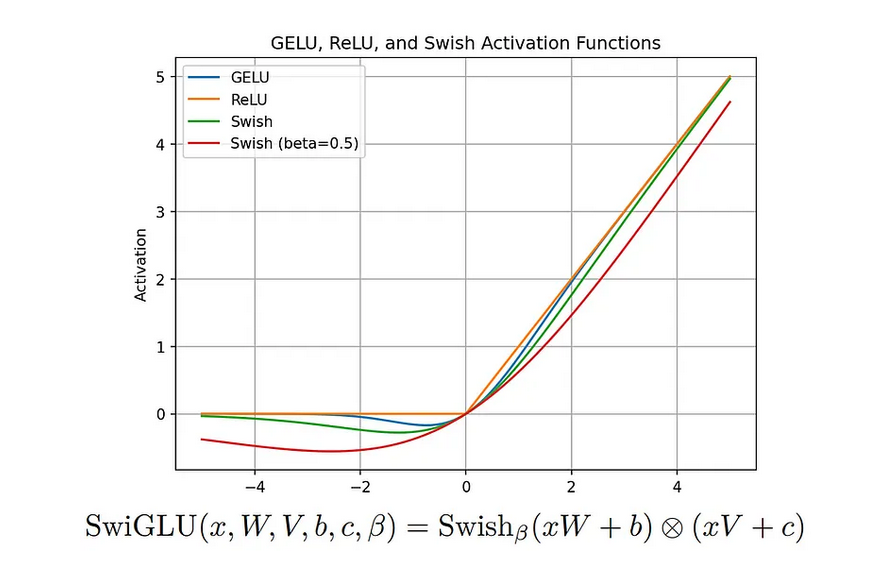
可以把它想象成一个智能荧光笔,在处理过程中让关键部分更加突出。该机制最早在PaLM模型中引入,如今已在LLaMA 3和Qwen 3等模型中应用以提升性能。
Swish 函数的数学表达式为:
是输入值,
是sigmoid函数,
是可学习参数(通常初始化为 1,后续可训练调整);该函数结合了ReLU的线性响应特性和Sigmoid的平滑特性。
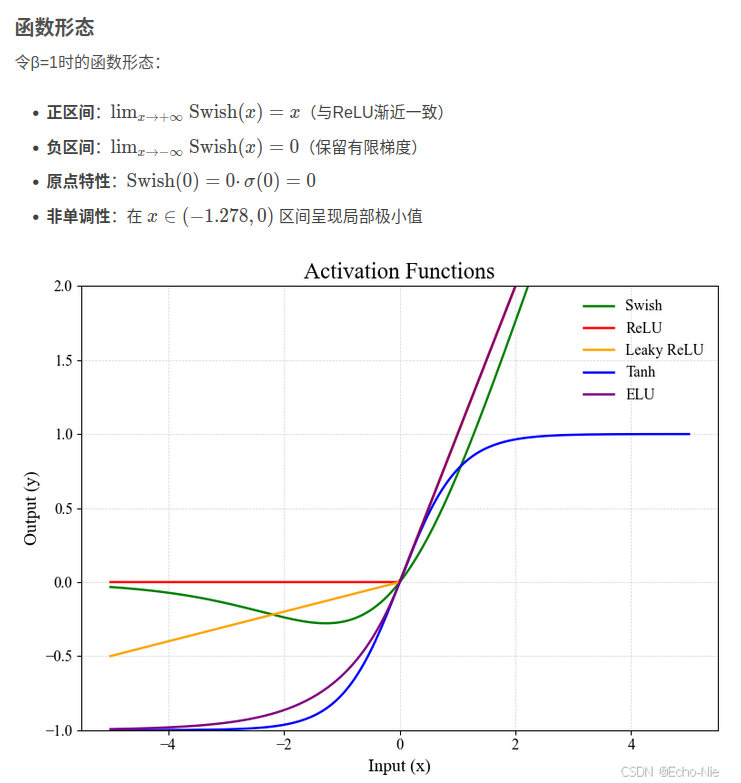
关于SwiGLU的更多细节,可参阅相关《GLU Variants Improve Transformer》论文。
1.3 旋转位置编码(RoPE)
RoPE(旋转位置编码)利用带有旋转特性的正弦函数对词元(token)的位置进行编码,使得嵌入向量能够通过“旋转”来反映相对位置关系。
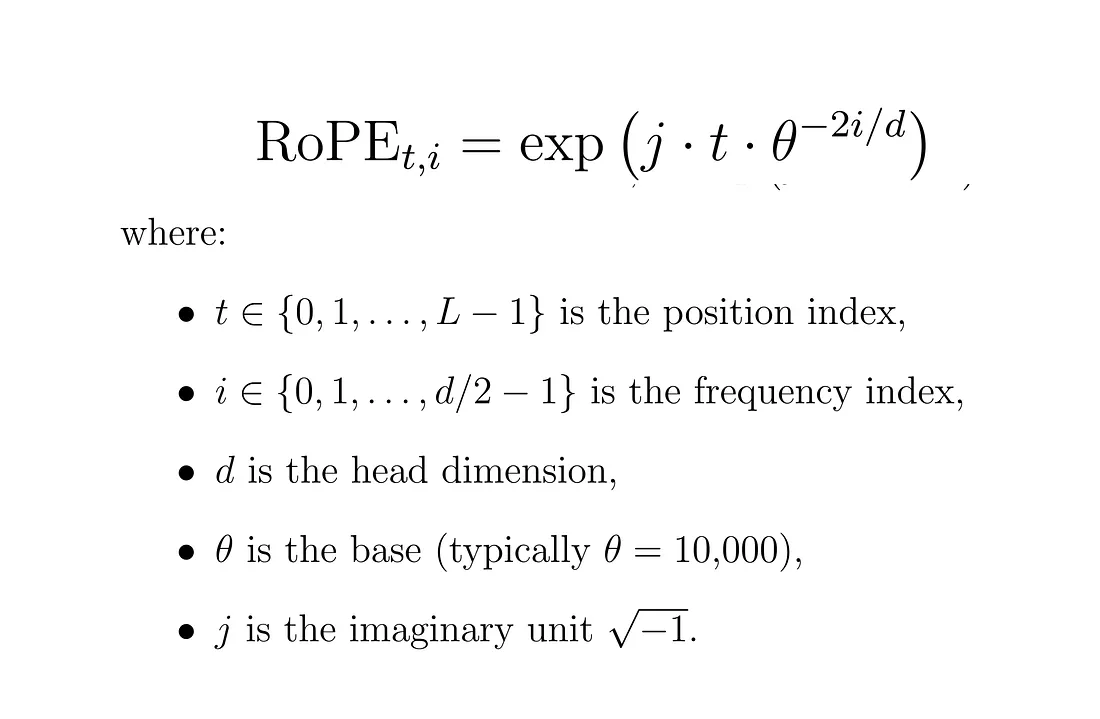
与固定位置嵌入不同,RoPE 支持更长的上下文,并且能更好地泛化到未见过的位置。想象一群学生围成一个圆圈移动——他们的绝对位置在变化,但彼此之间的相对距离保持不变。这种方式帮助模型更灵活地追踪词语的顺序。
1.4 Byte Pair Encoding (BPE)
BPE(字节对编码)通过不断合并高频字符对(如“th”“ing”)来构建词元(token),从而使模型能够更高效地处理不常见或新出现的词汇。
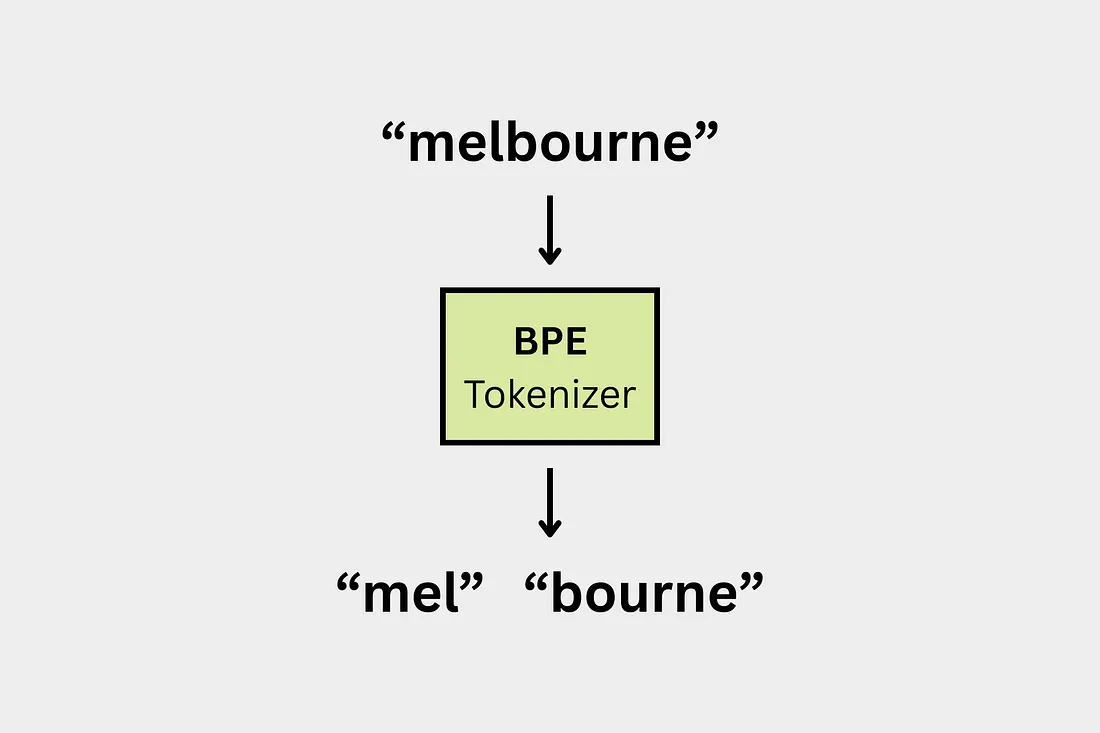
Qwen 3 使用的是 BPE(字节对编码),它倾向于保留完整已知的单词(例如,如果“hugging”在词表中,就会作为一个整体存在)。而 LLaMA 3 使用的是 SentencePiece 实现的 BPE,这种实现可能会把同一个单词拆分成多个部分(比如拆成“hug” + “ging”)。这一差异会影响到分词速度,也会影响模型对文本的理解方式。
2 阶段设置
将使用少量 Python 库,但建议提前安装这些库,以避免运行时出现“找不到模块(no module found)”的错误。
# Download Required modules
pip install sentencepiece tiktoken torch matplotlib huggingface_hub tokenizers safetensors
在安装完所需的库之后,我们需要下载本指南中将用到的 Qwen 3 模型架构的权重文件和配置文件。
我们选用的是一个较小规模的 Qwen 3 MoE(混合专家)版本,该版本包含两个专家网络,每个专家的参数量为 0.80 亿(0.8B)。这些必要的文件构成了 Qwen 3 模型架构的核心部分。下载这些文件有两种方式可供选择。
选项1:ModelScope下载
如果没有科学工具,首先考虑在ModelScope寻找开源版本:huihui-ai/Huihui-MoE-0.8B-2E
pip install modelscope
modelscope download huihui-ai/Huihui-MoE-0.8B-2E --local_dir ./Huihui-MoE-0.8B-2E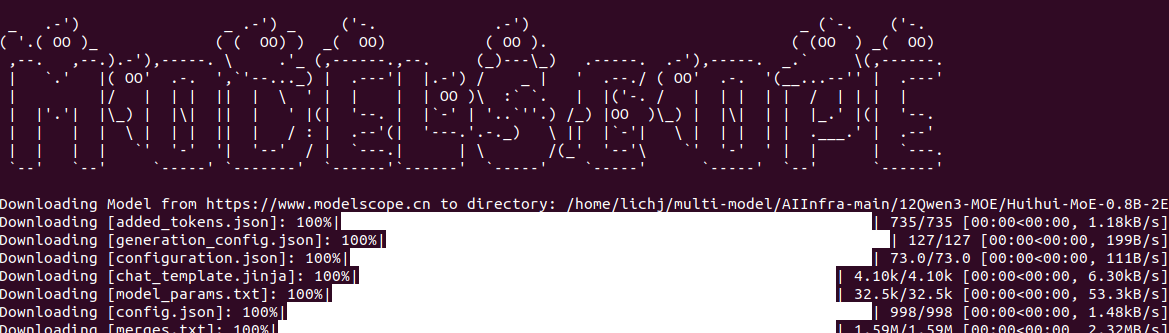
选项 2:镜像下载(适合linux/macOS)
export HF_ENDPOINT=https://hf-mirror.com  # Linux/macOS
pip install "huggingface_hub[cli]"
# 下载一个文件
huggingface-cli download huihui-ai/Huihui-MoE-0.8B-2E --local-dir ./Huihui-MoE-0.8B-2EHuihui-MoE-0.8B-2E 是由 huihui.ai 开发的一款基于 Mixture of Experts(混合专家,简称 MoE) 架构的语言模型,其基础模型为 Qwen/Qwen3-0.6B。该模型在标准 Transformer 架构的基础上进行了改进,将传统的多层感知机(MLP)层替换为包含 2 个专家网络(experts) 的 MoE 层,在保证高性能的同时实现了高效的推理。此模型专为自然语言处理任务设计,适用于 文本生成、问答系统以及对话应用 等多种场景。目前,Huihui-MoE-0.8B-2E 是参数量最小的 MoE 模型之一,并且具备良好的可扩展性,未来可以根据需求增加更多的专家网络。该模型 尚未经过特定任务的微调(fine-tuning),但你可以根据自身需求对其进行微调,以适配具体应用场景。如果你 不进行微调,也可以像使用原始模型 Qwen/Qwen3-0.6B 一样直接调用和使用该模型。
选项 3:手动下载
前往 Qwen-0.8B-2E 的 Hugging Face(HF)模型目录,手动下载以下四个文件。
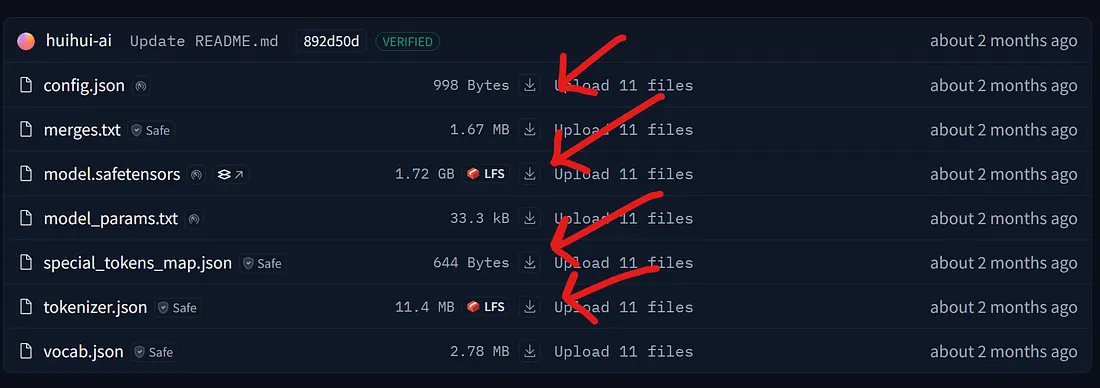
选项 4:Coding
可以使用 huggingface_hub 提供的 snapshot downloader 模块,来下载 Qwen 3 MoE 模型在 Hugging Face 上的整个仓库内容。接下来,我们就采用这种方法进行下载。
# Import tqdm for progress bars and snapshot_download for downloading model files
from tqdm import tqdm
from huggingface_hub import snapshot_download

# Define the Hugging Face repository ID and the local directory to save the files
repo_id = "huihui-ai/Huihui-MoE-0.8B-2E"
local_dir = "Huihui-MoE-0.8B-2E"

# Download the model snapshot from Hugging Face, excluding .bin files
# This will fetch config, tokenizer, and safetensors weights only
snapshot_download(
    repo_id=repo_id,
    local_dir=local_dir,
    ignore_patterns=["*.bin"],      # Skip large .bin files, only get safetensors
    tqdm_class=tqdm                # Use standard tqdm for progress bar
)
所有文件下载完成后,我们需要导入本教程中将会用到的各个库。.
3 为什么要模型权重?
因为我们目标是 精准复现 Qwen 3 MoE 模型,这意味着当我们输入一段文本时,模型必须能够给出有意义的输出。举个例子,如果输入是:“the color of the sun is?”(太阳是什么颜色的?),那么期望的输出就应该是:“white”(白色)。要实现这样的效果,就需要在大规模数据集上对大语言模型(LLM)进行训练,而这需要非常强大的计算资源,在个人或小团队环境下通常是难以实现的。
不过,阿里巴巴已经公开发布了 Qwen 3 的模型架构文件,更专业一点的说法就是,他们开放了 预训练模型权重(pretrained weights) 供大家使用。我们刚才已经下载了这些文件,这意味着我们现在可以 复现 Qwen 3 的模型架构,而无需从头开始训练,也不用准备大规模的数据集。一切基础已经搭建好了,我们只需要把各个组件放在正确的位置上即可。
tokenizer.json 文件说明: Qwen 3 使用的是 字节对编码(Byte Pair Encoding,简称 BPE),这是一种主流的词元(token)构建方法。值得一提的是,AI 研究者 Andrej Karpathy 对 BPE 有一个非常清晰简洁的实现minbpe,值得参考。
# This file contains the vocabulary, merge rules, and configuration.
tokenizer_path = Path("Huihui-MoE-0.8B-2E/tokenizer.json")

# The Tokenizer.from_file() method is the standard way to load tokenizers
# from the Hugging Face ecosystem.
tokenizer = Tokenizer.from_file(str(tokenizer_path))

# We can also load them from the special_tokens_map.json for confirmation
with open("Huihui-MoE-0.8B-2E/special_tokens_map.json", "r") as f:
    special_tokens_map = json.load(f)
    print(f"Special tokens from file: {special_tokens_map}")


#### OUTPUT ####

Special tokens from file: {
'additional_special_tokens': ['<|im_start|>',
'<|im_end|>', '<|object_ref_start|>', '<|object_ref_end|>', '<|box_start|>'
...
}
这些 Special tokens 将用于包裹我们的提示词(prompt),从而指导 Qwen 3 模型架构如何对我们的查询(query)做出回应。
# We'll follow the encode -> decode pattern to ensure it works correctly.
prompt = "The only thing I know is that I know"

# .encode() returns an Encoding object, we access the token IDs via .ids
encoded = tokenizer.encode(prompt)
print(f"\nOriginal prompt: '{prompt}'")
print(f"Encoded token IDs: {encoded.ids}")

# .decode() converts the token IDs back to a string.
decoded = tokenizer.decode(encoded.ids)
print(f"Decoded back to text: '{decoded}'")

# Verify the vocabulary size
vocab_size = tokenizer.get_vocab_size()
print(f"\nTokenizer vocabulary size: {vocab_size}")


#### OUTPUT ####
Original prompt: 'The only thing I know is that I know'
Encoded token IDs: [785, 1172, 3166, 358, 1414, 374, 429, 358, 1414]
Decoded back to text: 'The only thing I know is that I know'
Tokenizer vocabulary size: 151669
词汇表大小表示的是训练数据中 不同字符(或词元)的总数量。该分词器属于 字典(词典)类型。
# Get the vocabulary as a dictionary: {token_string: token_id}
vocab = tokenizer.get_vocab()

# Display a slice of the vocabulary for inspection (tokens 5600 to 5609)
sample_vocab_slice = list(vocab.items())[5600:5610]
sample_vocab_slice

#### OUTPUT ####
[('íĮIJ', 129382),
 ('ĠBrands', 54232),
 ('Ġincorporates', 51824),
 ('à¸ŀระราà¸Ĭ', 132851),
 ('ĉResource', 79487),
 ('ĠĠĠĠĉĠ', 80840),
 ('hover', 17583),
 ('Movement', 38050),
 ('解åĨ³äºĨ', 105826),
('ĠonBackPressed', 70609)]当我们从中打印10个随机项目时,您将看到使用BPE算法形成的字符串。键表示BPE训练中的字节序列,而值表示基于频率的合并排名。在 BPE(字节对编码)算法中,合并排名 的数值越小,表示该字节对的 合并优先级越高。
config.json — 包含各种参数,例如:
# Define the path to the configuration file.
config_path = Path("Huihui-MoE-0.8B-2E/config.json")

# Open and load the JSON file into a Python dictionary.
with open(config_path, "r") as f:
    config = json.load(f)

# Print the configuration to see all the parameters.
# This gives us a complete overview of the model we're about to build.
print(json.dumps(config, indent=4))


#### OUTPUT ####
{
    "architectures": [
        "Qwen3MoeForCausalLM"
    ],
    "attention_bias": false,
    "attention_dropout": 0.0,
    "bos_token_id": 151643,
    "decoder_sparse_step": 1,
    "eos_token_id": 151645,
    "head_dim": 128,
    "hidden_act": "silu",
    ...
    "transformers_version": "4.52.4",
    "use_cache": true,
    "use_sliding_window": false,
    "vocab_size": 151936
}
这些参数值将通过明确指定头数(heads)、嵌入向量的维度、专家数量等细节,帮助我们复现 Qwen-3 的架构。让我们将这些值保存下来,以便后续使用。
# --- Main Architecture Parameters ---
# Extract model hyperparameters from the config dictionary.

# Embedding dimension (hidden size of the model)
dim = config["hidden_size"]
# Number of transformer layers
n_layers = config["num_hidden_layers"]
# Number of attention heads
n_heads = config["num_attention_heads"]
# Number of key/value heads (for grouped-query attention)
n_kv_heads = config["num_key_value_heads"]
# Vocabulary size
vocab_size = config["vocab_size"]
# RMSNorm epsilon value for numerical stability
norm_eps = config["rms_norm_eps"]
# Rotary positional embedding theta parameter
rope_theta = torch.tensor(config["rope_theta"])
# Dimension of each attention head
head_dim = config["head_dim"]  # For attention calculations

# --- Mixture-of-Experts (MoE) Specific Parameters ---
# Number of experts in the MoE layer
num_experts = config["num_experts"]
# Number of experts selected per token by the router
num_experts_per_tok = config["num_experts_per_tok"]
# Intermediate size of the MoE feed-forward network
moe_intermediate_size = config["moe_intermediate_size"]
model.safetensors — 包含了 Qwen 0.8B 2Experts 模型学到的参数(即权重)。这些参数记录了模型如何理解和处理语言的信息,例如它是如何表示词元(tokens)、计算注意力(attention)、进行专家选择(experts selection)以及归一化输出(normalize its outputs)的。
# Define the path to the model weights file
model_weights_path = Path("Huihui-MoE-0.8B-2E/model.safetensors")

# Load the weights into a dictionary; each key is a layer/parameter name, and each value is a torch tensor
model_weights = load_file(model_weights_path)

# Inspect the loaded weights: print the first 20 layer names to confirm successful loading
print("First 20 keys in model_weights:")
print(json.dumps(list(model_weights.keys())[:20], indent=4))


#### OUTPUT ####
[
    "model.embed_tokens.weight",
    "model.layers.0.input_layernorm.weight",
    "model.layers.0.mlp.experts.0.down_proj.weight",
    "model.layers.0.mlp.experts.0.gate_proj.weight",
    "model.layers.0.mlp.experts.0.up_proj.weight",
    "model.layers.0.mlp.experts.1.down_proj.weight",
    ...
    "model.layers.1.mlp.experts.0.gate_proj.weight",
    "model.layers.1.mlp.experts.0.up_proj.weight"
    ...
]
如果您熟悉 Transformer 架构,那么您应该已经了解过查询矩阵(query matrix)、键矩阵(key matrix)等相关概念。稍后,我们将利用这些层(layers)和权重(weights),在 Qwen 3 MoE 的架构中构建类似的矩阵,并加入混合专家(MoE,Mixture of Experts)组件。
现在,我们已经拥有了分词器(tokenizer)、包含权重的架构模型(architecture model),以及配置参数(configuration parameters),接下来就让我们从零开始编写属于我们自己的 Qwen 3 MoE 模型吧。
4 Tokenized Text
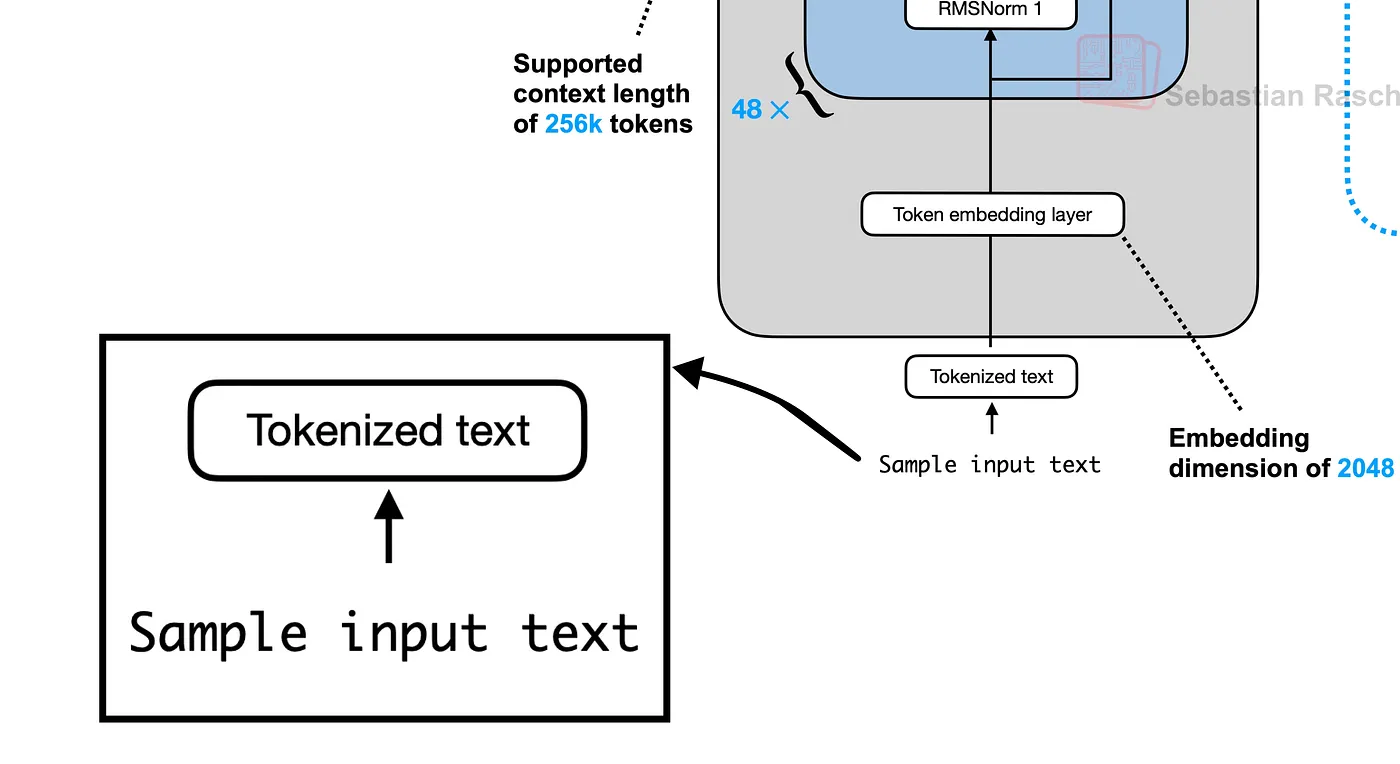
第一步是将我们的输入文本转换为词元(tokens)。Qwen 3 使用一种特定的对话模板,并包含特殊词元(special tokens),例如 <|im_start|> 和 <|im_end|>,用于构建对话结构。这有助于模型区分用户的问题(queries)与模型自身的回复(responses)。
# Our sample user prompt
prompt = "The only thing I know is that I know"

# Get token IDs for special tokens and template components
im_start_id = tokenizer.token_to_id("<|im_start|>")
im_end_id = tokenizer.token_to_id("<|im_end|>")
newline_id = tokenizer.encode("\n").ids[0]
user_ids = tokenizer.encode("user").ids
assistant_ids = tokenizer.encode("assistant").ids
prompt_ids = tokenizer.encode(prompt).ids

# Manually construct the full prompt using the chat template:
# <|im_start|>user\n{prompt}<|im_end|>\n<|im_start|>assistant\n
prefix_ids = [im_start_id] + user_ids + [newline_id]
suffix_ids = [im_end_id, newline_id, im_start_id] + assistant_ids + [newline_id]
tokens_list = prefix_ids + prompt_ids + suffix_ids

# Convert the list of token IDs into a PyTorch tensor
tokens = torch.tensor(tokens_list)

print(f"Final combined token IDs: {tokens}")

# Decode for verification
prompt_split_as_tokens = [tokenizer.decode([token.item()]) for token in tokens]
print(f"\nPrompt split into tokens: {prompt_split_as_tokens}")


#### OUTPUT ####
Final combined token IDs: tensor([151644,    872,  ... , 8])
Prompt split into tokens: ['', 'user', '\n', 'The', ..., '\n']
#### OUTPUT ####
现在,我们已经将提示词(prompt)转换成了一个由 17 个词元(tokens)组成的结构化列表,可以输入给模型进行处理了。
5 创建 Token Embedding Layer
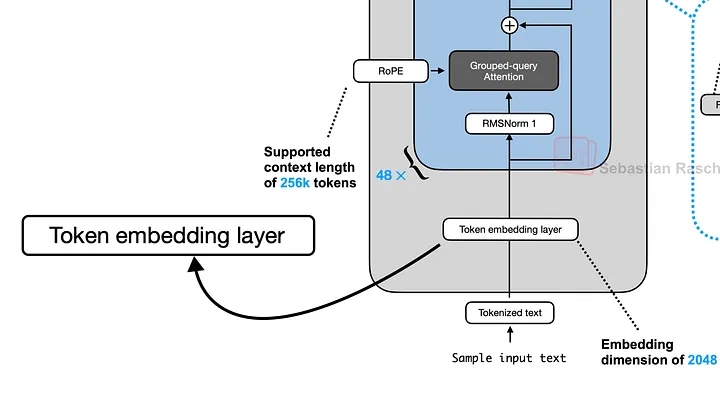
embedding 是一个稠密向量,用于在高维空间中表示词元(token)的语义信息。我们需要将包含 17 个词元的输入向量,转换成一个形状为 [17, 1024] 的张量,其中 1024(即 dim,代表 embedding 维度)就是嵌入向量的维度。
# Initialize the embedding layer with the correct size
embedding_layer = nn.Embedding(vocab_size, dim)
# Load the pre-trained weights into our layer
embedding_layer.weight.data.copy_(model_weights["model.embed_tokens.weight"])

# Pass our tokens through the layer to get their embeddings
token_embeddings_unnormalized = embedding_layer(tokens).to(torch.bfloat16)

# Verify the shape
print("Shape of the token embeddings:", token_embeddings_unnormalized.shape)


#### OUTPUT ####
Shape of the token embeddings: torch.Size([17, 1024])
#### OUTPUT ####
这些嵌入向量目前尚未经过归一化处理,如果不进行归一化,将会对模型产生严重影响。在下一节中,我们将对输入向量执行归一化操作。
6 使用 RMSNorm 进行归一化
将定义 rms_norm 函数,该函数基于输入向量的均方根(Root Mean Square,RMS)值对其进行缩放。这一步是我们 Transformer 层中的第一个预归一化(pre-normalization)步骤。
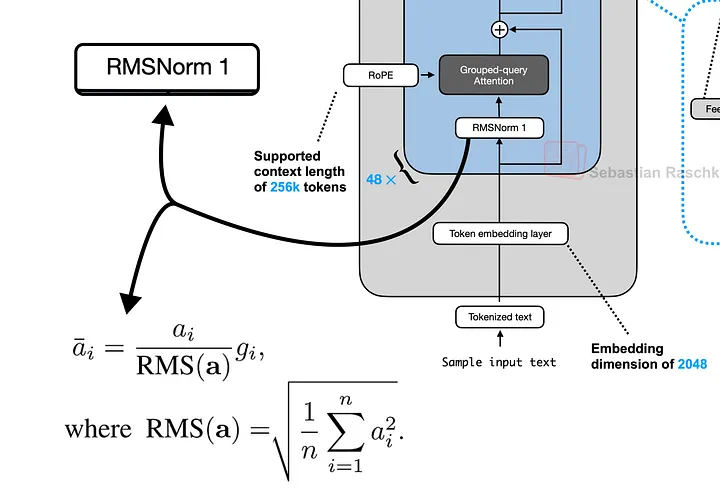
# RMSNorm function: scales the input tensor by the reciprocal of its root mean square
def rms_norm(tensor, norm_weights):
    input_dtype = tensor.dtype
    tensor_float = tensor.to(torch.float32)
    # Calculate the variance (mean of squares)
    variance = tensor_float.pow(2).mean(-1, keepdim=True)
    # Normalize by multiplying with the reciprocal square root of the variance
    normalized_tensor = tensor_float * torch.rsqrt(variance + norm_eps)
    # Apply the learnable weights and cast back to the original dtype
    return (normalized_tensor * norm_weights).to(input_dtype)
我们将使用来自 layers_0 的注意力权重(attention weights)来对尚未归一化的嵌入向量进行归一化处理。之所以选用 layer_0,是因为我们当前正在构建 Qwen 3 架构的第一层。
# Apply RMSNorm to the embeddings using the weights
# for the first layer's input
token_embeddings_normalized = rms_norm(
    token_embeddings_unnormalized,
    model_weights["model.layers.0.input_layernorm.weight"]
)
print("Shape of the normalized token embeddings:", token_embeddings_normalized.shape)

#### OUTPUT ####
Shape of the normalized token embeddings: torch.Size([17, 1024])
#### OUTPUT ####
经过归一化处理后,张量的形状保持不变,但其中的数值现已完成归一化,可以输入到注意力机制(attention mechanism)中使用了。
7 分组查询注意力机制(Grouped-Query Attention)
接下来,我们将生成查询向量(Query,Q)、键向量(Key,K)和值向量(Value,V)。这些预训练得到的权重被存储在大型组合矩阵中。我们需要对这些矩阵进行重新调整形状(reshape),以分离出针对我们 16 个注意力头(attention heads)各自的权重。
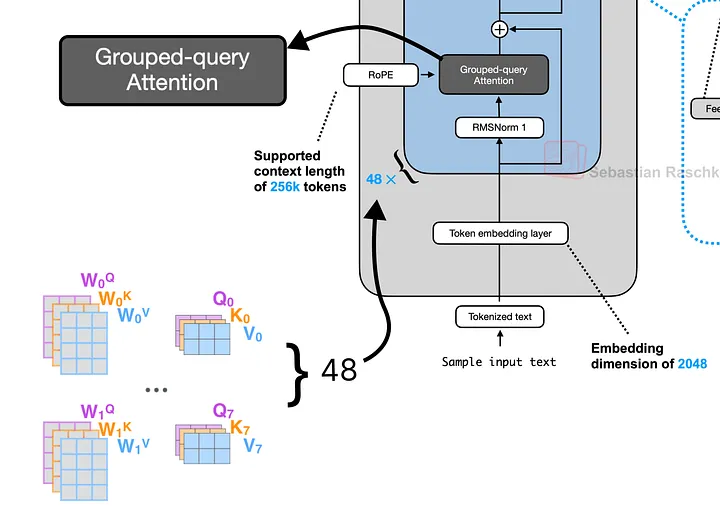
该模型采用了一种名为分组查询注意力(Grouped-Query Attention,简称 GQA)的优化策略:在 16 个查询头(Query heads)中共享较少数量的键头(Key heads)和值头(Value heads)——具体为 8 个。这种设计能在几乎不损失模型性能的前提下,有效降低计算开销。
# Unpack the query weights into 16 heads
q_layer0 = model_weights["model.layers.0.self_attn.q_proj.weight"]
q_layer0 = q_layer0.view(n_heads, head_dim, dim)

# Unpack the key weights into 8 shared heads
k_layer0 = model_weights["model.layers.0.self_attn.k_proj.weight"]
k_layer0 = k_layer0.view(n_kv_heads, head_dim, dim)

# Unpack the value weights into 8 shared heads
v_layer0 = model_weights["model.layers.0.self_attn.v_proj.weight"]
v_layer0 = v_layer0.view(n_kv_heads, head_dim, dim)
接下来,我们将通过将已归一化的嵌入向量(normalized embeddings)与当前注意力头的权重相乘,来计算第一个注意力头(head)对应的查询向量(Q)、键向量(K)和值向量(V)。
# Get the weights for the first head (head 0)
q_layer0_head0 = q_layer0[0]
k_layer0_head0 = k_layer0[0] # The first Q head uses the first KV head
v_layer0_head0 = v_layer0[0]

# Calculate the Q, K, and V vectors for each of the 17 tokens
q_per_token = torch.matmul(token_embeddings_normalized, q_layer0_head0.T)
k_per_token = torch.matmul(token_embeddings_normalized, k_layer0_head0.T)
v_per_token = torch.matmul(token_embeddings_normalized, v_layer0_head0.T)

# Verify the shape of the query vectors
print("Shape of Query vectors per token:", q_per_token.shape)


#### OUTPUT ####
Shape of Query vectors per token: torch.Size([17, 128])
#### OUTPUT ####
目前,我们的 17 个词元(tokens)中的每一个,在第一个注意力头(head)中都分别拥有一个维度为 128 的查询向量(Q)、键向量(K)和值向量(V)。
8 旋转位置编码(Rotary Position Embedding)
这些向量目前还不知道它们在序列中的位置信息。我们将使用 RoPE 通过对这些向量进行“旋转”操作,来注入位置信息。为了提高计算效率,我们可以预先计算出所有可能位置(直到最大序列长度为止)所对应的旋转角度。
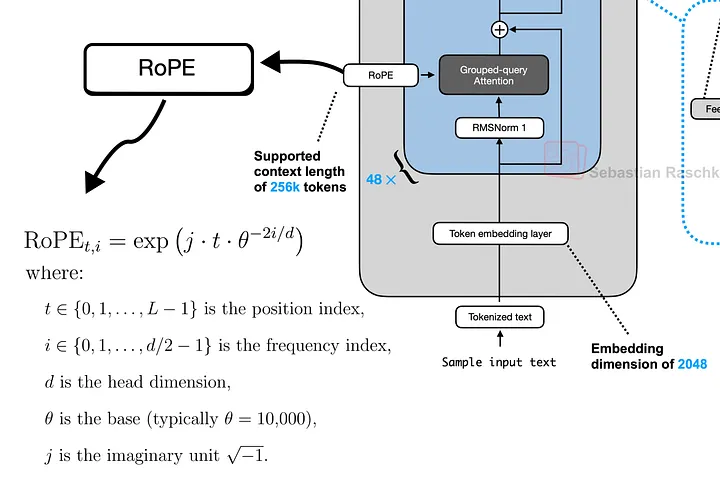
# Pre-compute RoPE frequencies for all possible positions
max_seq_len = config["max_position_embeddings"]
freqs = 1.0 / (rope_theta ** (torch.arange(0, head_dim, 2) / head_dim))
t = torch.arange(max_seq_len)
freqs_for_each_token = torch.outer(t, freqs)
# `freqs_cis` is our lookup table of complex numbers for rotation
freqs_cis = torch.polar(torch.ones_like(freqs_for_each_token), freqs_for_each_token)
freqs_cis 张量中存储的就是用于执行旋转操作的复数。我们可以针对单个词元(token)可视化这些旋转过程,从而观察每一对二维维度(2D pair of dimensions)是如何按照不同角度进行旋转的。
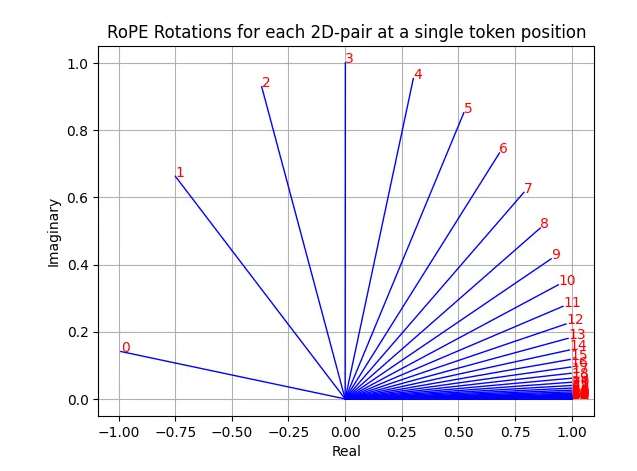
我们将这些旋转操作应用到查询向量(Q)和键向量(K)上。具体而言,旋转是通过将向量视为复数,并执行逐元素乘法(element-wise multiplication)来完成的。
# Get the pre-computed rotations for our sequence of 17 tokens
freqs_cis_for_tokens = freqs_cis[:len(tokens)]

# --- Apply RoPE to Query vectors ---
# Reshape [17, 128] to [17, 64, 2] and view as complex numbers [17, 64]
q_per_token_as_complex_numbers = torch.view_as_complex(q_per_token.float().view(q_per_token.shape[0], -1, 2))
# Apply rotation via complex multiplication
q_per_token_rotated_complex = q_per_token_as_complex_numbers * freqs_cis_for_tokens
# Convert back to real numbers and reshape to [17, 128]
q_per_token_rotated = torch.view_as_real(q_per_token_rotated_complex).view(q_per_token.shape)

# --- Apply RoPE to Key vectors (same process) ---
k_per_token_as_complex_numbers = torch.view_as_complex(k_per_token.float().view(k_per_token.shape[0], -1, 2))
k_per_token_rotated_complex = k_per_token_as_complex_numbers * freqs_cis_for_tokens
k_per_token_rotated = torch.view_as_real(k_per_token_rotated_complex).view(k_per_token.shape)

print("Shape of rotated Query vectors:", q_per_token_rotated.shape)


#### OUTPUT ####
Shape of rotated Query vectors: torch.Size([17, 128])
#### OUTPUT ####
9 计算 Attention Scores
现在,我们通过计算查询矩阵(query)和键矩阵(key)的点积(dot product)来求得注意力分数(attention scores)。这将生成一个形状为 [17, 17] 的矩阵,其中每个元素表示每个词元(token)应该“关注”(attend)其他每个词元的程度。为了稳定训练过程,我们会将这些分数除以头维度(head dimension)的平方根进行缩放(scale)。
# Calculate dot product of Q and K to get attention scores
qk_per_token = torch.matmul(q_per_token_rotated, k_per_token_rotated.T)
# Scale the scores for numerical stability
qk_per_token_scaled = qk_per_token / (head_dim**0.5)
我们可以将这些原始注意力分数可视化为热力图(heatmap)。
# Calculate the raw attention scores by multiplying rotated Q and K vectors
qk_per_token = torch.matmul(q_per_token_rotated, k_per_token_rotated.T)

# Scale the attention scores by the square root of the head dimension
qk_per_token_scaled = qk_per_token / (head_dim**0.5)

# Visualize the raw attention scores before masking
def display_qk_heatmap(qk_matrix, title="Attention Heatmap"):
    _, ax = plt.subplots()
    im = ax.imshow(qk_matrix.to(torch.float32).detach(), cmap='viridis')
    ax.set_xticks(range(len(prompt_split_as_tokens)))
    ax.set_yticks(range(len(prompt_split_as_tokens)))
    ax.set_xticklabels(prompt_split_as_tokens, rotation=90)
    ax.set_yticklabels(prompt_split_as_tokens)
    ax.figure.colorbar(im, ax=ax)
    plt.title(title)
    plt.show()

display_qk_heatmap(qk_per_token_scaled, title="Raw Attention Scores (Before Masking)")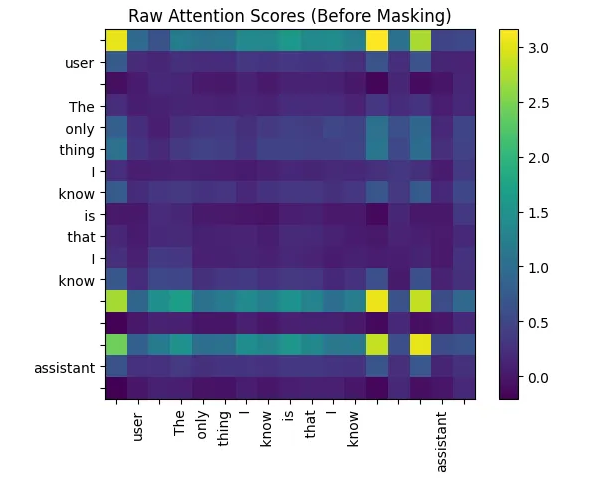
为防止该自回归模型中的词元(tokens)“窥见”未来信息,我们会施加一个因果掩码(causal mask)。该掩码会将矩阵上三角区域内的所有注意力分数设为负无穷(negative infinity),这样经过 Softmax 函数处理后,这些位置的分数就会变为零。
# Create an upper-triangular mask with -inf values
mask = torch.full((len(tokens), len(tokens)), float("-inf"))
mask = torch.triu(mask, diagonal=1)

# Apply the mask to the scores
qk_per_token_masked = qk_per_token_scaled + mask
掩码矩阵像:
# Printing masking approach
print(mask)

#### OUTPUT ####
tensor([[0., -inf, -inf, -inf, -inf, -inf, -inf, -inf, -inf, -inf, -inf, -inf, -inf, -inf, -inf, -inf, -inf],
        [0., 0., -inf, -inf, -inf, -inf, -inf, -inf, -inf, -inf, -inf, -inf, -inf, -inf, -inf, -inf, -inf],
        [0., 0., 0., -inf, -inf, -inf, -inf, -inf, -inf, -inf, -inf, -inf, -inf, -inf, -inf, -inf, -inf],
        [0., 0., 0., 0., -inf, -inf, -inf, -inf, -inf, -inf, -inf, -inf, -inf, -inf, -inf, -inf, -inf],
        [0., 0., 0., 0., 0., -inf, -inf, -inf, -inf, -inf, -inf, -inf, -inf, -inf, -inf, -inf, -inf],
        [0., 0., 0., 0., 0., 0., -inf, -inf, -inf, -inf, -inf, -inf, -inf, -inf, -inf, -inf, -inf],
        [0., 0., 0., 0., 0., 0., 0., -inf, -inf, -inf, -inf, -inf, -inf, -inf, -inf, -inf, -inf],
        [0., 0., 0., 0., 0., 0., 0., 0., -inf, -inf, -inf, -inf, -inf, -inf, -inf, -inf, -inf],
        [0., 0., 0., 0., 0., 0., 0., 0., 0., -inf, -inf, -inf, -inf, -inf, -inf, -inf, -inf],
        [0., 0., 0., 0., 0., 0., 0., 0., 0., 0., -inf, -inf, -inf, -inf, -inf, -inf, -inf],
        [0., 0., 0., 0., 0., 0., 0., 0., 0., 0., 0., -inf, -inf, -inf, -inf, -inf, -inf],
        [0., 0., 0., 0., 0., 0., 0., 0., 0., 0., 0., 0., -inf, -inf, -inf, -inf, -inf],
        [0., 0., 0., 0., 0., 0., 0., 0., 0., 0., 0., 0., 0., -inf, -inf, -inf, -inf],
        [0., 0., 0., 0., 0., 0., 0., 0., 0., 0., 0., 0., 0., 0., -inf, -inf, -inf],
        [0., 0., 0., 0., 0., 0., 0., 0., 0., 0., 0., 0., 0., 0., 0., -inf, -inf],
        [0., 0., 0., 0., 0., 0., 0., 0., 0., 0., 0., 0., 0., 0., 0., 0., -inf],
        [0., 0., 0., 0., 0., 0., 0., 0., 0., 0., 0., 0., 0., 0., 0., 0., 0.]])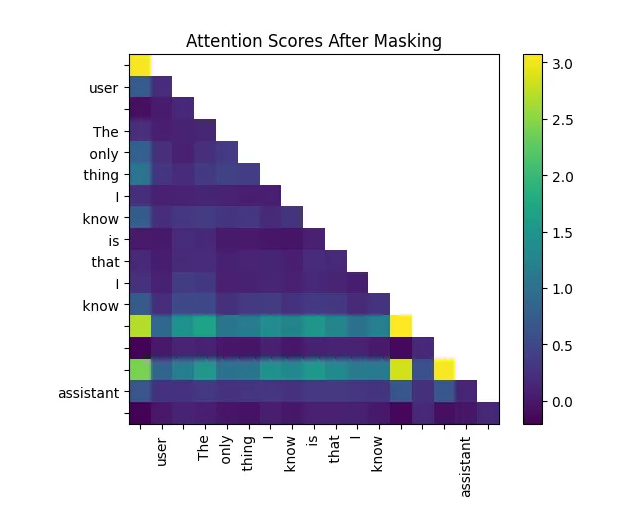
最后,我们对这些分数(即注意力分数)施加 Softmax 函数,将其转换为概率分布(也就是注意力权重),并将其与值矩阵(Value matrix)相乘。这样便得到了值的加权求和结果,从而输出该注意力头(attention head)的最终结果。
# Apply softmax to turn scores into probabilities
qk_per_token_after_masking_after_softmax = torch.nn.functional.softmax(qk_per_token_masked.float(), dim=1).to(torch.bfloat16)
# Multiply the attention weights by the Value vectors
qkv_attention = torch.matmul(qk_per_token_after_masking_after_softmax, v_per_token)

print("Shape of the final attention output for Head 0:", qkv_attention.shape)


#### OUTPUT ####
Shape of the final attention output for Head 0: torch.Size([17, 128])
#### OUTPUT ####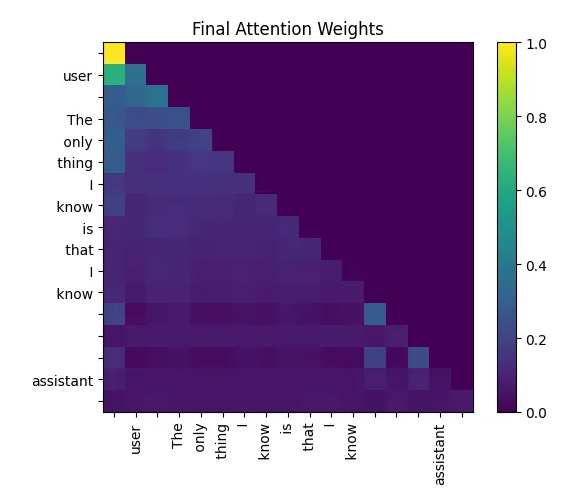
该输出是一个新的 [17, 128] 张量,其中每个词元(token)的向量现在都包含了来自所有前面词元的上下文信息。
10 实现多头注意力机制(Multi-Head Attention)
接下来,我们通过循环为全部 16 个注意力头(heads)重复上述自注意力(self-attention)过程。每个注意力头都会输出一个 [17, 128] 的张量,我们将这些输出收集到一个列表中。
(通过会将多个注意力头设置成新维度,这里主要方便读者阅读,采用循环操作)
# Create an empty list to store the attention output of each head.
qkv_attention_store = []

# Iterate over each of the 16 attention heads.
for head in range(n_heads):
    # Get the Q, K, and V weights for the current head.
    # Note the use of `head // 4` for K and V due to Grouped-Query Attention.
    # Every 4 query heads share the same key and value heads.
    q_layer0_head = q_layer0[head]
    k_layer0_head = k_layer0[head // (n_heads // n_kv_heads)]
    v_layer0_head = v_layer0[head // (n_heads // n_kv_heads)]

    # Project the normalized embeddings into Q, K, and V vectors for this head.
    q_per_token = torch.matmul(token_embeddings_normalized, q_layer0_head.T)
    k_per_token = torch.matmul(token_embeddings_normalized, k_layer0_head.T)
    v_per_token = torch.matmul(token_embeddings_normalized, v_layer0_head.T)

    # Apply RoPE to the Q and K vectors for this head.
    q_per_token_split_into_pairs = q_per_token.float().view(q_per_token.shape[0], -1, 2)
    q_per_token_as_complex_numbers = torch.view_as_complex(q_per_token_split_into_pairs)
    q_per_token_as_complex_numbers_rotated = q_per_token_as_complex_numbers * freqs_cis_for_tokens
    q_per_token_split_into_pairs_rotated = torch.view_as_real(q_per_token_as_complex_numbers_rotated)
    q_per_token_rotated = q_per_token_split_into_pairs_rotated.view(q_per_token.shape)

    k_per_token_split_into_pairs = k_per_token.float().view(k_per_token.shape[0], -1, 2)
    k_per_token_as_complex_numbers = torch.view_as_complex(k_per_token_split_into_pairs)
    k_per_token_as_complex_numbers_rotated = k_per_token_as_complex_numbers * freqs_cis_for_tokens
    k_per_token_split_into_pairs_rotated = torch.view_as_real(k_per_token_as_complex_numbers_rotated)
    k_per_token_rotated = k_per_token_split_into_pairs_rotated.view(k_per_token.shape)

    # Calculate and scale the attention scores.
    qk_per_token = torch.matmul(q_per_token_rotated, k_per_token_rotated.T) / (head_dim**0.5)

    # Apply the causal mask.
    qk_per_token_masked = qk_per_token + mask

    # Apply softmax to get the attention weights.
    qk_per_token_after_masking_after_softmax = torch.nn.functional.softmax(qk_per_token_masked.float(), dim=1).to(torch.bfloat16)

    # Aggregate the Value vectors using the attention weights.
    qkv_attention = torch.matmul(qk_per_token_after_masking_after_softmax, v_per_token)

    # Append the result of this head to our list.
    qkv_attention_store.append(qkv_attention)
在循环结束后,我们将这 16 个注意力头的输出拼接(concatenate)成一个大的单一张量,其尺寸为 [17, 2048](即 16 × 128 = 2048)。随后,我们使用输出权重矩阵 o_proj,将这个大张量投影(project)回模型原本的维度(1024),完成多头注意力机制的最终输出。
# Concatenate the outputs from all 16 heads along the last dimension
stacked_qkv_attention = torch.cat(qkv_attention_store, dim=-1)

# Get the output projection weights
w_layer0 = model_weights["model.layers.0.self_attn.o_proj.weight"]

# Project the concatenated outputs back to the model's hidden dimension
embedding_delta = torch.matmul(stacked_qkv_attention, w_layer0.T)
最终得到的结果 embedding_delta 会被加回到该层的原始输入上。这就是第一个残差连接(residual connection)——这项关键技术能够通过让梯度更顺畅地流动,从而有效支持非常深层网络的训练。
# Add the output of the attention block back to its input (residual connection)
embedding_after_attention = token_embeddings_unnormalized + embedding_delta
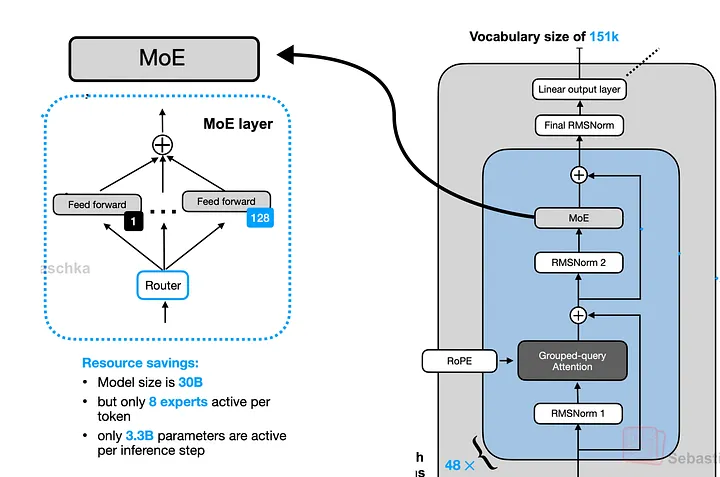
11 混合专家模块(Mixture-of-Experts)
这是 Transformer 块中的第二个子层。首先,我们会对该子层的输入施加预归一化(pre-normalization)操作。
# Apply RMSNorm before the MoE block, using the 'post_attention_layernorm' weights
embedding_after_attention_normalized = rms_norm(
    embedding_after_attention,
    model_weights["model.layers.0.post_attention_layernorm.weight"]
)
接下来,router(router,这里是一个简单的线性层)会计算分数,用于决定每个词元(token)应该被发送到两个专家(experts)中的哪一个。
# --- Step 1: The MoE Router ---
# The router is a simple linear layer that determines which expert to send each token to.
# It projects our [17, 1024] tensor to a [17, num_experts] tensor of scores (logits).
gate = model_weights["model.layers.0.mlp.gate.weight"]
router_logits = torch.matmul(embedding_after_attention_normalized, gate.T)

# We apply softmax to the logits to get probabilities, and then find the expert with the
# highest probability for each token.
routing_weights = torch.nn.functional.softmax(router_logits.float(), dim=1).to(torch.bfloat16)
routing_expert_indices = torch.argmax(routing_weights, dim=1)

print("Router logits shape:", router_logits.shape)
print("Expert chosen for each of the 17 tokens:", routing_expert_indices)

# --- Step 2: The Expert Layers ---
# Each expert is a SwiGLU-style Feed-Forward Network.
expert0_w1 = model_weights["model.layers.0.mlp.experts.0.gate_proj.weight"]
expert0_w2 = model_weights["model.layers.0.mlp.experts.0.down_proj.weight"]
expert0_w3 = model_weights["model.layers.0.mlp.experts.0.up_proj.weight"]

expert1_w1 = model_weights["model.layers.0.mlp.experts.1.gate_proj.weight"]
expert1_w2 = model_weights["model.layers.0.mlp.experts.1.down_proj.weight"]
expert1_w3 = model_weights["model.layers.0.mlp.experts.1.up_proj.weight"]

# --- Step 3: Process tokens with their chosen expert ---
final_expert_output = torch.zeros_like(embedding_after_attention_normalized)

#### OUTPUT ####
Router logits shape: torch.Size([17, 2])
Expert chosen for each of the 17 tokens: tensor([1, 1, 1, 1, 1, 1, 1, 1, 1, 1, 1, 1, 1, 1, 1, 1, 1])
#### OUTPUT ####
在本例中,router 决定将全部 17 个词元(tokens)都路由至专家 1。接下来,我们会将每个词元的嵌入向量(embedding)送入其所选专家的前馈神经网络(Feed-Forward Network,简称 FFN)进行处理,然后将各专家的输出结果按照路由器给出的路由概率进行加权合并。
# Initialize a tensor to store the final output from the experts
final_expert_output = torch.zeros_like(embedding_after_attention_normalized)

# Loop through each token and process it with its chosen expert
for i, token_embedding in enumerate(embedding_after_attention_normalized):
    chosen_expert_index = routing_expert_indices[i]

    # (Get weights for the chosen expert and apply the FFN logic)
    # Get the weights for the chosen expert
    if chosen_expert_index == 0:
        w1, w2, w3 = expert0_w1, expert0_w2, expert0_w3
    else:
        w1, w2, w3 = expert1_w1, expert1_w2, expert1_w3

    # Apply the SwiGLU activation for this token's chosen expert
    silu_output = torch.nn.functional.silu(torch.matmul(token_embedding, w1.T))
    gated_output = silu_output * torch.matmul(token_embedding, w3.T)
    expert_output = torch.matmul(gated_output, w2.T)

    # Weight the expert's output by its routing probability
    final_expert_output[i] = expert_output * routing_weights[i, chosen_expert_index]
最后,我们将混合专家模块(MoE Block)的输出结果,与注意力模块(attention block)的输出相加。这是第二个残差连接(residual connection),至此,整个 Transformer 层的构建便完成了。
# Second residual connection: add the output of the MoE block to its input
layer_0_embedding = embedding_after_attention + final_expert_output
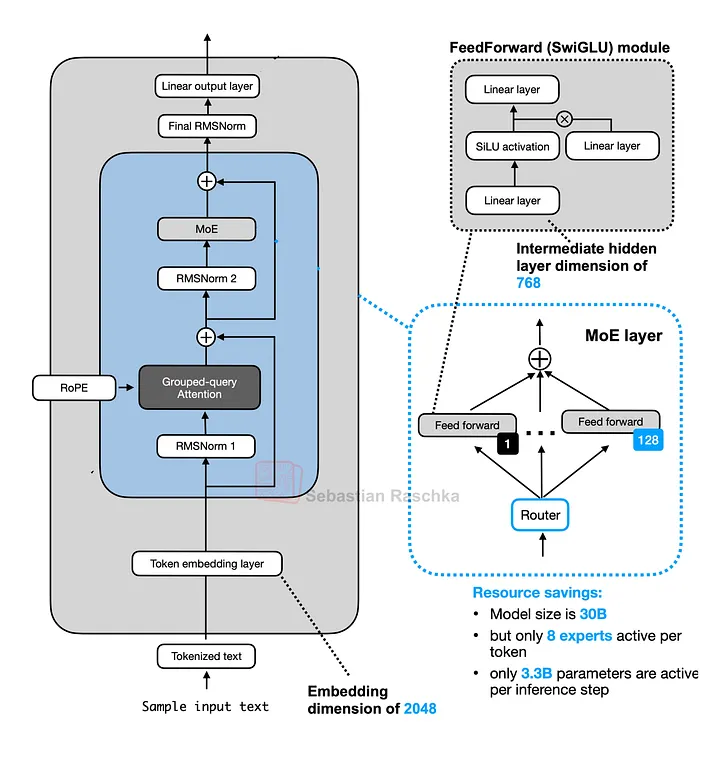
12 整合所有模块
现在我们已经集齐了所有组件,可以通过循环遍历全部 28 层来构建完整的模型。前一层的输出将作为下一层的输入。
# The final embedding starts as the output from the token embedding layer.
# We will update this tensor in-place as it passes through the layers.
final_embedding = token_embeddings_unnormalized

# Loop through each of the 28 layers of the transformer.
for layer in range(n_layers):

    # --- Attention Sub-Layer ---

    # 1. RMS Normalization before attention
    attention_input = rms_norm(final_embedding, model_weights[f"model.layers.{layer}.input_layernorm.weight"])

    # 2. Multi-Head Attention
    q_layer = model_weights[f"model.layers.{layer}.self_attn.q_proj.weight"].view(n_heads, head_dim, dim)
    k_layer = model_weights[f"model.layers.{layer}.self_attn.k_proj.weight"].view(n_kv_heads, head_dim, dim)
    v_layer = model_weights[f"model.layers.{layer}.self_attn.v_proj.weight"].view(n_kv_heads, head_dim, dim)
    w_layer = model_weights[f"model.layers.{layer}.self_attn.o_proj.weight"]

    qkv_attention_store = []
    for head in range(n_heads):
        q_layer_head = q_layer[head]
        k_layer_head = k_layer[head // (n_heads // n_kv_heads)]
        v_layer_head = v_layer[head // (n_heads // n_kv_heads)]

        q_per_token = torch.matmul(attention_input, q_layer_head.T)
        k_per_token = torch.matmul(attention_input, k_layer_head.T)
        v_per_token = torch.matmul(attention_input, v_layer_head.T)

        q_per_token_rotated = torch.view_as_real(torch.view_as_complex(q_per_token.float().view(q_per_token.shape[0], -1, 2)) * freqs_cis_for_tokens).view(q_per_token.shape)
        k_per_token_rotated = torch.view_as_real(torch.view_as_complex(k_per_token.float().view(k_per_token.shape[0], -1, 2)) * freqs_cis_for_tokens).view(k_per_token.shape)

        qk_per_token = torch.matmul(q_per_token_rotated, k_per_token_rotated.T) / (head_dim**0.5)
        qk_per_token_masked = qk_per_token + mask
        qk_per_token_after_masking_after_softmax = torch.nn.functional.softmax(qk_per_token_masked.float(), dim=1).to(torch.bfloat16)

        qkv_attention = torch.matmul(qk_per_token_after_masking_after_softmax, v_per_token)
        qkv_attention_store.append(qkv_attention)

    stacked_qkv_attention = torch.cat(qkv_attention_store, dim=-1)
    embedding_delta = torch.matmul(stacked_qkv_attention, w_layer.T)

    # 3. First Residual Connection
    embedding_after_attention = final_embedding + embedding_delta

    # --- Mixture-of-Experts Sub-Layer ---

    # 1. RMS Normalization before MoE
    moe_input = rms_norm(embedding_after_attention, model_weights[f"model.layers.{layer}.post_attention_layernorm.weight"])

    # 2. Router
    gate = model_weights[f"model.layers.{layer}.mlp.gate.weight"]
    router_logits = torch.matmul(moe_input, gate.T)
    routing_weights = torch.nn.functional.softmax(router_logits.float(), dim=1).to(torch.bfloat16)
    routing_expert_indices = torch.argmax(routing_weights, dim=1)

    # 3. Expert Layers
    final_expert_output = torch.zeros_like(moe_input)

    expert0_w1 = model_weights[f"model.layers.{layer}.mlp.experts.0.gate_proj.weight"]
    expert0_w2 = model_weights[f"model.layers.{layer}.mlp.experts.0.down_proj.weight"]
    expert0_w3 = model_weights[f"model.layers.{layer}.mlp.experts.0.up_proj.weight"]

    expert1_w1 = model_weights[f"model.layers.{layer}.mlp.experts.1.gate_proj.weight"]
    expert1_w2 = model_weights[f"model.layers.{layer}.mlp.experts.1.down_proj.weight"]
    expert1_w3 = model_weights[f"model.layers.{layer}.mlp.experts.1.up_proj.weight"]

    for i, token_embedding in enumerate(moe_input):
        chosen_expert_index = routing_expert_indices[i]

        if chosen_expert_index == 0:
            w1, w2, w3 = expert0_w1, expert0_w2, expert0_w3
        else:
            w1, w2, w3 = expert1_w1, expert1_w2, expert1_w3

        silu_output = torch.nn.functional.silu(torch.matmul(token_embedding, w1.T))
        gated_output = silu_output * torch.matmul(token_embedding, w3.T)
        expert_output = torch.matmul(gated_output, w2.T)

        final_expert_output[i] = expert_output * routing_weights[i, chosen_expert_index]

    # 4. Second Residual Connection
    final_embedding = embedding_after_attention + final_expert_output

# --- Verify the final shape ---
print("Shape of the final embeddings after all layers:", final_embedding.shape)
#### OUTPUT ####
Shape of the final embeddings after all layers: torch.Size([17, 1024])
#### OUTPUT ####
13 生成最终输出
现在,我们得到了最终的嵌入向量(embedding),它代表了模型对于下一个词元(token)的预测结果。该张量的形状为 [17, 1024]。首先,我们会对其施加最后一次 RMSNorm 归一化操作。
# Apply the final layer normalization
final_embedding_normalized = rms_norm(final_embedding, model_weights["model.norm.weight"])
要获得最终的预测结果,我们只需要取序列中最后一个词元(token)对应的嵌入向量(embedding)。这是一个维度为 [1024] 的向量。接着,我们将这个向量与语言模型头部权重(language model head weights,该权重通常与词元嵌入层的权重共享/tied)相乘,从而得到词汇表中每个词对应的得分,也称为 logits(未归一化的预测分数)。
# The LM Head weights are the same as the embedding weights (weight tying)
lm_head_weights = model_weights["model.embed_tokens.weight"]

# We only care about the last token's output to predict the next token
last_token_embedding = final_embedding_normalized[-1]

# Calculate the logits by multiplying with the LM Head
logits = torch.matmul(last_token_embedding, lm_head_weights.T)

print("Shape of the final logits:", logits.shape)

#### OUTPUT ####
Shape of the final logits: torch.Size([151936])
#### OUTPUT ####
具有最高 logits 分数的词元即为我们模型的预测结果。我们使用 argmax 函数来找出该词元在词汇表中的索引。
# Find the token ID with the highest score
next_token_id = torch.argmax(logits, dim=-1)
print(f"Predicted Token ID: {next_token_id.item()}")

# Decode the ID back to a string to see the predicted word
predicted_word = tokenizer.decode([next_token_id.item()])
print(f"\nPredicted Word: '{predicted_word}'")


#### OUTPUT ####
Predicted Token ID: 12454
Predicted Word: 'nothing'
#### OUTPUT ####
因此,在输入提示词 ...assistant\n,模型预测下一个最可能的词是“nothing”。这虽然只是一个单词元(单 token)的生成示例,但它充分证明:我们从头开始实现的整个 Qwen 3 混合专家(MoE)架构运行正确、功能完备。您只需修改开头的 prompt 变量,并相应调整词元张量(token tensor)的构建方式,就可以尝试使用不同的输入文本进行实验。

火山引擎开发者社区是火山引擎打造的AI技术生态平台,聚焦Agent与大模型开发,提供豆包系列模型(图像/视频/视觉)、智能分析与会话工具,并配套评测集、动手实验室及行业案例库。社区通过技术沙龙、挑战赛等活动促进开发者成长,新用户可领50万Tokens权益,助力构建智能应用。
更多推荐
 21
21 0
0- 0


 已为社区贡献4条内容

所有评论(0)