SpringAI实践(一)
最近看了很多大模型的文章,感觉AI可以能做很多事情,例如RAG(文档检索生成)、Function Calling(模型回调)、MCP(模型上下文协议)、AI链式工作流等,接下来会都动手尝试一下这些功能,探索运用大模型可以拓展哪些能力。实现这些功能需要探索的很多,这里先进行第一步使用SpringAI调用大模型实现对话。
最近看了很多大模型的文章,感觉AI可以能做很多事情,例如RAG(文档检索生成)、Function Calling(模型回调)、MCP(模型上下文协议)、AI链式工作流等,接下来会都动手尝试一下这些功能,探索运用大模型可以拓展哪些能力。实现这些功能需要探索的很多,这里先进行第一步使用SpringAI调用大模型实现对话。
一、引入Spring AI
新建一个Spring Boot的工程,在工程中引入Spring AI的依赖,Spring AI支持Ollma、类OpenAI的接口,这两个引入的pom不一样,这里示例中是使用的硅基流动的模型
xml
代码解读
复制代码
<!-- Spring AI --> <properties> <spring-ai.version>1.0.0-M6</spring-ai.version> </properties> <dependency> <groupId>org.springframework.ai</groupId> <artifactId>spring-ai-openai-spring-boot-starter</artifactId> <version>${spring-ai.version}</version> </dependency>
这里为了展示调用结果,同时引入Spring Boot Web相关依赖,使用restful方式调用
xml
代码解读
复制代码
<!-- Spring Boot --> <properties> <spring-boot.version>3.4.0</spring-boot.version> </properties> <dependency> <groupId>org.springframework.boot</groupId> <artifactId>spring-boot-starter-web</artifactId> <version>${spring-boot.version}</version> </dependency>
二、配置模型接口信息
这里使用的是硅基流动中Qwen/Qwen2.5-7B-Instruct模型,也可以其他的对话模型
yml
代码解读
复制代码
server: port: 9000 spring: ai: openai: api-key: ${密钥} base-url: https://api.siliconflow.cn/ chat: options: model: Qwen/Qwen2.5-7B-Instruct completions-path: /v1/chat/completions
三、使用Spring AI调用模型
编写控制器 OpenAiChatClientController 实现调用逻辑,可以设置默认的系统Prompt,定义模型的参数
java
代码解读
复制代码
package com.renne.ai.learn.chat.controller; import jakarta.servlet.http.HttpServletResponse; import org.springframework.ai.chat.client.ChatClient; import org.springframework.ai.chat.client.advisor.MessageChatMemoryAdvisor; import org.springframework.ai.chat.client.advisor.SimpleLoggerAdvisor; import org.springframework.ai.chat.memory.InMemoryChatMemory; import org.springframework.ai.openai.OpenAiChatOptions; import org.springframework.http.MediaType; import org.springframework.http.codec.ServerSentEvent; import org.springframework.web.bind.annotation.GetMapping; import org.springframework.web.bind.annotation.RequestMapping; import org.springframework.web.bind.annotation.RequestParam; import org.springframework.web.bind.annotation.RestController; import reactor.core.publisher.Flux; @RestController @RequestMapping("/openai/chat") public class OpenAiChatClientController { private final ChatClient openAiChatClient; private static final String DEFAULT_PROMPT = "你是一个聊天助手,请根据用户提问回答!"; public OpenAiChatClientController(ChatClient.Builder chatClientBuilder) { this.openAiChatClient = chatClientBuilder .defaultSystem(DEFAULT_PROMPT) // 实现 Chat Memory 的 Advisor // 在使用 Chat Memory 时,需要指定对话 ID,以便 Spring AI 处理上下文。 .defaultAdvisors( new MessageChatMemoryAdvisor(new InMemoryChatMemory()) ) // 实现 Logger 的 Advisor .defaultAdvisors( new SimpleLoggerAdvisor() ) // 设置 ChatClient 中 ChatModel 的 Options 参数 .defaultOptions( OpenAiChatOptions.builder() .topP(0.7) .build() ) .build(); } /** * ChatClient 简单调用 */ @GetMapping("/simple/chat") public String simpleChat(@RequestParam String message) { return openAiChatClient .prompt(message).call().content(); } /** * ChatClient 简单调用 * 默认使用 InMemoryChatMemory ** @param message 消息 * @param chatId 会话ID */@GetMapping("/simple/chat") public String simpleChat(@RequestParam String message, @RequestParam String chatId) { return openAiChatClient .prompt(message) .advisors(a -> a .param(AbstractChatMemoryAdvisor.CHAT_MEMORY_CONVERSATION_ID_KEY, chatId) // 设置聊天会话ID .param(AbstractChatMemoryAdvisor.CHAT_MEMORY_RETRIEVE_SIZE_KEY, 100)) // 设置聊天记录检索数量 .call().content(); } /** * ChatClient 流式调用 */ @GetMapping("/stream/chat") public Flux<String> streamChat(@RequestParam String message, HttpServletResponse response) { response.setCharacterEncoding("UTF-8"); return openAiChatClient.prompt(message).stream().content(); } /** * ChatClient 流式响应 */ @GetMapping(value = "/stream/response", produces = MediaType.TEXT_EVENT_STREAM_VALUE) public Flux<ServerSentEvent<String>> streamChat(@RequestParam String message) { return openAiChatClient.prompt() .user(message) .stream() .content() .map(content -> ServerSentEvent.<String>builder() .data(content) .build()); } }
使用InMemoryChatMemory聊天记录的存储,可以让模型记住对话记录,结合上下文去回答,chatId就是会话窗口的id,在这个id不变的情况下,它会自定义的去在总结100条对话记录,然后再回答你的问题
调用streamChat接口可以得到模型的返回值
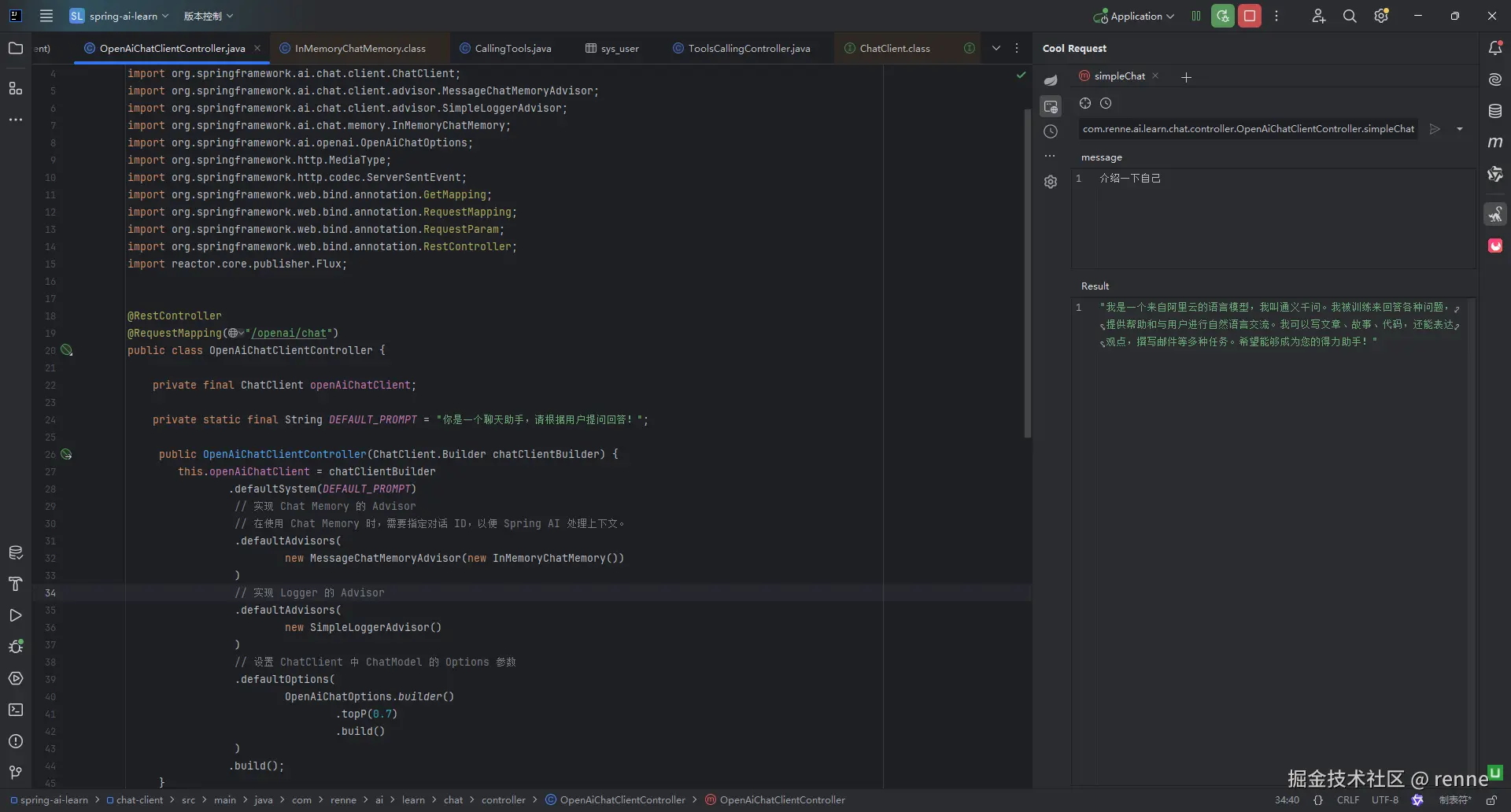
这里实现了使用SpringAI调用大模型的类OpenAI接口实现对话。

火山引擎开发者社区是火山引擎打造的AI技术生态平台,聚焦Agent与大模型开发,提供豆包系列模型(图像/视频/视觉)、智能分析与会话工具,并配套评测集、动手实验室及行业案例库。社区通过技术沙龙、挑战赛等活动促进开发者成长,新用户可领50万Tokens权益,助力构建智能应用。
更多推荐
 5
5 0
0- 0


 已为社区贡献8条内容

所有评论(0)