AI_Agents(四)_AI智能体工具使用设计模式
AI_Agents(四)_AI智能体工具使用设计模式
本文基于开源项目进行解读与拓展
- 官方项目地址:GitHub - microsoft/ai-agents-for-beginners
- 项目许可证:MIT License
04-tool-use
工具使用设计模式(Tool Use Design Pattern)
Tool Use Design Pattern 侧重于使 LLM 能够与外部工具交互以实现特定目标。工具是代理可以执行以执行作的代码。工具可以是简单的函数 (如计算器),也可以是对第三方服务的 API 调用(如股票价格查找或天气预报)。在 AI 代理的上下文中,工具旨在由代理执行,以响应模型生成的函数调用 。
1.工具应用场景
AI 代理可以利用工具完成复杂任务、检索信息或做出决策。工具使用设计模式通常应用于需要动态与外部系统交互的场景,例如数据库、Web 服务或代码解释器。这种能力在以下多种场景中非常有用:
- 动态信息检索:代理可以查询外部 API 或数据库以获取最新数据(例如,查询 SQLite 数据库进行数据分析、获取股票价格或天气信息)。
- 代码执行和解释:代理可以执行代码或脚本来解决数学问题、生成报告或进行模拟。
- 工作流自动化:通过集成任务调度器、电子邮件服务或数据管道等工具,自动化重复性或多步骤的工作流。
- 客户支持:代理可以与 CRM 系统、工单平台或知识库交互,以解决用户问题。
- 内容生成与编辑:代理可以利用语法检查器、文本摘要工具或内容安全评估器等工具,协助完成内容创建任务。
2.所需元素/构件
实现工具使用设计模式需要哪些元素/构件?
函数/工具调用
函数调用是使大型语言模型(LLM)能够与工具交互的主要方式。您会发现“函数”和“工具”这两个术语常常互换使用,因为“函数”(可重用代码块)就是代理用于执行任务的“工具”。为了让函数的代码能够被调用,LLM 需要将用户的请求与函数的描述进行匹配。为此,需要向 LLM 提供包含所有可用函数描述的架构。LLM 会选择最适合任务的函数,并返回其名称和参数。选定的函数被调用,其响应会发送回 LLM,LLM 再利用这些信息回复用户的请求。
要为代理实现函数调用,开发者需要:
1)支持函数调用的 LLM 模型
2)包含函数描述的架构
3)每个描述中提到的函数代码
以下通过获取某城市当前时间的示例来说明:
1)初始化支持函数调用的 LLM:
并非所有模型都支持函数调用,因此需要确认您使用的 LLM 是否支持。Azure OpenAI 支持函数调用。我们可以从初始化 Azure OpenAI 客户端开始。
# Initialize the Azure OpenAI client
client = AzureOpenAI(
    azure_endpoint = os.getenv("AZURE_OPENAI_ENDPOINT"),
    api_key=os.getenv("AZURE_OPENAI_API_KEY"),
    api_version="2024-05-01-preview"
)
2)创建函数架构:
定义一个包含函数名称、功能描述以及参数名称和描述的 JSON 架构。然后将此架构与用户请求(例如查找旧金山的时间)一起传递给上述创建的客户端。需要注意的是,返回的是一个工具调用,而不是问题的最终答案。如前所述,LLM 返回其为任务选择的函数名称及其参数。
# Function description for the model to read
tools = [
    {
        "type": "function",
        "function": {
            "name": "get_current_time",
            "description": "Get the current time in a given location",
            "parameters": {
                "type": "object",
                "properties": {
                    "location": {
                        "type": "string",
                        "description": "The city name, e.g. San Francisco",
                    },
                },
                "required": ["location"],
            },
        }
    }
]
# Initial user message
messages = [{"role": "user", "content": "What's the current time in San Francisco"}]

# First API call: Ask the model to use the function
  response = client.chat.completions.create(
      model=deployment_name,
      messages=messages,
      tools=tools,
      tool_choice="auto",
  )

  # Process the model's response
  response_message = response.choices[0].message
  messages.append(response_message)

  print("Model's response:")

  print(response_message)
Model's response:
ChatCompletionMessage(content=None, role='assistant', function_call=None, tool_calls=[ChatCompletionMessageToolCall(id='call_pOsKdUlqvdyttYB67MOj434b', function=Function(arguments='{"location":"San Francisco"}', name='get_current_time'), type='function')])
3)执行任务所需的函数代码:
现在,LLM 已经选择了需要运行的函数,接下来需要实现并执行完成任务的代码。我们可以用 Python 实现获取当前时间的代码,同时编写代码从 response_message 中提取函数名称和参数,以获得最终结果。
  def get_current_time(location):
    """Get the current time for a given location"""
    print(f"get_current_time called with location: {location}")
    location_lower = location.lower()

    for key, timezone in TIMEZONE_DATA.items():
        if key in location_lower:
            print(f"Timezone found for {key}")
            current_time = datetime.now(ZoneInfo(timezone)).strftime("%I:%M %p")
            return json.dumps({
                "location": location,
                "current_time": current_time
            })

    print(f"No timezone data found for {location_lower}")
    return json.dumps({"location": location, "current_time": "unknown"})
 # Handle function calls
  if response_message.tool_calls:
      for tool_call in response_message.tool_calls:
          if tool_call.function.name == "get_current_time":

              function_args = json.loads(tool_call.function.arguments)

              time_response = get_current_time(
                  location=function_args.get("location")
              )

              messages.append({
                  "tool_call_id": tool_call.id,
                  "role": "tool",
                  "name": "get_current_time",
                  "content": time_response,
              })
  else:
      print("No tool calls were made by the model.")

  # Second API call: Get the final response from the model
  final_response = client.chat.completions.create(
      model=deployment_name,
      messages=messages,
  )

  return final_response.choices[0].message.content
  get_current_time called with location: San Francisco
  Timezone found for san francisco
  The current time in San Francisco is 09:24 AM.
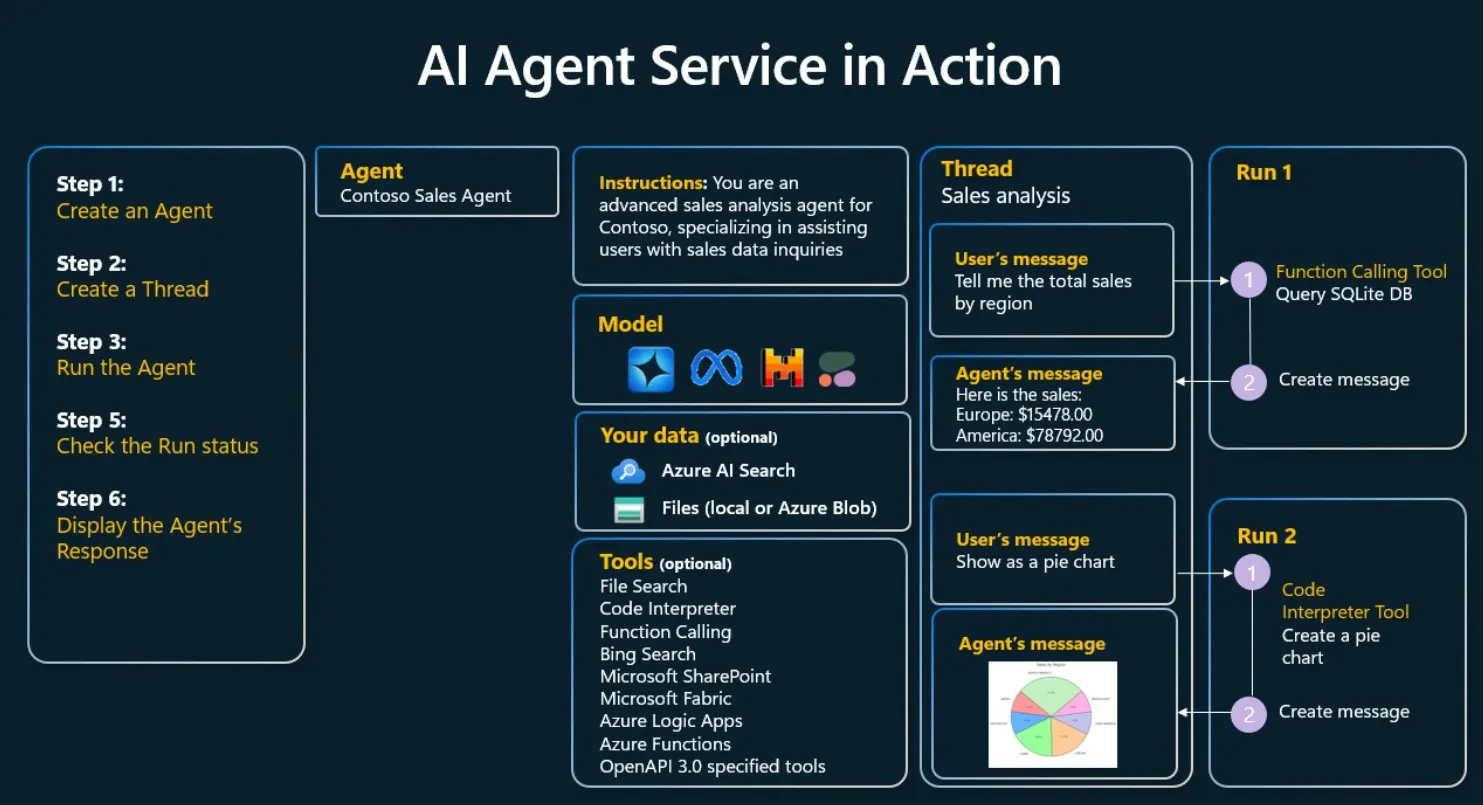
函数调用是大多数代理工具使用设计的核心,但从零开始实现可能会有一定挑战。代理框架为我们提供了预构建的模块,用于实现工具使用。 下图说明了如何使用 Azure AI 代理服务来分析销售数据:
3.注意事项
使用工具使用设计模式构建可信赖 AI 代理需要注意哪些?
使用 LLM 动态生成 SQL 时,常见的担忧是安全性,尤其是 SQL 注入或恶意操作(如删除或篡改数据库)的风险。虽然这些担忧是合理的,但通过正确配置数据库访问权限可以有效缓解这些问题。对于大多数数据库,这包括将数据库配置为只读模式。对于 PostgreSQL 或 Azure SQL 等数据库服务,应用程序应被分配一个只读(SELECT)角色。
在安全环境中运行应用程序可以进一步增强保护。在企业场景中,通常会从操作系统中提取和转换数据到一个只读数据库或数据仓库中,并采用用户友好的架构。这种方法确保数据安全、性能优化且易于访问,同时限制了应用程序的只读访问权限。

火山引擎开发者社区是火山引擎打造的AI技术生态平台,聚焦Agent与大模型开发,提供豆包系列模型(图像/视频/视觉)、智能分析与会话工具,并配套评测集、动手实验室及行业案例库。社区通过技术沙龙、挑战赛等活动促进开发者成长,新用户可领50万Tokens权益,助力构建智能应用。
更多推荐
 8
8 0
0- 0


 已为社区贡献39条内容

所有评论(0)