vue的websocket通信(进阶)
这里我主要介绍的是封装的websocket底层工具进行管理,有助于组件间的复用
首先在utils工具里面建立一个websocket.ts的底层工具
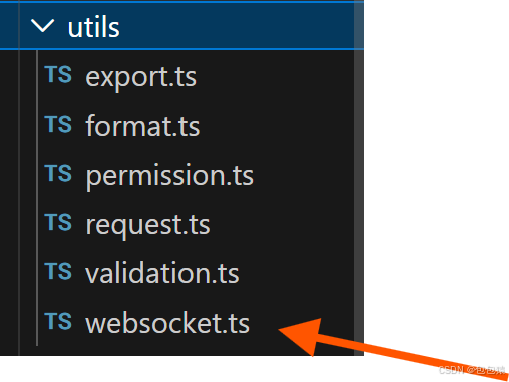
这个websocket.ts主要分为三个部分
第一:WebsocketConfig:定义接口
第二:WebsocketManage类:管理连接的全生命周期
第三:WebsocketServer类及其实例:主要用于存储不同的实例
以下将详细介绍和讲解
WebsocketConfig
定义一个WebSocketConfig导出类型
export interface WebSocketConfig {
  url: string;
  reconnectInterval?: number;
  maxReconnectAttempts?: number;
  heartbeatInterval?: number;
  onMessage: (data: any) => void;
  onOpen?: () => void;
  onClose?: () => void;
  onError?: (error: Event) => void;
  onReconnect?: (attempt: number) => void;
}
包括url地址,最大重连次数基本的连接方法等
WebsocketManage类
建立连接,重联,心跳检测,发送信息,关闭连接
export class WebSocketManager {
  //私有成员,只能在类的内部访问
  private ws: WebSocket | null = null;
  private config: WebSocketConfig;//存储配置信息
  private reconnectAttempts = 0;//记录当前重连次数
  private reconnectTimer: any = null;//存储重联定时器的id
  private heartbeatTimer: any = null;//存储心跳定时器的id
  private isManualClose = false;//是否手动关闭连接

  constructor(config: WebSocketConfig) {
    this.config = {
      reconnectInterval: 3000,
      maxReconnectAttempts: 5,
      heartbeatInterval: 30000,
      ...config
    };
    this.connect();
  }

  private connect(): void {
    try {
      this.ws = new WebSocket(this.config.url);
      this.setupEventListeners();
    } catch (error) {
      console.error('WebSocket连接失败:', error);
      this.handleReconnect();
    }
  }

  private setupEventListeners(): void {
    if (!this.ws) return;

    this.ws.onopen = () => {
      console.log('WebSocket连接成功');
      this.reconnectAttempts = 0;
      this.startHeartbeat();
      this.config.onOpen?.();
    };

    this.ws.onmessage = (event) => {
      try {
        const data = JSON.parse(event.data);
        this.config.onMessage(data);
      } catch (error) {
        console.error('WebSocket消息解析失败:', error);
      }
    };

    this.ws.onclose = (event) => {
      console.log('WebSocket连接关闭:', event.code, event.reason);
      this.stopHeartbeat();
      this.config.onClose?.();

      if (!this.isManualClose) {
        this.handleReconnect();
      }
    };

    this.ws.onerror = (error) => {
      console.error('WebSocket错误:', error);
      this.config.onError?.(error);
    };
  }

  private handleReconnect(): void {
    if (this.reconnectAttempts >= this.config.maxReconnectAttempts!) {
      console.error('WebSocket重连次数已达上限');
      return;
    }

    this.reconnectAttempts++;
    this.config.onReconnect?.(this.reconnectAttempts);

    this.reconnectTimer = setTimeout(() => {
      console.log(`尝试第${this.reconnectAttempts}次重连...`);
      this.connect();
    }, this.config.reconnectInterval);
  }

  private startHeartbeat(): void {
    this.stopHeartbeat();

    this.heartbeatTimer = setInterval(() => {
      if (this.ws?.readyState === WebSocket.OPEN) {
        this.send({ type: 'heartbeat', timestamp: Date.now() });
      }
    }, this.config.heartbeatInterval);
  }

  private stopHeartbeat(): void {
    if (this.heartbeatTimer) {
      clearInterval(this.heartbeatTimer);
      this.heartbeatTimer = null;
    }
  }

  send(data: any): void {
    if (this.ws?.readyState === WebSocket.OPEN) {
      this.ws.send(JSON.stringify(data));
    } else {
      console.warn('WebSocket未连接,消息发送失败');
    }
  }

  close(): void {
    this.isManualClose = true;
    this.stopHeartbeat();

    if (this.reconnectTimer) {
      clearTimeout(this.reconnectTimer);
      this.reconnectTimer = null;
    }

    if (this.ws) {
      this.ws.close();
      this.ws = null;
    }
  }

  getReadyState(): number {
    return this.ws?.readyState || WebSocket.CLOSED;
  }
}
WebsocketServer
创建WebSocket单例管理器
class WebSocketService {
  private instances: Map<string, WebSocketManager> = new Map();

  createInstance(key: string, config: WebSocketConfig): WebSocketManager {
    this.closeInstance(key);

    const instance = new WebSocketManager(config);
    this.instances.set(key, instance);
    return instance;
  }

  getInstance(key: string): WebSocketManager | undefined {
    return this.instances.get(key);
  }

  closeInstance(key: string): void {
    const instance = this.instances.get(key);
    if (instance) {
      instance.close();
      this.instances.delete(key);
    }
  }

  closeAll(): void {
    this.instances.forEach((instance, key) => {
      instance.close();
      this.instances.delete(key);
    });
  }
}

export const webSocketService = new WebSocketService();
附上完整的代码
// utils/websocket.ts
//定义一个WebSocketConfig导出类型
export interface WebSocketConfig {
  url: string;
  reconnectInterval?: number;
  maxReconnectAttempts?: number;
  heartbeatInterval?: number;
  onMessage: (data: any) => void;
  onOpen?: () => void;
  onClose?: () => void;
  onError?: (error: Event) => void;
  onReconnect?: (attempt: number) => void;
}
//建立连接,重联,心跳检测,发送信息,关闭连接
export class WebSocketManager {
  //私有成员,只能在类的内部访问
  private ws: WebSocket | null = null;
  private config: WebSocketConfig;//存储配置信息
  private reconnectAttempts = 0;//记录当前重连次数
  private reconnectTimer: any = null;//存储重联定时器的id
  private heartbeatTimer: any = null;//存储心跳定时器的id
  private isManualClose = false;//是否手动关闭连接

  constructor(config: WebSocketConfig) {
    this.config = {
      reconnectInterval: 3000,
      maxReconnectAttempts: 5,
      heartbeatInterval: 30000,
      ...config
    };
    this.connect();
  }

  private connect(): void {
    try {
      this.ws = new WebSocket(this.config.url);
      this.setupEventListeners();
    } catch (error) {
      console.error('WebSocket连接失败:', error);
      this.handleReconnect();
    }
  }

  private setupEventListeners(): void {
    if (!this.ws) return;

    this.ws.onopen = () => {
      console.log('WebSocket连接成功');
      this.reconnectAttempts = 0;
      this.startHeartbeat();
      this.config.onOpen?.();
    };

    this.ws.onmessage = (event) => {
      try {
        const data = JSON.parse(event.data);
        this.config.onMessage(data);
      } catch (error) {
        console.error('WebSocket消息解析失败:', error);
      }
    };

    this.ws.onclose = (event) => {
      console.log('WebSocket连接关闭:', event.code, event.reason);
      this.stopHeartbeat();
      this.config.onClose?.();

      if (!this.isManualClose) {
        this.handleReconnect();
      }
    };

    this.ws.onerror = (error) => {
      console.error('WebSocket错误:', error);
      this.config.onError?.(error);
    };
  }

  private handleReconnect(): void {
    if (this.reconnectAttempts >= this.config.maxReconnectAttempts!) {
      console.error('WebSocket重连次数已达上限');
      return;
    }

    this.reconnectAttempts++;
    this.config.onReconnect?.(this.reconnectAttempts);

    this.reconnectTimer = setTimeout(() => {
      console.log(`尝试第${this.reconnectAttempts}次重连...`);
      this.connect();
    }, this.config.reconnectInterval);
  }

  private startHeartbeat(): void {
    this.stopHeartbeat();

    this.heartbeatTimer = setInterval(() => {
      if (this.ws?.readyState === WebSocket.OPEN) {
        this.send({ type: 'heartbeat', timestamp: Date.now() });
      }
    }, this.config.heartbeatInterval);
  }

  private stopHeartbeat(): void {
    if (this.heartbeatTimer) {
      clearInterval(this.heartbeatTimer);
      this.heartbeatTimer = null;
    }
  }

  send(data: any): void {
    if (this.ws?.readyState === WebSocket.OPEN) {
      this.ws.send(JSON.stringify(data));
    } else {
      console.warn('WebSocket未连接,消息发送失败');
    }
  }

  close(): void {
    this.isManualClose = true;
    this.stopHeartbeat();

    if (this.reconnectTimer) {
      clearTimeout(this.reconnectTimer);
      this.reconnectTimer = null;
    }

    if (this.ws) {
      this.ws.close();
      this.ws = null;
    }
  }

  getReadyState(): number {
    return this.ws?.readyState || WebSocket.CLOSED;
  }
}

// 创建WebSocket单例管理器
class WebSocketService {
  private instances: Map<string, WebSocketManager> = new Map();

  createInstance(key: string, config: WebSocketConfig): WebSocketManager {
    this.closeInstance(key);

    const instance = new WebSocketManager(config);
    this.instances.set(key, instance);
    return instance;
  }

  getInstance(key: string): WebSocketManager | undefined {
    return this.instances.get(key);
  }

  closeInstance(key: string): void {
    const instance = this.instances.get(key);
    if (instance) {
      instance.close();
      this.instances.delete(key);
    }
  }

  closeAll(): void {
    this.instances.forEach((instance, key) => {
      instance.close();
      this.instances.delete(key);
    });
  }
}

export const webSocketService = new WebSocketService();
其次在业务逻辑的方法里面创建针对于业务逻辑的通信方法
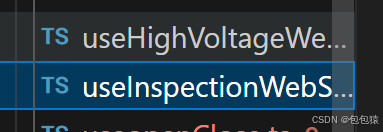
上述只做演示
业务通信的逻辑如下所示
1定义websocket导出数据接口
①需要数据的结构类型
②响应数据的结构类型
2定义业务导出方法
①定义响应式数据
②处理处理WebSocket消息
初始化数据
各种状态选择的更新
心跳响应
③获取当前响应时间
④更新最后响应时间
⑤初始化WebSocket连接
webSocketService.createInstance创建实例
onMessage
onClose
onError
onReconnect
⑥获取WebSocket URL
⑦手动发送消息
⑧发送心跳包
⑨断开连接
⑩获取连接状态
11.获取连接状态
12.
  onUnmounted(() => {
    disconnect();
  });
然后return所有的方法和数据
下面附上我的一个业务逻辑组件中的代码,大家需要根据具体情况进行调整
// composables/useInspectionWebSocket.ts
import { ref, onUnmounted } from 'vue';
import { webSocketService, WebSocketManager } from '@/utils/websocket';
// import { inspect } from 'util';
import dayjs from 'dayjs';
// WebSocket数据接口定义
export interface InspectionTaskData {
  name: string;
  startDate: string;
  startTime: string;
  status: string;
  progress: number;
  taskId?: string;
}

export interface WebSocketMessage {
  type?: 'data_update' | 'heartbeat' | 'status_change' | 'initial_data' | 'progress_update';
  data: InspectionTaskData | any;
  timestamp?: number;
}

export const useInspectionWebSocket = () => {
  const taskData = ref<InspectionTaskData>({
    name: '日常全屋巡检',
    startDate: '2025年9月10日',
    startTime: '12:30:30',
    status: '等待连接...',
    progress: 0
  });

  const isConnected = ref(false);
  const reconnectAttempts = ref(0);
  const lastUpdateTime = ref<string>('--:--:--');

  let wsManager: WebSocketManager | null = null;

  // 处理WebSocket消息
  const handleWebSocketMessage = (message: WebSocketMessage) => {
    updateLastUpdateTime();

    switch (message.type) {
      case 'initial_data':
        // 初始数据
        if (message.data) {
          taskData.value = { ...taskData.value, ...message.data };
        }
        break;

      case 'progress_update':
        // 进度更新
        if (message.data) {
          taskData.value.progress = Math.min(100, Math.max(0, message.data.progress || 0));

          // 更新状态文本
          if (taskData.value.progress < 100) {
            taskData.value.status = '巡检进行中';
          } else {
            taskData.value.status = '巡检完成';
          }
        }
        break;

      case 'status_change':
        // 状态更新
        if (message.data) {
          taskData.value.status = message.data.status || taskData.value.status;
        }
        break;

      case 'heartbeat':
        // 心跳响应
        console.log('收到心跳响应');
        break;

      default:
        console.log('收到巡检任务的消息:', message.data);
        taskData.value.name=message.data.inspect_name
        taskData.value.startDate=dayjs(message.data.create_time).format('YYYY年MM月DD日 HH时mm分ss秒')
        taskData.value.status=message.data.inspect_status_value
        taskData.value.progress=message.data.inspection_progress
    }
  };

  // 更新最后更新时间
  const updateLastUpdateTime = () => {
    const now = new Date();
    lastUpdateTime.value = now.toLocaleTimeString('zh-CN', {
      hour12: false,
      hour: '2-digit',
      minute: '2-digit',
      second: '2-digit'
    });
  };

  // 初始化WebSocket连接
  const connect = (url: string = getWebSocketUrl()) => {
    if (wsManager) {
      disconnect();
    }

    wsManager = webSocketService.createInstance('inspection-task', {
      url,
      onMessage: handleWebSocketMessage,
      onOpen: () => {
        isConnected.value = true;
        reconnectAttempts.value = 0;
        console.log('巡检任务WebSocket连接成功');

        // 连接成功后请求初始数据
        sendMessage({
          type: 'request_initial_data',
          taskId: 'inspection_001'
        });
      },
      onClose: () => {
        isConnected.value = false;
        console.log('巡检任务WebSocket连接关闭');
      },
      onError: (error) => {
        console.error('巡检任务WebSocket错误:', error);
      },
      onReconnect: (attempt) => {
        reconnectAttempts.value = attempt;
        console.log(`巡检任务WebSocket第${attempt}次重连尝试`);
      }
    });
  };

  // 获取WebSocket URL(根据环境配置)
  const getWebSocketUrl = (): string => {
    // const protocol = window.location.protocol === 'https:' ? 'wss:' : 'ws:';
    // const host = window.location.host;
    return 'ws://192.168.13.10:9090/windfarm/ws/v2/executetask/';
  };

  // 手动发送消息
  const sendMessage = (message: any) => {
    if (wsManager) {
      wsManager.send(message);
    }
  };

  // 发送心跳包
  const sendHeartbeat = () => {
    sendMessage({
      type: 'heartbeat',
      timestamp: Date.now()
    });
  };

  // 断开连接
  const disconnect = () => {
    if (wsManager) {
      webSocketService.closeInstance('inspection-task');
      wsManager = null;
      isConnected.value = false;
    }
  };

  // 获取连接状态
  const getConnectionStatus = () => {
    if (!wsManager) return 'disconnected';

    const readyState = wsManager.getReadyState();
    switch (readyState) {
      case WebSocket.CONNECTING:
        return 'connecting';
      case WebSocket.OPEN:
        return 'connected';
      case WebSocket.CLOSING:
        return 'closing';
      default:
        return 'disconnected';
    }
  };

  onUnmounted(() => {
    disconnect();
  });

  return {
    taskData,
    isConnected,
    reconnectAttempts,
    lastUpdateTime,
    connect,
    disconnect,
    sendMessage,
    sendHeartbeat,
    getConnectionStatus
  };
};
然后在自己的业务组件中导入这些方法就可以使用啦,希望对大家有帮助

中国智能体开发者社区,聚焦智能体与大模型开发,提供前沿资讯、实用工具链、开源项目及行业案例。通过技术沙龙、开发者大赛等活动,促进经验交流与协作,助力开发者快速构建创新智能应用。
更多推荐

 5
5 0
0- 0


 已为社区贡献2条内容

所有评论(0)