深入探讨 AI 编程的三个核心领域:自动化代码生成、低代码 / 无代码开发和算法优化实践,通过丰富的代码示例、流程图、Prompt 工程案例和实践指南,为开发者展示如何利用 AI 提升编程效率和质量。
本文探讨了AI在软件开发中的三大核心应用领域:自动化代码生成、低代码/无代码开发和算法优化。通过丰富的代码示例、流程图和Prompt工程案例,展示了如何利用AI提升编程效率和质量。内容包括自动化代码生成的原理与技术栈、代码生成工具与框架实践、Prompt工程实践、工作流与最佳实践;低代码平台的核心组件与实现、AI增强功能;以及算法优化的主要维度和基于AI的代码性能优化实现。文章提供了从理论到实践的
人工智能正在重塑软件开发的各个方面,从代码编写到系统架构,从算法设计到应用部署。本指南将深入探讨 AI 编程的三个核心领域:自动化代码生成、低代码 / 无代码开发和算法优化实践,通过丰富的代码示例、流程图、Prompt 工程案例和实践指南,为开发者展示如何利用 AI 提升编程效率和质量。
一、自动化代码生成
1.1 自动化代码生成的原理与技术栈
自动化代码生成是指利用 AI 模型根据文本描述、需求规格或其他形式的输入自动生成可执行代码的过程。其核心技术基于大型语言模型 (LLM),如 GPT-4、CodeLlama 等,这些模型通过训练海量代码库学习编程语言的语法、语义和最佳实践。
graph TD
A[需求分析] --> B[Prompt工程]
B --> C[大语言模型]
C --> D[代码生成]
D --> E[代码优化]
E --> F[单元测试生成]
F --> G[集成测试]
G --> H[部署]
D --> I[人工审核]
I --> E
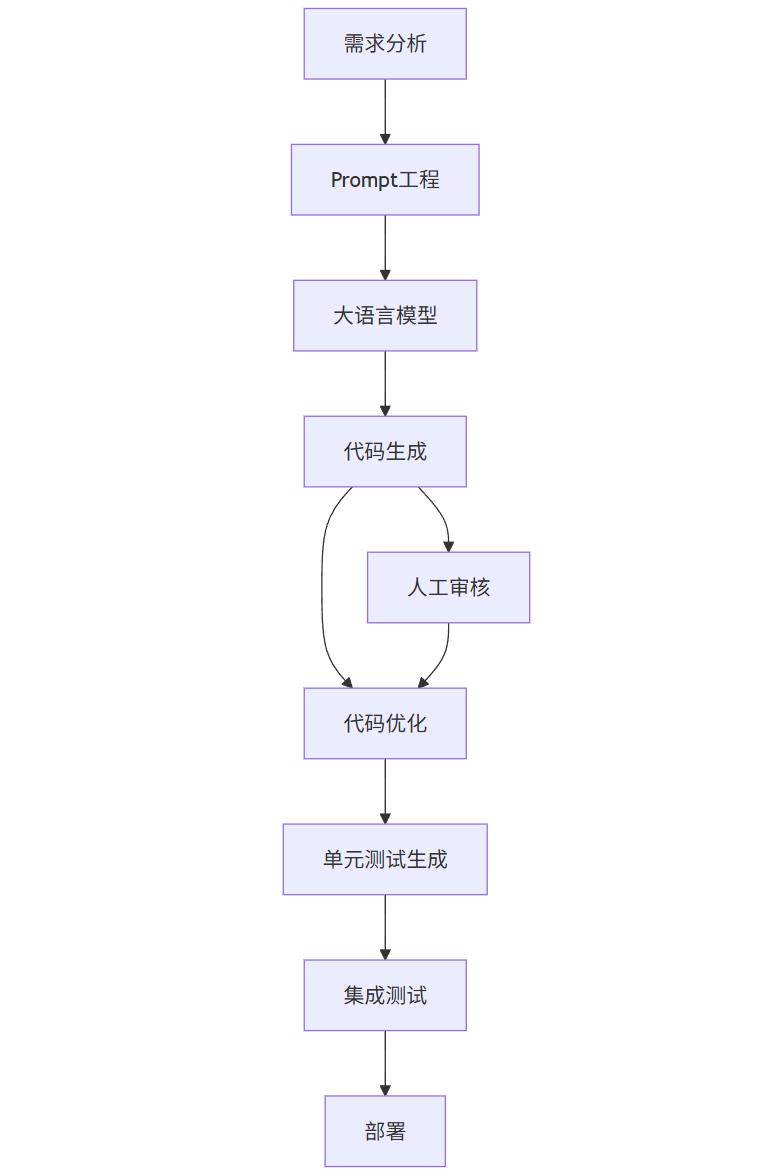
核心技术组件:
- 大型语言模型 (LLM):代码生成的核心引擎
- Prompt 工程:将需求转化为模型可理解的指令
- 代码补全接口:提供实时编码辅助
- 代码分析工具:验证生成代码的正确性
- 测试生成器:为生成代码创建测试用例
1.2 代码生成工具与框架实践
1.2.1 OpenAI API 代码生成实现
以下是使用 OpenAI API 实现代码生成的示例,展示如何构建一个简单的代码生成服务:
import openai
import json
import logging
from typing import Dict, Optional, List
# 配置日志
logging.basicConfig(level=logging.INFO)
logger = logging.getLogger(__name__)
class CodeGenerator:
def __init__(self, api_key: str, model: str = "gpt-4"):
"""
初始化代码生成器
:param api_key: OpenAI API密钥
:param model: 使用的模型名称
"""
openai.api_key = api_key
self.model = model
# 定义支持的编程语言及其文件扩展名
self.supported_languages = {
"python": ".py",
"javascript": ".js",
"java": ".java",
"csharp": ".cs",
"go": ".go",
"rust": ".rs",
"typescript": ".ts",
"html": ".html",
"css": ".css"
}
def generate_code(self,
prompt: str,
language: str = "python",
requirements: Optional[List[str]] = None,
style_guidelines: Optional[str] = None,
max_tokens: int = 1000,
temperature: float = 0.7) -> Dict[str, str]:
"""
生成代码
:param prompt: 代码需求描述
:param language: 目标编程语言
:param requirements: 功能需求列表
:param style_guidelines: 代码风格指南
:param max_tokens: 最大生成令牌数
:param temperature: 生成随机性参数(0-1)
:return: 包含生成代码和文件名的字典
"""
try:
# 验证语言是否支持
if language not in self.supported_languages:
raise ValueError(f"不支持的编程语言: {language}")
# 构建完整提示
full_prompt = self._build_prompt(prompt, language, requirements, style_guidelines)
# 调用OpenAI API
response = openai.ChatCompletion.create(
model=self.model,
messages=[
{"role": "system", "content": "你是一位专业的程序员,能够根据需求生成高质量、可维护的代码。"},
{"role": "user", "content": full_prompt}
],
max_tokens=max_tokens,
temperature=temperature,
top_p=1.0,
frequency_penalty=0.0,
presence_penalty=0.0
)
# 提取生成的代码
code = response.choices[0].message['content']
# 清理代码(去除可能的Markdown标记)
code = self._clean_code(code)
# 生成建议的文件名
filename = self._generate_filename(prompt, language)
logger.info(f"成功生成{language}代码: {filename}")
return {
"code": code,
"filename": filename,
"language": language
}
except Exception as e:
logger.error(f"代码生成失败: {str(e)}")
raise
def _build_prompt(self, prompt: str, language: str, requirements: List[str], style_guidelines: str) -> str:
"""构建完整的提示信息"""
full_prompt = f"请使用{language}编写代码,实现以下需求:\n{prompt}\n"
if requirements:
full_prompt += "\n具体需求包括:\n"
for req in requirements:
full_prompt += f"- {req}\n"
if style_guidelines:
full_prompt += f"\n请遵循以下代码风格指南:\n{style_guidelines}\n"
full_prompt += "\n请只返回完整的代码,不要添加解释。确保代码可直接运行,包含必要的导入语句。"
return full_prompt
def _clean_code(self, code: str) -> str:
"""清理代码,去除可能的Markdown标记"""
# 去除代码块标记
if code.startswith("```"):
code = code.split("```")[1]
# 去除可能的语言指定
if code.startswith(tuple(self.supported_languages.keys())):
code = code.split("\n", 1)[1]
return code.strip()
def _generate_filename(self, prompt: str, language: str) -> str:
"""根据提示生成建议的文件名"""
# 简单实现:取提示前几个词作为文件名
words = prompt.split()[:3]
if not words:
return f"generated_code{self.supported_languages[language]}"
filename = "_".join(words).lower().replace(",", "").replace(".", "")
return f"{filename}{self.supported_languages[language]}"
def generate_test(self, code: str, language: str = "python") -> str:
"""为生成的代码生成测试用例"""
try:
prompt = f"请为以下{language}代码生成单元测试:\n{code}\n"
prompt += "请只返回完整的测试代码,确保测试覆盖率尽可能高。"
response = openai.ChatCompletion.create(
model=self.model,
messages=[
{"role": "system", "content": "你是一位专业的测试工程师,能够为代码生成全面的单元测试。"},
{"role": "user", "content": prompt}
],
max_tokens=1000,
temperature=0.5
)
test_code = response.choices[0].message['content']
return self._clean_code(test_code)
except Exception as e:
logger.error(f"测试生成失败: {str(e)}")
raise
# 使用示例
if __name__ == "__main__":
import os
# 从环境变量获取API密钥
api_key = os.getenv("OPENAI_API_KEY")
if not api_key:
raise ValueError("请设置OPENAI_API_KEY环境变量")
generator = CodeGenerator(api_key=api_key)
# 生成一个简单的Python函数
result = generator.generate_code(
prompt="实现一个函数,计算斐波那契数列的第n项,确保处理边界情况并进行输入验证。",
language="python",
requirements=[
"处理n为0和负数的情况",
"确保输入为整数",
"使用递归或迭代方法实现"
],
style_guidelines="遵循PEP 8规范,添加适当的注释"
)
print(f"生成的代码文件名: {result['filename']}")
print("\n生成的代码:")
print("-" * 80)
print(result['code'])
print("-" * 80)
# 生成测试用例
test_code = generator.generate_test(result['code'], language="python")
print("\n生成的测试代码:")
print("-" * 80)
print(test_code)
print("-" * 80)
1.2.2 代码生成的 Prompt 工程实践
有效的 Prompt 设计是获得高质量生成代码的关键。以下是不同场景下的 Prompt 示例及其效果对比:
基础 Prompt 示例:
plaintext
写一个Python函数来计算两个数的最大公约数。
优化后的 Prompt 示例:
plaintext
请实现一个Python函数gcd(a, b),用于计算两个整数的最大公约数。
要求:
1. 使用欧几里得算法实现
2. 确保函数能处理0和负数
3. 添加详细的文档字符串,说明参数、返回值和使用示例
4. 包含输入验证,确保输入为整数
5. 遵循PEP 8编码规范
复杂系统 Prompt 示例:
plaintext
请设计一个简单的图书管理系统的Python类结构。
需求:
- 系统应能管理图书、作者和用户
- 图书应包含ISBN、标题、作者、出版年份和可用数量等属性
- 用户可以借书和还书,系统需要跟踪借阅记录
- 实现基本的查询功能,如按作者查找图书、按标题查找图书等

请提供:
1. 完整的类定义,包括属性和方法
2. 每个类和方法的文档字符串
3. 示例用法代码
4. 确保代码可扩展,便于未来添加新功能
Prompt 效果对比表:
| Prompt 类型 | 代码质量 | 完整性 | 可维护性 | 符合需求程度 |
|---|---|---|---|---|
| 基础 Prompt | 中 | 低 | 中 | 中 |
| 优化 Prompt | 高 | 高 | 高 | 高 |
| 系统 Prompt | 高 | 高 | 高 | 高 |
1.3 自动化代码生成的工作流与最佳实践
自动化代码生成并非简单的 "一键生成",而是一个需要人机协作的过程。以下是推荐的工作流程:
graph LR
A[需求细化] --> B[构建精确Prompt]
B --> C[生成初始代码]
C --> D[代码审查与测试]
D --> E{是否符合要求?}
E -->|是| F[集成到项目]
E -->|否| G[调整Prompt并重新生成]
F --> H[代码优化与文档完善]
H --> I[最终测试]
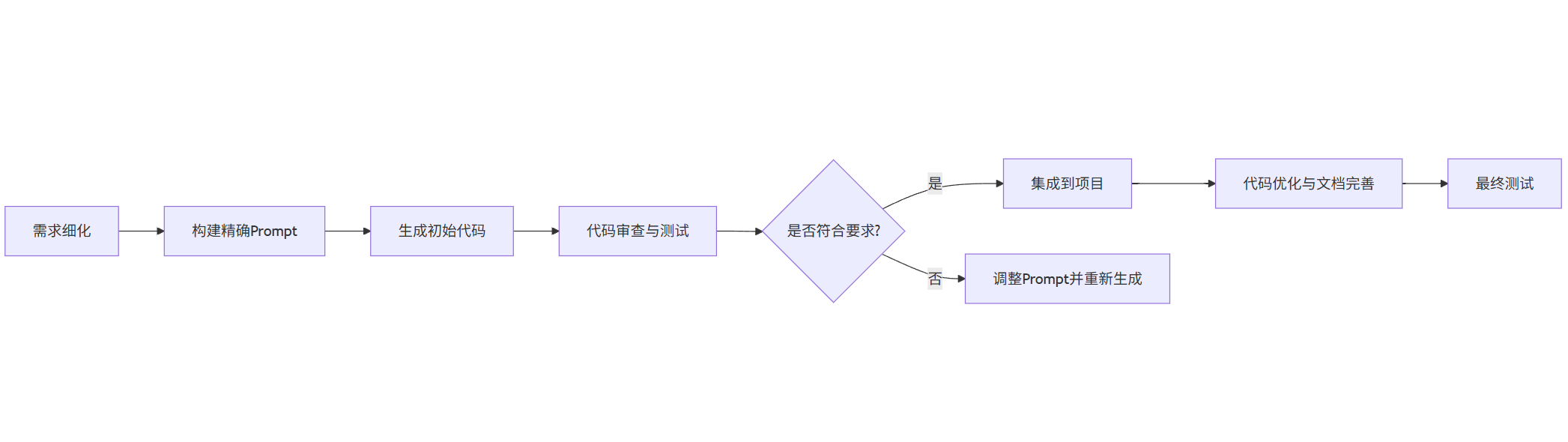
最佳实践:
- 需求细化:在生成代码前,尽可能详细地明确需求和约束条件
- 增量生成:复杂功能应拆分为小块,逐步生成和集成
- ** Prompt 迭代 **:根据生成结果不断优化 Prompt,建立 Prompt 库
- 严格测试:对生成的代码进行全面测试,包括单元测试和集成测试
- 代码审查:将生成代码视为初稿,进行必要的修改和优化
- 文档同步:确保生成代码有完善的文档,便于维护
1.4 自动化代码生成的应用场景与案例
数据处理脚本生成:
AI 可以快速生成处理 CSV、JSON 等格式数据的脚本,自动完成数据清洗、转换和分析。
import pandas as pd
import numpy as np
import matplotlib.pyplot as plt
from typing import Tuple, Optional, Dict
class DataProcessor:
"""
数据处理工具类,用于CSV文件的读取、清洗、分析和可视化
"""
def __init__(self, file_path: str):
"""
初始化数据处理器
:param file_path: CSV文件路径
"""
self.file_path = file_path
self.data = None
self.cleaned_data = None
self.analysis_results = None
def load_data(self, delimiter: str = ',', encoding: str = 'utf-8') -> pd.DataFrame:
"""
加载CSV数据
:param delimiter: 分隔符
:param encoding: 文件编码
:return: 加载的数据框
"""
try:
self.data = pd.read_csv(
self.file_path,
delimiter=delimiter,
encoding=encoding
)
print(f"成功加载数据,形状: {self.data.shape}")
return self.data
except Exception as e:
print(f"加载数据失败: {str(e)}")
raise
def clean_data(self,
drop_duplicates: bool = True,
handle_missing: str = 'mean',
columns_to_drop: Optional[list] = None) -> pd.DataFrame:
"""
数据清洗
:param drop_duplicates: 是否删除重复项
:param handle_missing: 缺失值处理方式 ('mean', 'median', 'mode', 'drop')
:param columns_to_drop: 需要删除的列
:return: 清洗后的数据框
"""
if self.data is None:
raise ValueError("请先加载数据")
# 创建数据副本
self.cleaned_data = self.data.copy()
# 删除指定列
if columns_to_drop:
self.cleaned_data = self.cleaned_data.drop(columns=columns_to_drop, errors='ignore')
# 删除重复项
if drop_duplicates:
initial_count = self.cleaned_data.shape[0]
self.cleaned_data = self.cleaned_data.drop_duplicates()
print(f"删除了 {initial_count - self.cleaned_data.shape[0]} 个重复项")
# 处理缺失值
numeric_cols = self.cleaned_data.select_dtypes(include=['number']).columns
categorical_cols = self.cleaned_data.select_dtypes(include=['object', 'category']).columns
if handle_missing == 'drop':
self.cleaned_data = self.cleaned_data.dropna()
print(f"删除了所有包含缺失值的行,剩余 {self.cleaned_data.shape[0]} 行")
else:
# 处理数值型列
for col in numeric_cols:
if self.cleaned_data[col].isnull().sum() > 0:
if handle_missing == 'mean':
self.cleaned_data[col].fillna(self.cleaned_data[col].mean(), inplace=True)
elif handle_missing == 'median':
self.cleaned_data[col].fillna(self.cleaned_data[col].median(), inplace=True)
# 处理分类型列
for col in categorical_cols:
if self.cleaned_data[col].isnull().sum() > 0:
self.cleaned_data[col].fillna(self.cleaned_data[col].mode()[0], inplace=True)
print("已填充所有缺失值")
return self.cleaned_data
def analyze_data(self) -> Dict[str, any]:
"""
数据分析,生成基本统计信息
:return: 分析结果字典
"""
if self.cleaned_data is None:
if self.data is None:
raise ValueError("请先加载数据")
else:
print("警告: 使用未清洗的数据进行分析")
data_to_analyze = self.data
else:
data_to_analyze = self.cleaned_data
# 基本统计信息
stats = data_to_analyze.describe(include='all')
# 相关性分析(仅对数值列)
numeric_cols = data_to_analyze.select_dtypes(include=['number']).columns
correlations = None
if len(numeric_cols) > 1:
correlations = data_to_analyze[numeric_cols].corr()
# 存储分析结果
self.analysis_results = {
'shape': data_to_analyze.shape,
'dtypes': data_to_analyze.dtypes.to_dict(),
'stats': stats,
'correlations': correlations
}
return self.analysis_results
def visualize_data(self,
column1: str,
column2: Optional[str] = None,
plot_type: str = 'histogram') -> None:
"""
数据可视化
:param column1: 要可视化的第一列
:param column2: 要可视化的第二列(用于散点图等)
:param plot_type: 图表类型 ('histogram', 'boxplot', 'scatter', 'bar')
"""
if self.cleaned_data is not None:
data_to_visualize = self.cleaned_data
elif self.data is not None:
data_to_visualize = self.data
else:
raise ValueError("请先加载数据")
# 检查列是否存在
if column1 not in data_to_visualize.columns:
raise ValueError(f"列 {column1} 不存在")
if column2 and column2 not in data_to_visualize.columns:
raise ValueError(f"列 {column2} 不存在")
plt.figure(figsize=(10, 6))
if plot_type == 'histogram':
plt.hist(data_to_visualize[column1], bins=20, alpha=0.7)
plt.title(f'{column1} 的直方图')
plt.xlabel(column1)
plt.ylabel('频率')
elif plot_type == 'boxplot':
data_to_visualize.boxplot(column=column1)
plt.title(f'{column1} 的箱线图')
elif plot_type == 'scatter' and column2:
plt.scatter(data_to_visualize[column1], data_to_visualize[column2], alpha=0.5)
plt.title(f'{column1} 与 {column2} 的散点图')
plt.xlabel(column1)
plt.ylabel(column2)
elif plot_type == 'bar' and pd.api.types.is_categorical_dtype(data_to_visualize[column1]):
counts = data_to_visualize[column1].value_counts()
counts.plot(kind='bar')
plt.title(f'{column1} 的条形图')
plt.xlabel(column1)
plt.ylabel('计数')
else:
raise ValueError(f"不支持的图表类型: {plot_type} 或参数不完整")
plt.tight_layout()
plt.show()
# 示例用法
if __name__ == "__main__":
# 创建数据处理器实例
processor = DataProcessor("data.csv")
# 加载数据
processor.load_data()
# 清洗数据
processor.clean_data(
drop_duplicates=True,
handle_missing='mean',
columns_to_drop=['unnecessary_column']
)
# 分析数据
results = processor.analyze_data()
print("\n数据基本统计信息:")
print(results['stats'])
# 如果有数值列,打印相关性
if results['correlations'] is not None:
print("\n数值列相关性:")
print(results['correlations'])
# 数据可视化
try:
processor.visualize_data('age', plot_type='histogram')
processor.visualize_data('income', plot_type='boxplot')
processor.visualize_data('age', 'income', plot_type='scatter')
except Exception as e:
print(f"可视化失败: {str(e)}")
API 客户端生成:
根据 API 文档自动生成客户端代码,减少手动编写的工作量和错误率。
import requests
import json
from typing import Dict, List, Optional, Any
class UserManagementClient:
"""
用户管理API客户端
提供对用户管理系统REST API的封装,支持用户的创建、查询、更新和删除操作
"""
def __init__(self, base_url: str, api_key: str):
"""
初始化API客户端
:param base_url: API基础URL,例如: "https://api.example.com/v1"
:param api_key: 用于身份验证的API密钥
"""
self.base_url = base_url.rstrip('/')
self.headers = {
'Content-Type': 'application/json',
'Authorization': f'Bearer {api_key}'
}
self.session = requests.Session()
self.session.headers.update(self.headers)
def _handle_response(self, response: requests.Response) -> Dict[str, Any]:
"""
处理API响应,统一错误处理
:param response: API响应对象
:return: 解析后的JSON数据
:raises: requests.exceptions.HTTPError 当API返回错误状态码时
"""
try:
response.raise_for_status()
# 处理空响应
if response.status_code == 204:
return {"status": "success", "message": "操作成功", "data": None}
return response.json()
except json.JSONDecodeError:
# 处理非JSON响应
return {
"status": "error",
"message": f"无效的响应格式: {response.text}",
"status_code": response.status_code
}
except requests.exceptions.HTTPError as e:
# 处理HTTP错误
error_msg = f"API请求失败: {str(e)}"
try:
# 尝试从响应中获取错误信息
error_data = response.json()
error_msg += f" - {error_data.get('message', '未知错误')}"
except json.JSONDecodeError:
pass
raise requests.exceptions.HTTPError(error_msg, response=response)
def get_users(self,
page: int = 1,
limit: int = 20,
sort_by: str = 'created_at',
sort_order: str = 'desc') -> Dict[str, Any]:
"""
获取用户列表
:param page: 页码,从1开始
:param limit: 每页条数
:param sort_by: 排序字段
:param sort_order: 排序方向,'asc'或'desc'
:return: 包含用户列表的响应数据
"""
params = {
'page': page,
'limit': limit,
'sort_by': sort_by,
'sort_order': sort_order
}
url = f"{self.base_url}/users"
response = self.session.get(url, params=params)
return self._handle_response(response)
def get_user(self, user_id: str) -> Dict[str, Any]:
"""
获取单个用户详情
:param user_id: 用户ID
:return: 包含用户详情的响应数据
"""
url = f"{self.base_url}/users/{user_id}"
response = self.session.get(url)
return self._handle_response(response)
def create_user(self, user_data: Dict[str, Any]) -> Dict[str, Any]:
"""
创建新用户
:param user_data: 用户数据字典,应包含:
- email: 邮箱地址
- username: 用户名
- password: 密码
- first_name: 名
- last_name: 姓
- role: 角色
:return: 包含创建的用户信息的响应数据
"""
# 验证必要字段
required_fields = ['email', 'username', 'password']
for field in required_fields:
if field not in user_data:
raise ValueError(f"缺少必要的用户数据字段: {field}")
url = f"{self.base_url}/users"
response = self.session.post(url, data=json.dumps(user_data))
return self._handle_response(response)
def update_user(self, user_id: str, user_data: Dict[str, Any]) -> Dict[str, Any]:
"""
更新用户信息
:param user_id: 用户ID
:param user_data: 要更新的用户数据字典
:return: 包含更新后的用户信息的响应数据
"""
url = f"{self.base_url}/users/{user_id}"
response = self.session.patch(url, data=json.dumps(user_data))
return self._handle_response(response)
def delete_user(self, user_id: str) -> Dict[str, Any]:
"""
删除用户
:param user_id: 用户ID
:return: 包含操作结果的响应数据
"""
url = f"{self.base_url}/users/{user_id}"
response = self.session.delete(url)
return self._handle_response(response)
def get_user_roles(self) -> Dict[str, Any]:
"""
获取可用的用户角色列表
:return: 包含角色列表的响应数据
"""
url = f"{self.base_url}/roles"
response = self.session.get(url)
return self._handle_response(response)
def update_user_role(self, user_id: str, role: str) -> Dict[str, Any]:
"""
更新用户角色
:param user_id: 用户ID
:param role: 新角色名称
:return: 包含操作结果的响应数据
"""
url = f"{self.base_url}/users/{user_id}/role"
response = self.session.patch(url, data=json.dumps({'role': role}))
return self._handle_response(response)
# 示例用法
if __name__ == "__main__":
# 初始化客户端
api_client = UserManagementClient(
base_url="https://api.example.com/v1",
api_key="your_api_key_here"
)
try:
# 获取用户列表
print("获取用户列表:")
users = api_client.get_users(page=1, limit=10)
print(json.dumps(users, indent=2))
# 创建新用户
print("\n创建新用户:")
new_user = {
"email": "new.user@example.com",
"username": "newuser",
"password": "securePassword123!",
"first_name": "New",
"last_name": "User",
"role": "user"
}
created_user = api_client.create_user(new_user)
print(json.dumps(created_user, indent=2))
user_id = created_user['data']['id']
# 获取单个用户详情
print("\n获取用户详情:")
user_details = api_client.get_user(user_id)
print(json.dumps(user_details, indent=2))
# 更新用户信息
print("\n更新用户信息:")
updated_data = {
"first_name": "Updated",
"last_name": "Name"
}
updated_user = api_client.update_user(user_id, updated_data)
print(json.dumps(updated_user, indent=2))
# 获取角色列表
print("\n获取角色列表:")
roles = api_client.get_user_roles()
print(json.dumps(roles, indent=2))
# 更新用户角色
print("\n更新用户角色:")
if roles['data'] and len(roles['data']) > 1:
new_role = roles['data'][1]['name'] # 选择第二个角色
role_update_result = api_client.update_user_role(user_id, new_role)
print(json.dumps(role_update_result, indent=2))
# 删除用户
print("\n删除用户:")
delete_result = api_client.delete_user(user_id)
print(json.dumps(delete_result, indent=2))
except requests.exceptions.HTTPError as e:
print(f"API请求错误: {str(e)}")
except Exception as e:
print(f"发生错误: {str(e)}")
二、低代码 / 无代码开发
2.1 低代码 / 无代码开发概述
低代码 / 无代码 (LC/NC) 开发平台允许用户通过图形界面和配置而非传统编码来创建应用程序。AI 进一步增强了这些平台的能力,使其能够自动生成代码、推荐组件和优化应用性能。
graph TD
A[业务需求] --> B[低代码平台]
B --> C[拖放组件设计UI]
C --> D[配置业务逻辑]
D --> E[AI辅助生成代码]
E --> F[自动化测试]
F --> G[一键部署]
G --> H[应用运行]
H --> I[监控与分析]
I --> J[AI驱动的优化建议]
J --> D
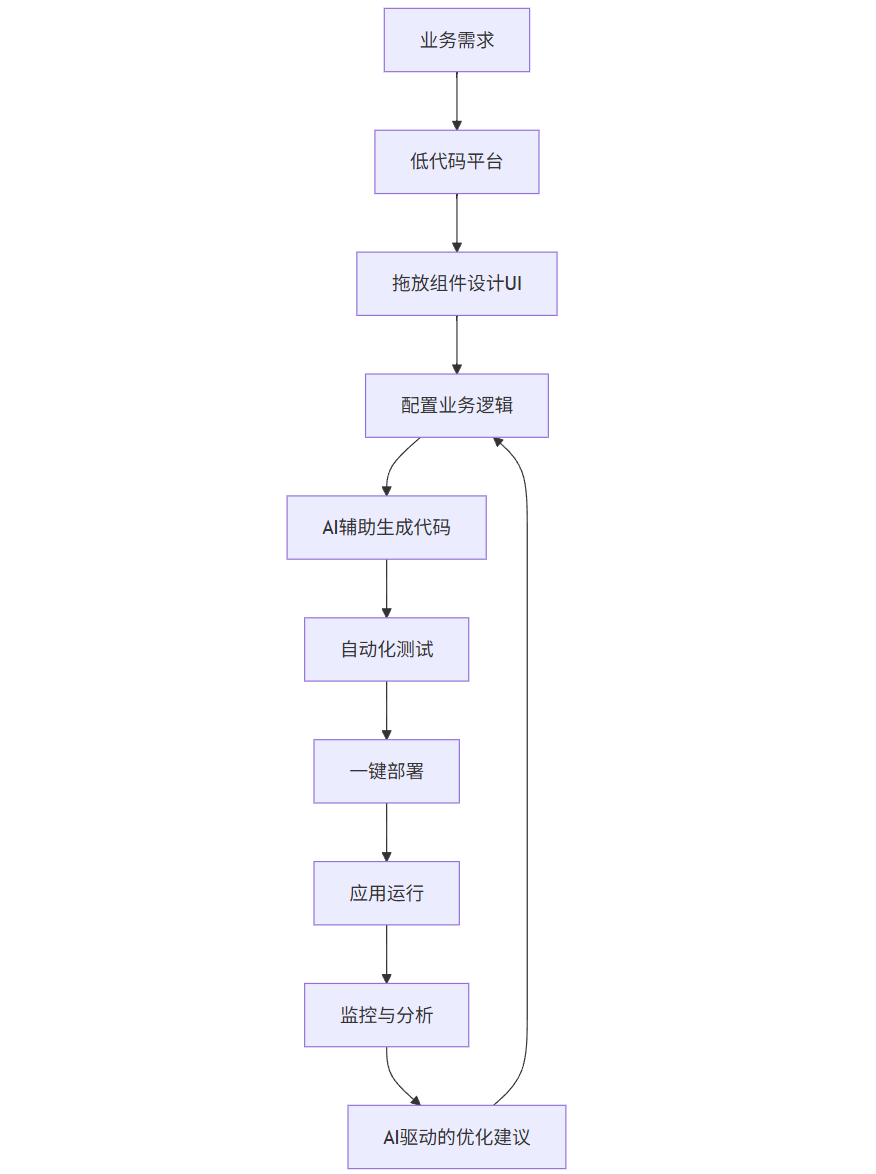
低代码与无代码的区别:
| 特性 | 低代码 | 无代码 |
|---|---|---|
| 目标用户 | 专业开发者、技术分析师 | 业务用户、 citizen 开发者 |
| 编码需求 | 部分场景需要编码扩展 | 几乎不需要编码 |
| 灵活性 | 高,可扩展定制 | 中,受平台限制 |
| 学习曲线 | 中等 | 平缓 |
| 适用场景 | 复杂企业应用 | 简单应用、快速原型 |
2.2 低代码平台核心组件与实现
一个基础的低代码平台包含以下核心组件:
- 可视化编辑器:用于拖放组件和设计 UI
- 组件库:预定义的 UI 和功能组件
- 工作流引擎:用于定义业务流程和逻辑
- 数据模型设计器:用于定义数据结构
- 自动化生成引擎:将配置转换为运行时代码
- 部署管理器:用于应用发布和管理
以下是一个简化的低代码平台核心实现:
class Component {
/**
* 组件基类,所有低代码组件继承此类
* @param {string} id - 组件唯一标识
* @param {string} type - 组件类型
* @param {Object} props - 组件属性
* @param {Array} children - 子组件
*/
constructor(id, type, props = {}, children = []) {
this.id = id;
this.type = type;
this.props = props;
this.children = children;
this.events = {}; // 存储组件事件处理
}
/**
* 添加事件处理函数
* @param {string} eventName - 事件名称
* @param {Function|Object} handler - 事件处理函数或配置
*/
addEvent(eventName, handler) {
this.events[eventName] = handler;
}
/**
* 转换为可序列化的对象
* @returns {Object} 序列化后的组件数据
*/
toJSON() {
return {
id: this.id,
type: this.type,
props: this.props,
children: this.children.map(child => child.toJSON()),
events: this.events
};
}
}
class ComponentLibrary {
/**
* 组件库,管理所有可用组件
*/
constructor() {
this.components = new Map();
this.initDefaultComponents();
}
/**
* 初始化默认组件
*/
initDefaultComponents() {
// 注册基础组件
this.registerComponent('button', {
name: '按钮',
description: '基础按钮组件',
defaultProps: {
label: '按钮',
variant: 'primary',
size: 'medium'
},
properties: [
{ name: 'label', type: 'string', label: '显示文本' },
{ name: 'variant', type: 'select', label: '样式', options: ['primary', 'secondary', 'danger'] },
{ name: 'size', type: 'select', label: '大小', options: ['small', 'medium', 'large'] },
{ name: 'disabled', type: 'boolean', label: '禁用' }
],
events: ['onClick']
});
this.registerComponent('input', {
name: '输入框',
description: '文本输入框',
defaultProps: {
placeholder: '请输入',
type: 'text',
value: ''
},
properties: [
{ name: 'placeholder', type: 'string', label: '提示文本' },
{ name: 'type', type: 'select', label: '类型', options: ['text', 'number', 'password', 'email'] },
{ name: 'value', type: 'string', label: '默认值' },
{ name: 'disabled', type: 'boolean', label: '禁用' },
{ name: 'required', type: 'boolean', label: '必填' }
],
events: ['onChange', 'onBlur', 'onFocus']
});
this.registerComponent('form', {
name: '表单',
description: '表单容器',
defaultProps: {
title: '表单',
layout: 'vertical'
},
properties: [
{ name: 'title', type: 'string', label: '标题' },
{ name: 'layout', type: 'select', label: '布局', options: ['vertical', 'horizontal'] }
],
events: ['onSubmit'],
canHaveChildren: true
});
this.registerComponent('table', {
name: '表格',
description: '数据表格',
defaultProps: {
dataSource: [],
columns: [],
pagination: true
},
properties: [
{ name: 'columns', type: 'array', label: '列定义' },
{ name: 'pagination', type: 'boolean', label: '分页' },
{ name: 'rowPerPage', type: 'number', label: '每页行数' }
],
events: ['onRowClick', 'onSort', 'onFilter']
});
}
/**
* 注册新组件
* @param {string} type - 组件类型标识
* @param {Object} config - 组件配置
*/
registerComponent(type, config) {
this.components.set(type, {
...config,
type,
canHaveChildren: config.canHaveChildren !== undefined ? config.canHaveChildren : false
});
}
/**
* 获取组件定义
* @param {string} type - 组件类型
* @returns {Object} 组件配置
*/
getComponent(type) {
return this.components.get(type);
}
/**
* 获取所有组件类型
* @returns {Array} 组件类型列表
*/
getAllComponentTypes() {
return Array.from(this.components.keys());
}
/**
* 创建组件实例
* @param {string} type - 组件类型
* @param {string} id - 组件ID
* @param {Object} props - 组件属性
* @param {Array} children - 子组件
* @returns {Component} 组件实例
*/
createComponentInstance(type, id, props = {}, children = []) {
const componentConfig = this.getComponent(type);
if (!componentConfig) {
throw new Error(`未找到组件类型: ${type}`);
}
// 合并默认属性和自定义属性
const mergedProps = { ...componentConfig.defaultProps, ...props };
return new Component(id, type, mergedProps, children);
}
}
class PageDesigner {
/**
* 页面设计器,用于创建和编辑页面
* @param {ComponentLibrary} componentLibrary - 组件库实例
*/
constructor(componentLibrary) {
this.componentLibrary = componentLibrary;
this.pages = new Map();
this.currentPageId = null;
this.dataModels = new Map(); // 存储数据模型
}
/**
* 创建新页面
* @param {string} pageId - 页面ID
* @param {string} pageName - 页面名称
* @param {Object} config - 页面配置
* @returns {Object} 页面信息
*/
createPage(pageId, pageName, config = {}) {
if (this.pages.has(pageId)) {
throw new Error(`页面ID已存在: ${pageId}`);
}
const page = {
id: pageId,
name: pageName,
config: {
title: pageName,
layout: 'fluid',
...config
},
components: [], // 根组件列表
dataSources: [], // 数据源配置
routes: [] // 页面内路由
};
this.pages.set(pageId, page);
this.currentPageId = pageId;
return page;
}
/**
* 添加组件到当前页面
* @param {string} type - 组件类型
* @param {Object} props - 组件属性
* @param {string|null} parentId - 父组件ID,null表示添加到根
* @returns {Component} 添加的组件
*/
addComponent(type, props = {}, parentId = null) {
if (!this.currentPageId) {
throw new Error('没有选中的页面,请先创建或选择页面');
}
const page = this.pages.get(this.currentPageId);
const componentId = `comp_${Date.now()}_${Math.floor(Math.random() * 1000)}`;
// 创建组件实例
const component = this.componentLibrary.createComponentInstance(
type,
componentId,
props
);
// 添加到父组件或根组件列表
if (parentId) {
const parentComponent = this.findComponentById(parentId);
if (parentComponent) {
parentComponent.children.push(component);
} else {
throw new Error(`未找到父组件: ${parentId}`);
}
} else {
page.components.push(component);
}
return component;
}
/**
* 根据ID查找组件
* @param {string} componentId - 组件ID
* @param {Array} components - 组件列表,默认为当前页面的根组件
* @returns {Component|null} 找到的组件或null
*/
findComponentById(componentId, components = null) {
if (!this.currentPageId) {
return null;
}
const pageComponents = components || this.pages.get(this.currentPageId).components;
for (const component of pageComponents) {
if (component.id === componentId) {
return component;
}
if (component.children && component.children.length > 0) {
const found = this.findComponentById(componentId, component.children);
if (found) {
return found;
}
}
}
return null;
}
/**
* 更新组件属性
* @param {string} componentId - 组件ID
* @param {Object} newProps - 新的属性
* @returns {Component|null} 更新后的组件
*/
updateComponentProps(componentId, newProps) {
const component = this.findComponentById(componentId);
if (component) {
component.props = { ...component.props, ...newProps };
return component;
}
return null;
}
/**
* 为组件添加事件处理
* @param {string} componentId - 组件ID
* @param {string} eventName - 事件名称
* @param {Object} handler - 事件处理配置
* @returns {Component|null} 更新后的组件
*/
addComponentEvent(componentId, eventName, handler) {
const component = this.findComponentById(componentId);
if (component) {
component.addEvent(eventName, handler);
return component;
}
return null;
}
/**
* 定义数据模型
* @param {string} modelId - 模型ID
* @param {string} modelName - 模型名称
* @param {Array} fields - 字段定义
*/
defineDataModel(modelId, modelName, fields) {
this.dataModels.set(modelId, {
id: modelId,
name: modelName,
fields: fields.map(field => ({
name: field.name,
type: field.type || 'string',
label: field.label || field.name,
required: field.required || false,
default: field.default,
validations: field.validations || []
}))
});
}
/**
* 导出当前页面设计
* @returns {Object} 页面设计数据
*/
exportCurrentPage() {
if (!this.currentPageId) {
throw new Error('没有选中的页面');
}
const page = this.pages.get(this.currentPageId);
return {
...page,
components: page.components.map(component => component.toJSON())
};
}
}
class CodeGenerator {
/**
* 代码生成器,将设计转换为可运行代码
*/
constructor() {
// 组件渲染函数映射
this.componentRenderers = new Map();
this.initRenderers();
}
/**
* 初始化组件渲染器
*/
initRenderers() {
// 按钮组件渲染器
this.componentRenderers.set('button', (component) => {
const { id, props, events } = component;
const eventHandlers = Object.entries(events).map(([event, handler]) => {
return `@${event}="${this.generateEventHandler(handler)}"`;
}).join(' ');
return `<button id="${id}" class="btn btn-${props.variant} btn-${props.size}" ${eventHandlers}>
${props.label}
</button>`;
});
// 输入框组件渲染器
this.componentRenderers.set('input', (component) => {
const { id, props, events } = component;
const eventHandlers = Object.entries(events).map(([event, handler]) => {
return `@${event}="${this.generateEventHandler(handler)}"`;
}).join(' ');
const requiredAttr = props.required ? 'required' : '';
const disabledAttr = props.disabled ? 'disabled' : '';
return `<input
id="${id}"
type="${props.type}"
placeholder="${props.placeholder}"
value="${props.value}"
${requiredAttr}
${disabledAttr}
${eventHandlers}
class="form-control"
/>`;
});
// 表单组件渲染器
this.componentRenderers.set('form', (component, renderChild) => {
const { id, props, events, children } = component;
const eventHandlers = Object.entries(events).map(([event, handler]) => {
return `@${event}="${this.generateEventHandler(handler)}"`;
}).join(' ');
const formLayout = props.layout === 'horizontal' ? 'form-horizontal' : '';
return `<form id="${id}" class="form ${formLayout}" ${eventHandlers}>
<h3>${props.title}</h3>
${children.map(child => renderChild(child)).join('')}
<button type="submit" class="btn btn-primary">提交</button>
</form>`;
});
// 表格组件渲染器
this.componentRenderers.set('table', (component) => {
const { id, props, events } = component;
const eventHandlers = Object.entries(events).map(([event, handler]) => {
return `@${event}="${this.generateEventHandler(handler)}"`;
}).join(' ');
// 生成表头
const headers = props.columns.map(col => `
<th ${col.sortable ? `@click="sort('${col.field}')"` : ''}>
${col.label}
</th>
`).join('');
// 生成表格内容(使用模板语法)
return `<table id="${id}" class="table table-striped" ${eventHandlers}>
<thead>
<tr>${headers}</tr>
</thead>
<tbody>
<tr v-for="(row, index) in ${props.dataSource}" :key="index">
${props.columns.map(col => `<td>{{ row.${col.field} }}</td>`).join('')}
</tr>
</tbody>
${props.pagination ? `
<tfoot>
<pagination
:current-page="currentPage"
:total-items="totalItems"
:items-per-page="${props.rowPerPage}"
@page-change="changePage"
></pagination>
</tfoot>
` : ''}
</table>`;
});
}
/**
* 生成事件处理代码
* @param {Object} handler - 事件处理配置
* @returns {string} 事件处理代码字符串
*/
generateEventHandler(handler) {
// 简单实现,实际可能更复杂
if (handler.type === 'navigate') {
return `() => navigateTo('${handler.target}')`;
} else if (handler.type === 'submitForm') {
return `(e) => handleFormSubmit(e)`;
} else if (handler.type === 'showAlert') {
return `() => showAlert('${handler.message}')`;
} else if (handler.customCode) {
return handler.customCode;
}
return '() => {}';
}
/**
* 递归渲染组件
* @param {Object} component - 组件定义
* @returns {string} 渲染后的HTML字符串
*/
renderComponent(component) {
const renderer = this.componentRenderers.get(component.type);
if (!renderer) {
console.warn(`未找到组件渲染器: ${component.type}`);
return `<div class="unknown-component">未知组件: ${component.type}</div>`;
}
// 递归渲染子组件
const renderChild = (child) => this.renderComponent(child);
return renderer(component, renderChild);
}
/**
* 生成页面HTML代码
* @param {Object} pageDesign - 页面设计数据
* @returns {string} 生成的HTML代码
*/
generatePageHTML(pageDesign) {
const componentsHTML = pageDesign.components.map(component =>
this.renderComponent(component)
).join('\n');
return `<!DOCTYPE html>
<html lang="zh-CN">
<head>
<meta charset="UTF-8">
<meta name="viewport" content="width=device-width, initial-scale=1.0">
<title>${pageDesign.config.title}</title>
<link rel="stylesheet" href="https://cdn.jsdelivr.net/npm/bootstrap@5.1.3/dist/css/bootstrap.min.css">
</head>
<body>
<div class="container mt-4">
${componentsHTML}
</div>
<script src="https://cdn.jsdelivr.net/npm/vue@3/dist/vue.global.js"></script>
<script>
const { createApp } = Vue;
createApp({
data() {
return {
// 自动生成的数据模型
${this.generateDataModel(pageDesign)}
}
},
methods: {
// 自动生成的方法
${this.generateMethods(pageDesign)}
},
mounted() {
// 页面加载时执行的代码
${this.generateMountedCode(pageDesign)}
}
}).mount('#app');
</script>
</body>
</html>
2.3 AI 增强的低代码开发
AI 为低代码平台带来了革命性的增强,主要体现在以下几个方面:
- 智能组件推荐:根据上下文和用户需求推荐合适的组件
- 自动化 UI 生成:根据文本描述自动生成用户界面
- 业务逻辑自动转换:将自然语言描述的业务规则转换为可执行逻辑
- 代码优化建议:分析生成的代码并提供优化建议
- 自动化测试生成:为低代码应用生成测试用例
以下是一个 AI 增强的低代码功能实现示例:
class AILowCodeAssistant {
/**
* AI增强的低代码助手
* @param {Object} llmClient - 大语言模型客户端
* @param {ComponentLibrary} componentLibrary - 组件库
*/
constructor(llmClient, componentLibrary) {
this.llmClient = llmClient;
this.componentLibrary = componentLibrary;
this.componentEmbeddings = new Map(); // 组件的向量表示
this.userPreferences = new Map(); // 用户偏好
this.contextHistory = []; // 上下文历史
// 初始化组件向量表示
this.initComponentEmbeddings();
}
/**
* 初始化组件的向量表示,用于相似性搜索
*/
async initComponentEmbeddings() {
const componentTypes = this.componentLibrary.getAllComponentTypes();
for (const type of componentTypes) {
const component = this.componentLibrary.getComponent(type);
// 创建组件描述文本
const description = `${component.name}: ${component.description}。属性包括: ${
component.properties.map(p => p.name).join(', ')
}。支持事件: ${Object.keys(component.events).join(', ')}`;
// 获取向量表示
const embedding = await this.llmClient.embedText(description);
this.componentEmbeddings.set(type, {
component,
description,
embedding
});
}
}
/**
* 基于用户输入的文本描述推荐合适的组件
* @param {string} userQuery - 用户查询/描述
* @param {number} limit - 返回推荐数量
* @returns {Array} 推荐的组件列表
*/
async recommendComponents(userQuery, limit = 3) {
if (this.componentEmbeddings.size === 0) {
await this.initComponentEmbeddings();
}
// 获取查询的向量表示
const queryEmbedding = await this.llmClient.embedText(userQuery);
// 计算与每个组件的相似度
const similarities = [];
for (const [type, { component, embedding }] of this.componentEmbeddings) {
const similarity = this.cosineSimilarity(queryEmbedding, embedding);
similarities.push({
type,
component,
similarity
});
}
// 按相似度排序并返回前N个
return similarities
.sort((a, b) => b.similarity - a.similarity)
.slice(0, limit);
}
/**
* 计算两个向量的余弦相似度
* @param {Array} vec1 - 向量1
* @param {Array} vec2 - 向量2
* @returns {number} 相似度分数
*/
cosineSimilarity(vec1, vec2) {
const dotProduct = vec1.reduce((sum, a, i) => sum + a * vec2[i], 0);
const mag1 = Math.sqrt(vec1.reduce((sum, a) => sum + a * a, 0));
const mag2 = Math.sqrt(vec2.reduce((sum, a) => sum + a * a, 0));
return mag1 && mag2 ? dotProduct / (mag1 * mag2) : 0;
}
/**
* 根据自然语言描述生成组件配置
* @param {string} description - 组件的自然语言描述
* @param {string} componentType - 组件类型(可选)
* @returns {Object} 生成的组件配置
*/
async generateComponentConfig(description, componentType = null) {
// 如果未指定组件类型,先推荐最合适的组件
let type = componentType;
if (!type) {
const recommendations = await this.recommendComponents(description, 1);
if (recommendations.length > 0) {
type = recommendations[0].type;
} else {
throw new Error('无法确定合适的组件类型');
}
}
const component = this.componentLibrary.getComponent(type);
if (!component) {
throw new Error(`未知的组件类型: ${type}`);
}
// 构建提示词
const prompt = `
请根据以下描述为${component.name}组件生成属性配置:
组件描述: ${component.description}
支持的属性: ${JSON.stringify(component.properties, null, 2)}
用户需求: ${description}
请返回一个JSON对象,只包含该组件的属性配置,不要添加其他解释。
如果某些属性无法从需求中确定,请使用默认值。
`;
// 调用LLM生成配置
const response = await this.llmClient.generateText(prompt);
try {
// 解析生成的JSON
const config = JSON.parse(response);
// 合并默认属性
return { ...component.defaultProps, ...config };
} catch (e) {
console.error('解析组件配置失败:', e);
console.error('LLM响应:', response);
// 失败时返回默认配置
return { ...component.defaultProps };
}
}
/**
* 根据自然语言描述生成页面布局
* @param {string} pageDescription - 页面描述
* @returns {Object} 生成的页面配置
*/
async generatePageLayout(pageDescription) {
// 获取所有可用组件信息
const componentsInfo = Array.from(this.componentEmbeddings.values())
.map(({ component }) => ({
type: component.type,
name: component.name,
description: component.description
}));
// 构建提示词
const prompt = `
请根据以下描述生成一个页面布局:
页面需求: ${pageDescription}
可用组件:
${JSON.stringify(componentsInfo, null, 2)}
请返回一个JSON对象,包含:
- pageTitle: 页面标题
- components: 组件数组,每个组件包含type和props
- layout: 布局说明
确保组件组合合理,符合用户需求,不要添加其他解释。
`;
// 调用LLM生成页面布局
const response = await this.llmClient.generateText(prompt);
try {
return JSON.parse(response);
} catch (e) {
console.error('解析页面布局失败:', e);
console.error('LLM响应:', response);
// 返回默认页面布局
return {
pageTitle: '新页面',
components: [],
layout: '默认布局'
};
}
}
/**
* 将自然语言描述转换为事件处理逻辑
* @param {string} logicDescription - 逻辑描述
* @param {string} componentType - 组件类型
* @param {string} eventName - 事件名称
* @returns {Object} 事件处理配置
*/
async generateEventHandler(logicDescription, componentType, eventName) {
const component = this.componentLibrary.getComponent(componentType);
if (!component) {
throw new Error(`未知的组件类型: ${componentType}`);
}
if (!component.events.includes(eventName)) {
throw new Error(`组件${componentType}不支持事件${eventName}`);
}
// 构建提示词
const prompt = `
请将以下逻辑描述转换为${component.name}组件的${eventName}事件处理代码:
逻辑描述: ${logicDescription}
请返回一个JSON对象,包含:
- type: 处理类型 (navigate, submitForm, showAlert, custom等)
- [其他相关属性]: 根据类型添加必要的属性
- customCode: 如果是custom类型,提供具体的处理代码
不要添加其他解释,只返回JSON。
`;
// 调用LLM生成事件处理逻辑
const response = await this.llmClient.generateText(prompt);
try {
return JSON.parse(response);
} catch (e) {
console.error('解析事件处理逻辑失败:', e);
console.error('LLM响应:', response);
return {
type: 'custom',
customCode: '// 自动生成失败,请手动编写'
};
}
}
/**
* 分析并优化生成的代码
* @param {string} code - 要优化的代码
* @param {string} language - 代码语言
* @returns {string} 优化后的代码
*/
async optimizeCode(code, language = 'javascript') {
const prompt = `
请优化以下${language}代码:
代码:
${code}
优化方向:
1. 提高性能
2. 增强可读性
3. 修复潜在错误
4. 遵循最佳实践
请返回优化后的完整代码,并添加注释说明主要修改点。
`;
return this.llmClient.generateText(prompt);
}
/**
* 记录用户操作,用于改进推荐
* @param {Object} action - 用户操作
*/
recordUserAction(action) {
this.contextHistory.push({
timestamp: new Date(),
...action
});
// 限制历史记录长度
if (this.contextHistory.length > 100) {
this.contextHistory.shift();
}
// 更新用户偏好
this.updateUserPreferences();
}
/**
* 更新用户偏好,用于个性化推荐
*/
updateUserPreferences() {
// 简单实现:统计用户常用组件
const componentUsage = {};
for (const action of this.contextHistory) {
if (action.type === 'addComponent' && action.componentType) {
const type = action.componentType;
componentUsage[type] = (componentUsage[type] || 0) + 1;
}
}
// 保存使用频率最高的3个组件
const topComponents = Object.entries(componentUsage)
.sort((a, b) => b[1] - a[1])
.slice(0, 3)
.map(([type]) => type);
this.userPreferences.set('topComponents', topComponents);
}
}
// 示例LLM客户端实现
class MockLLMClient {
/**
* 模拟的大语言模型客户端
*/
async embedText(text) {
// 模拟文本嵌入,实际应调用真实的嵌入API
// 生成随机向量作为示例
const embedding = [];
for (let i = 0; i < 10; i++) {
embedding.push(Math.random() * 2 - 1); // 范围: [-1, 1)
}
return embedding;
}
async generateText(prompt) {
// 模拟文本生成,实际应调用真实的LLM API
console.log('LLM Prompt:', prompt);
// 根据提示类型返回不同的模拟结果
if (prompt.includes('生成属性配置')) {
return JSON.stringify({
label: '提交',
variant: 'primary',
size: 'medium'
});
} else if (prompt.includes('生成一个页面布局')) {
return JSON.stringify({
pageTitle: '用户管理',
components: [
{
type: 'form',
props: {
title: '用户搜索',
layout: 'horizontal'
}
},
{
type: 'table',
props: {
columns: [
{ field: 'name', label: '姓名' },
{ field: 'email', label: '邮箱' }
],
pagination: true
}
}
],
layout: '垂直布局,表单在上,表格在下'
});
} else if (prompt.includes('转换为事件处理代码')) {
return JSON.stringify({
type: 'showAlert',
message: '操作成功'
});
} else if (prompt.includes('优化以下代码')) {
return `// 优化后的代码
function calculateTotal(prices) {
if (!Array.isArray(prices)) return 0;
return prices.reduce((sum, price) => {
const numPrice = Number(price);
return sum + (isNaN(numPrice) ? 0 : numPrice);
}, 0);
}
// 主要修改:
// 1. 添加了输入验证,确保参数是数组
// 2. 增加了价格转换和NaN处理
// 3. 使用更简洁的reduce语法`;
}
return '// 模拟生成的内容';
}
}
// 示例用法
async function aiLowCodeDemo() {
// 创建组件库
const componentLib = new ComponentLibrary(); // 假设已在前面定义
// 创建模拟LLM客户端
const llmClient = new MockLLMClient();
// 创建AI助手
const aiAssistant = new AILowCodeAssistant(llmClient, componentLib);
// 1. 推荐组件示例
console.log('=== 组件推荐示例 ===');
const recommendations = await aiAssistant.recommendComponents(
'我需要一个可以点击提交表单的元素'
);
console.log('推荐组件:', recommendations.map(r => ({
type: r.type,
name: r.component.name,
similarity: r.similarity.toFixed(4)
})));
// 2. 生成组件配置示例
console.log('\n=== 生成组件配置示例 ===');
const buttonConfig = await aiAssistant.generateComponentConfig(
'一个红色的提交按钮,大小为大型',
'button'
);
console.log('按钮配置:', buttonConfig);
// 3. 生成页面布局示例
console.log('\n=== 生成页面布局示例 ===');
const pageLayout = await aiAssistant.generatePageLayout(
'一个用户管理页面,包含搜索表单和用户列表,列表需要分页'
);
console.log('页面布局:', pageLayout);
// 4. 生成事件处理逻辑示例
console.log('\n=== 生成事件处理示例 ===');
const eventHandler = await aiAssistant.generateEventHandler(
'点击时显示"提交成功"的提示',
'button',
'onClick'
);
console.log('事件处理:', eventHandler);
// 5. 代码优化示例
console.log('\n=== 代码优化示例 ===');
const originalCode = `
function calculateTotal(prices) {
var sum = 0;
for (var i = 0; i < prices.length; i++) {
sum += prices[i];
}
return sum;
}
`;
const optimizedCode = await aiAssistant.optimizeCode(originalCode);
console.log('优化后的代码:', optimizedCode);
// 6. 记录用户操作示例
aiAssistant.recordUserAction({
type: 'addComponent',
componentType: 'button',
timestamp: new Date()
});
aiAssistant.recordUserAction({
type: 'addComponent',
componentType: 'table',
timestamp: new Date()
});
console.log('\n用户偏好:', aiAssistant.userPreferences.get('topComponents'));
}
// 运行示例
// aiLowCodeDemo();
2.4 低代码 / 无代码开发实践与案例
企业内部工具快速开发:
低代码平台非常适合开发企业内部工具,如数据仪表盘、审批流程、库存管理等应用。
低代码开发的优势与局限分析:
| 优势 | 局限 |
|---|---|
| 开发速度快,可快速迭代 | 复杂场景下灵活性不足 |
| 降低开发门槛,扩大开发者范围 | 可能产生 "黑箱" 配置,难以调试 |
| 标准化组件,减少重复工作 | 平台锁定风险 |
| 易于维护和更新 | 性能可能不如手写代码优化 |
| 适合快速原型验证 | 复杂业务逻辑实现困难 |
三、算法优化实践
3.1 AI 驱动的算法优化概述
AI 在算法优化中的应用正在改变传统的优化方式,通过机器学习和深度学习技术,计算机可以自动发现更优的算法实现、参数配置和数据处理策略。
graph TD
A[原始算法] --> B[性能分析]
B --> C[瓶颈识别]
C --> D[AI优化建议]
D --> E[算法重构]
E --> F[性能测试]
F --> G{达到目标?}
G -->|是| H[部署优化后算法]
G -->|否| C
D --> I[参数优化]
I --> F
D --> J[数据结构优化]
J --> E
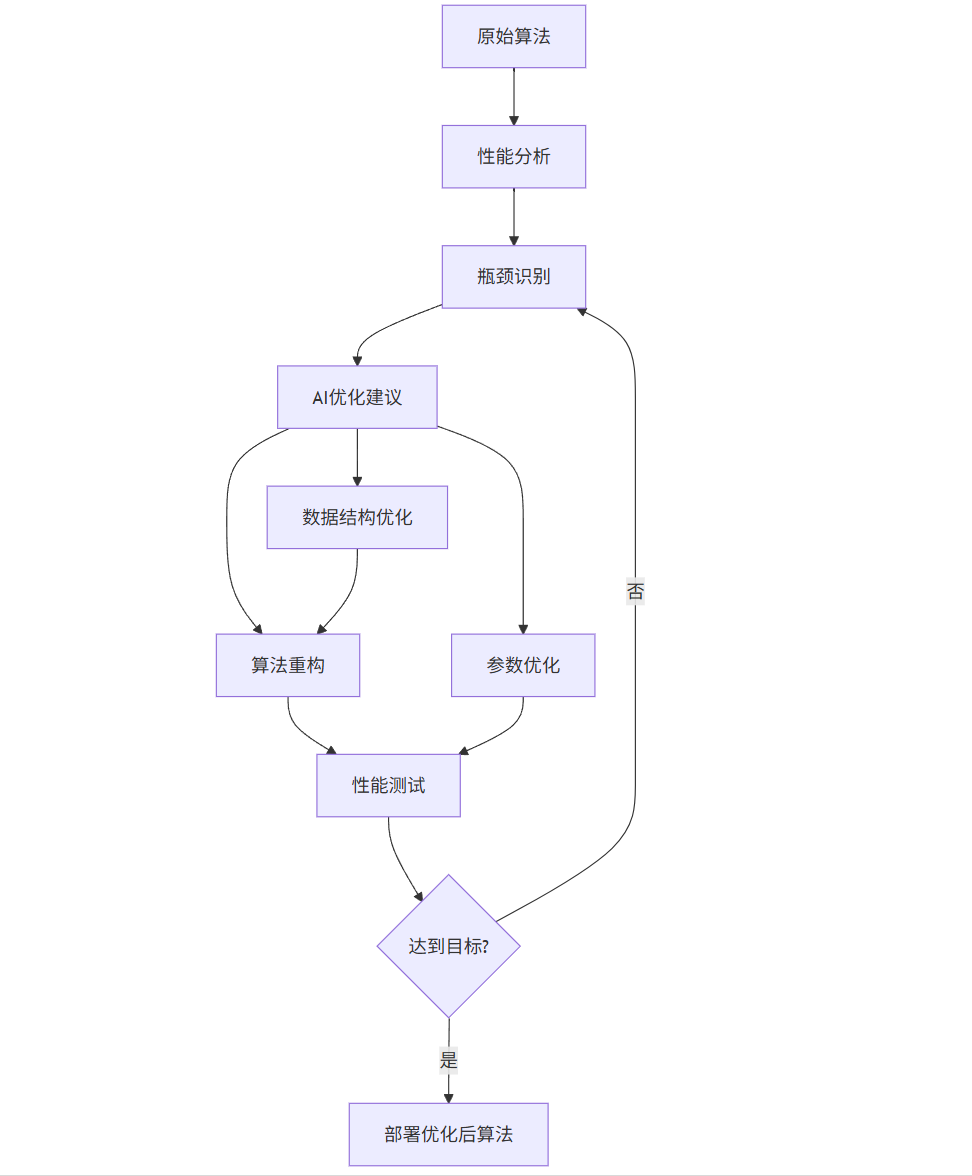
算法优化的主要维度包括:
- 时间复杂度优化:减少算法执行时间
- 空间复杂度优化:降低内存占用
- 稳定性提升:减少异常情况和错误
- 可扩展性增强:适应更大规模数据
- 能耗优化:减少计算资源消耗
3.2 基于 AI 的代码性能优化
AI 可以分析代码并自动识别性能瓶颈,提出优化建议,甚至直接生成优化后的代码。以下是一个代码性能优化工具的实现:
import ast
import timeit
import cProfile
import pstats
import io
import re
from typing import Dict, List, Tuple, Optional, Any
import openai
class CodeAnalyzer:
"""代码分析器,用于识别代码中的性能瓶颈"""
def __init__(self):
self.issues = [] # 存储识别的性能问题
self.complexity = {} # 存储代码复杂度
def analyze(self, code: str, function_name: Optional[str] = None) -> Dict[str, Any]:
"""
分析代码性能问题
:param code: 要分析的代码
:param function_name: 可选,指定要分析的函数名
:return: 分析结果
"""
self.issues = []
self.complexity = {}
# 解析抽象语法树
try:
tree = ast.parse(code)
except SyntaxError as e:
raise ValueError(f"代码语法错误: {str(e)}")
# 分析代码复杂度
self._analyze_complexity(tree)
# 检查常见性能问题
self._check_performance_issues(tree)
# 如果指定了函数,单独分析
if function_name:
func_issues = [issue for issue in self.issues if issue.get('function') == function_name]
func_complexity = self.complexity.get(function_name, {})
return {
'function': function_name,
'complexity': func_complexity,
'issues': func_issues,
'overall_issues': self.issues,
'overall_complexity': self.complexity
}
return {
'complexity': self.complexity,
'issues': self.issues
}
def _analyze_complexity(self, tree: ast.AST) -> None:
"""分析代码复杂度"""
# 简单实现:计算函数的圈复杂度
for node in ast.walk(tree):
if isinstance(node, ast.FunctionDef):
# 计算圈复杂度
complexity = 1 # 基础复杂度
for n in ast.walk(node):
if isinstance(n, (ast.If, ast.For, ast.While, ast.And, ast.Or,
ast.Assert, ast.Raise, ast.Try, ast.ExceptHandler)):
complexity += 1
self.complexity[node.name] = {
'cyclomatic_complexity': complexity,
'line_count': len(ast.unparse(node).split('\n')),
'is_high_complexity': complexity > 10
}
if complexity > 10:
self.issues.append({
'type': 'high_complexity',
'function': node.name,
'message': f"函数 {node.name} 圈复杂度较高 ({complexity}),建议拆分",
'severity': 'medium'
})
def _check_performance_issues(self, tree: ast.AST) -> None:
"""检查常见的性能问题"""
# 检查列表拼接而非列表推导
for node in ast.walk(tree):
if isinstance(node, ast.FunctionDef):
func_name = node.name
self._check_list_operations(node, func_name)
self._check_loop_issues(node, func_name)
self._check_string_concatenation(node, func_name)
self._check_unnecessary_copies(node, func_name)
def _check_list_operations(self, node: ast.FunctionDef, func_name: str) -> None:
"""检查列表操作中的性能问题"""
for n in ast.walk(node):
# 检查在循环中使用list.append()而非列表推导
if isinstance(n, ast.For):
# 查找循环中的append操作
has_append = False
target_id = None
if isinstance(n.target, ast.Name):
target_id = n.target.id
for body_node in n.body:
if isinstance(body_node, ast.Expr) and isinstance(body_node.value, ast.Call):
call = body_node.value
if (isinstance(call.func, ast.Attribute) and
call.func.attr == 'append' and
isinstance(call.func.value, ast.Name)):
has_append = True
list_name = call.func.value.id
# 检查是否可以替换为列表推导
if target_id and len(n.body) == 1:
self.issues.append({
'type': 'list_append_in_loop',
'function': func_name,
'message': f"函数 {func_name} 中在循环中使用 {list_name}.append(),建议使用列表推导",
'severity': 'low'
})
def _check_loop_issues(self, node: ast.FunctionDef, func_name: str) -> None:
"""检查循环中的性能问题"""
for n in ast.walk(node):
# 检查嵌套循环
if isinstance(n, ast.For):
loop_depth = 0
current = n
while hasattr(current, 'parent'):
current = current.parent
if isinstance(current, (ast.For, ast.While)):
loop_depth += 1
# 记录每个节点的父节点,用于计算嵌套深度
for child in ast.iter_child_nodes(n):
child.parent = n
if loop_depth >= 3:
self.issues.append({
'type': 'deeply_nested_loops',
'function': func_name,
'message': f"函数 {func_name} 中存在深度为 {loop_depth+1} 的嵌套循环,可能影响性能",
'severity': 'high'
})
def _check_string_concatenation(self, node: ast.FunctionDef, func_name: str) -> None:
"""检查循环中的字符串拼接"""
for n in ast.walk(node):
if isinstance(n, ast.For):
for body_node in n.body:
if isinstance(body_node, ast.AugAssign) and isinstance(body_node.op, ast.Add):
if isinstance(body_node.target, ast.Name) and isinstance(body_node.value, ast.Str):
self.issues.append({
'type': 'string_concat_in_loop',
'function': func_name,
'message': f"函数 {func_name} 中在循环中使用字符串拼接,建议使用str.join()或io.StringIO",
'severity': 'medium'
})
def _check_unnecessary_copies(self, node: ast.FunctionDef, func_name: str) -> None:
"""检查不必要的数据复制"""
for n in ast.walk(node):
if isinstance(n, ast.Assign):
for target in n.targets:
if isinstance(target, ast.Name) and isinstance(n.value, ast.Call):
# 检查不必要的列表复制
if (isinstance(n.value.func, ast.Name) and
n.value.func.id == 'list' and
len(n.value.args) == 1 and
isinstance(n.value.args[0], ast.Name)):
self.issues.append({
'type': 'unnecessary_copy',
'function': func_name,
'message': f"函数 {func_name} 中存在不必要的列表复制,可直接引用原列表",
'severity': 'low'
})
class PerformanceTester:
"""性能测试器,用于测量代码执行时间和资源消耗"""
def __init__(self):
self.results = {}
def test_function(self, code: str, function_name: str, args: str = "()", runs: int = 1000) -> Dict[str, Any]:
"""
测试函数性能
:param code: 包含函数的代码
:param function_name: 函数名
:param args: 函数参数,字符串形式
:param runs: 运行次数
:return: 性能测试结果
"""
# 构建测试代码
test_code = f"{code}\n\n{function_name}{args}"
# 测量执行时间
timeTaken = timeit.timeit(test_code, number=runs)
avg_time = timeTaken / runs * 1e6 # 转换为微秒
# 使用cProfile进行详细分析
pr = cProfile.Profile()
pr.enable()
# 执行一次以获取详细性能数据
try:
exec(test_code, globals())
except Exception as e:
raise ValueError(f"执行测试代码时出错: {str(e)}")
pr.disable()
s = io.StringIO()
ps = pstats.Stats(pr, stream=s).sort_stats('cumulative')
ps.print_stats(10) # 只打印前10行
profile_data = s.getvalue()
self.results[function_name] = {
'total_time': timeTaken,
'avg_time_us': avg_time,
'runs': runs,
'profile_data': profile_data
}
return self.results[function_name]
def compare_functions(self, code1: str, func1: str, code2: str, func2: str, args: str = "()") -> Dict[str, Any]:
"""比较两个函数的性能"""
result1 = self.test_function(code1, func1, args)
result2 = self.test_function(code2, func2, args)
improvement = (result1['avg_time_us'] - result2['avg_time_us']) / result1['avg_time_us'] * 100
return {
'function1': {
'name': func1,
'avg_time_us': result1['avg_time_us']
},
'function2': {
'name

火山引擎开发者社区是火山引擎打造的AI技术生态平台,聚焦Agent与大模型开发,提供豆包系列模型(图像/视频/视觉)、智能分析与会话工具,并配套评测集、动手实验室及行业案例库。社区通过技术沙龙、挑战赛等活动促进开发者成长,新用户可领50万Tokens权益,助力构建智能应用。
更多推荐
 6
6 0
0- 0


 已为社区贡献131条内容

所有评论(0)