OCR验证结合大模型输出格式化内容,以发票为例
【代码】OCR验证结合大模型输出格式化内容,以发票为例。
·
OCR验证结合大模型输出格式化内容
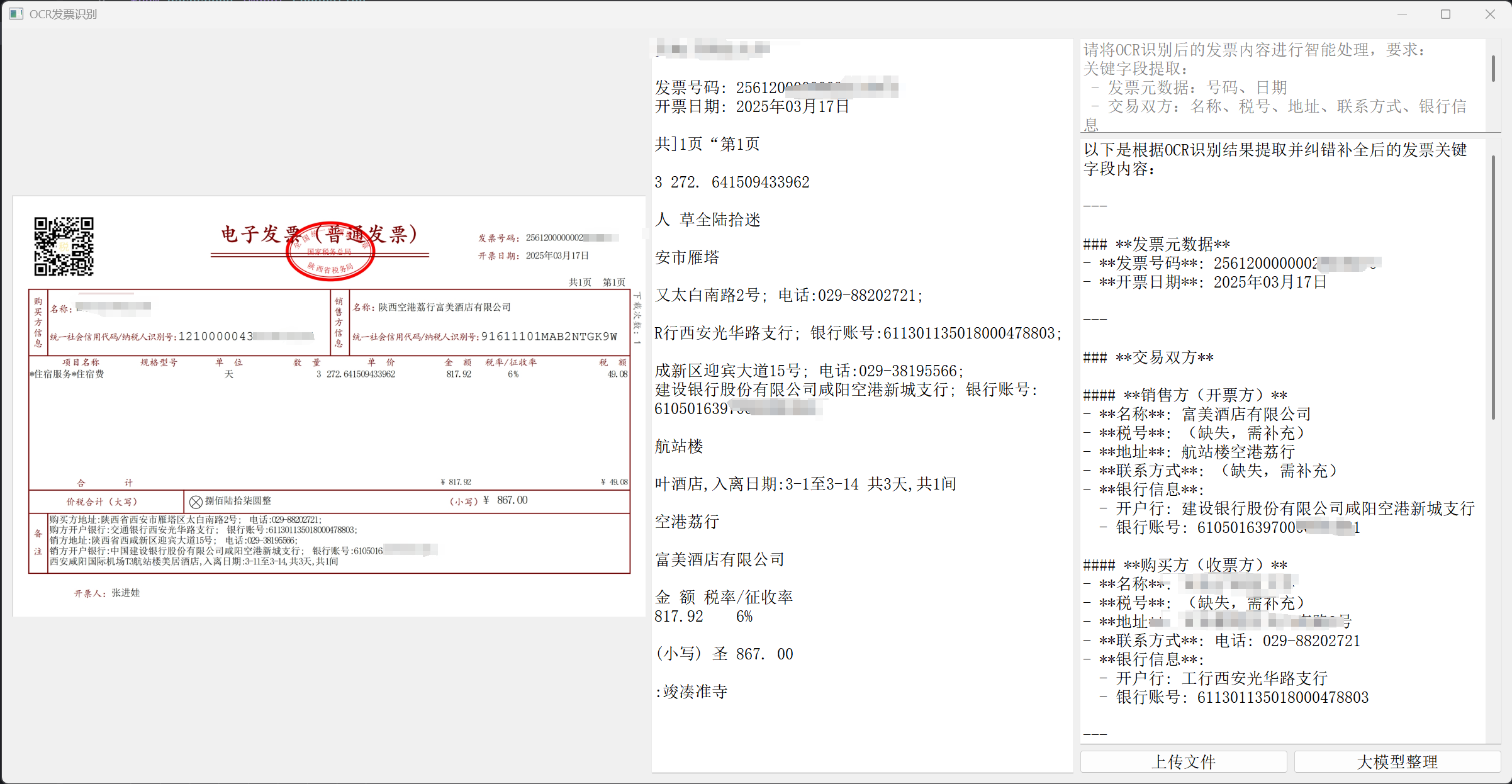
代码如下 代码片.
import sys
import os
import pytesseract
from PyQt5.QtWidgets import QApplication, QWidget, QVBoxLayout, QHBoxLayout, QPushButton, QFileDialog, QTextEdit, QLabel
from PyQt5.QtGui import QPixmap, QImage, QFont
from PyQt5.QtCore import Qt
from pdf2image import convert_from_path
import dashscope
from dashscope import Generation

# 请替换为你的阿里云访问密钥
DASHSCOPE_API_KEY = 'your qwen api key here'
# 指定千问模型名称
QWEN_MODEL_NAME = 'qwen-plus'
pytesseract.pytesseract.tesseract_cmd = r'C:\Program Files\Tesseract-OCR\tesseract.exe'

class OCRApp(QWidget):
    def __init__(self):
        super().__init__()
        self.initUI()
        dashscope.api_key = DASHSCOPE_API_KEY

    def initUI(self):
        # 主布局,水平布局
        main_layout = QHBoxLayout()

        # 左边:发票内容显示区域,设置伸缩因子为 3 让其占比更大
        left_layout = QVBoxLayout()
        self.image_label = QLabel(self)
        self.image_label.setAlignment(Qt.AlignCenter)
        left_layout.addWidget(self.image_label)
        main_layout.addLayout(left_layout, 3)

        # 中间:OCR识别结果,设置伸缩因子为 2
        self.ocr_text_edit = QTextEdit(self)
        self.ocr_text_edit.setReadOnly(True)
        main_layout.addWidget(self.ocr_text_edit, 2)


        right_layout = QVBoxLayout()
        self.prompt_text_edit = QTextEdit(self)
        self.prompt_text_edit.setPlainText("请将OCR识别后的发票内容进行智能处理,要求:\n"
                                   "关键字段提取:\n"
                                   " - 发票元数据:号码、日期\n"
                                   " - 交易双方:名称、税号、地址、联系方式、银行信息\n"
                                   " - 商品明细:项目名称、规格、单位、数量、单价、金额、税率、税额\n"
                                   " - 统计信息:合计金额、税额、价税合计\n"
                                   " - 特殊备注:住宿天数、房间数、订单姓名等\n"
                                   "纠错补全:修正错别字/乱码,补全缺失字段,补全和纠错即可,不用额外说明")
        # 设置提示文本的样式,使其字体变浅色
        self.prompt_text_edit.setStyleSheet("color: #808080;")
        self.prompt_text_edit.setFixedHeight(int(100 * 1.5))
        self.final_text_edit = QTextEdit(self)
        self.final_text_edit.setReadOnly(True)
        right_layout.addWidget(self.prompt_text_edit)
        right_layout.addWidget(self.final_text_edit)

        # 按钮布局
        button_layout = QHBoxLayout()
        self.upload_button = QPushButton('上传文件', self)
        self.upload_button.clicked.connect(self.upload_file)
        self.process_button = QPushButton('大模型整理', self)
        self.process_button.clicked.connect(self.process_with_model)
        button_layout.addWidget(self.upload_button)
        button_layout.addWidget(self.process_button)
        right_layout.addLayout(button_layout)

        main_layout.addLayout(right_layout, 2)

        self.setLayout(main_layout)
        self.setWindowTitle('OCR发票识别')
        # 将窗口初始大小放大 1.5 倍
        self.setGeometry(300, 300, int(1200 * 2), int(600 * 2))
        self.show()

    def upload_file(self):
        file_path, _ = QFileDialog.getOpenFileName(self, '选择文件', '', '图片文件 (*.png *.jpg *.jpeg);;PDF文件 (*.pdf)')
        if file_path:
            try:
                if file_path.lower().endswith('.pdf'):
                    # 获取 PDF 文件的文件名(不含扩展名)
                    file_name = os.path.splitext(os.path.basename(file_path))[0]
                    images = convert_from_path(file_path)
                    if images:
                        image = images[0]
                        # 生成与 PDF 文件名相同的图片名
                        temp_image_path = f"{file_name}.png"
                        image.save(temp_image_path, 'PNG')
                        pixmap = QPixmap(temp_image_path)
                        # 确保图片能正确缩放显示
                        scaled_pixmap = pixmap.scaled(self.image_label.width(), self.image_label.height(), Qt.KeepAspectRatio, Qt.SmoothTransformation)
                        self.image_label.setPixmap(scaled_pixmap)
                        text = self.ocr_image(image)
                        # 删除临时文件
                        try:
                            os.remove(temp_image_path)
                        except Exception as e:
                            print(f"删除临时文件 {temp_image_path} 时出错: {e}")
                else:
                    pixmap = QPixmap(file_path)
                    # 确保图片能正确缩放显示
                    scaled_pixmap = pixmap.scaled(self.image_label.width(), self.image_label.height(), Qt.KeepAspectRatio, Qt.SmoothTransformation)
                    self.image_label.setPixmap(scaled_pixmap)
                    text = self.ocr_image(file_path)

                self.ocr_text_edit.setPlainText(text)
            except Exception as e:
                print(f"处理文件时出错: {e}")
                self.ocr_text_edit.setPlainText(f"处理文件时出错: {e}")

    def ocr_image(self, image):
        # 指定语言为中文,chi_sim 代表简体中文,若使用繁体中文则改为 chi_tra
        if isinstance(image, str):
            text = pytesseract.image_to_string(image, lang='chi_sim')
        else:
            text = pytesseract.image_to_string(image, lang='chi_sim')
        return text

    def process_with_model(self):
        text = self.ocr_text_edit.toPlainText()
        prompt = self.prompt_text_edit.toPlainText()
        full_prompt = f"{prompt}:{text}"
        response = Generation.call(
            model=QWEN_MODEL_NAME,
            messages=[{'role': 'user', 'content': full_prompt}]
        )
        if response.status_code == 200:
            self.final_text_edit.setPlainText(response.output.text)
        else:
            self.final_text_edit.setPlainText(f"请求失败,错误码: {response.status_code}, 错误信息: {response.message}")

if __name__ == '__main__':
    app = QApplication(sys.argv)
    # 将字体大小放大 1.5 倍
    font = app.font()
    font.setPointSize(int(font.pointSize() * 1.5))
    app.setFont(font)
    ex = OCRApp()
    sys.exit(app.exec_())

火山引擎开发者社区是火山引擎打造的AI技术生态平台,聚焦Agent与大模型开发,提供豆包系列模型(图像/视频/视觉)、智能分析与会话工具,并配套评测集、动手实验室及行业案例库。社区通过技术沙龙、挑战赛等活动促进开发者成长,新用户可领50万Tokens权益,助力构建智能应用。
更多推荐
 3
3 0
0- 0


 已为社区贡献2条内容

所有评论(0)