单层感知机的二分类模型
本篇博客主要神经网络中最简单的网络模型,即单层感知机(Single Layer Perceptron),并基于pytorch框架实现该网络的搭建。虽然如今看来,该模型只能解决线性可分的问题,但作为神经网络的开山之作,仍值得学习。单层感知机网络结构可表示为下图所示(最近发现豆包的画图功能有进步,所以直接用豆包的图片了):z∑i1nwixibwTxbzi1∑nwixibwTxb。
文章目录
前言
本篇博客主要神经网络中最简单的网络模型,即单层感知机(Single Layer Perceptron),并基于pytorch框架实现该网络的搭建。虽然如今看来,该模型只能解决线性可分的问题,但作为神经网络的开山之作,仍值得学习。
1.单层感知机
1.1模型介绍
单层感知机网络结构可表示为下图所示(最近发现豆包的画图功能有进步,所以直接用豆包的图片了):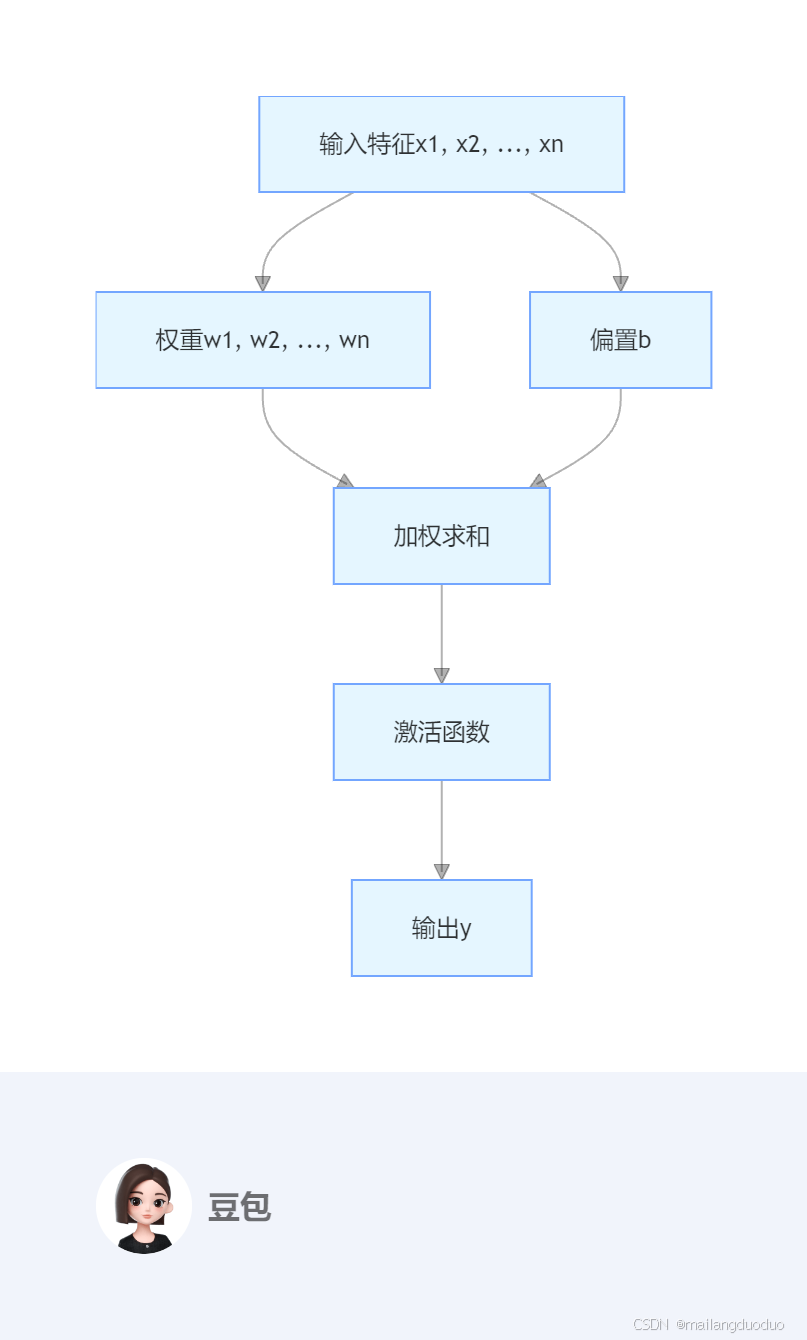
根据图示结构,得到的加权和可表示为: z = ∑ i = 1 n w i x i + b = w T x + b z = \sum_{i = 1}^{n} w_{i}x_{i}+b = w^{T}x + b z=i=1∑nwixi+b=wTx+b
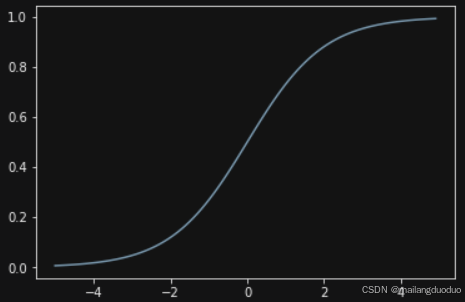
激活层一般选用Sigmoid 函数将输出值压缩到 0 到 1 之间,输出值大于 0.5 时,将其预测为正类;小于 0.5 时,预测为负类。
Sigmoid 函数如下:
σ ( z ) = 1 1 + e − z \sigma(z)=\frac{1}{1 + e^{-z}} σ(z)=1+e−z1
可视化结果为:
详细的模型介绍可参考:机器学习——感知机模型
1.2模型搭建
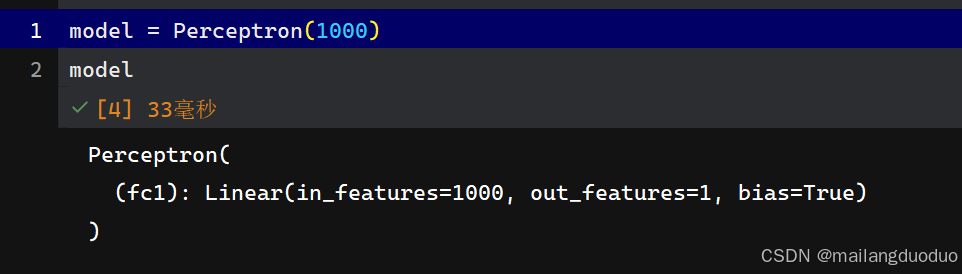
这里使用pytorch框架搭建,直接定义一个线性层即可,具体代码如下:
class Perceptron(nn.Module):
    def __init__(self, input_dim):
        super(Perceptron, self).__init__()
        self.fc1 = nn.Linear(input_dim, 1)

    def forward(self, x_in):
        return torch.sigmoid(self.fc1(x_in))
2.数据集
2.1数据集介绍
这里的数据集是自制的,确定两个类别的中心点,围绕该中心点生成正态分布的坐标。
2.2代码介绍
LEFT_CENTER = (3, 3)
RIGHT_CENTER = (3, -2)
def get_toy_data(batch_size, left_center=LEFT_CENTER, right_center=RIGHT_CENTER):
    x_data = []
    y_targets = np.zeros(batch_size)
    for batch_i in range(batch_size):
        if np.random.random() > 0.5:
            x_data.append(np.random.normal(loc=left_center))
        else:
            x_data.append(np.random.normal(loc=right_center))
            y_targets[batch_i] = 1
    return torch.tensor(x_data, dtype=torch.float32), torch.tensor(y_targets, dtype=torch.float32)
这里的定义了一个函数,用来生产一个批量的数据及标签,因为使用的是随机数和0.5比大小,所以生成的两个类别数量基本一致,不会出现类不平衡现象。
2.3可视化
这里将随机生成的一个批量的数据进行可视化,代码如下:
X, y = get_toy_data(100)
# 可视化数据分布
plt.scatter(X[:,0], X[:,1], c=y)
plt.show()
运行结果: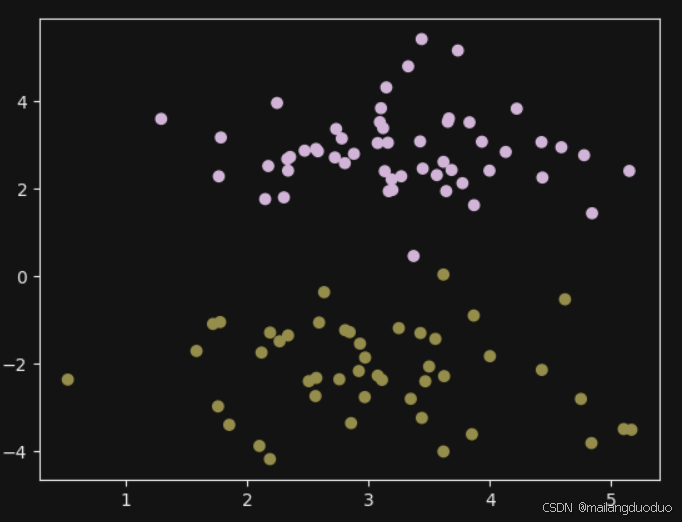
3.训练过程可视化
首先根据感知机模型的输出,将预测值大于0.5的置为1,小于0.5的值为零。同时将数据类型由tensor转换为np.int32类型
    y_pred = perceptron(x_data)
    y_pred = (y_pred > 0.5).long().data.numpy().astype(np.int32)

    x_data = x_data.data.numpy()
    y_truth = y_truth.data.numpy().astype(np.int32)
接着创建了两个嵌套列表,all_x和all_colors:
all_x列表用来存储真实标签的情况,即真实标记为0的存储在all_x[0]列表中,真实标记为1的存储在all_x[1]列表中。all_colors列表用来存储对应标签的预测情况,如果预测正确就计为白色,错误计为黑色,和all_x列表内的元素一一对应,最后np.stack将其转换为numpy数组。
    n_classes = 2
    all_x = [[] for _ in range(n_classes)]
    all_colors = [[] for _ in range(n_classes)]

    colors = ['black', 'white']
    markers = ['o', '*']

    for x_i, y_pred_i, y_true_i in zip(x_data, y_pred, y_truth):
        all_x[y_true_i].append(x_i)
        if y_pred_i == y_true_i:
            all_colors[y_true_i].append("white")
        else:
            all_colors[y_true_i].append("black")
        #all_colors[y_true_i].append(colors[y_pred_i])

    all_x = [np.stack(x_list) for x_list in all_x]
接着将其进行可视化,类别0用mark[0]表示,类别1用mark[1]表示,预测正确颜色标记为白色,错误标记成黑色。
    if ax is None:
        _, ax = plt.subplots(1, 1, figsize=(10,10))

    for x_list, color_list, marker in zip(all_x, all_colors, markers):
        ax.scatter(x_list[:, 0], x_list[:, 1], edgecolor="black", marker=marker, facecolor=color_list, s=300)
此时已经完成预测结果的可视化,为了更好地观察结果,此处将分类的超平面也进行可视化输出,详细过程如下:
首先,确定横纵坐标的表示范围,直接使用所有坐标的最大值和最小值表示即可
    xlim = (min([x_list[:,0].min() for x_list in all_x]),
            max([x_list[:,0].max() for x_list in all_x]))

    ylim = (min([x_list[:,1].min() for x_list in all_x]),
            max([x_list[:,1].max() for x_list in all_x]))
这里定义一个网格,得到网格中每个点的坐标xy最终类型大小为(900,2)(此处是这个)
    xx = np.linspace(xlim[0], xlim[1], 30)
    yy = np.linspace(ylim[0], ylim[1], 30)
    YY, XX = np.meshgrid(yy, xx)
    xy = np.vstack([XX.ravel(), YY.ravel()]).T
接着将得到的xy坐标作为输入到感知机模型,得到对应的输出,输出的形状为(900,1)再将其调整为(30,30)
Z = perceptron(torch.tensor(xy, dtype=torch.float32)).detach().numpy().reshape(XX.shape)
最后使用contour()绘制等高线即可,并添加上标题信息等内容:
    ax.contour(XX, YY, Z, colors='k', levels=levels, linestyles=linestyles)

    plt.suptitle(title)

    if epoch is not None:
        plt.text(xlim[0], ylim[1], "Epoch = {}".format(str(epoch)))```
这里将上述过程封装成了一个函数,具体如下:
def visualize_results(perceptron, x_data, y_truth, n_samples=1000, ax=None, epoch=None,
                      title='', levels=[0.3, 0.4, 0.5], linestyles=['--', '-', '--']):
    y_pred = perceptron(x_data)
    y_pred = (y_pred > 0.5).long().data.numpy().astype(np.int32)

    x_data = x_data.data.numpy()
    y_truth = y_truth.data.numpy().astype(np.int32)

    n_classes = 2

    all_x = [[] for _ in range(n_classes)]
    all_colors = [[] for _ in range(n_classes)]

    colors = ['black', 'white']
    markers = ['o', '*']

    for x_i, y_pred_i, y_true_i in zip(x_data, y_pred, y_truth):
        all_x[y_true_i].append(x_i)
        if y_pred_i == y_true_i:
            all_colors[y_true_i].append("white")
        else:
            all_colors[y_true_i].append("black")
        #all_colors[y_true_i].append(colors[y_pred_i])

    all_x = [np.stack(x_list) for x_list in all_x]

    if ax is None:
        _, ax = plt.subplots(1, 1, figsize=(10,10))

    for x_list, color_list, marker in zip(all_x, all_colors, markers):
        ax.scatter(x_list[:, 0], x_list[:, 1], edgecolor="black", marker=marker, facecolor=color_list, s=300)


    xlim = (min([x_list[:,0].min() for x_list in all_x]),
            max([x_list[:,0].max() for x_list in all_x]))

    ylim = (min([x_list[:,1].min() for x_list in all_x]),
            max([x_list[:,1].max() for x_list in all_x]))

    # hyperplane

    xx = np.linspace(xlim[0], xlim[1], 30)
    yy = np.linspace(ylim[0], ylim[1], 30)
    YY, XX = np.meshgrid(yy, xx)
    xy = np.vstack([XX.ravel(), YY.ravel()]).T

    Z = perceptron(torch.tensor(xy, dtype=torch.float32)).detach().numpy().reshape(XX.shape)
    ax.contour(XX, YY, Z, colors='k', levels=levels, linestyles=linestyles)

    plt.suptitle(title)

    if epoch is not None:
        plt.text(xlim[0], ylim[1], "Epoch = {}".format(str(epoch)))
接着就是训练过程了。
4.训练阶段
4.1超参数选择
首先定义一些超参数,包括学习率、输入尺寸、批量大小、一轮共有多少个批量,共有多少轮数。同时设置了随机种子,使得结果能够保持可复现。
lr = 0.01
input_dim = 2

batch_size = 1000
n_epochs = 12
n_batches = 5

seed = 1337

torch.manual_seed(seed)
torch.cuda.manual_seed_all(seed)
np.random.seed(seed)
4.2优化器与损失
这里选择的优化器为Adam,损失为二元交叉熵损失。
perceptron = Perceptron(input_dim=input_dim)
optimizer = optim.Adam(params=perceptron.parameters(), lr=lr)
bce_loss = nn.BCELoss()
4.3数据集加载
这里的数据集获取加载在每个批次里面,因此并没有完整的数据集,但为了可视化方便,选用第一次选取的批次作为可视化,代码如下:
x_data_static, y_truth_static = get_toy_data(batch_size)
fig, ax = plt.subplots(1, 1, figsize=(10,5))
visualize_results(perceptron, x_data_static, y_truth_static, ax=ax, title='Initial Model State')
plt.axis('off')
plt.show()
结果如下: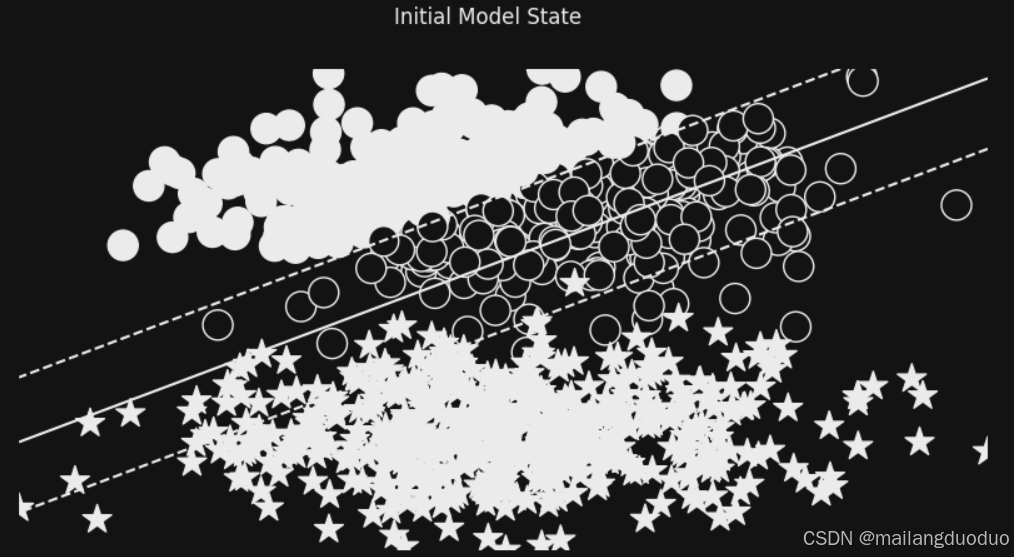
4.4训练过程
这里的训练过程并不是简单的,但epoch达到最大的epochs结束,而是增加了求他条件,损失需要小于0.3且连续两次的损失变化需要小于epsilon且epoch达到最大的epochs结束。这里选择的批量足够大,因此避免了损失的波动
losses = []
change = 1.0
last = 10.0
epsilon = 1e-3
epoch = 0
while change > epsilon or epoch < n_epochs or last > 0.3:
    for _ in range(n_batches):

        optimizer.zero_grad()
        x_data, y_target = get_toy_data(batch_size)
        y_pred = perceptron(x_data).squeeze()
        loss = bce_loss(y_pred, y_target)
        loss.backward()
        optimizer.step()


        loss_value = loss.item()
        losses.append(loss_value)

        change = abs(last - loss_value)
        last = loss_value

    fig, ax = plt.subplots(1, 1, figsize=(10,5))
    visualize_results(perceptron, x_data_static, y_truth_static, ax=ax, epoch=epoch,
                      title=f"{loss_value}; {change}")
    plt.axis('off')
    epoch += 1
plt.show()
运行结果: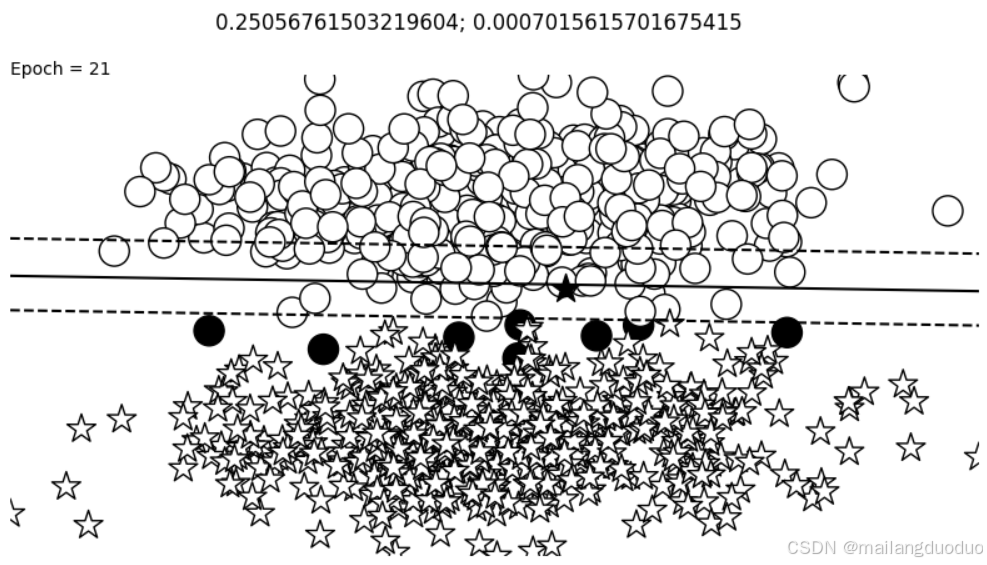

这里之所以和之前的颜色设置的不太一样,是因为主题选择有关
5.结语
本案例至此介绍完毕,主要是感知机模型,使用的自制数据集,实现了简单的二分类问题。如有不足欢迎批评指出!!!

火山引擎开发者社区是火山引擎打造的AI技术生态平台,聚焦Agent与大模型开发,提供豆包系列模型(图像/视频/视觉)、智能分析与会话工具,并配套评测集、动手实验室及行业案例库。社区通过技术沙龙、挑战赛等活动促进开发者成长,新用户可领50万Tokens权益,助力构建智能应用。
更多推荐
 26
26 0
0- 0


 已为社区贡献3条内容

所有评论(0)