Ffmpeg推视频流+mediamtx流媒体服务+labelimg打标签+YOLOV5训练数据集模型+YOLOV5实时RTSP流目标体检测并RTSP流推送+.NET显示RTSP视频流yolov5检测
Ffmpeg推视频流+mediamtx流媒体服务+labelimg打标签+YOLOV5训练数据集模型+YOLOV5实时RTSP流目标体检测并RTSP流推送+.NET显示RTSP视频流+.NET yolov5模型推理检测
Ffmpeg推视频流+mediamtx流媒体服务+labelimg打标签+YOLOV5训练数据集模型+YOLOV5实时RTSP流目标体检测并RTSP流推送+.NET显示RTSP视频流+.NET yolov5模型推理检测
前言
Yolov5的学习记录,在这里不讲环境部署、不讲工具的详细使用,只讲我学习过程中我认为需要提出来的场景。(各插件环境部署百度资料多的是)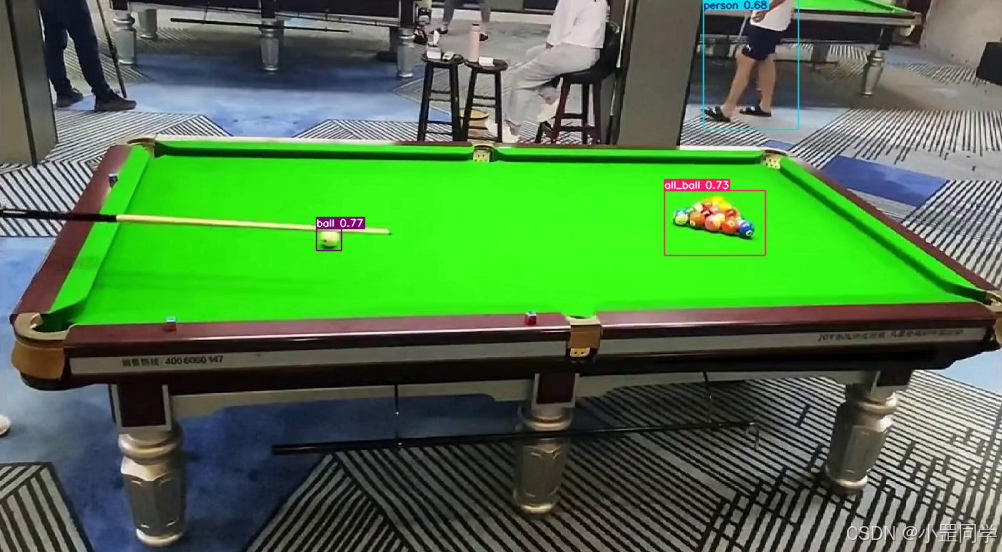
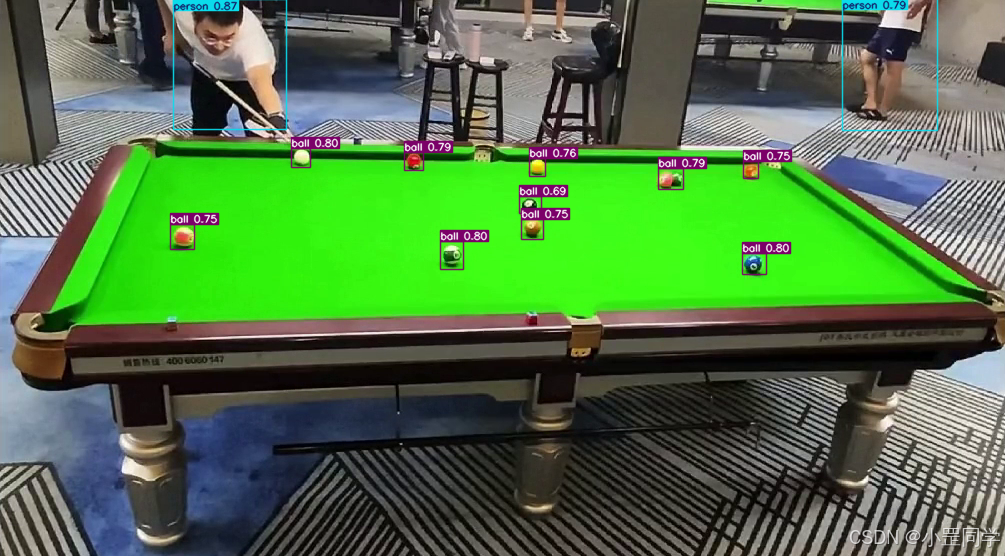
1、搭建Mediamtx流媒体服务 (Linux)
MediaMTX(原名 rtsp-simple-server)是一个开源的实时媒体服务器和媒体代理
源代码开源地址 https://github.com/bluenviron/mediamtx。
对源代码不关心的话直接下载releases https://github.com/bluenviron/mediamtx/releases
启动mediamtx流媒体服务。端口或者其他的配置如果需要修改直接修改 mediamtx.yml
2、FFmpeg视频推流 (Windows)
安装ffmpeg,他是干嘛的我就不介绍了,可以另行查询
https://ffmpeg.org/download.html
https://blog.csdn.net/Natsuago/article/details/143231558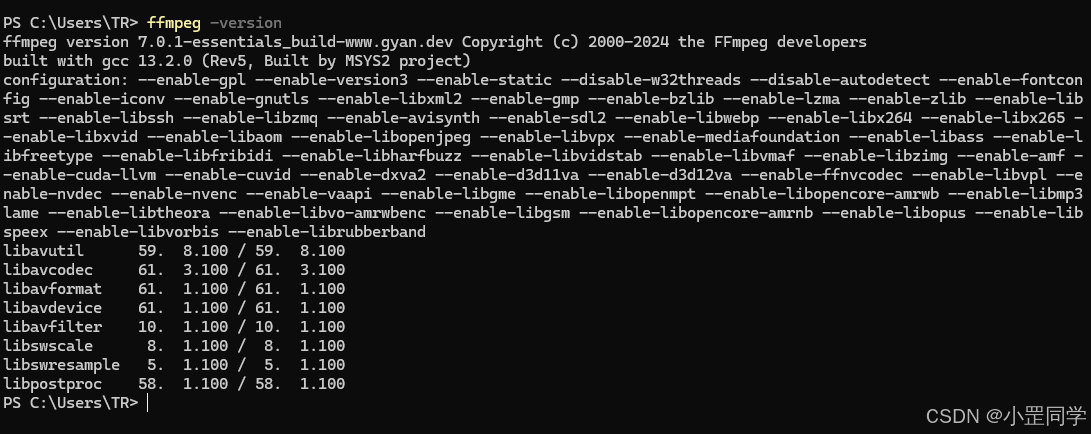
ffmpeg 可以把摄像头的rtsp视频流镜像推送到云端的rtsp流媒体服务(云端)。这里我就不用摄像头的的rtsp视频流了。我把一个mp4视频循环的推送到流媒体服务。这里我的流媒体rtsp服务是 rtsp://192.168.88.100:15999/live/stream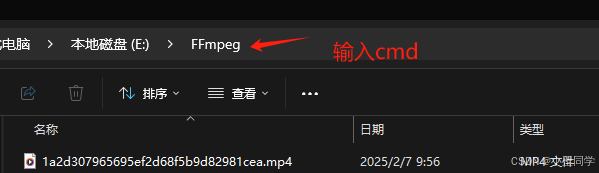
ffmpeg -re -stream_loop -1 -i 1a2d307965695ef2d68f5b9d82981cea.mp4 -c:v libx264 -preset slow -b:v 4000k -c:a aac -b:a 192k -rtsp_transport tcp -f rtsp rtsp://192.168.88.100:15999/live/stream
这样就说明是在推流了
还有其他的命令可以作参考。比如ffmpeg推rtsp流
ffmpeg -rtsp_transport tcp -i "rtsp://admin:123456@192.168.1.3:554/ch01.264&channel=1" -vcodec libx264 -b:v 1024k -vf scale=1280:720 -bf 0 -f rtsp rtsp://admin:123456@192.168.88.142:8554/live/stream
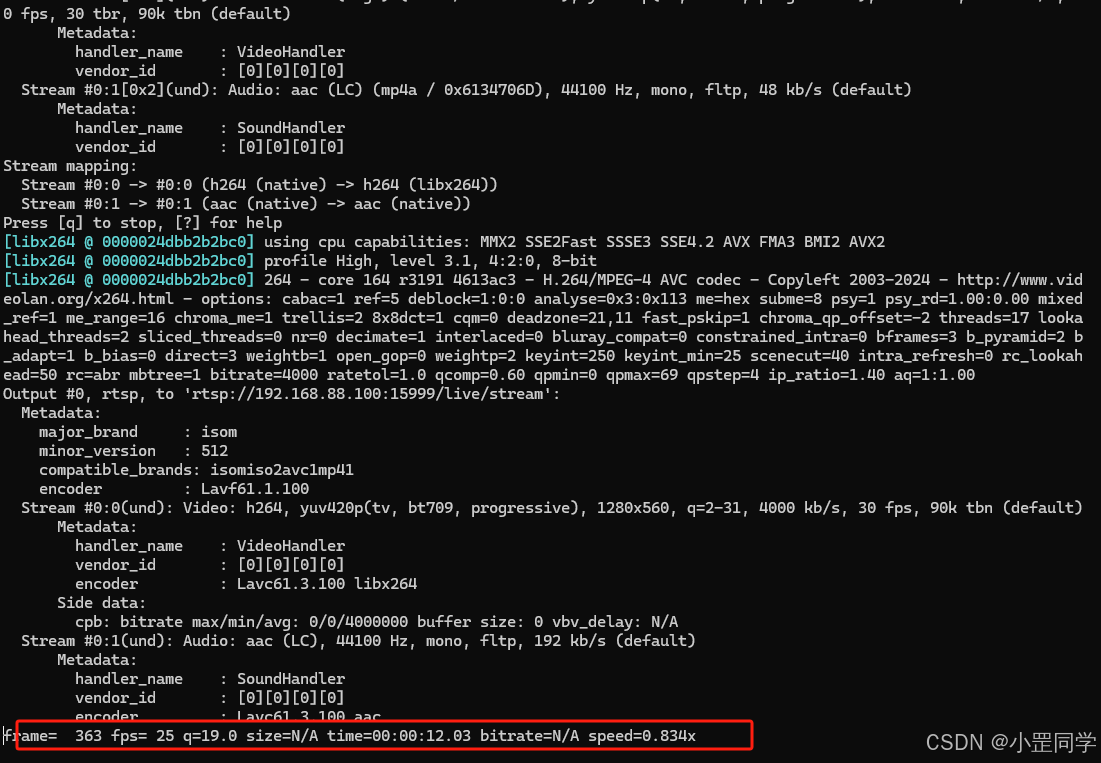
从流媒体服务端打印的日志就可以看到已经有客户端进行推送到 ‘live/stream’ 流地址了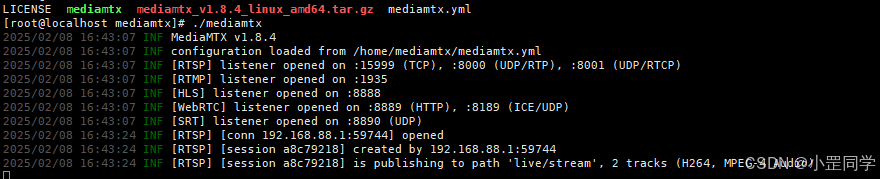
流媒体会自动转成浏览器能直接播放的视频源,比如HLS格式的源。地址是 http://192.168.88.100:8888/live/stream/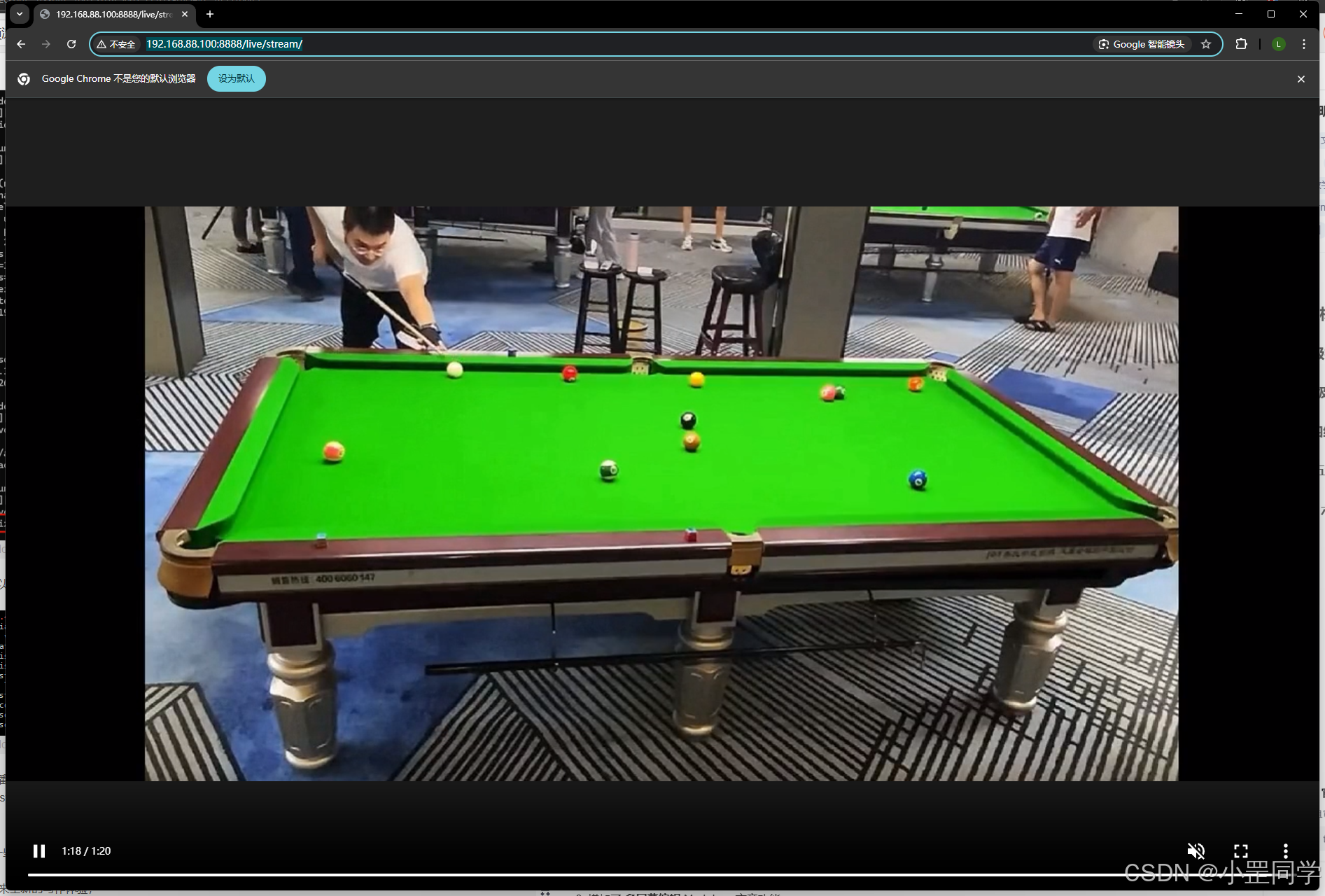
测试一下rtsp流地址 rtsp://192.168.88.100:15999/live/stream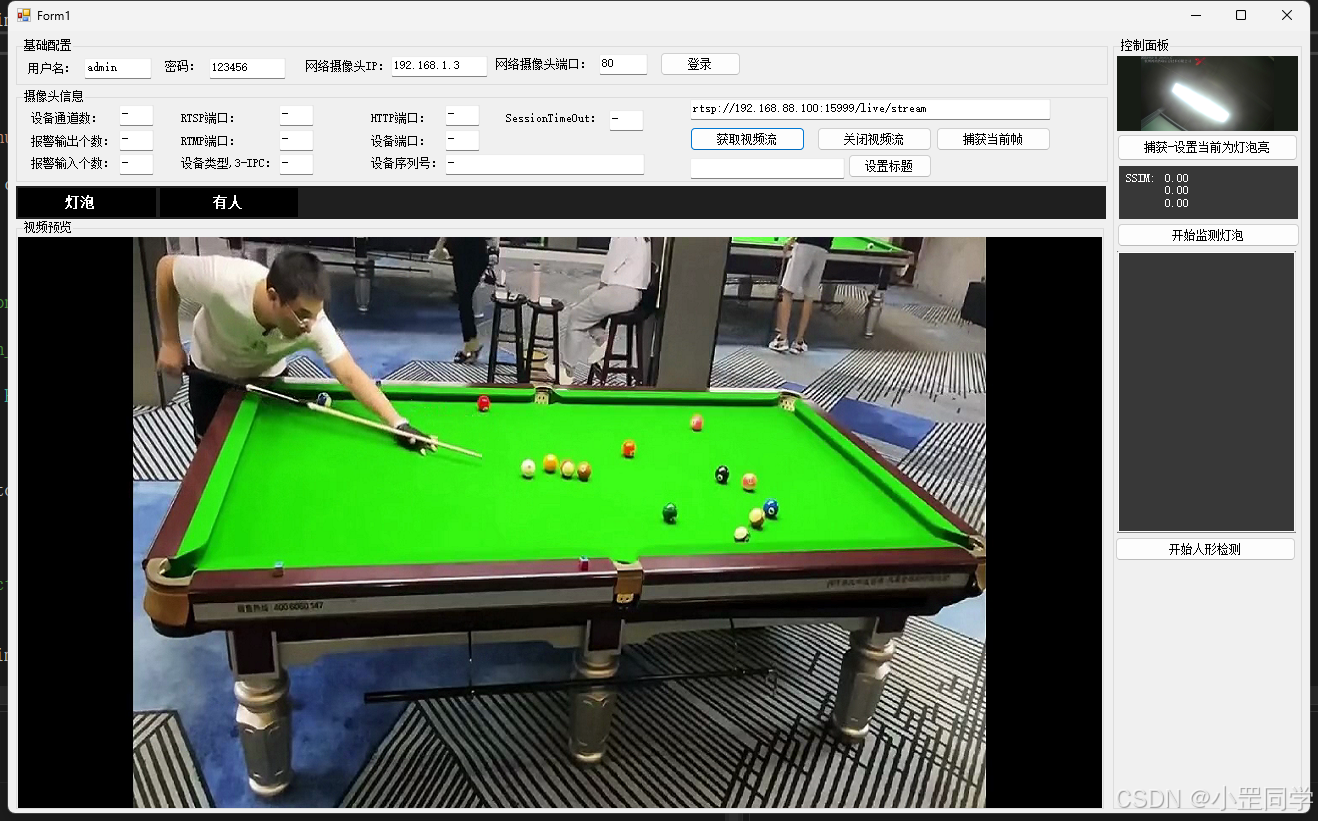
3、Labelimg 目标检测标注工具 (Windows)
LabelImg(是一个开源的目标检测标注工具)。我现在想要做的是,标记出监控桌球的视频流中有那些目标物体或者说人。
LabelImg github地址 https://github.com/HumanSignal/labelImg
https://blog.csdn.net/knighthood2001/article/details/125883343
具体如何使用请自行查阅资料
https://blog.csdn.net/Dontla/article/details/102662815
对需要检测的物体进行提前标注。比如我对这个球桌的视频随便抽几帧image出来进行标注。
如果使用的是labelImg的releases(二进制 exe文件)切记安装目录不允许出现中文!!不允许出现中文!!不允许出现中文!!
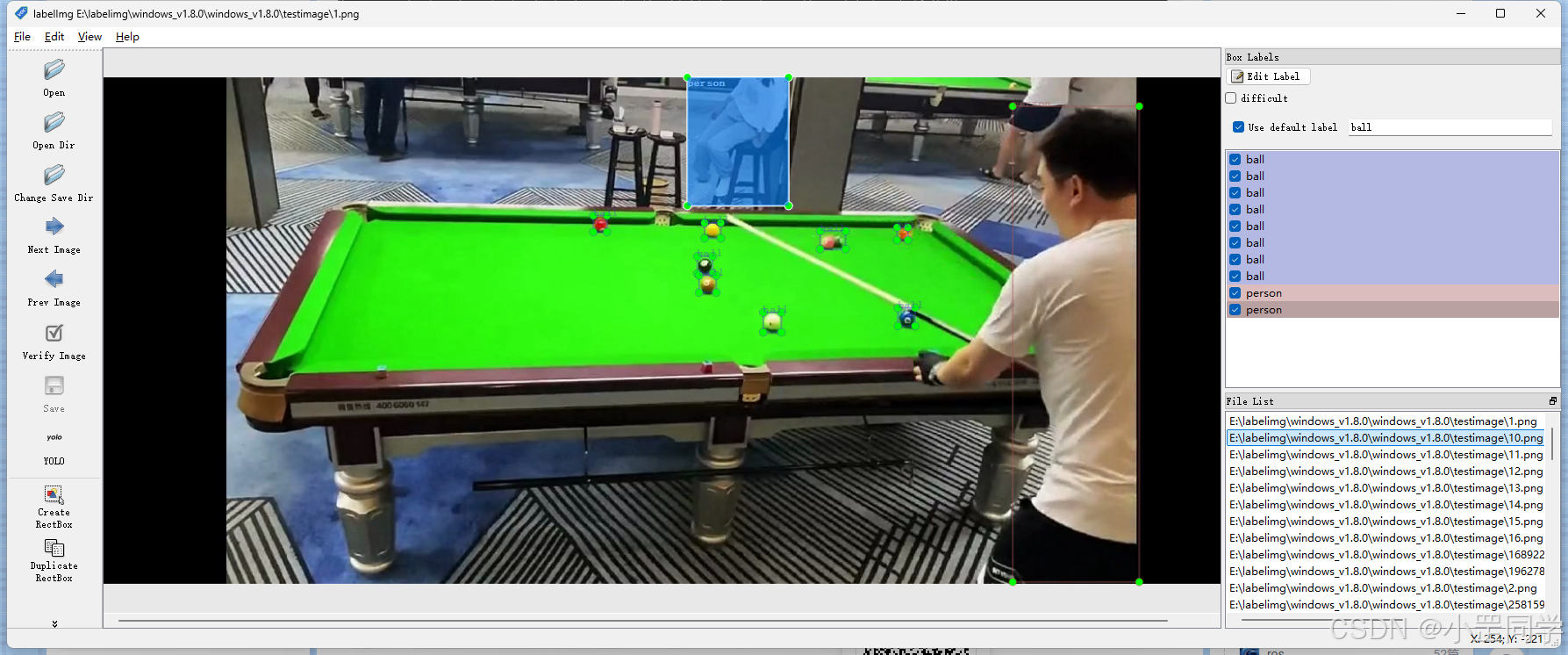
因为标注出来的数据集我需要在yolov5中进行模型训练。所以一定要切换YOLOV5格式
在进行标注的时候Label切记不能是中文!! 切记不能是中文!! 切记不能是中文!! (不然你的 classes.txt变为空了)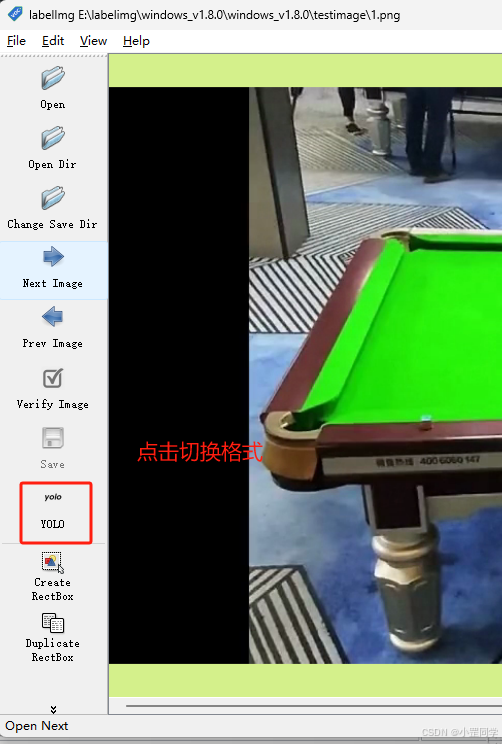
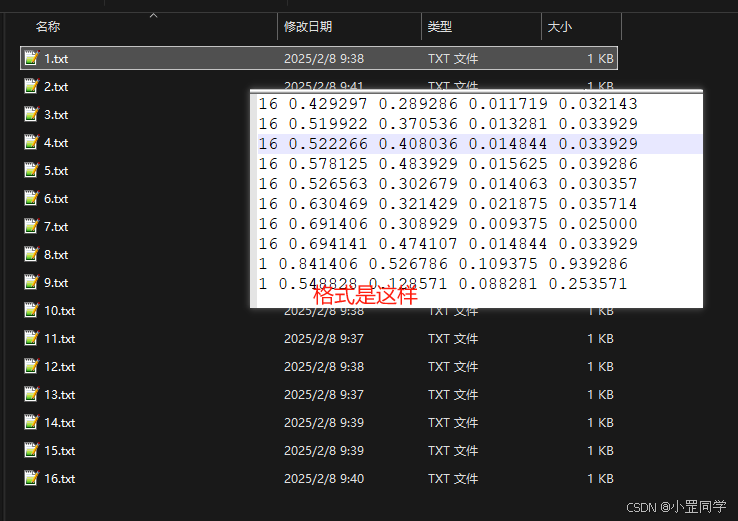
标注完之后每一张image都会生成一个yolo的数据集格式 *.txt
记住每一张image都会生成对应的txt文件。
如果有照片在保存的时候显示报错 ‘impossible to save : float division by zero ’ 或者说是没有生成txt,那就说明你的照片格式有问题。比如把jpg后缀修改成png??还有可能图像文件本身就是损坏的。一定要给删除,删掉这个照片。只是训练而已,再找一张格式对的。噢,对了软件上就有这个。

YOLOv5 采用了 .txt 文件来描述同名图像文件中目标的类别和位置信息。.txt 文件中的每一行代表图像中的一个目标,多个目标采用多行数据来保存。
在 YOLOv5 中,标注文件使用一种特定的文本格式。每行代表一个对象,包含类别 ID、边界框中心点的 x 和 y 坐标,以及边界框的宽度和高度。所有坐标和尺寸都是相对于图像宽度和高度的比例值。例如,一个标注文件的内容可能如下:
16 0.5 0.5 0.25 0.25
这表示图像中有一个对象,类别 ID 为 16(例如桌球),边界框的中心点坐标为(0.5, 0.5),宽度和高度分别为 0.25
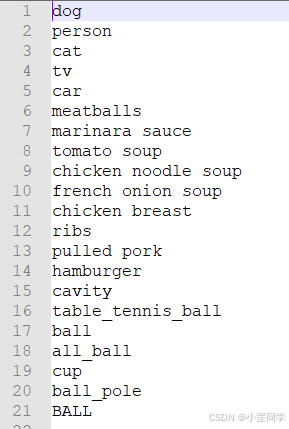
对了labelimg还会生成 classes.txt。比如:
整理YOLOV5数据集进行训练。
数据集的文件结构
一般情况下, 一个完整的数据集包含三部分内容:
- classes.txt 文件,用于记录类别名称
- images 文件夹,用于保存图片文件
- labels 文件夹,用于保存标注文件
其中,数据集中对应的训练集、验证集和测试集分别放在 train 、val 和 test 文件夹中。同样,images 和 labels 文件夹中的结构应该一一对应。数据比例建议 : 70% 用于训练,20% 用于验证,10% 用于测试。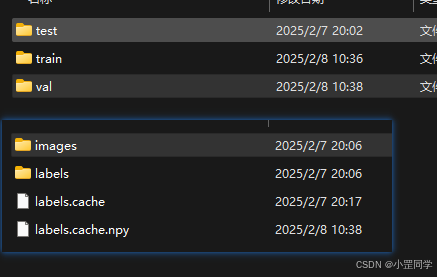
5、YOLOV5 训练模型
Yolov5 github地址 https://github.com/ultralytics/yolov5
https://blog.csdn.net/qq_44697805/article/details/107702939
使用Labelimg数据集训练 YOLOV5 模型
# 克隆YOLOv5仓库
git clone https://github.com/ultralytics/yolov5.git

# 进入仓库目录
cd yolov5

# 安装依赖项
pip install -r requirements.txt

# 训练模型
python train.py --img 640 --batch 16 --epochs 100 --data custom_dataset.yaml --weights yolov5s.pt --cache
python环境自己搞定噢
在 YOLOv5 中,训练命令的参数有多个,以下是一些常用参数的介绍:
–img:输入图片的大小。这个参数将图片调整为正方形,例如 640x640 像素。较大的图片尺寸可能会提高检测精度,但会增加计算成本和训练时间。
–batch:每个批次的图片数量。较大的批次可以更好地利用 GPU 资源,但可能会导致内存不足。
–epochs:训练周期。表示模型在整个数据集上训练的次数。较多的周期可能会提高模型性能,但会增加训练时间。
–data:数据集配置文件。这个文件包含了训练和验证数据集的路径、类别名称等信息。你需要根据自己的数据集创建一个 YAML 文件。
–weights:预训练权重文件。这个参数用于加载预训练的权重,以便进行迁移学习。你可以使用 YOLOv5 提供的预训练权重(例如 yolov5s.pt),也可以使用自己训练过的权重。
–cache:缓存数据集图片。这个参数可以加速训练,因为它会将数据集图片加载到内存中。但是,这会消耗更多的内存。
–name:实验名称。这个参数可以为你的训练实验指定一个名称,以便更好地组织和查找训练结果。
–device:训练设备。这个参数可以指定训练使用的设备,例如 “0” 表示使用第一个 GPU,“0,1” 表示使用前两个 GPU,“cpu” 表示使用 CPU。
–workers:数据加载器线程数。这个参数可以指定用于加载数据的线程数。较多的线程可以加速数据加载,但可能会占用更多的系统资源。
这些参数仅是训练命令中的一部分。可以在 YOLOv5 的官方文档中查看更多参数和详细信息。根据实际需求调整参数以优化模型性能和训练速度。
在yolov5根目录中新建一个数据集文件夹叫dataset,把labelImg整理好的数据集文件结构给粘贴进去。
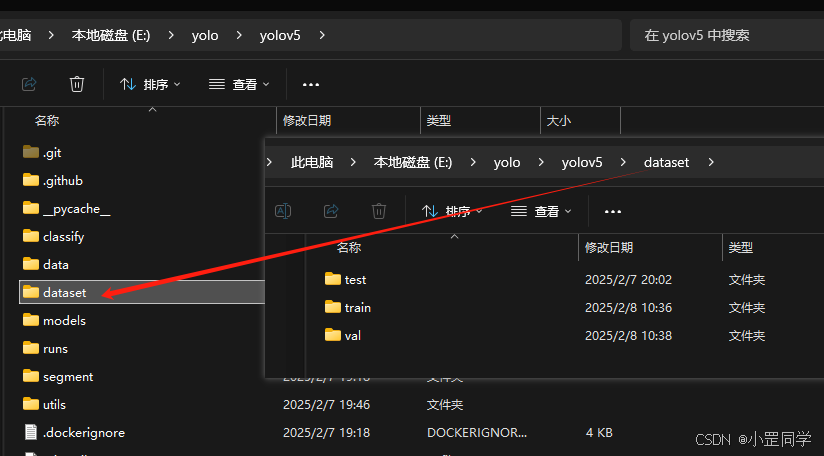
新建一个 YAML 配置文件,指定训练和验证数据集的路径、类别数量和类别名称。在训练命令中,使用–data 参数指定 YAML 配置文件的路径。YOLOv5 会自动读取图像和对应的标注文件,进行模型训练。
比如我新建了testball.yaml 文件包含了自定义数据集的相关信息。需要根据实际情况调整训练参数。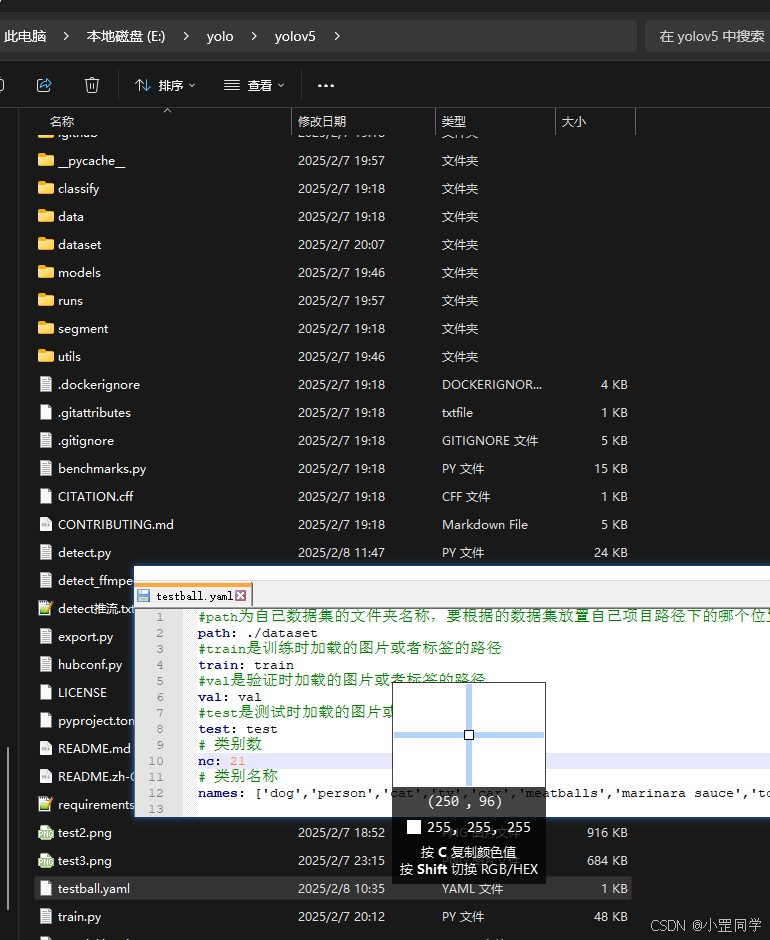
准备好了之后现在可以开始进行模型训练了
python train.py --img 640 --batch 16 --epochs 100 --data testball.yaml --weights yolov5s.pt --cache
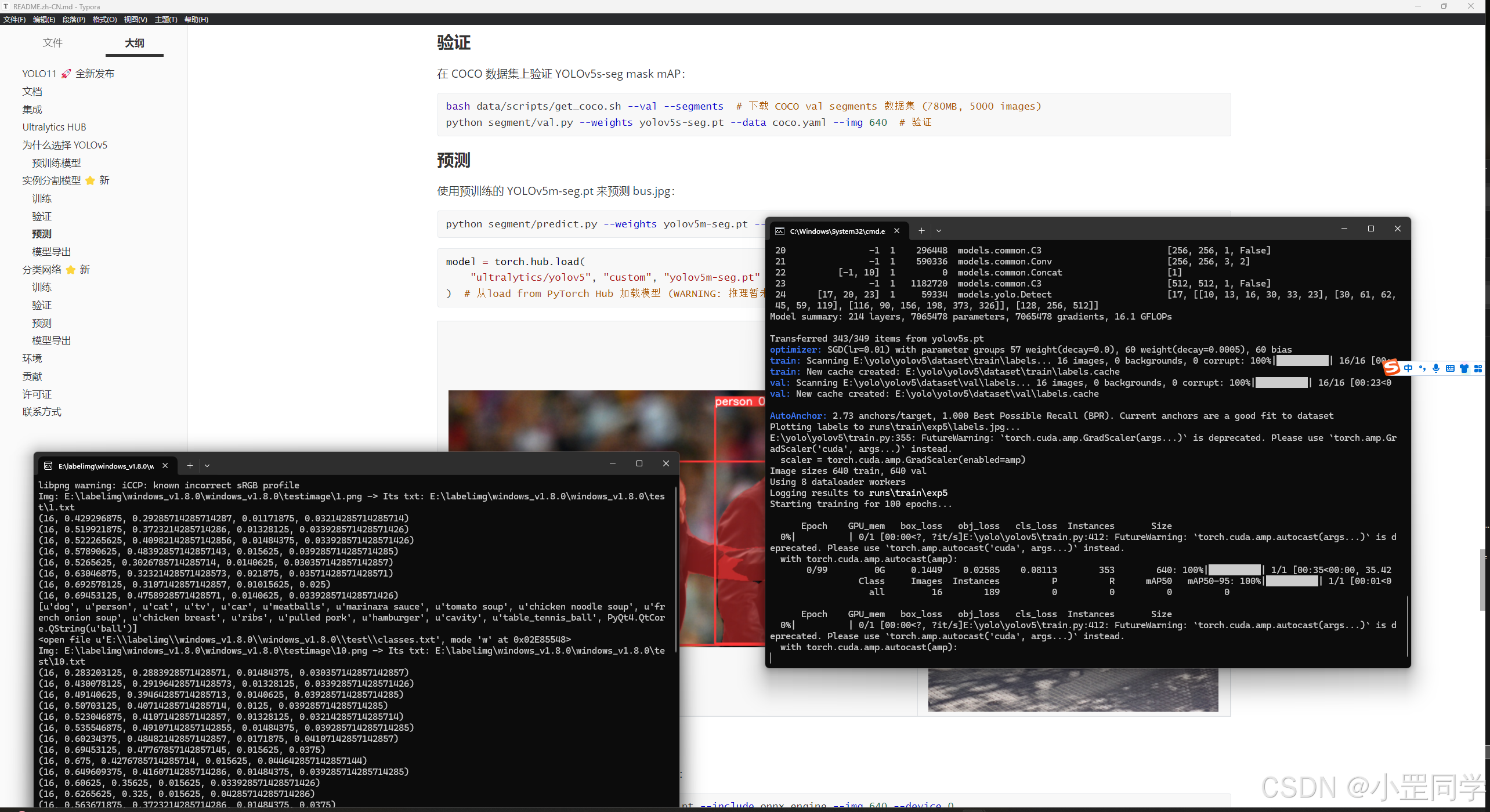
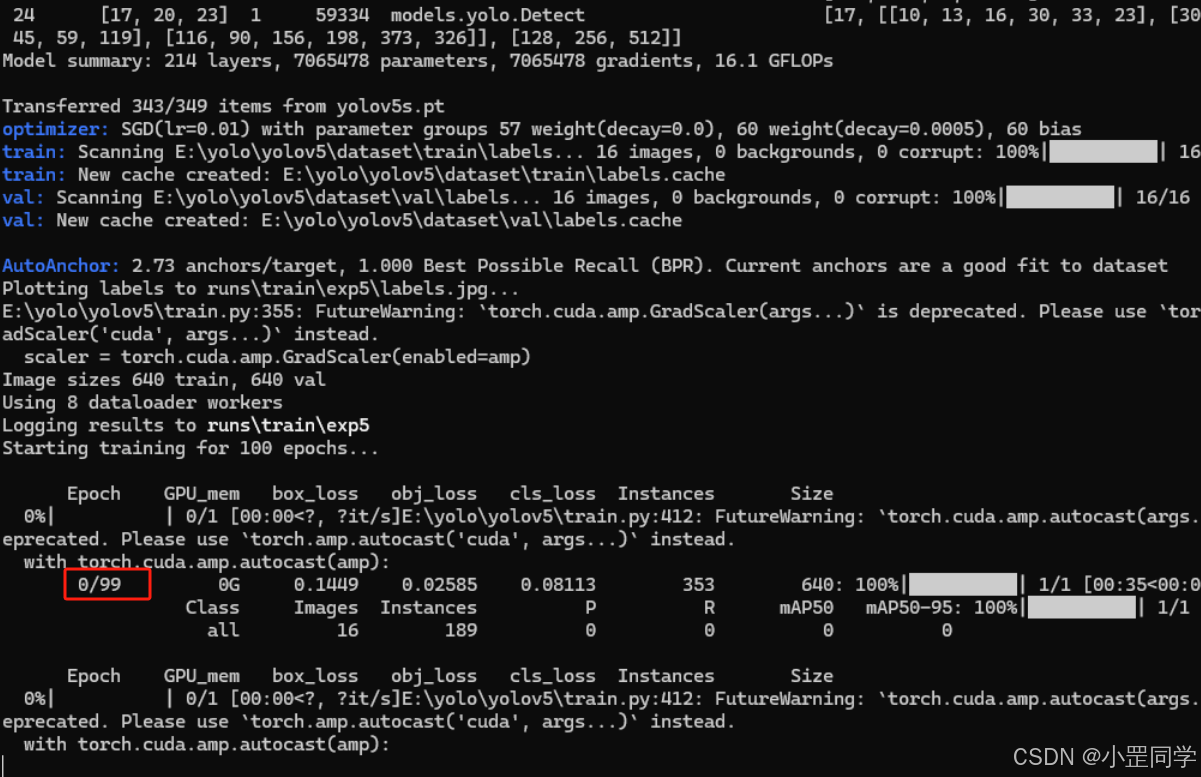
训练的次数默认是100次,出现以上日志之后,就可以抽几根烟慢慢等待训练结束啦。
Yolov5训练结束之后结果会放在 yolov5\runs\train\exp中比如: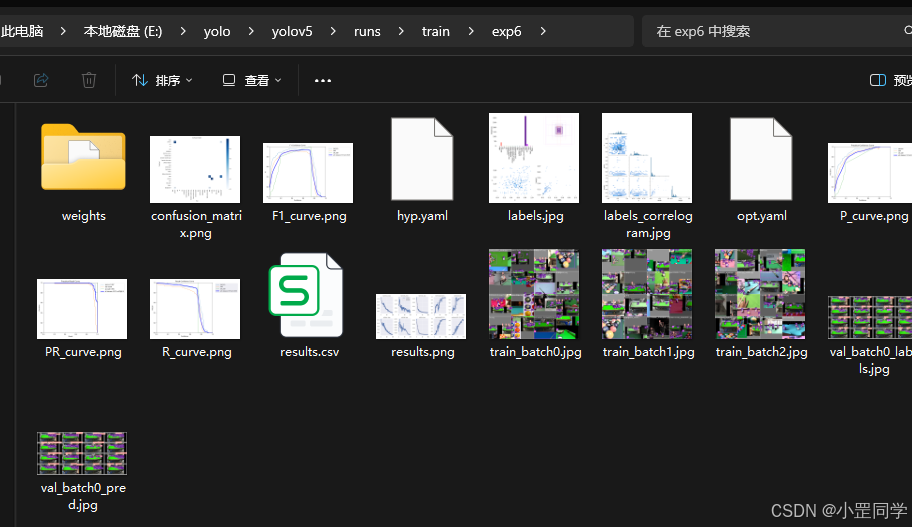
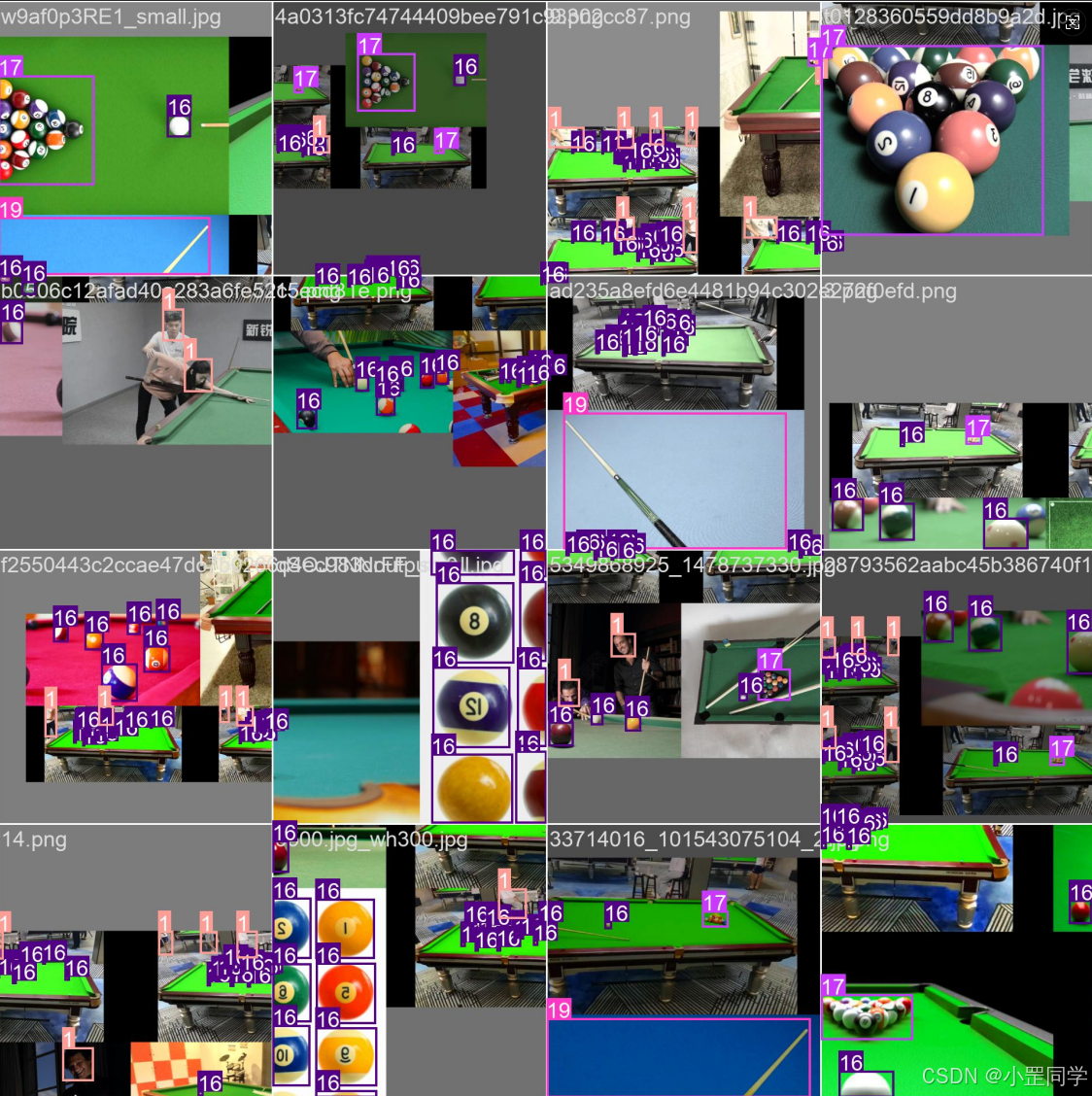
其中训练出来的模型文件是在 ‘weights’ 文件中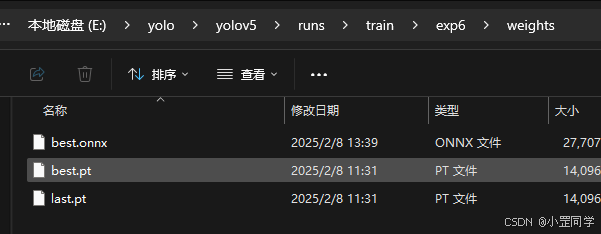
我这里多了一个onnx后缀的文件,是因为我后来转换导出的。因为我需要在.net 程序中进行模型推理检测。不支持pt模型文件后缀。
所以YOLOV5 pt后缀转换成onnx模型文件代码是(回到yolov5根目录)
# 把best.pt  转换成onnx
python export.py --weights runs/train/exp6/weights/best.pt --data testball.yaml --img 640 --batch 1 --dynamic --simplify --include onnx
好了现在开始测试一下吧
6、YOLOV5实时RTSP流目标体检测并RTSP流推送
python detect.py --source "rtsp://192.168.88.100:15999/live/stream" --weights runs/train/exp6/weights/best.pt --conf-thres 0.6 --view-img
运行图结果如下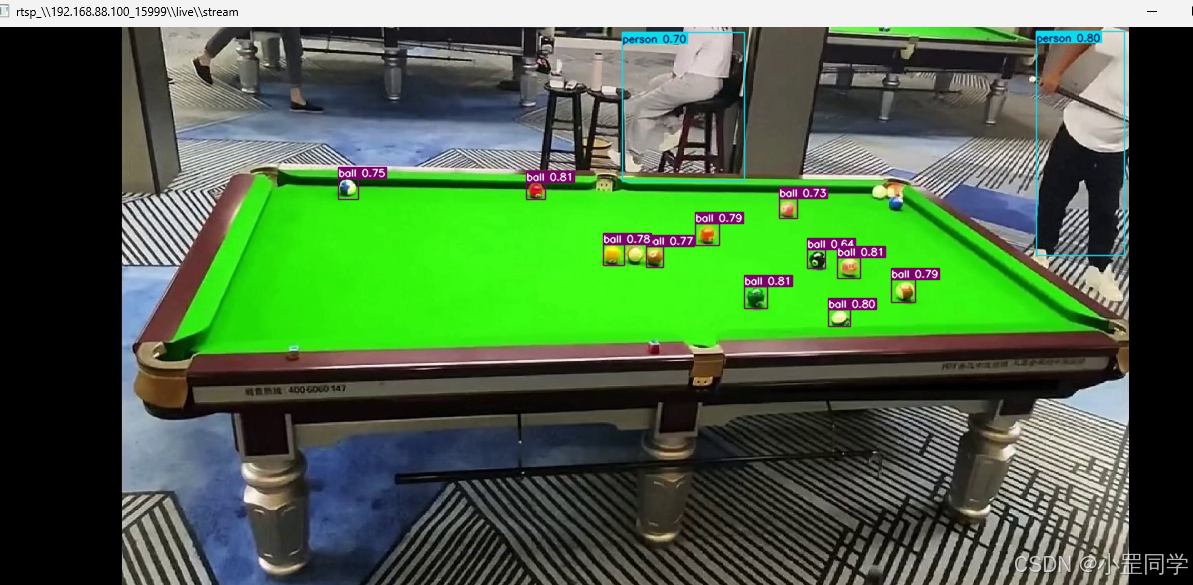
运行视频结果如下:
Ffmpeg推视频流+mediamtx流媒体服务+labelimg打标签+YOLOV5训练数据集模型+YOLOV5实时RTSP流目标体检测并RTSP流推送+.N
如果只运行yolov5本身的 detect.py 它支持的源有
Usage - sources:
  $ python detect.py --weights yolov5s.pt --source 0                               # webcam
                                                     img.jpg                         # image
                                                     vid.mp4                         # video
                                                     screen                          # screenshot
                                                     path/                           # directory
                                                     list.txt                        # list of images
                                                     list.streams                    # list of streams
                                                     'path/*.jpg'                    # glob
                                                     'https://youtu.be/LNwODJXcvt4'  # YouTube
                                                     'rtsp://example.com/media.mp4'  # RTSP, RTMP, HTTP stream
这是它的输入源。输出源就是把模型推理的结果在输入源的视频流中使用opencv标注出来(有标注框那种),并且使用opencv显示出来。在整体结束之后结果会生成mp4文件在 ‘yolov5\runs\detect’’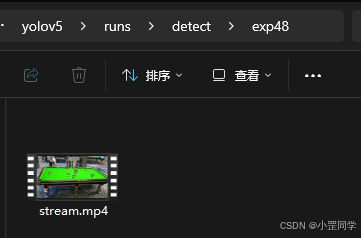
但是我想要的不是这样。我需要Yolov5接入RTSP源视频流进行模型推理检测,检测的结果在原有的视频源中进行帧标注,然后一帧一帧的生成新的视频流推出去。接入的rtsp视频是没有标注的,输出的视频源是有推理结果标注的最后推送到流媒体服务中(云端)。或者说给第三方软件进行RTSP连接获取视频流。
通过查询YOLOV5资料和detect.py代码阅读。如果非要把模型推理后的视频流推出去必须修改代码!!
detect.py源代码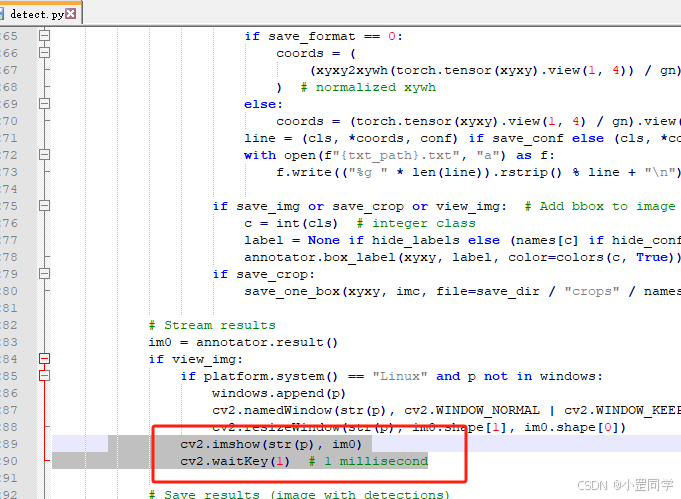
im0就是流对象。我的想法是通过修改detect.py源代码,加入 ffmpeg 推流功能。(测试了,没问题没问题!!!!)
修改后的 detect.py源代码主要地方在如下:(别急,最后我会贴出完整代码!!!!!!!!!)
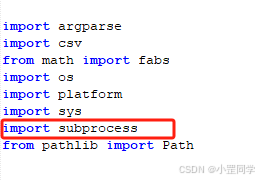
1、这里导入subprocess,用来召唤ffmpeg
2、这里新增两个参数
outpush_rtmp_url:输出源的rtmp地址(要推流的地址)
isopencv2show:是否显示opencv显示视频流的窗体(原有代码逻辑,想了想只增代码不删代码)
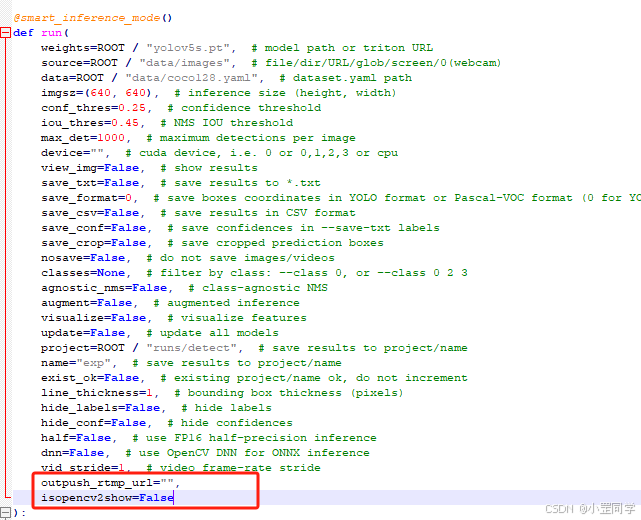
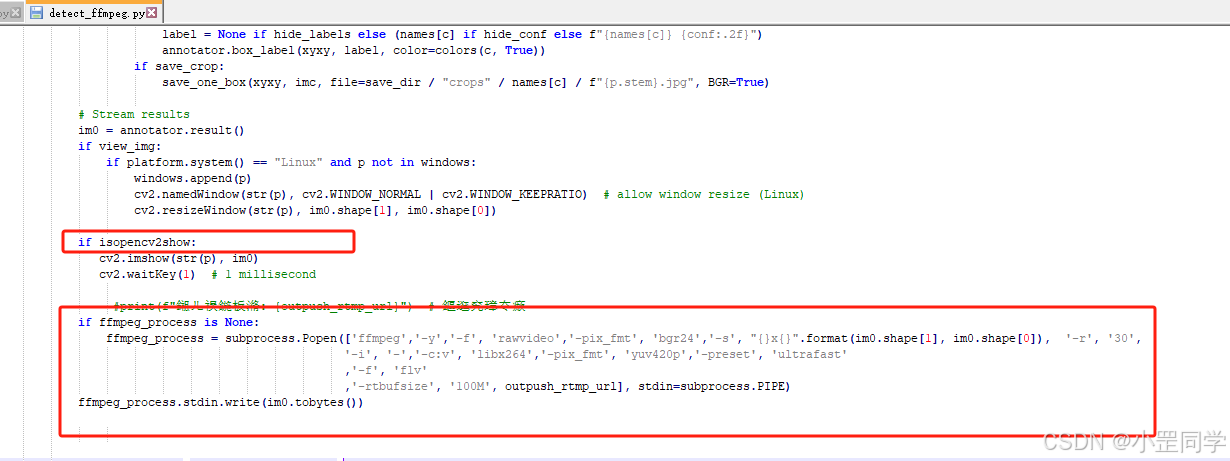

以下是修改后 ‘detect_ffmpeg.py’ 完整代码
# Ultralytics 馃殌 AGPL-3.0 License - https://ultralytics.com/license
"""
Run YOLOv5 detection inference on images, videos, directories, globs, YouTube, webcam, streams, etc.
Usage - sources:
$ python detect.py --weights yolov5s.pt --source 0 # webcam
img.jpg # image
vid.mp4 # video
screen # screenshot
path/ # directory
list.txt # list of images
list.streams # list of streams
'path/*.jpg' # glob
'https://youtu.be/LNwODJXcvt4' # YouTube
'rtsp://example.com/media.mp4' # RTSP, RTMP, HTTP stream
Usage - formats:
$ python detect.py --weights yolov5s.pt # PyTorch
yolov5s.torchscript # TorchScript
yolov5s.onnx # ONNX Runtime or OpenCV DNN with --dnn
yolov5s_openvino_model # OpenVINO
yolov5s.engine # TensorRT
yolov5s.mlpackage # CoreML (macOS-only)
yolov5s_saved_model # TensorFlow SavedModel
yolov5s.pb # TensorFlow GraphDef
yolov5s.tflite # TensorFlow Lite
yolov5s_edgetpu.tflite # TensorFlow Edge TPU
yolov5s_paddle_model # PaddlePaddle
"""
import argparse
import csv
from math import fabs
import os
import platform
import sys
import subprocess
from pathlib import Path
import torch
FILE = Path(__file__).resolve()
ROOT = FILE.parents[0] # YOLOv5 root directory
if str(ROOT) not in sys.path:
sys.path.append(str(ROOT)) # add ROOT to PATH
ROOT = Path(os.path.relpath(ROOT, Path.cwd())) # relative
from ultralytics.utils.plotting import Annotator, colors, save_one_box
from models.common import DetectMultiBackend
from utils.dataloaders import IMG_FORMATS, VID_FORMATS, LoadImages, LoadScreenshots, LoadStreams
from utils.general import (
LOGGER,
Profile,
check_file,
check_img_size,
check_imshow,
check_requirements,
colorstr,
cv2,
increment_path,
non_max_suppression,
print_args,
scale_boxes,
strip_optimizer,
xyxy2xywh,
)
from utils.torch_utils import select_device, smart_inference_mode
@smart_inference_mode()
def run(
weights=ROOT / "yolov5s.pt", # model path or triton URL
source=ROOT / "data/images", # file/dir/URL/glob/screen/0(webcam)
data=ROOT / "data/coco128.yaml", # dataset.yaml path
imgsz=(640, 640), # inference size (height, width)
conf_thres=0.25, # confidence threshold
iou_thres=0.45, # NMS IOU threshold
max_det=1000, # maximum detections per image
device="", # cuda device, i.e. 0 or 0,1,2,3 or cpu
view_img=False, # show results
save_txt=False, # save results to *.txt
save_format=0, # save boxes coordinates in YOLO format or Pascal-VOC format (0 for YOLO and 1 for Pascal-VOC)
save_csv=False, # save results in CSV format
save_conf=False, # save confidences in --save-txt labels
save_crop=False, # save cropped prediction boxes
nosave=False, # do not save images/videos
classes=None, # filter by class: --class 0, or --class 0 2 3
agnostic_nms=False, # class-agnostic NMS
augment=False, # augmented inference
visualize=False, # visualize features
update=False, # update all models
project=ROOT / "runs/detect", # save results to project/name
name="exp", # save results to project/name
exist_ok=False, # existing project/name ok, do not increment
line_thickness=1, # bounding box thickness (pixels)
hide_labels=False, # hide labels
hide_conf=False, # hide confidences
half=False, # use FP16 half-precision inference
dnn=False, # use OpenCV DNN for ONNX inference
vid_stride=1, # video frame-rate stride
outpush_rtmp_url="",
isopencv2show=False
):
"""
Runs YOLOv5 detection inference on various sources like images, videos, directories, streams, etc.
Args:
weights (str | Path): Path to the model weights file or a Triton URL. Default is 'yolov5s.pt'.
source (str | Path): Input source, which can be a file, directory, URL, glob pattern, screen capture, or webcam
index. Default is 'data/images'.
data (str | Path): Path to the dataset YAML file. Default is 'data/coco128.yaml'.
imgsz (tuple[int, int]): Inference image size as a tuple (height, width). Default is (640, 640).
conf_thres (float): Confidence threshold for detections. Default is 0.25.
iou_thres (float): Intersection Over Union (IOU) threshold for non-max suppression. Default is 0.45.
max_det (int): Maximum number of detections per image. Default is 1000.
device (str): CUDA device identifier (e.g., '0' or '0,1,2,3') or 'cpu'. Default is an empty string, which uses the
best available device.
view_img (bool): If True, display inference results using OpenCV. Default is False.
save_txt (bool): If True, save results in a text file. Default is False.
save_csv (bool): If True, save results in a CSV file. Default is False.
save_conf (bool): If True, include confidence scores in the saved results. Default is False.
save_crop (bool): If True, save cropped prediction boxes. Default is False.
nosave (bool): If True, do not save inference images or videos. Default is False.
classes (list[int]): List of class indices to filter detections by. Default is None.
agnostic_nms (bool): If True, perform class-agnostic non-max suppression. Default is False.
augment (bool): If True, use augmented inference. Default is False.
visualize (bool): If True, visualize feature maps. Default is False.
update (bool): If True, update all models' weights. Default is False.
project (str | Path): Directory to save results. Default is 'runs/detect'.
name (str): Name of the current experiment; used to create a subdirectory within 'project'. Default is 'exp'.
exist_ok (bool): If True, existing directories with the same name are reused instead of being incremented. Default is
False.
line_thickness (int): Thickness of bounding box lines in pixels. Default is 3.
hide_labels (bool): If True, do not display labels on bounding boxes. Default is False.
hide_conf (bool): If True, do not display confidence scores on bounding boxes. Default is False.
half (bool): If True, use FP16 half-precision inference. Default is False.
dnn (bool): If True, use OpenCV DNN backend for ONNX inference. Default is False.
vid_stride (int): Stride for processing video frames, to skip frames between processing. Default is 1.
Returns:
None
Examples:
```python
from ultralytics import run
# Run inference on an image
run(source='data/images/example.jpg', weights='yolov5s.pt', device='0')
# Run inference on a video with specific confidence threshold
run(source='data/videos/example.mp4', weights='yolov5s.pt', conf_thres=0.4, device='0')
```
"""
source = str(source)
save_img = not nosave and not source.endswith(".txt") # save inference images
is_file = Path(source).suffix[1:] in (IMG_FORMATS + VID_FORMATS)
is_url = source.lower().startswith(("rtsp://", "rtmp://", "http://", "https://"))
webcam = source.isnumeric() or source.endswith(".streams") or (is_url and not is_file)
screenshot = source.lower().startswith("screen")
if is_url and is_file:
source = check_file(source) # download
# Directories
save_dir = increment_path(Path(project) / name, exist_ok=exist_ok) # increment run
(save_dir / "labels" if save_txt else save_dir).mkdir(parents=True, exist_ok=True) # make dir
# Load model
device = select_device(device)
model = DetectMultiBackend(weights, device=device, dnn=dnn, data=data, fp16=half)
stride, names, pt = model.stride, model.names, model.pt
imgsz = check_img_size(imgsz, s=stride) # check image size
# Dataloader
bs = 1 # batch_size
if webcam:
view_img = check_imshow(warn=True)
dataset = LoadStreams(source, img_size=imgsz, stride=stride, auto=pt, vid_stride=vid_stride)
bs = len(dataset)
elif screenshot:
dataset = LoadScreenshots(source, img_size=imgsz, stride=stride, auto=pt)
else:
dataset = LoadImages(source, img_size=imgsz, stride=stride, auto=pt, vid_stride=vid_stride)
vid_path, vid_writer = [None] * bs, [None] * bs
# Run inference
model.warmup(imgsz=(1 if pt or model.triton else bs, 3, *imgsz)) # warmup
seen, windows, dt = 0, [], (Profile(device=device), Profile(device=device), Profile(device=device))
ffmpeg_process = None # 瀹氫箟鍦ㄥ閮ㄤ綔鐢ㄥ煙
for path, im, im0s, vid_cap, s in dataset:
with dt[0]:
im = torch.from_numpy(im).to(model.device)
im = im.half() if model.fp16 else im.float() # uint8 to fp16/32
im /= 255 # 0 - 255 to 0.0 - 1.0
if len(im.shape) == 3:
im = im[None] # expand for batch dim
if model.xml and im.shape[0] > 1:
ims = torch.chunk(im, im.shape[0], 0)
# Inference
with dt[1]:
visualize = increment_path(save_dir / Path(path).stem, mkdir=True) if visualize else False
if model.xml and im.shape[0] > 1:
pred = None
for image in ims:
if pred is None:
pred = model(image, augment=augment, visualize=visualize).unsqueeze(0)
else:
pred = torch.cat((pred, model(image, augment=augment, visualize=visualize).unsqueeze(0)), dim=0)
pred = [pred, None]
else:
pred = model(im, augment=augment, visualize=visualize)
# NMS
with dt[2]:
pred = non_max_suppression(pred, conf_thres, iou_thres, classes, agnostic_nms, max_det=max_det)
# Second-stage classifier (optional)
# pred = utils.general.apply_classifier(pred, classifier_model, im, im0s)
# Define the path for the CSV file
csv_path = save_dir / "predictions.csv"
# Create or append to the CSV file
def write_to_csv(image_name, prediction, confidence):
"""Writes prediction data for an image to a CSV file, appending if the file exists."""
data = {"Image Name": image_name, "Prediction": prediction, "Confidence": confidence}
file_exists = os.path.isfile(csv_path)
with open(csv_path, mode="a", newline="") as f:
writer = csv.DictWriter(f, fieldnames=data.keys())
if not file_exists:
writer.writeheader()
writer.writerow(data)
# Process predictions
for i, det in enumerate(pred): # per image
seen += 1
if webcam: # batch_size >= 1
p, im0, frame = path[i], im0s[i].copy(), dataset.count
s += f"{i}: "
else:
p, im0, frame = path, im0s.copy(), getattr(dataset, "frame", 0)
p = Path(p) # to Path
save_path = str(save_dir / p.name) # im.jpg
txt_path = str(save_dir / "labels" / p.stem) + ("" if dataset.mode == "image" else f"_{frame}") # im.txt
s += "{:g}x{:g} ".format(*im.shape[2:]) # print string
gn = torch.tensor(im0.shape)[[1, 0, 1, 0]] # normalization gain whwh
imc = im0.copy() if save_crop else im0 # for save_crop
annotator = Annotator(im0, line_width=line_thickness, example=str(names))
if len(det):
# Rescale boxes from img_size to im0 size
det[:, :4] = scale_boxes(im.shape[2:], det[:, :4], im0.shape).round()
# Print results
for c in det[:, 5].unique():
n = (det[:, 5] == c).sum() # detections per class
s += f"{n} {names[int(c)]}{'s' * (n > 1)}, " # add to string
# Write results
for *xyxy, conf, cls in reversed(det):
c = int(cls) # integer class
label = names[c] if hide_conf else f"{names[c]}"
confidence = float(conf)
confidence_str = f"{confidence:.2f}"
if save_csv:
write_to_csv(p.name, label, confidence_str)
if save_txt: # Write to file
if save_format == 0:
coords = (
(xyxy2xywh(torch.tensor(xyxy).view(1, 4)) / gn).view(-1).tolist()
) # normalized xywh
else:
coords = (torch.tensor(xyxy).view(1, 4) / gn).view(-1).tolist() # xyxy
line = (cls, *coords, conf) if save_conf else (cls, *coords) # label format
with open(f"{txt_path}.txt", "a") as f:
f.write(("%g " * len(line)).rstrip() % line + "\n")
if save_img or save_crop or view_img: # Add bbox to image
c = int(cls) # integer class
label = None if hide_labels else (names[c] if hide_conf else f"{names[c]} {conf:.2f}")
annotator.box_label(xyxy, label, color=colors(c, True))
if save_crop:
save_one_box(xyxy, imc, file=save_dir / "crops" / names[c] / f"{p.stem}.jpg", BGR=True)
# Stream results
im0 = annotator.result()
if view_img:
if platform.system() == "Linux" and p not in windows:
windows.append(p)
cv2.namedWindow(str(p), cv2.WINDOW_NORMAL | cv2.WINDOW_KEEPRATIO) # allow window resize (Linux)
cv2.resizeWindow(str(p), im0.shape[1], im0.shape[0])
if isopencv2show:
cv2.imshow(str(p), im0)
cv2.waitKey(1) # 1 millisecond
#print(f"鎺ㄦ祦鍦板潃: {outpush_rtmp_url}") # 鏂逛究璋冭瘯
if ffmpeg_process is None:
ffmpeg_process = subprocess.Popen(['ffmpeg','-y','-f', 'rawvideo','-pix_fmt', 'bgr24','-s', "{}x{}".format(im0.shape[1], im0.shape[0]), '-r', '30',
'-i', '-','-c:v', 'libx264','-pix_fmt', 'yuv420p','-preset', 'ultrafast'
,'-f', 'flv'
,'-rtbufsize', '100M', outpush_rtmp_url], stdin=subprocess.PIPE)
ffmpeg_process.stdin.write(im0.tobytes())
# Save results (image with detections)
if save_img:
if dataset.mode == "image":
cv2.imwrite(save_path, im0)
else: # 'video' or 'stream'
if vid_path[i] != save_path: # new video
vid_path[i] = save_path
if isinstance(vid_writer[i], cv2.VideoWriter):
vid_writer[i].release() # release previous video writer
if vid_cap: # video
fps = vid_cap.get(cv2.CAP_PROP_FPS)
w = int(vid_cap.get(cv2.CAP_PROP_FRAME_WIDTH))
h = int(vid_cap.get(cv2.CAP_PROP_FRAME_HEIGHT))
else: # stream
fps, w, h = 30, im0.shape[1], im0.shape[0]
save_path = str(Path(save_path).with_suffix(".mp4")) # force *.mp4 suffix on results videos
vid_writer[i] = cv2.VideoWriter(save_path, cv2.VideoWriter_fourcc(*"mp4v"), fps, (w, h))
vid_writer[i].write(im0)
# Print time (inference-only)
LOGGER.info(f"{s}{'' if len(det) else '(no detections), '}{dt[1].dt * 1e3:.1f}ms")
# Print results
t = tuple(x.t / seen * 1e3 for x in dt) # speeds per image
LOGGER.info(f"Speed: %.1fms pre-process, %.1fms inference, %.1fms NMS per image at shape {(1, 3, *imgsz)}" % t)
if save_txt or save_img:
s = f"\n{len(list(save_dir.glob('labels/*.txt')))} labels saved to {save_dir / 'labels'}" if save_txt else ""
LOGGER.info(f"Results saved to {colorstr('bold', save_dir)}{s}")
if update:
strip_optimizer(weights[0]) # update model (to fix SourceChangeWarning)
def parse_opt():
"""
Parse command-line arguments for YOLOv5 detection, allowing custom inference options and model configurations.
Args:
--weights (str | list[str], optional): Model path or Triton URL. Defaults to ROOT / 'yolov5s.pt'.
--source (str, optional): File/dir/URL/glob/screen/0(webcam). Defaults to ROOT / 'data/images'.
--data (str, optional): Dataset YAML path. Provides dataset configuration information.
--imgsz (list[int], optional): Inference size (height, width). Defaults to [640].
--conf-thres (float, optional): Confidence threshold. Defaults to 0.25.
--iou-thres (float, optional): NMS IoU threshold. Defaults to 0.45.
--max-det (int, optional): Maximum number of detections per image. Defaults to 1000.
--device (str, optional): CUDA device, i.e., '0' or '0,1,2,3' or 'cpu'. Defaults to "".
--view-img (bool, optional): Flag to display results. Defaults to False.
--save-txt (bool, optional): Flag to save results to *.txt files. Defaults to False.
--save-csv (bool, optional): Flag to save results in CSV format. Defaults to False.
--save-conf (bool, optional): Flag to save confidences in labels saved via --save-txt. Defaults to False.
--save-crop (bool, optional): Flag to save cropped prediction boxes. Defaults to False.
--nosave (bool, optional): Flag to prevent saving images/videos. Defaults to False.
--classes (list[int], optional): List of classes to filter results by, e.g., '--classes 0 2 3'. Defaults to None.
--agnostic-nms (bool, optional): Flag for class-agnostic NMS. Defaults to False.
--augment (bool, optional): Flag for augmented inference. Defaults to False.
--visualize (bool, optional): Flag for visualizing features. Defaults to False.
--update (bool, optional): Flag to update all models in the model directory. Defaults to False.
--project (str, optional): Directory to save results. Defaults to ROOT / 'runs/detect'.
--name (str, optional): Sub-directory name for saving results within --project. Defaults to 'exp'.
--exist-ok (bool, optional): Flag to allow overwriting if the project/name already exists. Defaults to False.
--line-thickness (int, optional): Thickness (in pixels) of bounding boxes. Defaults to 3.
--hide-labels (bool, optional): Flag to hide labels in the output. Defaults to False.
--hide-conf (bool, optional): Flag to hide confidences in the output. Defaults to False.
--half (bool, optional): Flag to use FP16 half-precision inference. Defaults to False.
--dnn (bool, optional): Flag to use OpenCV DNN for ONNX inference. Defaults to False.
--vid-stride (int, optional): Video frame-rate stride, determining the number of frames to skip in between
consecutive frames. Defaults to 1.
Returns:
argparse.Namespace: Parsed command-line arguments as an argparse.Namespace object.
Example:
```python
from ultralytics import YOLOv5
args = YOLOv5.parse_opt()
```
"""
parser = argparse.ArgumentParser()
parser.add_argument("--weights", nargs="+", type=str, default=ROOT / "yolov5s.pt", help="model path or triton URL")
parser.add_argument("--source", type=str, default=ROOT / "data/images", help="file/dir/URL/glob/screen/0(webcam)")
parser.add_argument("--data", type=str, default=ROOT / "data/coco128.yaml", help="(optional) dataset.yaml path")
parser.add_argument("--imgsz", "--img", "--img-size", nargs="+", type=int, default=[640], help="inference size h,w")
parser.add_argument("--conf-thres", type=float, default=0.25, help="confidence threshold")
parser.add_argument("--iou-thres", type=float, default=0.45, help="NMS IoU threshold")
parser.add_argument("--max-det", type=int, default=1000, help="maximum detections per image")
parser.add_argument("--device", default="", help="cuda device, i.e. 0 or 0,1,2,3 or cpu")
parser.add_argument("--view-img", action="store_true", help="show results")
parser.add_argument("--save-txt", action="store_true", help="save results to *.txt")
parser.add_argument(
"--save-format",
type=int,
default=0,
help="whether to save boxes coordinates in YOLO format or Pascal-VOC format when save-txt is True, 0 for YOLO and 1 for Pascal-VOC",
)
parser.add_argument("--save-csv", action="store_true", help="save results in CSV format")
parser.add_argument("--save-conf", action="store_true", help="save confidences in --save-txt labels")
parser.add_argument("--save-crop", action="store_true", help="save cropped prediction boxes")
parser.add_argument("--nosave", action="store_true", help="do not save images/videos")
parser.add_argument("--classes", nargs="+", type=int, help="filter by class: --classes 0, or --classes 0 2 3")
parser.add_argument("--agnostic-nms", action="store_true", help="class-agnostic NMS")
parser.add_argument("--augment", action="store_true", help="augmented inference")
parser.add_argument("--visualize", action="store_true", help="visualize features")
parser.add_argument("--update", action="store_true", help="update all models")
parser.add_argument("--project", default=ROOT / "runs/detect", help="save results to project/name")
parser.add_argument("--name", default="exp", help="save results to project/name")
parser.add_argument("--exist-ok", action="store_true", help="existing project/name ok, do not increment")
parser.add_argument("--line-thickness", default=1, type=int, help="bounding box thickness (pixels)")
parser.add_argument("--hide-labels", default=False, action="store_true", help="hide labels")
parser.add_argument("--hide-conf", default=False, action="store_true", help="hide confidences")
parser.add_argument("--half", action="store_true", help="use FP16 half-precision inference")
parser.add_argument("--dnn", action="store_true", help="use OpenCV DNN for ONNX inference")
parser.add_argument("--vid-stride", type=int, default=1, help="video frame-rate stride")
parser.add_argument("--isopencv2show", default=False, help="show windows")
parser.add_argument("--outpush-rtmp-url", type=str, required=True, help="RTMP 鎺ㄦ祦鍦板潃锛屼緥濡傦細rtmp://192.168.88.100:1935/live/stream")
opt = parser.parse_args()
opt.imgsz *= 2 if len(opt.imgsz) == 1 else 1 # expand
print_args(vars(opt))
return opt
def main(opt):
"""
Executes YOLOv5 model inference based on provided command-line arguments, validating dependencies before running.
Args:
opt (argparse.Namespace): Command-line arguments for YOLOv5 detection. See function `parse_opt` for details.
Returns:
None
Note:
This function performs essential pre-execution checks and initiates the YOLOv5 detection process based on user-specified
options. Refer to the usage guide and examples for more information about different sources and formats at:
https://github.com/ultralytics/ultralytics
Example usage:
```python
if __name__ == "__main__":
opt = parse_opt()
main(opt)
```
"""
check_requirements(ROOT / "requirements.txt", exclude=("tensorboard", "thop"))
run(**vars(opt))
if __name__ == "__main__":
opt = parse_opt()
main(opt)
现在我们来测试一下:
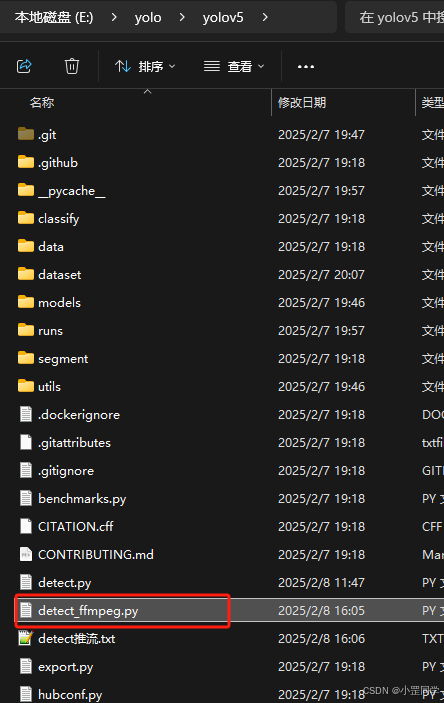
python detect_ffmpeg.py --source "rtsp://192.168.88.100:15999/live/stream" --weights runs/train/exp6/weights/best.pt --conf-thres 0.6 --outpush-rtmp-url "rtmp://192.168.88.100:1935/live/stream3" --isopencv2show True
- –source:rtsp 未处理的视频源地址
- –outpush-rtmp-url:已处理完成需要推送的rtsp推流地址
- –isopencv2show:是否显示opencv视频窗体
比如我现在要把处理完成的视频流推送到 rtmp://192.168.88.100:1935/live/stream3 中去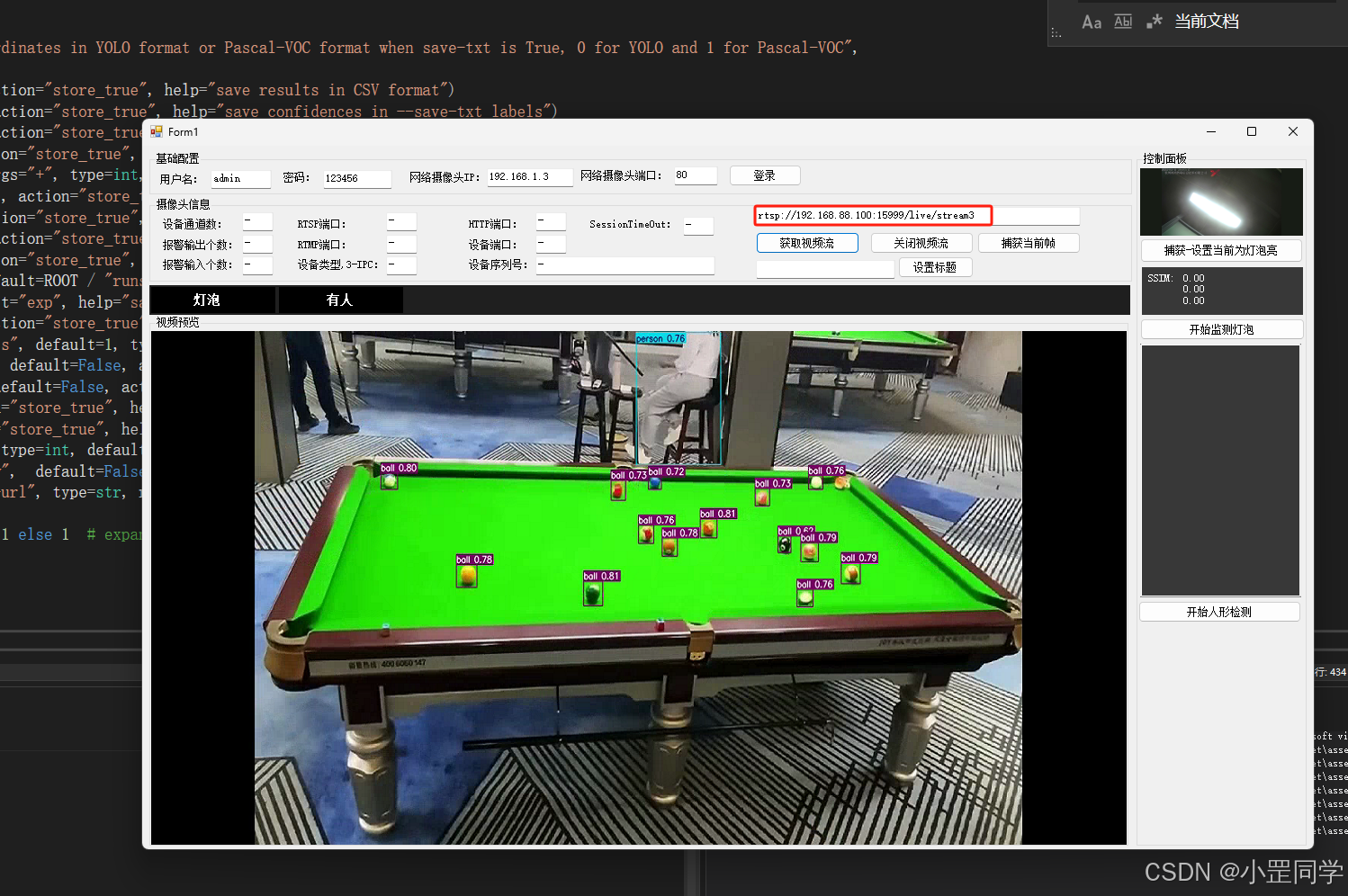
好了OK!!!
6、.NET显示RTSP视频流(三种方式)
1、导入库 WebEye.Controls.WinForms.StreamPlayerControl.dll 。里边有个用户控件 StreamPlayerControl
            var uri = new Uri(txt_rtspUri.Text);
            //直接使用
            this.streamPlayerControl1.StartPlay(uri);
2、导入库 OpenCvSharp4、OpenCvSharp4.Windows
     private void button3_Click(object sender, EventArgs e)
        {
            string rtspUrl = "rtsp://192.168.88.100:15999/live/stream";

            using (var capture = new VideoCapture(rtspUrl))
            {
                if (!capture.IsOpened())
                {
                   MessageBox.Show("无法打开 RTSP 流");
                    return;
                }

                using (var window = new Window("RTSP Stream"))
                {
                    Mat frame = new Mat();
                    while (true)
                    {
                        if (!capture.Read(frame) || frame.Empty())
                        {
                            MessageBox.Show("无法读取帧");
                            break;
                        }

                        window.ShowImage(frame);
                        int key = Cv2.WaitKey(1);
                        if (key == 27) // 按 ESC 退出
                            break;
                    }
                }
            }

        }
3、导入库 RtspClientSharp、RtspClientSharp.RawFrames.Video、RtspClientSharp.Rtsp
   public async  void StartPlay(string url)
        {
            var connectionParameters = new ConnectionParameters(new Uri(url));
            if (_cancellationTokenSource != null)
            {
                _cancellationTokenSource.Dispose();
                _cancellationTokenSource = null;
            }
            connectionParameters.RtpTransport = RtpTransportProtocol.UDP;
            _cancellationTokenSource = new CancellationTokenSource();

            TimeSpan delay = TimeSpan.FromSeconds(1);
            using (var rtspClient = new RtspClient(connectionParameters))
            {
                rtspClient.FrameReceived += RtspClient_FrameReceived;
                while (true)
                {
                    try
                    {
                        await rtspClient.ConnectAsync(_cancellationTokenSource.Token);
                        await rtspClient.ReceiveAsync(_cancellationTokenSource.Token);
                    }
                    catch (OperationCanceledException)
                    {
                        return;
                    }
                    catch (RtspClientException e)
                    {
                        await Task.Delay(delay);
                    }
                }
            }
        }
7、.NET Yolov5模型检测
using var image = await Image.LoadAsync<Rgba32>("Assets/test.jpg");
{
    using var scorer = new YoloScorer<YoloCocoP5Model>("Assets/Weights/yolov5n.onnx");
    {
        var predictions = scorer.Predict(image);

        var font = new Font(new FontCollection().Add("C:/Windows/Fonts/consola.ttf"), 16);

        foreach (var prediction in predictions) // draw predictions
        {
            var score = Math.Round(prediction.Score, 2);

            var (x, y) = (prediction.Rectangle.Left - 3, prediction.Rectangle.Top - 23);

            image.Mutate(a => a.DrawPolygon(new Pen(prediction.Label.Color, 1),
                new PointF(prediction.Rectangle.Left, prediction.Rectangle.Top),
                new PointF(prediction.Rectangle.Right, prediction.Rectangle.Top),
                new PointF(prediction.Rectangle.Right, prediction.Rectangle.Bottom),
                new PointF(prediction.Rectangle.Left, prediction.Rectangle.Bottom)
            ));

            image.Mutate(a => a.DrawText($"{prediction.Label.Name} ({score})",
                font, prediction.Label.Color, new PointF(x, y)));
        }

        await image.SaveAsync("Assets/result.jpg");
    }
}
好了结束了!!
运行视频结果如下:
Ffmpeg推视频流+mediamtx流媒体服务+labelimg打标签+YOLOV5训练数据集模型+YOLOV5实时RTSP流目标体检测并RTSP流推送+.N

中国智能体开发者社区,聚焦智能体与大模型开发,提供前沿资讯、实用工具链、开源项目及行业案例。通过技术沙龙、开发者大赛等活动,促进经验交流与协作,助力开发者快速构建创新智能应用。
更多推荐
 16
16 0
0- 0


 已为社区贡献1条内容

所有评论(0)