3步搞定图谱RAG应用:Unstructured+Graph Retriever实战指南
新一代基于图谱的检索增强生成(Graph-based RAG)技术通过结合知识图谱和向量检索,显著提升了AI输出的准确性和上下文相关性。Unstructured工具自动提取文档结构化元数据并存储至Astra DB,简化了知识图谱构建流程;而Graph Retriever库则动态利用这些元数据构建图谱查询,无需专用图数据库。这种方案克服了传统语义检索的局限性,通过显式捕捉文档间关系实现更精准的上下文
近年来,检索增强生成(RAG)已成为一种强大的方法,用于提高生成式 AI 输出的准确性和上下文相关性。传统方法通常依赖向量数据库中的语义相似性搜索。虽然这种方法有效,但存在固有限制,尤其是在捕捉细微的上下文关系或文档之间的结构化关联方面。
基于图谱的 RAG 方法,通过多种方式将 RAG 技术与知识图谱结合,有望实现更高的精度,但其实施一直颇具挑战性。过去,构建、管理和维护这些“知识图谱”非常困难,这通常涉及三个方面:手动从文档中提取结构化关系;使用不灵活的静态图数据库;以及部署专用的图数据库基础设施。
幸运的是,近期的一些进展——特别是 Unstructured(https://unstructured.io/) 和新发布的 Graph Retriever(https://datastax.github.io/graph-rag/) 库等工具——极大地简化了这些工作流程。Unstructured 提供了将非结构化文档一键转换为结构化、图谱就绪数据的功能。它通过使用先进的大语言模型 (LLM) 进行定制提示词来自动化实体提取,并将结果利用向量数据库进行存储。Graph Retriever 库随后直接利用这些富含元数据的向量存储动态构建基于图谱的查询,无需专用的图数据库。
本文将通过一个示例应用来探讨新一代简化Graph-based RAG 的工具。该示例的代码已作为 notebook(https://colab.research.google.com/drive/1mRX0w0L4djpUAXl69v1x71osE94HnruV?usp=sharing) 提供。
Graph-based RAG 的工作原理
Graph-based RAG 使用了与传统基于语义相似性的 RAG 相似的许多工具和技术,但也增加了一些重要特性:
- • 文档通过结构化元数据得到增强,例如实体(人物、地点、组织等)。
- • 基于这些结构化元数据动态构建图谱,捕捉文档之间的显式关系。
- • 通过遍历这些结构化连接进行检索,使检索结果更符合上下文。
这种结构化方法提供了卓越的上下文导航能力,使应用能够不仅基于语义,还能显式地根据元数据中存在的关联和实体来获取文档。
Unstructured 和 Graph Retriever 库的功能与优势
与大多数 AI/ML 问题一样,高质量数据至关重要。在Graph-based RAG 中,每个文档或文档块的准确元数据至关重要,因为元数据是构建和使用知识图谱的基础。传统上,元数据分配类似于手动标注数据集,但 Unstructured 提供了广泛且可扩展的开箱即用元数据。Unstructured 通过增强标准 ETL(提取、转换、加载)流程(例如引入定制提示词),能够利用基于 LLM 的命名实体识别 (NER) 自动生成元数据键值对。这反过来提高了检索的准确性。
Unstructured 的 ETL+ for GenAI 持续从业务系统收集新生成的非结构化数据,使用优化且预构建的管道将其转换为 LLM 就绪格式,并写入 DataStax Astra DB(https://www.datastax.com/products/datastax-astra)。您可以在几秒内部署完整的摄取和预处理管道,其中包括用于分区、增强、分块和 embedding 等步骤的配置选项和第三方集成。这使得构建知识图谱无需编写任何代码或创建任何自定义步骤。关键的 NER 增强步骤可以轻松地在 Unstructured 的 UI 或 API 中配置到完整的 ETL+ 管道中:
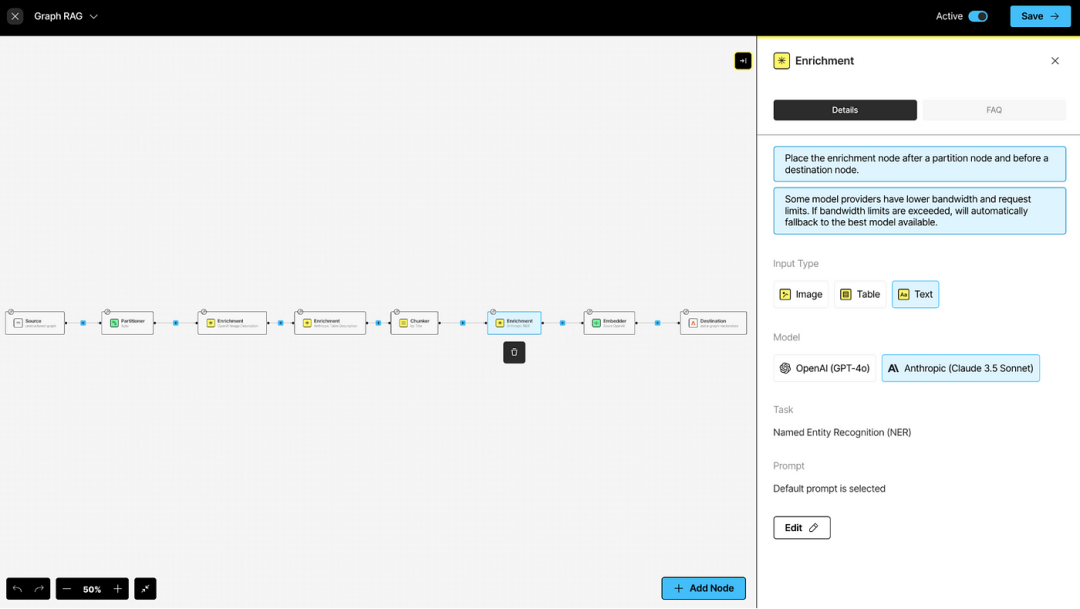
您的提示词可以定制和测试,以确保您的元数据能够捕捉到您想要提取的实体以及知识图谱所需的响应格式:
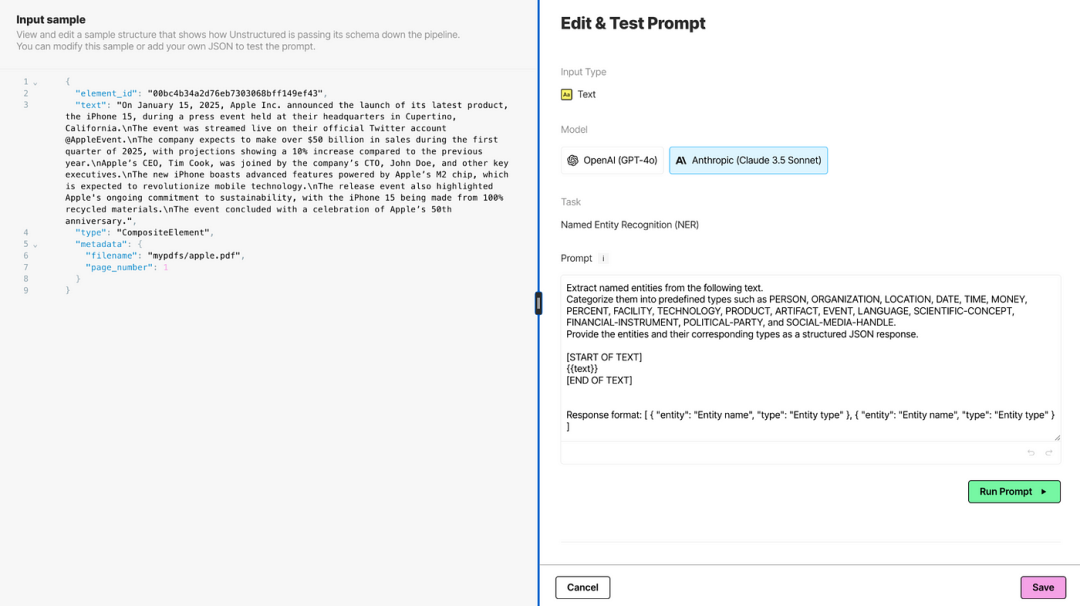
Unstructured 的声明式方法使非开发者能够通过简单地连接组件来构建工作流程。这不仅加快了开发速度,还确保了规模化处理时的高效执行,因为工作流程能够在 Unstructured 平台上无缝运行。
Graph Retriever 库
开源的 Graph Retriever 库基于 LangChain 向量存储,并利用结构化元数据(在此例中是 Unstructured 生成的元数据)动态构建图谱。它使应用能够在运行时动态构建图谱,从而在不增加复杂基础设施的情况下提升检索的灵活性、上下文感知能力以及精确度。
分步指南:使用 Unstructured 进行文档增强
所有这些步骤都可以在 Unstructured UI(https://platform.unstructured.io/) 中无代码完成,只需按照平台浏览器中的设置步骤操作即可。另外,我们还提供了一个 notebook,通过使用 Workflow Endpoint 的 Unstructured API 提供了完整的 ETL + 增强管道。这个 notebook 是完整Graph-based RAG 流程的前置步骤,假定工作流程已经设置完成。下面,我们突出展示了链接的工作流程创建 notebook 中的几个关键步骤。
设置您的凭据后(参见 notebook),创建您的 Astra DB 目标连接器:
import osfrom unstructured_client importUnstructuredClient
from unstructured_client.models.operationsimportCreateDestinationRequest
from unstructured_client.models.sharedimport (
    CreateDestinationConnector,
    DestinationConnectorType,
    AstraDBConnectorConfigInput
)withUnstructuredClient(api_key_auth=os.getenv("UNSTRUCTURED_API_KEY")) asclient:
    destination_response = client.destinations.create_destination(
        request=CreateDestinationRequest(
            create_destination_connector=CreateDestinationConnector(
                name="graphrag_astra_destination",
                type=DestinationConnectorType.ASTRADB,
                config=AstraDBConnectorConfigInput(
                    token=os.environ.get('ASTRA_DB_APPLICATION_TOKEN'),
                    api_endpoint=os.environ.get('ASTRA_DB_API_ENDPOINT'),
                    collection_name=os.environ.get('ASTRA_DB_COLLECTION_NAME'),
                    keyspace=os.environ.get('ASTRA_DB_KEYSPACE'),
                    batch_size=20,
                    flatten_metadata=True
                )
            )
        )
    )
然后,您可以为您的工作流程创建所有节点:
from unstructured_client.models.sharedimport (
    WorkflowNode,
    WorkflowNodeType,
    WorkflowType,
    Schedule
)# Partition the content by using a vision language model (VLM).
partition_node = WorkflowNode(
    name="Partitioner",
    subtype="vlm",
    type=WorkflowNodeType.PARTITION,
    settings={
        "provider": "anthropic",
        "provider_api_key": None,
        "model": "claude-3-5-sonnet-20241022",
        "output_format": "text/html",
        "user_prompt": None,
        "format_html": True,
        "unique_element_ids": True,
        "is_dynamic": True,
        "allow_fast": True
    }
)# Summarize each detected image.
image_summarizer_node = WorkflowNode(
    name="Image summarizer",
    subtype="openai_image_description",
    type=WorkflowNodeType.PROMPTER,
    settings={}
)# Summarize each detected table.
table_summarizer_node = WorkflowNode(
    name="Table summarizer",
    subtype="anthropic_table_description",
    type=WorkflowNodeType.PROMPTER,
    settings={}
)# Chunk the partitioned content.
chunk_node = WorkflowNode(
    name="Chunker",
    subtype="chunk_by_title",
    type=WorkflowNodeType.CHUNK,
    settings={
        "unstructured_api_url": None,
        "unstructured_api_key": None,
        "multipage_sections": False,
        "combine_text_under_n_chars": 0,
        "include_orig_elements": True,
        "new_after_n_chars": 1500,
        "max_characters": 2048,
        "overlap": 160,
        "overlap_all": False,
        "contextual_chunking_strategy": None
    }
)# Label each recognized named entity.
named_entity_recognizer_node = WorkflowNode(
    name="Named entity recognizer",
    subtype="openai_ner",
    type=WorkflowNodeType.PROMPTER,
    settings={
        "prompt_interface_overrides": {
            "prompt": {
                "user": (
                    "Extract all named entities, including people and locations, from the given text segments "
                    "and provide structured metadata for each entity identified.\n\n"
                    'Response format: {"PLACES": ["England", "Middlesex"]}'
                )
            }
        }
    }
)# Generate vector embeddings.
embed_node = WorkflowNode(
    name="Embedder",
    subtype="azure_openai",
    type=WorkflowNodeType.EMBED,
    settings={
        "model_name": "text-embedding-3-large"
    }
)
请注意,named_entity_recognizer_node 负责为节点和边生成元数据。无论您通过 UI 还是 API 创建工作流程,都应将其置于分块节点之后,这一点至关重要。
这是上述工作流程中包含的提示词,既指定了要提取的实体类型,也指定了将用于构建知识图谱的响应格式。
Extract all named entities, including people, and locations, from the given text segments and provide structured metadata for each entity identified.Response format: {"PLACES": ["England" , "Middlesex"] }
接下来,设置好工作流程后(完整代码请参见工作流程创建 notebook(https://colab.research.google.com/drive/1upL-Qd-4jMeZTS3cTgrtvmLejal-RdqA?usp=sharing)),我们将运行它并查看响应:
from unstructured_client.models.operations import RunWorkflowRequestresponse = client.workflows.run_workflow(
    request=RunWorkflowRequest(
        workflow_id=info.id
    )
)print(response.raw_response)
这会自动捕捉实体,例如人物(如“牛顿”)和地点(“伍尔索普”),并将它们直接嵌入结构化元数据中:
{
  "content":"Newton was born on 25 December 1642 in Woolsthorpe, Lincolnshire, England. He died on 20 March 1726/27 in Kensington, Middlesex, England.",
"metadata":{
    "type":"NarrativeText",
    "element_id":"bd2de89e6b456f86e8ef09391fc3c4b9",
    "metadata":{
      "entities":{
        "PEOPLE":["Newton"],
        "PLACES":[
          "Woolsthorpe",
          "Lincolnshire",
          "England",
          "Kensington",
          "Middlesex"
        ]
      }
    }
}
}
这种结构化元数据构成了动态图谱构建的基础。此外,所有上述步骤均可在 Unstructured UI中无代码完成。
分步指南:利用 Graph Retriever 进行动态检索
Graph Retriever 库使您能够结合非结构化相似性搜索和结构化图谱遍历。与专用的图数据库不同,Graph Retriever 库基于向量存储构建,使用元数据动态构建文档之间的连接。
在上一节中,我们看到了 Unstructured 如何用于将文档块和相关元数据填充到 Astra DB。准备好增强的元数据后,Graph Retriever 可以动态创建基于图谱的检索器。在构建这样的检索器之前,我们先看看如何使用此数据集进行传统 RAG 查询。
首先,您需要指定 embedding 模型并初始化向量存储。然后,您可以构建一个基本检索器并进行信息查询。例如,查询关于柏拉图的信息:
from langchain_astradb import AstraDBVectorStore
from langchain_openai import OpenAIEmbeddingsembedding_model = OpenAIEmbeddings(model="text-embedding-3-small")vectorstore = AstraDBVectorStore(
  collection_name=os.getenv("ASTRA_DB_COLLECTION"),
  namespace=os.getenv("ASTRA_DB_KEYSPACE"),
  embedding=embedding_model,
)
query_text = "Information about Plato"
results = vectorstore.similarity_search(query_text, k=3)
Plato
{'PEOPLE': 'Plato'}
-------------------
Plato was a philosopher in Classical Greece and the founder of the Academy in Athens, the first institution of higher learning in the Western world. He is widely considered one of the most important figures in the development of Western philosophy.
{'EVENTS': ['development of Western philosophy'],
 'PEOPLE': ['Plato'],
 'PLACES': ['Classical Greece', 'Athens']}
-------------------
Plato was born in 428/427 or 424/423 BC in Athens, Greece. He died in 348/347 BC in Athens, Greece.
{'DATES': ['428/427 BC', '424/423 BC', '348/347 BC'],
 'PEOPLE': ['Plato'],
 'PLACES': ['Athens', 'Greece']}
-------------------
如您所见,此查询成功检索了描述柏拉图的文档块,但请注意,结果主要聚焦于柏拉图本身。Graph Retriever 使我们能够检索更丰富多样的结果集,为我们的查询提供更丰富的上下文信息。
要使用 Graph Retriever,您需要指定向量存储、图谱的边和搜索策略。“边”配置描述了图谱的模式;在此例中,我们将检索器配置为连接与给定地点相关的文档。类似地,“策略”配置描述了如何使用图谱。在此例中,我们首先通过向量相似性搜索最相关的三个文档,然后检索图谱中与这最初的三个文档相关的最多 10 个文档。
from graph_retriever import GraphRetrieversimple = GraphRetriever(
    store = vectorstore,
    edges = [("metadata.entities.PLACES", "metadata.entities.PLACES")],
    strategy = Eager(k=10, start_k=3, max_depth=2)
)
results = simple.invoke("Information about Plato")
'Plato - No PEOPLE metadata'
-------------------
('Plato was a philosopher in Classical Greece and the founder of the Academy '
 'in Athens, the first institution of higher learning in the Western world. He '
 'is widely considered one of the most important figures in the development of '
 "Western philosophy. - ['Classical Greece', 'Athens']")
-------------------
('Plato was born in 428/427 or 424/423 BC in Athens, Greece. He died in '
 "348/347 BC in Athens, Greece. - ['Athens', 'Greece']")
-------------------
('Aristotle was born in 384 BC in Stagira, Chalcidice, Greece. He died in 322 '
 "BC in Euboea, Greece. - ['Stagira', 'Chalcidice', 'Greece', 'Euboea']")
-------------------
('Alexander III of Macedon, commonly known as Alexander the Great, was a king '
 'of the ancient Greek kingdom of Macedon and a member of the Argead dynasty. '
 'He was born in Pella in 356 BC and succeeded his father Philip II to the '
 'throne at the age of 20. He spent most of his ruling years on an '
 'unprecedented military campaign through Asia and northeast Africa, and by '
 'the age of 30, he had created one of the largest empires of the ancient '
 "world, stretching from Greece to northwestern India. - ['Macedon', 'Pella', "
 "'Asia', 'northeast Africa', 'Greece', 'northwestern India']")
-------------------
('Philip II was born in 382 BC in Pella, Macedon. He was assassinated in 336 '
 "BC in Aegae, Macedon. - ['Pella', 'Macedon', 'Aegae']")
-------------------
('Philip II of Macedon was the king of the ancient Greek kingdom of Macedon '
 'from 359 BC until his assassination in 336 BC. He was a member of the Argead '
 "dynasty and the father of Alexander the Great. - ['Macedon', 'Greek']")
-------------------
('Philip II is credited with transforming Macedon into a powerful military '
 'state. He reformed the Macedonian army, introducing the phalanx infantry '
 'corps, and expanded his kingdom through both diplomacy and military '
 'conquest. His reign laid the groundwork for the future conquests of his son, '
 "Alexander the Great. - ['Macedon']")
-------------------
('Alexander was born on 20 July 356 BC in Pella, Macedon. He died on 10/11 '
 'June 323 BC in the Palace of Nebuchadnezzar II, Babylon, Mesopotamia '
 "(modern-day Iraq). - ['Pella', 'Macedon', 'Palace of Nebuchadnezzar II', "
 "'Babylon', 'Mesopotamia', 'Iraq']")
-------------------
结果现在包含了关于柏拉图出生地和居住地的补充信息。这通过共享地点将这些文档与最初检索到的文档关联起来。我们可以通过简单地创建一个配置为使用不同元数据的新检索器来改变图谱的结构。例如,我们可以遵循基于共享人物而不是地点的连接:
by_people = GraphRetriever(
    store = vectorstore,
    edges = [("metadata.entities.PEOPLE", "metadata.entities.PEOPLE")],
    strategy = Eager(k=10, start_k=3, max_depth=2)
)
results = by_people.invoke("Information about Greece")
Graph Retriever 库能够创建多种不同的图谱结构,并提供丰富的图谱遍历操作。重新定义图谱的边和模式也非常容易;只要相关的元数据可用,我们只需使用新的模式或策略重新配置 GraphRetriever 即可,无需额外的数据加载或计算开销。边定义和遍历策略随后在查询时应用。而且,如果作为 agentic 工作流的一部分使用Graph-based RAG,这个重新配置过程足够简单,甚至可以通过 AI agent 根据每次查询来选择适当的图谱模式。
结论
Unstructured 和 Graph Retriever 库(https://datastax.github.io/graph-rag/) 等现代工具降低了实现基于图谱的 RAG 应用的门槛。这些技术自动化和简化了复杂的图谱构建任务,消除了传统的基础设施需求,并提供了灵活强大的动态检索能力。
随着这些进步,基于图谱的检索变得更加易用、直观,并能够显著丰富您的基于检索的 AI 应用。
读者福利:如果大家对大模型感兴趣,这套大模型学习资料一定对你有用
对于0基础小白入门:
如果你是零基础小白,想快速入门大模型是可以考虑的。
一方面是学习时间相对较短,学习内容更全面更集中。
二方面是可以根据这些资料规划好学习计划和方向。
包括:大模型学习线路汇总、学习阶段,大模型实战案例,大模型学习视频,人工智能、机器学习、大模型书籍PDF。带你从零基础系统性的学好大模型!
😝有需要的小伙伴,可以保存图片到wx扫描二v码免费领取【保证100%免费】🆓
👉AI大模型学习路线汇总👈
大模型学习路线图,整体分为7个大的阶段:(全套教程文末领取哈)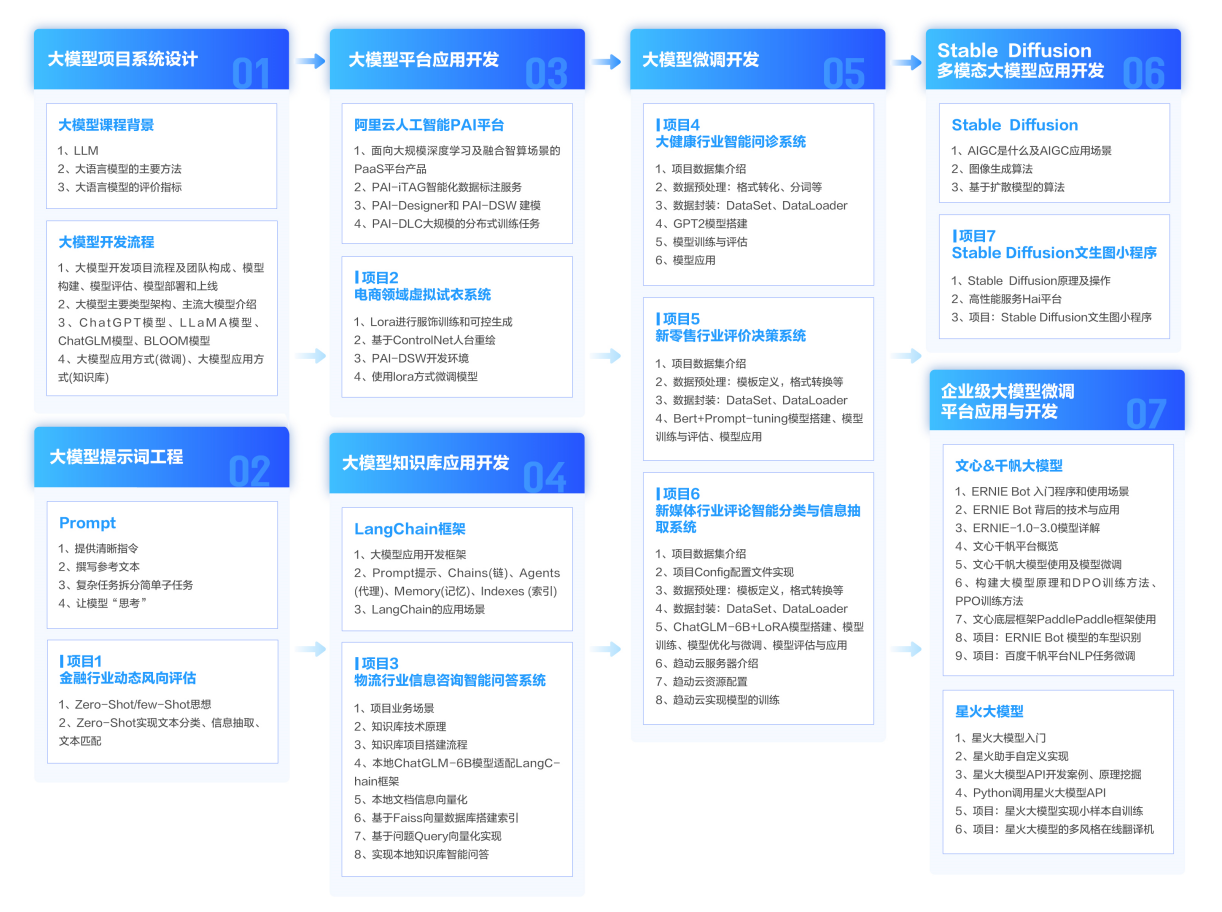
第一阶段: 从大模型系统设计入手,讲解大模型的主要方法;
第二阶段: 在通过大模型提示词工程从Prompts角度入手更好发挥模型的作用;
第三阶段: 大模型平台应用开发借助阿里云PAI平台构建电商领域虚拟试衣系统;
第四阶段: 大模型知识库应用开发以LangChain框架为例,构建物流行业咨询智能问答系统;
第五阶段: 大模型微调开发借助以大健康、新零售、新媒体领域构建适合当前领域大模型;
第六阶段: 以SD多模态大模型为主,搭建了文生图小程序案例;
第七阶段: 以大模型平台应用与开发为主,通过星火大模型,文心大模型等成熟大模型构建大模型行业应用。
👉大模型实战案例👈
光学理论是没用的,要学会跟着一起做,要动手实操,才能将自己的所学运用到实际当中去,这时候可以搞点实战案例来学习。

👉大模型视频和PDF合集👈
观看零基础学习书籍和视频,看书籍和视频学习是最快捷也是最有效果的方式,跟着视频中老师的思路,从基础到深入,还是很容易入门的。
👉学会后的收获:👈
• 基于大模型全栈工程实现(前端、后端、产品经理、设计、数据分析等),通过这门课可获得不同能力;
• 能够利用大模型解决相关实际项目需求: 大数据时代,越来越多的企业和机构需要处理海量数据,利用大模型技术可以更好地处理这些数据,提高数据分析和决策的准确性。因此,掌握大模型应用开发技能,可以让程序员更好地应对实际项目需求;
• 基于大模型和企业数据AI应用开发,实现大模型理论、掌握GPU算力、硬件、LangChain开发框架和项目实战技能, 学会Fine-tuning垂直训练大模型(数据准备、数据蒸馏、大模型部署)一站式掌握;
• 能够完成时下热门大模型垂直领域模型训练能力,提高程序员的编码能力: 大模型应用开发需要掌握机器学习算法、深度学习框架等技术,这些技术的掌握可以提高程序员的编码能力和分析能力,让程序员更加熟练地编写高质量的代码。
👉获取方式:
😝有需要的小伙伴,可以保存图片到wx扫描二v码免费领取【保证100%免费】🆓

火山引擎开发者社区是火山引擎打造的AI技术生态平台,聚焦Agent与大模型开发,提供豆包系列模型(图像/视频/视觉)、智能分析与会话工具,并配套评测集、动手实验室及行业案例库。社区通过技术沙龙、挑战赛等活动促进开发者成长,新用户可领50万Tokens权益,助力构建智能应用。
更多推荐
 12
12 0
0- 0


 已为社区贡献132条内容

所有评论(0)