制作数据集(Windows/SlowFast)
4、抽取frames文件夹中的视频关键帧图片,用于标注。前面的代码可以将抽取出来的图片全部存放至一个,后面注释的代码可以生成子文件夹,生成每个视频对应的关键帧图片文件夹。,转数据为ava2.1数据格式(via数据集转为slowfast格式),原文中csv文件与代码同一目录,先改为从文件夹中读取并存放至对应文件夹。3、抽取视频每帧的图片,这个文件夹frames也是自动生成,会对应每个视频生成对应的图
在windows系统,pycharm中制作数据集,从视频开始。 参考文章:
SlowFast训练自己的数据集-CSDN博客 https://blog.csdn.net/weixin_43720054/article/details/1262980061、收集视频,放置文件夹D:\PycharmProjects\AVA2SFProject\ava\videos中
2、裁剪视频代码,原文中是裁剪前30秒,因为视频在1分钟内,改为了裁剪前60秒。代码如下:
这里不需要创建新文件夹,会自动生成'videos_cut'文件夹。
import os
import glob
# 遍历 ./ava/videos 下的所有视频文件,裁剪前30秒。
# 使用os.path.join确保跨平台兼容性
IN_DATA_DIR = os.path.join('', 'ava', 'videos')
OUT_DATA_DIR = os.path.join('', 'ava', 'videos_cut')

# 创建输出目录(如果不存在)
if not os.path.exists(OUT_DATA_DIR):
    print(f"{OUT_DATA_DIR} doesn't exist. Creating it.")
    os.makedirs(OUT_DATA_DIR, exist_ok=True)

# 遍历输入目录中的所有视频文件
for video_path in glob.glob(os.path.join(IN_DATA_DIR, '*')):
    # 获取输出文件名(保持原文件名)
    out_name = os.path.join(OUT_DATA_DIR, os.path.basename(video_path))

    # 如果输出文件不存在,则进行处理
    if not os.path.exists(out_name):
        # 构造ffmpeg命令,第一个会压缩视频质量
        # ffmpeg_cmd = f'ffmpeg -ss 0 -t 30 -i "{video_path}" -r 30 -strict experimental "{out_name}"'
        # 这里可以保持原视频质量,按需求注释即可
        ffmpeg_cmd = (
            f'ffmpeg -ss 0 -t 60 -i "{video_path}" '
            f'-c:v mpeg4 -qscale:v 2 '  # 使用MPEG-4编码
            f'"{out_name}"'
        )
        # 1.-ss 0:从视频的第0秒开始处理
        # 2.-t 60:处理时长为60秒
        # 3.-i \"{video_path}\":指定输入视频文件路径
        # 4.-c:v mpeg4:使用MPEG-4视频编码格式
        # 5.-qscale:v 2:设置视频质量(2-31,2为高质量)
        # 6.\"{out_name}\":指定输出文件名这个命令会从输入视频的第0秒开始,截取60秒的内容,使用MPEG-4编码并以高质量保存为输出文件。

        # 执行命令
        os.system(ffmpeg_cmd)

        # 裁剪前60秒,保存到ava/videos_cut,视频显示01:00
        # -r 30,修改此处可影响输出视频的帧率
        # FFmpeg默认会从最近的关键帧开始解码,如果视频关键帧间隔较大(如每10秒一个),会导致前几秒的解码质量下降
        # 设置了-r 60强制输出60FPS
        # 问题:如果原始视频是30FPS,强制升帧会导致帧插值模糊
        ''' -ss 0:从视频的第 0 秒开始处理(即从开头裁剪)。
            -t 60:裁剪时长为 60 秒(保留前 60 秒的内容)。
            -i "{video_path}":输入视频文件的路径({video_path}会被替换为实际路径)。
            -r 40:关键参数:设置输出视频的帧率(Frame Rate)为 40 FPS(Frames Per Second)。
            如果输入视频的帧率 ≠ 40,ffmpeg 会通过丢帧或插值帧来调整帧率。

            数字变化的影响:
            如果 -r 40改为 -r 30,输出视频的帧率会降低(更卡顿,但文件可能更小)。
            如果改为 -r 60,输出视频的帧率会提高(更流畅,但文件可能更大)。
            注意:单纯调高帧率不会让原低帧率视频变流畅(可能需要插值算法辅助)。
            -strict experimental:允许使用某些实验性编解码器或功能(早期 ffmpeg 版本可能需要,现代版本通常可省略)。
            "{out_name}":输出视频文件的路径({out_name}会被替换为实际路径)。'''
3、抽取视频每帧的图片,这个文件夹frames也是自动生成,会对应每个视频生成对应的图片文件夹,文件夹中图片数量非常多,占内存,需要足够空间。
import os
import glob

# 使用Unix风格的路径(正斜杠),Python在Windows上也能正确处理
IN_DATA_DIR = "./ava/videos_cut"
OUT_DATA_DIR = "./ava/frames"

# 创建输出目录(如果不存在)
if not os.path.exists(OUT_DATA_DIR):
    print(f"{OUT_DATA_DIR} doesn't exist. Creating it.")
    os.makedirs(OUT_DATA_DIR, exist_ok=True)

# 遍历输入目录中的所有视频文件
for video_path in glob.glob(os.path.join(IN_DATA_DIR, '*')):
    # 转换为Unix风格的路径(仅用于显示和命令构造)
    unix_video_path = video_path.replace(os.sep, '/')

    # 获取不带扩展名的视频文件名
    video_name = os.path.basename(unix_video_path)
    if video_name.endswith('.webm'):
        video_name = video_name[:-5]
    else:
        video_name = video_name[:-4]  # 假设其他视频格式都是4字符扩展名

    # 创建视频对应的输出目录(使用Unix风格路径)
    out_video_dir = f"{OUT_DATA_DIR}/{video_name}"
    os.makedirs(out_video_dir.replace('/', os.sep), exist_ok=True)

    # 设置输出文件名模式(Unix风格路径)
    out_name = f"{out_video_dir}/{video_name}_%05d.jpg"
    # out_name = f"{OUT_DATA_DIR}/{video_name}_%05d.jpg"

    # 构造ffmpeg命令(使用Unix风格路径)
    ffmpeg_cmd = f'ffmpeg -i "{unix_video_path}" -r 30 -q:v 1 "{out_name}"'
    # 1.-i \"{unix_video_path}\":指定输入视频文件路径
    # 2.-r 30:设置输出帧率为30帧/秒,即每秒会抽取30张图片
    # 3.-q:v 1:设置输出图片质量(1-31,1为最高质量)
    # 4. \"{out_name}\":指定输出图片的命名格式因此,这个命令会以每秒60帧的从输入视频中抽取图片,并保存为高质量JPEG格式。


    # 在Windows上执行命令
os.system(ffmpeg_cmd)-
ffmpeg_cmd = f'ffmpeg -i "{unix_video_path}" -r 60 -q:v 1 "{out_name}"'
-
这行代码里面的参数修改影响裁剪数量何质量,这里写成了 -r 60,1秒60张图,太多了,30即可,因为用于slowfast的训练,在slow流里,1秒会采集到15帧,在fast流里1秒会采集到2帧。-q:v 1则代表裁剪质量。
4、抽取frames文件夹中的视频关键帧图片,1秒1张,用于标注。前面的代码可以将抽取出来的图片全部存放至一个,后面注释的代码可以生成子文件夹,生成每个视频对应的关键帧图片文件夹。
import os
import shutil
from tqdm import tqdm

start = 0
seconds = 60
# 表示视频处理的时长,这里设置为60秒,即会处理视频的前60秒内容
fps = 30
# 表示帧率(Frames Per Second),这里设置为30帧/秒,即每秒从视频中提取30张图片

video_path = os.path.join('.', 'ava', 'videos')
labelframes_path = os.path.join('.', 'ava', 'labelframes')
rawframes_path = os.path.join('.', 'ava', 'frames')
cut_videos_dir = os.path.join('.', 'ava', 'videos_cut')

# 清理旧数据
shutil.rmtree(labelframes_path, ignore_errors=True)
shutil.rmtree(rawframes_path, ignore_errors=True)

# 步骤1:裁剪视频(调用cut_videos.py)
os.system('python cut_videos.py')

# 步骤2:抽帧(调用extract_rgb_frames_ffmpeg.py)
os.system('python extract_rgb_frames_ffmpeg.py')

# 步骤3:复制关键帧到labelframes
os.makedirs(labelframes_path, exist_ok=True)
video_ids = [os.path.splitext(vid)[0] for vid in os.listdir(video_path)]  # 兼容任意扩展名

for video_id in tqdm(video_ids):
    # 检查抽帧目录是否存在
    frame_dir = os.path.join(rawframes_path, video_id)
    if not os.path.exists(frame_dir):
        continue  # 跳过未成功处理的视频

    # 复制指定范围的帧
    for img_id in range(2 * fps + 1, (seconds - 2) * fps, fps):
        src_img_name = f"{video_id}_{format(img_id, '05d')}.jpg"  # 匹配实际帧命名
        dst_img_name = f"{video_id}_{format(start + img_id // fps, '05d')}.jpg"

        src_path = os.path.join(frame_dir, src_img_name)
        dst_path = os.path.join(labelframes_path, dst_img_name)

        if os.path.exists(src_path):
            shutil.copyfile(src_path, dst_path)

'''label下创建每个文件对应的子文件夹
import os
import shutil
from tqdm import tqdm


# 视频处理流水线(裁剪→抽帧→关键帧复制)
start = 0
seconds = 60 #控制处理时长
fps = 60 # 控制帧率

video_path = './ava/videos'
labelframes_path = './ava/labelframes'
rawframes_path = './ava/frames'

# 清理旧数据
shutil.rmtree(labelframes_path, ignore_errors=True)
shutil.rmtree(rawframes_path, ignore_errors=True)

# 步骤1:裁剪视频(调用cut_videos.py)
os.system('python cut_videos.py')

# 步骤2:抽帧(调用extract_rgb_frames_ffmpeg.py)
os.system('python extract_rgb_frames_ffmpeg.py')

# 步骤3:复制关键帧到labelframes,保持相同的目录结构
video_ids = [os.path.splitext(vid)[0] for vid in os.listdir(video_path)]  # 兼容任意扩展名

for video_id in tqdm(video_ids):
    # 检查抽帧目录是否存在
    frame_dir = os.path.join(rawframes_path, video_id)
    if not os.path.exists(frame_dir):
        continue  # 跳过未成功处理的视频

    # 创建对应的labelframes子目录
    label_dir = os.path.join(labelframes_path, video_id)
    os.makedirs(label_dir, exist_ok=True)

    # 复制指定时间范围
    for img_id in range(2 * fps + 1, (seconds - 2) * fps, fps):
        src_img_name = f"{video_id}_{format(img_id, '05d')}.jpg"
        dst_img_name = f"{video_id}_{format(start + img_id // fps, '05d')}.jpg"

        # 路径处理
        src_path = os.path.join(frame_dir, src_img_name)
        dst_path = os.path.join(label_dir, dst_img_name)

        # 仅复制存在的源文件,避免因文件缺失导致的程序中断
        if os.path.exists(src_path):
            shutil.copyfile(src_path, dst_path)
'''
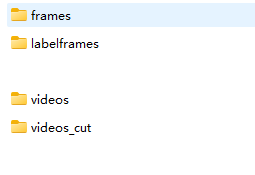
5、生成最终的四个文件夹如图。
6、用VIA3.0标注后,将导出的csv文件存放至对应文件夹 "/input_csvs" ,转数据为ava2.1数据格式(via数据集转为slowfast格式),原文中csv文件与代码同一目录,先改为从文件夹中读取并存放至对应文件夹。
"""
Theme:ava format data transformer
author:Hongbo Jiang
time:2022/3/14/1:51:51
description:

    这是一个数据格式转换器,根据mmaction2的ava数据格式转换规则将来自网站:
    https://www.robots.ox.ac.uk/~vgg/software/via/app/via_video_annotator.html
    的、标注好的、视频理解类型的csv文件转换为mmaction2指定的数据格式。
    转换规则:
        # AVA Annotation Explained
        In this section, we explain the annotation format of AVA in details:
        ```
        mmaction2
        ├── data
        │   ├── ava
        │   │   ├── annotations
        │   │   |   ├── ava_dense_proposals_train.FAIR.recall_93.9.pkl
        │   │   |   ├── ava_dense_proposals_val.FAIR.recall_93.9.pkl
        │   │   |   ├── ava_dense_proposals_test.FAIR.recall_93.9.pkl
        │   │   |   ├── ava_train_v2.1.csv
        │   │   |   ├── ava_val_v2.1.csv
        │   │   |   ├── ava_train_excluded_timestamps_v2.1.csv
        │   │   |   ├── ava_val_excluded_timestamps_v2.1.csv
        │   │   |   ├── ava_action_list_v2.1.pbtxt
        ```
        ## The proposals generated by human detectors
        In the annotation folder, `ava_dense_proposals_[train/val/test].FAIR.recall_93.9.pkl` are human proposals generated by a human detector. They are used in training, validation and testing respectively. Take `ava_dense_proposals_train.FAIR.recall_93.9.pkl` as an example. It is a dictionary of size 203626. The key consists of the `videoID` and the `timestamp`. For example, the key `-5KQ66BBWC4,0902` means the values are the detection results for the frame at the $$902_{nd}$$ second in the video `-5KQ66BBWC4`. The values in the dictionary are numpy arrays with shape $$N \times 5$$ , $$N$$ is the number of detected human bounding boxes in the corresponding frame. The format of bounding box is $$[x_1, y_1, x_2, y_2, score], 0 \le x_1, y_1, x_2, w_2, score \le 1$$. $$(x_1, y_1)$$ indicates the top-left corner of the bounding box, $$(x_2, y_2)$$ indicates the bottom-right corner of the bounding box; $$(0, 0)$$ indicates the top-left corner of the image, while $$(1, 1)$$ indicates the bottom-right corner of the image.
        ## The ground-truth labels for spatio-temporal action detection
        In the annotation folder, `ava_[train/val]_v[2.1/2.2].csv` are ground-truth labels for spatio-temporal action detection, which are used during training & validation. Take `ava_train_v2.1.csv` as an example, it is a csv file with 837318 lines, each line is the annotation for a human instance in one frame. For example, the first line in `ava_train_v2.1.csv` is `'-5KQ66BBWC4,0902,0.077,0.151,0.283,0.811,80,1'`: the first two items `-5KQ66BBWC4` and `0902` indicate that it corresponds to the $$902_{nd}$$ second in the video `-5KQ66BBWC4`. The next four items ($$[0.077(x_1), 0.151(y_1), 0.283(x_2), 0.811(y_2)]$$) indicates the location of the bounding box, the bbox format is the same as human proposals. The next item `80` is the action label. The last item `1` is the ID of this bounding box.
        ## Excluded timestamps
        `ava_[train/val]_excludes_timestamps_v[2.1/2.2].csv` contains excluded timestamps which are not used during training or validation. The format is `video_id, second_idx` .
        ## Label map
        `ava_action_list_v[2.1/2.2]_for_activitynet_[2018/2019].pbtxt` contains the label map of the AVA dataset, which maps the action name to the label index.
"""

import csv
import os
from distutils.log import info
import pickle
from matplotlib.pyplot import contour, show
import numpy as np
import cv2
from sklearn.utils import shuffle


def transformer(origin_csv_path, frame_image_dir,
                train_output_pkl_path, train_output_csv_path,
                valid_output_pkl_path, valid_output_csv_path,
                exclude_train_output_csv_path, exclude_valid_output_csv_path,
                out_action_list, out_labelmap_path, dataset_percent=0.9):
    """
    输入:
    origin_csv_path:从网站导出的csv文件路径。
    frame_image_dir:以"视频名_第n秒.jpg"格式命名的图片,这些图片是通过逐秒读取的。
    output_pkl_path:输出pkl文件路径
    output_csv_path:输出csv文件路径
    out_labelmap_path:输出labelmap.txt文件路径
    dataset_percent:训练集和测试集分割

    输出:无

    """

    # -----------------------------------------------------------------------------------------------
    get_label_map(origin_csv_path, out_action_list, out_labelmap_path)
    # -----------------------------------------------------------------------------------------------
    information_array = [[], [], []]
    # 读取输入csv文件的位置信息段落
    with open(origin_csv_path, 'r', encoding="utf-8") as csvfile:
        count = 0
        content = csv.reader(csvfile)
        for line in content:
            # print(line)
            if count >= 10:
                frame_image_name = eval(line[1])[0]  # str
                # print(line[-2])
                location_info = eval(line[4])[1:]  # list
                action_list = list(eval(line[5]).values())[0].split(',')
                action_list = [int(x) for x in action_list]  # list
                information_array[0].append(frame_image_name)
                information_array[1].append(location_info)
                information_array[2].append(action_list)
            count += 1
    # 将:对应帧图片名字、物体位置信息、动作种类信息汇总为一个信息数组
    information_array = np.array(information_array, dtype=object).transpose()
    # information_array = np.array(information_array)
    # -----------------------------------------------------------------------------------------------
    num_train = int(dataset_percent * len(information_array))
    train_info_array = information_array[:num_train]
    valid_info_array = information_array[num_train:]

    # 获取所有图像文件的路径(包括子文件夹中的)
    all_image_paths = []
    for root, dirs, files in os.walk(frame_image_dir):
        for file in files:
            if file.lower().endswith(('.png', '.jpg', '.jpeg')):
                all_image_paths.append(os.path.join(root, file))

    # 创建图像名称到完整路径的映射
    image_name_to_path = {os.path.basename(path): path for path in all_image_paths}
    # 处理训练集和验证集
    get_pkl_csv(train_info_array, train_output_pkl_path, train_output_csv_path, exclude_train_output_csv_path, image_name_to_path)
    get_pkl_csv(valid_info_array, valid_output_pkl_path, valid_output_csv_path, exclude_valid_output_csv_path, image_name_to_path)


def get_label_map(origin_csv_path, out_action_list, out_labelmap_path):
    classes_list = 0
    classes_content = ""
    labelmap_strings = ""
    # 提取出csv中的第9行的行为下标,内容是一个字符串格式的嵌套字典,需先将其解析为Python字典,再遍历所有属性的options
    with open(origin_csv_path, 'r', encoding="utf-8") as csvfile:
        count = 0
        content = csv.reader(csvfile)
        for line in content:
            if count == 8:
                classes_list = line
                break
            count += 1
    # 截取种类字典段落
    st = 0
    ed = 0
    # 错误逻辑:从第一个"options"到第一个"default_option_id"截取,仅覆盖属性3的options
    for i in range(len(classes_list)):
        if classes_list[i].startswith('options'):
            st = i
        if classes_list[i].startswith('default_option_id'):
            ed = i
    for i in range(st, ed):
        if i == st:
            classes_content = classes_content + classes_list[i][len('options:'):] + ','
        else:
            classes_content = classes_content + classes_list[i] + ','
    classes_dict = eval(classes_content)[0]


    # 写入labelmap.txt文件
    with open(out_action_list, 'w') as f:  # 写入action_list文件
        for v, k in classes_dict.items():
            # labelmap_strings = labelmap_strings + "label {{\n  name: \"{}\"\n  label_id: {}\n}}\n".format(
                # k, int(v) + 1)
            labelmap_strings = labelmap_strings + "label {{\n  name: \"{}\"\n  label_id: {}\n  label_type: PERSON_MOVEMENT\n}}\n".format(
                k, int(v) + 1)
        f.write(labelmap_strings)
    labelmap_strings = ""
    with open(out_labelmap_path, 'w') as f:  # 写入label_map文件
        for v, k in classes_dict.items():
            labelmap_strings = labelmap_strings + "{}: {}\n".format(int(v) + 1, k)
        f.write(labelmap_strings)

def get_pkl_csv(information_array, output_pkl_path, output_csv_path, exclude_output_csv_path, image_name_to_path):
# def get_pkl_csv(information_array, output_pkl_path, output_csv_path, exclude_output_csv_path, frame_image_dir):
    pkl_data = dict()
    csv_data = []
    read_data = {}

    # 预初始化pkl_data字典
    for i in range(len(information_array)):
        img_name = information_array[i][0]
        video_name, frame_name = '_'.join(img_name.split('_')[:-1]), format(int(img_name.split('_')[-1][:-4]), '04d')
        pkl_key = video_name + ',' + frame_name
        pkl_data[pkl_key] = []

    # 遍历所有的图片进行信息读取并写入pkl数据
    for i in range(len(information_array)):
        img_name = information_array[i][0]
        # -------------------------------------------------------------------------------------------
        video_name, frame_name = '_'.join(img_name.split('_')[:-1]), str(int(img_name.split('_')[-1][:-4]))
        # 我的格式是"视频名称_帧名称",格式不同可自行更改
        # -------------------------------------------------------------------------------------------

        # imgpath = frame_image_dir + '/' + img_name
        # 从映射中获取图像路径
        imgpath = image_name_to_path.get(img_name)
        if imgpath is None:
            print(f"警告: 未找到图像 {img_name}")
            continue
        location_list = information_array[i][1]
        action_info = information_array[i][2]
        image_array = cv2.imread(imgpath)
        h, w = image_array.shape[:2]

        # 进行归一化
        location_list[0] /= w
        location_list[1] /= h
        location_list[2] /= w
        location_list[3] /= h
        location_list[2] += location_list[0]
        location_list[3] += location_list[1]

        # 组装csv数据
        for kind_idx in action_info:
            csv_info = [video_name, frame_name, *location_list, kind_idx + 1, 1]
            csv_data.append(csv_info)

        # 组装pkl数据
        location_list = location_list + [1]
        pkl_key = video_name + ',' + format(int(frame_name), '04d')
        pkl_value = location_list
        pkl_data[pkl_key].append(pkl_value)

    # 转换pkl数据格式
    for k, v in pkl_data.items():
        read_data[k] = np.array(v)

    # 写入文件
    with open(output_pkl_path, 'wb') as f:
        pickle.dump(read_data, f)

    with open(output_csv_path, 'w', newline='') as f:
        f_csv = csv.writer(f)
        f_csv.writerows(csv_data)

    with open(exclude_output_csv_path, 'w', newline='') as f:
        f_csv = csv.writer(f)
        f_csv.writerows([])


def showpkl(pkl_path):
    with open(pkl_path, 'rb') as f:
        content = pickle.load(f)
    return content


def showcsv(csv_path):
    output = []
    with open(csv_path, 'r') as f:
        content = csv.reader(f)
        for line in content:
            output.append(line)
    return output


def showlabelmap(labelmap_path):
    classes_dict = dict()
    with open(labelmap_path, 'r') as f:
        content = (f.read().split('\n'))[:-1]
        for item in content:
            mid_idx = -1
            for i in range(len(item)):
                if item[i] == ":":
                    mid_idx = i
            classes_dict[item[:mid_idx]] = item[mid_idx + 1:]
    return classes_dict


def batch_transformer(input_csv_dir, frame_image_dir, output_annotations_dir, dataset_percent=0.9):
    """
    批量处理多个CSV文件并生成子文件夹

    参数:
        input_csv_dir: 包含多个CSV文件的输入目录
        frame_image_dir: 包含帧图像的目录
        output_annotations_dir: 输出annotations目录
        dataset_percent: 训练集和验证集分割比例
    """
    # 获取labelframes的子文件夹名称列表
    # labelframes_subdirs = [d for d in os.listdir(frame_image_dir)
                          # if os.path.isdir(os.path.join(frame_image_dir, d))]
    # 获取所有CSV文件
    csv_files = [f for f in os.listdir(input_csv_dir) if f.endswith('.csv')]

    for csv_file in csv_files:
        # 获取不带扩展名的文件名
        csv_name = os.path.splitext(csv_file)[0]
        # csv_prefix = os.path.splitext(csv_file)[0].split('_')[0]
        # 为每个CSV创建子文件夹
        output_subdir = os.path.join(output_annotations_dir, csv_name)

        '''# 查找匹配的labelframes子文件夹
        matching_subdir = None
        for subdir in labelframes_subdirs:
            if subdir.startswith(csv_prefix):
                matching_subdir = subdir
                break

        if not matching_subdir:
            print(f"警告: 未找到与 {csv_file} 对应的labelframes子文件夹,跳过处理")
            continue

        # 使用labelframes子文件夹名称创建annotations子文件夹
        output_subdir = os.path.join(output_annotations_dir, matching_subdir)'''
        os.makedirs(output_subdir, exist_ok=True)

        # 设置输出文件路径
        train_pkl = os.path.join(output_subdir, 'ava_dense_proposals_train.FAIR.recall_93.9.pkl')
        train_csv = os.path.join(output_subdir, 'ava_train_v2.1.csv')
        val_pkl = os.path.join(output_subdir, 'ava_dense_proposals_val.FAIR.recall_93.9.pkl')
        val_csv = os.path.join(output_subdir, 'ava_val_v2.1.csv')
        exclude_train_csv = os.path.join(output_subdir, 'ava_train_excluded_timestamps_v2.1.csv')
        exclude_val_csv = os.path.join(output_subdir, 'ava_val_excluded_timestamps_v2.1.csv')
        action_list = os.path.join(output_subdir, 'ava_action_list_v2.1.pbtxt')
        labelmap = os.path.join(output_subdir, 'labelmap.txt')

        # 调用原始transformer函数
        transformer(
            os.path.join(input_csv_dir, csv_file),
            frame_image_dir,
            train_pkl,
            train_csv,
            val_pkl,
            val_csv,
            exclude_train_csv,
            exclude_val_csv,
            action_list,
            labelmap,
            dataset_percent
        )

        print(f"处理完成: {csv_file} -> {output_subdir}")

# 创建annotations目录
os.makedirs('./ava/annotations', exist_ok=True)

# 调用批量处理函数
batch_transformer(
    input_csv_dir='./input_csvs',  # 包含多个CSV文件的目录
    frame_image_dir='ava/labelframes',  # 帧图像目录
    output_annotations_dir='./ava/annotations',  # 输出目录
    dataset_percent=0.9
)
火山引擎开发者社区是火山引擎打造的AI技术生态平台,聚焦Agent与大模型开发,提供豆包系列模型(图像/视频/视觉)、智能分析与会话工具,并配套评测集、动手实验室及行业案例库。社区通过技术沙龙、挑战赛等活动促进开发者成长,新用户可领50万Tokens权益,助力构建智能应用。
更多推荐
 4
4 0
0- 0


 已为社区贡献4条内容

所有评论(0)