03 大模型学习——Langchain
LangChain 是一个开源框架(一套在大模型能力上封装的工具框架),帮助开发者轻松构建应用程序,这些应用程序能够利用语言模型(特别是大型语言模型)来实现各种功能。LangChain 的核心理念是提供一个结构化的方法来连接不同的组件(如语言模型、数据源等),以便构建复杂的应用程序。langchain帮助我们灵活的调用大语言模型,把和大型语言模型的交互的流程抽象出来,变成一个一个的小模块,方便更好
一、Langchain开源库
1、Langchain介绍
LangChain 是一个开源框架(一套在大模型能力上封装的工具框架),帮助开发者轻松构建应用程序,这些应用程序能够利用语言模型(特别是大型语言模型)来实现各种功能。LangChain 的核心理念是提供一个结构化的方法来连接不同的组件(如语言模型、数据源等),以便构建复杂的应用程序。langchain帮助我们灵活的调用大语言模型,把和大型语言模型的交互的流程抽象出来,变成一个一个的小模块,方便更好的进行调用。通过把这些小模块串联起来,实现更多更复杂的功能。
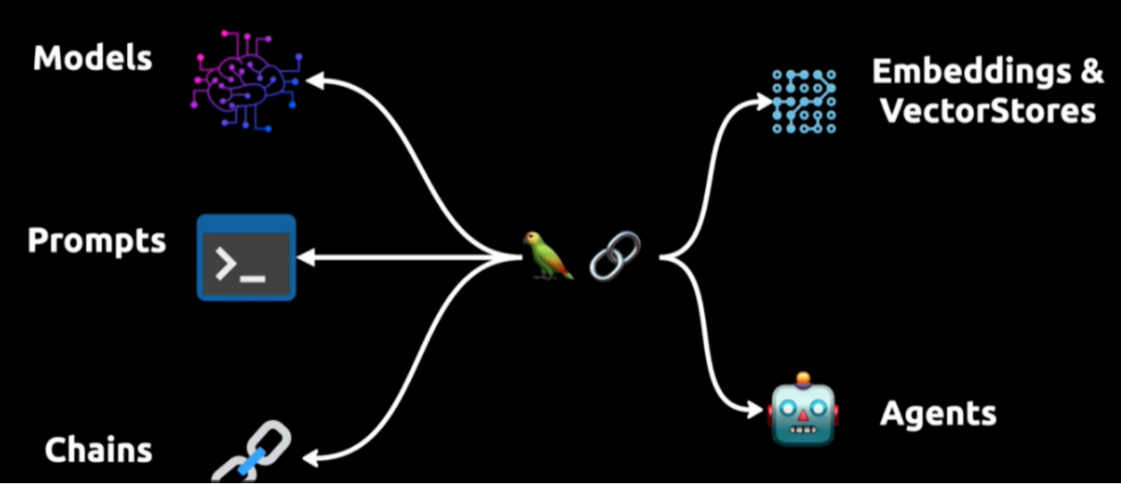
2、LangChain六大组件(⭐)
模型(Models):调用大语言模型的LangChain接口,输出解析。
提示模板(Prompts):使提示工程标准化。
数据检索(Indexes):构建并操作文档,接受用户的查询并返回最相关的文档,搭建本地知识库。
记忆(Memory):通过短时记忆和长时记忆,在对话过程中存储和检索数据,让聊天机器人记住你。
链(Chains):LangChain核心机制,封装各种功能,通过链式组合完成任务。
代理(Agents):另一个LangChain中的核心机制,通过“代理”让大模型自主调用外部工具和内部工具。
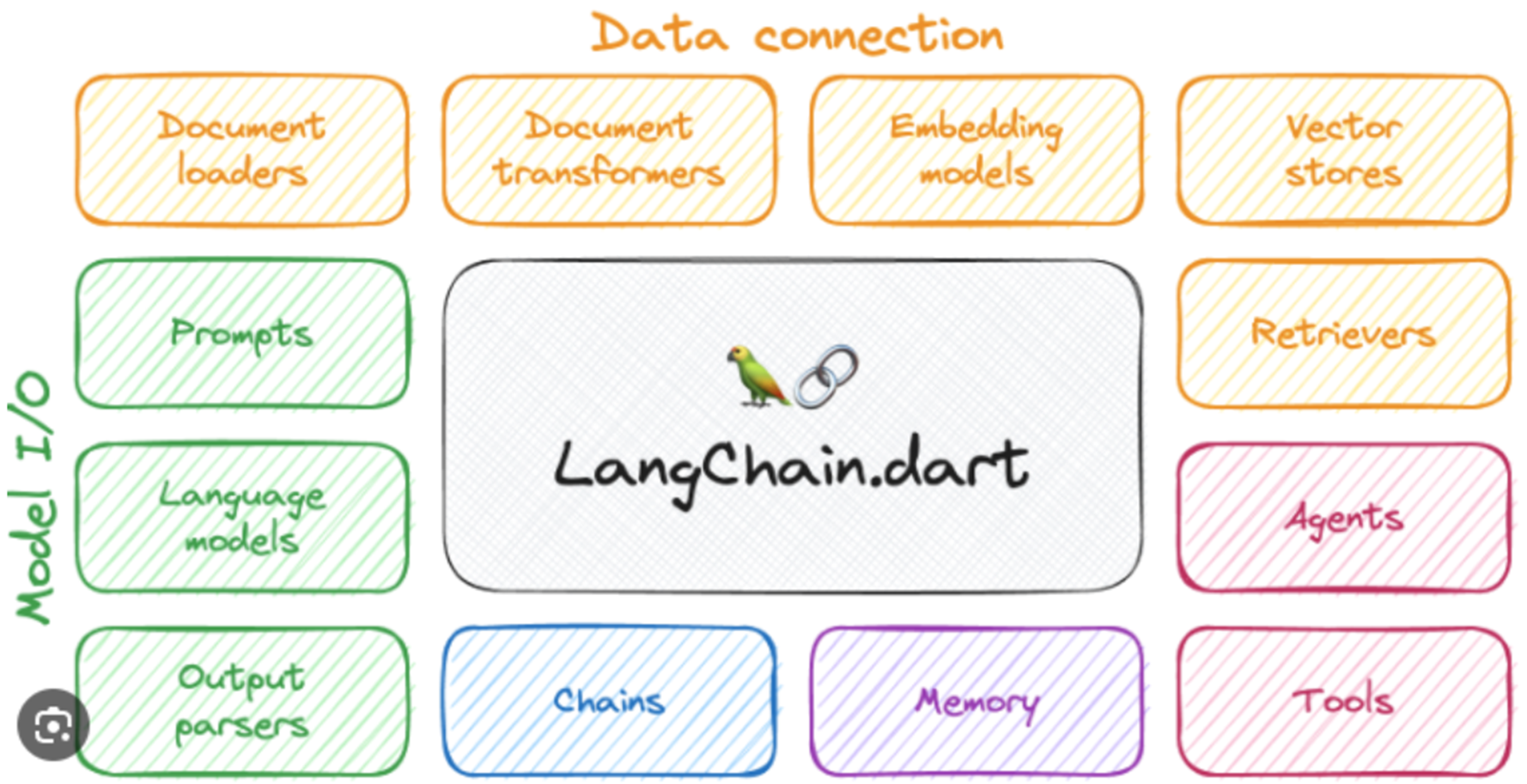
3、LangChain常见用例
个人助理(Personal Assistants):主要的LangChain使用用例,和你交互并具有你的有关数据与知识,并做出行动。
问答(Question Answering):第二个重大的LangChain使用用例。利用文档中的信息来构建答案,回答特定文档中的问题。
聊天机器人(Chatbots):语言模型擅长生成文本,非常适合创建聊天机器人。
自治代理(Autonomous Agents):长时间运行的代理采取多步操作以尝试完成目标。
代理模拟(Agent Simulations):将代理置于封闭环境中观察它们如何相互作用,如何对事件作出反应,观察它们长期记忆能力。
查询表格数据(Tabular):使用LLM查询存储在表格格式中的数据(csv、SQL、数据框等)。
代码理解(Code):使用LLM查询来自GitHub的源代码。
与API交互(APIs):使LLM与API交互,以便为提供更实时的信息。
内容提取(Extraction):从文本中提取结构化信息。
摘要(Summarization):将较长的文档汇总为更短、更简洁的信息块,是一种数据增强生成的类型。
评估(Evaluation):使用语言模型本身进行评估,LangChain提供一些用于辅助评估的提示或链。
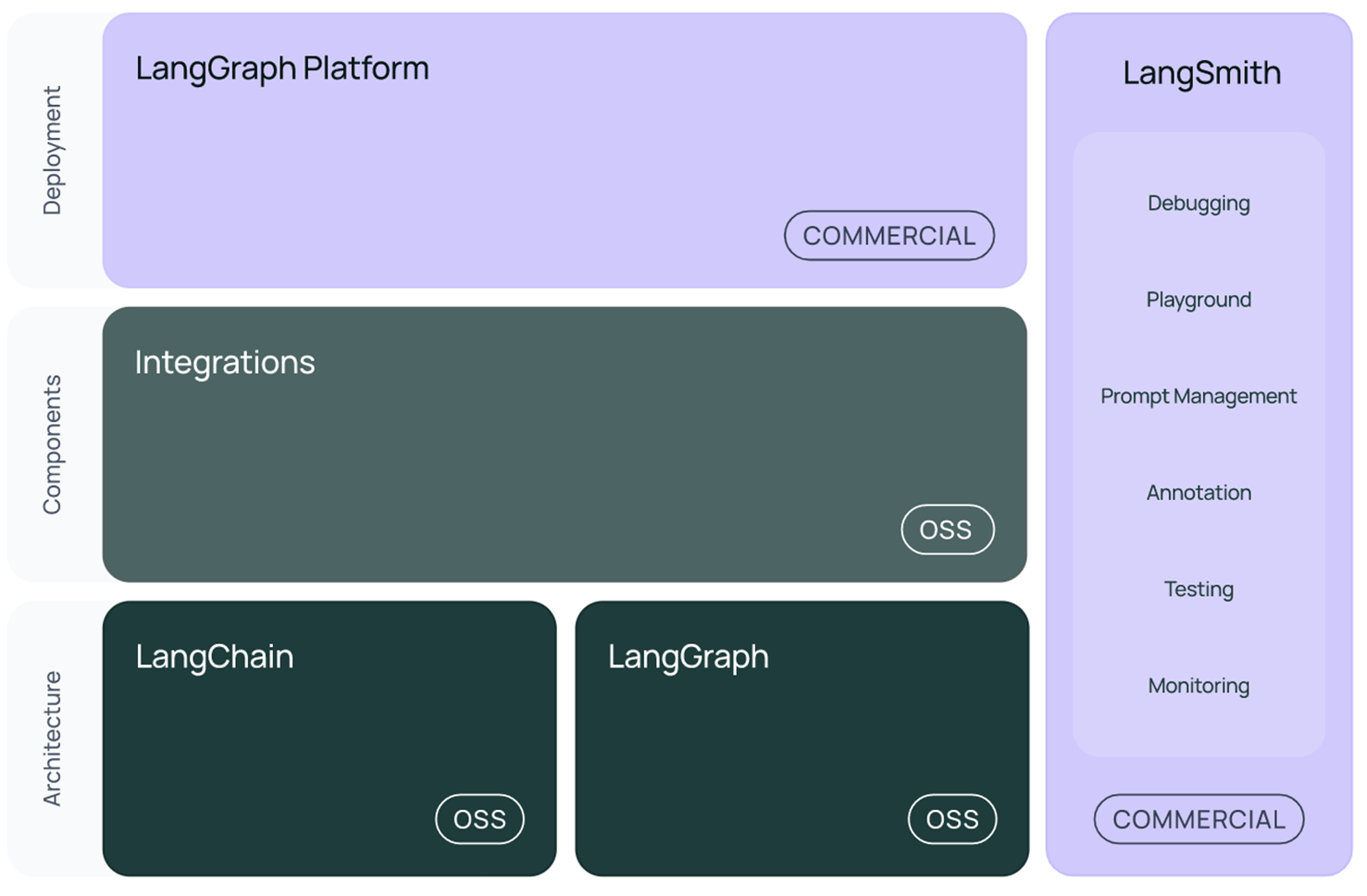
4、LangChain开源库的组成
langchain_core :语言模型、文档加载器、嵌入模型、向量存储、检索器等
langchain_community :开发者社区(如langchain-openai、ChatTongyi等),依赖于langchain-core
langchain :构成应用程序认知架构的链、代理和检索策略
langgraph:用于构建复杂的智能体应用,
langserve:将 LangChain 链部署为 REST API
LangSmith:调试、测试、评估和监控LLM应用程序
二、模型(Models)
在LangChain中,模型主要分为以下三类:
文本嵌入模型(Text Embedding Models):文本嵌入模型将文本作为输入,并返回词向量。(Word2Vec、GloVe、BERT)
大型语言模型(LLMs):大型语言模型(LLMs)一种以文本字符串作为输入,并返回文本字符串作为输出的模型。(GPT-3、GPT-4、qwen2、deepseek)
聊天模型(Chat Models):聊天模型通常由语言模型支持,但它们的API更加结构化。具体来说,这些模型将聊天消息列表作为输入,并返回聊天消息。(ChatGPT、DialogGPT、ChatGLM、ChatTongyi)

from langchain_ollama.llms import OllamaLLM

model = OllamaLLM(model="qwen2:0.5b")
print(model.invoke("我在成都,我要去重庆旅游,请给我一些出行建议。"))  # 调用llm
from langchain_community.chat_models import ChatTongyi
llm = ChatTongyi(
model="qwen-long",
top_p=0.8, # 文本生成的多样性
temperature="0.2", # 文本生成的随机性
api_key=api_key
)
print(llm.invoke("我在成都,我要去重庆旅游,请给我一些出行建议。"))引入SystemMessage与HumanMessage 与大模型进行对话
HumanMessage用于表示人类用户发送给语言模型的消息。当你想要与一个语言模型进行交互时,你可以使用 HumanMessage 来构造对话的历史记录,以便模型能够基于上下文做出响应。结合 SystemMessage 和 AIMessage,您可以更好地控制模型的行为,例如设置模型的角色、语气等。
from langchain.schema import HumanMessage,SystemMessage,AIMessage
from langchain_ollama.llms import OllamaLLM

llm = OllamaLLM( model="qwen2:0.5b")
system = SystemMessage("你是一个地道的重庆人")
human = HumanMessage("我在成都,我要去重庆旅游,请告诉我重庆哪些地方好玩。")
messages= [system,human]
print(llm.invoke(messages))
三、提示词(Prompt)
1、基本概念
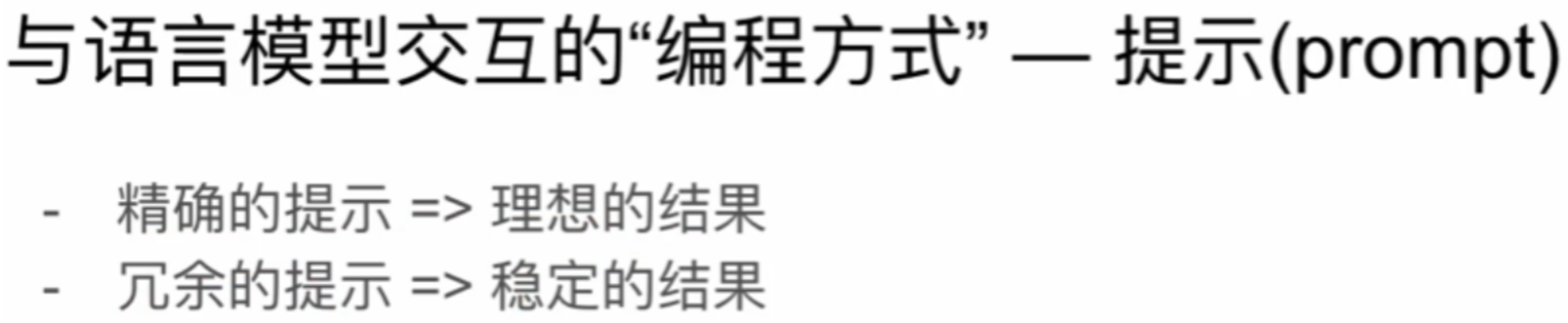
语言模型以文本作为输入,这段文本通常被称为提示(Prompt)。通常情况下,这不仅仅是一个硬编码的字符串,而是模板、示例和用户输入的组合。LangChain提供了多个类和函数,以便轻松构建和处理提示。
你可以理解 Prompt是与LLM沟通的方式,Prompt编写的好坏决定了最后的效果,关于Prompt也有提示词是一门大学问。
2、提示词组成要素
角色:给大模型定义一个匹配目标任务的角色。用一句话就可以明确它的角色(比如“我是一位资深java工程师”),收窄问题域,减少二义性,让“通用”瞬间变得“专业”。
指示:对具体任务进行详细描述。
上下文:给出与任务相关的其它背景信息(如历史对话、情境等)。
例子:举例很重要,就像是师傅教学之后,需要给徒弟(大模型)演示一下如何操作,这个操作是大模型生成输出时的一个重要参考,对输出结果有很大帮助。
输入:任务的输入信息,最好在提示词中有明确的“输入”标识。
输出:输出的格式描述,比如用郭德纲的语气、输出不超过十个字、以JSON格式返回结果等。
3、提示词的使用技巧
清晰,明确,避免模糊
提示模板是指一种可复制的生成提示的方式。它包含一个文本字符串(模板),可以从最终用户处接收一组参数并生成提示。提示模板可能包含以下内容:
对语言模型的指令
提供一些简单示例给大语言模型从而使模型输出更接近理想结果
提给语言模型的问题
4、Prompt代码实现(⭐)
from langchain_core.prompts import PromptTemplate

# 模板字符串
template = """
你上知天文,下知地理,请为我的{product}公司取一个威武霸气的名字。
"""
# 方式一
prompt_template1 = PromptTemplate(
    template=template,
    input_variables=["product"]
)
print(prompt_template1.format(product="羽毛球"))

# 方式二:
prompt_template2 = PromptTemplate.from_template(template)
print(prompt_template2.format(product="羽毛球"))

# 方式一简化(可省略输入变量)
prompt_template3 = PromptTemplate(template=template)
print(prompt_template3.format(product="羽毛球"))
from langchain_core.prompts import PromptTemplate
# 没有参数
# prompt_temp = PromptTemplate(template="请给我讲个睡前故事")
prompt_temp = PromptTemplate(template="请给我讲个睡前故事",input_variables=[])
print(prompt_temp.format())
# 一个参数
# prompt_temp = PromptTemplate(template="请给我讲个{type}的睡前故事")
prompt_temp = PromptTemplate(template="请给我讲个{type}的睡前故事",input_variables=["type"])
print(prompt_temp.format(type="搞笑"))
# 多个参数
# prompt_temp = PromptTemplate(template="请给我讲个{type1}和{type2}的睡前故事")
prompt_temp = PromptTemplate(template="请给我讲个{type1}和{type2}的睡前故事",input_variables=["type1","type2"])
print(prompt_temp.format(type1="恐怖",type2="搞笑"))
from langchain_ollama.llms import OllamaLLM
from langchain_core.prompts import PromptTemplate

llm = OllamaLLM(model="qwen2:7b")
prompt_temp = PromptTemplate(template="请给我讲个{type1}和{type2}的睡前故事",input_variables=["type1","type2"])

llm.invoke(prompt_temp.format(type1="恐怖",type2="搞笑"))
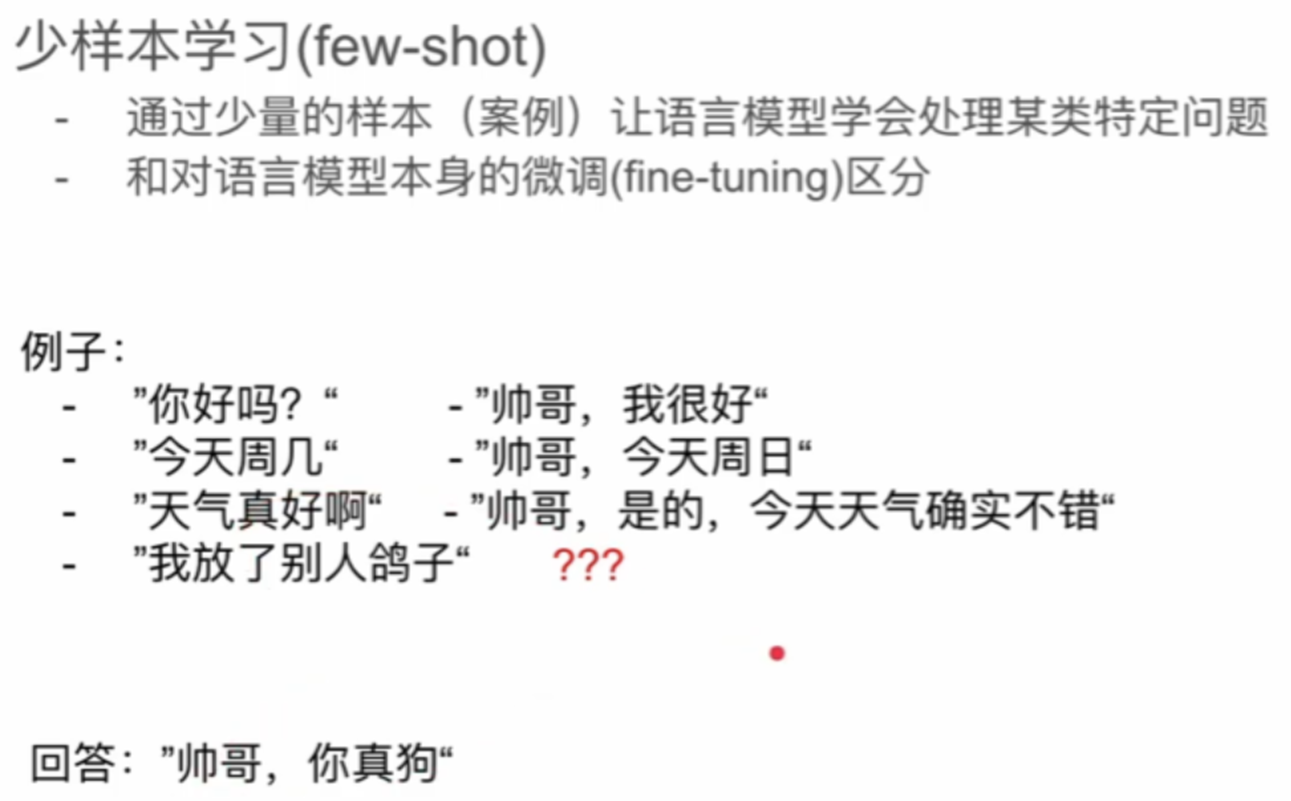
5、少样本学习(提供示例给LLM从而实现逻辑思维)
from langchain_ollama.llms import OllamaLLM
from langchain.prompts import PromptTemplate
# 少样本学习提示模板
from langchain.prompts.few_shot import FewShotPromptTemplate
# from langchain_core.prompts.few_shot import FewShotPromptTemplate

# 构建语料,可猜测可推敲
examples = [
    {"question":"你好,你去干什么?","answer":"我去打篮球。"},
    {"question":"oh,今天是星期几呀,篮球场开门吗?","answer":"哦,今天星期三,篮球场没有开,那我去不了了"},
    {"question":"篮球场没有开,我们去踢足球吧。","answer":"好的,走。"},
]
prompt_temp = PromptTemplate(template="问:{question},答:{answer}",input_variables=["question","answer"])
"""
FewShotPromptTemplate 的主要参数包括:
    examples: 包含示例的列表,每个示例是一个字典。
    example_prompt: 用于格式化每个示例的 PromptTemplate。
    prefix: 提示的前缀部分,通常用于描述任务。
    suffix: 提示的后缀部分,通常用于引导模型生成输出。
    input_variables: 输入变量列表,这些变量将在生成最终提示时被替换。
"""
few_prompt = FewShotPromptTemplate(
    examples=examples,
    example_prompt=prompt_temp,
    suffix="请问:{input}", # 问题格式
    input_variables=["input"]  # 输入变量
)
format_prompt_temp = few_prompt.format(input="明天星期几?")
print(format_prompt_temp)

llm = OllamaLLM(model="qwen2:7b")
response = llm.invoke(format_prompt_temp)
print(response)
from langchain import PromptTemplate, FewShotPromptTemplate
# 定义示例
examples = [
{
"input": "2 + 2",
"output": "4"
},
{
"input": "3 * 3",
"output": "9"
}
]
# 定义示例的格式化模板
example_prompt = PromptTemplate(
input_variables=["input", "output"],
template="Input: {input}\nOutput: {output}"
)
# 定义 FewShotPromptTemplate
few_shot_prompt = FewShotPromptTemplate(
examples=examples,
example_prompt=example_prompt,
prefix="Solve the following math problems:",
suffix="Input: {math_problem}\nOutput:",
input_variables=["math_problem"]
)
# 生成最终提示
math_problem = "4 * 4"
final_prompt = few_shot_prompt.format(math_problem=math_problem)
print(final_prompt)
llm.invoke(final_prompt)四、链(Chain)
1、基本概念
"chain"通常用于描述一系列的操作或函数,按特定的顺序依次执行,前一个操作的输出会作为后一个操作的输入。这种模式也被称为管道(Pipeline)或链式调用(Chain Calling)。串联小模块,形成一种链式结构,这种模块化的编码方式非常有利于项目开发。
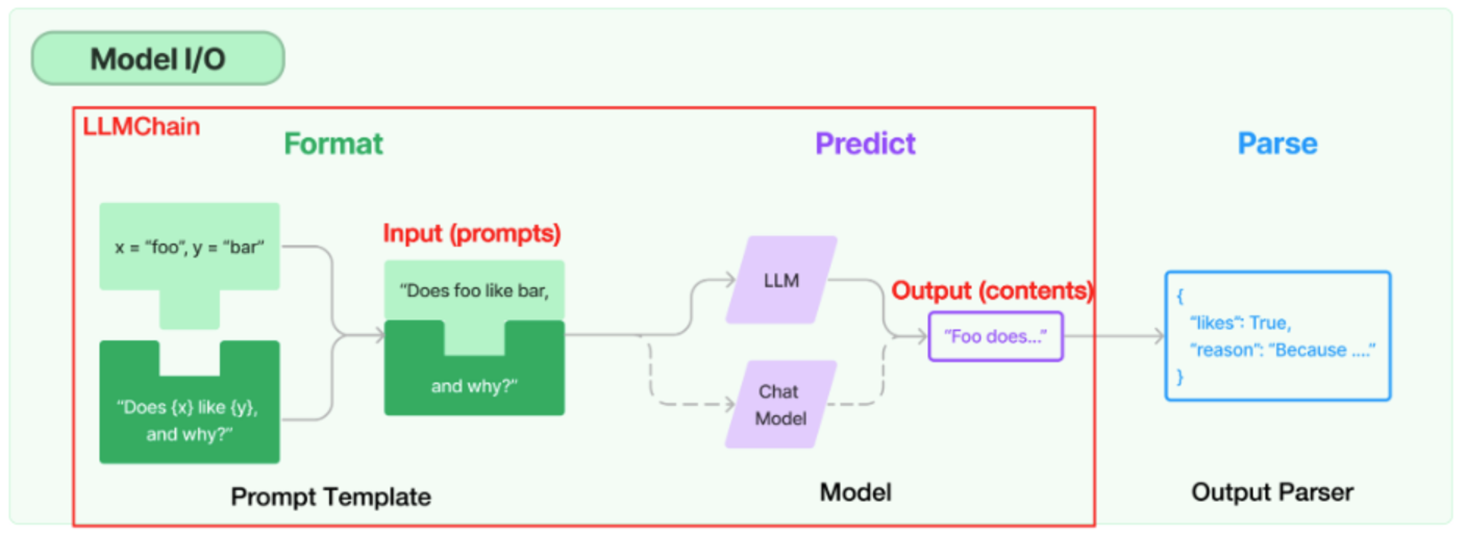
"chain"的作用:
- 将处理流程串联起来:通过将一系列的操作串联起来,可以使处理流程更清晰,更易于理解和维护。
- 简化代码:通过链式调用,可以避免在每一步操作后都需要单独保存和处理结果,从而简化代码。
- 提高灵活性:通过改变链中的操作或其顺序,可以轻松地修改处理流程,以适应不同的需求。
- 提高效率:在某些情况下,链式调用可以提高代码的执行效率。例如,如果链中的每个操作都是异步执行的,那么整个处理流程可能会比逐个执行这些操作更快。
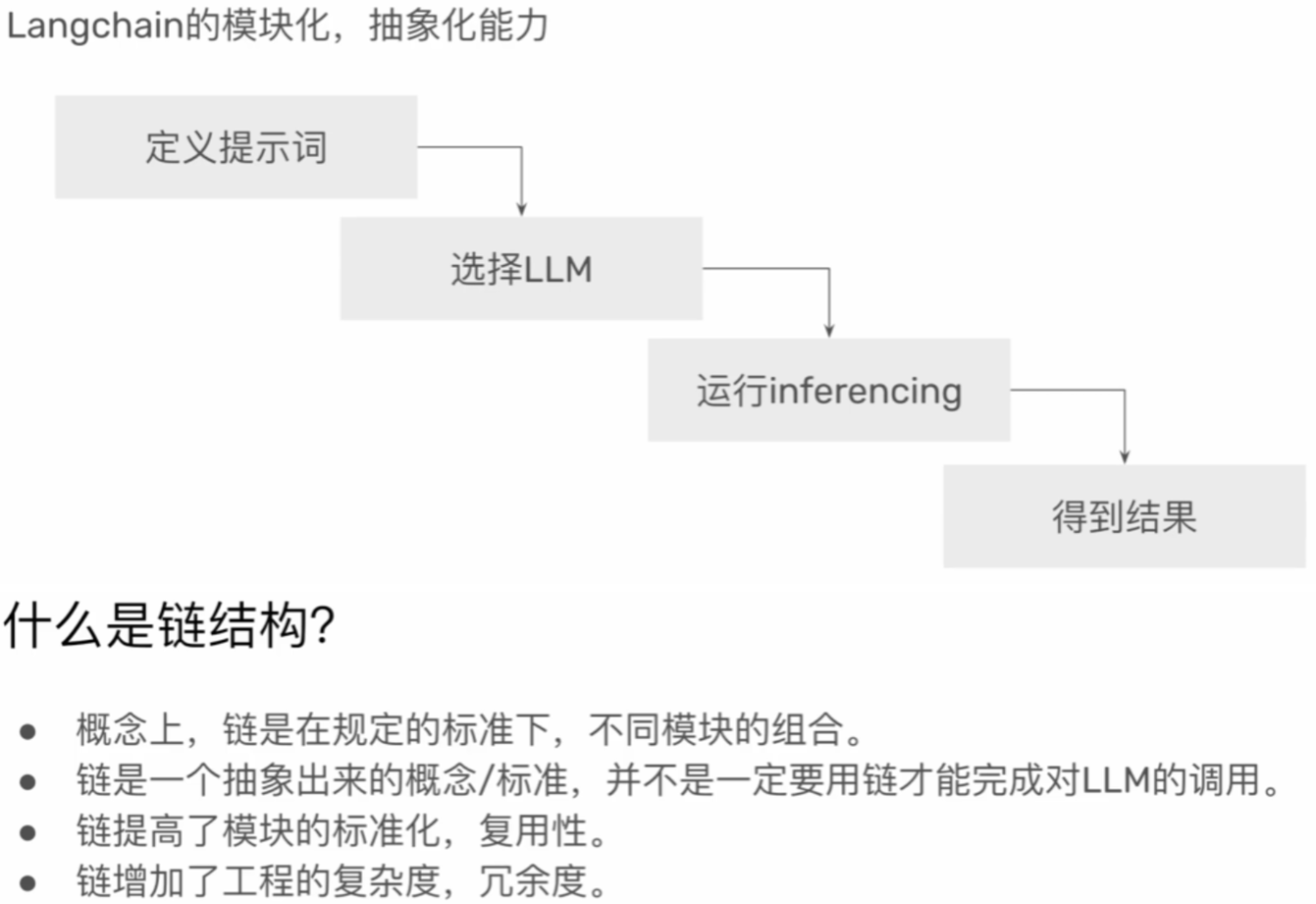
2、单链结构
- 定义prompt
- 定义llm
- 定义chain
- 运行invoke

from langchain_ollama.llms import OllamaLLM
from langchain.prompts import PromptTemplate
from langchain.chains import LLMChain
from langchain.schema.runnable import RunnableSequence

# 1. 定义提示模板
prompt=PromptTemplate(
    template="你是一个资深的喜剧演员,给我将一个关于{content1}的{content2}",  # 提示模板
    input_variables=["conten1","content2"]  # 输入变量
)

# 2. 初始化语言模型
llm = OllamaLLM(model="deepseek-r1:1.5b",temperature=0)  # temperature 控制生成结果的随机性,通常取值范围为 0 到 1 之间,值越大随机性越高

# 3. 构建单链
# chain = LLMChain(prompt=prompt, llm=llm)  # 方式一
# chain = prompt | llm  # 方式二
chain = RunnableSequence(prompt,llm)  # 方式三

# 4. 运行链
res = chain.invoke({"content1":"美国","content2":"笑话"})

print(res)
3、输出解析器OutputParser
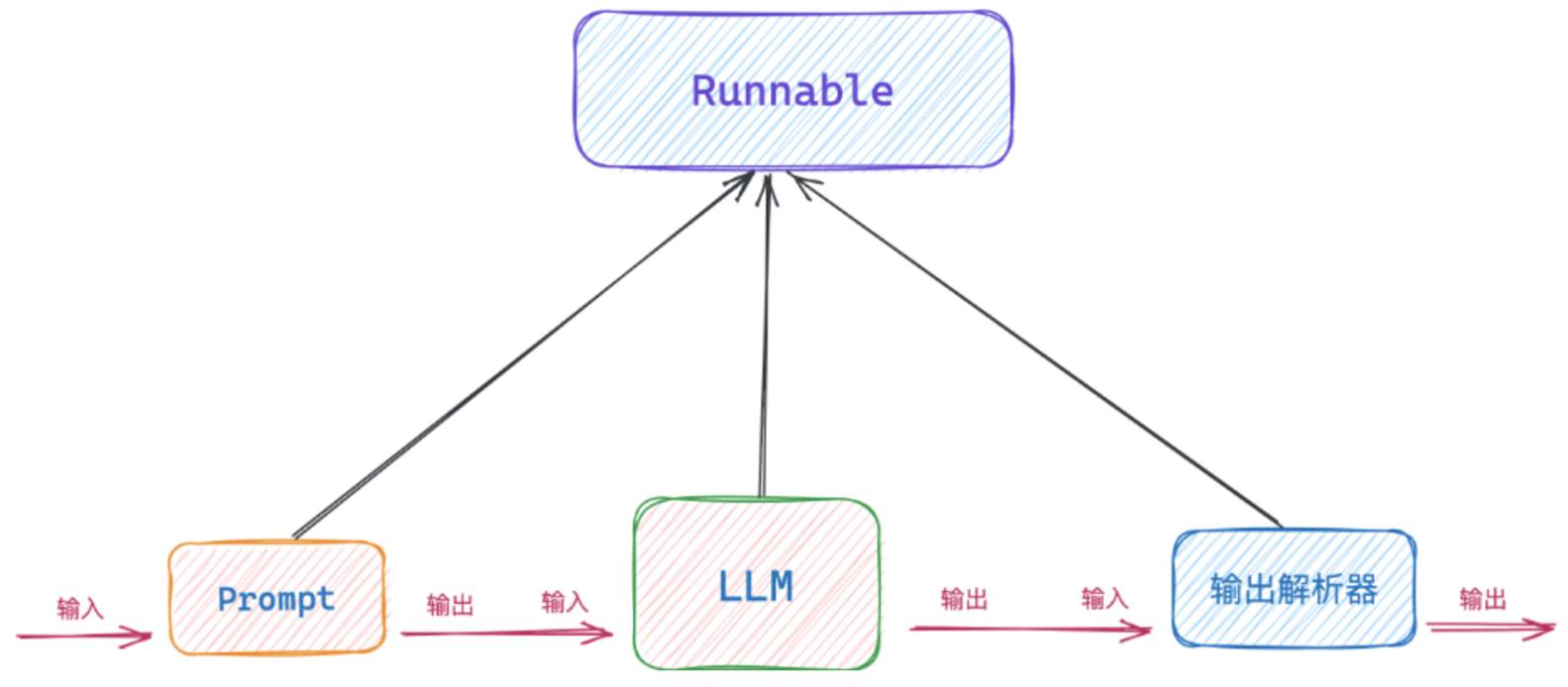
常规的使用LangChain构建LLM应用的流程是:Prompt 输入、调用LLM 、LLM输出。有时候我们期望LLM给到的数据是格式化的数据,方便做后续的处理。
这时就需要在Prompt里设置好要求,然后LLM会在输出内容后,再将内容传给输出解析器,输出解析器会解析成我们预期的格式。

在LangChain里只要实现了Runnable接口,有invoke方法,都可以成为链,可以拿上一个链的输出作为自己的输入。比如:ChatPromptTemplate 、ChatOpenAI 、PydanticOutputParser等。
模型输出解析为:
字符串:StrOutputParser
列表:CommaSeparatedListOutputParser
自定义的数据结构:PydanticOutputParser
from langchain_ollama.llms import OllamaLLM
from langchain.prompts import ChatPromptTemplate
from langchain_core.output_parsers import StrOutputParser  # 输出字符串

# 1. 定义提示模板(由于有输出解析器,需要使用ChatPromptTemplate)
prompt = ChatPromptTemplate(
    # 专家模型的获取方法:提示词、RAG、专业微调的预训练模型、微调
    [
        ("system","你是一个物理学家"),
        ("human","{input}")
    ]
)

# 2. 初始化语言模型
llm = OllamaLLM(model="deepseek-r1:1.5b",temperature=0)

# 3. 输出解析器(输出为字符串)
output_parser = StrOutputParser()

# 4. 构建单链
chain = prompt | llm | output_parser

# print(prompt.format(input="请问量子纠缠是什么意思?"))  # 输出提示词

# 5. 运行链
res = chain.invoke({"input":"请问量子纠缠是什么意思?"})

print(res)
print(type(res))  # <class 'str'>
from langchain_ollama.llms import OllamaLLM
from langchain.prompts import ChatPromptTemplate
from langchain_core.output_parsers import CommaSeparatedListOutputParser # 输出列表化
# 1. 定义提示模板
prompt = ChatPromptTemplate(
[
("system","{parser}"),
("human","我第一次来{city},给我推荐{num}个景点。")
]
)
# 2. 初始化语言模型
llm = OllamaLLM(model="deepseek-r1:1.5b",temperature=0)
# 3. 输出解析器(输出为列表)
output_parser = CommaSeparatedListOutputParser() # 初始化输出解析器
output_parser_instructions = output_parser.get_format_instructions() # 获取格式指令
# 4. 构建单链
chain = prompt | llm | output_parser
# print(prompt.format(city="成都",num=3,parser=output_parser_instructions)) # 输出提示词
# System: Your response should be a list of comma separated values, eg: `foo, bar, baz` or `foo,bar,baz`
# Human: 我第一次来成都,给我推荐3个景点。
# 5. 运行链
res = chain.invoke({"city":"成都","num":3,"parser":output_parser_instructions})
print(res)
print(type(res)) # <class 'list'>4、路由链Router chain(多链结构)
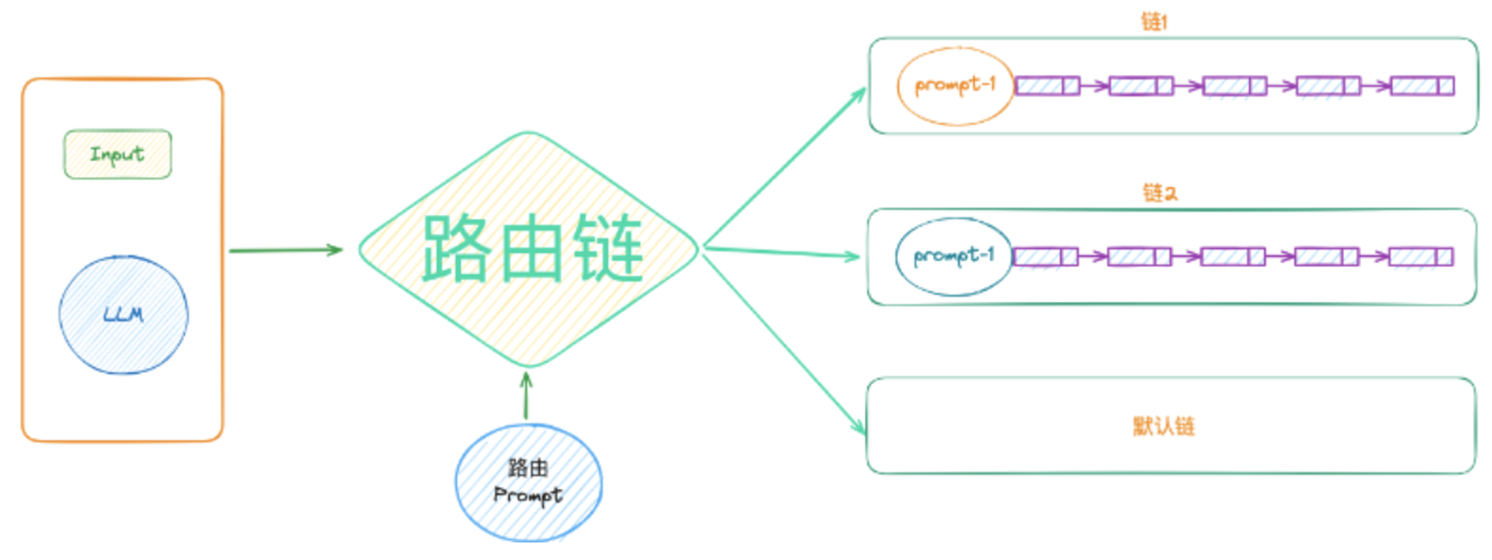
路由链(RouterChain)是由LLM根据输入的Prompt去选择具体的某个链。路由链中一般会存在多个Prompt,Prompt结合LLM决定下一步选择哪个链。简单来说,就是根据“用户输入”的信息,能够动态的选择交给“谁”去解决问题。
from langchain_ollama.llms import OllamaLLM
from langchain.prompts import PromptTemplate
from langchain.chains import LLMChain, ConversationChain
from langchain.chains.router.multi_prompt_prompt import MULTI_PROMPT_ROUTER_TEMPLATE
from langchain.chains.router.llm_router import RouterOutputParser
from langchain.chains.router import LLMRouterChain, MultiPromptChain

# 初始化语言模型
llm = OllamaLLM(model="qwen2:7b")

# 定义专家链
math_template = """
你是一位伟大的数学家,知道所有的数学问题,你超越了高斯和莱布尼茨,我向你提问,问题如下:
{input}
"""
math_prompt = PromptTemplate.from_template(math_template)
math_chain = LLMChain(llm=llm, prompt=math_prompt, output_key="text")

physics_template = """
你是一位伟大的物理学家,知道所有的物理问题,你得过诺贝尔物理学奖,我向你提问,问题如下:
{input}
"""
physics_prompt = PromptTemplate.from_template(physics_template)
physics_chain = LLMChain(llm=llm, prompt=physics_prompt, output_key="text")

chemistry_template = """
你是一位伟大的化学家,知道所有的化学问题,你得过诺贝尔化学奖,我向你提问,问题如下:
{input}
"""
chemistry_prompt = PromptTemplate.from_template(chemistry_template)
chemistry_chain = LLMChain(llm=llm, prompt=chemistry_prompt, output_key="text")

# 定义目标链
destination_chains = {
    "math": math_chain,
    "physics": physics_chain,
    "chemistry": chemistry_chain
}

# 定义默认链
default_prompt = PromptTemplate(
    input_variables=["input"],
    template="你是一个通用的助手,请回答以下问题:\n{input}"
)
# default_chain = ConversationChain(llm=llm, output_key="text")  # 用于处理对话或会话的链式结构
default_chain = LLMChain(llm=llm, prompt=default_prompt, output_key="text")

# 定义路由提示模板
destinations = """
math: 擅长回答数学问题
physics: 擅长回答物理问题
chemistry: 擅长回答化学问题
"""
router_template = MULTI_PROMPT_ROUTER_TEMPLATE.format(destinations=destinations)
router_prompt = PromptTemplate(
    template=router_template,
    input_variables=["input"],
    output_parser=RouterOutputParser()
)

# 定义路由链
router_chain = LLMRouterChain.from_llm(llm=llm, prompt=router_prompt)

# 定义多提示链
multi_prompt_chain = MultiPromptChain(
    router_chain=router_chain,
    default_chain=default_chain,
    destination_chains=destination_chains,
    verbose=True  # 设置为 True 可以查看链的详细执行过程
)

# 运行测试
res = multi_prompt_chain.invoke({"input": "介绍一下python"})
print(res["text"])
5、顺序链Sequential Chain
它允许我们将多个LLMChain按照特定的顺序连接起来,形成一个处理流程。这种链式结构使得我们可以将一个大任务分解为几个小任务,并依次执行,每个任务的输出成为下一个任务的输入。(多次大语言模型调用,最少2次调用LLM)
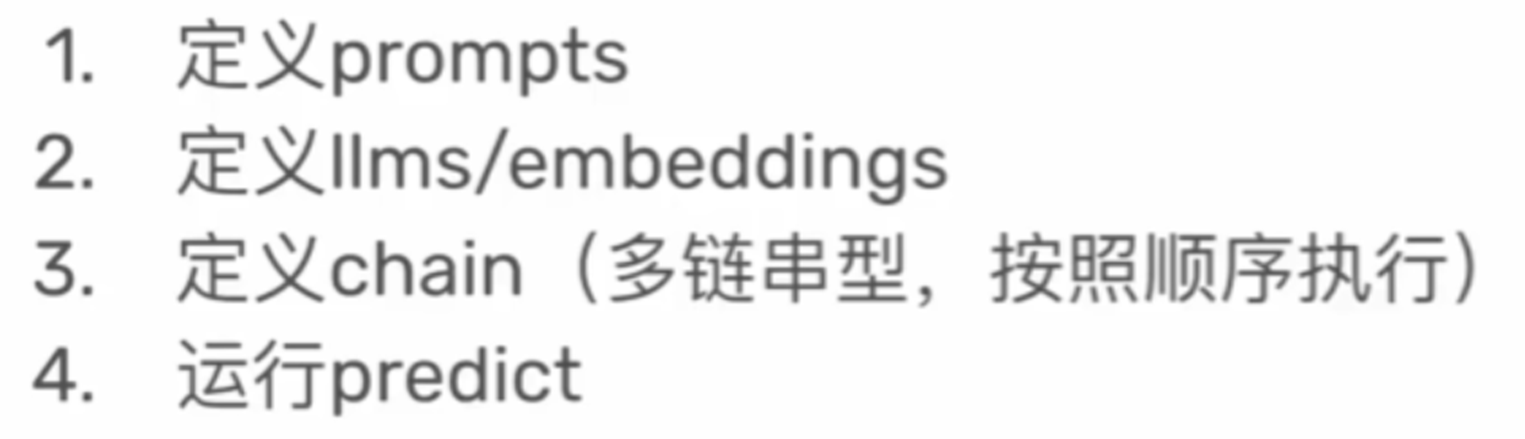
内容生成,评分系统
from langchain_ollama.llms import OllamaLLM
from langchain.prompts import PromptTemplate
from langchain.chains import LLMChain, SequentialChain

llm = OllamaLLM(model="qwen2:7b")
# 写作文
write_template = """
你小学三年级在读,你9岁,我给你某年的高考作文题命题,你完成一篇800字的作文。
年:{year},作文题目:{title}
你:这是我写的作文。
"""
write_prompt_template = PromptTemplate(
    template=write_template,
    input_variables=["year", "title"]
)
write_chain = LLMChain(
    llm=llm,
    prompt=write_prompt_template,
    output_key="composetion"
    )
# 作文评分
score_template = """
你是一位文学家,得过诺贝尔文学奖,请你为这篇作文打分,满分100分。
作文:{composetion}
这是我的评分。
"""
score_prompt_template = PromptTemplate(
    template=score_template,
    input_variables=["composetion"]
)
score_chain = LLMChain(
    llm=llm,
    prompt=score_prompt_template,
    output_key="score"
    )
# 链的连接,顺序链
list_chain = SequentialChain(
    chains=[write_chain, score_chain],
    input_variables=["year", "title"],
    output_variables=["composetion", "score"],
    verbose=True
)
res = list_chain.invoke(
    {"year": 2024,
     "title": "打开,发现新的自己"}
)
# print(res["year"])
# print(res["title"])
# print(res["composetion"])
print(res["score"])
6、转换链 transform chain
我们经常需要对输入数据进行预处理,这样可以更好地利用LLM。LangChain提供了一个强大的工具——转换链(TransformChain),它可以帮我们轻松实现这一任务。
转换链(TransformChain)主要是将给定的数据按照某个函数进行转换,再将 转换后的结果 输出给LLM。 所以转换链的核心是:根据业务逻辑编写合适的转换函数。

有时,我们在将数据发送给LLM之前,希望对其做一些操作时(比如替换一些字符串、截取部分文本等等),就会用到转换链。TransformChain 在 NLP 中很重要,有些场景还很实用:
- 根据需求定义转换函数transform_func,入参和出参都是字典。
- 实例化转换链TransformChain。
- 因为转换链只能做内容转换的事情,后续的操作还需要LLM介入,所以需要实例化LLMChain。
- 最终通过顺序连SimpleSequentialChain将TransformChain和LLMChain串起来完成任务。
内容转换,再进行总结提炼。
from langchain_ollama.llms import OllamaLLM
from langchain.prompts import PromptTemplate
from langchain.chains import LLMChain, TransformChain, SimpleSequentialChain


file_content = ""
with open("data.txt", "r", encoding="UTF-8") as file:
    file_content = file.read()

# 转换函数
def transform_fun(data):
    text = data["input_text"]
    trsnaform_text = text.replace("PVC", "聚氯乙烯(Polyvinyl Chloride)")
    return {"output_text": trsnaform_text}

# 转换链(chain,llm),
transform_chain = TransformChain(
    transform=transform_fun,
    input_variables=["input_text"],
    output_variables=["output_text"],
    verbose=True
)
res = transform_chain.invoke(file_content)
print(res)
# 内容提取,内容压缩
prompt_template = """
请你对以下文字做总结,100字以内,控制在100字以内。
{input_text}
总结:
"""
prompt = PromptTemplate(
    input_variables=["input_text"],
    template=prompt_template)
llm = OllamaLLM(model="qwen2:7b")
llm_chain = LLMChain(llm=llm, prompt=prompt)
# 顺序链
all_chain = SimpleSequentialChain(
    chains=[transform_chain, llm_chain]
)
res = all_chain.invoke(file_content)
print(res)
7、新闻内容重塑
步骤:
- 爬取新闻标题及正文内容;
- 新闻标题及内容重塑;
- 利用大模型生成图片;
- 设置网页(大模型生成HTML代码文件)
from langchain_ollama.llms import OllamaLLM
from langchain.prompts import PromptTemplate

llm = OllamaLLM(model="qwen2:7b")
template = """
你是一个专业的新闻编辑,需要对以下新闻标题及内容进行改写,保持原内容的含义不变,句子结构和
用词习惯发生变化,标题如下:{news_title},原文如下:{news_text}
修改之后的新闻标题+内容如下:
"""
prompt = PromptTemplate(input_variables=["news_title","news_text"], template=template)
rewrite_chain = prompt | llm
news_title = "梅西人品太好!哪怕天太冷都愿意跟对手换球衣!"
news_text = """
2月20日。美冠杯第一轮,迈阿密国际1比0击败堪萨斯城竞技,全场唯一进球来自梅西。这是梅西在新年的首球,他在此前的友谊赛也有进球、助攻和冠军,但美国或者全世界可不是沙特,阿拉冠级别的进球、助攻和冠军都不会被统计的,所以这个进球才是梅西新年首球。
梅西是在零下14度、零下17度的天气踢球、进球和赢球的,他这个进球也需要自己一顿操作。在这种极冷天气下,本身就怕冷的梅西确实影响状态,但他依旧能成为全场最佳,有进球,还是让球队赢球的全场唯一进球。
梅西穿着厚厚的保暖衣裤,这种天气确实不适合踢球。不过梅西不仅踢球、进球和赢球,他在赛后还同意对手的交换球衣申请。这就是足球人品历史第一人的含金量,也是影响力的代表。
此外,在比赛过程中,还有球迷冲进场内,找梅西合影和签名,梅西照样满足他的需求。这同样是人品和影响力的代表。因为有梅西,虽然这场比赛虽然冷,也有大量球迷到场观战。梅西在这么冷的天气踢球,散步都要颤抖。毕竟要踢球,不能穿太厚。可一旦有赢球契机,散步中的梅西立刻变成杀神,于是他踢进全场唯一进球。
美冠杯是迈阿密国际今年第一场正赛,加上友谊赛,还没输过球。迈阿密国际上赛季因为后卫不行导致提前出局,现在后卫的问题依旧没解决,所以他们必须更加依赖梅西。
"""
rewrite = rewrite_chain.invoke({"news_title": news_title,"news_text": news_text})
print(rewrite)
五、记忆(Memory)
当我们与 LLM 聊天时,它们无法记住上下文信息。
LLM没有记忆,LLM 的本质是基于统计和概率来生成文本,对于每次请求,它们都将上下文视为独立事件。这意味着当你与 LLM 进行对话时,它不会记住你之前说过的话,这就导致了 LLM 有时表现得不够智能。
这种“无记忆”属性使得 LLM 无法在长期对话中有效跟踪上下文,也无法积累历史信息。比如,当你在聊天过程中提到一个人名,后续再次提及该人时,LLM 可能会忘记你之前的描述。
LLM记不住你上一个问题,那么怎么让它记住你呢?
如果将已有信息放入到 memory 中,每次跟 LLM 对话时,把已有的信息丢给 LLM,那么 LLM 就能够正确回答。
1、短期记忆
Langchain 提供了 ConversationBufferMemory 类,可以用来存储和管理对话。
ConversationBufferMemory 包含input变量和output变量,input代表人类输入,output代表 AI 输出。
每次往ConversationBufferMemory组件里存入对话信息时,都会存储到history的变量里。
ConversationChain
ConversationBufferMemory
from langchain_ollama import OllamaLLM
from langchain.prompts import ChatPromptTemplate
from langchain.memory import ConversationBufferMemory

# 大模型
llm = OllamaLLM(model="qwen2:7b")

# 提示词
prompt = ChatPromptTemplate.from_messages([
    ("system","你是我的智能助手,我们的聊天上下文存储在<history>标签中,<history>{history}<history>"),
    ("user","这是我的问题:{question}")
])
# 初始化内存
memory = ConversationBufferMemory()
# 添加对话记录
memory.save_context(
    {"input":"你好,我叫jason,我是一名程序员。"},
    {"output":""}
)
# 加载内存变量
memory_var = memory.load_memory_variables({})
# print(memory_var)  # {'history': 'Human: 你好,我叫jason,我是一名程序员。\nAI: '}
prompt_str = prompt.format_messages(question = "请给我介绍一下microsoft公司",
    history= memory_var["history"])
prompt_str = prompt.format_messages(question = "你还记得我叫什么名字吗?",
    history= memory_var["history"])
# 模型推理
res = llm.invoke(prompt_str)
print(res)

# 查看内存中的对话记录,只保存了memory.save_context()的内容
print(memory.buffer)  # Human: 你好,我叫jason,我是一名程序员。AI:
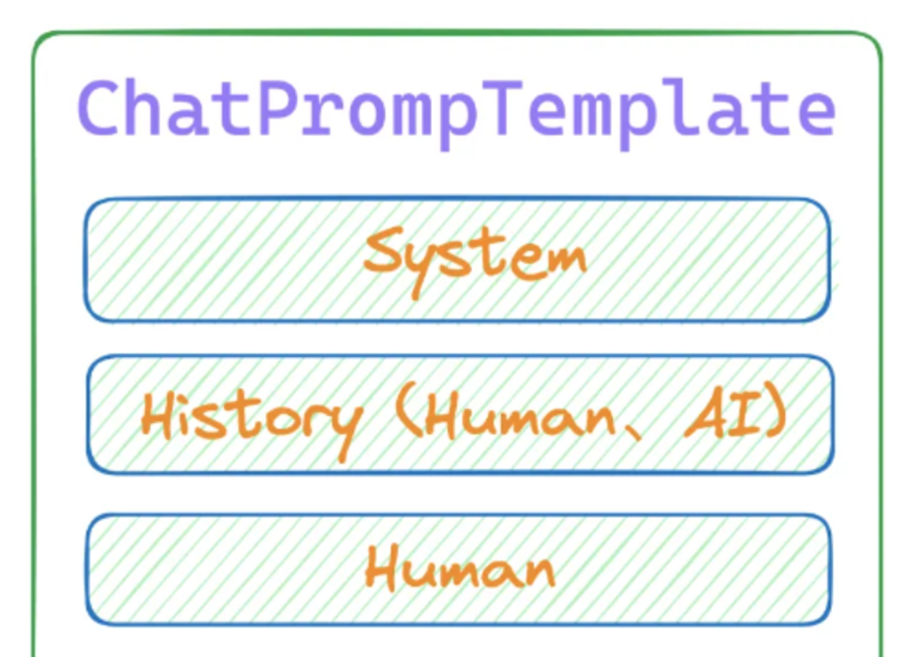
在 Langchain 中,MessagesPlaceholder是一个占位符,用于在对话模板中动态插入上下文信息。它可以帮助我们灵活地管理对话内容,确保 LLM 能够使用最上下文来生成响应。
采用ConversationChain对话链结合PromptTemplate和MessagesPlaceholder,几行代码就可以轻松让 LLM 拥有短时记忆。
from langchain.chains import ConversationChain
from langchain_ollama import OllamaLLM
from langchain.prompts import ChatPromptTemplate,MessagesPlaceholder
from langchain.memory import ConversationBufferMemory

# 初始化大模型
llm = OllamaLLM(model="qwen2:7b")
# 提示词模板 MessagesPlaceholder
prompt = ChatPromptTemplate.from_messages([
    ("system","你是我的爱妃,请用臣妾的语气跟我讲话。"),
    MessagesPlaceholder(variable_name="history"),
    ("human","{input}")
])
# 初始化内存 return_messages=True  将对话历史存储为消息列表
memory= ConversationBufferMemory(return_messages=True)
# 创建对话链
chain = ConversationChain(llm=llm,memory=memory,prompt=prompt)

res = chain.invoke({"input":"给我唱首歌"})
# print(res)
res = chain.invoke("我刚才让你做什么了?")
# print(res)

print(memory.buffer)
from langchain_ollama.llms import OllamaLLM
from langchain.chains import ConversationChain
from langchain.memory import ConversationBufferMemory
llm = OllamaLLM(model= "qwen2:7b",temperature=0.0)
# 创建带有对话记录功能的实例
memory = ConversationBufferMemory()
# 生成对话链实例,用于后续对话使用
# 通过verbose=True参数可以看到LangChain具体的实现的方式
conversation = ConversationChain(llm=llm, memory=memory,verbose=False)
# 几轮对话之后,再询问第一个问题中给出的信息,还是可以正常获取到
res = conversation.predict(input="你好,我叫kobe")
# print(res)
res = conversation.predict(input="1+1等于几?")
# print(res)
res = conversation.predict(input="今天是周二,昨天是周几?")
# print(res)
res = conversation.predict(input="我的名字是什么?")
# print(res)
# 输出已经保存的对话记录
print(memory.buffer)2、长期记忆
短期记忆在会话关闭或者服务器重启后,就会丢失。如果想长期记住对话信息,只能采用长期记忆组件。
LangChain 支持多种长期记忆组件,比如Elasticsearch、MongoDB、Redis等,下面以Redis为例,演示如何使用长期记忆。
# linux安装redis
# pip install redis -i Simple Index
# apt-get update
# apt-get install redis-server
# service redis-server start
# redis-cli ping
# windows
import redis

# 1. 连接 Redis
"""
host:Redis 服务器的 IP 地址(127.0.0.1 表示本地)。
port:Redis 服务器的端口号(默认是 6379)。
db:选择 Redis 数据库(默认是 0)。
"""
r = redis.Redis(host="127.0.0.1",port=6379,db=0)
# 2. 检测能否连接
try:
    r.ping()
    print("连接成功")
except redis.ConnectionError:
    print("连接失败")

# 增--写入数据:使用 lpush 方法向列表 mydata 中插入数据。每次插入的数据会放在列表的头部。
r.lpush("mydata","杨红","18")
r.lpush("mydata","maguangp","16") # 向列表头部插入元素
r.rpush("mydata","jindou","14")  # 向列表尾部插入元素

# 改--改数据 lset(self, name: str, index: int, value: str)
r.lset("mydata", 1, "xxxx")

# 查--读取数据:使用 lrange 方法获取列表 mydata 中的所有元素。
tasks = r.lrange(name="mydata",start=0,end=-1)
for task in tasks:
    print(task.decode("utf-8"))  # 解码字节数据

# 删--删除数据
r.delete("mydata")
from langchain_ollama import OllamaLLM
from langchain.prompts import ChatPromptTemplate,MessagesPlaceholder
from langchain_core.runnables.history import RunnableWithMessageHistory
from langchain_community.chat_message_histories import RedisChatMessageHistory
# 大模型初始化
llm = OllamaLLM(model="qwen2:7b")
# 提示词
prompt = ChatPromptTemplate.from_messages([
("system","你是我的助手,你擅长{ability}。"),
MessagesPlaceholder(variable_name="history"),
("human","{question}")
])
# 创建单链
chain = prompt | llm
# 聊天历史链 redis
chain_with_history = RunnableWithMessageHistory(
chain,
lambda session_id:RedisChatMessageHistory(
session_id,
url="redis://127.0.0.1:6379/0"
),
input_messages_key="question",
history_messages_key="history"
)
# res = chain_with_history.invoke(
# input={"ability": "数学", "question": "介绍一下复变函数"},
# config={"configurable": {"session_id": "ability_question"}}
# )
# print(res)
# res = chain_with_history.invoke(
# input={"ability": "物理", "question": "介绍一下牛顿"},
# config={"configurable": {"session_id": "user02"}}
# )
# print(res)
res = chain_with_history.invoke(
input={"ability": "物理", "question": "我刚才问了你什么问题"},
config={"configurable": {"session_id": "ability_question"}}
)
print(res)
# res = chain_with_history.invoke(
# input={"ability": "物理", "question": "我刚才问了你什么问题"},
# config={"configurable": {"session_id": "user02"}}
# )
# print(res)六、智能体(AI Agent)
1、简介
AI Agent:智能体或代理,是一个有着聪明大脑而且能够感知外部环境并采取行动的智能系统,Agent 三要素:
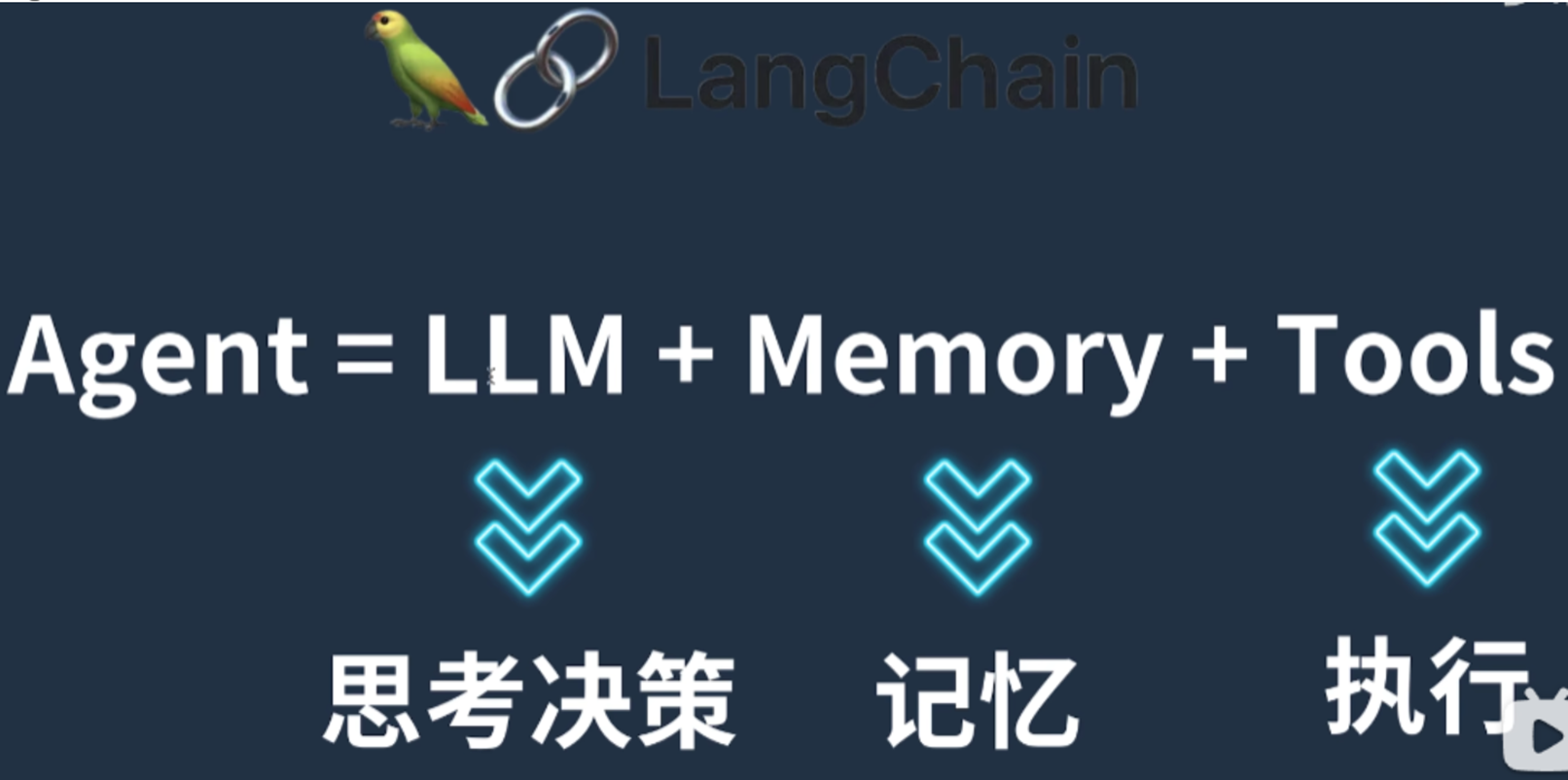
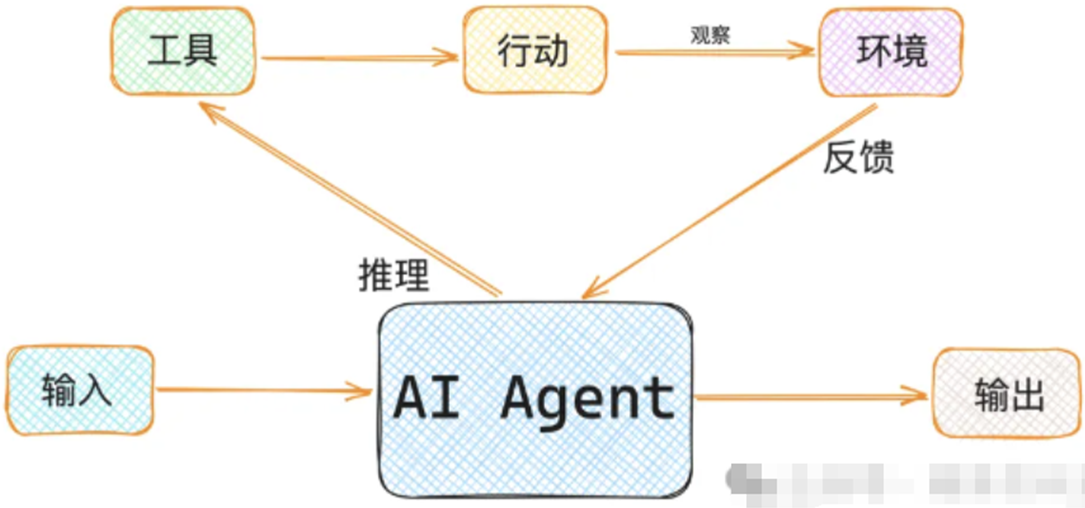
要让AI Agent充分利用它的“大脑”和各种组件,需要一种协调机制。ReAct机制就是常用的协调机制。通过ReAct机制(推理和行动),AI Agent能够结合外部环境和行动组件,完成复杂的任务。
为什么我们需要AI Agent呢?其实说到底是因为单一的模型对我们来说作用不大,我们需要的是一个具备智能的复杂系统。只有复杂系统才能真正的应到到实际生产工作中。
2、工作原理
Agent代理的工作原理可以概括为以下几个步骤:
1、接收用户输入:Agent首先接收用户的输入(问题、请求、指令)。
2、分析并决策:Agent利用语言模型对用户输入进行分析,并根据分析结果决定要采取的操作。
3、调用工具并执行:一旦决定了要采取的操作,Agent就会调用相应的工具来执行该操作。这些工具可以是LangChain提供的内置工具,也可以是开发者自定义的工具。
4、返回结果并更新状态:执行完操作后,Agent将结果返回给用户,并更新其内部状态,以便处理后续的用户输入。
3、langchain内置tools
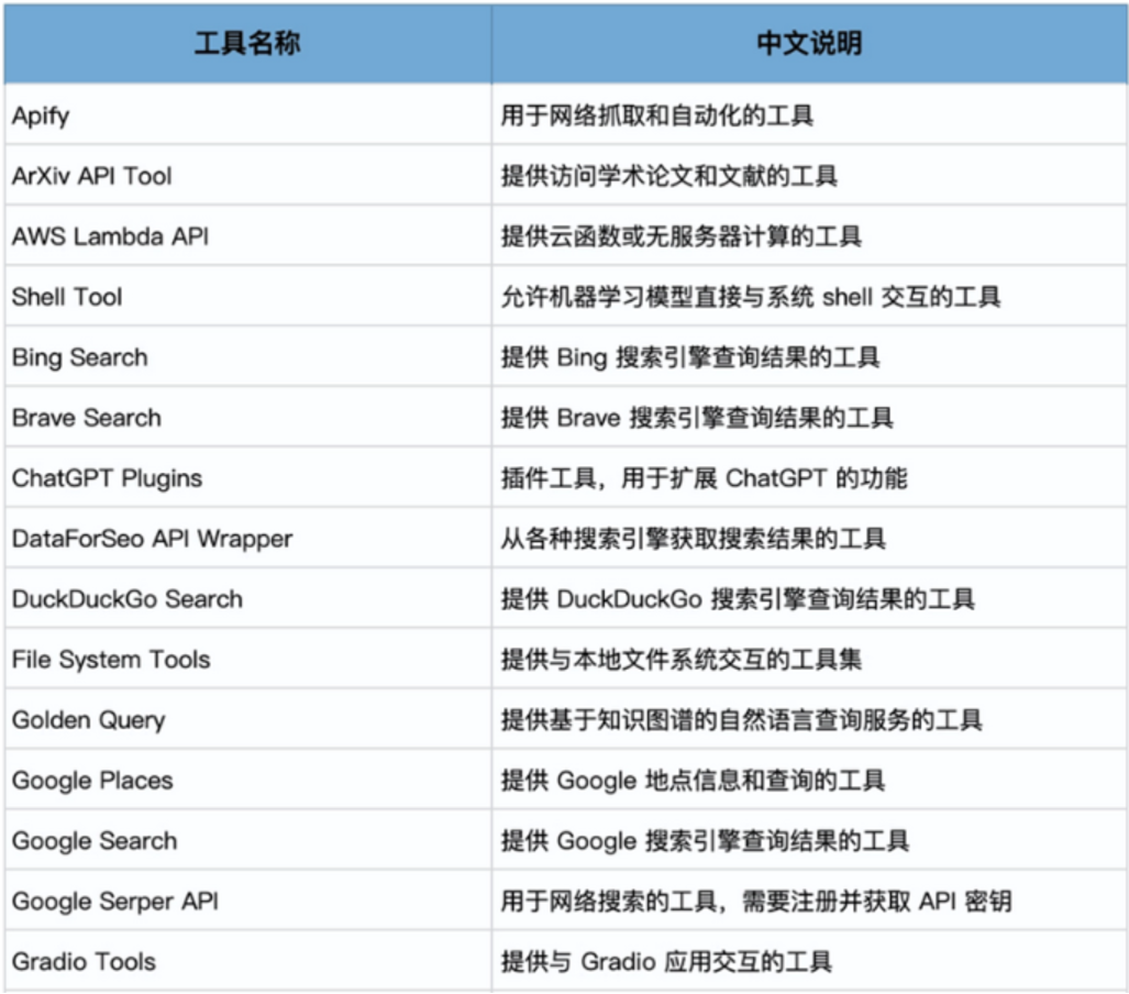
from langchain.agents import get_all_tool_names

tool_names = get_all_tool_names()
for name in tool_names:
    print(name)
4、维基百科插件、serpapi搜索引擎
from langchain_community.tools import WikipediaQueryRun
from langchain_community.utilities import WikipediaAPIWrapper

api = WikipediaAPIWrapper(
    top_k_results=3,
    doc_content_chars_max= 200
)
tool = WikipediaQueryRun(api_wrapper=api)
# print(tool.name)  # wikipedia
# print(tool.args)  # {'query': {'description': 'query to look up on wikipedia', 'title': 'Query', 'type': 'string'}}
# print(tool.description)

# print(api.run("who is trump"))
print(tool.run({"query":"who is trump"}))  # 英文,且需要连外网
# serpapi一个用于获取搜索引擎结果页面 (SERP) 的 API 服务,以编程的方式访问 Google、Bing、Yahoo 等多个搜索引擎的结果
# 获取serpapi api_key 访问 Sign In - SerpApi
#pip install serpapi google-search-results -i Simple Index
import os
from langchain_community.utilities import SerpAPIWrapper

# 进程级别的环境变量设置
os.environ["SERPAPI_API_KEY"] = 'your key'
serach = SerpAPIWrapper()
print(serach.run("介绍一下图灵"))
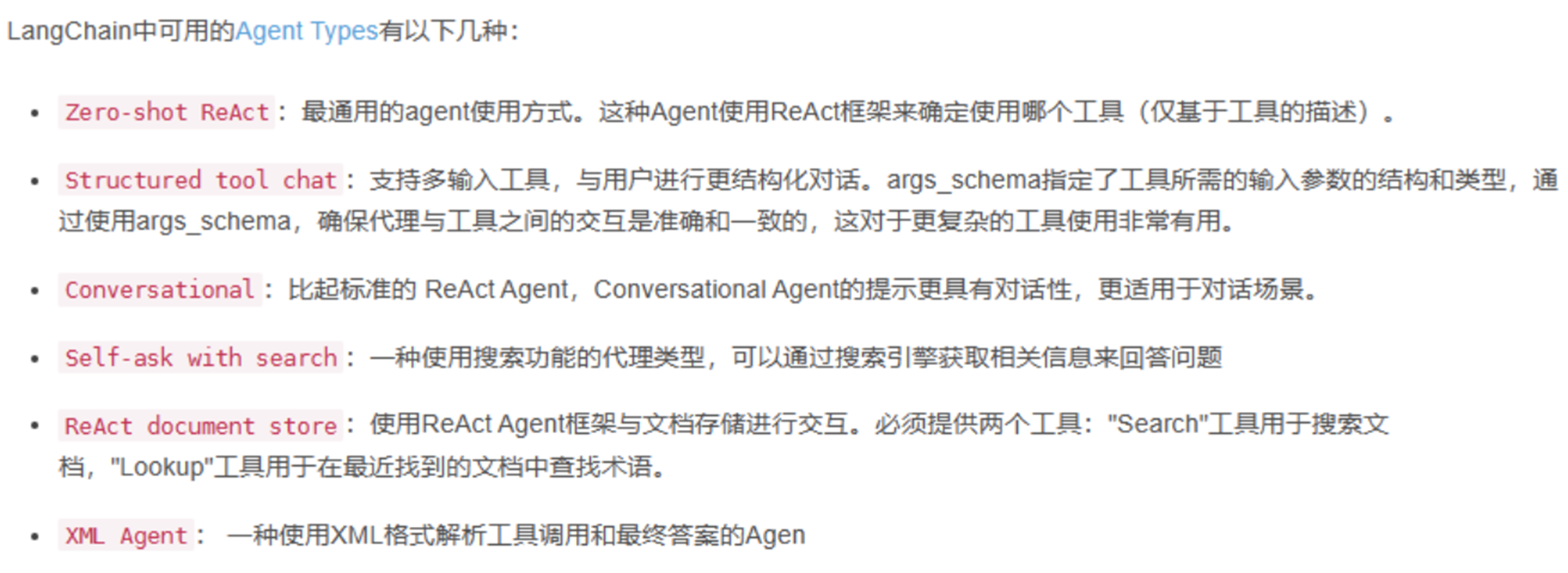
5、Agent Types
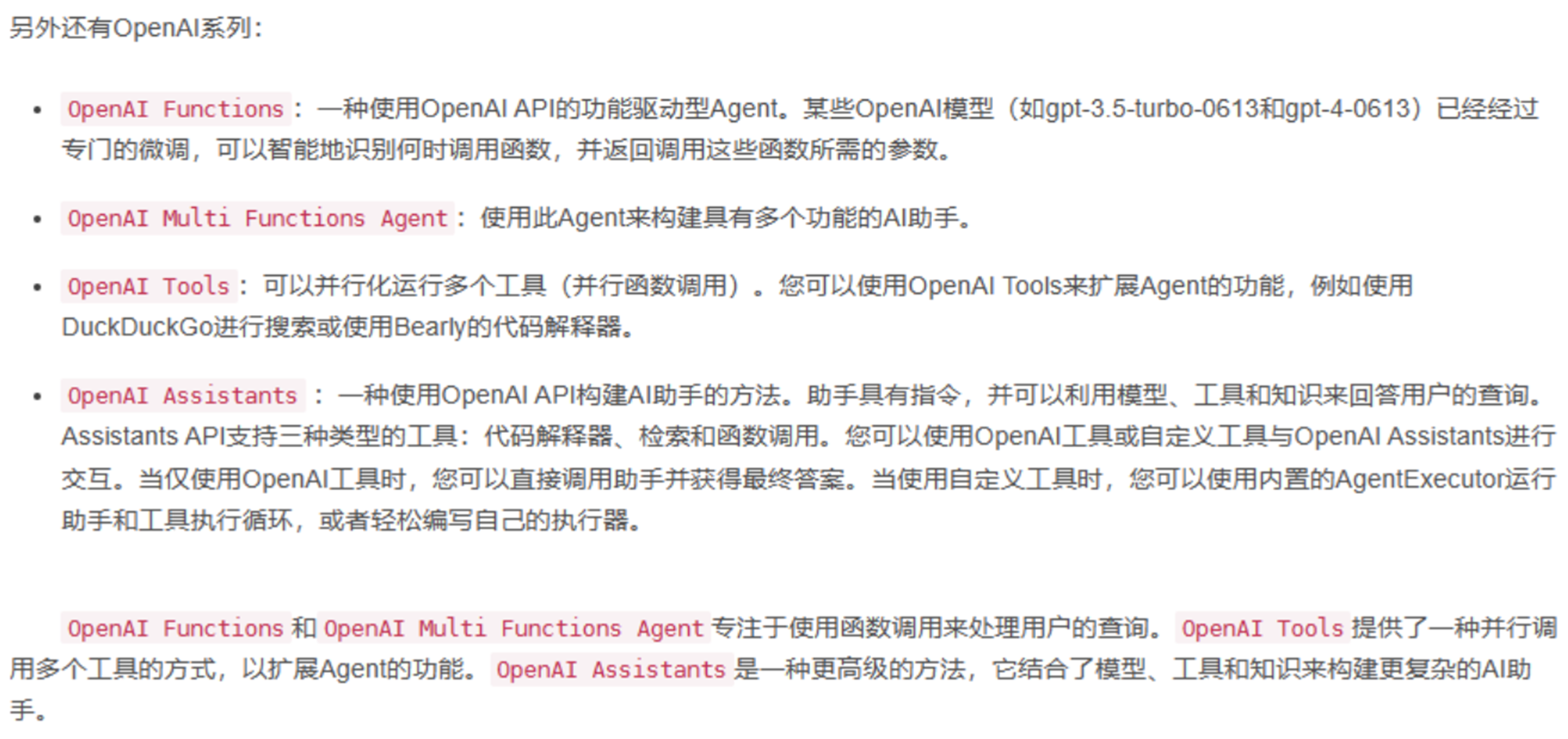
6、创建智能体(思维LLM、记忆Memery、工具Tools)
from langchain_ollama import OllamaLLM
from langchain_community.utilities import WikipediaAPIWrapper
from langchain_community.tools import Tool
from langchain.memory import ConversationBufferMemory
from langchain.agents import initialize_agent, AgentType

# 大模型
llm = OllamaLLM(model="qwen2:7b")
# 维基百科搜索
wikipedia_tool = Tool(
    name="Wikipedia",
    func=WikipediaAPIWrapper(top_k_results=3, doc_content_chars_max=200).run,
    description="A tool to search Wikipedia for information."
)

# 记忆
memory = ConversationBufferMemory(memory_key="chat_history")

# AgentExecutor agent执行器
tools = [wikipedia_tool]
agent = initialize_agent(
    tools,
    llm,
    agent=AgentType.STRUCTURED_CHAT_ZERO_SHOT_REACT_DESCRIPTION,
    memory=memory,
    verbose=True
)
res = agent.invoke("a is equal to 2 to the 8th, b is equal to 3 to the 4th, c is equal to a times b, output the value of c.")
print(res)
res = agent.invoke("What was my last question.")
print(res)
from langchain_community.chat_models import ChatTongyi
from langchain.memory import ConversationBufferMemory
import os
from langchain_community.agent_toolkits.load_tools import load_tools
from langchain.agents import initialize_agent, AgentType
# 在线模型
llm = ChatTongyi(
model="qwen-long",
top_p=0.8, # 文本生成的多样性
temperature=0.2, # 文本生成的随机性
api_key= api_key
)
# 记忆
memory = ConversationBufferMemory(memory_key="chat_history") # 使用 chat_history 作为键名
# 工具(搜索、专家等)
# 进程级别的环境变量
os.environ["SERPAPI_API_KEY"] = ''
tools = load_tools(
tool_names=["serpapi","llm-math"],
llm=llm # 工具
)
# Agent
agent = initialize_agent(
tools=tools,
llm=llm,
agent=AgentType.STRUCTURED_CHAT_ZERO_SHOT_REACT_DESCRIPTION,
# agent=AgentType.CONVERSATIONAL_REACT_DESCRIPTION,
memory=memory,
verbose=True
)
res = agent.invoke("a等于2的8次方,b等于3的4次方,c等于a乘以b,输出c的值。")
print(res)
# 检查记忆
# print("当前记忆内容:", memory.buffer)
res = agent.invoke("我的上一个问题是什么。")
print(res)
7、聊天机器人
from langchain_ollama import OllamaLLM
from langchain_community.chat_models import ChatTongyi
from langchain.memory import ConversationBufferMemory
from langchain_community.tools import Tool
from langchain.agents import initialize_agent,AgentType


# 大模型初始化
# llm = OllamaLLM(model="qwen2:7b")
llm = ChatTongyi(
    model="qwen-long",
    top_p=0.8,  # 文本生成的多样性
    temperature=0.2, # 文本生成的随机性
    api_key='sk-******'
)

# 记忆
memory = ConversationBufferMemory(memory_key="chat_history")

# 工具
def tool_fun():
    return "聊天相应"

Chat_Tool = Tool(
    name="chat_tool",
    func=tool_fun,
    description="A tool for chat."
)
tools = [Chat_Tool]

# Agent(llm memory tools)
agent = initialize_agent(
    tools=tools,
    llm=llm,
    agent=AgentType.CONVERSATIONAL_REACT_DESCRIPTION,
    memory=memory,
    verbose=True
)

# 聊天入口
while True:
    user_input = input("请输入一些文本: ")
    if user_input.lower()=="q":
        print("你结束了聊天")
        print(f"聊天记录:{memory.load_memory_variables({})}")
        break
    res = agent.invoke(user_input)
    print(f"机器人:{res['output']}")
火山引擎开发者社区是火山引擎打造的AI技术生态平台,聚焦Agent与大模型开发,提供豆包系列模型(图像/视频/视觉)、智能分析与会话工具,并配套评测集、动手实验室及行业案例库。社区通过技术沙龙、挑战赛等活动促进开发者成长,新用户可领50万Tokens权益,助力构建智能应用。
更多推荐
 47
47 0
0- 0


 已为社区贡献7条内容

所有评论(0)