

在现代 Web 开发中,实现动态文本渲染的需求日益增多。无论是聊天应用、实时通知,还是交互式界面,打字机风格的文本渲染都能显著提升用户体验。最近新写了一个开源的 NPM 包——Typewriter-SSE,它通过 Server-Sent Events (SSE) 技术实现了流式文本传输和打字机效果渲染。项目代码已开源,可在 GitHub 查看。效果见:
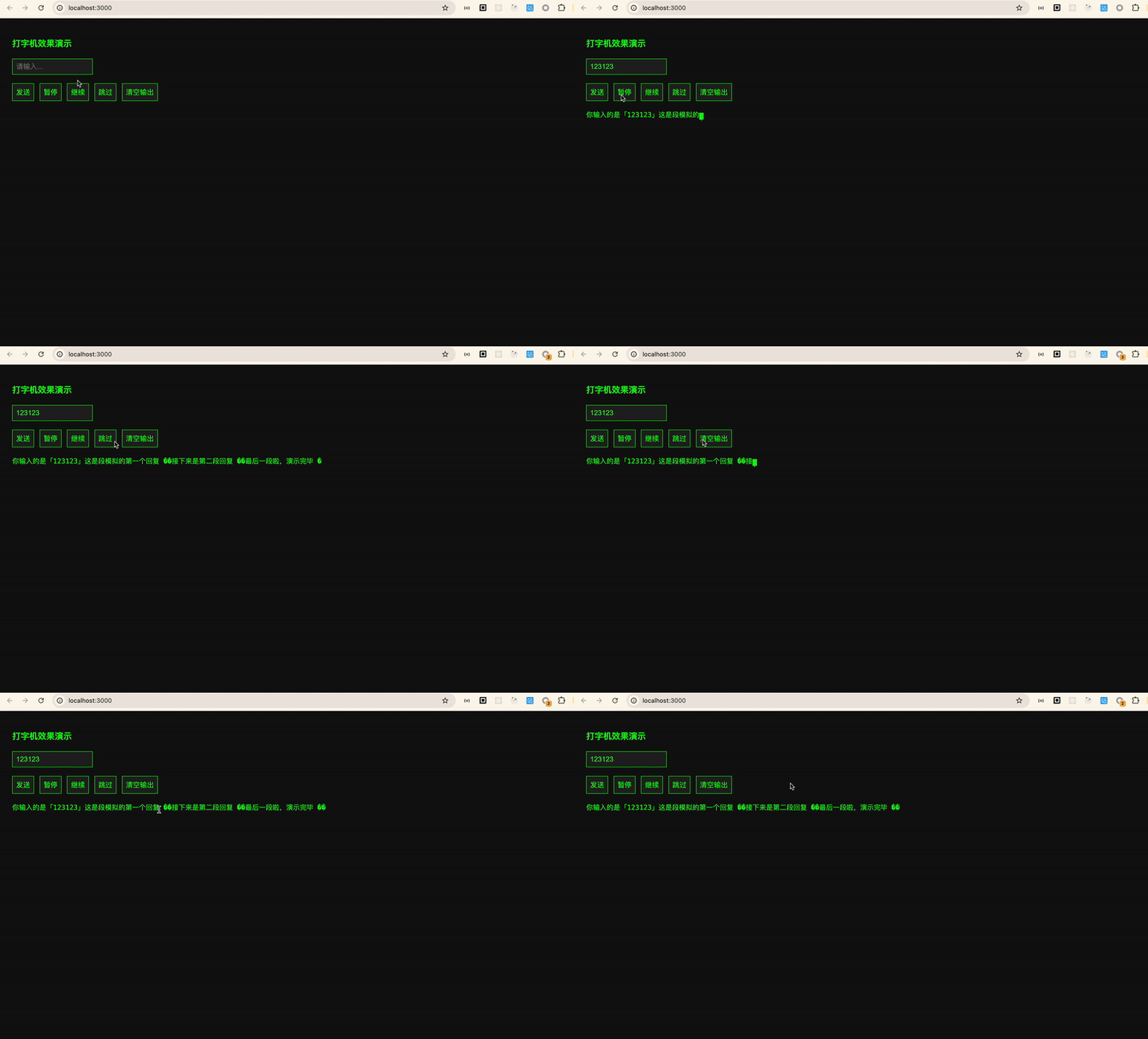
一、SSE 技术简介
Server-Sent Events (SSE) 是一种允许服务器向浏览器单向推送数据的技术。与传统的轮询或 WebSocket 不同,SSE 基于 HTTP 协议,仅支持文本数据传输,且服务器到客户端的连接保持开启状态,直到服务器关闭连接。SSE 的主要特点包括:
-
单向通信:仅支持服务器向客户端推送数据,适合不需要双向通信的场景。
-
轻量级:基于 HTTP 协议,无需额外的 WebSocket 协议支持。
-
自动重连:浏览器会自动处理连接中断后的重连逻辑。
-
简单易用:通过
EventSource接口即可在客户端实现 SSE 的接收。
SSE 的典型应用场景包括实时通知、动态数据更新等,尤其适合需要服务器主动推送数据的场景。
Typewriter-SSE 的实现原理
Typewriter-SSE 结合了 SSE 技术和前端动画,实现了流式文本的打字机效果渲染。其核心逻辑包括:
-
SSE 数据接收:通过
EventSource接口连接到服务器端的 SSE 端点,接收服务器推送的文本数据。 -
逐字渲染:将接收到的文本数据逐字渲染到指定的容器中,通过定时器控制每个字符的渲染速度,模拟打字机效果。
-
光标动画:通过 CSS 动画实现光标的闪烁效果,增强视觉体验。
-
交互控制:提供暂停、恢复、跳过和清空等控制方法,允许用户在渲染过程中进行操作
二、如何安装和使用 Typewriter-SSE?
安装 Typewriter-SSE 非常简单,只需要通过 npm 命令即可完成:
|
1
|
npm install typewriter-sse
|
在项目中使用
|
1
2
3
4
5
6
7
8
9
10
11
12
13
14
|
import TypewriterSSE from 'typewriter-sse' ;
const writer = new TypewriterSSE({
container: '#output' , // 指定文本渲染的容器
endpoint: '/sse?q=hello world' , // SSE 服务端的 URL
cursor: {
blink: true , // 是否让光标闪烁
color: '#0f0' , // 光标颜色
char: '|' // 光标字符
},
onComplete: () => console.log( 'Finished typing!' ) // 文本渲染完成后的回调函数
});
writer.start();
|
三、主要功能和配置选项
1. 打字机效果
Typewriter-SSE 的核心功能是将文本逐字渲染到指定的容器中,模拟打字机的效果。你可以通过
typingSpeed 选项来控制每个字符的延迟时间,从而调整打字的速度。
2. SSE 支持
通过 SSE 技术,Typewriter-SSE 能够动态接收来自服务器的文本数据。这意味着你可以将文本分段发送到客户端,而客户端会逐字渲染这些文本。这种技术特别适合实现聊天机器人、实时通知等场景。
3. 光标自定义
你可以通过
cursor 选项来自定义光标的样式,包括是否闪烁、颜色和字符。这让你可以根据项目的整体风格来调整光标的视觉效果。
4. 事件回调
Typewriter-SSE 提供了多种事件回调函数,例如
onChar(每个字符渲染时触发)和 onComplete(文本渲染完成时触发)。这些回调函数可以帮助你更好地控制文本渲染过程,并在合适的时候执行其他逻辑。
5. 暂停、恢复、跳过和清空
Typewriter-SSE 提供了暂停、恢复、跳过和清空文本的控制方法。你可以通过这些方法来实现更复杂的交互逻辑,例如让用户暂停文本渲染、跳过未渲染的文本或清空已渲染的文本。
四、一个完整的示例
为了让大家更好地理解 Typewriter-SSE 的使用方法,我将展示一个完整的示例。这个示例包括一个简单的服务器端代码和一个客户端页面,用于演示 Typewriter-SSE 的效果。
1. 服务器端代码
这是一个基于 Node.js 的简单服务器代码,它通过 SSE 技术向客户端发送分段的文本数据。
|
1
2
3
4
5
6
7
8
9
10
11
12
13
14
15
16
17
18
19
20
21
22
23
24
25
26
27
28
29
30
31
32
33
34
35
36
37
38
39
40
41
42
43
44
45
|
const express = require( 'express' );
const path = require( 'path' );
const app = express();
const PORT = 3000;
app.use(express. static (path.join(__dirname, 'public' )));
app.get( '/sse' , (req, res) => {
res.setHeader( 'Content-Type' , 'text/event-stream' );
res.setHeader( 'Cache-Control' , 'no-cache' );
res.setHeader( 'Connection' , 'keep-alive' );
const query = req.query.q || "你没有输入任何内容哦~" ;
const paragraphs = [
`你输入的是「${query}」`,
`这是段模拟的第一个回复 🌟`,
`接下来是第二段回复 🚀`,
`最后一段啦,演示完毕 🏁`
];
let pIndex = 0;
let charIndex = 0;
const interval = setInterval(() => {
if (pIndex < paragraphs.length) {
if (charIndex < paragraphs[pIndex].length) {
res.write(`data: ${paragraphs[pIndex][charIndex++]}\n\n`);
} else {
res.write(`data: \n\n`); // 空行分段
pIndex++;
charIndex = 0;
}
} else {
clearInterval(interval);
res.write( 'event: done\n' );
res.write( 'data: end\n\n' );
res.end();
}
}, 50);
});
app.listen(PORT, () => {
console.log(`Server running at http: //localhost:${PORT}`);
});
|
2. 客户端页面
这是一个简单的 HTML 页面,它使用 Typewriter-SSE 来渲染来自服务器的文本数据。
|
1
2
3
4
5
6
7
8
9
10
11
12
13
14
15
16
17
18
19
20
21
22
23
24
25
26
27
28
29
30
31
32
33
34
35
36
37
38
39
40
41
42
43
44
45
46
47
48
49
50
51
52
53
54
55
56
57
58
59
60
61
62
63
64
65
66
67
68
69
70
71
72
73
74
75
76
77
78
79
80
81
82
83
84
85
|
<!DOCTYPE html>
<html lang= "zh" >
<head>
<meta charset= "UTF-8" >
<title>打字机 + SSE + 控制面板</title>
<style>
body {
background: #111;
color: #0f0;
font-family: monospace;
padding: 20px;
}
#output {
white-space: pre-wrap;
font-size: 1.2em;
min-height: 100px;
margin-top: 1em;
}
input[type= "text" ], button {
padding: 8px;
font-size: 1em;
margin: 5px 5px 5px 0;
background: #222;
color: #0f0;
border: 1px solid #0f0;
}
.controls {
margin-top: 10px;
}
</style>
</head>
<body>
<h2>打字机效果演示</h2>
<input type= "text" id= "prompt" placeholder= "请输入..." />
<div class = "controls" >
<button id= "send" >发送</button>
<button id= "pause" >暂停</button>
<button id= "resume" >继续</button>
<button id= "skip" >跳过</button>
<button id= "delete" >清空输出</button>
</div>
<div id= "output" ></div>
<script type= "module" >
import TypewriterSSE from './typewriter-sse.js' ;
let writer = null ;
document.getElementById( 'send' ).addEventListener( 'click' , () => {
const query = document.getElementById( 'prompt' ).value.trim();
if (!query) return alert( '请输入内容' );
if (writer) writer.stop();
const output = document.getElementById( 'output' );
output.textContent = "" ;
writer = new TypewriterSSE({
container: output,
endpoint: '/sse?q=' + encodeURIComponent(query),
cursor: { blink: true , color: '#0f0' , char: '|' },
onComplete: () => console.log( '输入完成' )
});
writer.start();
});
document.getElementById( 'pause' ).addEventListener( 'click' , () => {
if (writer) writer.pause();
});
document.getElementById( 'resume' ).addEventListener( 'click' , () => {
if (writer) writer.resume();
});
document.getElementById( 'skip' ).addEventListener( 'click' , () => {
if (writer) writer.skip();
});
document.getElementById( 'delete' ).addEventListener( 'click' , () => {
if (writer) writer.deleteAll();
});
</script>
</body>
</html>
|
总结
Typewriter-SSE 是一个基于 SSE 技术实现的流式文本渲染库,能够为 Web 应用带来动态的打字机效果。它不仅支持流式文本传输,还提供了丰富的交互控制功能。如果你对 Typewriter-SSE 感兴趣,或者希望了解更多实现细节,欢迎访问 GitHub 仓库。


 已为社区贡献1条内容

所有评论(0)