Qwen3微调 05 Qwen3高效微调实战
04是科学上网。
# Qwen3微调 05 Qwen3高效微调实战
04是科学上网
一、数据集下载
# 设置 HTTP 和 HTTPS 代理
import os
os.environ["HTTP_PROXY"] = "http://127.0.0.1:7890"
os.environ["HTTPS_PROXY"] = "http://127.0.0.1:7890"
from datasets import load_dataset
reasoning_dataset = load_dataset("unsloth/OpenMathReasoning-mini", split = "cot")
non_reasoning_dataset = load_dataset("mlabonne/FineTome-100k", split = "train")
reasoning_dataset是这样的:
Dataset({
features: [‘expected_answer’, ‘problem_type’, ‘problem_source’, ‘generation_model’, ‘pass_rate_72b_tir’, ‘problem’, ‘generated_solution’, ‘inference_mode’],
num_rows: 19252
})
一共19252条数据。
non_reasoning_dataset是这样的:
Dataset({
features: [‘conversations’, ‘source’, ‘score’],
num_rows: 100000
})
一共100000条数据。十万条,不均衡。
二、数据集清洗
1.推理数据集
接下来尝试对上述两个格式各异的数据集进行数据清洗,主要是围绕数据集进行数据格式的调整,便于后续带入Qwen3提示词模板。
对于dataset格式的数据对象来说,可以先创建满足格式调整的函数,然后使用map方法对数据集格式进行调整。
这里先创建generate_conversation函数, 用于对reasoning_dataset中的每一条数据进行格式调整,即通过新创建一个新的特征conversations,来以对话形式保存历史问答数据:
def generate_conversation(examples):
    problems  = examples["problem"]
    solutions = examples["generated_solution"]
    conversations = []
    for problem, solution in zip(problems, solutions):
        conversations.append([
            {"role" : "user",      "content" : problem},
            {"role" : "assistant", "content" : solution},
        ])
    return { "conversations": conversations, }


reasoning_data = reasoning_dataset.map(generate_conversation, batched = True)

reasoning_data["conversations"][0]
使用map函数进行增加
# 接下来将其带入Qwen3的提示词模板中进行转化
reasoning_conversations = tokenizer.apply_chat_template(
    reasoning_data["conversations"],
    tokenize = False,
)
这样,就是有<im_start>等格式的数据集了
2.问答数据集
处理non_reasoning_conversations数据集,由于该数据集采用了sharegpt对话格式,因此可以直接借助Unsloth的standardize_sharegpt库进行数据集的格式转化
from unsloth.chat_templates import standardize_sharegpt
dataset = standardize_sharegpt(non_reasoning_dataset)
dataset["conversations"][0]
non_reasoning_conversations = tokenizer.apply_chat_template(
    dataset["conversations"],
    tokenize = False,
)
3.数据集抽样
推理数据集与问答数据集比例为4:1
chat_percentage = 0.75

import pandas as pd
non_reasoning_subset = pd.Series(non_reasoning_conversations)
non_reasoning_subset = non_reasoning_subset.sample(
    int(len(reasoning_conversations) * (1.0 - chat_percentage)),
    random_state = 2407,
)

data = pd.concat([
    pd.Series(reasoning_conversations),
    pd.Series(non_reasoning_subset)
])
data.name = "text"

from datasets import Dataset
combined_dataset = Dataset.from_pandas(pd.DataFrame(data))
combined_dataset = combined_dataset.shuffle(seed = 3407)

combined_dataset.save_to_disk("cleaned_qwen3_dataset")
后续想使用,可以按如下读取:
from datasets import load_from_disk
combined_dataset = load_from_disk("cleaned_qwen3_dataset")
三、Unsloth微调流程实践
需要注册wandb 17101
1.LoRA参数注入
代码如下(示例):
model = FastLanguageModel.get_peft_model(
    model,
    r = 32,           # Choose any number > 0! Suggested 8, 16, 32, 64, 128
    target_modules = ["q_proj", "k_proj", "v_proj", "o_proj",
                      "gate_proj", "up_proj", "down_proj",],
    lora_alpha = 32,  # Best to choose alpha = rank or rank*2
    lora_dropout = 0, # Supports any, but = 0 is optimized
    bias = "none",    # Supports any, but = "none" is optimized
    # [NEW] "unsloth" uses 30% less VRAM, fits 2x larger batch sizes!
    use_gradient_checkpointing = "unsloth", # True or "unsloth" for very long context
    random_state = 3407,
    use_rslora = False,   # We support rank stabilized LoRA
    loftq_config = None,  # And LoftQ
)
2.设置微调参数
from trl import SFTTrainer, SFTConfig
trainer = SFTTrainer(
    model = model,
    tokenizer = tokenizer,
    train_dataset = combined_dataset,
    eval_dataset = None, # Can set up evaluation!
    args = SFTConfig(
        dataset_text_field = "text",
        per_device_train_batch_size = 2,
        gradient_accumulation_steps = 4, # Use GA to mimic batch size!
        warmup_steps = 5,
        # num_train_epochs = 1, # Set this for 1 full training run.
        max_steps = 10,
        learning_rate = 2e-4, # Reduce to 2e-5 for long training runs
        logging_steps = 1,
        optim = "adamw_8bit",
        weight_decay = 0.01,
        lr_scheduler_type = "linear",
        seed = 3407,
        report_to = "wandb", # Use this for WandB etc
    ),
)
查看显存使用
# @title Show current memory stats
gpu_stats = torch.cuda.get_device_properties(0)
start_gpu_memory = round(torch.cuda.max_memory_reserved() / 1024 / 1024 / 1024, 3)
max_memory = round(gpu_stats.total_memory / 1024 / 1024 / 1024, 3)
print(f"GPU = {gpu_stats.name}. Max memory = {max_memory} GB.")
print(f"{start_gpu_memory} GB of memory reserved.")
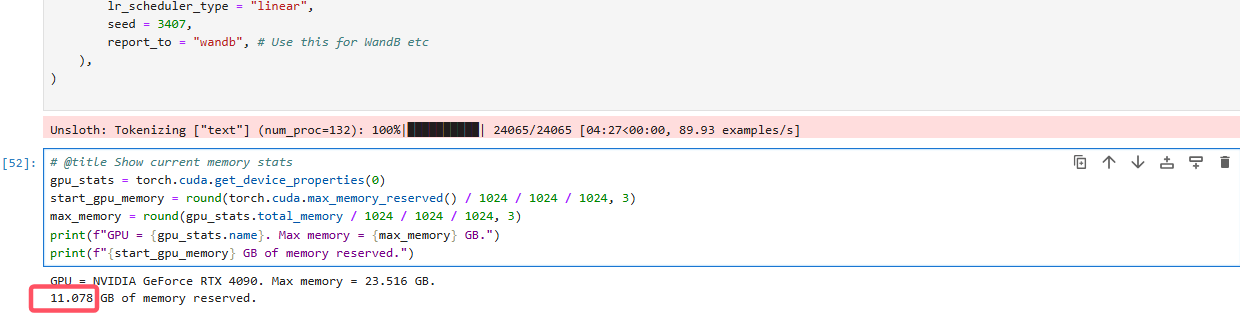
可见,微调14B的4bit动态量化模型,需要12GB显存。
3.设置wandb
import wandb
os.environ["WANDB_NOTEBOOK_NAME"] = "Qwen3高效微调(下).ipynb"
wandb.login(key="4a99a5efe82e45255295eff636b861df9dc171XX") #自己的秘钥
4.小规模微调执行和保存
trainer_stats = trainer.train()
保存:
model.save pretrained("lora model")# Local saving
tokenizer.save pretrained("lora model")
对话测试
messages = [
    {"role" : "user", "content" : "Solve (x + 2)^2 = 0."}
]
text = tokenizer.apply_chat_template(
    messages,
    tokenize = False,
    add_generation_prompt = True, # Must add for generation
    enable_thinking = False, # Disable thinking
)

from transformers import TextStreamer
_ = model.generate(
    **tokenizer(text, return_tensors = "pt").to("cuda"),
    max_new_tokens = 256, # Increase for longer outputs!
    temperature = 0.7, top_p = 0.8, top_k = 20, # For non thinking
    streamer = TextStreamer(tokenizer, skip_prompt = True),
)
messages = [
    {"role" : "user", "content" : "Solve (x + 2)^2 = 0."}
]
text = tokenizer.apply_chat_template(
    messages,
    tokenize = False,
    add_generation_prompt = True, # Must add for generation
    enable_thinking = True, # Disable thinking
)

from transformers import TextStreamer
_ = model.generate(
    **tokenizer(text, return_tensors = "pt").to("cuda"),
    max_new_tokens = 20488, # Increase for longer outputs!
    temperature = 0.6, top_p = 0.95, top_k = 20, # For thinking
    streamer = TextStreamer(tokenizer, skip_prompt = True),
)
四、模型大规模微调
接下来模型大规模微调
#接下来继续深入进行训练,此处考虑训练完一整个epoch,总共约40小时左右,训练流程如下所示:
from trl import SFTTrainer, SFTConfig
trainer = SFTTrainer(
    model = model,
    tokenizer = tokenizer,
    train_dataset = combined_dataset,
    eval_dataset = None, # Can set up evaluation!
    args = SFTConfig(
        dataset_text_field = "text",
        per_device_train_batch_size = 4,
        gradient_accumulation_steps = 2, # Use GA to mimic batch size!
        warmup_steps = 5,
        num_train_epochs = 1, # Set this for 1 full training run.
        learning_rate = 2e-4, # Reduce to 2e-5 for long training runs
        logging_steps = 1,
        optim = "adamw_8bit",
        weight_decay = 0.01,
        lr_scheduler_type = "linear",
        seed = 3407,
        report_to = "none", # Use this for WandB etc
    ),
)
trainer_stats = trainer.train()
微调结束后,进行具体效果展示
# 此时训练完成后再进行对话,能明显看出模型当前数学性能有所提升,具体问答效果如下:
messages = [
    {"role" : "user", "content" : "Determine the surface area of the portion of the plane $2x + 3y + 6z = 9$ that lies in the first octant."}
]
text = tokenizer.apply_chat_template(
    messages,
    tokenize = False,
    add_generation_prompt = True, # Must add for generation
    enable_thinking = True, # Disable thinking
)

from transformers import TextStreamer
_ = model.generate(
    **tokenizer(text, return_tensors = "pt").to("cuda"),
    max_new_tokens = 20488, # Increase for longer outputs!
    temperature = 0.6, top_p = 0.95, top_k = 20, # For thinking
    streamer = TextStreamer(tokenizer, skip_prompt = True),
)
后续可以使用evalscope进行评测。开启vllm服务。
from evalscope import TaskConfig, run_task
task_cfg = TaskConfig(
    model='lora_model',
    api_url='http://127.0.0.1:8000/v1/chat/completions',
    eval_type='openai_api',
    datasets=[
        'data_collection',
    ],
    dataset_args={
        'data_collection': {
            'dataset_id': 'evalscope/Qwen3-Test-Collection',
            'subset_name': 'default',  # 指定子集名称
            'split': 'test',  # 指定拆分
            'filters': {'remove_until': '</think>'}  # 过滤掉思考的内容
        }
    },
    eval_batch_size=128,
    generation_config={
        'max_tokens': 30000,  # 最大生成token数,建议设置为较大值避免输出截断
        'temperature': 0.6,  # 采样温度 (qwen 报告推荐值)
        'top_p': 0.95,  # top-p采样 (qwen 报告推荐值)
        'top_k': 20,  # top-k采样 (qwen 报告推荐值)
        'n': 1,  # 每个请求产生的回复数量
    },
    timeout=60000,  # 超时时间
    stream=True,  # 是否使用流式输出
    limit=2000,  # 设置为2000条数据进行测试
)
run_task(task_cfg=task_cfg)
使用evalscope app开启前端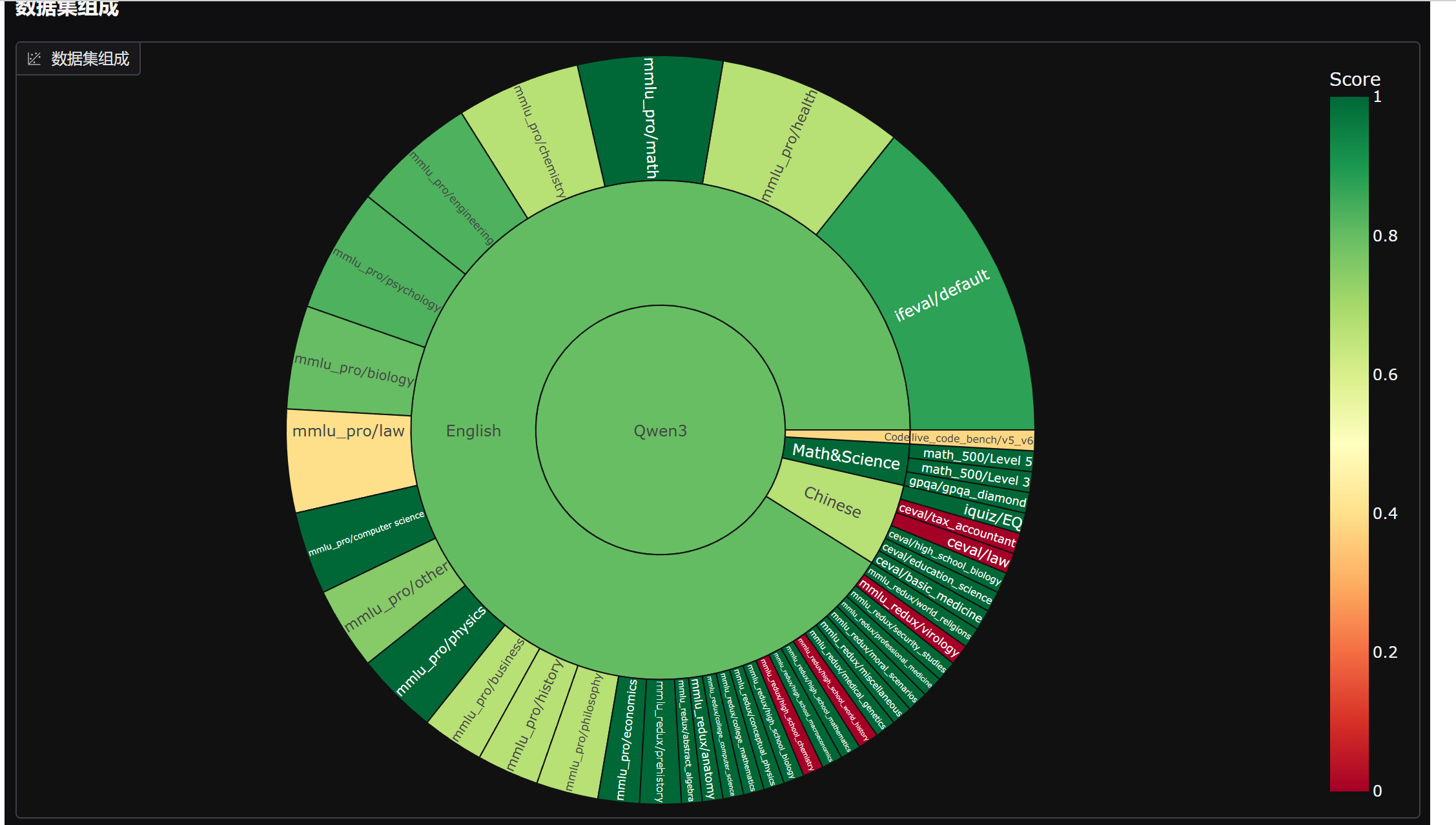
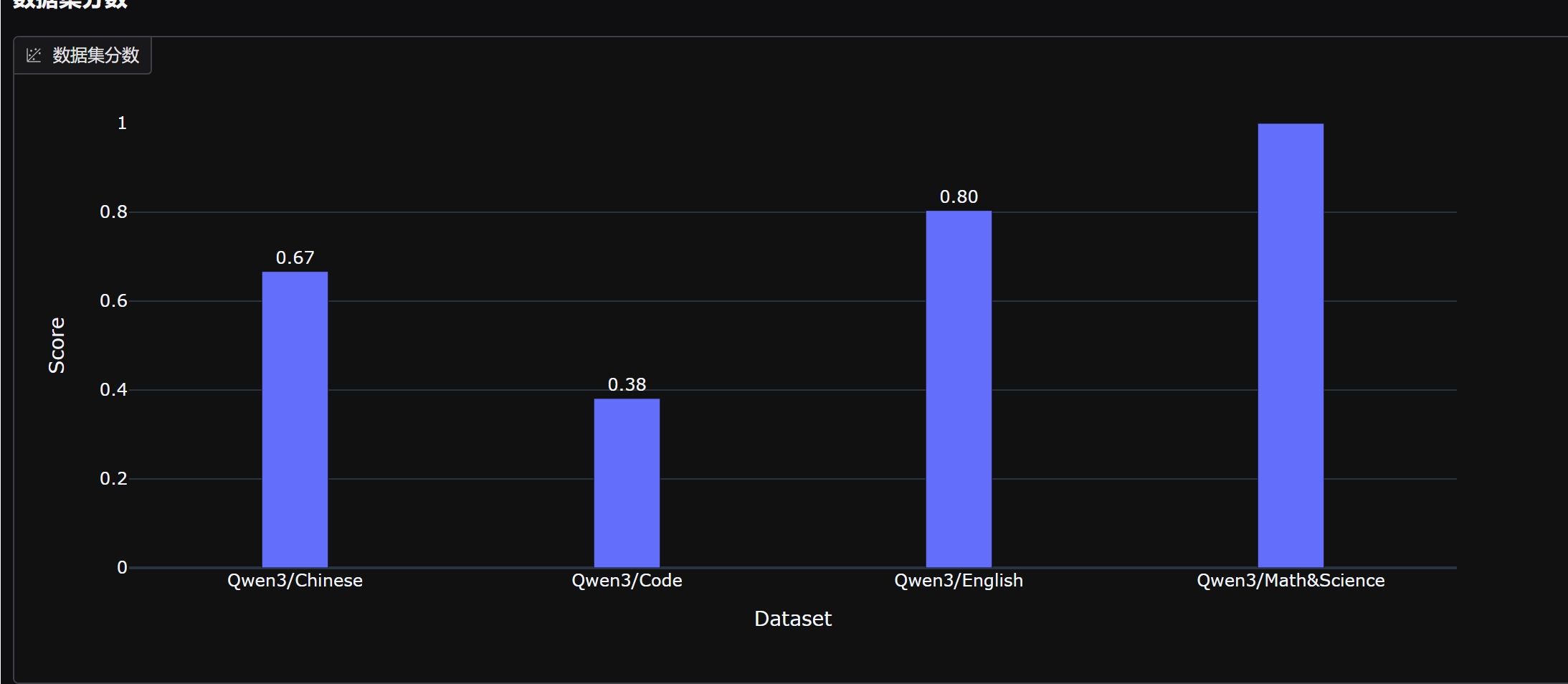
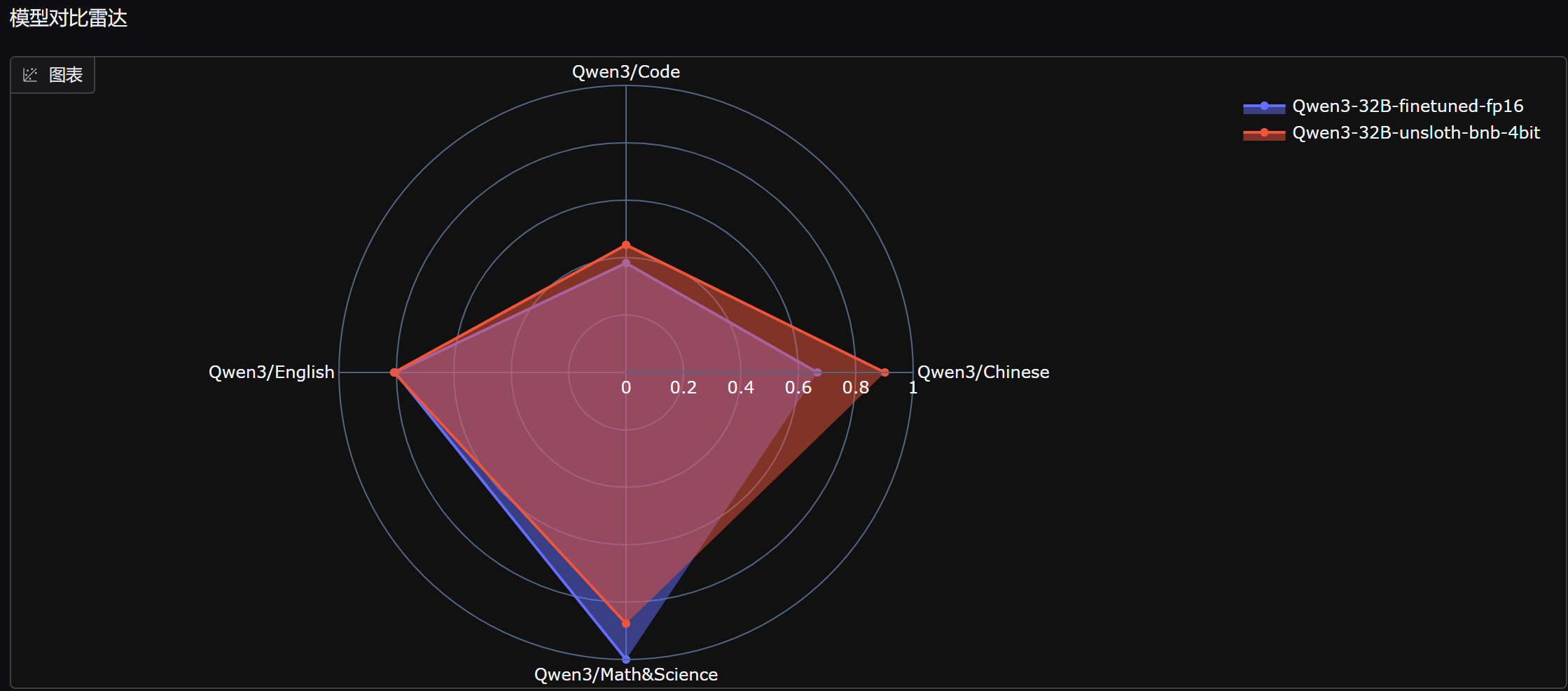
能够发现,微调后模型数学能力明显提升,但中文能力和代码能力略有下降。

火山引擎开发者社区是火山引擎打造的AI技术生态平台,聚焦Agent与大模型开发,提供豆包系列模型(图像/视频/视觉)、智能分析与会话工具,并配套评测集、动手实验室及行业案例库。社区通过技术沙龙、挑战赛等活动促进开发者成长,新用户可领50万Tokens权益,助力构建智能应用。
更多推荐
 12
12 0
0- 0


 已为社区贡献3条内容

所有评论(0)