Android开发事件总线EventBus
EventBus
EventBus是一款针对Android优化的发布-订阅事件总线。它简化了应用程序内各组件间、组件与后台线 程间的通信。其核心优点是将发送者和接收者解耦。开发中Fragment和Fragment的通信常规需要以一个Activity作为中转,耦合度极高。现代开发中有很多技术用来解决这些问题,EventBus就是其中出色的一种。
EventBus的使用
在讲到 EventBus 的基本用法之前,我们需要了解 EventBus 的三要素以及它的 4 种ThreadMode。
EventBus的三要素如下。
Event:事件。可以是任意类型的对象。Subscriber:事件订阅者。在 EventBus 3.0 之前消息处理的方法只能限定于onEvent、onEventMainThread、onEventBackgroundThread和onEventAsync,它们分别代表4种线程模型。而在EventBus 3.0之后,事件处理的方法可以随便取名,但是需要添加一个注解@Subscribe,并且要指定线程模型(默认 为POSTING)。4种线程模型下面会讲到。Publisher:事件发布者。可以在任意线程任意位置发送事件, 直接调用EventBus的post(Object)方法。可以自己实例化EventBus对象,但一般使用EventBus.getDefault()就可以。根据post函数参数的类型,会自动调用订阅相应类型事件的函数。
EventBus的4种ThreadMode(线程模型)如下。
POSTING(默认):如果使用事件处理函数指定了线程模型为POSTING,那么该事件是在哪个线程发布出来的,事件处理函数就会在哪个线程中运行,也就是说发布事件和接收事件在同一个线程中。在线程模型为POSTING的事件处理函数中尽量避免执行耗时操作,因为它会阻塞事件的传递,甚至有可能会引 起ANR。MAIN:事件的处理会在UI线程中执行。事件处理的时间不能太长,长了会导致ANR。BACKGROUND:如果事件是在UI线程中发布出来的,那么该事件处理函数就会在新的线程中运行; 如果事件本来就是在子线程中发布出来的,那么该事件处理函数直接在发布事件的线程中执行。在此事件处理函数中禁止进行UI更新操作。ASYNC:无论事件在哪个线程中发布,该事件处理函数都会在新建的子线程中执行;同样,此事件 处理函数中禁止进行UI更新操作。
EventBus使用起来分为以下5个步骤。
(1)自定义一个事件类
public class MessageEvent() {
	...
}
(2)在需要订阅事件的地方注册事件 EventBus.getDefault().register(this);
(3)发送事件 EventBus.getDefault().post(messageEvent);
(4)处理事件 前面说过,消息处理的方法可以随便取名,但是需要添加一个注解@Subscribe,并且要指定线程模型 (默认为POSTING)。
(5)取消事件订阅 EventBus.getDefault().unregister(this);
示例
data class MessageEvent(var message: String)
首先,简单定义一个事件类,接着在下面的活动中进行注册EventBus,处理消息的方法我们命名为onMessageEvent,要记得在上面加@Subscribe注解,该方法我们无需手动调用。该活动对应的xml布局就是两个TextView。最后一定不要忘记取消事件订阅,否则会造成内存泄漏。
class MainActivity : AppCompatActivity() {
    override fun onCreate(savedInstanceState: Bundle?) {
        super.onCreate(savedInstanceState)
        enableEdgeToEdge()
        setContentView(R.layout.activity_main)

        EventBus.getDefault().register(this)
        val tv1 = findViewById<TextView>(R.id.tv1)
        val tv2 = findViewById<TextView>(R.id.tv2)

        tv2.setOnClickListener {
            val intent = android.content.Intent(this, SecondaryActivity::class.java)
            startActivity(intent)
        }
    }

    @Subscribe(threadMode = ThreadMode.POSTING)
    fun onMessageEvent(event: MessageEvent) {
        val tv1 = findViewById<TextView>(R.id.tv1)
        tv1.text = event.message
    }

    override fun onDestroy() {
        super.onDestroy()
        EventBus.getDefault().unregister(this)
    }
}
接着在另一个活动中发布事件,这里简单传过去一个字符串,并在点击事件中finish结束该活动回到上一个活动。
class SecondaryActivity : AppCompatActivity() {
    override fun onCreate(savedInstanceState: Bundle?) {
        super.onCreate(savedInstanceState)
        enableEdgeToEdge()
        setContentView(R.layout.activity_secondary)

        val tv_text = findViewById<android.widget.TextView>(R.id.textView)
        tv_text.setOnClickListener {
            EventBus.getDefault().post(MessageEvent("来自 SecondaryActivity 的消息"))
            finish()
        }
    }
}
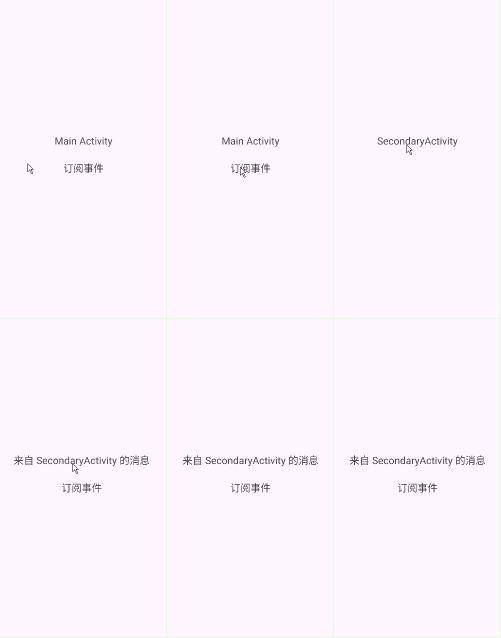
最终达到这样的效果
EventBus的黏性事件
EventBus的黏性事件就是在发送事件之后再订阅该事件也能收到该事件,这跟黏性广播类似。为了验证黏性事件,我们修改以前的代码,MainActivity中在tv1点击后再进行注册,同时我们在订阅注解中加上sticky = true
class MainActivity : AppCompatActivity() {
    override fun onCreate(savedInstanceState: Bundle?) {
        super.onCreate(savedInstanceState)
        enableEdgeToEdge()
        setContentView(R.layout.activity_main)

        val tv1 = findViewById<TextView>(R.id.tv1)
        val tv2 = findViewById<TextView>(R.id.tv2)
        tv1.setOnClickListener {
            EventBus.getDefault().register(this)
        }
        tv2.setOnClickListener {
            val intent = android.content.Intent(this, SecondaryActivity::class.java)
            startActivity(intent)
        }
    }

    @Subscribe(threadMode = ThreadMode.POSTING, sticky = true)
    fun onMessageEvent(event: MessageEvent) {
        val tv1 = findViewById<TextView>(R.id.tv1)
        tv1.text = event.message
    }

    override fun onDestroy() {
        super.onDestroy()
        EventBus.getDefault().unregister(this)
    }
}
SecondaryActivity中的post方法改为postSticky即可
class SecondaryActivity : AppCompatActivity() {
    override fun onCreate(savedInstanceState: Bundle?) {
        super.onCreate(savedInstanceState)
        enableEdgeToEdge()
        setContentView(R.layout.activity_secondary)

        val tv_text = findViewById<android.widget.TextView>(R.id.textView)
        tv_text.setOnClickListener {
            EventBus.getDefault().postSticky(MessageEvent("来自 SecondaryActivity 的消息"))
            finish()
        }
    }
}
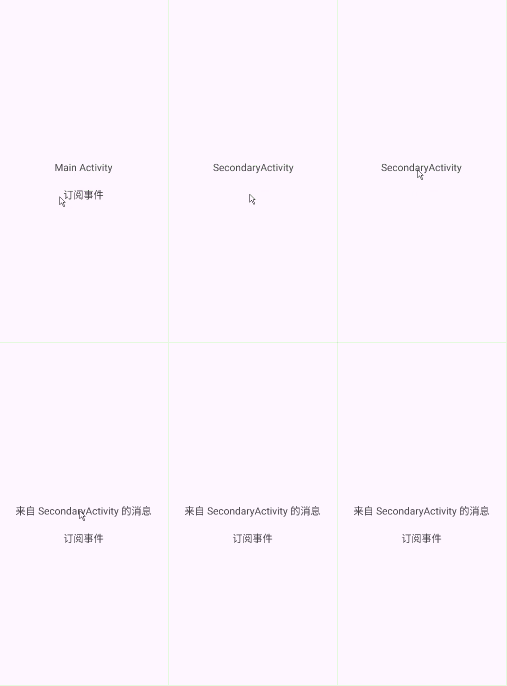
EventBus的源码分析
上面简单讲了一下EventBus的用法,下面来具体看一下EventBus的源码
EventBus的构造方法
我们上面通过EventBus.getDefault()来获取EventBus实例,对应的源码如下
    public static EventBus getDefault() {
        EventBus instance = defaultInstance;
        if (instance == null) {
            synchronized (EventBus.class) {
                instance = EventBus.defaultInstance;
                if (instance == null) {
                    instance = EventBus.defaultInstance = new EventBus();
                }
            }
        }
        return instance;
    }
这里用了DLC双重检查机制检查有无实例存在,有的话返回,没有就调用 new EventBus();创建,顺藤摸瓜看 new EventBus();是如何创建的
    public EventBus() {
        this(DEFAULT_BUILDER);
    }
常量DEFAULT_BUILDER在源码中也是一个构造private static final EventBusBuilder DEFAULT_BUILDER = new EventBusBuilder();this调用了EventBus的另一个构造方法,看一下该构造的源码
    EventBus(EventBusBuilder builder) {
        logger = builder.getLogger();
        subscriptionsByEventType = new HashMap<>();
        typesBySubscriber = new HashMap<>();
        stickyEvents = new ConcurrentHashMap<>();
        mainThreadSupport = builder.getMainThreadSupport();
        mainThreadPoster = mainThreadSupport != null ? mainThreadSupport.createPoster(this) : null;
        backgroundPoster = new BackgroundPoster(this);
        asyncPoster = new AsyncPoster(this);
        indexCount = builder.subscriberInfoIndexes != null ? builder.subscriberInfoIndexes.size() : 0;
        subscriberMethodFinder = new SubscriberMethodFinder(builder.subscriberInfoIndexes,
                builder.strictMethodVerification, builder.ignoreGeneratedIndex);
        logSubscriberExceptions = builder.logSubscriberExceptions;
        logNoSubscriberMessages = builder.logNoSubscriberMessages;
        sendSubscriberExceptionEvent = builder.sendSubscriberExceptionEvent;
        sendNoSubscriberEvent = builder.sendNoSubscriberEvent;
        throwSubscriberException = builder.throwSubscriberException;
        eventInheritance = builder.eventInheritance;
        executorService = builder.executorService;
    }
代码开头初始化了三个核心的 Map 数据结构,它们是 EventBus 能够高效管理事件和订阅者的基础。
-
subscriptionsByEventType(HashMap):这是 最重要 的映射表。它的 Key 是事件类型(例如MyEvent.class),Value 是订阅了该事件类型的所有Subscription(订阅信息,包含订阅者对象和订阅方法)的列表(CopyOnWriteArrayList<Subscription>)。当调用post(event)时,EventBus 就是通过这个表快速找到所有需要通知的订阅方法。 -
typesBySubscriber(HashMap):这个表的 Key 是订阅者对象(例如一个 Activity 实例),Value 是该订阅者所订阅的所有事件类型的集合(List<Class<?>>,具体指的你定义的、作为 @Subscribe注解方法参数的那个类的 Class 对象,因为一个订阅者可能关心多种事件)。它主要用于在取消注册(unregister)时,能快速找到该订阅者关心的所有事件,并从subscriptionsByEventType中清理掉对应的订阅信息。 -
stickyEvents(ConcurrentHashMap):用于存储粘性事件。它的 Key 是事件类型,Value 是最后一次发布的该类型的事件对象。粘性事件的特点是,后订阅的订阅者也能收到在它订阅之前发布的最新事件。
接下来代码初始化了三个关键的 Poster (线程调度器)对象,它们负责在不同线程模式下执行事件的分发。mainThreadPoster、backgroundPoster、asyncPoster,这分别对应3种线程模式,而Posting因为直接在发布事件的线程调用,不进行线程切换,因此无需特定调度器。
接下来的subscriberMethodFinder这个组件是 EventBus 的“扫描仪”。在调用 register(this)时,它负责通过反射(或更高效的编译时生成的索引)扫描订阅者类(如 Activity),找出所有被 @Subscribe注解的公开方法,并缓存起来。这避免了每次注册时都进行耗时的反射操作。
后面的代码是从 EventBusBuilder中获取的各种配置参数就不深入讲了。
因此我们可以通过构造一个EventBusBuilder来对EventBus进行配置,这里采用了建造者模式。
订阅者注册
获取EventBus后,便可以将订阅者注册到EventBus中。下面来看一下register方法。
    public void register(Object subscriber) {
        if (AndroidDependenciesDetector.isAndroidSDKAvailable() && !AndroidDependenciesDetector.areAndroidComponentsAvailable()) {
            // Crash if the user (developer) has not imported the Android compatibility library.
            throw new RuntimeException("It looks like you are using EventBus on Android, " +
                    "make sure to add the \"eventbus\" Android library to your dependencies.");
        }

        Class<?> subscriberClass = subscriber.getClass();
        List<SubscriberMethod> subscriberMethods = subscriberMethodFinder.findSubscriberMethods(subscriberClass);
        synchronized (this) {
            for (SubscriberMethod subscriberMethod : subscriberMethods) {
                subscribe(subscriber, subscriberMethod);
            }
        }
    }
findSubscriberMethods方法找出一个SubscriberMethod的集合,也就是传进来的订阅者的所有订阅方法,接下来遍历订阅者的订阅方法来完成订阅者的注册操作。可以看出register方法做了两 件事:一件事是查找订阅者的订阅方法findSubscriberMethods,另一件事是订阅者的注册 subscribe(subscriber, subscriberMethod);。在SubscriberMethod类中,主要用来保 存订阅方法的Method对象、线程模式、事件类型、优先级、是否是黏性事件等属性。
下面来查看 findSubscriberMethods方法
    List<SubscriberMethod> findSubscriberMethods(Class<?> subscriberClass) {
        List<SubscriberMethod> subscriberMethods = METHOD_CACHE.get(subscriberClass);
        if (subscriberMethods != null) {
            return subscriberMethods;
        }

        if (ignoreGeneratedIndex) {
            subscriberMethods = findUsingReflection(subscriberClass);
        } else {
            subscriberMethods = findUsingInfo(subscriberClass);
        }
        if (subscriberMethods.isEmpty()) {
            throw new EventBusException("Subscriber " + subscriberClass
                    + " and its super classes have no public methods with the @Subscribe annotation");
        } else {
            METHOD_CACHE.put(subscriberClass, subscriberMethods);
            return subscriberMethods;
        }
    }
代码METHOD_CACHE.get(subscriberClass)从缓存中查找是否有订阅方法的集合,如果找到了就立马返回。如果缓存中没有,则根据 ignoreGeneratedIndex属性的值来选择采用何种方法来查找订阅方法的集合。ignoreGeneratedIndex 属性表示是否忽略注解器生成的 MyEventBusIndex,默认是false,表示尝试使用索引。也就是默认使用findUsingInfo(subscriberClass);用索引信息进行查询(但是没有主动配置索引的情况下,这种尝试会失败,并自动回退到反射方式),否则调用findUsingReflection(subscriberClass)强制使用运行时反射来查找订阅方法。如何生成MyEventBusIndex 类以及它的使用,可以参考官方文档。
我们在项目中经常通过EventBus单例模式来获取默认的EventBus对 象,也就是ignoreGeneratedIndex为false的情况,这种情况调用了findUsingInfo方法
    private List<SubscriberMethod> findUsingInfo(Class<?> subscriberClass) {
        FindState findState = prepareFindState();
        findState.initForSubscriber(subscriberClass);
        while (findState.clazz != null) {
            findState.subscriberInfo = getSubscriberInfo(findState);
            if (findState.subscriberInfo != null) {
                SubscriberMethod[] array = findState.subscriberInfo.getSubscriberMethods();
                for (SubscriberMethod subscriberMethod : array) {
                    if (findState.checkAdd(subscriberMethod.method, subscriberMethod.eventType)) {
                        findState.subscriberMethods.add(subscriberMethod);
                    }
                }
            } else {
                findUsingReflectionInSingleClass(findState);
            }
            findState.moveToSuperclass();
        }
        return getMethodsAndRelease(findState);
    }
上面代码通过 getSubscriberInfo 方法来获取订阅者信息。在我们开始查找订阅方法的时候并没 有忽略注解器为我们生成的索引 MyEventBusIndex。如果我们通过EventBusBuilder配置了 MyEventBusIndex,便会获取subscriberInfo。
下面再调用subscriberInfo的getSubscriberMethods方法便可以得 到订阅方法相关的信息。如果没有配置MyEventBusIndex,便会执行findUsingReflectionInSingleClass方法,将订阅方法保存到findState中。
最后再通过getMethodsAndRelease方 法对findState做回收处理并返回订阅方法的List集合。默认情况下是没有配置MyEventBusIndex的,因此现在查看一下findUsing-ReflectionInSingleClass方法的执行过程.
    private void findUsingReflectionInSingleClass(FindState findState) {
        Method[] methods;
        try {
            // This is faster than getMethods, especially when subscribers are fat classes like Activities
            methods = findState.clazz.getDeclaredMethods();
        } catch (Throwable th) {
            // Workaround for java.lang.NoClassDefFoundError, see https://github.com/greenrobot/EventBus/issues/149
            try {
                methods = findState.clazz.getMethods();
            } catch (LinkageError error) { // super class of NoClassDefFoundError to be a bit more broad...
                String msg = "Could not inspect methods of " + findState.clazz.getName();
                if (ignoreGeneratedIndex) {
                    msg += ". Please consider using EventBus annotation processor to avoid reflection.";
                } else {
                    msg += ". Please make this class visible to EventBus annotation processor to avoid reflection.";
                }
                throw new EventBusException(msg, error);
            }
            findState.skipSuperClasses = true;
        }
        for (Method method : methods) {
            int modifiers = method.getModifiers();
            if ((modifiers & Modifier.PUBLIC) != 0 && (modifiers & MODIFIERS_IGNORE) == 0) {
                Class<?>[] parameterTypes = method.getParameterTypes();
                if (parameterTypes.length == 1) {
                    Subscribe subscribeAnnotation = method.getAnnotation(Subscribe.class);
                    if (subscribeAnnotation != null) {
                        Class<?> eventType = parameterTypes[0];
                        if (findState.checkAdd(method, eventType)) {
                            ThreadMode threadMode = subscribeAnnotation.threadMode();
                            findState.subscriberMethods.add(new SubscriberMethod(method, eventType, threadMode,
                                    subscribeAnnotation.priority(), subscribeAnnotation.sticky()));
                        }
                    }
                    ......
                }
            }
    }
代码methods = findState.clazz.getDeclaredMethods();通过反射来获取订阅者中所有的方法,并根据方法的类型、参数和注解来找到订阅方 法。找到订阅方法后将订阅方法的相关信息保存到findState中。
在查找完订阅者的订阅方法以后便开始对所有的订阅方法进行注册。我们再回到 register方法,该方法还调用了subscribe方法来对订阅方法进行注册,如下所示
    private void subscribe(Object subscriber, SubscriberMethod subscriberMethod) {
        Class<?> eventType = subscriberMethod.eventType;
        Subscription newSubscription = new Subscription(subscriber, subscriberMethod);
        CopyOnWriteArrayList<Subscription> subscriptions = subscriptionsByEventType.get(eventType);
        if (subscriptions == null) {
            subscriptions = new CopyOnWriteArrayList<>();
            subscriptionsByEventType.put(eventType, subscriptions);
        } else {
            if (subscriptions.contains(newSubscription)) {
                throw new EventBusException("Subscriber " + subscriber.getClass() + " already registered to event "
                        + eventType);
            }
        }

        int size = subscriptions.size();
        for (int i = 0; i <= size; i++) {
            if (i == size || subscriberMethod.priority > subscriptions.get(i).subscriberMethod.priority) {
                subscriptions.add(i, newSubscription);//插入订阅对象集合
                break;
            }
        }

        List<Class<?>> subscribedEvents = typesBySubscriber.get(subscriber);
        if (subscribedEvents == null) {
            subscribedEvents = new ArrayList<>();
            typesBySubscriber.put(subscriber, subscribedEvents);
        }
        subscribedEvents.add(eventType);

        if (subscriberMethod.sticky) {
            if (eventInheritance) {
                // Existing sticky events of all subclasses of eventType have to be considered.
                // Note: Iterating over all events may be inefficient with lots of sticky events,
                // thus data structure should be changed to allow a more efficient lookup
                // (e.g. an additional map storing sub classes of super classes: Class -> List<Class>).
                Set<Map.Entry<Class<?>, Object>> entries = stickyEvents.entrySet();
                for (Map.Entry<Class<?>, Object> entry : entries) {
                    Class<?> candidateEventType = entry.getKey();
                    if (eventType.isAssignableFrom(candidateEventType)) {
                        Object stickyEvent = entry.getValue();
                        checkPostStickyEventToSubscription(newSubscription, stickyEvent);
                    }
                }
            } else {
                Object stickyEvent = stickyEvents.get(eventType);
                checkPostStickyEventToSubscription(newSubscription, stickyEvent);
            }
        }
    }
首先,代码Subscription newSubscription = new Subscription(subscriber, subscriberMethod);会根据subscriber(订阅者)和subscriberMethod(订阅方法)创建一个 Subscription(订阅对象)。
接着代码CopyOnWriteArrayList<Subscription> subscriptions = subscriptionsByEventType.get(eventType);根据eventType(事件类型)获取Subscriptions(订阅对象集合)。如果 Subscriptions为null则重新创建,并将Subscriptions根据eventType保存在subscriptionsByEventTypeMap集合)。
代码subscriptions.add(i, newSubscription);按照订阅方法的优先级插入到订阅对象集合中,完成订阅方法的注册。
代码 List<Class<?>> subscribedEvents = typesBySubscriber.get(subscriber);通过 subscriber获取subscribedEvents(事件类型集合)。如果subscribedEvents为null则重新创建,并将eventType 添加到subscribedEvents中,并根据subscriber将subscribedEvents存储在typesBySubscriber(Map集合)。如果是黏性事件,则从stickyEvents事件保存队列中取出该事件类型的事件发送给当前订阅者。
总的来说, subscribe方法主要就是做了两件事:一件事是将Subscriptions根据eventType封装到subscriptionsByEventType 中,将subscribedEvents根据subscriber封装到typesBySubscriber中;第二件事就是对黏性事件的处理。
事件的发送
在获取EventBus对象以后,可以通过post方法来进行对事件的提交。post方法的源码如下所示
    public void post(Object event) {
        PostingThreadState postingState = currentPostingThreadState.get();
        List<Object> eventQueue = postingState.eventQueue;
        eventQueue.add(event);

        if (!postingState.isPosting) {
            postingState.isMainThread = isMainThread();
            postingState.isPosting = true;
            if (postingState.canceled) {
                throw new EventBusException("Internal error. Abort state was not reset");
            }
            try {
                while (!eventQueue.isEmpty()) {
                    postSingleEvent(eventQueue.remove(0), postingState);
                }
            } finally {
                postingState.isPosting = false;
                postingState.isMainThread = false;
            }
        }
    }
首先从PostingThreadState对象中取出事件队列,然后再将当前的事件插入事件队列。最后将队列中的事件依次交由 postSingleEvent 方法进行处理,并移除该事件。之后查看postSingleEvent方法里做了什么
    private void postSingleEvent(Object event, PostingThreadState postingState) throws Error {
        Class<?> eventClass = event.getClass();
        boolean subscriptionFound = false;
        if (eventInheritance) {
            List<Class<?>> eventTypes = lookupAllEventTypes(eventClass);
            int countTypes = eventTypes.size();
            for (int h = 0; h < countTypes; h++) {
                Class<?> clazz = eventTypes.get(h);
                subscriptionFound |= postSingleEventForEventType(event, postingState, clazz);
            }
        } else {
            subscriptionFound = postSingleEventForEventType(event, postingState, eventClass);
        }
        if (!subscriptionFound) {
            if (logNoSubscriberMessages) {
                logger.log(Level.FINE, "No subscribers registered for event " + eventClass);
            }
            if (sendNoSubscriberEvent && eventClass != NoSubscriberEvent.class &&
                    eventClass != SubscriberExceptionEvent.class) {
                post(new NoSubscriberEvent(this, event));
            }
        }
    }
eventInheritance表示是否向上查找事件的父类,默认为true,可以通过在EventBusBuilder中进行 配置。当eventInheritance为true时,则通过lookupAllEventTypes找到所有的父类事件并存在List中,然后通过 postSingleEventForEventType方法对事件逐一处理。postSingleEventForEventType方法的源码如下所示
    private boolean postSingleEventForEventType(Object event, PostingThreadState postingState, Class<?> eventClass) {
        CopyOnWriteArrayList<Subscription> subscriptions;
        synchronized (this) {
            subscriptions = subscriptionsByEventType.get(eventClass);
        }
        if (subscriptions != null && !subscriptions.isEmpty()) {
            for (Subscription subscription : subscriptions) {
                postingState.event = event;
                postingState.subscription = subscription;
                boolean aborted;
                try {
                    postToSubscription(subscription, event, postingState.isMainThread);
                    aborted = postingState.canceled;
                } finally {
                    postingState.event = null;
                    postingState.subscription = null;
                    postingState.canceled = false;
                }
                if (aborted) {
                    break;
                }
            }
            return true;
        }
        return false;
    }
上面代码subscriptions = subscriptionsByEventType.get(eventClass);同步取出该事件对应的Subscriptions(订阅对象集合)。
for (Subscription subscription : subscriptions)遍历Subscriptions, 将事件 event 和对应的 Subscription(订阅对象)传递给 postingState 并调用postToSubscription方法对事件进 行处理。接下来查看postToSubscription方法。
    private void postToSubscription(Subscription subscription, Object event, boolean isMainThread) {
        switch (subscription.subscriberMethod.threadMode) {
            case POSTING:
                invokeSubscriber(subscription, event);
                break;
            case MAIN:
                if (isMainThread) {
                    invokeSubscriber(subscription, event);
                } else {
                    mainThreadPoster.enqueue(subscription, event);
                }
                break;
            case MAIN_ORDERED:
                if (mainThreadPoster != null) {
                    mainThreadPoster.enqueue(subscription, event);
                } else {
                    // temporary: technically not correct as poster not decoupled from subscriber
                    invokeSubscriber(subscription, event);
                }
                break;
            case BACKGROUND:
                if (isMainThread) {
                    backgroundPoster.enqueue(subscription, event);
                } else {
                    invokeSubscriber(subscription, event);
                }
                break;
            case ASYNC:
                asyncPoster.enqueue(subscription, event);
                break;
            default:
                throw new IllegalStateException("Unknown thread mode: " + subscription.subscriberMethod.threadMode);
        }
    }
取出订阅方法的threadMode(线程模式),之后根据threadMode来分别处理。如果threadMode是 MAIN,若提交事件的线程是主线程,则通过反射直接运行订阅的方法;若其不是主线程,则需要 mainThreadPoster 将我们的订阅事件添加到主线程队列中。mainThreadPoster 是HandlerPoster类型的,继承 自Handler,通过Handler将订阅方法切换到主线程执行。
订阅者取消注册
取消注册则需要调用unregister方法,如下所示:
    public synchronized void unregister(Object subscriber) {
        List<Class<?>> subscribedTypes = typesBySubscriber.get(subscriber);
        if (subscribedTypes != null) {
            for (Class<?> eventType : subscribedTypes) {
                unsubscribeByEventType(subscriber, eventType);
            }
            typesBySubscriber.remove(subscriber);
        } else {
            logger.log(Level.WARNING, "Subscriber to unregister was not registered before: " + subscriber.getClass());
        }
    }
typesBySubscriber它是一个map集合。上面代码 List<Class<?>> subscribedTypes = typesBySubscriber.get(subscriber);通过 subscriber找到subscribedTypes(事件类型集合)。
typesBySubscriber.remove(subscriber);处将subscriber对应的eventType从 typesBySubscriber 中移除。
for (Class<?> eventType : subscribedTypes)遍历 subscribedTypes,并调用 unsubscribeByEventType方法。
    private void unsubscribeByEventType(Object subscriber, Class<?> eventType) {
        List<Subscription> subscriptions = subscriptionsByEventType.get(eventType);
        if (subscriptions != null) {
            int size = subscriptions.size();
            for (int i = 0; i < size; i++) {
                Subscription subscription = subscriptions.get(i);
                if (subscription.subscriber == subscriber) {
                    subscription.active = false;
                    subscriptions.remove(i);
                    i--;
                    size--;
                }
            }
        }
    }
上面代码 List<Subscription> subscriptions = subscriptionsByEventType.get(eventType);通过eventType来得到对应的Subscriptions(订阅对象集合),并在for循环中判断如果 Subscription (订阅对象)的subscriber(订阅者)属性等于传进来的subscriber,则从Subscriptions中移除该 Subscription。
到这里,EventBus从注册到取消注册的流程就全部结束了。

中国智能体开发者社区,聚焦智能体与大模型开发,提供前沿资讯、实用工具链、开源项目及行业案例。通过技术沙龙、开发者大赛等活动,促进经验交流与协作,助力开发者快速构建创新智能应用。
更多推荐


 28
28 0
0- 0


 已为社区贡献2条内容

所有评论(0)