【ROS2】服务 Service Hello World 代码示例讲解(C++版)
其中,使用指定编译系统为hello_world_service_cpp:自定义功能包名称结果如下图:其中,有ROS2建议创建一个 License 文件以说明该功能包的发布许可。可以使用└── src。

ROS 系列学习教程(总目录)
ROS2 系列学习教程(总目录)
一、Service通讯机制
服务是 ROS 节点的另一种通信方式。服务基于调用-响应模型,而非主题的发布者-订阅者模型。主题允许节点订阅数据流并获取持续更新,而服务仅在客户端明确调用时才提供数据。
在 ROS 2 中,服务指的是远程过程调用。换句话说,一个节点可以对另一个节点进行远程过程调用,该节点将执行计算并返回结果。
在 ROS 2 中,由于客户端通常需要等待结果,因此服务应该能够快速返回。服务不应该用于长时间运行的进程,尤其是在异常情况下可能需要被抢占的进程。如果你的服务需要执行长时间运行的计算,请考虑使用 Action。
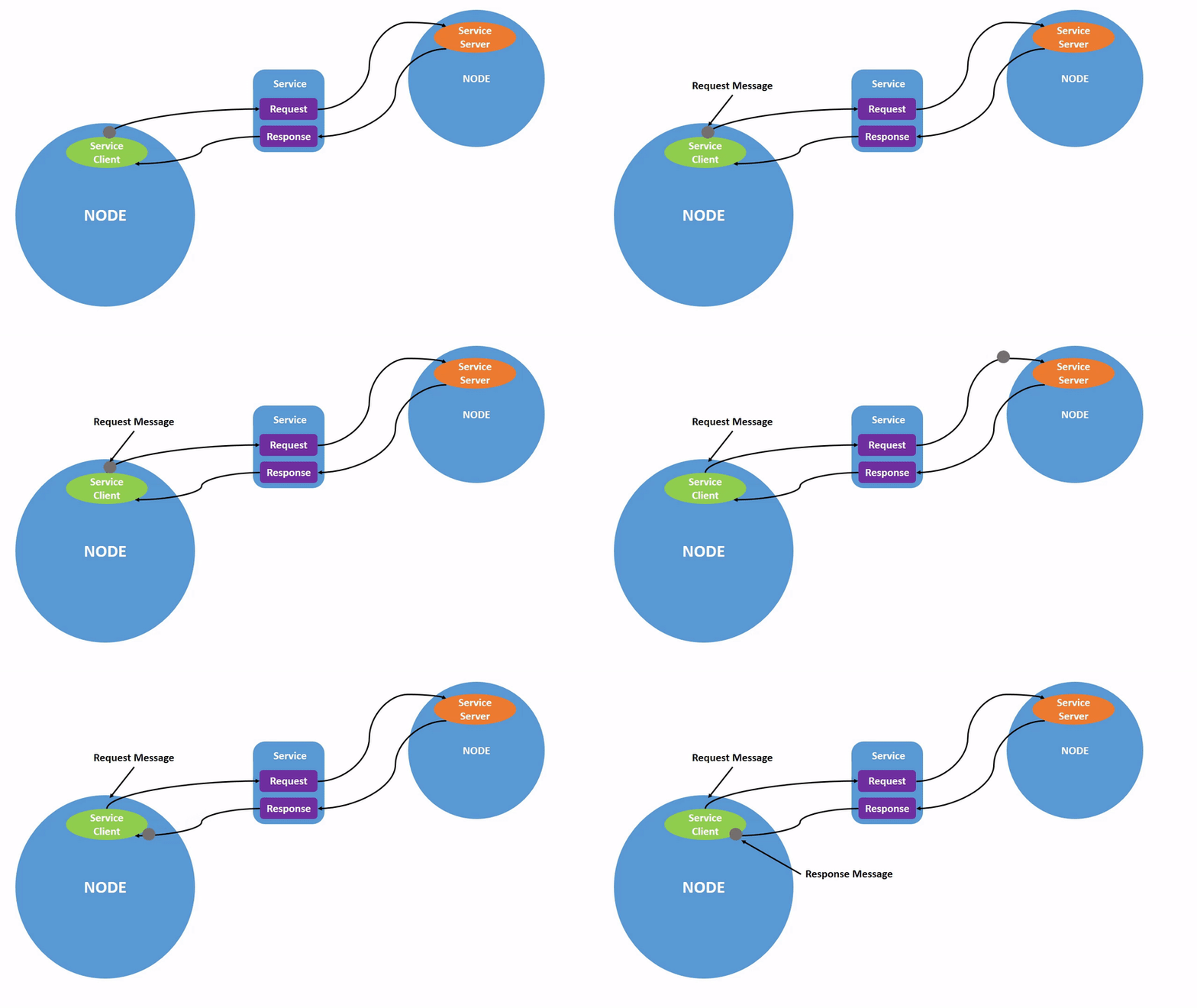
一个服务由两部分组成:服务器和客户端。
服务器是接受远程过程请求并执行某些计算的实体,客户端是一个请求远程服务器代替其执行计算的实体。
服务的执行流程如下图:
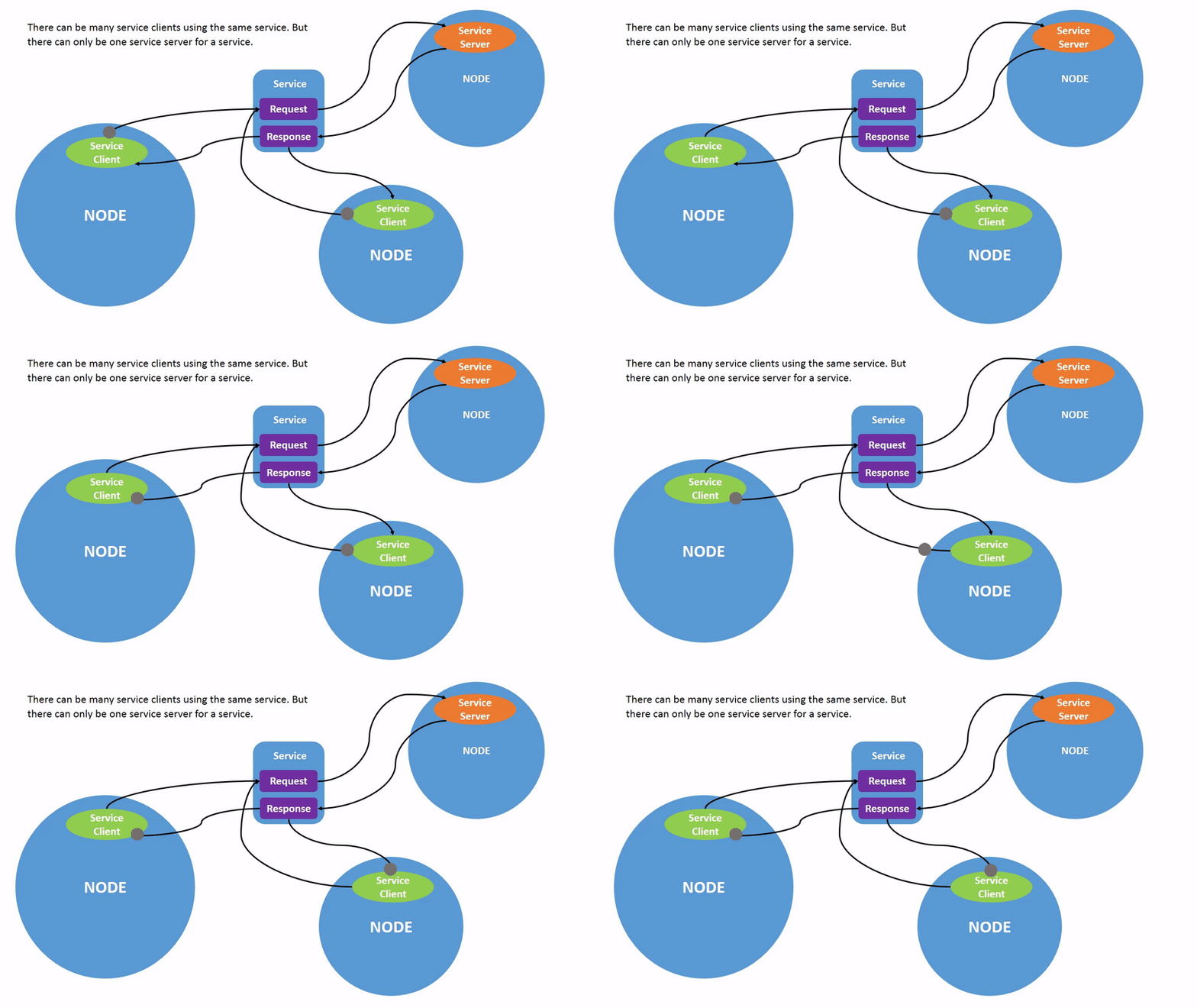
每个服务只能有一个服务器,但可以有多个客户端,如下图:
二、创建自定义服务C++版
2.1 创建功能包
cd ros2_learning/src
ros2 pkg create --build-type ament_cmake hello_world_service_cpp
其中,
使用 --build-type 指定编译系统为 ament_cmake
hello_world_service_cpp:自定义功能包名称
结果如下图:
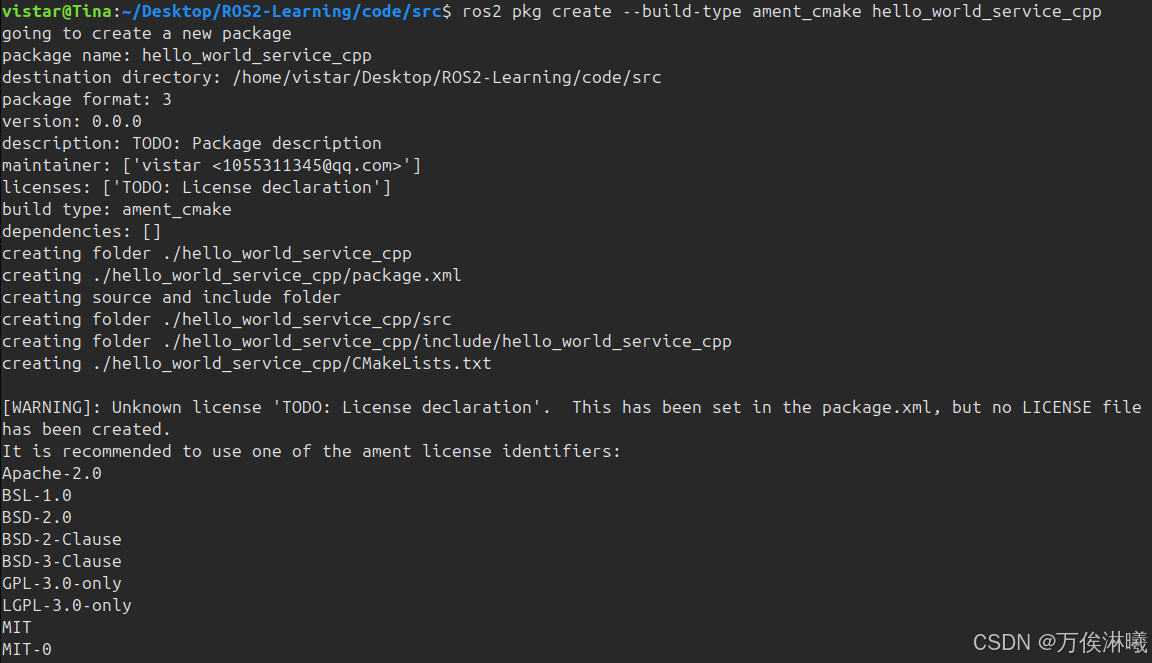
其中,有 [WARNING]: Unknown license 'TODO: License declaration'. ROS2建议创建一个 License 文件以说明该功能包的发布许可。可以使用 --license LICENSE 参数指定,例如:
ros2 pkg create --build-type ament_cmake --license Apache-2.0 hello_world_service_cpp
生成的目录结构如下:
hello_world_service_cpp
├── CMakeLists.txt
├── include
│   └── hello_world_service_cpp
├── LICENSE
├── package.xml
└── src
2.2 编辑源文件
我们编写一个服务端(server)和一个客户端(client),实现计算两个整型数字的和。
在 hello_world_service_cpp/include 目录下新增 server.h 文件,文件内容如下:
#pragma once
#include "rclcpp/rclcpp.hpp"
#include "example_interfaces/srv/add_two_ints.hpp"

using AddTwoInts = example_interfaces::srv::AddTwoInts;

class AddTwoIntsServer : public rclcpp::Node
{
public:
    AddTwoIntsServer();

private:
    void handle_add_two_ints(
        const std::shared_ptr<AddTwoInts::Request> request,
        std::shared_ptr<AddTwoInts::Response> response);

    rclcpp::Service<AddTwoInts>::SharedPtr service_;
};
在 hello_world_service_cpp/src 目录下新增 server.cpp 文件,文件内容如下:
#include "rclcpp/rclcpp.hpp"
#include "example_interfaces/srv/add_two_ints.hpp"
#include "hello_world_service_cpp/server.h"

AddTwoIntsServer::AddTwoIntsServer() : Node("add_two_ints_server")
{
    // 创建服务
    service_ = this->create_service<AddTwoInts>(
        "add_two_ints",
        std::bind(&AddTwoIntsServer::handle_add_two_ints, this,
                  std::placeholders::_1, std::placeholders::_2));

    RCLCPP_INFO(this->get_logger(), "AddTwoInts 服务端已启动...");
}

void AddTwoIntsServer::handle_add_two_ints(
    const std::shared_ptr<AddTwoInts::Request> request,
    std::shared_ptr<AddTwoInts::Response> response)
{
    RCLCPP_INFO(this->get_logger(), "收到请求: %ld + %ld", request->a, request->b);
    response->sum = request->a + request->b;
    RCLCPP_INFO(this->get_logger(), "返回结果: %ld", response->sum);
}

int main(int argc, char **argv)
{
    rclcpp::init(argc, argv);
    auto server = std::make_shared<AddTwoIntsServer>();
    rclcpp::spin(server);
    rclcpp::shutdown();

    return 0;
}
在 hello_world_service_cpp/include 目录下新增 client.h 文件,文件内容如下:
#pragma once
#include "rclcpp/rclcpp.hpp"
#include "example_interfaces/srv/add_two_ints.hpp"

#include <chrono>

using namespace std::chrono_literals;
using AddTwoInts = example_interfaces::srv::AddTwoInts;

class AddTwoIntsClient : public rclcpp::Node
{
public:
    AddTwoIntsClient();
    ~AddTwoIntsClient();
    bool send_request(int a, int b);

private:
    rclcpp::Client<AddTwoInts>::SharedPtr client_;
};
在 hello_world_service_cpp/src 目录下新增 client.cpp 文件,文件内容如下:
#include "rclcpp/rclcpp.hpp"
#include "example_interfaces/srv/add_two_ints.hpp"
#include "hello_world_service_cpp/client.h"

AddTwoIntsClient::AddTwoIntsClient() : Node("add_two_ints_client")
{
    client_ = this->create_client<AddTwoInts>("/add_two_ints");
}

AddTwoIntsClient::~AddTwoIntsClient()
{
}

bool AddTwoIntsClient::send_request(int a, int b)
{
    // 等待服务端
    if (!client_->wait_for_service(5s))
    {
        RCLCPP_ERROR(this->get_logger(), "等待服务端超时");

        return false;
    }

    auto request = std::make_shared<AddTwoInts::Request>();
    request->a = a;
    request->b = b;

    RCLCPP_INFO(this->get_logger(), "发送请求: %ld + %ld", request->a, request->b);

    auto result = client_->async_send_request(request);
    if (rclcpp::spin_until_future_complete(this->shared_from_this(), result) ==
        rclcpp::FutureReturnCode::SUCCESS)
    {
        auto response = result.get();
        RCLCPP_INFO(this->get_logger(), "计算结果: %ld", response->sum);
    }
    else
    {
        RCLCPP_ERROR(this->get_logger(), "请求失败");
    }

    return false;
}

int main(int argc, char **argv)
{
    rclcpp::init(argc, argv);
    auto node = std::make_shared<AddTwoIntsClient>();

    if (argc >= 3)
    {
        int a = std::stoi(argv[1]);
        int b = std::stoi(argv[2]);
        RCLCPP_INFO(node->get_logger(), "请求参数: %d + %d", a, b);
        node->send_request(a, b);
    }

    rclcpp::shutdown();

    return 0;
}
2.3 编辑编译配置文件CMakeList.txt
默认生成的 CMakeList.txt 文件内容如下:
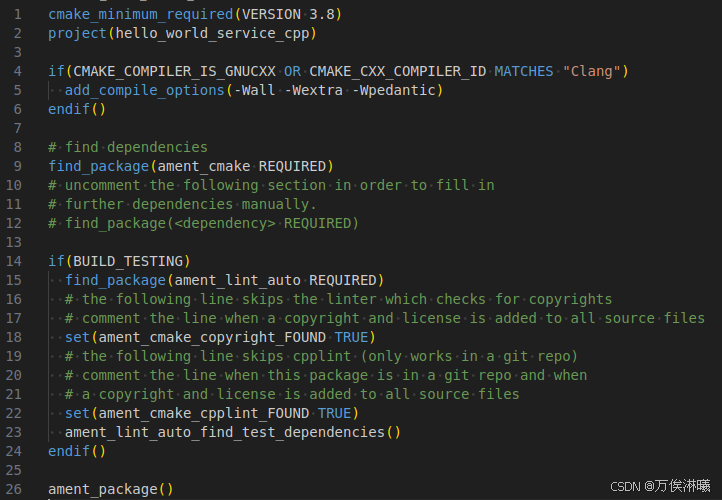
由于新增了server 和 client,所以要配置该文件的编译规则。
找到ros2_learning/src/hello_world_service_cpp/CMakeLists.txt,修改如下:
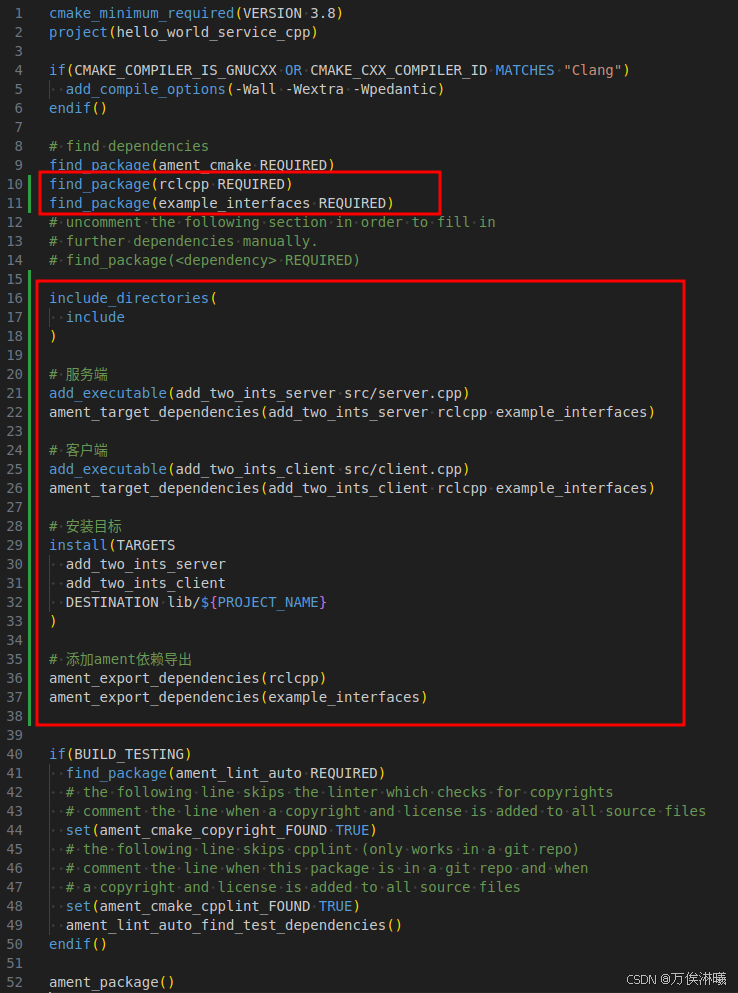
修改说明如下:
find_package(rclcpp REQUIRED)
find_package(example_interfaces REQUIRED)

# 指定头文件目录
include_directories(
  include
)

# 指定源文件,生成可执行文件
add_executable(add_two_ints_server src/server.cpp)
# 指定可执行文件的依赖项
ament_target_dependencies(add_two_ints_server rclcpp example_interfaces)

add_executable(add_two_ints_client src/client.cpp)
ament_target_dependencies(add_two_ints_client rclcpp example_interfaces)

# 定义安装规则,指定可执行文件的安装目录
install(TARGETS
  add_two_ints_server
  add_two_ints_client
  DESTINATION lib/${PROJECT_NAME}
)

# 添加ament依赖导出
ament_export_dependencies(rclcpp)
ament_export_dependencies(example_interfaces)
2.4 编译工程
进入到工作空间 ros2_learning 目录,执行如下指令编译该工程:
colcon build
2.5 运行节点
ROS2 提供了 run 命令,可以根据包名和节点名,在任何目录执行。
但需要先设置环境变量,即让系统可以找到节点,进入到工作空间目录,执行如下指令:
source install/setup.bash
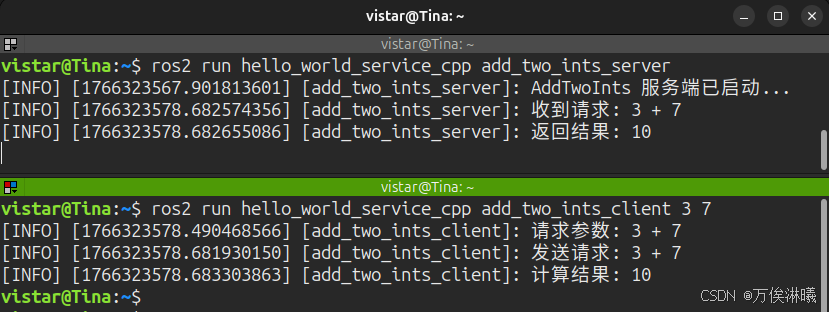
执行如下命令分别启动服务端和客户端节点:
ros2 run hello_world_service_cpp add_two_ints_server
ros2 run hello_world_service_cpp add_two_ints_client 3 7
启动节点后,打印如下:

火山引擎开发者社区是火山引擎打造的AI技术生态平台,聚焦Agent与大模型开发,提供豆包系列模型(图像/视频/视觉)、智能分析与会话工具,并配套评测集、动手实验室及行业案例库。社区通过技术沙龙、挑战赛等活动促进开发者成长,新用户可领50万Tokens权益,助力构建智能应用。
更多推荐
 43
43 0
0- 0


 已为社区贡献32条内容

所有评论(0)