ECB30使用opencv实时检测人脸-全志T113
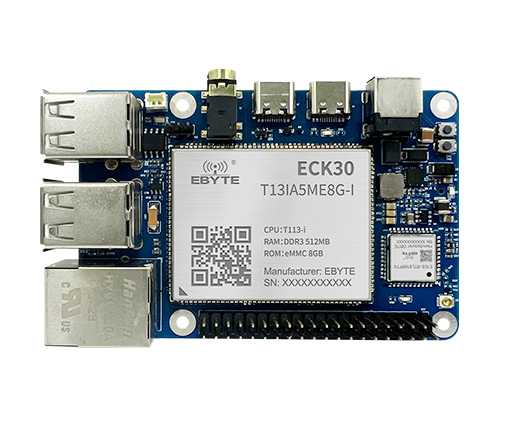
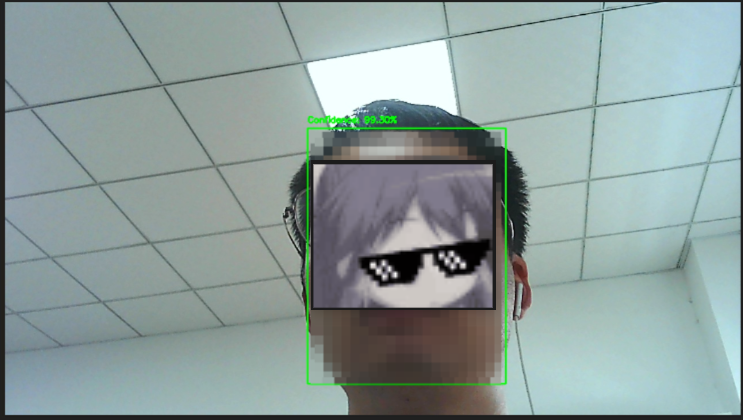
这里给大家分享一个在ECB30平台上使用USB摄像头,然后使用opencv实时检测人脸的项目,不需要太多代码,分分钟就搞定了。ECB30-P4T13IA5ME8G-I工业级单板机是亿佰特基于全志T113-i处理器推出高性价比嵌入式单板机,单板机由核心板ECK30-T13IA5ME8G-I和底板组成,核心板与底板采用邮票孔焊接方式组合在一起,外形尺寸兼容树莓派。我们还是直接先看效果,可以看到人脸被准
前言
这里给大家分享一个在ECB30平台上使用USB摄像头,然后使用opencv实时检测人脸的项目,不需要太多代码,分分钟就搞定了。
ECB30-P4T13IA5ME8G-I工业级单板机是亿佰特基于全志T113-i处理器推出高性价比嵌入式单板机,单板机由核心板ECK30-T13IA5ME8G-I和底板组成,核心板与底板采用邮票孔焊接方式组合在一起,外形尺寸兼容树莓派。
我们还是直接先看效果,可以看到人脸被准确的框选了。
环境
硬件:
- ECB31
- 720P USB摄像头
软件
- ubuntu 2204
- opencv
- 官方模型
实现
这里我们直接使用opencv预先训练好的模型来进行测试
对于更准确的检测,建议使用基于深度学习的对象检测方法,如 YOLO 或 SSD。
接下来我们就一步步实现上面的效果。
下载模型配置文件和权重文件
wget https://raw.githubusercontent.com/opencv/opencv/master/samples/dnn/face_detector/deploy.prototxt
wget https://github.com/opencv/opencv_3rdparty/raw/dnn_samples_face_detector_20170830/res10_300x300_ssd_iter_140000.caffemodel
可以在虚拟机上进行下载然后直接scp到开发板
tree
.
├── detection_results
│   ├── detection_1761188125_12.jpg
│   ├── detection_1761188135_21.jpg
│   └── detection_1761188142_27.jpg
├── opencv_models
│   ├── deploy.prototxt
│   └── res10_300x300_ssd_iter_140000.caffemodel
└── person.py

2 directories, 6 files
python.py如下
- 设置摄像头分辨率为1280x720
- 添加了只保存检测到目标的帧的功能
- 进一步降低了帧率(5FPS)并添加了跳帧处理(每3帧处理1帧)
- 添加了输出目录创建和带时间戳的文件命名
- 添加了处理100帧后自动停止的机制
- 添加了小型延迟以减少CPU负载
import cv2
import numpy as np
import os
import time

def detect_person_dl():
    # Set model file paths
    model_dir = os.path.expanduser("./opencv_models")
    model_file = os.path.join(model_dir, "res10_300x300_ssd_iter_140000.caffemodel")
    config_file = os.path.join(model_dir, "deploy.prototxt")

    # Check if model files exist
    if not os.path.exists(model_file) or not os.path.exists(config_file):
        print("Model files do not exist. Please download the model files first.")
        print(f"Model files should be located at: {model_dir}")
        return

    # Load the network
    net = cv2.dnn.readNetFromCaffe(config_file, model_file)

    # Open camera with 1280x720 resolution
    cap = cv2.VideoCapture(0)
    if not cap.isOpened():
        print("Unable to open camera")
        return

    # Set camera resolution to 1280x720
    cap.set(cv2.CAP_PROP_FRAME_WIDTH, 1280)
    cap.set(cv2.CAP_PROP_FRAME_HEIGHT, 720)

    # Reduce frame rate for better performance on low-power devices
    cap.set(cv2.CAP_PROP_FPS, 5)  # Lower FPS for T113 platform

    frame_count = 0
    output_dir = "detection_results"
    os.makedirs(output_dir, exist_ok=True)

    # Process frames from camera
    while True:
        # Read frame
        ret, frame = cap.read()
        if not ret:
            print("Failed to grab frame")
            break

        frame_count += 1

        # Process only every 3rd frame to reduce load
        if frame_count % 3 != 0:
            continue

        # Prepare the input image
        h, w = frame.shape[:2]
        blob = cv2.dnn.blobFromImage(cv2.resize(frame, (300, 300)), 1.0, (300, 300), (104.0, 177.0, 123.0))

        # Forward propagate through the network
        net.setInput(blob)
        detections = net.forward()

        detection_found = False

        # Process detection results
        for i in range(detections.shape[2]):
            confidence = detections[0, 0, i, 2]

            # Filter out low confidence detections
            if confidence > 0.5:
                detection_found = True
                # Calculate bounding box coordinates
                box = detections[0, 0, i, 3:7] * np.array([w, h, w, h])
                (startX, startY, endX, endY) = box.astype("int")

                # Ensure bounding box is within image boundaries
                startX = max(0, startX)
                startY = max(0, startY)
                endX = min(w, endX)
                endY = min(h, endY)

                # Draw bounding box and label
                cv2.rectangle(frame, (startX, startY), (endX, endY), (0, 255, 0), 2)
                text = f"Confidence: {confidence * 100:.2f}%"
                cv2.putText(frame, text, (startX, startY-10),
                            cv2.FONT_HERSHEY_SIMPLEX, 0.5, (0, 255, 0), 2)

        # Save frame if detection found
        if detection_found:
            timestamp = int(time.time())
            output_path = os.path.join(output_dir, f"detection_{timestamp}_{frame_count}.jpg")
            cv2.imwrite(output_path, frame)
            print(f"Detection saved: {output_path}")

        # Break loop after processing 100 frames or on 'q' key press (if needed)
        if frame_count >= 100:
            break

        # Small delay to reduce CPU load
        time.sleep(0.1)

    # Release resources
    cap.release()
    print("Processing completed")

# Usage example
if __name__ == "__main__":
    detect_person_dl()
运行
运行之前,我们需要插入usb的720p摄像头,插入摄像头之后,我们看一下设备是否存在
ls /dev/video0
设备没问题之后,直接运行,然后我们把摄像头就可以对准人脸了
 python3 person.py
[ WARN:0] global ./modules/videoio/src/cap_gstreamer.cpp (616) isPipelinePlaying OpenCV | GStreamer warning: GStreamer: pipeline have not been created
Detection saved: detection_results/detection_1761188125_12.jpg
Detection saved: detection_results/detection_1761188135_21.jpg
Detection saved: detection_results/detection_1761188142_27.jpg
就会在当前目录下生成detection_results文件夹,保存识别到的人脸了。

火山引擎开发者社区是火山引擎打造的AI技术生态平台,聚焦Agent与大模型开发,提供豆包系列模型(图像/视频/视觉)、智能分析与会话工具,并配套评测集、动手实验室及行业案例库。社区通过技术沙龙、挑战赛等活动促进开发者成长,新用户可领50万Tokens权益,助力构建智能应用。
更多推荐
 5
5 0
0- 0


 已为社区贡献1条内容

所有评论(0)