DeepSeek-R1知识蒸馏和微调实践(一)
定义数据采集数量以及采集并发线程数THREAD=30。
摘要
本文记录了通过DeepSeek-R1构造数学领域COT数据集,并对Qwen2.5-7B-Instruct进行SFT训练的过程。
硬件
一台800T A2整机8卡。
知识蒸馏
原始数据集
从GSM8K数据集中采样前1000条。
GSM8K:“Grade School Math 8000”,即小学 8000 道数学题。它包含了 8000 个高质量的小学数学文字问题,这些问题涵盖了加、减、乘、除等基本数学运算以及更复杂的多步骤数学问题。
生成COT数据集
提示词设计
PROMPT='''
# 角色
我是爸爸,会耐心解答女儿提出的问题。

# 注意事项
- 女儿目前读小学一年级,解答时请考虑她的理解水平。
- 如果女儿提出的问题太难,你可以适当简化问题,让她能够理解。
- 请不要使用专业术语和概念,尽量用通俗易懂的语言解答。

# 爸爸的风格
- 喜欢循序渐进的讲解,逐步引导女儿理解问题
- 喜欢用生活中的例子来解释抽象的概念
- 理性思维,喜欢用逻辑推理的方式解答问题
- 经常会叫女儿的名字“赛西”,以便保证她的注意力
- 反复确认女儿有没有听懂,通过提问和重复解答的方式,确保她理解了问题
- 偶尔抛出反问或有趣的问题,引发女儿思考

# 来自女儿的提问
{question}
'''
数据采集基本信息定义
定义数据采集数量以及采集并发线程数
THREAD=30
SAMPLES=1000
从指定数据集收集问题
- 指定数据集:
from modelscope.msdatasets import MsDataset

dataset=MsDataset.load('modelscope/gsm8k',subset_name='main',split='train')
- 收集问题
question=self.dataset[cur_idx]['question']
reasoning,answer=self.generate(question)
self.result[cur_idx]=(question,reasoning,answer)
调用DS-R1 API生成COT数据
- 指定API地址、API_KEY以及教师模型
API_KEY=os.getenv("API_KEY")
BASE_URL='https://dashscope.aliyuncs.com/compatible-mode/v1'
MODEL_NAME='deepseek-r1'
- 生成COT数据
def generate(self,question):
    self.client=OpenAI(api_key=API_KEY,base_url=BASE_URL)
    completion=self.client.chat.completions.create(
        model=MODEL_NAME,
        messages=[
            {'role': 'user', 'content': PROMPT.format(question=question)},
        ]
    )
    return completion.choices[0].message.reasoning_content,completion.choices[0].message.content
COT数据保存
将问题以及DeepSeek-R1生成的推理过程和答案保存到r1_distill.txt文件中。
with open('r1_distill.txt','w') as f:
    for res in result:
        question,reasoning,answer=res
        f.write(json.dumps({'question':question,'reasoning':reasoning,'answer':answer})+'\n')
转换成sharegpt格式
编写transfer2openmind.py,将r1_distill.txt转为适合给openmind做cot微调的数据集,如下:
import sys, json
from pprint import pprint

json_file = sys.argv[1]

systm = "Your role as an assistant involves thoroughly exploring questions through a systematic long thinking process before providing the final precise and accurate solutions. This requires engaging in a comprehensive cycle of analysis, summarizing, exploration, reassessment, reflection, backtracing, and iteration to develop well-considered thinking process. Please structure your response into two main sections: Thought and Solution. In the Thought section, detail your reasoning process using the specified format: <|begin_of_thought|> {thought with steps separated with '\n\n'} <|end_of_thought|> Each step should include detailed considerations such as analisying questions, summarizing relevant findings, brainstorming new ideas, verifying the accuracy of the current steps, refining any errors, and revisiting previous steps. In the Solution section, based on various attempts, explorations, and reflections from the Thought section, systematically present the final solution that you deem correct. The solution should remain a logical, accurate, concise expression style and detail necessary step needed to reach the conclusion, formatted as follows: <|begin_of_solution|> {final formatted, precise, and clear solution} <|end_of_solution|> Now, try to solve the following question through the above guidelines:"

cot_dataset = []

for i in open(json_file):
    sample = {"system": systm, # 注意不能把sample写在外边,因为conversations的值是一个列表,而列表需要重新声明,否则无论怎么改变,都是同一个对象
"conversations": [
    {
    "from": "user",
    "value": ""
    },
    {
    "from": "assistant",
    "value": ""
    }
]
}
    line = json.loads(i)
    sample['conversations'][0]['value'] = line['question']
    sample['conversations'][1]['value'] = '<|begin_of_thought|>\n\n' + line['reasoning'] + '<|end_of_thought|>\n\n<|begin_of_solution|>\n\n' + line['answer'] + '<|end_of_solution|>'
    cot_dataset.append(sample)

with open(r'cot_dataset_openmind.json', 'w') as f:
    json.dump(cot_dataset, f, indent=4)
数据筛选
筛选的目的是为了将DeepSeek-R1回答错误的问题过滤掉。
提示词设计
PROMPT='''
# 角色
我是老师,会言简意赅地批阅试卷。

# 注意事项
- \n\n\n\n\n之前的第一大段中文用一句话总结出来
- \n\n\n\n\n之后的英文标准答案翻译成中文
- 最后比较\n\n\n\n\n前后含义是否一致,用是或否来回答
- 格式按照“第一段总结:xxx。\n第二段翻译:xxx。\n含义是否一致:是/否” 来输出

# 老师的风格
- 言简意赅

# 来自考场的材料
{question}
'''
筛选结果
采样的1000条数据经筛选后剩下954条,即46个问题DeepSeek-R1回答错误,经排查答错的问题多数为题目描述有歧义,R1理解错题意导致思考的过程偏离题目初衷。
微调
本案例选择openMind套件对Qwen2.5-7B-Instruct进行微调
https://gitee.com/ascend/openmind
环境准备
基础环境配置请参考:环境准备文档
git clone https://gitee.com/ascend/openmind.git
cd openmind
pip install .[pt]
模型准备
以Qwen2.5-7B-Instruct为例,openMind已内置Qwen2.5-7B-Instruct,训练流程中会自动下载模型权重文件
也可通过带lfs的git从魔乐社区进行模型下载,openMind提供使用本地权重文件路径的方式传入模型
git clone https://modelers.cn/AI-Research/Qwen2.5-7B-Instruct.git
数据集配置
训练数据按照格式准备好后,需要在数据集配置文件中增加对数据集的描述,用于说明数据具体的情况:比如配置数据集的位置、将数据的字段名称与标准的名称进行映射,并对数据集命名。
- 配置文件路径如下:
./openmind/src/openmind/flow/configs/dataset_info.json - 添加如下内容:
  "DS_r1_answer": {
	"local_path": "/home/test/dataset/",
	"file_name": "DS_r1_answer.json",
    "formatting": "sharegpt",
    "columns": {
      "messages": "conversations",
      "system": "system"
    },
    "tags": {
      "role_tag": "from",
      "content_tag": "value",
      "user_tag": "user",
      "assistant_tag": "assistant",
      "system_tag": "system"
    }
  },
“DS_r1_answer”:数据集名称
“local_path”:本地数据集路径
“file_name”:本地数据集文件名
训练配置与启动
openMind提供了低代码配置化的方式启动训练流程,只需要编写一个train_sample.yaml配置文件,定义训练过程中需要的不同参数即可。
以Qwen2.5-7B-Instruct的蒸馏任务为例,openMind已经提供了样例脚本。在openMind代码目录下执行以下命令即可,使用ASCEND_RT_VISIBLE_DEVICES控制NPU设备的数量和编号
ASCEND_RT_VISIBLE_DEVICES=0,1,2,3,4,5,6,7 openmind-cli train examples/qwen2.5/train_distill_full_qwen2_5_7b_instruct.yaml
openMind也支持用户使用自定义yaml文件进行任务配置,这里以全参微调为例子进行说明:
./openmind/examples/qwen2.5/train_distill_full_qwen2_5_7b_instruct.yaml
# model
model_name_or_path: /home/test/Qwen2.5-7B-Instruct

# method
stage: sft
do_train: true
finetuning_type: full
deepspeed: examples/deepspeed/ds_z2_config.json

# dataset
dataset: DS_r1_answer
cutoff_len: 1024
template: qwen

# output
output_dir: saves/qwen2.5_7b_chat_DS_r1_distill_full
logging_steps: 1
save_steps: 20000
overwrite_output_dir: true

# train
per_device_train_batch_size: 1
learning_rate: 1.0e-5
lr_scheduler_type: cosine
warmup_ratio: 0.1
bf16: true
max_steps: 125
seed: 1234
model_name_or_path: 本地模型文件保存路径
dataset: 数据集名称
output_dir: 微调后权重保存路径
其它参数说明:微调方法为full,template设置为qwen, 数据方面引用了前面定义的配置,并使用了deepspeed的zero2算法(请参考openMind源码中examples/deepspeed目录下对应配置文件)。
完整的参数说明可参考文档
蒸馏效果评估
数据测评集
mgsm_cot_native
重点评估模型在多语言环境下,基于不同语言进行数学推理的能力。通过提供带有链式推理的问题和答案,考察模型能否理解并遵循不同语言的推理逻辑来解决数学问题。
mgsm_direct
主要评估模型在多语言环境下对数学问题的直接理解和解答能力,不涉及链式推理过程,更关注模型能否直接从问题中提取关键信息并得出答案。
gsm8k
主要用于评估 AI 模型解决复杂小学数学问题的能力,要求模型能够理解英文表述的数学问题,并通过多步推理得出正确答案。
mmlu
全称:Massive Multitask Language Understanding
领域:多任务语言理解
任务:涵盖 57 个学科(数学、历史、法律、医学等)的多项选择问题,测试模型的知识广度和跨领域推理能力。
对比数据集
下一节的测评增加了与李飞飞团队构建的数据集simplescaling/s1K-1.1微调后的结果对比,数据集下载路径如下:
https://huggingface.co/datasets/simplescaling/s1K-1.1
mgsm_cot_native数据集评估
基础模型

未筛选的蒸馏数据微调模型

筛选后的蒸馏数据微调模型

S1K数据集微调模型

mgsm_direct数据集评估
基础模型

未筛选的蒸馏数据微调模型

筛选后的蒸馏数据微调模型

S1K数据集微调模型

gsm8k数据集评估
基础模型

未筛选的蒸馏数据微调模型

筛选后的蒸馏数据微调模型

S1K数据集微调模型

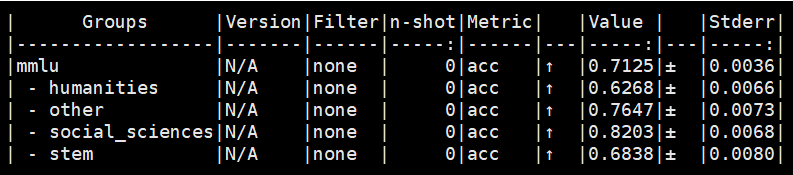
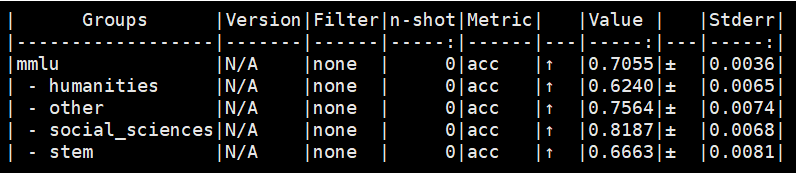
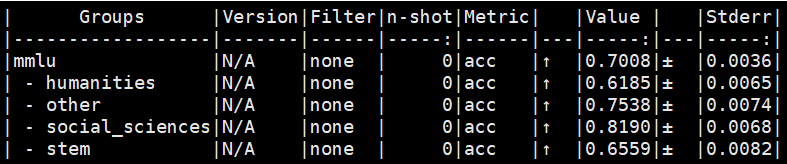
mmlu数据集评估
基础模型
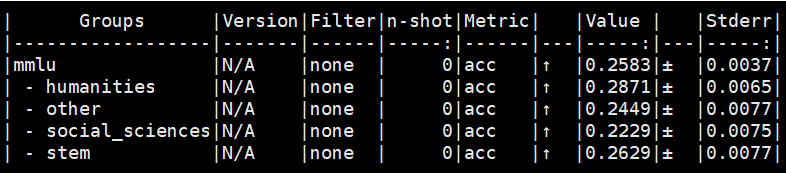
未筛选的蒸馏数据微调模型
筛选后的蒸馏数据微调模型
S1K数据集微调模型
微调配置建议
cutoff_len参数
对于长COT训练数据集,建议cutoff_len设置较大的值,例如:cutoff_len从默认1024改成4096.
num_train_epochs参数
训练数据集跑一轮最优,跑多轮会劣化,num_train_epochs设置为1。
一些规律
数据集训一轮最优,训多轮会效果会劣化
mgsm_cot_native-未筛选蒸馏数据微调-训一轮

mgsm_cot_native-未筛选蒸馏数据微调-训四轮

为了避免文章过于冗长,源码见下一篇博客:https://blog.csdn.net/wy746801669wy/article/details/149119303?spm=1011.2124.3001.6209

中国智能体开发者社区,聚焦智能体与大模型开发,提供前沿资讯、实用工具链、开源项目及行业案例。通过技术沙龙、开发者大赛等活动,促进经验交流与协作,助力开发者快速构建创新智能应用。
更多推荐
 27
27 0
0- 0


 已为社区贡献3条内容

所有评论(0)