斗破苍穹知识图谱问答系统
本项目背景和目的:根据OpenKG创建知识图谱,算了不说了。项目开发原则:尽量规划,也不要想太多以后需求改变怎么办,尽量先做出来,吸取经验。灵魂三问(做完了吗?上线了吗?有人用吗?),需求带动技术。做出来做对做快BS架构:前端采用Vue3+Axios,后端基于Flask+HanLP+Py2neo→ Vue3 监听输入框(@click="sendMessage")→ Axios 调用 Flask A
斗破苍穹知识图谱问答系统
本项目背景和目的:根据OpenKGFights Break Firmament《斗破苍穹》知识图谱 - 数据集 - 开放知识图谱创建知识图谱,算了不说了。
项目开发原则:尽量规划,也不要想太多以后需求改变怎么办,尽量先做出来,吸取经验。灵魂三问(做完了吗?上线了吗?有人用吗?),需求带动技术。
做出来
做对
做快
BS架构:前端采用Vue3+Axios,后端基于Flask+HanLP+Py2neo
数据交互流程:
用户输入 → Vue3 监听输入框(@click="sendMessage")
发送请求 → Axios 调用 Flask API(
http://localhost:5000/api/query)后端处理 → Flask 解析请求,HanLP识别实体,查询 Neo4j 图谱
返回数据 → JSON 格式(
{query: "药尘的徒弟是谁?", result: "药尘的徒弟是:萧炎"})前端渲染 → Vue3 用
v-for展示结果
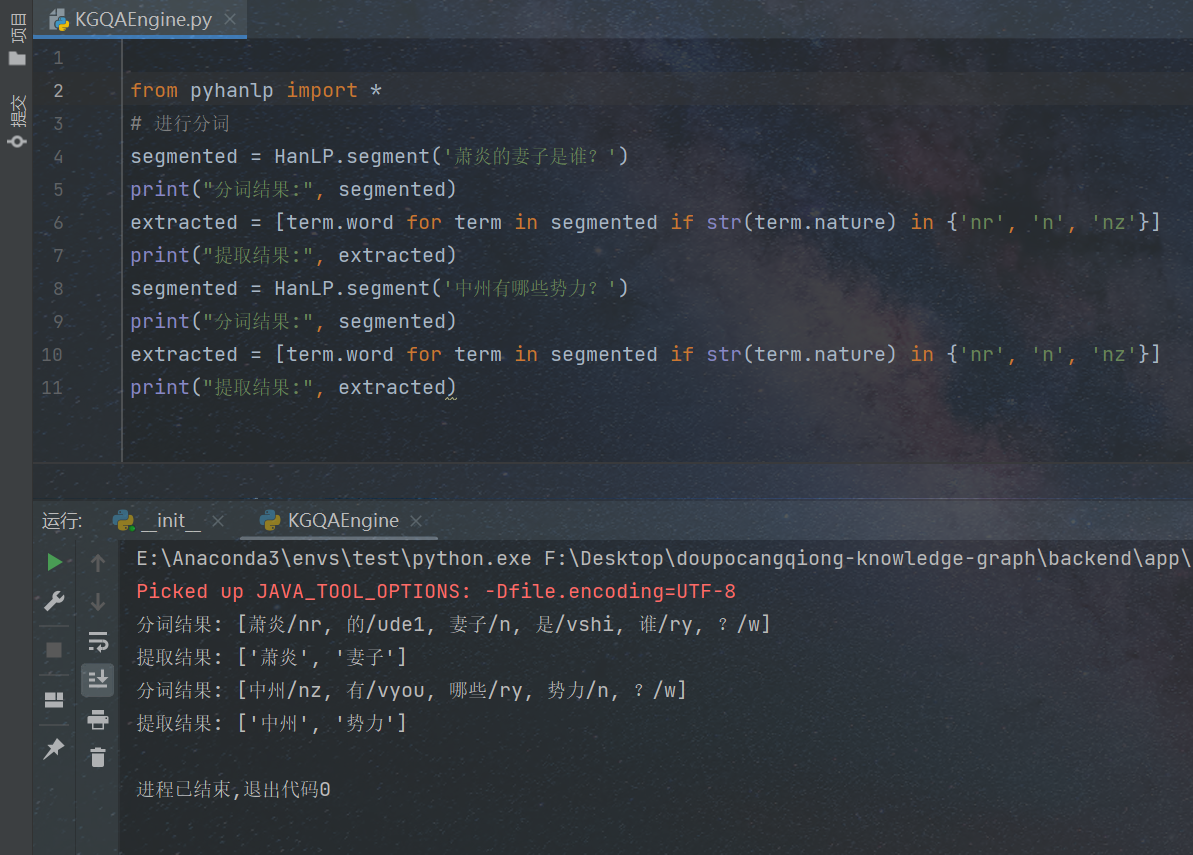
HanLP
HanLP 是一款由 hankcs 开发的自然语言处理(NLP)工具包,支持多种语言(以中文为核心),提供了丰富的功能,包括分词、词性标注、命名实体识别、依存句法分析、文本分类等。
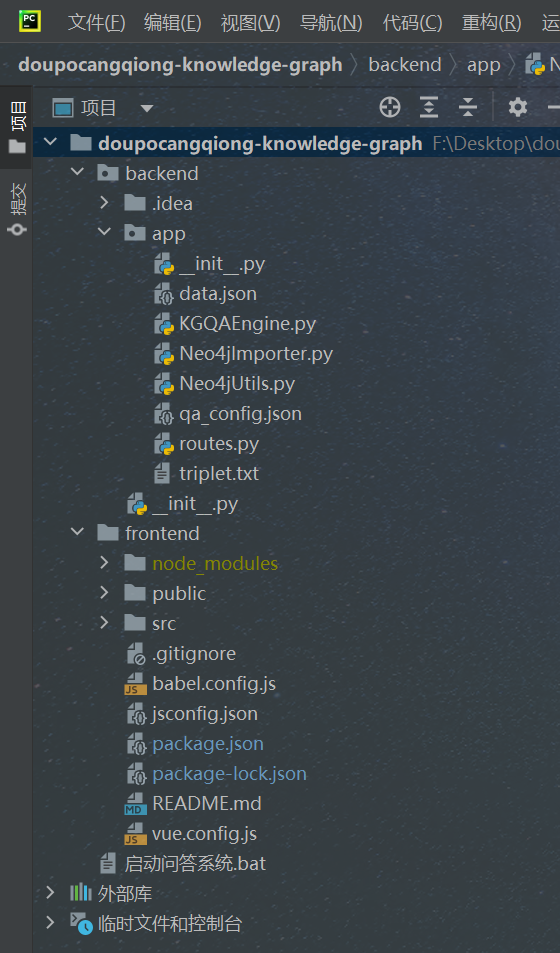
目录结构
数据库导入
from neo4j import GraphDatabase
import json
from collections import defaultdict
class Neo4jImporter:
    def __init__(self):
        self.driver = GraphDatabase.driver("bolt://localhost:7687", auth=("neo4j", "12345678"))
    def close(self):
        self.driver.close()
    def import_entities(self, entity_file):
        with open(entity_file, 'r', encoding='utf-8') as f:
            entities = json.load(f)
        # 按标签分组(处理多标签和空标签情况)
        label_groups = defaultdict(list)
        for entity in entities:
            labels = entity["n"]["labels"]
            label_groups[tuple(labels)].append(entity)
        with self.driver.session() as session:
            # 批量处理每个标签组
            batch_size = 100
            for labels, group in label_groups.items():
                # 构建标签字符串(处理特殊字符)
                label_str = ""
                if labels:
                    escaped_labels = [f"`{label}`" for label in labels]
                    label_str = ":" + ":".join(escaped_labels)
                query = f"""
                UNWIND $batch AS entity
                MERGE (n{label_str} {{name: entity.n.properties.name}})
                SET n += entity.n.properties
                """
                # 分批次提交
                for i in range(0, len(group), batch_size) :
                    batch = group[i :i + batch_size]
                    session.run(query, batch=batch)
            print(f"✅ 实体导入完成 | 总数: {len(entities)} | 标签组: {len(label_groups)}")

    def import_relations(self, relation_file):
        bidirectional = {
            "妻子": "丈夫",
            "徒弟": "师父",
            "敌对": "敌对"
        }
        # 数据清洗和预处理
        with open(relation_file, 'r', encoding='utf-8') as f :
            relations = []
            for line in f :
                try :
                    clean_line = line.strip().strip('()')
                    if not clean_line: continue
                    parts = [p.strip() for p in clean_line.split(',')]
                    if len(parts) != 3: continue
                    relations.append(parts)
                except Exception as e:
                    print(f"格式错误: {line} | 错误: {str(e)}")
        # 生成双向关系
        all_relations = []
        for head, rel_type, tail in relations:
            all_relations.append((head, rel_type, tail))
            if rel_type in bidirectional:
                reverse_rel = bidirectional[rel_type]
                all_relations.append((tail, reverse_rel, head))
        # 按关系类型分组处理
        rel_groups = defaultdict(list)
        for rel in all_relations:
            rel_groups[rel[1]].append(rel)
        with self.driver.session() as session:
            batch_size = 100
            for rel_type, group in rel_groups.items():
                # 处理特殊字符关系类型
                escaped_rel_type = rel_type.replace('`', '')  # 防止双重转义
                query = f"""
                UNWIND $batch AS rel
                MERGE (h {{name: rel.head}})
                MERGE (t {{name: rel.tail}})
                MERGE (h)-[:`{escaped_rel_type}`]->(t)
                """
                data_batch = [{'head': h, 'tail': t} for h, _, t in group]
                # 批量提交
                for i in range(0, len(data_batch), batch_size) :
                    batch = data_batch[i :i + batch_size]
                    session.run(query, batch=batch)
            print(f"✅ 关系导入完成 | 总数: {len(all_relations)} | 关系类型: {len(rel_groups)}")

if __name__ == "__main__":
    importer = Neo4jImporter()
    try :
        importer.import_entities("data.json") # 原始数据
        importer.import_relations("triplet.txt") # 三元组
    except Exception as e :
        print(f"❌ 导入失败: {str(e)}")
    finally:
        importer.close()
前端代码
<template>
  <el-scrollbar>
  <div class="common-layout">
    <el-container>
      <!-- 头部 -->
      <el-header>
        <h1>{{ title }}</h1>
      </el-header>
      <!-- 聊天展示区域 -->
      <el-main class="chat-container">
        <div v-for="(message, index) in messages" :key="index" :class="['chat-message', message.type]">
          <!-- 头像和名称 -->
          <div class="avatar">
            <img
              v-if="message.type === 'user'"
              :src="require('@/assets/我.jpg')"
              alt="User Avatar"
            />
            <img
              v-else
              :src="require('@/assets/智能小梦.jpg')"
              alt="Bot Avatar"
            />
          </div>
          <div class="message-wrapper">
            <!-- 名称 -->
            <div class="name">
              {{ message.type === 'user' ? '我' : '智能小梦' }}
            </div>
            <!-- 消息内容 -->
            <div class="message-content" v-html="formatMessageContent(message.content)"></div>
          </div>
        </div>

      </el-main>
      <!-- 问答输入区域 -->
      <el-footer>
        <el-input
          v-model="inputMessage"
          placeholder="请输入你的问题"
          @keyup.enter="sendMessage"
          clearable
        >
          <template #append>
            <el-button type="primary" @click="sendMessage">发送</el-button>
          </template>
        </el-input>
      </el-footer>
    </el-container>
  </div>
</el-scrollbar>
</template>
<script>
import { ref, onMounted } from 'vue';
import axios from 'axios';

export default {
  name: 'App',
  setup() {
    const inputMessage = ref(''); // 输入的消息
    const messages = ref([]); // 聊天记录
    const title = ref(''); // 标题
    // 获取标题
    const fetchTitle = async () => {
      try {
        const response = await axios.get('http://localhost:5000/api/title');
        title.value = response.data.title;
      } catch (err) {
        console.error('获取标题失败:', err);
        title.value = '知识图谱问答系统';
      }
    };
    // 获取欢迎消息
    const fetchWelcomeMessage = async () => {
      try {
        const response = await axios.get('http://localhost:5000/api/welcome');
        messages.value.push({
          type: 'bot',
          content: response.data.message,
        });
      } catch (err) {
        console.error('获取欢迎消息失败:', err);
        messages.value.push({
          type: 'bot',
          content: '欢迎使用知识图谱问答系统!',
        });
      }
    };
    // 发送消息
    const sendMessage = async () => {
      if (!inputMessage.value.trim()) {
        return; // 如果输入为空,直接返回
      }
      // 将用户输入添加到聊天记录
      messages.value.push({
        type: 'user',
        content: inputMessage.value,
      });
      // 后端请求
      try {
        const response = await axios.get('http://localhost:5000/api/query', {
          params: { q: inputMessage.value },
        });

        // 将后端返回的结果添加到聊天记录
        messages.value.push({
          type: 'bot',
          content: response.data.result,
        });
      } catch (err) {
        console.error('请求失败:', err);
        messages.value.push({
          type: 'bot',
          content: '抱歉,请求失败,请稍后重试!',
        });
      }

      // 清空输入框
      inputMessage.value = '';
    };

    // 格式化消息内容,将 \n 替换为 <br>
    const formatMessageContent = (content) => {
      return content.replace(/\n/g, '<br>');
    };

    // 在组件挂载时获取标题和欢迎消息
    onMounted(() => {
      fetchTitle();
      fetchWelcomeMessage();
    });

    return {
      inputMessage,
      messages,
      title,
      sendMessage,
      formatMessageContent,
    };
  },
};
</script>

<style>
/* 全局样式,去除页面与窗口的缝隙 */
body, html, #app {
  margin: 0;
  padding: 0;
  height: 100%;
}

.common-layout {
  height: 100vh;
  display: flex;
  flex-direction: column;
}

.el-header {
  background-color: #42b983;
  color: white;
  padding: 20px;
  text-align: center;
}

.chat-container {
  flex: 1;
  overflow-y: auto;
  padding: 20px;
  background-color: #f5f5f5;
}

.chat-message {
  margin-bottom: 15px;
  display: flex;
  align-items: flex-start;
}

.chat-message.user {
  flex-direction: row-reverse; /* 用户消息头像在右侧 */
}

.chat-message.bot {
  flex-direction: row; /* 系统消息头像在左侧 */
}

.avatar {
  width: 40px;
  height: 40px;
}

.avatar img {
  width: 100%;
  height: 100%;
  border-radius: 50%;
}

.message-wrapper {
  max-width: 70%;
}

.name {
  font-size: 12px;
  color: #666;
  margin-bottom: 5px;
}

.user .message-wrapper {
  margin-right: 10px;
}

.bot .message-wrapper {
  margin-left: 10px;
}

.message-content {
  padding: 10px 15px;
  border-radius: 10px;
}

.user .message-content {
  background-color: #42b983;
  color: white;
}

.bot .message-content {
  background-color: #ffffff;
  border: 1px solid #ddd;
  color: #333;
}

.el-footer {
  padding: 20px;
  background-color: #ffffff;
  border-top: 1px solid #ddd;
}

.el-input {
  width: 100%;
}
</style>
后端代码
# routes.py
from flask import jsonify, request
from pyhanlp import *
def init_routes(app):
    @app.route('/api/title', methods=['GET'])
    def title():
        return jsonify({
            "title": '斗破苍穹知识图谱问答系统'
        })
    @app.route('/api/welcome', methods=['GET'])
    def get_welcome_message():
        return jsonify({
            "message": (
                "欢迎使用斗破苍穹知识图谱问答系统!你可以问我关于斗破苍穹的各种问题。例如:\n"
                "<p>1. 查询人物关系:</p>"
                "<ul>"
                "<li>萧炎的妻子是谁?</li>"
                "<li>萧炎的红颜知己有哪些?</li>"
                "<li>药尘的徒弟是谁?</li>"
                "<li>萧薰儿属于哪个家族?</li>"
                "</ul>"
                "<p>2. 查询势力信息:</p>"
                "<ul>"
                "<li>中州有哪些势力?</li>"
                "<li>魂殿的殿主是谁?</li>"
                "<li>丹塔的巨头有哪些?</li>"
                "<li>星陨阁的阁主是谁?</li>"
                "</ul>"
                "<p>3. 查询家族与敌对关系:</p>"
                "<ul>"
                "<li>远古八族包含哪些家族?</li>"
                "<li>太虚古龙族的族长是谁?</li>"
                "<li>天妖凰族的敌人是谁?</li>"
                "<li>魂族的敌对势力有哪些?</li>"
                "</ul>"
                "请随意提问,我会尽力为你解答!"
            )
        })
    @app.route('/api/query', methods=['GET'])
    def query_knowledge_graph():
        # 获取查询参数
        query = request.args.get('q', '')
        # 这里可以调用知识图谱查询逻辑
        result = process_query(query)
        # 返回结果
        print("查询参数:", query)
        print("查询结果:", result)
        return jsonify({
            "query": query,
            "result": result
        })
def merge_consecutive_nouns(terms):
    merged = []
    i = 0
    n = len(terms)
    while i < n:
        term = terms[i]
        if str(term.nature) in {'n', 'nr', 'nz', 'nnt', 'ng', 'm', 't'}:
            merged_word = term.word
            j = i + 1
            while j < n and str(terms[j].nature) in {'n', 'nr', 'nz', 'nnt', 'ng', 'm', 't'}:
                merged_word += terms[j].word
                j += 1
            merged.append(merged_word)
            i = j
        else:
            i += 1
    return merged
def process_query(query):
    """
    处理查询逻辑:萧炎的妻子是谁?
    """
    from .Neo4jUtils import Neo4jUtils
    neo4j = Neo4jUtils(uri="bolt://localhost:7687", user="neo4j", password="12345678")
    answer = "抱歉,我暂时无法处理该问题。"
    # 进行分词
    segmented = HanLP.segment(query)
    print("分词结果:", segmented)
    extracted = merge_consecutive_nouns(segmented)
    print("提取结果:", extracted)
    # 如果提取到实体和关系,进行查询
    if len(extracted) >= 2:
        entity = extracted[0]
        relation = extracted[1]
        # 调用 get_answer 方法查询
        result = neo4j.get_answer(relation=relation, direction="out", entity=entity)
        if result:
            answer = f"{entity}的{relation}是:{'、'.join(result)}"
        else:
            answer = f"{entity}的{relation}信息暂未收录"

    neo4j.close()
    print("查询结果:", answer)
    return answer
if __name__ == '__main__':
    print(process_query("萧炎的妻子是谁?"))
    print(process_query("中州有哪些势力?"))
# Neo4jUtils.py
from neo4j import GraphDatabase
class Neo4jUtils.py:
def __init__(self, uri, user, password):
"""
初始化 Neo4j 连接
:param uri: Neo4j 数据库地址,例如 'bolt://localhost:7687'
:param user: 用户名
:param password: 密码
"""
self._driver = GraphDatabase.driver(uri, auth=(user, password))
def close(self):
"""
关闭数据库连接
"""
self._driver.close()
def run_query(self, query, parameters=None):
"""
执行 Cypher 查询
:param query: Cypher 查询语句
:param parameters: 查询参数
:return: 查询结果
"""
with self._driver.session() as session:
result = session.run(query, parameters)
return list(result) # 将结果转换为列表
def get_answer(self, relation: str, direction: str, entity: str) -> list :
"""
通用查询方法(新版)
:param relation: 关系类型,来自配置文件的'relation'字段
:param direction: 关系方向,来自配置文件的'direction'字段(in/out)
:param entity: 查询主体名称
:return: 查询结果列表
"""
# 参数校验
if direction not in ["in", "out"] :
raise ValueError(f"无效的关系方向: {direction},仅支持 in/out")
# 动态生成Cypher查询
cypher_template = """
MATCH (n1 {{name: $entity}}){relation}(n2)
RETURN n2.name AS name
"""
# 根据方向生成关系语法
relation_arrow = {
"out" : f"-[:{relation}]->",
"in" : f"<-[:{relation}]-"
}[direction]
# 安全拼接查询语句(因relation来自配置文件白名单,无需防注入)
query = cypher_template.format(relation=relation_arrow)
# 执行查询
result = self.run_query(query, parameters={"entity" : entity})
return [record["name"] for record in result]
if __name__ == "__main__":
# 初始化 Neo4j 连接
neo4j_utils = Neo4jUtils(uri="bolt://localhost:7687", user="neo4j", password="12345678")
try:
# 查询萧炎的妻子
wife_names = neo4j_utils.get_answer("妻子", "萧炎", )
print(f"萧炎的妻子有:{wife_names}")
# 查询中州的势力
force_names = neo4j_utils.get_answer("势力", "中州")
print(f"中州的势力有:{force_names}")
except Exception as e:
print(f"查询出错:{e}")
# 关闭连接
neo4j_utils.close()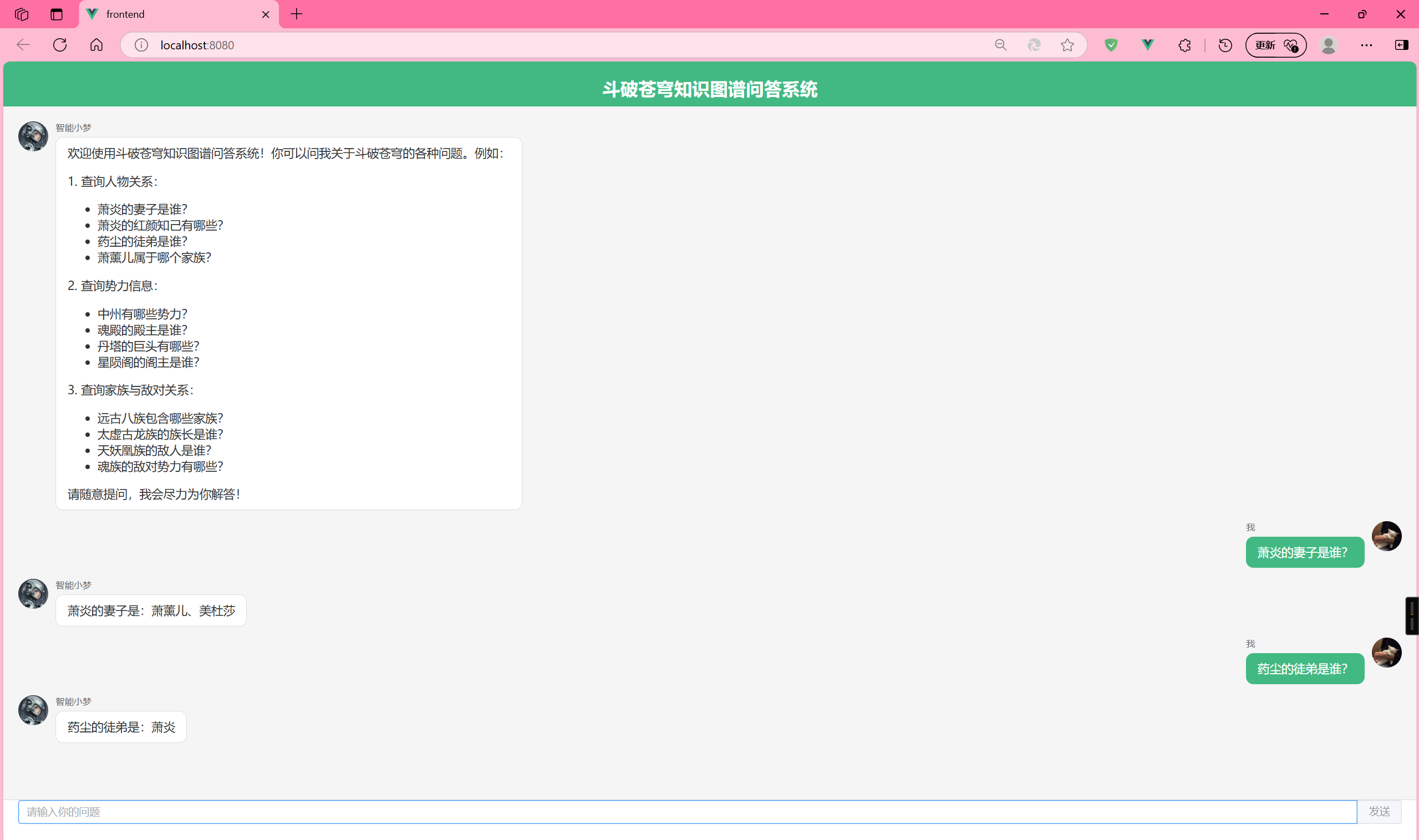

火山引擎开发者社区是火山引擎打造的AI技术生态平台,聚焦Agent与大模型开发,提供豆包系列模型(图像/视频/视觉)、智能分析与会话工具,并配套评测集、动手实验室及行业案例库。社区通过技术沙龙、挑战赛等活动促进开发者成长,新用户可领50万Tokens权益,助力构建智能应用。
更多推荐
 4
4 0
0- 0


 已为社区贡献2条内容

所有评论(0)