node-onvif与webrtcstreamer摄像机云台控制
node-onvif实现摄像机自动发现与云台控制
·
node-onvif实现摄像机云台控制效果如下
20251103_102528
代码目录结构: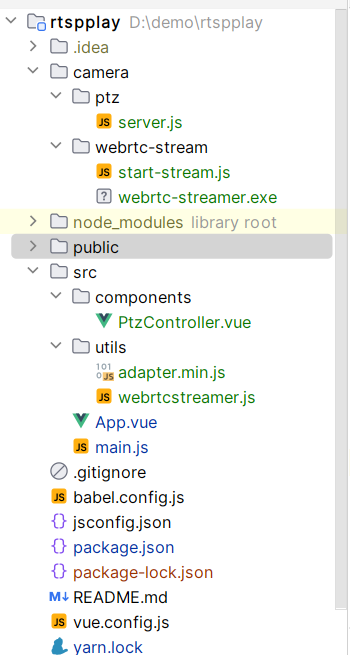
项目运行之后自动启动webrtc和ptz控制服务,支持局域网摄像头自动搜索,监控视频实时播放,云台控制等功能,这种设计目前非常支持本地开发调试使用,上线后需要node运行webrtc和ptz控制服务
页面代码 PtzController.vue
/* eslint-disable no-undef */
<template>
  <div class="camera-page">
    <h3>ONVIF 摄像机监控与云台控制</h3>

    <div class="camera-container">
      <!-- 左侧视频 -->
      <div class="video-area">
        <video ref="videoElement" autoplay muted playsinline></video>
      </div>

      <!-- 右侧控制面板 -->
      <div class="control-panel">
        <div class="discover-section">
          <el-button type="primary" @click="discoverDevices" :loading="loading">
            {{ loading ? '发现中...' : '发现设备' }}
          </el-button>
        </div>

        <div class="auth-section">
          <label>用户名</label><el-input v-model="username" placeholder="用户名" size="small" clearable></el-input>
          <label>密码</label><el-input v-model="password" placeholder="密码" show-password size="small" clearable></el-input>
        </div>

        <div v-if="devices.length" class="device-list">
          <h3>发现的设备</h3>
          <ul>
            <li v-for="(device, index) in devices" :key="index" class="device-item">
              <span>{{ device.name }} - {{ device.xaddr }}</span>
              <el-button
                  size="mini"
                  :type="selectedDevice === index ? 'success' : 'info'"
                  @click="selectDevice(index)"
              >
                {{ selectedDevice === index ? '已选择' : '选择' }}
              </el-button>
            </li>
          </ul>
        </div>

        <div v-if="selectedDevice !== null" class="ptz-interface">
          <h3>云台控制</h3>
          <div class="ptz-grid">
            <!-- 第一行:上 -->
            <div></div>
            <button class="ptz-btn" @mousedown="startMove(0, 0.5, 0)" @mouseup="stopMove">↑</button>
            <div></div>
            <button class="ptz-btn" @mousedown="startMove(-0.5, 0, 0)" @mouseup="stopMove">←</button>
            <button class="ptz-btn stop" @click="stopMove">●</button>
            <button class="ptz-btn" @mousedown="startMove(0.5, 0, 0)" @mouseup="stopMove">→</button>
            <div></div>
            <button class="ptz-btn" @mousedown="startMove(0, -0.5, 0)" @mouseup="stopMove">↓</button>
            <div></div>
          </div>
        </div>
      </div>
    </div>
    <transition name="fade">
      <div v-if="message" class="message" :class="{ error: isError }">
        {{ message }}
      </div>
    </transition>
  </div>
</template>

<script>
import axios from 'axios'
/* global WebRtcStreamer */
import "../utils/webrtcstreamer.js";
import "../utils/adapter.min.js";

export default {
  name: "CameraControl",
  data() {
    return {
      devices: [],
      selectedDevice: null,
      loading: false,
      message: "",
      isError: false,
      username: "admin",//摄像机登录用户名
      password: "admin123456",//摄像机登录密码
      streamer: null,
      rtspUrl: "" // 将根据所选设备自动生成
    };
  },
  methods: {
    async discoverDevices() {
      this.loading = true;
      this.message = "";
      try {
        const res = await axios.get("http://localhost:3000/discover");
        if (res.data.success) {
          this.devices = res.data.devices;
          this.message = `发现 ${this.devices.length} 个设备`;
          this.isError = false;
        } else {
          this.message = "发现设备失败: " + res.data.error;
          this.isError = true;
        }
      } catch (e) {
        this.message = "发现错误: " + e.message;
        this.isError = true;
      } finally {
        this.loading = false;
      }
    },
    async selectDevice(index) {
      this.selectedDevice = index;
      const device = this.devices[index];
      console.log(device)
      // 假设 RTSP URL 以 IP 推断,这里仅示例
    //  const ip = device.xaddr.split("/")[2].split(":")[0];

      const res = await axios.post("http://localhost:3000/getRtsp", {
        deviceIndex: this.selectedDevice,
        username: this.username,
        password: this.password
      });
      console.log(res)
      this.rtspUrl = res.data.data;
      this.initStream(this.rtspUrl);
      this.message = `已选择设备: ${device.name}`;
      this.isError = false;
    },
    initStream(rtspUrl) {
      const videoElement = this.$refs.videoElement;
      if (!videoElement) return;

      if (this.streamer) {
        this.streamer.disconnect();
        this.streamer = null;
      }

      this.streamer = new WebRtcStreamer(videoElement, location.protocol + "//127.0.0.1:8000");
      this.streamer.connect(rtspUrl);
    },
    async startMove(x, y, zoom) {
      if (this.selectedDevice === null) {
        this.message = "请先选择一个设备";
        this.isError = true;
        return;
      }
      try {
        const res = await axios.post("http://localhost:3000/ptz-control", {
          deviceIndex: this.selectedDevice,
          x, y, zoom,
          username: this.username,
          password: this.password
        });
        this.message = res.data.success
            ? `移动 (X:${x}, Y:${y}, Zoom:${zoom})`
            : "移动失败: " + res.data.error;
        this.isError = !res.data.success;
      } catch (e) {
        this.message = "移动错误: " + e.message;
        this.isError = true;
      }
    },
    async stopMove() {
      if (this.selectedDevice === null) return;
      try {
        const res = await axios.post("http://localhost:3000/ptz-stop", {
          deviceIndex: this.selectedDevice,
          username: this.username,
          password: this.password
        });
        this.message = res.data.success ? "停止移动" : "停止失败: " + res.data.error;
        this.isError = !res.data.success;
      } catch (e) {
        this.message = "停止错误: " + e.message;
        this.isError = true;
      }
    }
  },
  beforeDestroy() {
    if (this.streamer) {
      this.streamer.disconnect();
      this.streamer = null;
    }
  }
};
</script>

<style scoped>
.camera-page {
  max-width: 1100px;
  margin: 40px auto;
  background: #fff;
  border-radius: 16px;
  padding: 25px 30px;
  box-shadow: 0 4px 15px rgba(0,0,0,0.1);
  font-family: 'Segoe UI', sans-serif;
}

h1 {
  text-align: center;
  margin-bottom: 25px;
  color: #333;
}

.camera-container {
  display: flex;
  gap: 25px;
}

.video-area {
  flex: 2;
  background: black;
  border-radius: 10px;
  overflow: hidden;
  height: 700px;
}

video {
  width: 100%;
  height: 100%;
  background-color: black;
}

.control-panel {
  flex: 1.2;
  display: flex;
  flex-direction: column;
  align-items: stretch;
  gap: 15px;
}

.device-list ul {
  list-style: none;
  padding: 0;
}

.device-item {
  display: flex;
  justify-content: space-between;
  align-items: center;
  background: #f9fafc;
  border-radius: 6px;
  margin: 6px 0;
  padding: 8px 10px;
}

.ptz-grid {
  display: grid;
  grid-template-columns: repeat(3, 60px);
  grid-template-rows: repeat(3, 60px);
  justify-content: center;
  align-items: center;
  gap: 8px;
  margin: 15px auto;
}

.ptz-btn {
  background-color: #f1f3f5;
  border: 1px solid #dcdfe6;
  border-radius: 50%;
  width: 55px;
  height: 55px;
  font-size: 20px;
  cursor: pointer;
  transition: all 0.2s;
}

.ptz-btn:hover {
  background-color: #e0f2f1;
  transform: scale(1.05);
}

.ptz-btn.stop {
  background-color: #f44336;
  color: #fff;
  font-weight: bold;
}

.zoom-controls {
  text-align: center;
  margin-top: 10px;
}

.message {
  margin-top: 20px;
  text-align: center;
  padding: 10px;
  border-radius: 8px;
}

.message.error {
  background-color: #ffebee;
  color: #c62828;
}
.message:not(.error) {
  background-color: #e8f5e9;
  color: #2e7d32;
}
</style>
ptz服务代码
const express = require('express');
const cors = require('cors');
const onvif = require("node-onvif");
const app = express();
const port = 3000;
app.use(cors());
app.use(express.json());
let devices = []; // 存储发现的设备

// 发现ONVIF设备端点
app.get('/discover', async (req, res) => {
    try {
        console.log('开始设备发现过程');
        const device_info_list = await onvif.startProbe();
        devices = device_info_list.map(info => ({
            urn: info.urn,
            name: info.name,
            xaddr: info.xaddrs[0]
        }));
        console.log(`发现 ${devices.length} 个设备`);
        res.json({ success: true, devices });
    } catch (error) {
        console.error('设备发现失败:', error);
        res.status(500).json({ success: false, error: error.message });
    }
});
//获取视频流地址
app.post('/getRtsp', async (req, res) => {
    const { deviceIndex ,username, password} = req.body;
    try {
        console.log(deviceIndex)
        const device_info = devices[deviceIndex];
        if (!device_info) {
            return res.status(400).json({ success: false, error: '设备未找到' });
        }
        // 创建设备实例
        const device = new onvif.OnvifDevice({
            xaddr: device_info.xaddr,
            user:  username,
            pass:  password
        });
        // 初始化设备
        await device.init();
        const profile = device.getCurrentProfile();
        console.log("profile",profile);
        res.json({ success: true, message: '获取视频流地址成功', data: profile.stream.rtsp });
    } catch (error) {
        console.error('获取视频流地址错误:', error);
        res.status(500).json({ success: false, error: error.message });
    }
});

// PTZ控制端点
app.post('/ptz-control', async (req, res) => {
    const { deviceIndex, x, y, zoom ,username, password} = req.body;
    try {
        const device_info = devices[deviceIndex];
        if (!device_info) {
            return res.status(400).json({ success: false, error: '设备未找到' });
        }
        // 创建设备实例
        const device = new onvif.OnvifDevice({
            xaddr: device_info.xaddr,
            user:  username,
            pass:  password
        });
        // 初始化设备
        await device.init();
        const profile = device.getCurrentProfile();
        const profileToken = profile.token;
        const result = await device.ptzMove({
            'profileToken': profileToken,
            'speed': { x: x || 0, y: y || 0, z: zoom || 0 }
        });
        res.json({ success: true, message: 'PTZ指令发送成功', data: result });
    } catch (error) {
        console.error('PTZ控制错误:', error);
        res.status(500).json({ success: false, error: error.message });
    }
});

// 停止PTZ运动
app.post('/ptz-stop', async (req, res) => {
    const { deviceIndex,username, password } = req.body;
    try {
        const device_info = devices[deviceIndex];
        if (!device_info) {
            return res.status(400).json({ success: false, error: '设备未找到' });
        }
        const device = new onvif.OnvifDevice({
            xaddr: device_info.xaddr,
            user :  username,
            pass :  password
        });
        await device.init();
        const result = await device.ptzStop();
        res.json({ success: true, message: 'PTZ运动已停止', data: result });
    } catch (error) {
        console.error('停止PTZ错误:', error);
        res.status(500).json({ success: false, error: error.message });
    }
});
app.listen(port, () => {
    console.log(`Node.js ONVIF服务器运行在 http://localhost:${port}`);
});
start-stream.js代码
const { spawn } = require('child_process')
const path = require('path')

const streamerPath = path.resolve(__dirname, '../webrtc-stream/webrtc-streamer.exe')

// 摄像头 RTSP 地址 这个不用改是启动必要数据随便写的
const rtspUrl = 'rtsp://192.168.1.11:554/ch=1&subtype=*'

console.log('启动 webrtc-streamer...')
const streamer = spawn(streamerPath, [
     rtspUrl,         //  RTSP
     '-p', '8000'    // HTTP 端口
], { stdio: 'inherit' })

streamer.on('exit', code =>
    streamer.kill()
);
package.json
{
  "name": "rtspplay",
  "version": "0.1.0",
  "private": true,
  "scripts": {
    /*这里是自动启动摄像头流和云台控制服务*/
    "serve": "concurrently \"node ./camera/webrtc-stream/start-stream.js\" \"node ./camera/ptz/server.js\" \"vue-cli-service serve\"",
    "build": "vue-cli-service build",
    "lint": "vue-cli-service lint"
  },
  "dependencies": {
    "axios": "^1.13.1",
    "body-parser": "^2.2.0",
    "core-js": "^3.8.3",
    "cors": "^2.8.5",
    "express": "^5.1.0",
    "node-onvif": "^0.1.7",
    "element-ui": "2.15.14",
    "node-rtsp-stream": "^0.0.9",
    "onvif": "^0.8.1",
    "vue": "^2.6.14",
    "ws": "^8.18.3"
  },
  "devDependencies": {
    "@babel/core": "^7.12.16",
    "@babel/eslint-parser": "^7.12.16",
    "@vue/cli-plugin-babel": "~5.0.0",
    "@vue/cli-plugin-eslint": "~5.0.0",
    "@vue/cli-service": "~5.0.0",
    "concurrently": "^9.2.1",
    "eslint": "^7.32.0",
    "eslint-plugin-vue": "^8.0.3",
    "vue-template-compiler": "^2.6.14"
  },
  "eslintConfig": {
    "root": true,
    "env": {
      "node": true
    },
    "extends": [
      "plugin:vue/essential",
      "eslint:recommended"
    ],
    "parserOptions": {
      "parser": "@babel/eslint-parser"
    },
    "rules": {}
  },
  "browserslist": [
    "> 1%",
    "last 2 versions",
    "not dead"
  ]
}

火山引擎开发者社区是火山引擎打造的AI技术生态平台,聚焦Agent与大模型开发,提供豆包系列模型(图像/视频/视觉)、智能分析与会话工具,并配套评测集、动手实验室及行业案例库。社区通过技术沙龙、挑战赛等活动促进开发者成长,新用户可领50万Tokens权益,助力构建智能应用。
更多推荐
 4
4 0
0- 0


 已为社区贡献1条内容

所有评论(0)