Spring Boot 实时广播消息
摘要:本文介绍了如何在SpringBoot中集成WebSocket实现实时消息推送。通过引入spring-boot-starter-websocket依赖,配置WebSocket连接端点(@EnableWebSocketMessageBroker)和消息代理(enableSimpleBroker),定义消息接口(@MessageMapping)完成服务端搭建。前端使用SockJS和STOMP库建立
目录
1. 简介
实时消息推送已成为提升用户体验的核心需求。无论是社交平台的即时聊天、电商系统的订单状态更新,还是金融领域的行情变动提醒,用户都期望信息能像面对面交流一样即时触达。然而,传统HTTP请求-响应模式——客户端需频繁轮询服务器,不仅浪费资源,更无法保证消息的实时性。
WebSocket技术通过在服务器与客户端之间建立持久双向通道,让消息推送从"被动拉取"转变为"主动推送"。在Spring Boot框架中集成WebSocket,开发者仅需3行核心代码即可实现全站实时广播。
接下来,我们将详细的实现一个简单的实时广播消息功能。
2.实战案例
2.1 引入依赖
<dependency>
  <groupId>org.springframework.boot</groupId>
  <artifactId>spring-boot-starter-websocket</artifactId>
</dependency>
仅需要此依赖,配置文件中不需要做任何的配置。
2.2 启用WebSocket功能
@Configuration
// 开启 WebSocket 消息处理功能;
// 它允许使用 STOMP(简单文本定向消息协议,Simple Text Oriented Messaging Protocol)来处理通过 WebSocket 进行的消息传递。
@EnableWebSocketMessageBroker
public class WebSocketConfig implements WebSocketMessageBrokerConfigurer {
  @Override
  public void configureMessageBroker(MessageBrokerRegistry config) {
    // 广播消息访问前缀
    config.enableSimpleBroker("/topic") ;
    // 客户端到服务器通信的前缀
    config.setApplicationDestinationPrefixes("/app") ;
  }
  @Override
  public void registerStompEndpoints(StompEndpointRegistry registry) {
    registry
      // WebSocket接口
      .addEndpoint("/ws")
      // 跨域配置
      .setAllowedOriginPatterns("*")
      // 启用SockJS以提供回退支持
      .withSockJS();
  }
}
详细说明:
-
@EnableWebSocketMessageBroker
开启 WebSocket 消息处理,支持通过 STOMP 协议实现高效的消息传递,让服务器与客户端能双向实时通信。
-
enableSimpleBroker("/topic")
启用内存消息代理,将带 /topic 前缀的消息(如 /topic/notify)自动广播给所有订阅该主题的客户端,实现消息的 "一对多" 推送。
-
setApplicationDestinationPrefixes("/app")
设置客户端发送消息到服务器的统一前缀 /app。例如,客户端发送 /app/send 时,会触发使用 @MessageMapping("/send") 注解的方法。
-
addEndpoint("/ws")
设置 WebSocket 连接入口为 /ws,前端通过 ws://localhost:8080/ws 建立实时通信会话。
-
setAllowedOriginPatterns("*")
允许动态域名(但不能和 allowCredentials(true) 同时使用)。
-
withSockJS()
启用 SockJS 兼容库,当浏览器不支持 WebSocket 时,自动降级使用 HTTP 流或长轮询,确保实时通信的可靠性。
2.3 定义消息接口
我们需要定义一个Controller接口用来接收和广播消息
@Controller
public class NotifyController {

  // 接受客户端请求(会自动拼接WebSocketConfig中配置的 /app 前缀)
  @MessageMapping("/send")
  // 该方法的返回值会自动广播到所有订阅了/topic/notify的客户端
  @SendTo("/topic/notify")
  public String send(String message) {
    // 广播消息
    return String.format("广播消息: %s", message) ;
  }
}
详细说明:
-
@MessageMapping("/send")
客户端(浏览器)调用 /app/send 接口时自动对应到该方法。这里的 /app 前缀是在配置文件中配置的。
-
@SendTo("/topic/notify")
用于广播消息。任何订阅了 /topic/notify 的客户端都将收到此方法返回的消息(方法返回值)。
2.4 前端页面
首先,我们要准备如下2个js:
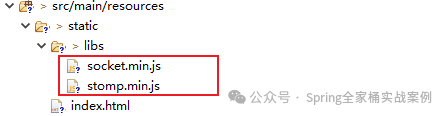
这两个js,我们可以通过如下地址下载:
index.html页面
<html lang="en">
<head>
  <meta charset="UTF-8">
  <title>实时通知系统</title>
  <script src="/libs/socket.min.js"></script>
  <script src="/libs/stomp.min.js"></script>
</head>
<body>
  <h2>实时通知系统</h2>
  <div id="notifys"></div>
  <input type="text" id="message" placeholder="输入消息">
  <button onclick="sendMessage()">发送消息</button>
  <script>
    let client = null;
    function connect() {
      const socket = new SockJS('http://localhost:8080/ws');
      client = Stomp.over(socket);

      client.connect({}, frame => {
        client.subscribe('/topic/notify', message => {
          showNotify(message.body);
        });
      }, (error) => {
        console.error(`WebSocket connection error: ${error}`);
      });
    }
    function sendMessage() {
      const elt = document.querySelector('#message')
      const message = elt.value;
      if (client && client.connected) {
        client.send('/app/send', {}, message);
        elt.value = ""
      } else {
        console.error('WebSocket 连接错误.');
      }
    }
    function showNotify(message) {
      const notifys = document.querySelector('#notifys') ;
      const notify = document.createElement('p');
      notify.textContent = message;
      notifys.appendChild(notify);
    }
    connect();
  </script>
</body>
</html>
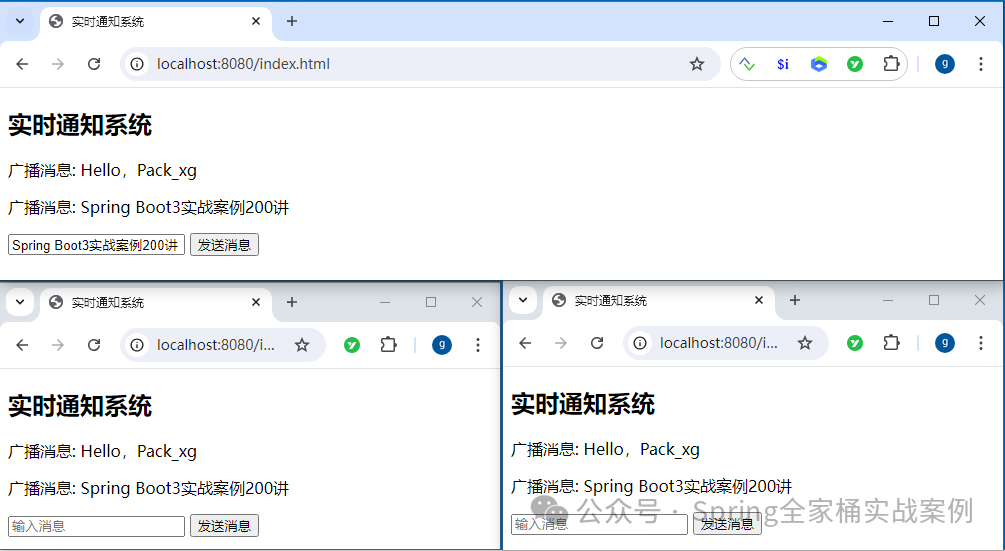
2.5 测试

火山引擎开发者社区是火山引擎打造的AI技术生态平台,聚焦Agent与大模型开发,提供豆包系列模型(图像/视频/视觉)、智能分析与会话工具,并配套评测集、动手实验室及行业案例库。社区通过技术沙龙、挑战赛等活动促进开发者成长,新用户可领50万Tokens权益,助力构建智能应用。
更多推荐
 11
11 0
0- 0


 已为社区贡献2条内容

所有评论(0)