NVIDIA大模型推理框架:TensorRT-LLM软件流程(二)trtllm-serve启动流程--C++ Module
TensorRT-LLM框架通过Pybind11实现Python与C++的交互。启动流程中,Python层调用tllm.ExecutorConfig会通过bindings.cpp映射到C++层的ExecutorConfig接口,并进行参数验证。Executor类同样通过C++实现,核心逻辑在Executor::Impl构造函数中完成,包括初始化并行配置、加载模型(如kDECODER_ONLY类型)
·
trtllm-serve启动流程–C++ Module
- 上一篇博主要是讲的Python module部分,这一篇博客主要是聚焦trtllm-serve 启动过程中C++ module
- 先介绍Python Layer调用C++ Layer使用的中间件Pybind11
- 个人觉得C++ 部分是非常复杂和丰富的,所以只关注了和嵌入相关并且我关注的部分
Pybind11 Layer
- TensorRT-LLM框架中是使用pybind11作为中间件来连接Python和C++
- 例如Python流程中调用tllm.ExecutorConfig,可以调用到C++ ExecutorConfig::ExecutorConfig interface
- Pybind11 module 调用链过程是:
- 1.先通过CMakeLists.txt编译生成Python可以使用的bindings module
- 2.再bindings.cpp文件中对executor绑定为bindings子模块,在Python代码中可以直接导入
- 3.最后对接口进行映射,并且对接口参数都初始化,可以让Python调用的时候可以不是必须全部传入,减少代码复杂度
//cpp\tensorrt_llm\pybind\CMakeLists.txt
set(TRTLLM_PYBIND_MODULE bindings)
set(TRTLLM_PYBIND_MODULE
    ${TRTLLM_PYBIND_MODULE}
    PARENT_SCOPE)
// cpp\tensorrt_llm\pybind\bindings.cpp
//Pybind链接关联层
auto mExecutor = m.def_submodule("executor", "Executor bindings");
tensorrt_llm::pybind::executor::initBindings(mExecutor);

//cpp\tensorrt_llm\pybind\executor\executorConfig.cpp
//Pybind映射层,py::arg定义参数类型,.def_property类成员属性绑定
py::class_<tle::ExecutorConfig>(m, "ExecutorConfig", pybind11::dynamic_attr())
    .def(py::init<                                                   //
             SizeType32,                                             // MaxBeamWidth
             tle::SchedulerConfig const&,                            // SchedulerConfig
             tle::KvCacheConfig const&,                              // KvCacheConfig
             >(),
        py::arg("max_beam_width") = 1, py::arg_v("scheduler_config", tle::SchedulerConfig(), "SchedulerConfig()"),
        py::arg_v("kv_cache_config", tle::KvCacheConfig(), "KvCacheConfig()"),
        py::arg("enable_chunked_context") = false, py::arg("normalize_log_probs") = true,
        .def_property("max_beam_width", &tle::ExecutorConfig::getMaxBeamWidth, &tle::ExecutorConfig::setMaxBeamWidth)
        .def_property("max_batch_size", &tle::ExecutorConfig::getMaxBatchSize, &tle::ExecutorConfig::setMaxBatchSize)
        .def_property("max_num_tokens", &tle::ExecutorConfig::getMaxNumTokens, &tle::ExecutorConfig::setMaxNumTokens)
        );
##tensorrt_llm\executor\executor.py
##导入module
from ..bindings import executor as tllm

##tensorrt_llm\llmapi\llm.py
##调用点
self._executor_config = tllm.ExecutorConfig(
    max_beam_width=self.args.max_beam_width,
    scheduler_config=PybindMirror.maybe_to_pybind(
        self.args.scheduler_config),
    batching_type=PybindMirror.maybe_to_pybind(self.args.batching_type)
    or tllm.BatchingType.INFLIGHT,
    max_batch_size=max_batch_size,
    max_num_tokens=max_num_tokens,
    gather_generation_logits=self.args.gather_generation_logits,
    fail_fast_on_attention_window_too_large=getattr(
        self.args, 'fail_fast_on_attention_window_too_large', False))
ExecutorConfig
- ExecutorConfig接口实现在cpp\tensorrt_llm\executor\executorConfig.cpp
- ExecutorConfig实现很简单只是对参数的有效性进行验证
// cpp\tensorrt_llm\executor\executorConfig.cpp
ExecutorConfig::ExecutorConfig(SizeType32 maxBeamWidth, SchedulerConfig schedulerConfig, KvCacheConfig kvCacheConfig,
    bool enableChunkedContext, bool normalizeLogProbs, SizeType32 iterStatsMaxIterations,
    SizeType32 requestStatsMaxIterations, BatchingType batchingType)
    : mMaxBeamWidth(maxBeamWidth)
    , mSchedulerConfig(std::move(schedulerConfig))
    , mKvCacheConfig(std::move(kvCacheConfig))
    , mEnableChunkedContext(enableChunkedContext)
    , mNormalizeLogProbs(normalizeLogProbs)
    , mIterStatsMaxIterations(iterStatsMaxIterations)
    , mRequestStatsMaxIterations(requestStatsMaxIterations)
    , mBatchingType(batchingType)
    , mMaxBatchSize(maxBatchSize)
{
    TLLM_CHECK(iterStatsMaxIterations >= 0);
    TLLM_CHECK(requestStatsMaxIterations >= 0);
    TLLM_CHECK(mMaxBeamWidth > 0);
    TLLM_CHECK(maxSeqIdleMicroseconds > 0);
}
Executor
- tllm.Executor也是调用到C++ Layer实现,流程和ExecutorConfig类似只是文件名为executor.cpp,直接来看实现代码
//cpp\tensorrt_llm\pybind\executor\executor.cpp
Executor::Executor(
    std::filesystem::path const& modelPath, tle::ModelType modelType, tle::ExecutorConfig const& executorConfig)
{
    mExecutor = std::make_unique<tle::Executor>(modelPath, modelType, executorConfig);
}

// cpp\tensorrt_llm\executor\executor.cpp
Executor::Executor(std::filesystem::path const& modelPath, ModelType modelType, ExecutorConfig const& executorConfig)
    : mImpl(std::make_unique<Executor::Impl>(modelPath, std::nullopt, modelType, executorConfig))
{
}

//cpp\tensorrt_llm\executor\executorImpl.cpp
Executor::Impl::Impl(std::filesystem::path const& modelPath,
    std::optional<std::filesystem::path> const& encoderModelPath, ModelType const modelType,
    ExecutorConfig const& executorConfig)
- 具体代码实现Impl来承接,执行到Executor::Impl::Impl构造函数
- initializeCommAndWorkers初始化parallelConfig
- modelType为kDECODER_ONLY,直接执行loadModel function
- createModel初始化处理request的batch方式赋值到gptModelType
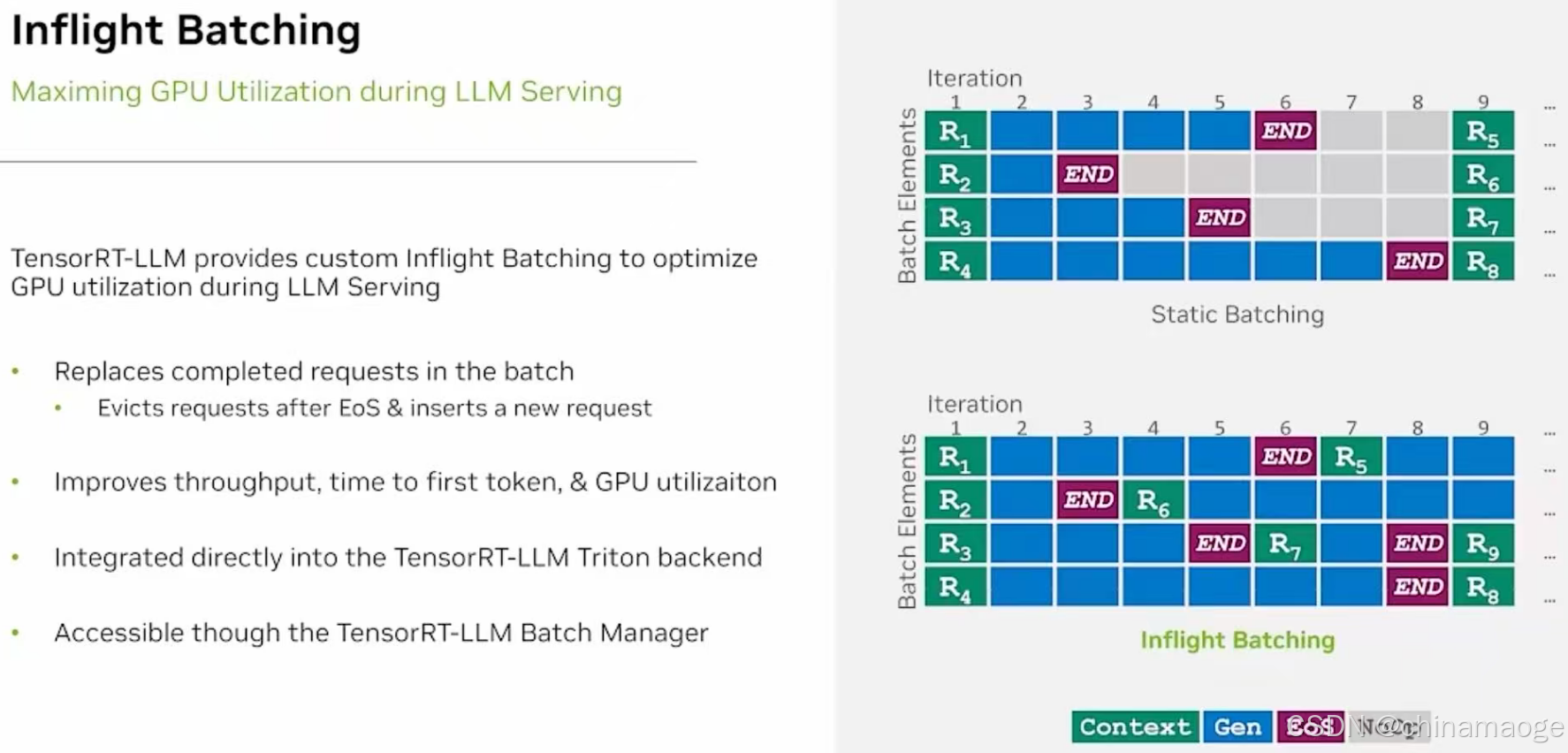
- create中instantiate TrtGptModelInflightBatching,Inflight Batching是TensorRT LLM设计的新特性,能在推理过程中动态合并新到达的请求。
- TrtGptModelInflightBatching 函数中具有GPT 模型结构、TensorRT 推理能力、Inflight Batching 调度逻辑三者解耦并初始化等功能
- inflight batching技术可以最大的利用GPU资源,在相同时间处理更多的requests
- loadModel结束之后会执行initialize,在其中会获取参数和Launch the execution thread,这个executionLoop在后面会用到
- _create_engine执行结束之后,从.engine file同级目录下读取config.json
- 通过_engine_config_to_model_config function instantiate data class ModelConfig,把config.json中的配置读取到_runtime_model_config,可以让TensorRT LLM在运行过程中获取优化后engine file的具体内部参数
// TensorRT-LLM加载config之后的打印
[TRT-LLM] [W] Implicitly setting QWenConfig.seq_length = 8192
[TRT-LLM] [W] Implicitly setting QWenConfig.qwen_type = qwen
[TRT-LLM] [W] Implicitly setting QWenConfig.moe_intermediate_size = 0
[TRT-LLM] [W] Implicitly setting QWenConfig.moe_shared_expert_intermediate_size = 0
[TRT-LLM] [W] Implicitly setting QWenConfig.tie_word_embeddings = False
[TRT-LLM] [I] Set dtype to float16.
[TRT-LLM] [I] Set bert_attention_plugin to auto.
[TRT-LLM] [I] Set gpt_attention_plugin to auto.
[TRT-LLM] [I] Set gemm_plugin to float16.
[TRT-LLM] [I] Set explicitly_disable_gemm_plugin to False.
流程图: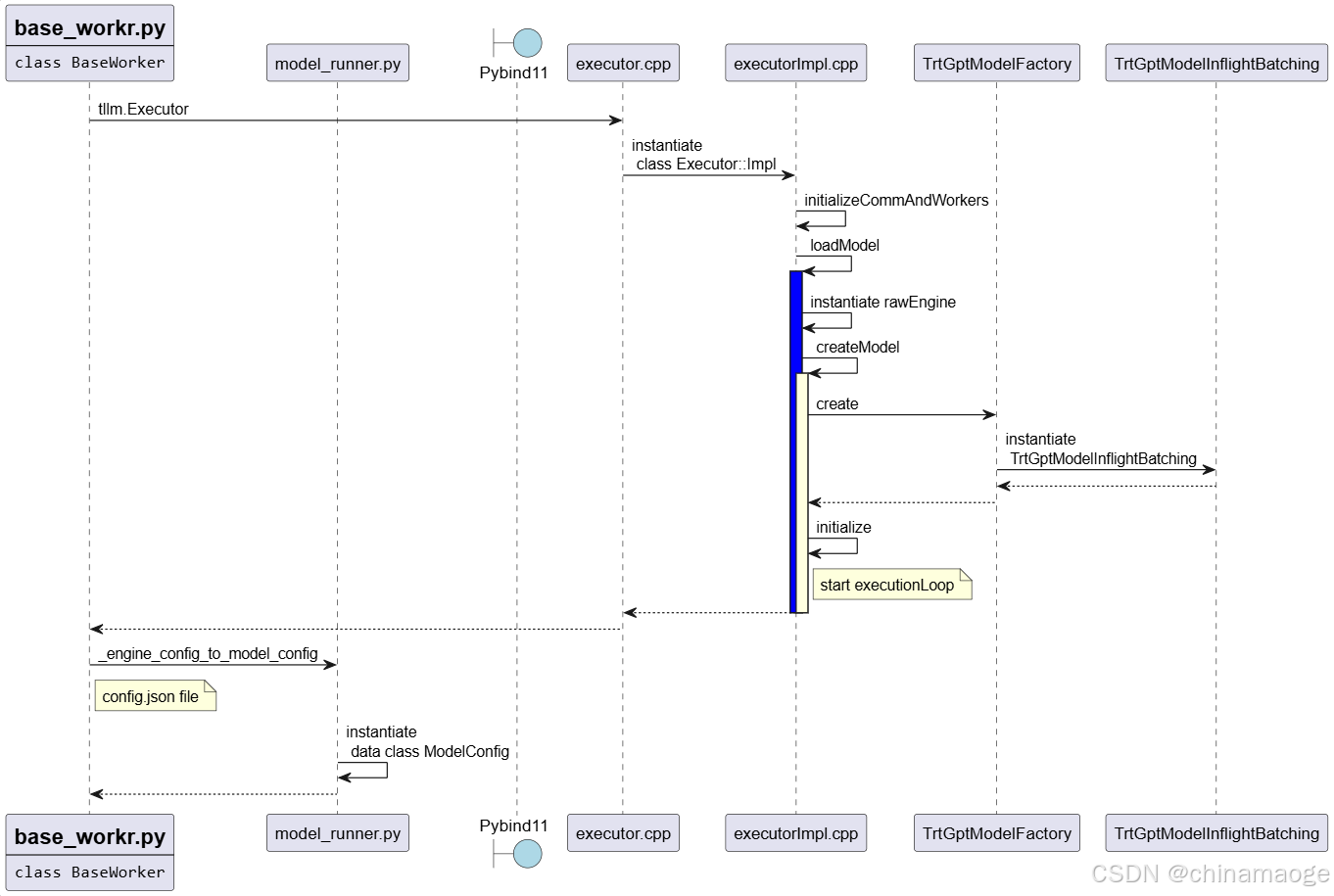
TrtGptModelInflightBatching
- 单独把TrtGptModelInflightBatching function拿出来做一个章节是因为这个函数功能非常多
- 初始化TrtGptModelInflightBatching首先会初始化父类TrtGptModel,TrtGptModel构造函数会从executorConfig中读取各种参数值设置,后面会在实际处理的过程中更改
- 接着instantiate Class TllmRuntime,StreamReader function读取.engine format 文件,binary读取方式。
- deserializeCudaEngine将预优化的.engine file 反序列化为 ICudaEngine 对象,ICudaEngine 是 TensorRT 的核心:包含了优化后的模型计算图(如层结构、算子融合结果)、输入输出张量定义、GPU 计算逻辑,具体实现是在TensorRT中
- createEngineInspector读取Engine file的内部细节检查
- mBufferManager为getDeviceMemorySizeV2分配计算图元数据、静态中间缓存、非流传输权重作为execution context memory,到这里总的实现序列化引擎文件到可执行 GPU 推理环境的转换
// cpp\tensorrt_llm\runtime\tllmRuntime.cpp
TllmRuntime::TllmRuntime() {
	auto reader = StreamReader(rawEngine.getPath());
	mEngine.reset(mRuntime->deserializeCudaEngine(reader));

	mEngineInspector.reset(mEngine->createEngineInspector());
	assessLikelihoodOfRuntimeAllocation(*mEngine, *mEngineInspector);
	setWeightStreaming(getEngine(), gpuWeightsPercent);
	auto const devMemorySize = mEngine->getDeviceMemorySizeV2();
	mEngineBuffer = mBufferManager.gpu(devMemorySize); }
- 模型读取完成之后,check mModelConfig、mWorldConfig、kvCacheConfig配置
- createBuffers创建出getMaxNumSequences数量的SlotDecoderBuffers放置在queue中,这个步骤会计算消耗的GPU memory
- createDecoder function创建出DecoderState and GptDecoder instance分别setup,GptDecoder中内部逻辑中也是分配GPU memory。如下面代码片所示,这是GptDecoder function多次调用到的结果,其中mBufferManager的操作就是在分配GPU memory。
// cpp\tensorrt_llm\layers\dynamicDecodeLayer.cpp
template <typename T>
void DynamicDecodeLayer<T>::initialize()
{
    TLLM_LOG_TRACE("%s start", __PRETTY_FUNCTION__);

    mOutputIdsPtrHost = mBufferManager->pinnedPool(ITensor::makeShape({}), TRTDataType<TokenIdType*>::value);
    mParentIdsPtrHost = mBufferManager->pinnedPool(ITensor::makeShape({}), TRTDataType<TokenIdType*>::value);
    mOutputIdsPtrDevice = mBufferManager->gpu(
        ITensor::makeShape({static_cast<SizeType32>(mDecoderDomain.getBatchSize())}), TRTDataType<TokenIdType*>::value);
    mParentIdsPtrDevice = mBufferManager->gpu(
        ITensor::makeShape({static_cast<SizeType32>(mDecoderDomain.getBatchSize())}), TRTDataType<TokenIdType*>::value);

    allocateBuffer();

    mCyclicStep = 0;
    mRuntimeMaxSeqLen = 0;
    mConfiguredBeamWidth = -1;

    if (!mDecodingMode.isAuto())
    {
        mConfiguredBeamWidth = mDecoderDomain.getBeamWidth();
        initializeLayers();
    }

    TLLM_LOG_TRACE("%s stop", __PRETTY_FUNCTION__);
}
- 在这里介绍这部分代码的原因是想介绍mBufferManager,TensorRT-LLM 还有一个介绍名字:A TensorRT Toolbox for Optimized Large Language Model Inference
- nvinfer1 namespace就来自于#include <NvInferRuntime.h>头文件,而这个头文件就来自于TensorRT,并且是其中核心组件的头文件
- TensorRT-LLM很多很多核心功能都是依赖于TensorRT实现
// cpp\tensorrt_llm\layers\baseLayer.h
std::shared_ptr<runtime::BufferManager> mBufferManager;

//cpp\include\tensorrt_llm\runtime\bufferManager.h
#pragma once
#include "tensorrt_llm/common/assert.h"
#include "tensorrt_llm/runtime/cudaStream.h"
#include "tensorrt_llm/runtime/iBuffer.h"
#include "tensorrt_llm/runtime/iTensor.h"
#include <NvInferRuntime.h>
#include <cstring>
#include <memory>
#include <set>
#include <string>
#include <vector>

class BufferManagerTest;
namespace tensorrt_llm::runtime
{
/// @brief Forward declaration as only used through pointer.
class CudaMemPool;
//! \brief A helper class for managing memory on host and device.
class BufferManager
{
public:
    using IBufferPtr = IBuffer::UniquePtr;
    using ITensorPtr = ITensor::UniquePtr;
    explicit BufferManager(CudaStreamPtr stream, bool trimPool = false);

    static auto constexpr kBYTE_TYPE = nvinfer1::DataType::kUINT8;
    //! \brief Allocates an `IBuffer` of the given size on the GPU, using cudaMallocAsync.
    [[nodiscard]] IBufferPtr gpu(std::size_t size, nvinfer1::DataType type = kBYTE_TYPE) const;
    //! \brief Allocates an `IBuffer` of the given size on the GPU, using cudaMalloc.
    [[nodiscard]] static IBufferPtr gpuSync(std::size_t size, nvinfer1::DataType type = kBYTE_TYPE);
};}
- createKvCacheManager 创建管理KV cache instance,和设置KV cache Pools,一般是有两级cache pool,primary GPU和secondary CPU cache pool,其中GPU速度最快。
- 会对pool划分block更加细致管理kv cache,我调试打印primaryBlocks=412, .secondayBlocks=0,Number of tokens per block=32,没有打开CPU cache pool,设置的Max Attention window Size=13184。
- 需要满足公式:单 block token 数 * block数量 >= windowSize,代码中直接就是相等的
- 实例化CapacityScheduler这是选择动态批处理(Inflight Batching)执行器的三种容量调度策略,因为hasKvCacheManager enable,所以实例化MaxUtilizationScheduler。
// cpp\include\tensorrt_llm\executor\types.h
/// @brief The policy used to select the subset of available requests in each iteration of the executor generation loop
enum class CapacitySchedulerPolicy
{
    /// @brief MAX_UTILIZATION packs as many requests as the underlying TRT engine can support in any iteration of the
    /// InflightBatching generation loop. While this is expected to maximize GPU throughput, it might require that some
    /// requests be paused and restarted depending on peak KV cache memory availability.
    kMAX_UTILIZATION = 0,

    /// @brief GUARANTEED_NO_EVICT uses KV cache more conservatively guaranteeing that a request, once started, will run
    /// to completion without eviction.
    kGUARANTEED_NO_EVICT = 1,

    /// @brief kSTATIC_BATCH does not schedule new requests until all requests in current batch are completed.
    /// Similar to kGUARANTEED_NO_EVICT, requests will run to completion without eviction.
    kSTATIC_BATCH = 2
};
- 最后部分代码是推测性解码(Speculative Decoding)优化和解码器请求管理的核心逻辑。
流程图: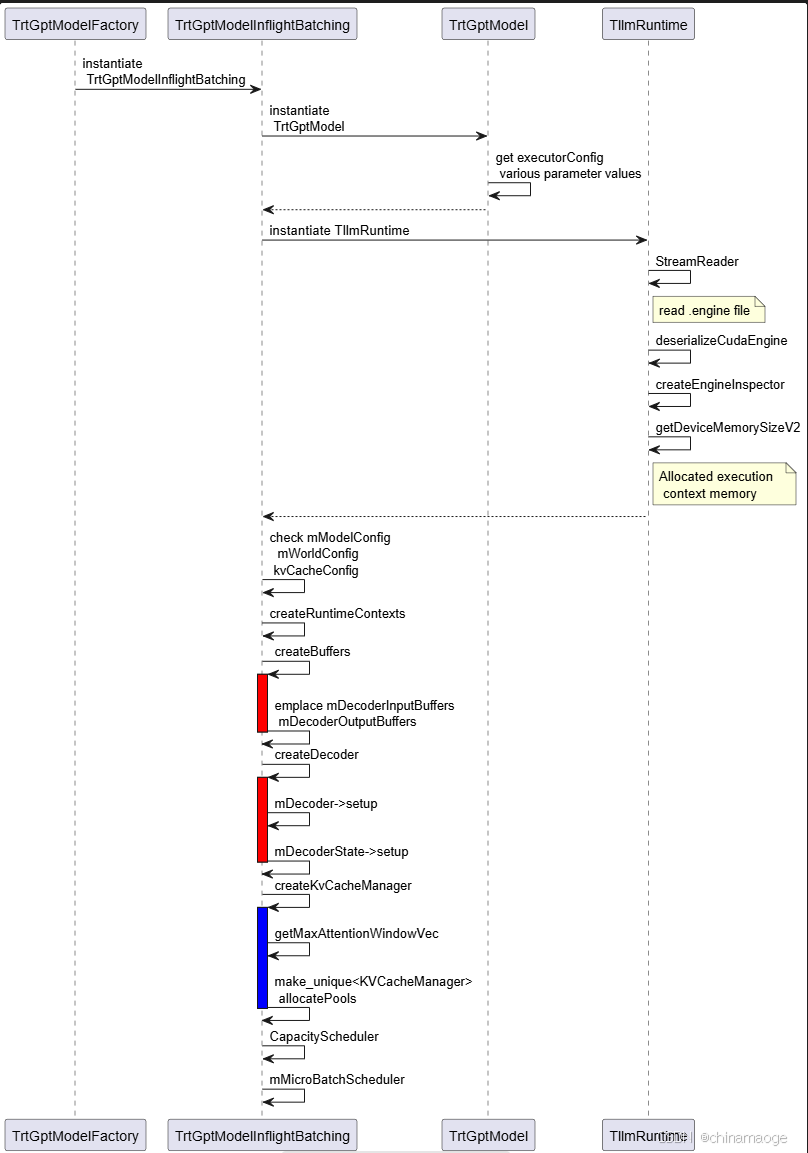
summary
- 通过一和二两篇博客,我们分析了TensorRT-LLM加载engine模型的流程,python提供API给应用层调用,通过pybind中间件调用到C++,耗时和具体处理部分都是C++实现。
- 模型初始化完整之后运行uvicorn.Server,接收http请求

- 接下来分析:TensorRT LLM接收到 request 请求并且处理的流程:trtllm-serve启动流程–HTTP Request
Tips
- TLLM_LOG_LEVEL环境变量可以设置TensorRT-LLM 打印log level 方便调试
// 设置log level debug
export TLLM_LOG_LEVEL=DEBUG
// 设置log level info
export TLLM_LOG_LEVEL=INFO
运行报错解决经验分享
Bus error
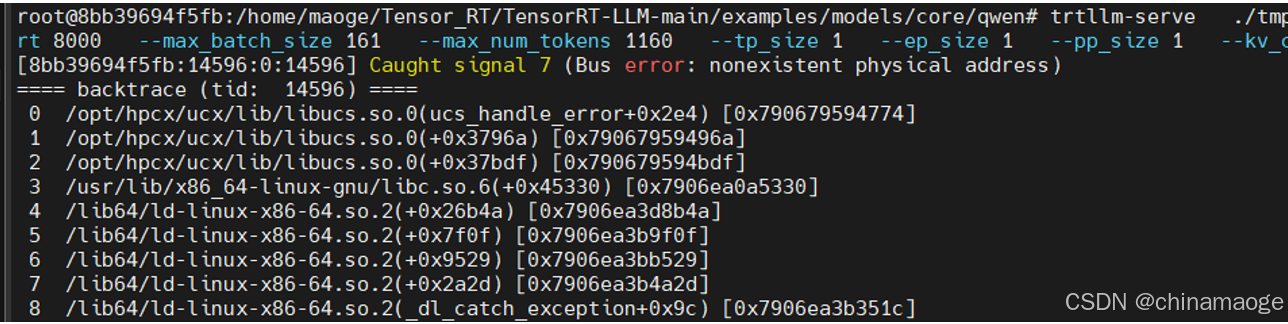
- 根本原因就是Docker 运行容器中physical memory不足,kill一些进程就能解决,因为我是在编译的过程中去运行大模型就会出现这样的问题,单独运行其中一个进程就没问题
final link failed
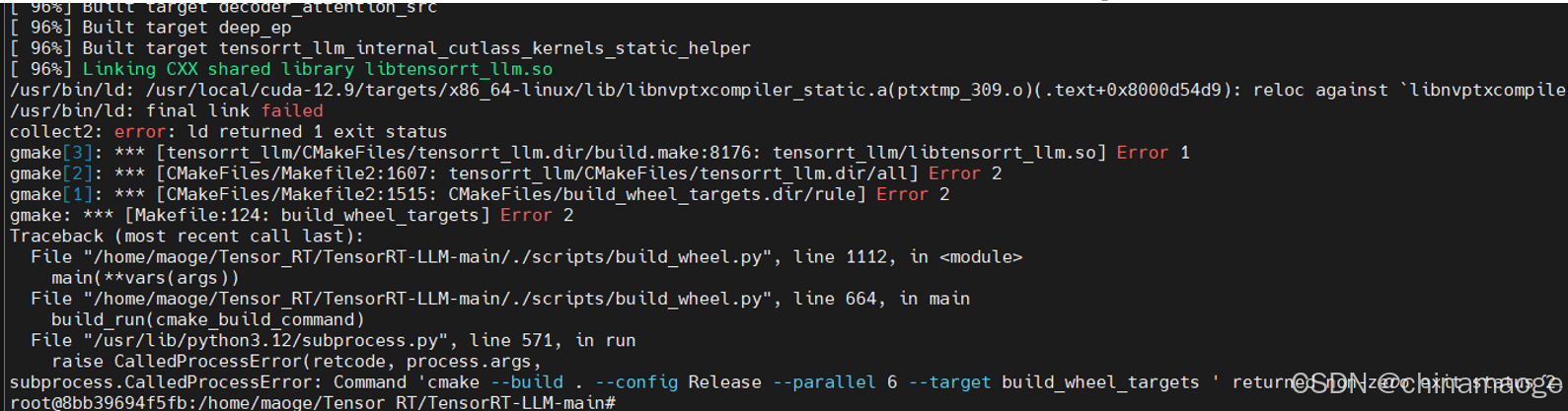
- 这个ld链接错误的根本原因我没有找到…
- 解决办法是:重启系统之后就可以编译通过了

火山引擎开发者社区是火山引擎打造的AI技术生态平台,聚焦Agent与大模型开发,提供豆包系列模型(图像/视频/视觉)、智能分析与会话工具,并配套评测集、动手实验室及行业案例库。社区通过技术沙龙、挑战赛等活动促进开发者成长,新用户可领50万Tokens权益,助力构建智能应用。
更多推荐
 12
12 0
0- 0


 已为社区贡献4条内容

所有评论(0)