【AI】——SpringAI集成DeepSeek实现智能服务系统
如果我们要求AI去做一件事,我们可以用到Function Call功能(提示:DeepSeek-R1还不支持这个功能,我们可以用DeepSeek-V3)

🎼个人主页:【Y小夜】
😎作者简介:一位双非学校的大三学生,编程爱好者,
专注于基础和实战分享,欢迎私信咨询!
🎆入门专栏:🎇【MySQL,Javaweb,Rust,python】
🎈热门专栏:🎊【Springboot,Redis,Springsecurity,Docker,AI】
感谢您的点赞、关注、评论、收藏、是对我最大的认可和支持!❤️

目录
🍟接入Deepseek实现简单对话
🥓引入依赖
因为SpringAI暂时还没发布,所以我们暂时使用他的快照版本。
    <!--        springAI的依赖-->
    <dependencyManagement>
        <dependencies>
            <dependency>
                <groupId>org.springframework.ai</groupId>
                <artifactId>spring-ai-bom</artifactId>
                <version>1.0.0-SNAPSHOT</version>
                <type>pom</type>
                <scope>import</scope>
            </dependency>
        </dependencies>
</dependencyManagement>又因为SpringAI快照版本还不支持Deepseek,所以我们这里使用阿里巴巴的SpringAI:Spring Cloud Alibaba官网_基于Springboot的微服务教程-阿里云
引入依赖依赖我们可以使用百炼里面的任意一个大模型:阿里云百炼
<!--        引入阿里AI的依赖-->
        <dependency>
            <groupId>com.alibaba.cloud.ai</groupId>
            <artifactId>spring-ai-alibaba-starter</artifactId>
            <version>1.0.0-M5.1</version>
        </dependency>
🥓添加配置
api-key可以自己去百炼上去申请
spring:
  ai:
    dashcope:
      api-key: XXXX
      chat:
        options:
          model: deepseek-r1
🥓编写测试类
package com.yan.kefu.controller;

import org.springframework.ai.chat.client.ChatClient;
import org.springframework.http.MediaType;
import org.springframework.web.bind.annotation.CrossOrigin;
import org.springframework.web.bind.annotation.GetMapping;
import org.springframework.web.bind.annotation.RequestParam;
import org.springframework.web.bind.annotation.RestController;

@RestController
@CrossOrigin
public class TestAiController {
    //没法自动导入,所以要构造一下
    private ChatClient chatClient;
    public TestAiController(ChatClient.Builder chatClient) {
        this.chatClient = chatClient.build();
    }
    @CrossOrigin
    @GetMapping(value = "/test")
    public String test(@RequestParam(value = "message")String message) {
        //首先通过prompt工程,然后在设置问题,最后通过call方法调用
        return  chatClient.prompt().user(message).call().content();
    }
}
然后然后打开网址:

发现我们成功了!!!

🥓使用流式输出
package com.yan.kefu.controller;

import org.springframework.ai.chat.client.ChatClient;
import org.springframework.http.MediaType;
import org.springframework.web.bind.annotation.CrossOrigin;
import org.springframework.web.bind.annotation.GetMapping;
import org.springframework.web.bind.annotation.RequestParam;
import org.springframework.web.bind.annotation.RestController;
import reactor.core.publisher.Flux;

@RestController
@CrossOrigin
public class TestAiController {
    //没法自动导入,所以要构造一下
    private ChatClient chatClient;
    public TestAiController(ChatClient.Builder chatClient) {
        this.chatClient = chatClient.build();
    }
    @CrossOrigin
    @GetMapping(value = "/test")
    public Flux<String> test(@RequestParam(value = "message")String message) {
        //首先通过prompt工程,然后在设置问题,最后通过call方法调用
        return  chatClient.prompt().user(message).stream().content();
    }
}
🍟添加记忆功能
先去创建一个chatMemory
package com.yan.kefu;

import org.springframework.ai.chat.memory.ChatMemory;
import org.springframework.ai.chat.memory.InMemoryChatMemory;
import org.springframework.boot.SpringApplication;
import org.springframework.boot.autoconfigure.SpringBootApplication;
import org.springframework.context.annotation.Bean;

@SpringBootApplication
public class KefuApplication {

    public static void main(String[] args) {
        SpringApplication.run(KefuApplication.class, args);
    }
    @Bean
     public ChatMemory chatMemory(){
        return  new InMemoryChatMemory();
    }

}
然后再构造·一下
package com.yan.kefu.controller;

import org.springframework.ai.chat.client.ChatClient;
import org.springframework.ai.chat.client.advisor.PromptChatMemoryAdvisor;
import org.springframework.ai.chat.memory.ChatMemory;
import org.springframework.http.MediaType;
import org.springframework.web.bind.annotation.CrossOrigin;
import org.springframework.web.bind.annotation.GetMapping;
import org.springframework.web.bind.annotation.RequestParam;
import org.springframework.web.bind.annotation.RestController;
import reactor.core.publisher.Flux;

@RestController
@CrossOrigin
public class TestAiController {
    //没法自动导入,所以要构造一下
    private ChatClient chatClient;
    public TestAiController(ChatClient.Builder chatClient, ChatMemory chatMemory) {
        this.chatClient = chatClient
                .defaultAdvisors(
                        new PromptChatMemoryAdvisor(chatMemory)
                )
                .build();
    }
    @CrossOrigin
    @GetMapping(value = "/test")
    public String test(@RequestParam(value = "message")String message) {
        //首先通过prompt工程,然后在设置问题,最后通过call方法调用
        return  chatClient.prompt().user(message)
                .advisors(a->a.param("chat_memory_response_size",100))//设置拼接大小
                .call().content();
    }
}
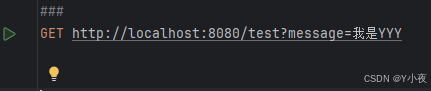
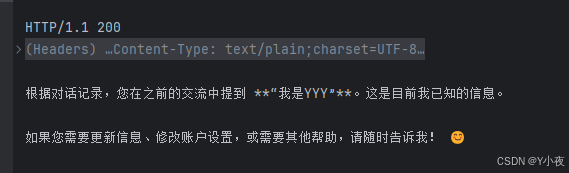
先告诉他我是YYY

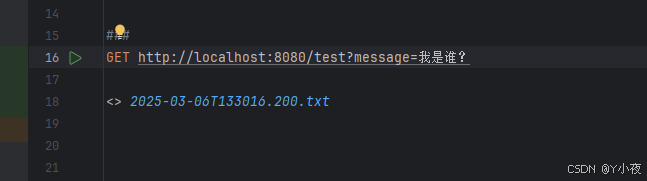
然后问他我是谁:
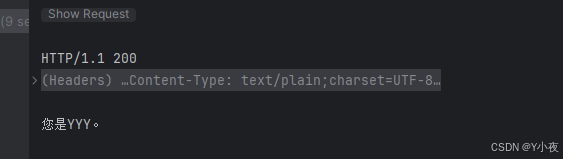
他会回答我是YYY,说明有了记忆功能。
🥓打印日志
我们首先要注册一个拦截器:
package com.yan.kefu.service;

import org.springframework.ai.chat.client.advisor.api.AdvisedRequest;
import org.springframework.ai.chat.client.advisor.api.AdvisedResponse;
import org.springframework.ai.chat.client.advisor.api.CallAroundAdvisor;
import org.springframework.ai.chat.client.advisor.api.CallAroundAdvisorChain;

public class LoggingAdvisor implements CallAroundAdvisor {
    @Override
    public AdvisedResponse aroundCall(AdvisedRequest advisedRequest, CallAroundAdvisorChain chain) {
        //在请求发送之前打印日志
        System.out.println("Request:"+advisedRequest);
        //调用下一个拦截器
        AdvisedResponse advisedResponse = chain.nextAroundCall(advisedRequest);
        //在响应返回之后打印日志
        System.out.println("Response:"+advisedResponse);
        return advisedResponse;
    }
    @Override
    public String getName() {
        //返回拦截器名称
        return "LoggingAdvisor";
    }
    @Override
    public int getOrder() {
        return 0;
    }
}
然后将拦截器添加到调用程序,
package com.yan.kefu.controller;

import com.yan.kefu.service.LoggingAdvisor;
import org.springframework.ai.chat.client.ChatClient;
import org.springframework.ai.chat.client.advisor.PromptChatMemoryAdvisor;
import org.springframework.ai.chat.memory.ChatMemory;
import org.springframework.http.MediaType;
import org.springframework.web.bind.annotation.CrossOrigin;
import org.springframework.web.bind.annotation.GetMapping;
import org.springframework.web.bind.annotation.RequestParam;
import org.springframework.web.bind.annotation.RestController;
import reactor.core.publisher.Flux;

@RestController
@CrossOrigin
public class TestAiController {
    //没法自动导入,所以要构造一下
    private ChatClient chatClient;
    public TestAiController(ChatClient.Builder chatClient, ChatMemory chatMemory) {
        this.chatClient = chatClient
                .defaultAdvisors(
                        new PromptChatMemoryAdvisor(chatMemory),
                        new LoggingAdvisor()
                )
                .build();
    }
    @CrossOrigin
    @GetMapping(value = "/test")
    public String test(@RequestParam(value = "message")String message) {
        //首先通过prompt工程,然后在设置问题,最后通过call方法调用
        return  chatClient.prompt().user(message)
                .advisors(a->a.param("chat_memory_response_size",100))//设置拼接大小
                .call().content();
    }
}
然后给他说,我是YYY,然后看一下打印信息。

然后在问他一下,我是谁,看一下打印信息,打印信息的内容里面包含上次提问的内容。

🥓设置角色
package com.yan.kefu.controller;

import com.yan.kefu.service.LoggingAdvisor;
import org.springframework.ai.chat.client.ChatClient;
import org.springframework.ai.chat.client.advisor.PromptChatMemoryAdvisor;
import org.springframework.ai.chat.memory.ChatMemory;
import org.springframework.http.MediaType;
import org.springframework.web.bind.annotation.CrossOrigin;
import org.springframework.web.bind.annotation.GetMapping;
import org.springframework.web.bind.annotation.RequestParam;
import org.springframework.web.bind.annotation.RestController;
import reactor.core.publisher.Flux;

import java.time.LocalDate;

@RestController
@CrossOrigin
public class TestAiController {
    //没法自动导入,所以要构造一下
    private ChatClient chatClient;
    public TestAiController(ChatClient.Builder chatClient, ChatMemory chatMemory) {
        this.chatClient = chatClient
                .defaultSystem(
                        "你是图灵航空公司的客户聊天支持代理,请以友好,乐于助人且愉快的方式来回复," +
                                "您正在通过在线聊天系统与客户互动。请你讲中文。今天的日期是{current_data}"
                )//设置角色
                .defaultAdvisors(
                        new PromptChatMemoryAdvisor(chatMemory),
                        new LoggingAdvisor()
                )
                .build();
    }
    @CrossOrigin
    @GetMapping(value = "/test")
    public String test(@RequestParam(value = "message")String message) {
        //首先通过prompt工程,然后在设置问题,最后通过call方法调用
        return  chatClient.prompt()
                .system(s->s.param("current_data", LocalDate.now().toString()))//传入当前的日期
                .user(message)
                .advisors(a->a.param("chat_memory_response_size",100))//设置拼接大小
                .call().content();
    }
}
然后进行测试,问他你是谁,你会得到:

package com.yan.kefu.controller;

import com.yan.kefu.service.LoggingAdvisor;
import org.springframework.ai.chat.client.ChatClient;
import org.springframework.ai.chat.client.advisor.PromptChatMemoryAdvisor;
import org.springframework.ai.chat.memory.ChatMemory;
import org.springframework.http.MediaType;
import org.springframework.web.bind.annotation.CrossOrigin;
import org.springframework.web.bind.annotation.GetMapping;
import org.springframework.web.bind.annotation.RequestParam;
import org.springframework.web.bind.annotation.RestController;
import reactor.core.publisher.Flux;

import java.time.LocalDate;

@RestController
@CrossOrigin
public class TestAiController {
    //没法自动导入,所以要构造一下
    private ChatClient chatClient;
    public TestAiController(ChatClient.Builder chatClient, ChatMemory chatMemory) {
        this.chatClient = chatClient
                .defaultSystem(
                        "你是图灵航空公司的客户聊天支持代理,请以友好,乐于助人且愉快的方式来回复," +
                                "您正在通过在线聊天系统与客户互动。" +
                                "在提供有关预定或者取消预定信息之前,您必须始终从用户获得一下信息:预定号、客户信息、在询问用户之前,请检查消息历史记录已获得次消息" +
                                "请你讲中文。今天的日期是{current_data}"
                )//设置角色
                .defaultAdvisors(
                        new PromptChatMemoryAdvisor(chatMemory),
                        new LoggingAdvisor()
                )
                .build();
    }
    @CrossOrigin
    @GetMapping(value = "/test")
    public String test(@RequestParam(value = "message")String message) {
        //首先通过prompt工程,然后在设置问题,最后通过call方法调用
        return  chatClient.prompt()
                .system(s->s.param("current_data", LocalDate.now().toString()))//传入当前的日期
                .user(message)
                .advisors(a->a.param("chat_memory_response_size",100))//设置拼接大小
                .call().content();
    }
}

🥓Function call功能
如果我们要求AI去做一件事,我们可以用到Function Call功能(提示:DeepSeek-R1还不支持这个功能,我们可以用DeepSeek-V3)
	// 取消预定航班
	public void cancelBooking(String bookingNumber, String name) {
		var booking = findBooking(bookingNumber, name);
		// 是不是发车前2天
		if (booking.getDate().isBefore(LocalDate.now().plusDays(2))) {
			throw new IllegalArgumentException("Booking cannot be cancelled within 48 hours of the start date.");
		}
		//设置状态为取消
		booking.setBookingStatus(BookingStatus.CANCELLED);
	}
@Bean
@Description("处理机票退订")
public Function<CancelBookingRequest,String> cancelBooking(){
return cancelBookingRequest -> {
// apply 调用退订方法
flightBookingService.cancelBooking(cancelBookingRequest.bookingNumber(),cancelBookingRequest.name());
return "退订成功!";
};
}将其配置到构造器上去:
    public OpenAiController(ChatClient.Builder chatClientBuilder, ChatMemory chatMemory, VectorStore vectorStore) {
        this.chatClient = chatClientBuilder.defaultSystem(
                """
                        您是“Tuling”航空公司的客户聊天支持代理。请以友好、乐于助人且愉快的方式来回复。
                        您正在通过在线聊天系统与客户互动。
                        在提供有关预订或取消预订的信息之前,您必须始终
                        从用户处获取以下信息:预订号、客户姓名。
                        在询问用户之前,请检查消息历史记录以获取此信息。
                        在更改或退订之前,请先获取预订信息并且用户确定之后才进行更改或退订。
                        请讲中文。
                        今天的日期是 {current_date}.
                        """
        )
                .defaultAdvisors(
                        new PromptChatMemoryAdvisor(chatMemory),
                        new LoggingAdvisor(),
                        new QuestionAnswerAdvisor(vectorStore, SearchRequest.defaults()) // RAG
                )
                .defaultFunctions("cancelBooking","getBookingDetails")
                .build();
    }
🥓向量化
先准备文本:
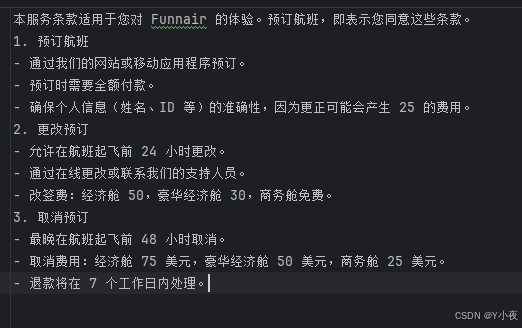
使用默认内存数据库,并将数据向量化:
//直接用内存中的向量数据库
    @Bean
    public VectorStore vectorStore(EmbeddingModel embeddingModel) {
        return new SimpleVectorStore(embeddingModel);
    }


    //     启动springboot的时候就会运行
    @Bean
    CommandLineRunner ingestTermOfServiceToVectorStore(EmbeddingModel embeddingModel, VectorStore vectorStore,
                                                       @Value("classpath:rag/terms-of-service.txt") Resource termsOfServiceDocs) {
        return args -> {
            vectorStore.write(                                  // 3.写入
                    new TokenTextSplitter().transform(          // 2.转换
                            new TextReader(termsOfServiceDocs).read())  // 1.读取
            );
        };
    }
修改注册:
    public OpenAiController(ChatClient.Builder chatClientBuilder, ChatMemory chatMemory, VectorStore vectorStore) {
        this.chatClient = chatClientBuilder.defaultSystem(
                """
                        您是“Tuling”航空公司的客户聊天支持代理。请以友好、乐于助人且愉快的方式来回复。
                        您正在通过在线聊天系统与客户互动。
                        在提供有关预订或取消预订的信息之前,您必须始终
                        从用户处获取以下信息:预订号、客户姓名。
                        在询问用户之前,请检查消息历史记录以获取此信息。
                        在更改或退订之前,请先获取预订信息并且用户确定之后才进行更改或退订。
                        请讲中文。
                        今天的日期是 {current_date}.
                        """
        )
                .defaultAdvisors(
                        new PromptChatMemoryAdvisor(chatMemory),
                        new LoggingAdvisor(),
                        new QuestionAnswerAdvisor(vectorStore, SearchRequest.defaults()) // RAG
                )
                .defaultFunctions("cancelBooking","getBookingDetails")
                .build();
    }
火山引擎开发者社区是火山引擎打造的AI技术生态平台,聚焦Agent与大模型开发,提供豆包系列模型(图像/视频/视觉)、智能分析与会话工具,并配套评测集、动手实验室及行业案例库。社区通过技术沙龙、挑战赛等活动促进开发者成长,新用户可领50万Tokens权益,助力构建智能应用。
更多推荐
 7
7 0
0- 0


 已为社区贡献5条内容

所有评论(0)