微信服务号发送模版消息
因为我是做了一个用户扫码的操作,然后关注公众号,才能获取openid,下面是生成二维码的代码。老板的需求:小程序发布活动,有人 报名完要给发布活动的人发一条服务号消息就张下面这样。往下滑会有一个模板,点击开通就可以了,然后左侧就有一个模板消息。我是php语言,其他语言用deepseek 改成你的语言。代码第一行的token 是你刚刚自己设置的token。下面获取你的appid 和 appsecre
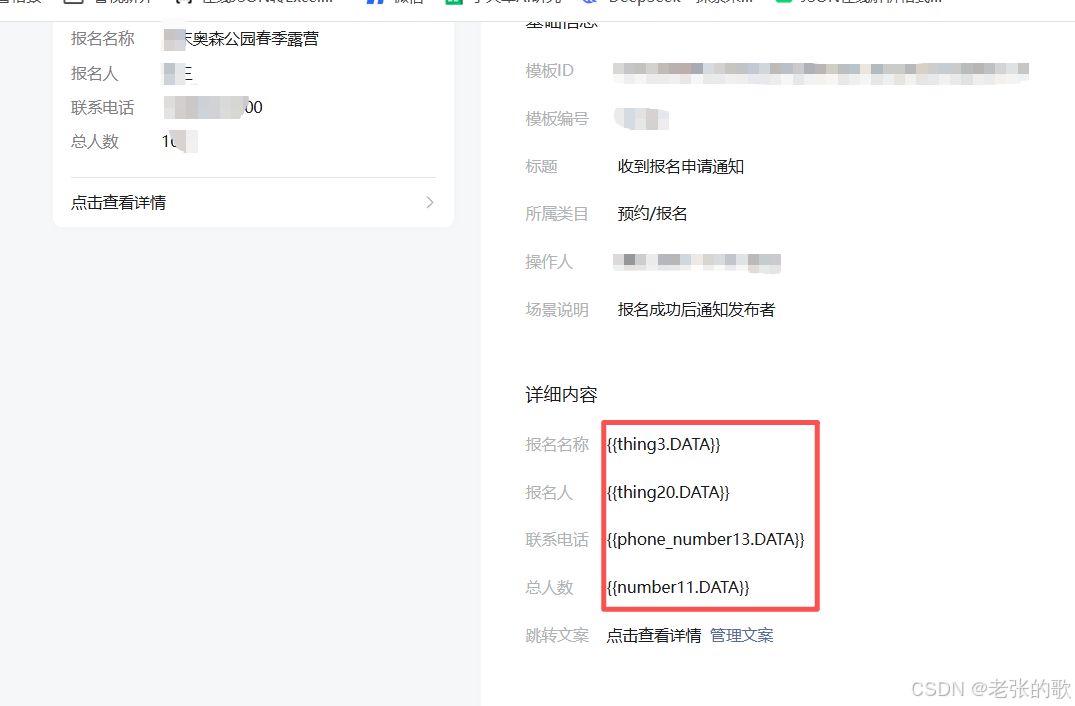
老板的需求:小程序发布活动,有人 报名完要给发布活动的人发一条服务号消息就张下面这样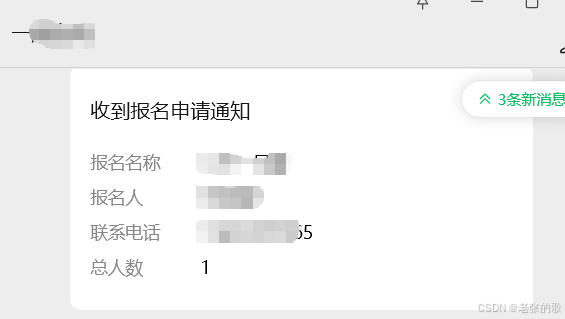
我是php语言,其他语言用deepseek 改成你的语言
准备工作开始
1:注册一个服务号且需要认证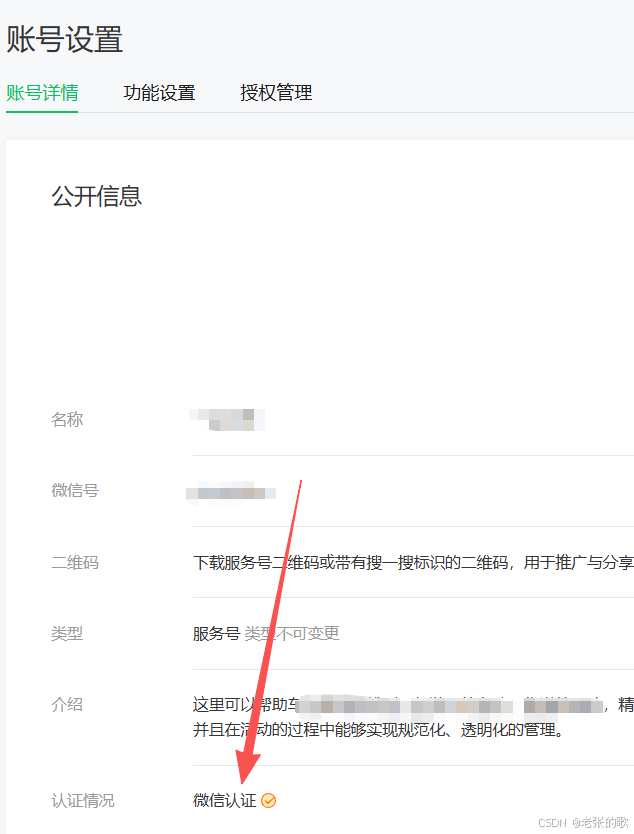
2.开通模板
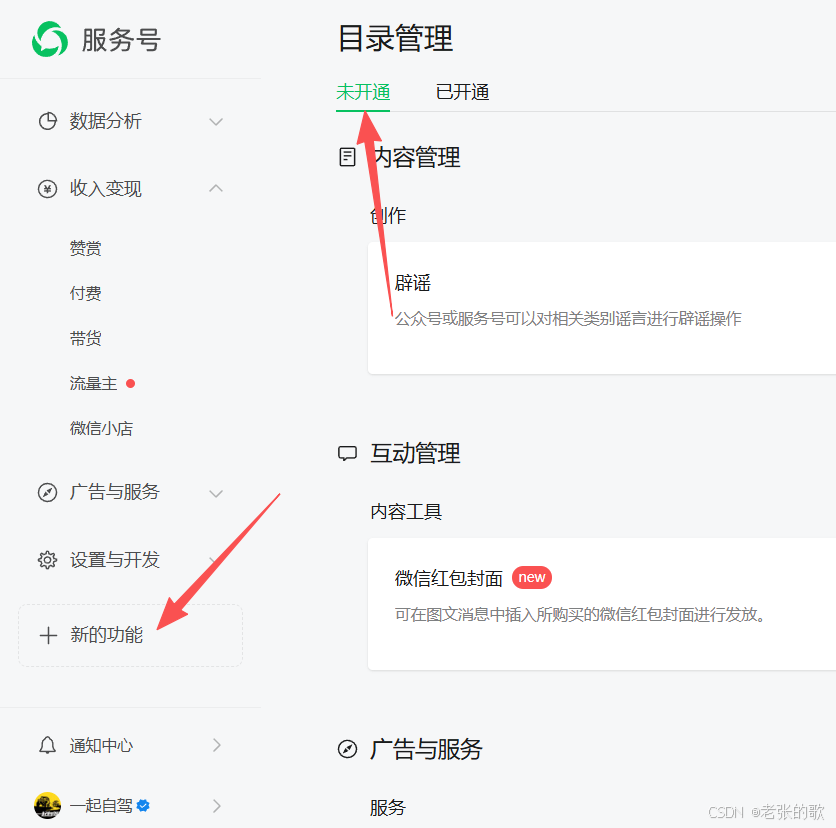
往下滑会有一个 模板,点击开通就可以了,然后左侧就有一个模板消息 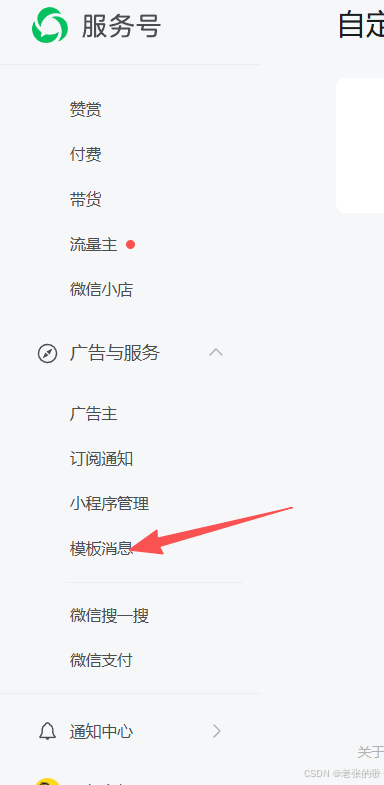
在模版库中找到一个适合的模板,如果没有你想要的模板,你就去修改你的服务类目,不详细讲了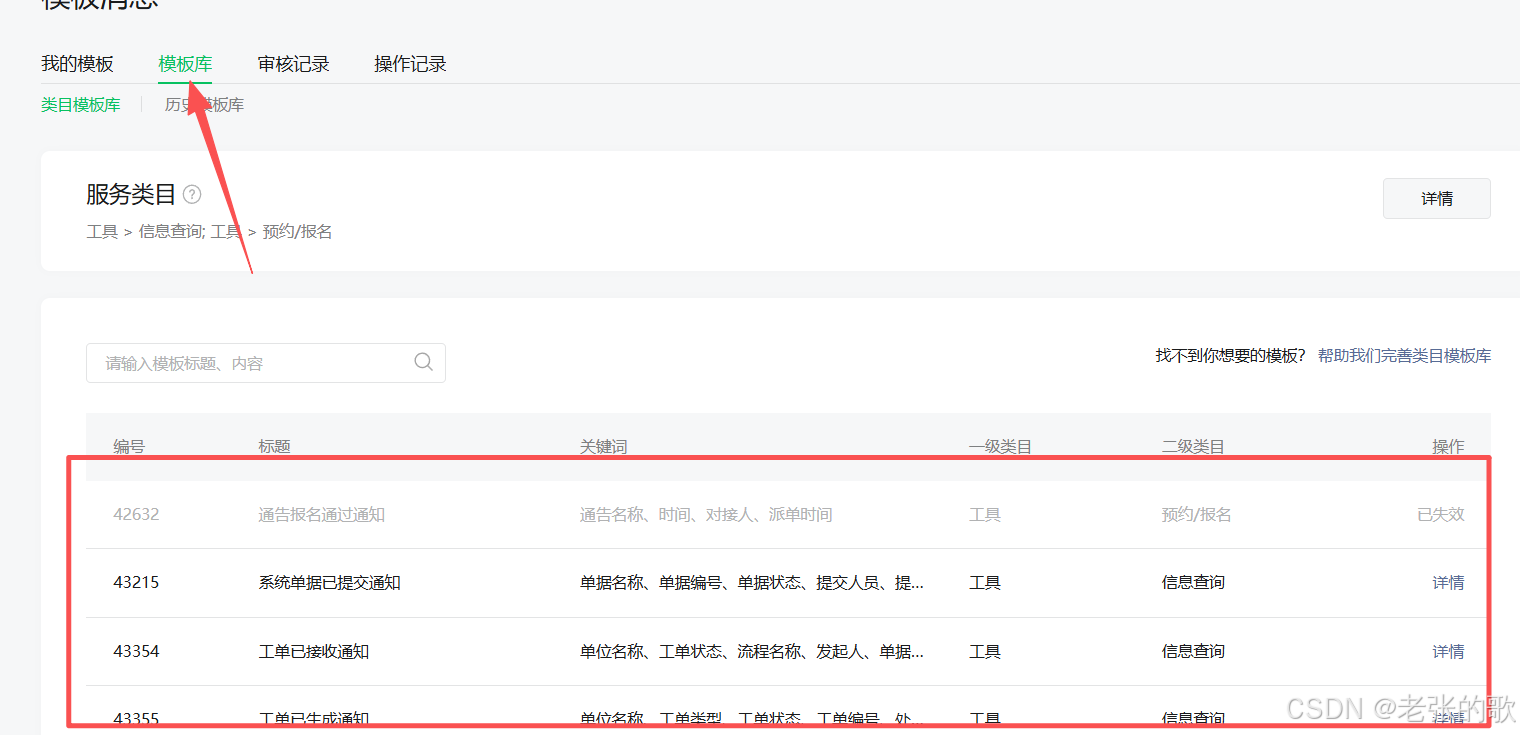
点右侧详情 选你需要的字段 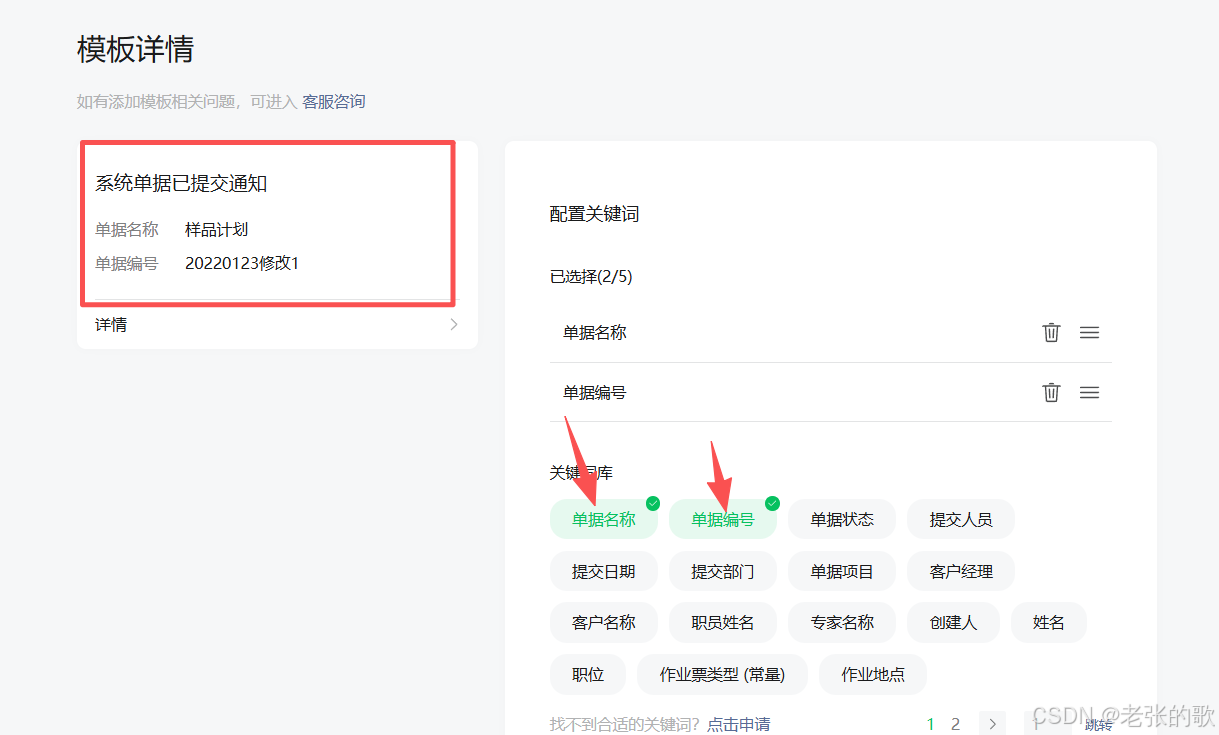
配完,先别着急写代码,还有一个重要的域名要配置,看下图,把这三个都写上,点进去设置,会教你怎么写,(有一个文件验证,别忘了放到根目录下或者能直接用域名访问到的地方)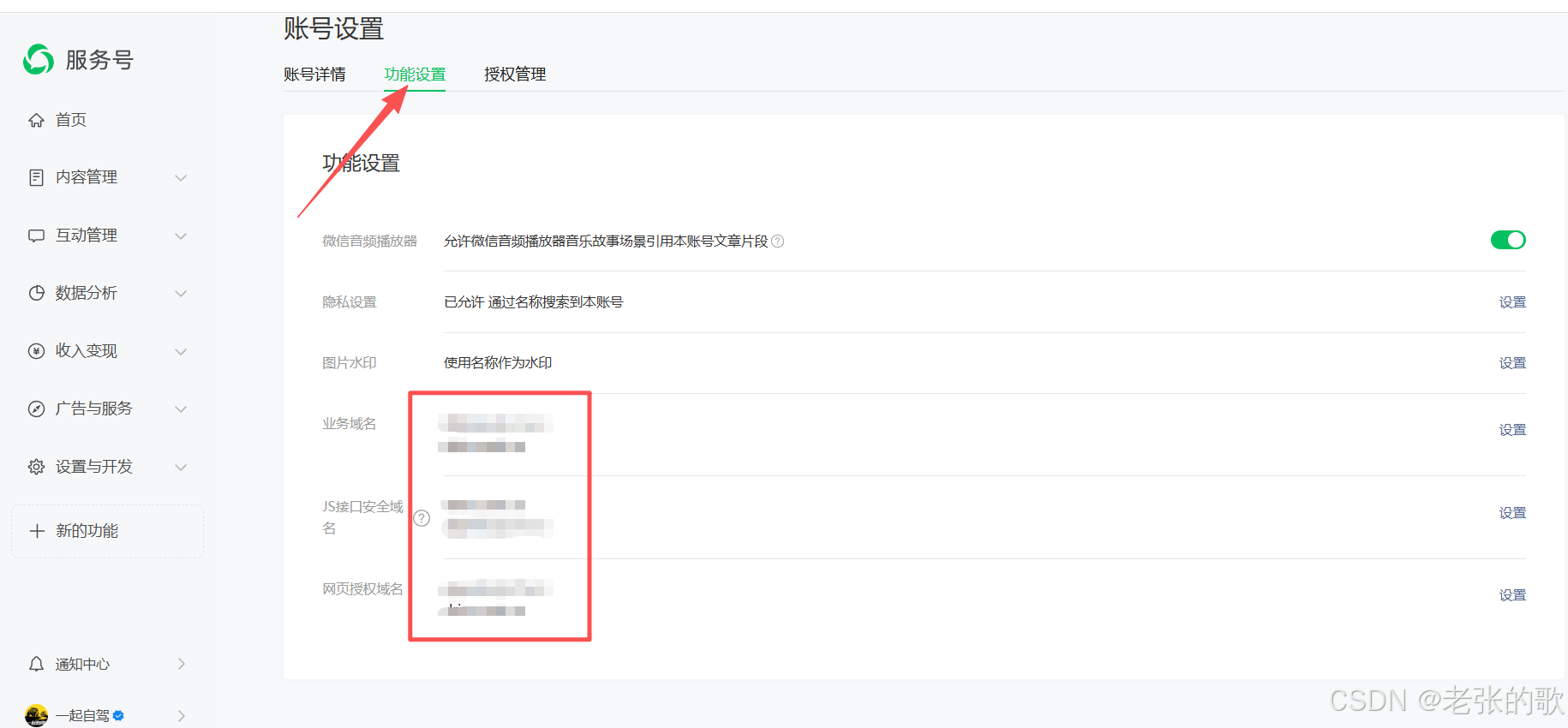
复制出来你的 模板id,把它先记下来 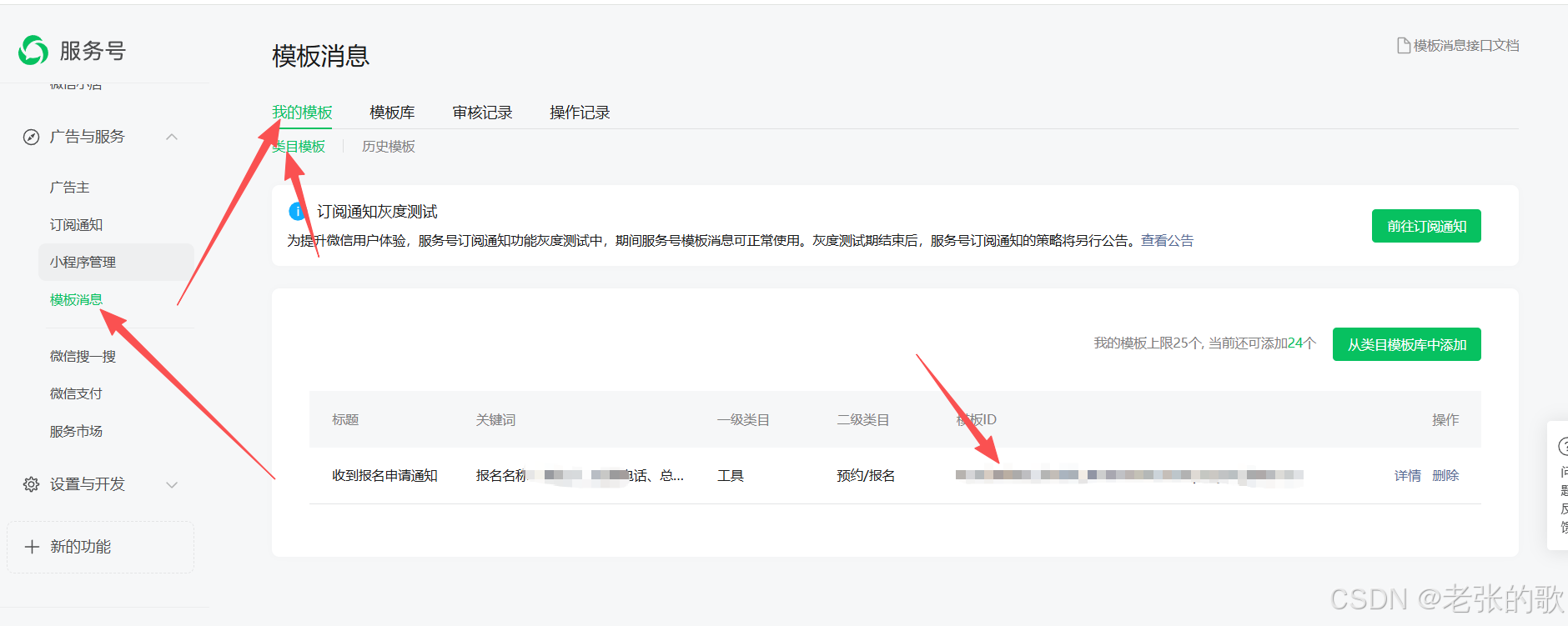
下面获取你的appid 和 appsecret 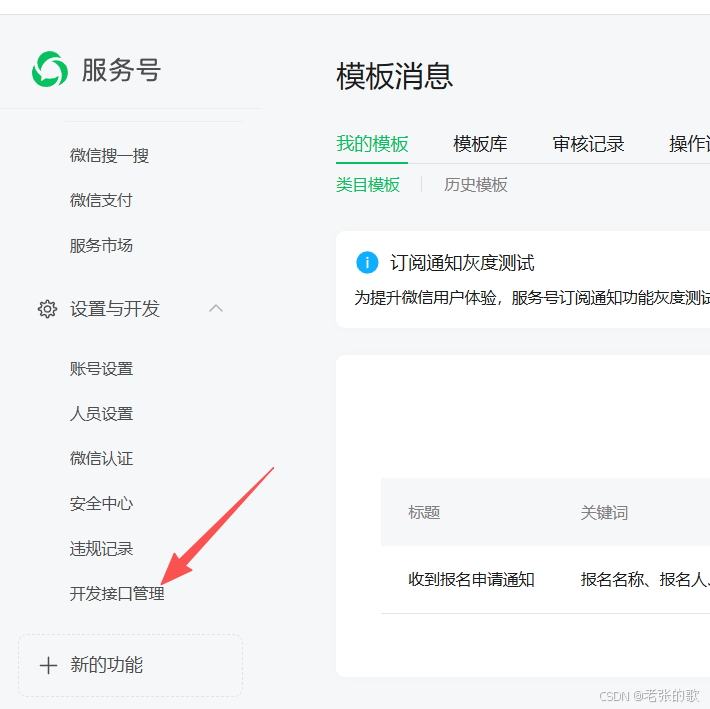
为方便运营者更好地管理开发接口,「设置与开发-开发接口管理」将于2025年12月1日起迁移至微信开发者平台。
访问地址 https://developers.weixin.qq.com/platform
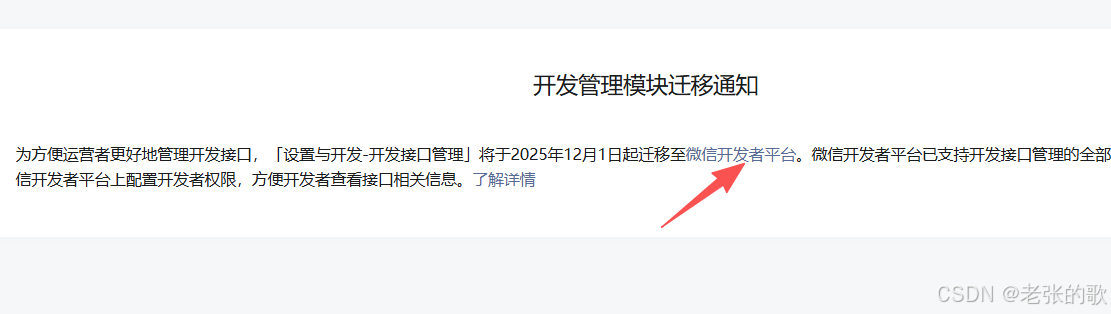
进去,登录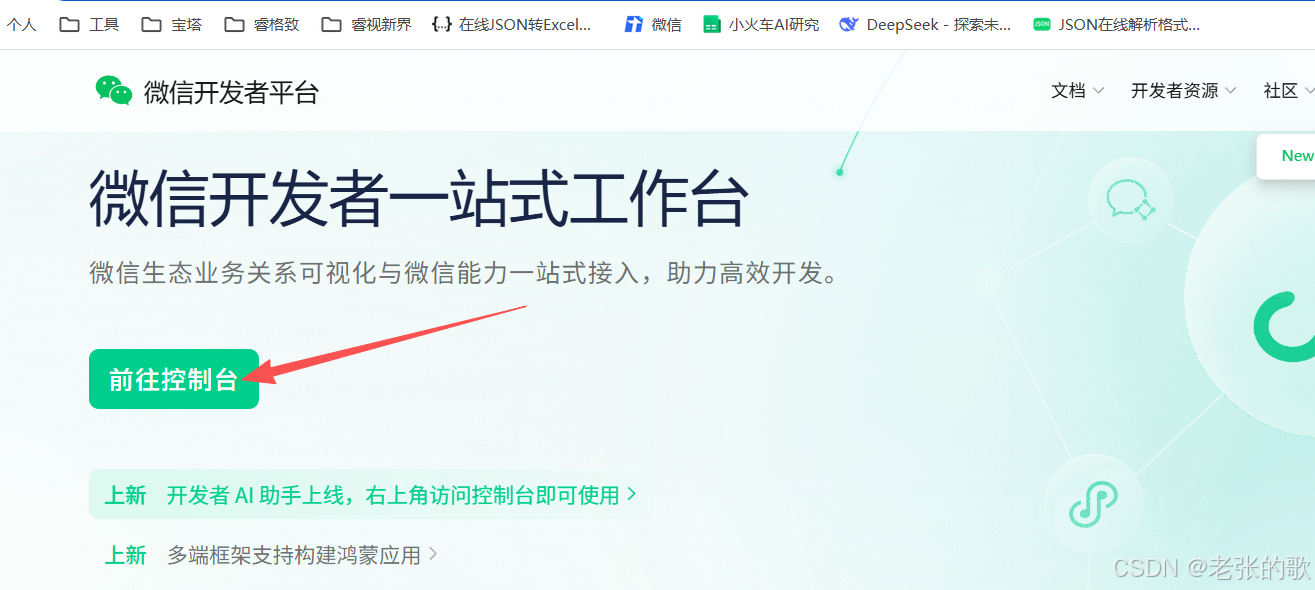
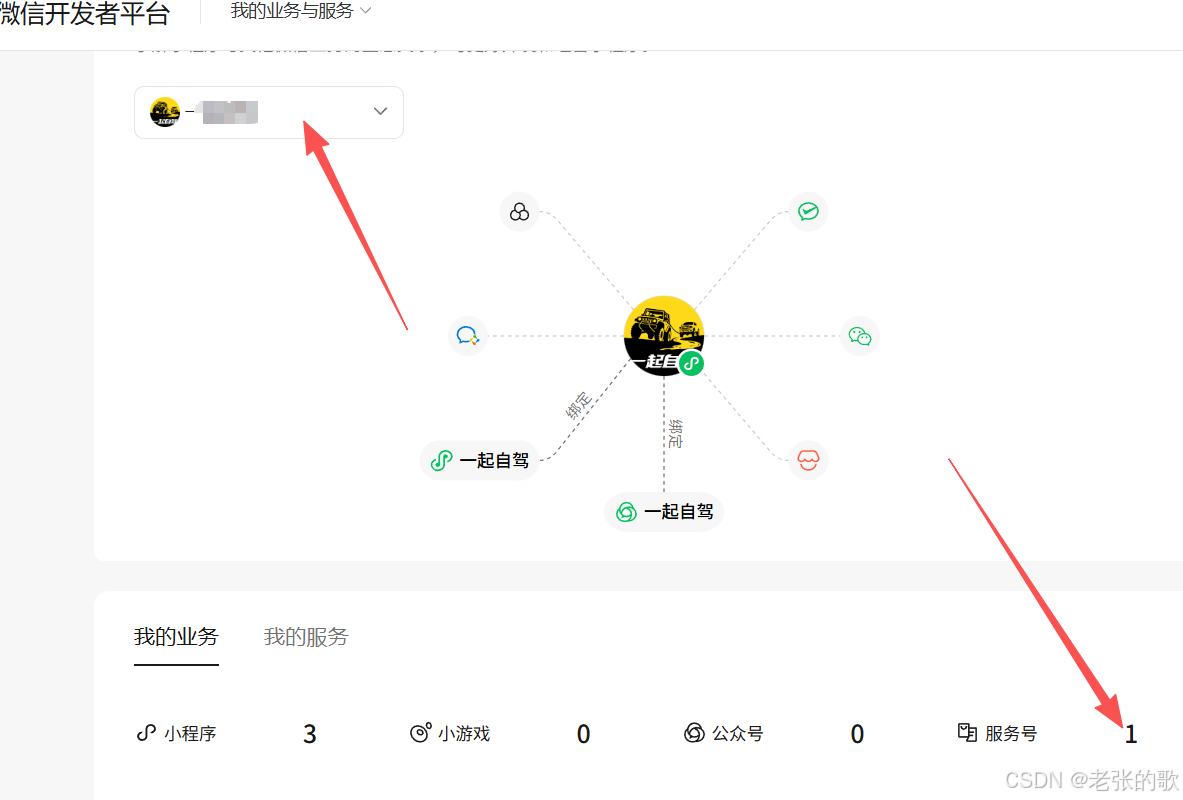
点服务号 的 1,顺便把消息推送的开启,消息加密模式选 兼容模式
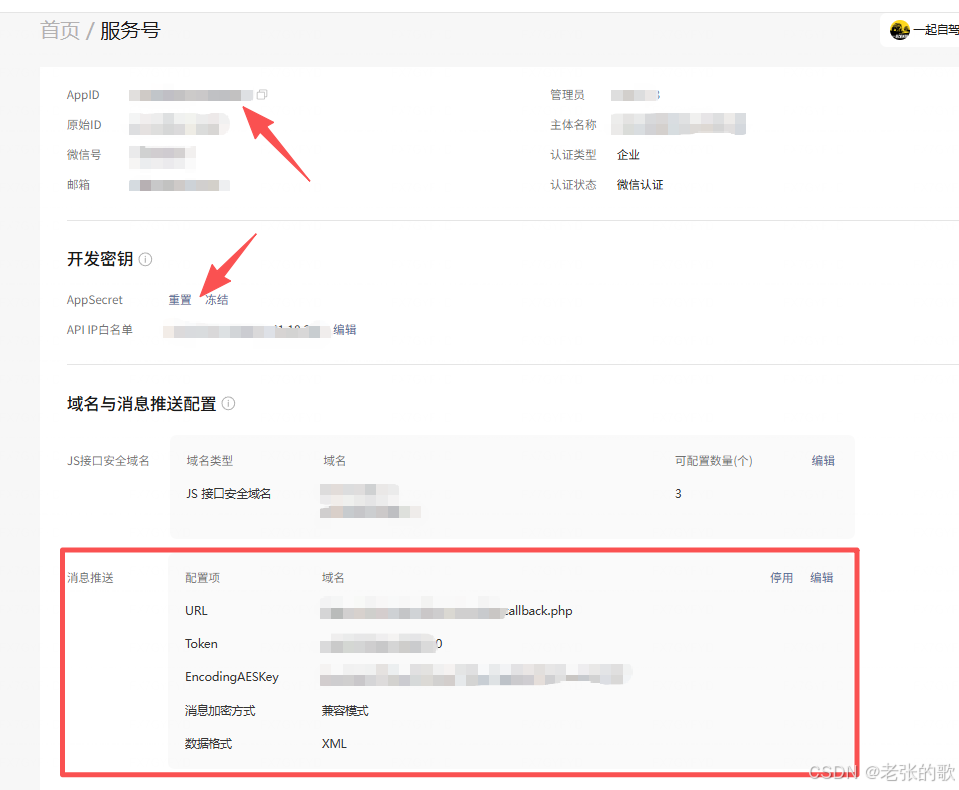
callback.php 放在你的根目录下,然他可以访问到,我用的thinkphp6,目录如下,代码如下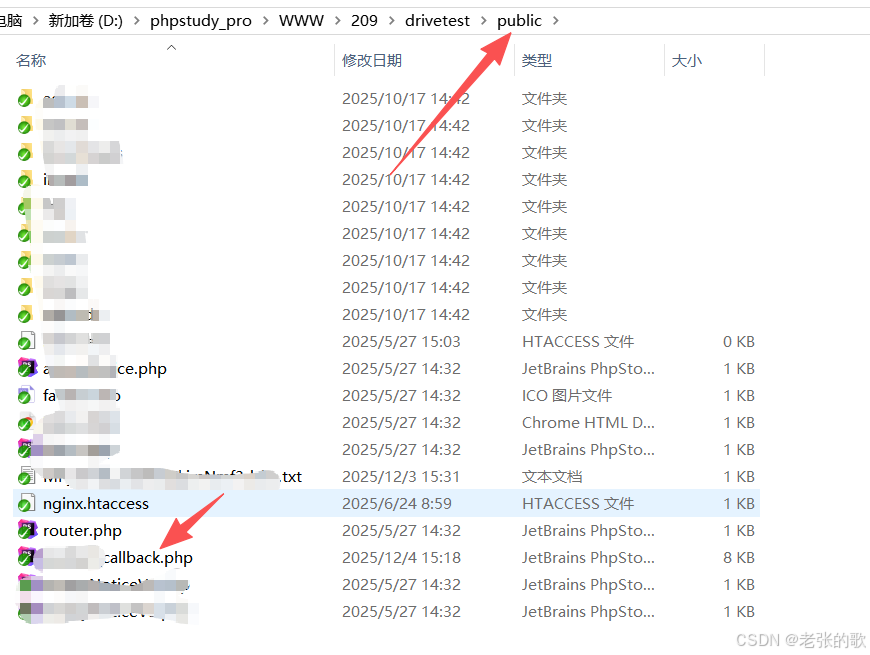
<?php
class WechatCallback {
    private $token = 'wx************';//自己在网页设置的token

    // 验证服务器
    public function valid() {
        if (isset($_GET['echostr'])) {
            $echoStr = $_GET["echostr"];
            if($this->checkSignature()){
                echo $echoStr;
                exit;
            }
        }
    }

    // 验证签名
    private function checkSignature() {
        $signature = $_GET["signature"];
        $timestamp = $_GET["timestamp"];
        $nonce = $_GET["nonce"];

        $token = $this->token;
        $tmpArr = array($token, $timestamp, $nonce);
        sort($tmpArr, SORT_STRING);
        $tmpStr = implode($tmpArr);
        $tmpStr = sha1($tmpStr);

        return $tmpStr == $signature;
    }

    // 处理消息
    public function responseMsg() {
        // 获取POST数据
        $postStr = file_get_contents("php://input");

        if (!empty($postStr)) {
            // 解析XML
            libxml_disable_entity_loader(true);
            $postObj = simplexml_load_string($postStr, 'SimpleXMLElement', LIBXML_NOCDATA);

            $msgType = $postObj->MsgType;
            $openid = (string)$postObj->FromUserName;

            // 事件推送处理
            if ($msgType == "event") {
                $event = $postObj->Event;

                // 关注事件
                if ($event == "subscribe") {
                    // 获取场景值(如果是扫码关注)
                    $eventKey = isset($postObj->EventKey) ? (string)$postObj->EventKey : '';

                    if (!empty($eventKey) && strpos($eventKey, 'qrscene_') === 0) {
                        $scene_id = substr($eventKey, 8); // 去掉qrscene_前缀
                        // 保存openid和scene_id的关联关系
                        $this->saveUserRelation($openid, $scene_id);
                        // 回复欢迎消息
                        $this->replyText($postObj, "欢迎关注!你自己想写啥写啥");
//                        $this->replyText($postObj, "感谢关注!您的OpenID是:{$openid},场景值:{$scene_id}");
                    } else {
                        // 普通关注
                        $this->replyText($postObj, "欢迎关注!你自己想写啥写啥");
                    }
                }
                // 扫描已关注的二维码事件
                elseif ($event == "SCAN") {
                    $scene_id = (string)$postObj->EventKey;
                    // 更新或记录扫码行为
//                    $this->updateScanRecord($openid, $scene_id);//没用

//                    $this->replyText($postObj, "欢迎回来!场景值:{$scene_id}");
                    $this->replyText($postObj, "欢迎回来!");
                }
                // 取消关注事件
                elseif ($event == "unsubscribe") {
                    // 更新用户状态为取消关注
                    $this->updateUserStatus($openid, 0);
                }
            }
        }
    }

    // 保存用户关联关系到数据库
    private function saveUserRelation($openid, $scene_id) {
        try {
            $db = new PDO(
                'mysql:host=127.0.0.1;port=3306;dbname=数据库名',
                '账号',
                '密码!',
                [PDO::MYSQL_ATTR_INIT_COMMAND => "SET NAMES utf8mb4"]
            );
            $db->setAttribute(PDO::ATTR_ERRMODE, PDO::ERRMODE_EXCEPTION);

            // 先检查是否已存在该openid
            $checkStmt = $db->prepare("SELECT id FROM openid WHERE openid = ?");
            $checkStmt->execute([$openid]);
            $exists = $checkStmt->fetch();

            if ($exists) {
                // 更新记录
                $stmt = $db->prepare("UPDATE openid SET scene_id = ? , subscribe = 1 WHERE openid = ?");
                $stmt->execute([$scene_id, $openid]);
            } else {
                // 插入新记录
                $stmt = $db->prepare("INSERT INTO openid (openid, scene_id,subscribe) VALUES (?, ?,1)");
                $stmt->execute([$openid, $scene_id]);
            }

            return true;
        } catch (PDOException $e) {
            error_log("数据库错误: " . $e->getMessage() . " | openid: " . $openid);
            return false;
        }
    }

    /**
     * 更新用户关注状态(取消关注时调用)
     * @param string $openid 用户OpenID
     * @param int $status 关注状态 (1-关注, 0-取消关注)
     * @return bool 更新是否成功
     */
    private function updateUserStatus($openid, $status) {
        try {
            // 复用与 saveUserRelation 相同的数据库连接配置
           $db = new PDO(
                'mysql:host=127.0.0.1;port=3306;dbname=数据库名',
                '账号',
                '密码!',
                [PDO::MYSQL_ATTR_INIT_COMMAND => "SET NAMES utf8mb4"]
            );
            $db->setAttribute(PDO::ATTR_ERRMODE, PDO::ERRMODE_EXCEPTION);

            // 准备更新用户 subscribe 状态的 SQL 语句
            $stmt = $db->prepare("UPDATE openid SET subscribe = ? WHERE openid = ?");
            // 执行更新
            $result = $stmt->execute([$status, $openid]);

            // 可选:记录日志,方便调试
            $action = $status ? '关注/重新关注' : '取消关注';
            error_log("用户状态更新: openid={$openid}, action={$action}, 影响行数=" . $stmt->rowCount());

            return $result;

        } catch (PDOException $e) {
            // 记录详细的错误信息到日志
            error_log("更新用户状态失败: " . $e->getMessage() . " | openid: " . $openid);
            return false;
        }
    }

    // 回复文本消息
    private function replyText($postObj, $content) {
        $fromUser = $postObj->ToUserName;
        $toUser = $postObj->FromUserName;
        $time = time();

        $textTpl = "<xml>
                    <ToUserName><![CDATA[%s]]></ToUserName>
                    <FromUserName><![CDATA[%s]]></FromUserName>
                    <CreateTime>%s</CreateTime>
                    <MsgType><![CDATA[text]]></MsgType>
                    <Content><![CDATA[%s]]></Content>
                    </xml>";

        $result = sprintf($textTpl, $toUser, $fromUser, $time, $content);
        echo $result;
        exit;
    }
}

// 主程序入口
$wechat = new WechatCallback();

// 验证服务器配置
if (isset($_GET['echostr'])) {
    $wechat->valid();
} else {
    $wechat->responseMsg();
}

?>
代码第一行的token 是你刚刚自己设置的token
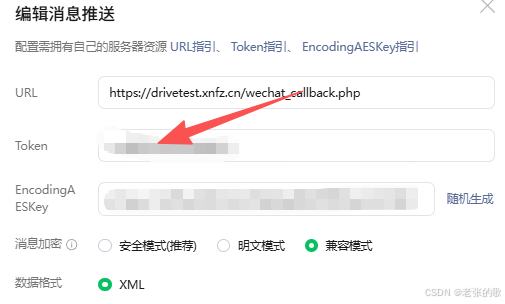
因为我是做了一个用户扫码的操作,然后关注公众号,才能获取openid,下面是生成二维码的代码
public function createTempQRCode() {
        $user_id = 123;
        // 尝试从 Redis 缓存中获取
        $cacheKey = "wechat_qrcode_ticket";
        $cachedData = Cache::get($cacheKey);
        if ($cachedData) {
            // 如果缓存存在,直接返回缓存数据
            return $this->renderSuccess($cachedData);
        }
        // 缓存不存在,请求微信接口
        $url = "https://api.weixin.qq.com/cgi-bin/token?grant_type=client_credential&appid=你的appid&secret=你的secret";
        $token_result = json_decode(file_get_contents($url), true);
        $url = "https://api.weixin.qq.com/cgi-bin/qrcode/create?access_token={$token_result['access_token']}";
        $data = [
            "expire_seconds" => 604800,
            "action_name" => "QR_SCENE",
            "action_info" => [
                "scene" => [
                    "scene_id" => $user_id
                ]
            ]
        ];
        $result = $this->httpPost($url, json_encode($data));
        $ticket = $result['ticket'];
        $responseData = [
            'qrcode_url' => "https://mp.weixin.qq.com/cgi-bin/showqrcode?ticket=" . urlencode($ticket),
            'ticket' => $ticket,
        ];
        // 将结果缓存到 Redis,缓存时间略小于二维码过期时间
        Cache::set($cacheKey, $responseData, 604800 - 3600);
        return $this->renderSuccess($responseData);
    }
返回回来的qrcode_url 就是二维码,你可以复制到浏览器关注
好了,到了你最后调用的时候了,上面代码已经把公众号的openid 入库了,拿着你的openid 去发送模板消息吧,下面是我的代码,仅供参考
    public static function notice($openid,$user_info,$count,$activity_name)
    {
        // 定义AppID和AppSecret
        $url = "https://api.weixin.qq.com/cgi-bin/token?grant_type=client_credential&appid=你的appid&secret=你的secret";
        $token_result = json_decode(file_get_contents($url), true);
        $accessToken = $token_result['access_token'];
        // 定义推送消息的接口地址
        $url = "https://api.weixin.qq.com/cgi-bin/message/template/send?access_token=".$accessToken;
        // 定义推送消息的内容
        $data = array(
            "touser" => $openid,//openid
            "template_id" => "你自己的模版id",
            "data" => array(//这个里面的参数根据你的模版中的来
                "first" => array(
                    "value" => "您收到了一条新的消息!",
                    "color" => "#173177"
                ),
                "thing3" => array(
                    "value" => "$activity_name",
                    "color" => "#173177"
                ),
                "thing20" => array(
                    "value" => "$user_info[nick_name]",
                    "color" => "#173177"
                ),
                "phone_number13" => array(
                    "value" => $user_info['mobile'],
                    "color" => "#173177"
                ),
                "number11" => array(
                    "value" => $count,
                    "color" => "red"
                )
            )
        );
        // 将推送消息转换为JSON格式
        $dataJson = json_encode($data);
        // 发送推送消息
        $ch = curl_init($url);
        curl_setopt($ch, CURLOPT_RETURNTRANSFER, true);
        curl_setopt($ch, CURLOPT_SSL_VERIFYPEER, false);
        curl_setopt($ch, CURLOPT_POST, true);
        curl_setopt($ch, CURLOPT_POSTFIELDS, $dataJson);
        curl_setopt($ch, CURLOPT_HTTPHEADER, array('Content-Type: application/json'));
        $result = curl_exec($ch);
        curl_close($ch);
        $result = json_decode($result, true);
        if ($result["errcode"] == 0) {
            return true;
            echo "推送成功!";
        } else {
            return false;
            echo "推送失败,错误代码:" . $result["errcode"] . ",错误信息:" . $result["errmsg"];
        }
    }
其中 这部分参数跟你自己的模板参数修改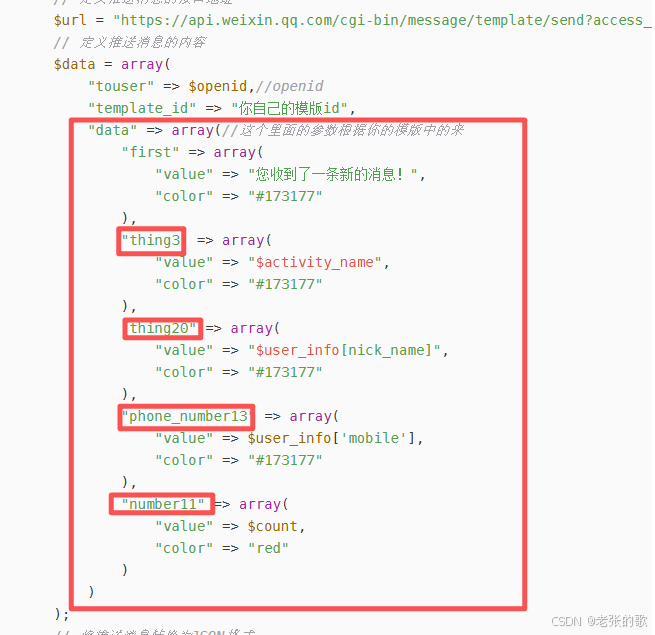

火山引擎开发者社区是火山引擎打造的AI技术生态平台,聚焦Agent与大模型开发,提供豆包系列模型(图像/视频/视觉)、智能分析与会话工具,并配套评测集、动手实验室及行业案例库。社区通过技术沙龙、挑战赛等活动促进开发者成长,新用户可领50万Tokens权益,助力构建智能应用。
更多推荐
 3
3 0
0- 0


 已为社区贡献2条内容

所有评论(0)