俄罗斯方块游戏,linux c语言编程
DeepSeek 辅助生成,测试完后,我对部分代码以及显示效果,做了优化。
·
#include <stdio.h>
#include <stdlib.h>
#include <unistd.h>  // 引用 read(),usleep()
#include <termios.h> // 终端 I/O 控制:回显、缓冲、特殊字符处理等
#include <time.h>
#include <signal.h>  // 信号处理

// 游戏区域尺寸
#define WIDTH 10
#define HEIGHT 20
#define BUFFER_HEIGHT 4 // 距离顶部 + 4,方块下落的起始位置

/*
四维数组:定义俄罗斯方块的 所有形状和旋转状态
第1维 [7]:7种基本方块类型(I, J, L, O, S, T, Z)
第2维 [4]:每种方块的4种旋转状态(0°, 90°, 180°, 270°)
第3维 [4]:每个方块的4个组成块
第4维 [2]:每个块的坐标 (x, y)
*/
const int shapes[7][4][4][2] = {
    // I 形 (shapes[0])
    {
        {{0,0}, {1,0}, {2,0}, {3,0}}, // 旋转0°
        {{0,0}, {0,1}, {0,2}, {0,3}}, // 旋转90°
        {{0,0}, {1,0}, {2,0}, {3,0}}, // 旋转180°
        {{0,0}, {0,1}, {0,2}, {0,3}}  // 旋转270°
    },
    // J 形 (shapes[1])
    {
        {{0,0}, {0,1}, {1,1}, {2,1}},
        {{1,0}, {1,1}, {1,2}, {0,2}},
        {{0,1}, {1,1}, {2,1}, {2,2}},
        {{0,0}, {1,0}, {0,1}, {0,2}}
    },
    // L 形 (shapes[2])
    {
        {{2,0}, {0,1}, {1,1}, {2,1}},
        {{0,0}, {1,0}, {1,1}, {1,2}},
        {{0,1}, {1,1}, {2,1}, {0,2}},
        {{1,0}, {1,1}, {1,2}, {2,2}}
    },
    // O 形 (shapes[3])
    {
        {{0,0}, {1,0}, {0,1}, {1,1}},
        {{0,0}, {1,0}, {0,1}, {1,1}},
        {{0,0}, {1,0}, {0,1}, {1,1}},
        {{0,0}, {1,0}, {0,1}, {1,1}}
    },
    // S 形
    {
        {{1,0}, {2,0}, {0,1}, {1,1}},
        {{0,0}, {0,1}, {1,1}, {1,2}},
        {{1,0}, {2,0}, {0,1}, {1,1}},
        {{0,0}, {0,1}, {1,1}, {1,2}}
    },
    // T 形
    {
        {{1,0}, {0,1}, {1,1}, {2,1}},
        {{1,0}, {1,1}, {2,1}, {1,2}},
        {{0,1}, {1,1}, {2,1}, {1,2}},
        {{1,0}, {0,1}, {1,1}, {1,2}}
    },
    // Z 形
    {
        {{0,0}, {1,0}, {1,1}, {2,1}},
        {{1,0}, {0,1}, {1,1}, {0,2}},
        {{0,0}, {1,0}, {1,1}, {2,1}},
        {{1,0}, {0,1}, {1,1}, {0,2}}
    }
};

// 7中颜色
const char* colors[] = {
    "\033[91m", // 亮红色 - I
    "\033[94m", // 亮蓝色 - J
    "\033[31m", // 红色 - L
    "\033[93m", // 亮黄色 - O
    "\033[92m", // 亮绿色 - S
    "\033[95m", // 亮紫色 - T
    "\033[96m"  // 亮青色 - Z
};

// 游戏状态
int board[HEIGHT + BUFFER_HEIGHT][WIDTH];// 游戏面板的二维数组 board[y][x] != -1 时,该方块已被占用,记录方块形状的编号
int current_piece, next_piece; // 方块形状编号
int current_rotation = 0;      // 旋转方向
int current_x, current_y;      // 坐标
int score = 0;
int level = 1;
int lines_cleared = 0;         // 累计消除的总行数
int game_over = 0;

// 终端设置
struct termios original_termios;

// 清理终端设置
void cleanup_terminal() {
    tcsetattr(STDIN_FILENO, TCSANOW, &original_termios); //ICANON:恢复行缓冲模式,ECHO:重新启用回显
    printf("\033[?25h\033[0m"); //显示光标并重置颜色,\033[?25h 显示光标,\033[?25l 用于隐藏光标,\033[0m 重置所有属性
}

// 初始化终端
void init_terminal() {
    struct termios new_termios;
    tcgetattr(STDIN_FILENO, &original_termios); // 保存原始设置
    // 修改终端设置
    new_termios = original_termios;             // 复制设置
    new_termios.c_lflag &= ~(ICANON | ECHO); // 禁用行缓冲和回显
    new_termios.c_cc[VMIN] = 0;              // 不等待最小字符数
    new_termios.c_cc[VTIME] = 0;             // 无超时
    tcsetattr(STDIN_FILENO, TCSANOW, &new_termios); // 应用新设置

    // 注册退出时自动调用,无论程序如何退出(正常退出、Ctrl+C、错误退出),都会自动调用cleanup_terminal()。
    atexit(cleanup_terminal);   // 注册清理函数,把 cleanup_terminal 函数登记到"退出时要执行的函数列表"中,
                                // 当程序退出时,系统自动调用这个列表中的所有函数
    printf("\033[?25l");        // 隐藏光标

    /*
    游戏运行时:光标隐藏,按键立即响应(无需回车),输入不显示
    游戏退出后:光标重新显示,终端恢复正常工作模式,所有颜色和属性重置
    */
}

// 设置光标位置
void set_cursor_pos(int x, int y) {
    printf("\033[%d;%dH", y, x);    //在ANSI转义序列中,行号在前,列号在后,这与通常的(x,y)坐标习惯相反。
}

// 清屏
void clear_screen() {
    printf("\033[2J");
}

// 绘制边框
void draw_border(int x, int y, int width, int height, const char* title) {
    int i, j;

    // 绘制标题
    set_cursor_pos(x + 2, y);   // 标题文字:在边框左上角(x + 2)的列位置开始
    printf("\033[1m%s\033[0m", title);

    // 绘制上边框
    set_cursor_pos(x, y + 1);
    printf("⚄");
    for (i = 0; i < width; i++) printf("⚄");
    printf("⚄");

    // 绘制左右边框
    for (j = 2; j < height + 2; j++) {
        set_cursor_pos(x, y + j);
        printf("▋");
        set_cursor_pos(x + width + 1, y + j);
        printf("▋");
    }

    // 绘制下边框
    set_cursor_pos(x, y + height + 2);
    printf("⚄");
    for (i = 0; i < width; i++) printf("⚄");
    printf("⚄");
}

// 初始化游戏:游戏首次启动、玩家按 r 重新开始,需要重置所有游戏状态时,调用此函数
void init_game() {
    int i, j;
    for (i = 0; i < HEIGHT + BUFFER_HEIGHT; i++) {
        for (j = 0; j < WIDTH; j++) {
            board[i][j] = -1; // 用 -1 标记所有位置为空
        }
    }

    // 初始化随机数生成器,用当前时间作为随机种子,确保每次游戏运行都有不同的随机序列
    // srand() 为 rand()函数设置起始点(种子),time(NULL) 获取当前时间
    srand(time(NULL));

    // 设置初始方块
    current_piece = rand() % 7; // 当前方块 (0-6), 7种不同形状的方块(I, J, L, O, S, T, Z)
    next_piece = rand() % 7;    // 下一个方块 (0-6)

    // 设置方块初始位置
    current_x = WIDTH / 2 - 1;  // 让方块在水平方向大致居中
    current_y = BUFFER_HEIGHT;  // 在缓冲区顶部开始下落,给玩家反应时间

    // 重置游戏状态变量
    score = 0;
    level = 1;
    lines_cleared = 0;  // 消除行数归零
    game_over = 0;      // 游戏运行状态
}

/*
    检查碰撞,检查指定位置和旋转状态的方块 是否会与 边界 或其他方块 发生碰撞。
    返回 1:发生碰撞,位置无效。       返回 0:没有碰撞,位置有效。
*/
int check_collision(int piece, int rotation, int x, int y) {
    int i;
    for (i = 0; i < 4; i++) {
        int block_x = x + shapes[piece][rotation][i][0]; // 计算实际x坐标
        int block_y = y + shapes[piece][rotation][i][1]; // 计算实际y坐标

        // 检查是否:超出左边界,超出右边界,超出下边界
        if (block_x < 0 || block_x >= WIDTH || block_y >= HEIGHT + BUFFER_HEIGHT) {
            return 1;
        }
        // 方块间碰撞检测:只在游戏区域内检查 && 该位置 是否已被其他方块占据
        if (block_y >= 0 && board[block_y][block_x] != -1) {
            return 1;
        }
    }
    return 0;
}

// 锁定方块到游戏区域,标记已被占用
void lock_piece() {
    int i;
    for (i = 0; i < 4; i++) {
        int block_x = current_x + shapes[current_piece][current_rotation][i][0];
        int block_y = current_y + shapes[current_piece][current_rotation][i][1];
        if (block_y >= 0) {
            board[block_y][block_x] = current_piece;  // 记录方块形状的编号,表示该方块已被占用
        }
    }
}

// 清除完整的行
void clear_lines() {
    int i, j, k;
    int lines_to_clear = 0;

    for (i = HEIGHT + BUFFER_HEIGHT - 1; i >= 0; i--)
    {
        int line_full = 1;
        for (j = 0; j < WIDTH; j++) {
            if (board[i][j] == -1) {
                line_full = 0;
                break;
            }
        }

        if (line_full) {
            lines_to_clear++;
            // 移动所有行向下
            for (k = i; k > 0; k--) {
                for (j = 0; j < WIDTH; j++) {
                    board[k][j] = board[k-1][j];
                }
            }
            // 清空顶行
            for (j = 0; j < WIDTH; j++) {
                board[0][j] = -1;
            }
            i++; // 重新检查当前行
        }
    }

    if (lines_to_clear > 0)
    {
        lines_cleared += lines_to_clear; // 累计消除的总行数

        if(lines_to_clear <=2)
            score += lines_to_clear * 10;
        else if(lines_to_clear == 3)
            score += 50;
        else if(lines_to_clear == 4)
            score += 100;

        // 可以修改提高升级的速度,方便测试
        level = lines_cleared / 5 + 1;  // 每消除5行 升1级,难度渐进
    }
}


// 生成新方块
void new_piece() {
    current_piece = next_piece;
    next_piece = rand() % 7;
    current_x = WIDTH / 2 - 1;
    current_y = BUFFER_HEIGHT;
    current_rotation = 0;

    if (check_collision(current_piece, current_rotation, current_x, current_y)) {
        game_over = 1;
    }
}

// 绘制游戏区域
void draw_board() {
    int i, j;

    // 绘制游戏区域边框
    draw_border(2, 1, WIDTH * 2, HEIGHT, "俄罗斯方块");

    // 绘制游戏区域内容
    for (i = BUFFER_HEIGHT; i < HEIGHT + BUFFER_HEIGHT; i++) {
        for (j = 0; j < WIDTH; j++) // 游戏面板的列索引
        {
            // 3:游戏区域 边框左边的偏移量,j * 2:每个游戏格子占2个字符宽度(为了显示方块更美观)方块看起来更方正
            // i - BUFFER_HEIGHT:将游戏面板 行索引 转换为 屏幕行索引(去掉缓冲区偏移)
            // + 3:游戏区域 距离边框上边的偏移量
            set_cursor_pos(3 + j * 2, i - BUFFER_HEIGHT + 3);
            if (board[i][j] != -1) {

                // board[i][j] 颜色数组索引,获取方块类型,取值范围:-1~6,空位置 -1,7种不同颜色的方块类型 0-6
                // colors[] 数组建立了类型到颜色的映射关系
                // \033[0m 确保颜色不影响后续输出
                printf("%s🟥\033[0m", colors[board[i][j]]);
            } else {
                printf("  ");
            }
        }
    }

    // 绘制当前下落的方块:循环遍历当前方块的4个组成块,计算每个块在游戏区域中的实际位置并绘制。
    for (i = 0; i < 4; i++) // 每个俄罗斯方块由4个小方块组成
    {
        // 计算每个块的实际坐标:current_piece 当前方块类型(0-6),current_rotation 当前旋转状态(0-3)
        int block_x = current_x + shapes[current_piece][current_rotation][i][0];
        int block_y = current_y + shapes[current_piece][current_rotation][i][1];
        // 检查是否在可见区域,只绘制在可见区域内的方块(y坐标 ≥ 缓冲区高度:4)
        if (block_y >= BUFFER_HEIGHT)
        {
            set_cursor_pos(3 + block_x * 2, block_y - BUFFER_HEIGHT + 3);
            printf("%s🟥\033[0m", colors[current_piece]);
        }
    }
}

// 绘制下一个方块预览
void draw_next_piece() {
    int i;

    // 绘制预览区域边框
    draw_border(30, 1, 13, 5, "下一个");

    // 清空预览区域
    for (i = 2; i < 7; i++) {
        set_cursor_pos(33, i + 1);
        printf("          ");
    }

    // 绘制下一个方块
    for (i = 0; i < 4; i++) {
        int block_x = shapes[next_piece][0][i][0];
        int block_y = shapes[next_piece][0][i][1];
        set_cursor_pos(34 + block_x * 2, block_y + 4);
        printf("%s🟥 \033[0m", colors[next_piece]);
    }
}

// 绘制分数和信息
void draw_info() {
    // 绘制信息区域边框
    draw_border(30, 9, 13, 7, "游戏信息");

    set_cursor_pos(31, 11);
    printf("分数: %d", score);

    set_cursor_pos(31, 13);
    printf("等级: %d", level);

    set_cursor_pos(31, 15);
    printf("行数: %d", lines_cleared);

    // 绘制控制说明
    draw_border(50, 1, 17, 13, "控制说明");  // 增加高度容纳所有文字

    set_cursor_pos(51, 3);
    printf("<- -> : 移动");
    set_cursor_pos(51, 4);
    printf("  ^   : 旋转");
    set_cursor_pos(51, 5);
    printf("  v   : 加速");
    set_cursor_pos(51, 6);
    printf("空格  : 直接落下");
    set_cursor_pos(51, 7);
    printf("  P   : 暂停");
    set_cursor_pos(51, 8);
    printf("  Q   : 退出");

    set_cursor_pos(51, 10);
    printf("消除1行 + 10分");
    set_cursor_pos(51, 11);
    printf("消除2行 + 20分");
    set_cursor_pos(51, 12);
    printf("消除3行 + 50分");
    set_cursor_pos(51, 13);
    printf("消除4行 + 100分");
    set_cursor_pos(51, 14);
    printf("消除5行 升级");
    set_cursor_pos(51, 15);
    printf("15级 最快速度");
}

// 绘制游戏结束画面
void draw_game_over() {
    set_cursor_pos(5, 4);
    printf("\033[43m\033[30m游戏结束!\033[0m");
    set_cursor_pos(5, 6);
    printf("\033[43m\033[30m最终分数: %d \033[0m", score);
    set_cursor_pos(5, 8);
    printf("\033[43m\033[30m按 'q' 退出 \033[0m");
    set_cursor_pos(5, 10);
    printf("\033[43m\033[30m按 'r' 重新开始 \033[0m");
}

// 绘制整个游戏界面
void draw_game()
{
    static int first_draw = 1;

    if (first_draw) {
        clear_screen();  // 只在第一次清屏
        first_draw = 0;
    }
    draw_next_piece();
    draw_board();
    draw_info();

    if (game_over) {
        draw_game_over();
    }

    // fflush() 确保所有绘制命令 立即显示在屏幕上
    // 强制刷新输出(标准输出stdout: 通常是行缓冲)
    fflush(stdout);
}

/*
    处理输入:read() 系统调用,非阻塞读取. STDIN_FILENO=0: 用户在键盘的输入,&c:读取数据存储的地址,1:要读取的字节数
    返回值判断 > 0 成功读取到字符(返回读取的字节数),= 0 到达文件末尾(EOF), < 0 读取错误
    为什么不用 getchar() 或 scanf()?阻塞等待,直到用户按回车。
    游戏循环中需要非阻塞检测,不等待输入,实时响应,无需按回车。
*/
void process_input() {
    char c;
    // 读取键盘输入
    while (read(STDIN_FILENO, &c, 1) > 0)
    {
        if (game_over) {
            if (c == 'q' || c == 'Q') {
                clear_screen();
                set_cursor_pos(1,1); // 光标设置在左上角
                exit(0);
            } else if (c == 'r' || c == 'R') {
                init_game();
                return;
            }
        }

        if (c == 'q' || c == 'Q') {
            clear_screen();
            set_cursor_pos(1,1);
            exit(0);
        } else if ((c == 'p' || c == 'P') && !game_over) {
            // 暂停功能
            set_cursor_pos(8, 4);
            printf("\033[43m\033[30m游戏暂停\033[0m");
            set_cursor_pos(5, 6);
            printf("\033[43m\033[30m按任意键继续...\033[0m");
            fflush(stdout);

            // 等待按键继续
            struct termios old_term, new_term;
            tcgetattr(STDIN_FILENO, &old_term);
            new_term = old_term;
            // 设置为非规范模式,禁用回显
            new_term.c_lflag &= ~(ICANON | ECHO);
            new_term.c_cc[VMIN] = 1;   // 读取1个字符
            new_term.c_cc[VTIME] = 0;  // 无超时
            tcsetattr(STDIN_FILENO, TCSANOW, &new_term);

            // 读取1个字符(不需要清空缓冲区)
            char ch;
            read(STDIN_FILENO, &ch, 1); // 等待玩家 按任意键,恢复游戏
            tcsetattr(STDIN_FILENO, TCSANOW, &old_term); // 恢复原始设置

            draw_game();
        } else if (!game_over) {
            if (c == '\033') { // 方向键
                read(STDIN_FILENO, &c, 1); // 读取1个字符
                if (c == '[') {
                    read(STDIN_FILENO, &c, 1); // 读取1个字符
                    switch (c) {
                        case 'A': // 按键上 - 旋转
                            {
                                int new_rotation = (current_rotation + 1) % 4;
                                if (!check_collision(current_piece, new_rotation, current_x, current_y)) {
                                    current_rotation = new_rotation;
                                }
                            }
                            break;
                        case 'B': // 按键下 - 加速下落
                            if (!check_collision(current_piece, current_rotation, current_x, current_y + 1)) {
                                current_y++;
                            }
                            break;
                        case 'C': // 按键右
                            if (!check_collision(current_piece, current_rotation, current_x + 1, current_y)) {
                                current_x++;
                            }
                            break;
                        case 'D': // 按键左
                            if (!check_collision(current_piece, current_rotation, current_x - 1, current_y)) {
                                current_x--;
                            }
                            break;
                    }
                }
            }
            else if (c == ' ') { // 空格 - 直接落下
                while (!check_collision(current_piece, current_rotation, current_x, current_y + 1)) {
                    current_y++;
                }
                lock_piece();   // 标记方块已被占用
                clear_lines();
                new_piece();
            }
        }
        // 每次输入处理后检查游戏状态并立即更新界面
        if (game_over) {
            draw_game_over();
            fflush(stdout);
        }
    }
}

// 游戏主循环
void game_loop() {
    int frames = 0;   // 帧计数器
    int drop_interval;// 下落速度 随等级增加

    while (1)
	{
        process_input(); // 非阻塞读取键盘输入
    	if(level <= 14)
			drop_interval = 25 - level*1.5; // 下落速度随等级增加
        else
            drop_interval = 3; // 最快速度限幅

        if (!game_over) {
            frames++;

            // 等级越低,frames越大,延时更长,自动下落更慢
            if (frames >= drop_interval) {
                frames = 0;
                if (!check_collision(current_piece, current_rotation, current_x, current_y + 1)) {
                    current_y++;
                } else {
                    lock_piece();
                    clear_lines(); // 检查并清除完整行
                    new_piece();   // 生成新方块
                }
            }

            draw_game();
        }

        usleep(40000); // 40ms
    }
}

int main()
{
    init_terminal();
    init_game();
    draw_game();
    game_loop();

    return 0;
}
DeepSeek 辅助生成,测试完后,我对部分代码以及显示效果,做了优化。
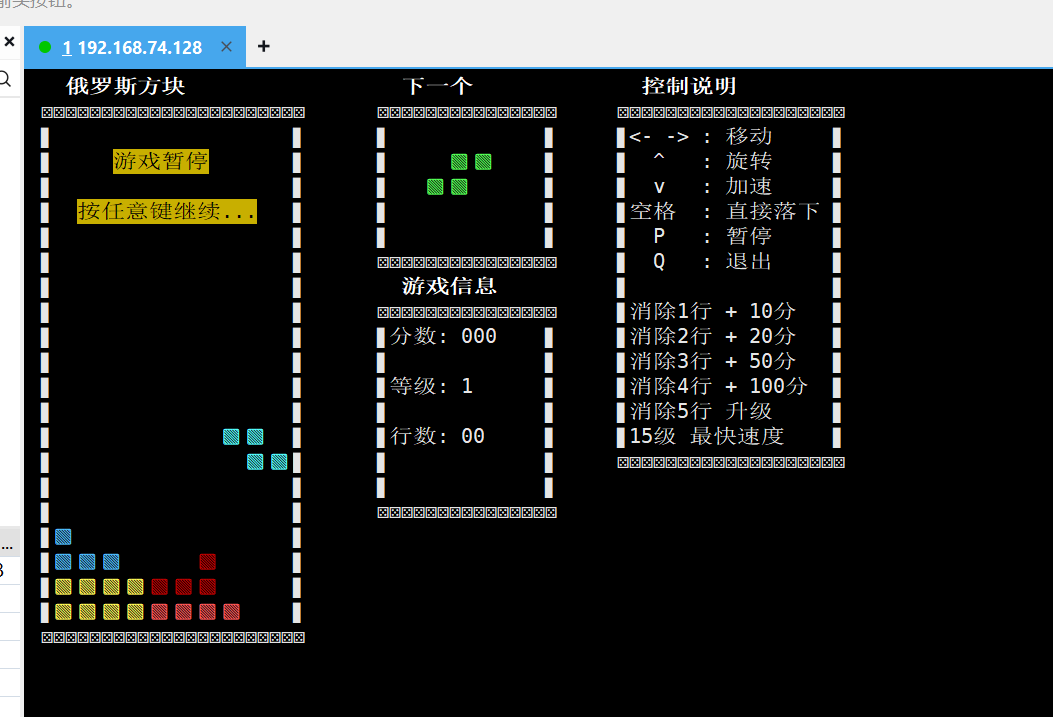
最后的运行效果如图:

火山引擎开发者社区是火山引擎打造的AI技术生态平台,聚焦Agent与大模型开发,提供豆包系列模型(图像/视频/视觉)、智能分析与会话工具,并配套评测集、动手实验室及行业案例库。社区通过技术沙龙、挑战赛等活动促进开发者成长,新用户可领50万Tokens权益,助力构建智能应用。
更多推荐
 3
3 0
0- 0


 已为社区贡献1条内容

所有评论(0)