WebRTC音频模块详细介绍第七部分-音频模块体验保障
音频模块是WebRTC非常重要的部分,音频模块中的NetEq是WebRTC的三大核心技术(NetEq/GCC/音频3A)之一,我们分七部分介绍该模块,本文是第四部分(NetEq核心原理)。WebRTC音频模块详细介绍第一部分-整体介绍WebRTC音频模块详细介绍第二部分-发送端WebRTC音频模块详细介绍第三部分-接收端WebRTC音频模块详细介绍第四部分-NetEq核心原理WebRTC音频模块详
1. 前言
音频模块是WebRTC非常重要的部分,音频模块中的NetEq是WebRTC的三大核心技术(NetEq/GCC/音频3A)之一,我们分七部分介绍该模块,本文是第七部分(体验保障)。这个专题包括:
- WebRTC音频模块详细介绍第一部分-整体介绍
- WebRTC音频模块详细介绍第二部分-发送端
- WebRTC音频模块详细介绍第三部分-接收端
- WebRTC音频模块详细介绍第四部分-NetEq核心原理
- WebRTC音频模块详细介绍第五部分-NetEq音频决策
- WebRTC音频模块详细介绍第六部分-NetEq数字信号处理
- WebRTC音频模块详细介绍第七部分-体验保障
2. Opus In-Band FEC编解码
2.1. 实验数据&价值
Opus In-Band FEC的价值,Mozilla曾做过测试(https://blog.mozilla.org/webrtc/audio-fec-experiments/),并附上了没有丢包/有丢包没有带内FEC/有丢包有带内FEC的对比录音,大家可以直观感受下。
我们看下Opus官网上的测试数据(https://www.opus-codec.org/static/presentations/opus_voice_aes135.pdf)。X轴代表丢包率,Y轴为POLQA得分(用来衡量音质)。从这个表格来看,Opus In-Band FEC的价值还是很大的。我们对这个数据本身并不质疑,只是这个报告并没有明确说明开启带内FEC时使用的冗余度。在带宽足够的情况下,冗余度越高,丢包恢复的效果越好,音质也越高。
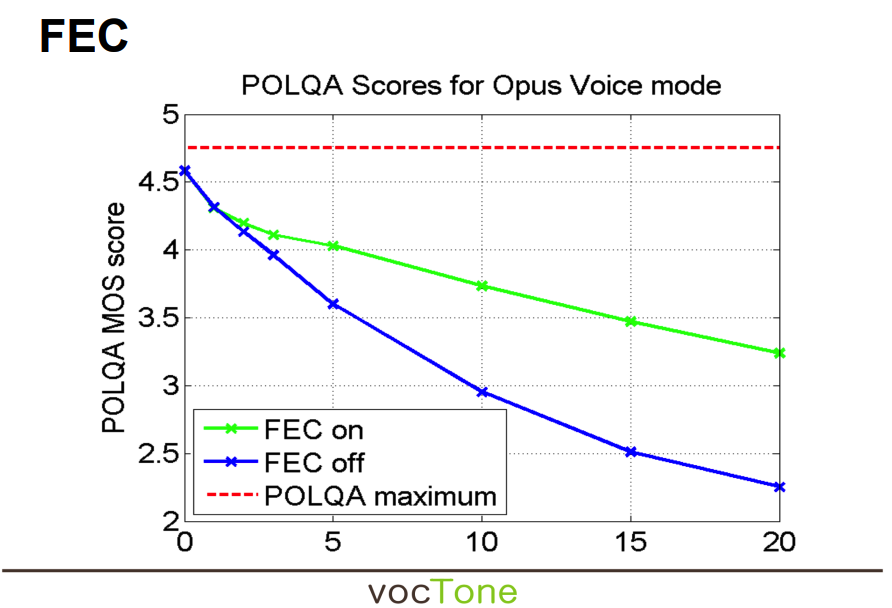
POLQA 的输出结果映射到MOS(Mean Opinion Score),范围为 0~5,其中:
- MOS = 5:语音质量极佳(接近无损)。
- MOS = 4:语音质量良好。
- MOS = 3:语音质量一般。
- MOS = 2:语音质量较差。
- MOS = 1:语音质量极差。
- MOS = 0:语音不可用。
2.2. FEC编码
由于FEC的生效涉及到发送端的编码和接收端的解码,所以需要通过SDP协商才能开启,具体做法是在offer/answer交换中包含“useinbandfec=1”。
例如下面的SDP片段:
m=audio 50000 UDP/TLS/RTP/SAVPF 111 127
a=rtpmap:111 opus/48000/2
a=fmtp:111 useinbandfec=1
WebRTC将SDP协商结果作为配置固定下来,源码如下:
absl::optional<AudioEncoderOpusConfig> AudioEncoderOpusImpl::SdpToConfig(
    const SdpAudioFormat& format) {
  if (!absl::EqualsIgnoreCase(format.name, "opus") ||
      format.clockrate_hz != kRtpTimestampRateHz || format.num_channels != 2) {
    return absl::nullopt;
  }

  AudioEncoderOpusConfig config;
  config.num_channels = GetChannelCount(format);
  config.frame_size_ms = GetFrameSizeMs(format);
  config.max_playback_rate_hz = GetMaxPlaybackRate(format);
  config.fec_enabled = (GetFormatParameter(format, "useinbandfec") == "1");
  config.dtx_enabled = (GetFormatParameter(format, "usedtx") == "1");
  config.cbr_enabled = (GetFormatParameter(format, "cbr") == "1");
  config.bitrate_bps =
      CalculateBitrate(config.max_playback_rate_hz, config.num_channels,
                       GetFormatParameter(format, "maxaveragebitrate"));
  config.application = config.num_channels == 1
                           ? AudioEncoderOpusConfig::ApplicationMode::kVoip
                           : AudioEncoderOpusConfig::ApplicationMode::kAudio;
  ...
  return config;
}
配置生效后,WebRTC基于新的配置重新创建Opus编码实例,源码如下:
// If the given config is OK, recreate the Opus encoder instance with those
// settings, save the config, and return true. Otherwise, do nothing and return
// false.
bool AudioEncoderOpusImpl::RecreateEncoderInstance(
    const AudioEncoderOpusConfig& config) {
  if (!config.IsOk())
    return false;
  config_ = config;
  ...
  if (config.fec_enabled) {
    RTC_CHECK_EQ(0, WebRtcOpus_EnableFec(inst_));
  } else {
    RTC_CHECK_EQ(0, WebRtcOpus_DisableFec(inst_));
  }
  ...
  if (config.dtx_enabled) {
    RTC_CHECK_EQ(0, WebRtcOpus_EnableDtx(inst_));
  } else {
    RTC_CHECK_EQ(0, WebRtcOpus_DisableDtx(inst_));
  }
  RTC_CHECK_EQ(0,
               WebRtcOpus_SetPacketLossRate(
                   inst_, static_cast<int32_t>(packet_loss_rate_ * 100 + .5)));
  if (config.cbr_enabled) {
    RTC_CHECK_EQ(0, WebRtcOpus_EnableCbr(inst_));
  } else {
    RTC_CHECK_EQ(0, WebRtcOpus_DisableCbr(inst_));
  }
  ...
  return true;
}
真正的FEC 编码算法在Opus 编码器内部实现,WebRTC使用的是第三方的libopus库。WebRTC 的代码只是通过opus_encoder_ctl()API来配置和启用它。
int16_t WebRtcOpus_EnableFec(OpusEncInst* inst) {
  if (inst) {
    return ENCODER_CTL(inst, OPUS_SET_INBAND_FEC(1));
  } else {
    return -1;
  }
}

#define ENCODER_CTL(inst, vargs)                \
  (inst->encoder                                \
       ? opus_encoder_ctl(inst->encoder, vargs) \
       : opus_multistream_encoder_ctl(inst->multistream_encoder, vargs))
Opus的带内FEC意味着FEC信息就编码在音频数据流本身中,不需要单独的RTP负载类型。接收端需要理解 Opus 的负载格式来提取 FEC 信息。
2.3. FEC解码
2.3.1. 调用堆栈
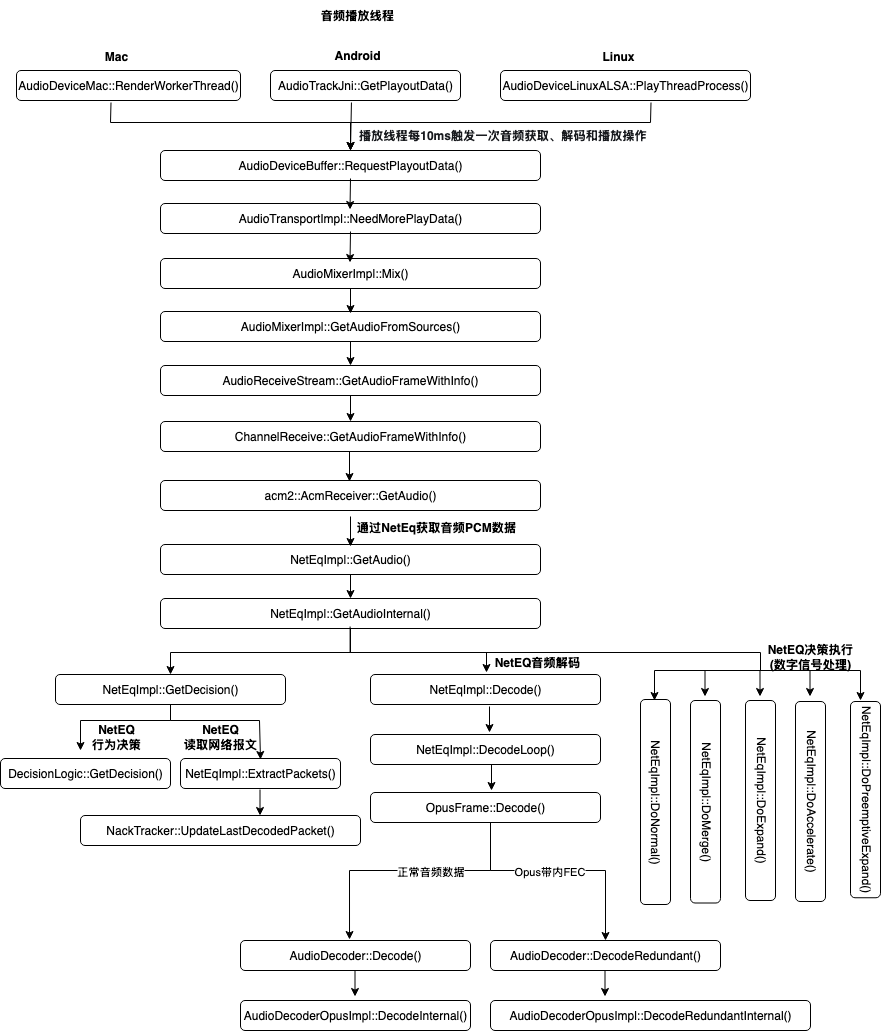
在前文我们说过,由于Opus支持in-band FEC,所以在解析接收到的音频报文时要先判断RTP Payload是否含有FEC,然后再构造OpusFrame,对于FEC和正常数据通过字段显示区分开。OpusFrame有三个私有数据:
AudioDecoder* const decoder_;
const rtc::Buffer payload_;
const bool is_primary_payload_;
其中is_primary_payload_为True表示这是Opus的带内FEC,否则为正常的音频数据。payload存放要解码的数据,而decoder则指向AudioDecoderOpusImpl结构体。理解这一点对我们理解带内FEC解码至关重要。
std::vector<AudioDecoder::ParseResult> AudioDecoderOpusImpl::ParsePayload(
    rtc::Buffer&& payload,
    uint32_t timestamp) {
  std::vector<ParseResult> results;

  if (PacketHasFec(payload.data(), payload.size())) {
    /*根据音频帧数据和采样率,计算在一个声道上一帧数据的采样点的总个数*/
    const int duration =
        PacketDurationRedundant(payload.data(), payload.size());

    rtc::Buffer payload_copy(payload.data(), payload.size());
    std::unique_ptr<EncodedAudioFrame> fec_frame(
        new OpusFrame(this, std::move(payload_copy), false));

    /*timestamp用单个声道的采样点个数表示,此处要将FEC报文的采样点个数给去掉
     *优先级低于原始报文
     */
    results.emplace_back(timestamp - duration, 1, std::move(fec_frame));
  }

  std::unique_ptr<EncodedAudioFrame> frame(
      new OpusFrame(this, std::move(payload), true));
  /*优先级为0,表示优先级高于FEC报文*/
  results.emplace_back(timestamp, 0, std::move(frame));

  return results;
}
音频报文经过反序列化后,存入NetEqImpl::packet_buffer_。播放线程从NetEqImpl::packet_buffer_中读取报文,对每个报文解码得到PCM数据,此时会调用Opus::Decode()。
/*遍历报文列表并对RTP报文逐一解码,解码时根据音频格式选用不同的解码器*/
int NetEqImpl::DecodeLoop(PacketList* packet_list,
                          const Operation& operation,
                          AudioDecoder* decoder,
                          int* decoded_length,
                          AudioDecoder::SpeechType* speech_type) {
  ...

  // Do decoding.
  while (!packet_list->empty() && !decoder_database_->IsComfortNoise(
                                      packet_list->front().payload_type)) {
    ...

    /*std::unique_ptr<AudioDecoder::EncodedAudioFrame> frame;
     *根据音频格式的不同,对应不同的继承类,例如OpusFrame
     */
    auto opt_result = packet_list->front().frame->Decode(
        rtc::ArrayView<int16_t>(&decoded_buffer_[*decoded_length],
                                decoded_buffer_length_ - *decoded_length));
    ...
  }  // End of decode loop.

  ...
  return 0;
}
OpusFrame::Decode()的代码如下,解码时,根据is_primary_payload_字段分别调用AudioDecoder::Decode()和AudioDecoder::DecodeRedundant(),后者处理的就是Opus带内FEC。
class OpusFrame : public AudioDecoder::EncodedAudioFrame {
 public:
  ...
  absl::optional<DecodeResult> Decode(
      rtc::ArrayView<int16_t> decoded) const override {
    AudioDecoder::SpeechType speech_type = AudioDecoder::kSpeech;
    int ret;
    if (is_primary_payload_) {
      /*call AudioDecoder::Decode()*/
      ret = decoder_->Decode(
          payload_.data(), payload_.size(), decoder_->SampleRateHz(),
          decoded.size() * sizeof(int16_t), decoded.data(), &speech_type);
    } else {
      /*call AudioDecoder::DecodeRedundant()*/
      ret = decoder_->DecodeRedundant(
          payload_.data(), payload_.size(), decoder_->SampleRateHz(),
          decoded.size() * sizeof(int16_t), decoded.data(), &speech_type);
    }

    if (ret < 0)
      return absl::nullopt;

    return DecodeResult{static_cast<size_t>(ret), speech_type};
  }
  ...
};
基于以上分析,我们给出完整的调用堆栈:
2.3.2. 核心源码分析
2.3.3. 判断是否为FEC报文
回顾下AudioDecoderOpusImpl::ParsePayload(),通过调用PacketHasFec()判断报文内容是否为FEC,针对FEC和正常数据分别创建OpusFrame,并用OpusFrame::is_primary_payload_来区分两种数据类型。我们接下来分析下这个函数。
bool AudioDecoderOpusImpl::PacketHasFec(const uint8_t* encoded,
                                        size_t encoded_len) const {
  int fec;
  fec = WebRtcOpus_PacketHasFec(encoded, encoded_len);
  return (fec == 1);
}
WebRtcOpus_PacketHasFec()用于判断一个Opus音频包是否包含带内FEC数据,其核心逻辑是解析 Opus包的低延迟(LP)层,检查是否存在 LBRR(Lost Burst Reconstruction Reference)标志,该标志用于标识 FEC 数据的存在。
// This method is based on Definition of the Opus Audio Codec
// (https://tools.ietf.org/html/rfc6716). Basically, this method is based on
// parsing the LP layer of an Opus packet, particularly the LBRR flag.
/*用于判断一个Opus音频包是否包含带内FEC数据,
 *其核心逻辑是解析 Opus包的低延迟(LP)层,
 *检查是否存在 LBRR(Lost Burst Reconstruction Reference)标志,
 *该标志用于标识 FEC 数据的存在
 *返回值:
 *  1:包含FEC数据(存在LBRR标志)
 *  0:不包含FEC数据或包无效
 */
int WebRtcOpus_PacketHasFec(const uint8_t* payload,
                            size_t payload_length_bytes) {
  if (payload == NULL || payload_length_bytes == 0)
    return 0;

  // In CELT_ONLY mode, packets should not have FEC.
  /*CELT_ONLY模式:
    当 Opus 包的第一个字节的最高位(0x80)被设置时,
    表示该包仅使用 CELT 编码,不包含 SILK 编码或 FEC 数据。
    *CELT:低延迟、高质量音频编码,不支持 FEC。
    *SILK:WebRTC 使用的音频编码,支持 FEC。
  */
  if (payload[0] & 0x80)
    return 0;

  /*获取当前 Opus 包中的 SILK 帧数*/
  int silk_frames = WebRtcOpus_NumSilkFrames(payload);
  if (silk_frames == 0)
    return 0;  // Not valid.

  /*获取通道数(单声道或立体声)
   *通道数影响 FEC 标志的解析(立体声需要处理 mid 和 side 通道)
   */
  const int channels = opus_packet_get_nb_channels(payload);
  RTC_DCHECK(channels == 1 || channels == 2);

  // Max number of frames in an Opus packet is 48.
  opus_int16 frame_sizes[48];
  const unsigned char* frame_data[48];

  // Parse packet to get the frames. But we only care about the first frame,
  // since we can only decode the FEC from the first one.
  /*使用 opus_packet_parse 将 Opus 包解析为多个帧(最多 48 帧)*/
  if (opus_packet_parse(payload, static_cast<opus_int32>(payload_length_bytes),
                        NULL, frame_data, frame_sizes, NULL) < 0) {
    return 0;
  }

  /*我们只关心第一个帧:FEC 数据(LBRR 标志)仅存在于第一个帧中
   *第一帧大小必须 ≥ 1 字节,否则无法解析 FEC 标志
   */
  if (frame_sizes[0] < 1) {
    return 0;
  }

  // A frame starts with the LP layer. The LP layer begins with two to eight
  // header bits.These consist of one VAD bit per SILK frame (up to 3),
  // followed by a single flag indicating the presence of LBRR frames.
  // For a stereo packet, these first flags correspond to the mid channel, and
  // a second set of flags is included for the side channel. Because these are
  // the first symbols decoded by the range coder and because they are coded
  // as binary values with uniform probability, they can be extracted directly
  // from the most significant bits of the first byte of compressed data.
  /*LBRR 标志位置:
   *  每个SILK帧对应一个 VAD(Voice Activity Detection)标志。
   *  LBRR 标志紧跟在 VAD 标志之后,位于第一个帧的第一个字节的特定位。
   *  单通道(mono):
   *    LBRR 标志位于 (silk_frames + 1) 位。
   *  立体声(stereo):
   *    mid 通道的 LBRR 标志位于 (silk_frames + 1) 位。
   *    side 通道的 LBRR 标志位于 (silk_frames + 1) * 2 + 1 位。
   *通过位掩码 0x80 >> ((n + 1) * (silk_frames + 1) - 1) 提取对应位。
   *如果任意通道的 LBRR 标志被设置(1),返回 1(存在 FEC)
  */
  for (int n = 0; n < channels; n++) {
    // The LBRR bit for channel 1 is on the (`silk_frames` + 1)-th bit, and
    // that of channel 2 is on the |(`silk_frames` + 1) * 2 + 1|-th bit.
    if (frame_data[0][0] & (0x80 >> ((n + 1) * (silk_frames + 1) - 1)))
      return 1;
  }

  return 0;
}
2.3.4. 解码FEC报文
AudioDecoder::DecodeRedundant()对FEC报文中的音频帧做解码,解码之前先评估解码缓存是否足够,解码一帧音频需要的空间为:单声道一帧数据的采样点个数*声道数(单声道为1,双声道为2)*sizeof(int16_t)。如果解码缓存空间足够,则像解码原始报文一样对FEC报文执行解码操作,并将解码后的数据存入由入参decoded指向的解码缓存。函数最终返回解码后的采样点的总个数(如果是双声道,则包含两个声道的采样点)。
int AudioDecoder::DecodeRedundant(const uint8_t* encoded,
                                  size_t encoded_len,
                                  int sample_rate_hz,
                                  size_t max_decoded_bytes,
                                  int16_t* decoded,
                                  SpeechType* speech_type) {
  rtc::MsanCheckInitialized(rtc::MakeArrayView(encoded, encoded_len));
  int duration = PacketDurationRedundant(encoded, encoded_len);
  if (duration >= 0 &&
      duration * Channels() * sizeof(int16_t) > max_decoded_bytes) {
    return -1;
  }
  return DecodeRedundantInternal(encoded, encoded_len, sample_rate_hz, decoded,
                                 speech_type);
}
int AudioDecoderOpusImpl::PacketDurationRedundant(const uint8_t* encoded,
size_t encoded_len) const {
if (!PacketHasFec(encoded, encoded_len)) {
// This packet is a RED packet.
return PacketDuration(encoded, encoded_len);
}
return WebRtcOpus_FecDurationEst(encoded, encoded_len, sample_rate_hz_);
}WebRtcOpus_FecDurationEst()根据音频帧数据和采样率,调用Opus库函数opus_packet_get_samples_per_frame()得到在一个声道上一帧数据的采样点的总个数。
int WebRtcOpus_FecDurationEst(const uint8_t* payload,
                              size_t payload_length_bytes,
                              int sample_rate_hz) {
  if (WebRtcOpus_PacketHasFec(payload, payload_length_bytes) != 1) {
    return 0;
  }

  /*Gets the number of samples per frame from an Opus packet
   *返回该帧音频的采样点总个数(单个声道)
   */
  const int samples =
      opus_packet_get_samples_per_frame(payload, sample_rate_hz);

  /*若采样点总个数小于10ms的采样点个数或大于120ms的采样点个数,
   *则认为数据异常,此时Return 0
   */
  const int samples_per_ms = sample_rate_hz / 1000;
  if (samples < 10 * samples_per_ms || samples > 120 * samples_per_ms) {
    /* Invalid payload duration. */
    return 0;
  }

  /*返回该帧音频采样点总个数*/
  return samples;
}
AudioDecoderOpusImpl::DecodeRedundantInternal()则调用opus_decode(),像解码原始报文一样解码FEC报文。
int AudioDecoderOpusImpl::DecodeRedundantInternal(const uint8_t* encoded,
                                                  size_t encoded_len,
                                                  int sample_rate_hz,
                                                  int16_t* decoded,
                                                  SpeechType* speech_type) {
  if (!PacketHasFec(encoded, encoded_len)) {
    // This packet is a RED packet.
    return DecodeInternal(encoded, encoded_len, sample_rate_hz, decoded,
                          speech_type);
  }

  int16_t temp_type = 1;  // Default is speech.
  int ret = WebRtcOpus_DecodeFec(dec_state_, encoded, encoded_len, decoded,
                                 &temp_type);
  if (ret > 0){
    ret *= static_cast<int>(channels_);  // Return total number of samples.
  }
  *speech_type = ConvertSpeechType(temp_type);
  return ret;
}
int WebRtcOpus_DecodeFec(OpusDecInst* inst,
const uint8_t* encoded,
size_t encoded_bytes,
int16_t* decoded,
int16_t* audio_type) {
int decoded_samples;
int fec_samples;
if (WebRtcOpus_PacketHasFec(encoded, encoded_bytes) != 1) {
return 0;
}
/*Gets the number of samples per frame from an Opus packet
*返回该帧音频的采样点总个数(单个声道)
*/
fec_samples =
opus_packet_get_samples_per_frame(encoded, inst->sample_rate_hz);
decoded_samples = DecodeNative(inst, encoded, encoded_bytes, fec_samples,
decoded, audio_type, 1);
if (decoded_samples < 0) {
return -1;
}
return decoded_samples;
}DecodeNative()调用Opus库函数opus_decode(),对音频帧做解码,入参frame_size是根据采样周期和采样率得出的单个声道的采样点的个数,decoded指向的内存块的大小不小于frame_size(该帧音频在单个声道下的采样点个数) * sizeof(int16_t)*声道数,否则会出现解码失败。该函数的返回值是解码后的采样点的总个数(如果是双声道,则包含两个声道的采样点)。
/* `frame_size` is set to maximum Opus frame size in the normal case, and
 * is set to the number of samples needed for PLC in case of losses.
 * It is up to the caller to make sure the value is correct.
 */
static int DecodeNative(OpusDecInst* inst,
                        const uint8_t* encoded,
                        size_t encoded_bytes,
                        int frame_size,
                        int16_t* decoded,
                        int16_t* audio_type,
                        int decode_fec) {
  int res = -1;
  if (inst->decoder) {
    /*Decode an Opus frame.
     *Returns Number of decoded samples or Error codes
     */
    res = opus_decode(
        inst->decoder, encoded, static_cast<opus_int32>(encoded_bytes),
        reinterpret_cast<opus_int16*>(decoded), frame_size, decode_fec);
  } else {
    res = opus_multistream_decode(inst->multistream_decoder, encoded,
                                  static_cast<opus_int32>(encoded_bytes),
                                  reinterpret_cast<opus_int16*>(decoded),
                                  frame_size, decode_fec);
  }

  if (res <= 0){
    return -1;
  }

  *audio_type = DetermineAudioType(inst, encoded_bytes);

  return res;
}
3. 音频播放延迟和NetEq Jitter Buffer Delay
音频播放延迟直接影响RTC通话的一个重要指标:端到端延迟。端到端延迟是指发送端开始采集音频(视频)到接收端完成音频播放(视频渲染)的时间差,这个时间差不能高于400ms,否则会影响通话质量。音频播放延迟最重要的影响因素是NetEq的Jitter Buffer Delay,所以研究Jitter Buffer Delay非常重要。
3.1. 音频播放延迟统计
音频播放线程会统计音频播放相关的延迟,该延迟由3部分组成:
- NetEq Jitter Buffer Delay,这个值和网络相关,来自真实的数据统计;
- 音频播放延迟,这个值和硬件相关;
- 音画同步带来的额外延迟。
uint32_t ChannelReceive::GetDelayEstimate() const {
  RTC_DCHECK_RUN_ON(&worker_thread_checker_);
  // Return the current jitter buffer delay + playout delay.
  return acm_receiver_.FilteredCurrentDelayMs() + playout_delay_ms_;
}
int AcmReceiver::FilteredCurrentDelayMs() const {
return NetEq_->FilteredCurrentDelayMs();
}NetEqImpl::FilteredCurrentDelayMs()获取NetEq JitterBuffer的真实水位和音画同步需要的水位的和,这个值是以时戳表示,该值除以音频采样率得到以毫秒为单位的时间差。
int NetEqImpl::FilteredCurrentDelayMs() const {
  MutexLock lock(&mutex_);
  // Sum up the filtered packet buffer level with the future length of the sync
  // buffer.
  const int delay_samples =
      controller_->GetFilteredBufferLevel() + sync_buffer_->FutureLength();
  // The division below will truncate. The return value is in ms.
  return delay_samples / rtc::CheckedDivExact(fs_hz_, 1000);
}
DecisionLogic::GetFilteredBufferLevel()读取NetEq JitterBuffer缓冲区的当前值,该值通过指数平滑算法调整,平衡了最新缓冲区大小和历史统计的缓冲区大小之间的关系,平滑后的数值作为Jitter Buffer的真实水位。这部分信息的更多情况参考BufferLevelFilter的介绍。
int DecisionLogic::GetFilteredBufferLevel() const {
  return buffer_level_filter_->filtered_current_level();
}
3.2. Jitter Buffer Delay的影响因素及工程调整
影响NetEq Jitter Buffer Delay的因素由多个,我们将从最关键到次要进行配列,值得注意的是:我们尝试去调节这些影响因素,更多的是基于项目的主观偏好,在卡顿和延迟之间做Tradeoff,努力在两者之间找到平衡点。
3.2.1. 网络因素
这是抖动缓冲区存在的首要原因,网络状况直接决定了NetEq需要“缓冲”多少数据来平滑播放。
首先是网络抖动。这是最核心、最直接的因素。数据包到达时间间隔的波动(方差)越大,NetEq就需要设置更大的缓冲区来吸收这种波动,以防止缓冲区变空(Underflow)导致播放中断。高抖动直接导致高延迟。
参考PacketArrivalHistory这一章节,我们用延迟抖动来衡量网络抖动的剧烈程度,其定义为:两个报文在接收端收到报文时的时间差减去发送端创建报文时的时间差,其值=Delta2-Delta1。延迟抖动越大,网络抖动越剧烈,Jitter Buffer Delay越大。
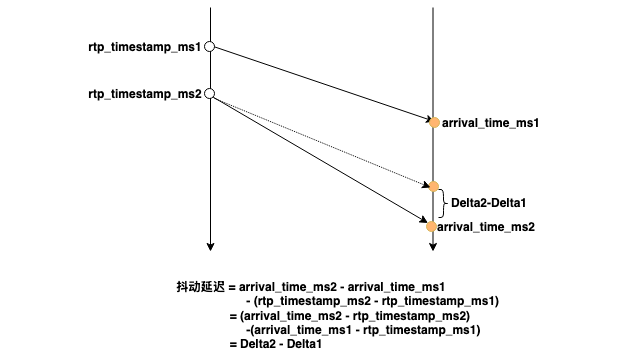
由于音频数据在发送端是均匀生产的,也就是上图中相邻帧的rtp_timestamp之间的间隔是固定的,但是接收端的arrival_time是波动的,也就是相邻帧的arrival_time之间的间隔是变化的。所以,当我们将所有音频帧的arrival_time绘制出来时,我们可以查看相邻帧的帧间隔,如果帧间隔的变化非常剧烈,我们就可以断定RTC的端到端延迟越大。反过来,如果RTC的端到端延迟很大,我们定位到音频帧的帧间隔很大时,可以初步判断网络波动是主因。
第二个网络因素是丢包和乱序。丢包率越高,获得完整一帧音频数据的时间开销就越大,已收到的报文在Jitter Buffer停留的时间就越长(既有可能在等待前一帧音频数据被完整收到,也有可能在需要等待同一帧的音频数据的其余报文被完整收到),Jitter Buffer Delay就越大。
严重的乱序需要缓冲区有足够的深度来等待先发后到的报文并做重新排序,这也会增加延迟。
解决网络问题的措施有很多种,具体包括:
- 尽可能地选择靠近用户的服务器(边缘节点)作为客户端的接入点,这样做带来最直接的好处是RTT变小。RTT变小后,通过NACK的方式实现丢包重传的时间开销也会变小(丢包重传的时间开销=重传次数*RTT)。就近接入的第二个好处是从发送端到接收端经过的节点变少了,网络波动、丢包、乱序的干扰因素会减少。
- 启用RED&FEC这些前向纠错技术。RED&FEC在带宽足够、高丢包、高延迟的情况下效果明显,但它也有弱点。有些场景下丢包是由于带宽不足导致的,这个时候启用RED&FEC,生成的冗余数据会占用部分带宽,导致原本就不足的带宽更加紧张,网络进一步恶化。另一方面,我们并不知道网络的真实情况(Ground Truth),很难判断丢包是随机因素导致,还是带宽不足导致,所以启用RED&FEC这项技术在很多时候是努力找到工程的整体最优解,但不可避免地会出现Bad Case(有些用户因为启用了这项技术导致体验恶化)。
3.2.2. NetEq内部算法
这是 NetEq的智能所在,它根据网络状况动态调整延迟。
- 目标缓冲水位(Target Buffer Level)。NetEq的核心控制算法会持续计算一个理想的目标缓冲大小(以毫秒为单位)。这个目标是动态的,根据当前测量的网络抖动、丢包率和延迟趋势不断调整。实际缓冲区大小会围绕这个目标值波动。算法会努力将延迟维持在一个既能有效对抗抖动又不会过高的水平。
- 加速(Accelerate)与丢包补偿(PLC)控制。当缓冲区快满时,NetEq 会采用加速播放来主动降低延迟,防止延迟无限增长;而当缓冲区快空或遇到丢包时,NetEq 会采用PLC(轻微拉伸音频时长)来填补空白,避免播放中断。这些操作的触发阈值、速度和幅度会直接影响缓冲区的稳定状态和大小,从而影响延迟。
在工程实践中,我们可以根据业务的偏好在卡顿和时延之间调整,例如在云渲染这类强交互的业务中,我们可以调低目标缓冲水位,让NetEq的Buffer深度变低;调整阈值让加速行为更早被触发,触发后更激进地加速播放。通过这样的手段,可以将延迟变得更低,代价是卡顿会升高。
3.2.3. 强制设置目标延迟的上下界
NetEq有两个参数:MinimumDelay/MaximumDelay,通过设置这两个参数,可以将NetEq Jitter Buffer的目标延迟控制在一个[effective_minimum_delay_ms_,maximum_delay_ms_]这个区间。effective_minimum_delay_ms_是在MinimumDelay基础上做微调,而maximum_delay_ms_等于MaximumDelay。
effective_minimum_delay_ms_作为下界存在,是为了音视频同步,确保音频有足够的缓冲等待视频帧(由于同一个时间段内产生的音频数据远小于视频帧,例如音频码率为48Kbps,视频码率为1Mbps,所以通常情况下音频数据先于视频数据到达接收端),避免音画不同步。
maximum_delay_ms_作为上界存在,是为了防止在网络极端恶劣的情况下延迟变得不可接受(例如超过 400ms),此时宁可部分卡顿也要保证实时性。
The End.

火山引擎开发者社区是火山引擎打造的AI技术生态平台,聚焦Agent与大模型开发,提供豆包系列模型(图像/视频/视觉)、智能分析与会话工具,并配套评测集、动手实验室及行业案例库。社区通过技术沙龙、挑战赛等活动促进开发者成长,新用户可领50万Tokens权益,助力构建智能应用。
更多推荐
 60
60 0
0- 0


 已为社区贡献5条内容

所有评论(0)