mcp协议详细剖析分解
MCP(模型上下文协议)是一种标准化的协议,它让 AI 大模型能够以一种有组织的方式和外部工具、资源进行互动。它支持多种传输方式,这样在不同的环境下都能灵活使用。
这里写自定义目录标题
mcp介绍
MCP(Model Context Protocol模型上下文协议)是一种标准化的协议,它让 AI 大模型能够以一种有组织的方式和外部工具、资源进行互动。它支持多种传输方式,这样在不同的环境下都能灵活使用。截止目前为止 mcp协议有两个版本,最新的版本是2025-03-26 ,另外一个版本2024-11-05
总体架构如图:
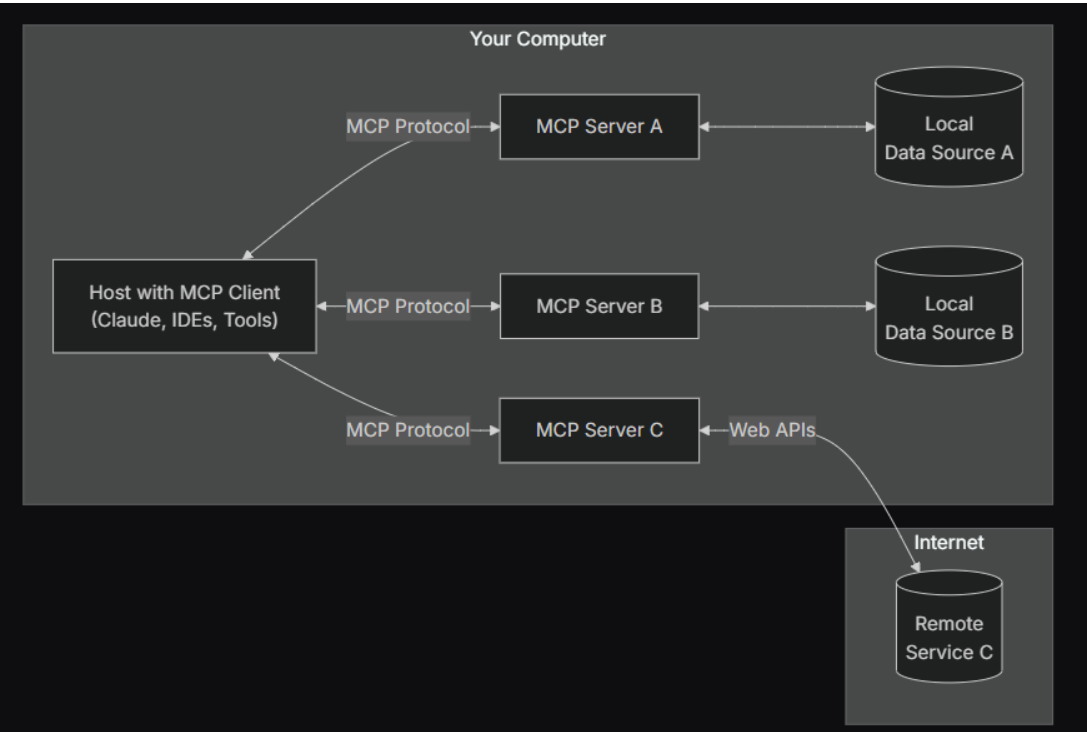
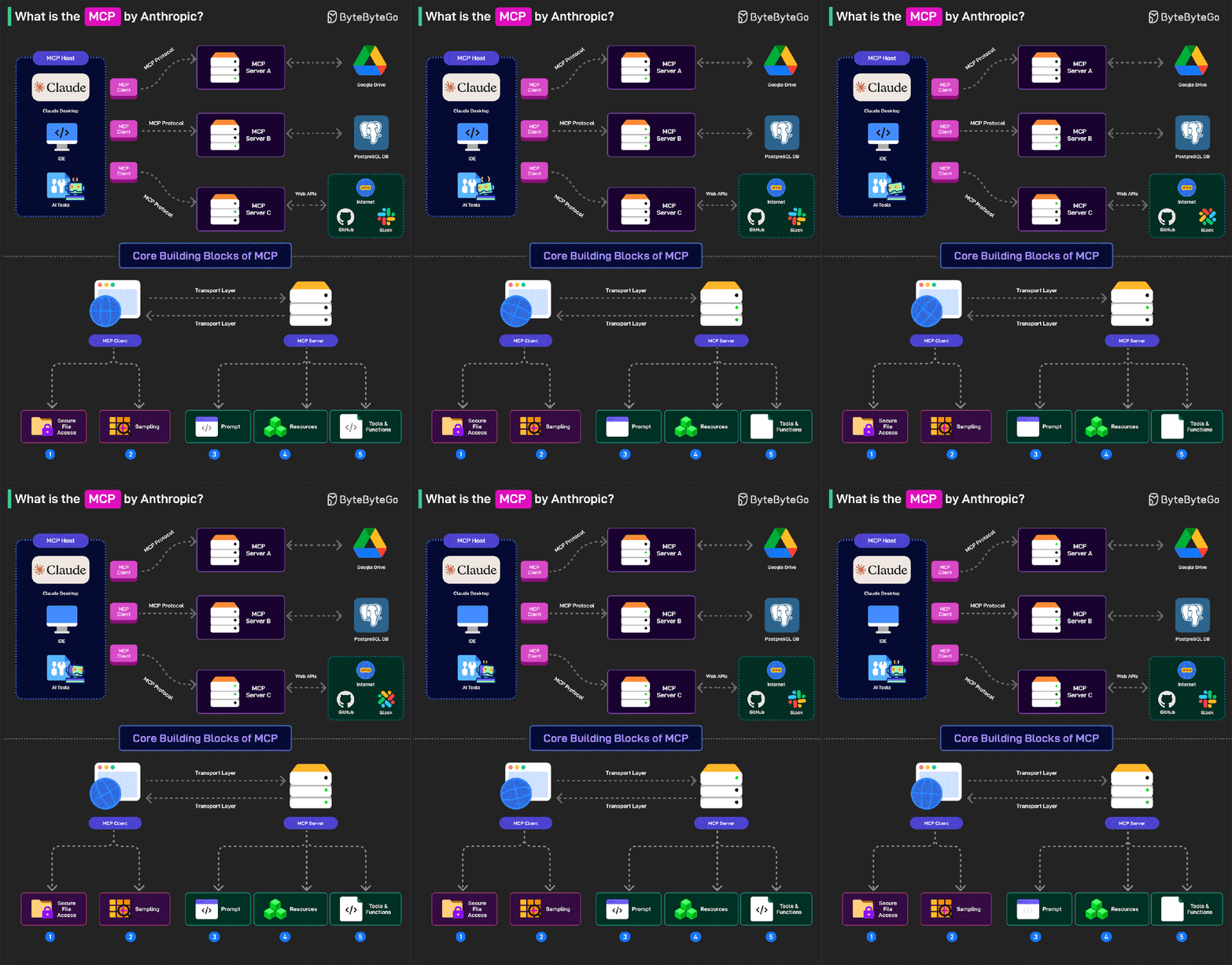
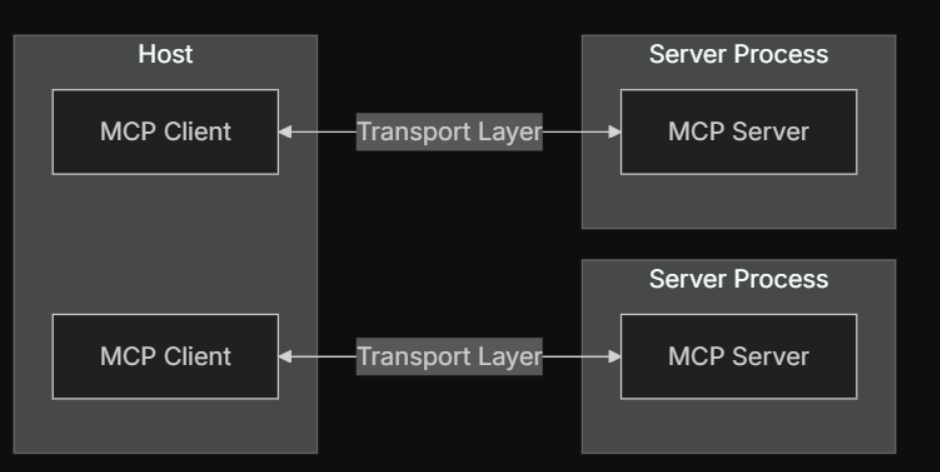
mcp采用的也是CS(client-server)框架:
concepts
mcp-server
- prompt ,server提供提示词模版的能力,客户端可以通过结构化的参数获取对应的提示词,用户跟大模型交互过程中使用。这种是客户端主动控制的。
- Resource,跟client root类似,它是server端向client提供的数据。
- tool,可以让大模型可以获取外部数据、计算等模型本身不具备能力的工具。
mcp-client
-
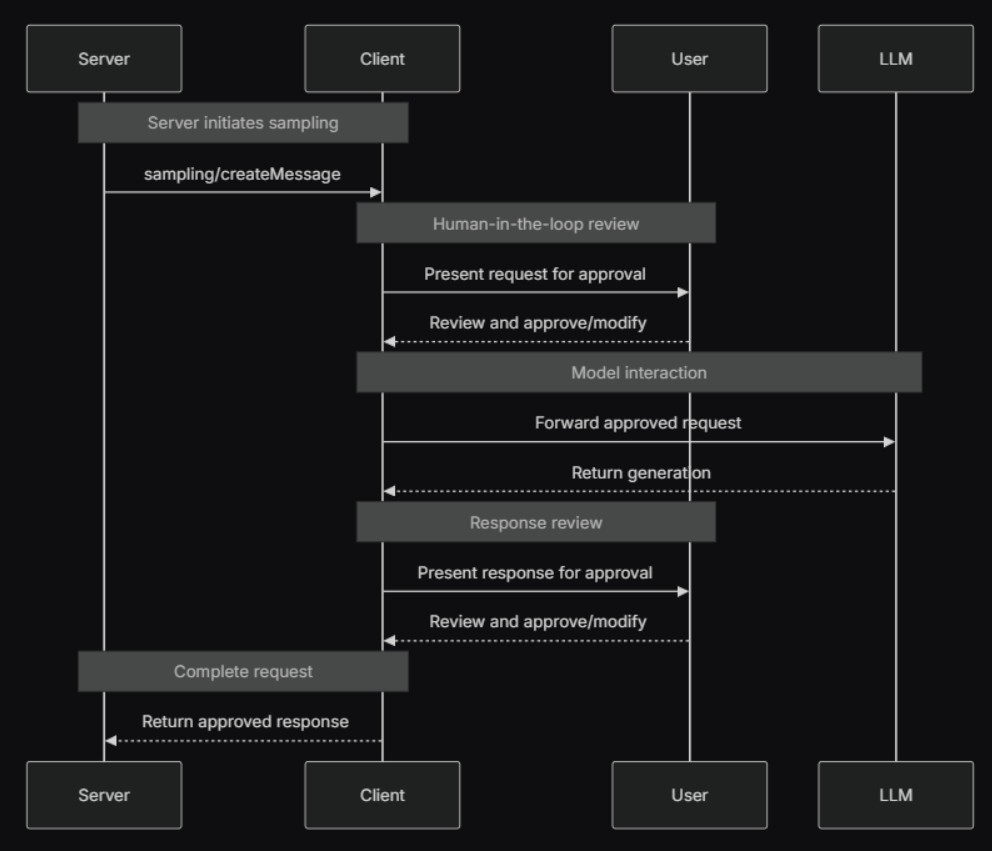
sampling,是服务端向客户端中的发起请求,可以通过客户端向ai 模型完成对用问题的采样。
-
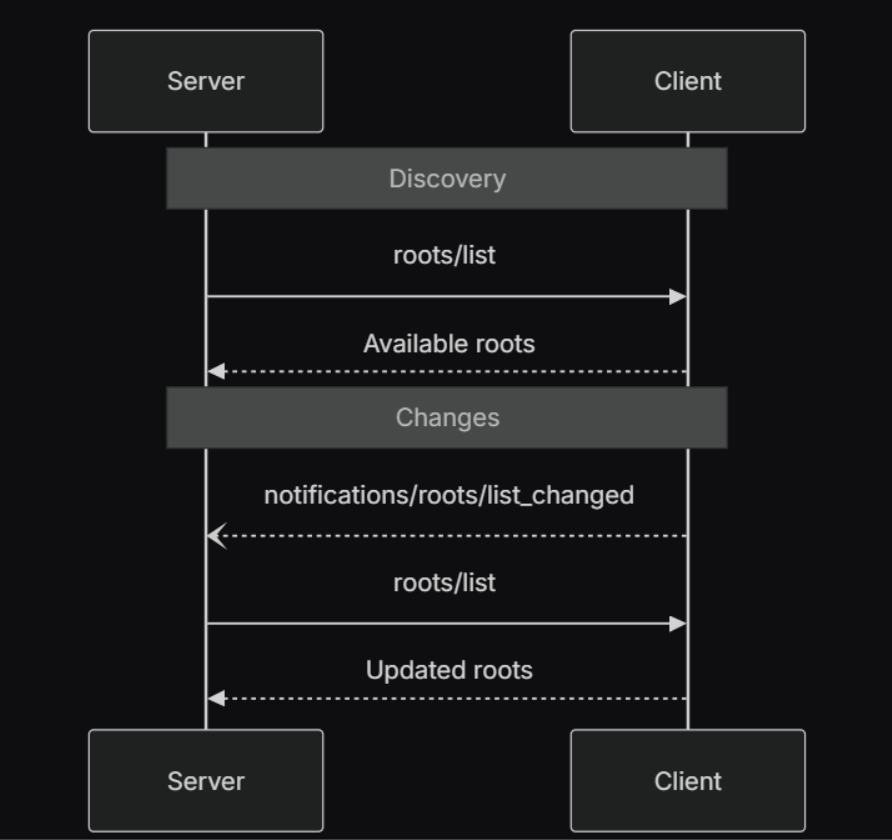
roots,是client端告诉服务端访问文档系统的边界,需要client端提供roots/list接口给服务端调用,用于返回客户端定义的文件系统访问边界。
connection
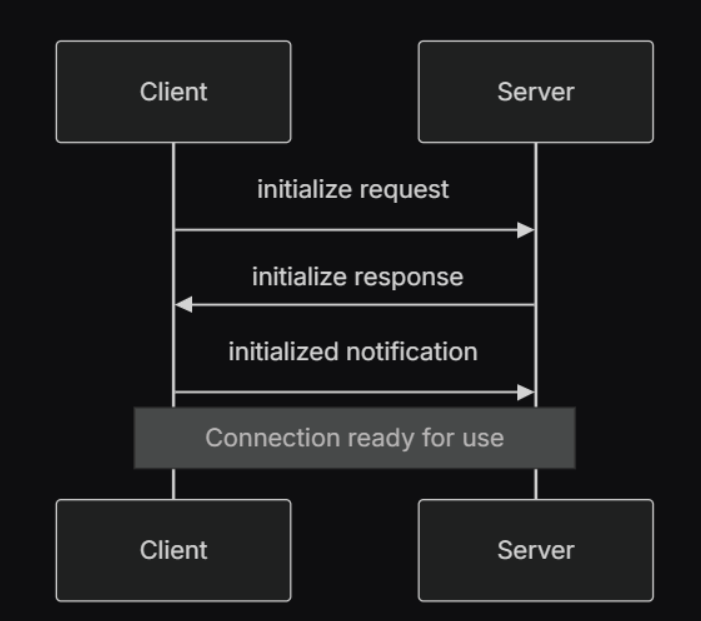
mcp-client跟mcp-server的建立连接流程如下,跟http的三次握手相似,如下图:
-
1.客户端发送初始化请求,包含协议版本和功能特性。数据传输协议使用的jsonrpc
initialize request body
{
    "jsonrpc": "2.0", //json协议版本
    "method": "initialize",// 初始化方法
    "id": "97e87016-0", //请求标识
    "params": {
        "protocolVersion": "2024-11-05", //客户端协议版本,这个跟client sdk协议中定义好的  这个需要跟返回结果中的版本一致
        "capabilities": {}, //client提供的功能特性
        "clientInfo": {   //client meta
            "name": "big-client", //客户端标识
            "version": "1.0.0" //版本
        }
    }
}
initialize reponse body:
{ "jsonrpc": "2.0", "id": "97e87016-0", "result": { "protocolVersion": "2024-11-05", //跟客户端协议版本一致才行 "capabilities": { //server提供的功能特性 "resources": {}, "tools": {}, "prompts": {} }, "serverInfo": { "name": "tavily-mcp", "version": "0.1.0" } } } -
2.服务器回应其协议版本和功能特性
-
3.客户端发送已初始化通知作为确认
-
4.正常消息交换开始
mcp -server
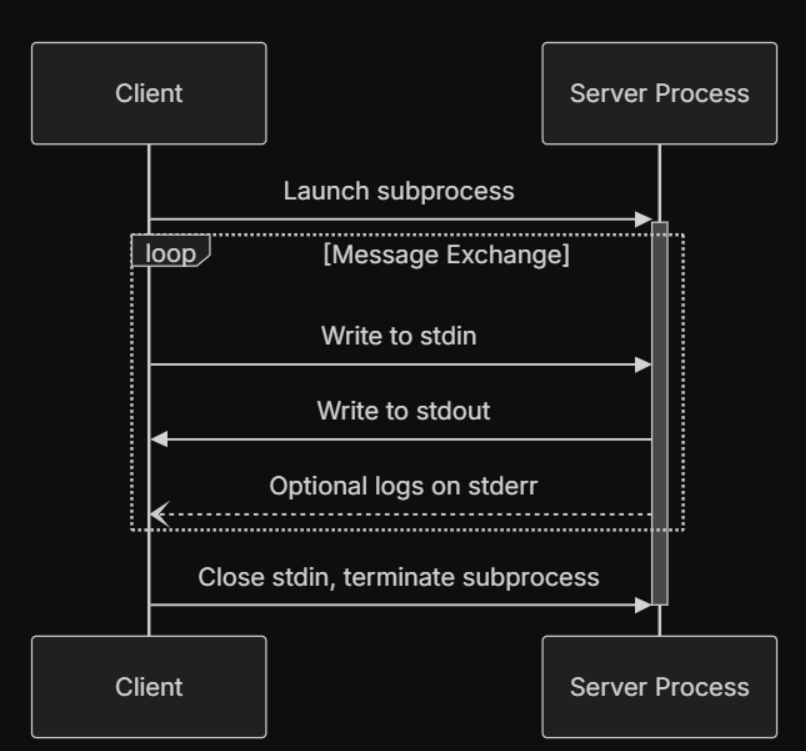
server按照部署方式有分类有两种:一种是跟client部署在同一个机器上,他们之间通过标准Stdio 通信;另外一种部署在远端的,2024-11-05版本使用的是基于HTTP with SSE ,2025-03-26版本中是Streamable HTTP。
-
Stdio 通信方式是mcp-server部署在一个机器上,client和server的进程通信。常见的mcp客户端像claude desktop、cursor 、WindSurf 、Cline都是支持的,而claude desktop目前只支持stdio。stdio可视化交互可以使用mcp官网提供**MCP Inspector **
-
http with sse ,mcp-server部署在远端,他们之间通信通过http with sse。
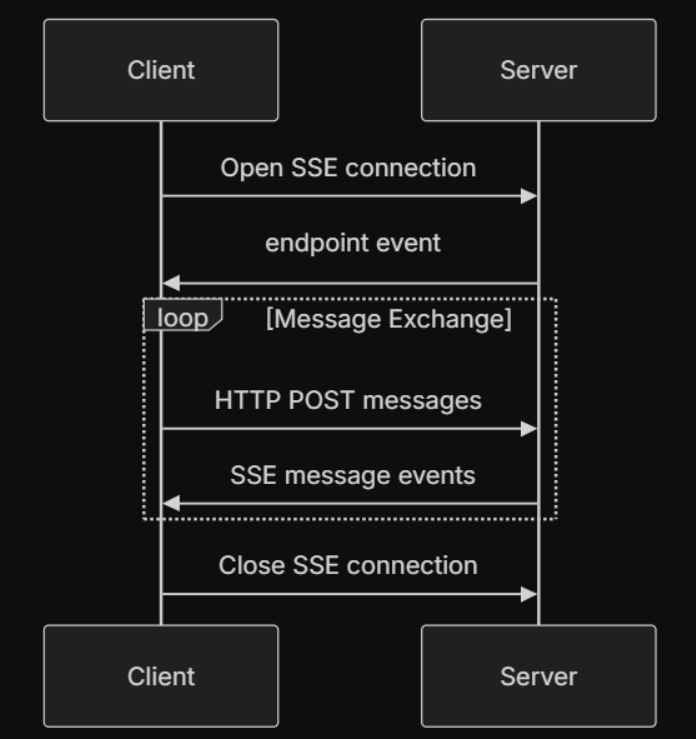
client向server通过http post请求,请求示例如下:
curl --location 'http://127.0.0.1:8080/app-llm/mcp/messages' \
--header 'Content-Type: application/json' \
--data '{
    "jsonrpc": "2.0",
    "id": "12344",
    "method": "tools/call",
    "params": {
        "name": "getWeather",
        "arguments": {
            "cityName": "成都"
        }
    }
}'
server 向client通信是通过sse,需要client创建一个sse连接,接入端点:
curl --location 'http://127.0.0.1:8080/app-llm/sse' \
--header 'content-type: text/event-stream'
- Streamable HTTP 待补充
mcp交互流程示例流程
说明client是基于spring ai mcp 框架实现。
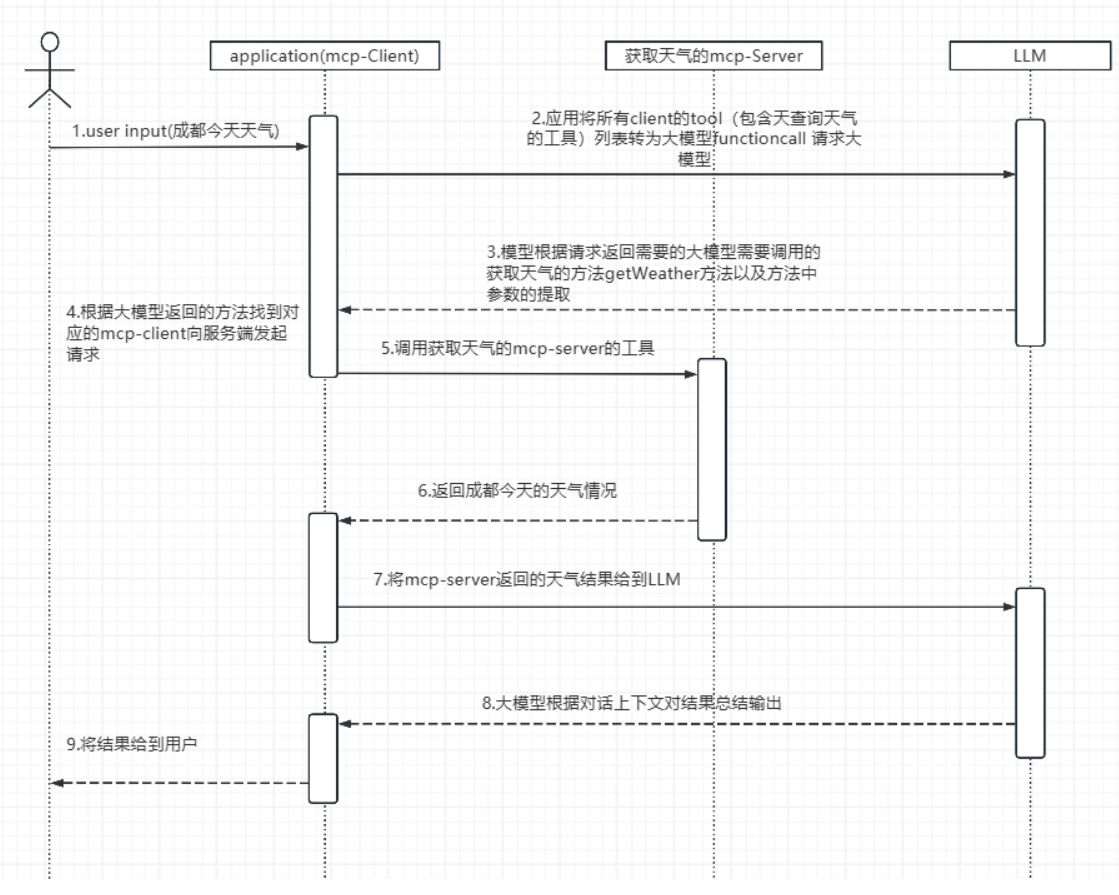
以一个可以查询天气的mcp-server服务为例,展示client-server交互过程。具体流程如下:
-
1.用户输入内容查询成都天气
-
2.根据用户的输入,让大模型分析使用的工具,对大模型的请求参数如下:
{
    "messages": [
        {
            "content": "You are useful assistant",
            "role": "system"
        },
        {
            "content": "成都今天的天气",
            "role": "user"
        }
    ],
    "model": "qwen-72B",
    "max_tokens": 2000,
    "stream": false,
    "temperature": 0.1,
    "tools": [
        {
            "type": "function",
            "function": {
                "description": "Get weather information by city name",
                "name": "getWeatherByCity",
                "parameters": {
                    "type": "object",
                    "properties": {
                        "query": {
                            "cityName": "string",
                            "description": "要查询天气的城市"
                        }
                    },
                    "required": [
                        "cityName"
                    ]
                }
            }
        },
        {
            "type": "function",
            "function": {
                "description": "Searches for local businesses and places using Brave's Local Search API. Best for queries related to physical locations, businesses, restaurants, services, etc. Returns detailed information including:\n- Business names and addresses\n- Ratings and review counts\n- Phone numbers and opening hours\nUse this when the query implies 'near me' or mentions specific locations. Automatically falls back to web search if no local results are found.",
                "name": "brave_local_search",
                "parameters": {
                    "type": "object",
                    "properties": {
                        "query": {
                            "type": "string",
                            "description": "Local search query (e.g. 'pizza near Central Park')"
                        },
                        "count": {
                            "type": "number",
                            "description": "Number of results (1-20, default 5)",
                            "default": 5
                        }
                    },
                    "required": [
                        "query"
                    ]
                }
            }
        }
    ]
}
spring ai mcp示例
spring ai 版本 现在已经发到1.0.0-M7,2025年5月份 将发布release版本 ,随机会发布正式版本GA。
spring ai 实现mcp协议使用大模型的function call方式,也有使用将工具描述放在system prompt中,如ide cline
spring ai mcp中关于client和server的配置如下:
spring:
  ai:
    openai:
      api-key: sk-dbc8ed51cec741d388e0ca023d33b551
      base-url: @llm.api.host@
      chat:
        options:
          model: qwen-72b
          max-tokens: 4000
        completions-path: /v1/chat/completions
        api-key: sk-dbc8ed51cec741d388e0ca023d33b551
    mcp:
      client:
        requestTimeout: 300000
        enabled: true
        name: big-client
        version: 1.0.0
#        sse:
#          connections:
#            server1:
#              url: http://localhost:8080/app-llm
        stdio:
          root-change-notification: true
          servers-configuration: classpath:mcp-servers.json //claude-desktop工具配置格式
      server:
        name: big-mcp-server
        version: 1.0.0
        type: SYNC
        sse-message-endpoint: /mcp/messages
        sse-endpoint: /sse
对应的stdio mcp-servers.json文件:
{
  "mcpServers": {
    "desktop-commander": { //本地文件系统
      "command": "cmd",
      "args": [
        "/c",
        "npx.cmd",
        "-y",
        "@smithery/cli@latest",
        "run",
        "@wonderwhy-er/desktop-commander",
        "--key",
        "99de4780-ca3b-4694-9bc7-a8098d80eb2"
      ]
    },
    "tvly": {  //web搜索
      "command": "npx.cmd",
      "args": [
        "-y",
        "tavily-mcp@0.1.4"
      ],
      "env": {
        "TAVILY_API_KEY": "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"
      }
    },
    "mysql": {
      "command": "npx.cmd",
      "args": ["mysql-mcp-server"],
      "env": {
        "MYSQL_HOST": "10.10.8.3",
        "MYSQL_PORT": "43306",
        "MYSQL_USER": "root",
        "MYSQL_PASSWORD": "Koala_MySQL#20Xx..A..",
        "MYSQL_DATABASE": "large_model_alarm"
      }
    },
    "amap-maps": {  //高德的mcp-server
      "command": "npx.cmd",
      "args": [
        "-y",
        "@amap/amap-maps-mcp-server"
      ],
      "env": {
        "AMAP_MAPS_API_KEY": "fe4a210af4a7083f78981b57a19b8eb"
      }
    }

  }
}
测试用例:
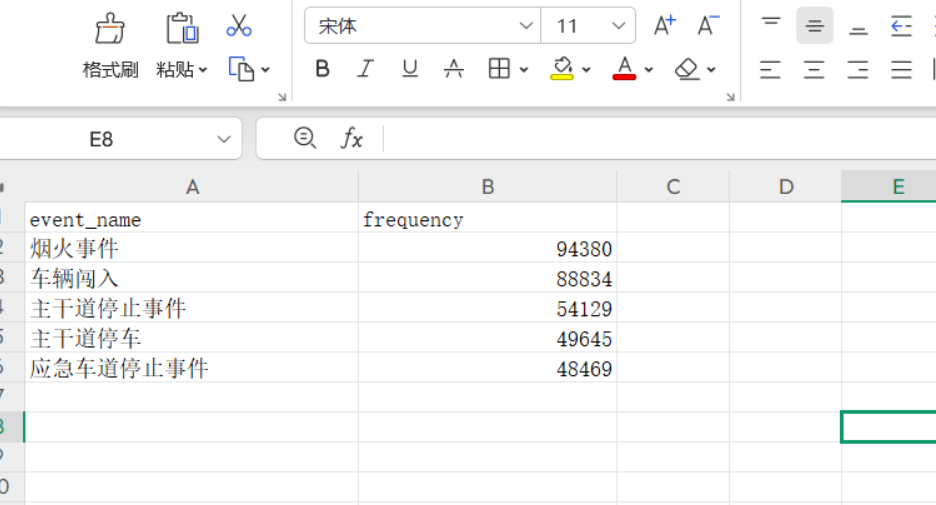
查询数据库large_model_alarm库中表kl_lm_event_alarm 都有哪些告警事件类型 ,统计告警事件类型出现频次最多的前5名,然后将结果以csv格式存储在我的D:\test文件
结果展示:
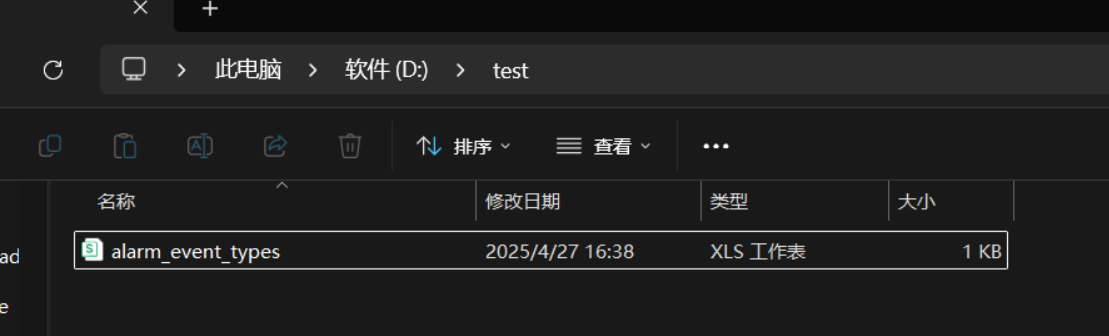
对应里边的内容为:
mcp 平台
cline
https://cline.bot/mcp-marketplace
smithery
https://smithery.ai/
awesome
https://github.com/punkpeye/awesome-mcp-servers/blob/main/README-zh.md
reddit mcp社区
https://www.reddit.com/r/mcp/
mcp.so
https://mcp.so/

火山引擎开发者社区是火山引擎打造的AI技术生态平台,聚焦Agent与大模型开发,提供豆包系列模型(图像/视频/视觉)、智能分析与会话工具,并配套评测集、动手实验室及行业案例库。社区通过技术沙龙、挑战赛等活动促进开发者成长,新用户可领50万Tokens权益,助力构建智能应用。
更多推荐
 27
27 0
0- 0


 已为社区贡献8条内容

所有评论(0)