【n8n教程笔记——工作流Workflow】文本课程(第一阶段)——5.3 过滤订单 (Filtering orders)
【代码】【n8n教程笔记——工作流Workflow】文本课程(第一阶段)——5.3 过滤订单 (Filtering orders)
文章目录
3. Filtering Orders
In this step of the workflow, you will learn how to filter data using conditional logic and how to use expressions in nodes using the If node.
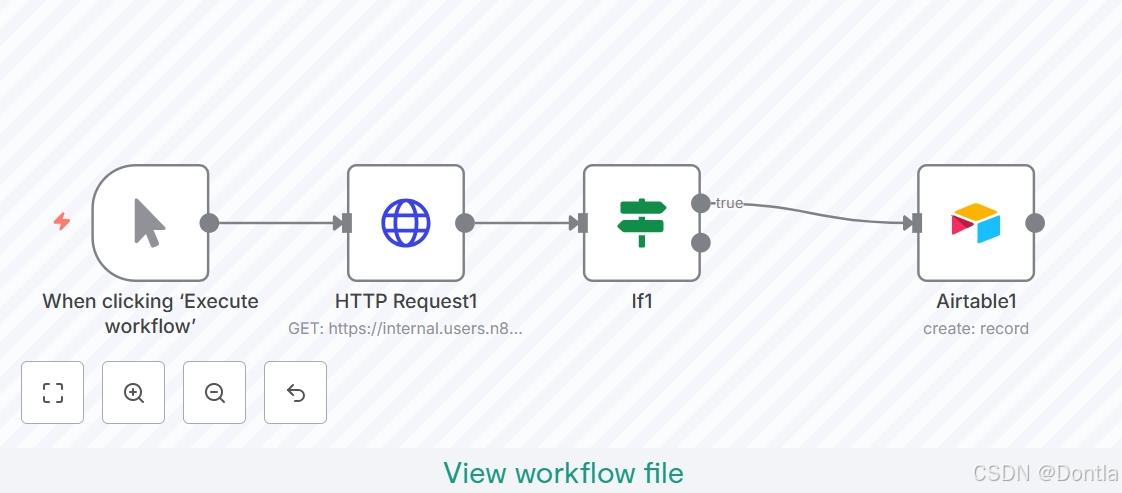
After this step, your workflow should look like this:
{
  "nodes": [
    {
      "parameters": {
        "url": "https://internal.users.n8n.cloud/webhook/custom-erp",
        "authentication": "genericCredentialType",
        "genericAuthType": "httpHeaderAuth",
        "sendHeaders": true,
        "headerParameters": {
          "parameters": [
            {
              "name": "unique_id",
              "value": "<YOUR_UNIQUE_ID_HERE>"
            }
          ]
        },
        "options": {}
      },
      "type": "n8n-nodes-base.httpRequest",
      "typeVersion": 4.2,
      "position": [
        340,
        -680
      ],
      "id": "ada6becf-c320-41a7-bdca-a842ea3ee769",
      "name": "HTTP Request1",
      "credentials": {
        "httpHeaderAuth": {
          "id": "sMuanZ4xGobAurzY",
          "name": "Nathan's ABCorp data warehouse account"
        }
      }
    },
    {
      "parameters": {
        "operation": "create",
        "base": {
          "__rl": true,
          "value": "app9nOVsRxdypoknP",
          "mode": "list",
          "cachedResultName": "beginner course"
        },
        "table": {
          "__rl": true,
          "value": "tblo2KuMyn5X4jU0s",
          "mode": "list",
          "cachedResultName": "orders"
        },
        "columns": {
          "mappingMode": "autoMapInputData",
          "value": {},
          "matchingColumns": [],
          "schema": [
            {
              "id": "orderID",
              "displayName": "orderID",
              "required": false,
              "defaultMatch": false,
              "canBeUsedToMatch": true,
              "display": true,
              "type": "number",
              "readOnly": false,
              "removed": false
            },
            {
              "id": "customerID",
              "displayName": "customerID",
              "required": false,
              "defaultMatch": false,
              "canBeUsedToMatch": true,
              "display": true,
              "type": "number",
              "readOnly": false,
              "removed": false
            },
            {
              "id": "employeeName",
              "displayName": "employeeName",
              "required": false,
              "defaultMatch": false,
              "canBeUsedToMatch": true,
              "display": true,
              "type": "string",
              "readOnly": false,
              "removed": false
            },
            {
              "id": "orderPrice",
              "displayName": "orderPrice",
              "required": false,
              "defaultMatch": false,
              "canBeUsedToMatch": true,
              "display": true,
              "type": "number",
              "readOnly": false,
              "removed": false
            },
            {
              "id": "orderStatus",
              "displayName": "orderStatus",
              "required": false,
              "defaultMatch": false,
              "canBeUsedToMatch": true,
              "display": true,
              "type": "string",
              "readOnly": false,
              "removed": false
            }
          ],
          "attemptToConvertTypes": false,
          "convertFieldsToString": false
        },
        "options": {}
      },
      "type": "n8n-nodes-base.airtable",
      "typeVersion": 2.1,
      "position": [
        800,
        -680
      ],
      "id": "5e60ca72-d773-439c-b39a-4b14c54f795b",
      "name": "Airtable1",
      "credentials": {
        "airtableTokenApi": {
          "id": "UT32NHUYnp4pn1H3",
          "name": "Airtable Personal Access Token account"
        }
      }
    },
    {
      "parameters": {
        "conditions": {
          "options": {
            "caseSensitive": true,
            "leftValue": "",
            "typeValidation": "strict",
            "version": 2
          },
          "conditions": [
            {
              "id": "526cb30c-0f90-4f66-8f98-b64ceb2e52f2",
              "leftValue": "={{ $json.orderStatus }}",
              "rightValue": "processing",
              "operator": {
                "type": "string",
                "operation": "equals"
              }
            }
          ],
          "combinator": "and"
        },
        "options": {}
      },
      "type": "n8n-nodes-base.if",
      "typeVersion": 2.2,
      "position": [
        540,
        -680
      ],
      "id": "70e4db65-f827-4e4f-8673-b405b7986d6e",
      "name": "If1"
    },
    {
      "parameters": {},
      "type": "n8n-nodes-base.manualTrigger",
      "typeVersion": 1,
      "position": [
        140,
        -680
      ],
      "id": "ffa1a8ce-1a1e-48c4-8a0d-6af28c0447a5",
      "name": "When clicking ‘Execute workflow’"
    }
  ],
  "connections": {
    "HTTP Request1": {
      "main": [
        [
          {
            "node": "If1",
            "type": "main",
            "index": 0
          }
        ]
      ]
    },
    "If1": {
      "main": [
        [
          {
            "node": "Airtable1",
            "type": "main",
            "index": 0
          }
        ],
        []
      ]
    },
    "When clicking ‘Execute workflow’": {
      "main": [
        [
          {
            "node": "HTTP Request1",
            "type": "main",
            "index": 0
          }
        ]
      ]
    }
  },
  "pinData": {},
  "meta": {
    "templateCredsSetupCompleted": true,
    "instanceId": "24789c4d5aa56ca018d140332e7a43fd37dd7af0409453314fff12dc1aeebfa8"
  }
}
To insert only processing orders into Airtable we need to filter our data by orderStatus. Basically, we want to tell the program that if the orderStatus is processing, then insert all records with this status into Airtable; else, for example, if the orderStatus isn’t processing, calculate the sum of all orders with the other orderStatus (booked).
This if-then-else command is conditional logic. In n8n workflows, you can add conditional logic with the If node, which splits a workflow conditionally based on comparison operations.
If vs. Switch
If you need to filter data on more than boolean values (true and false), use the Switch node. The Switch node is similar to the If node, but supports multiple output connectors.
Add If node before the Airtable node
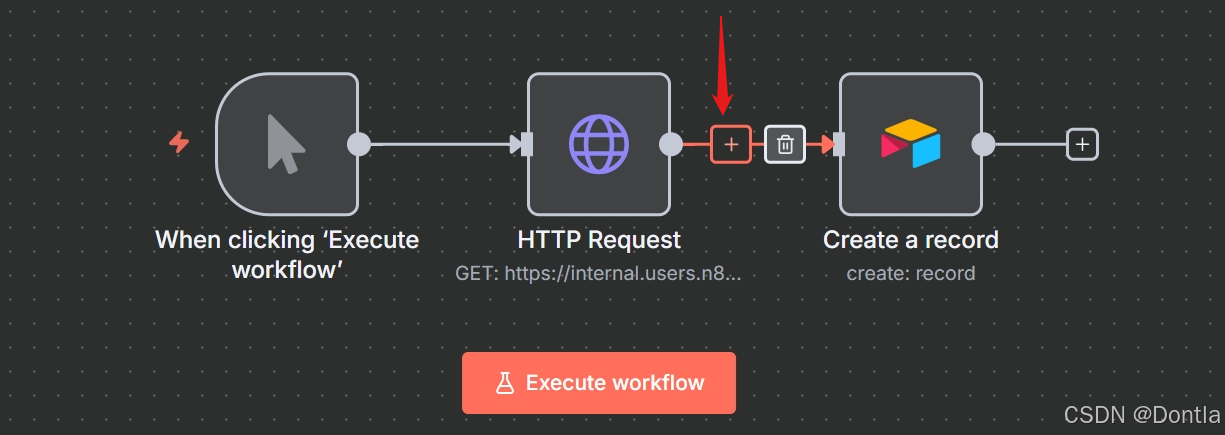
First, let’s add an If node between the connection from the HTTP Request node to the Airtable node:
-
Hover over the arrow connection the HTTP Request node and the Airtable node.
-
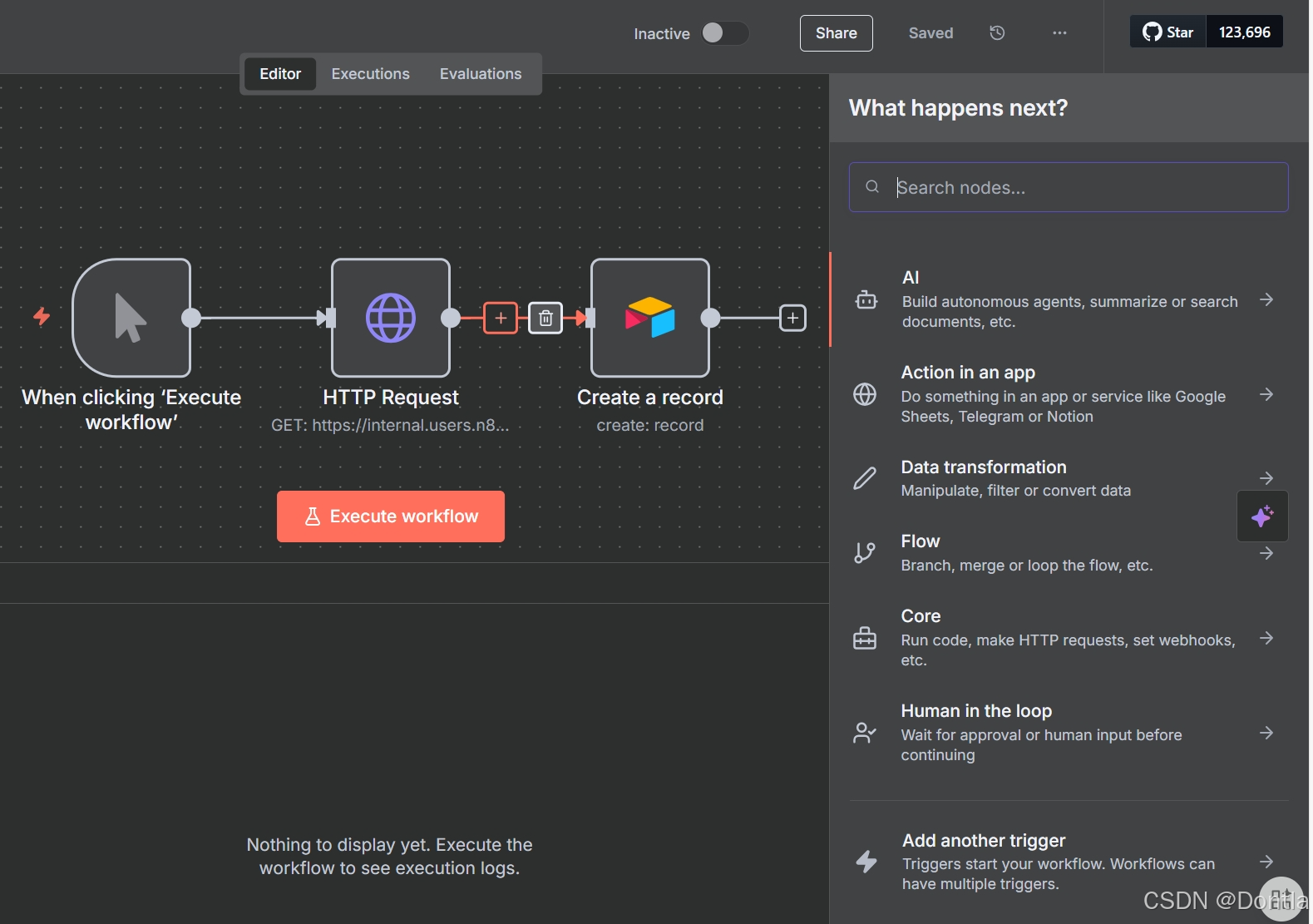
Select the + sign between the HTTP Request node and the Airtable node.
Configure the If node
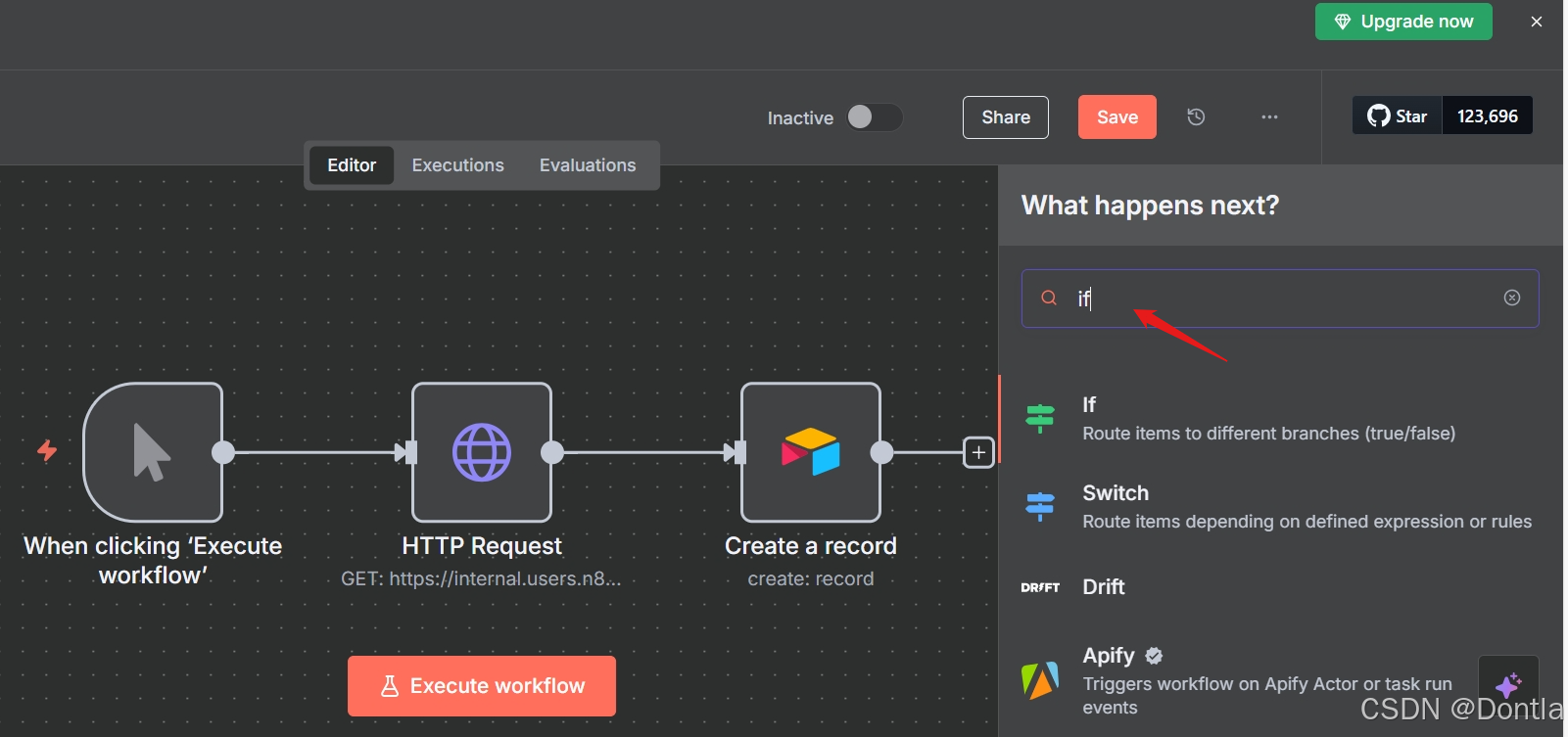
Selecting the plus removes the connection to the Airtable node to the HTTP request. Now, let’s add an If node connected to the HTTP Request node:
-
Search for the If node.
-
Select it when it appears in the search.
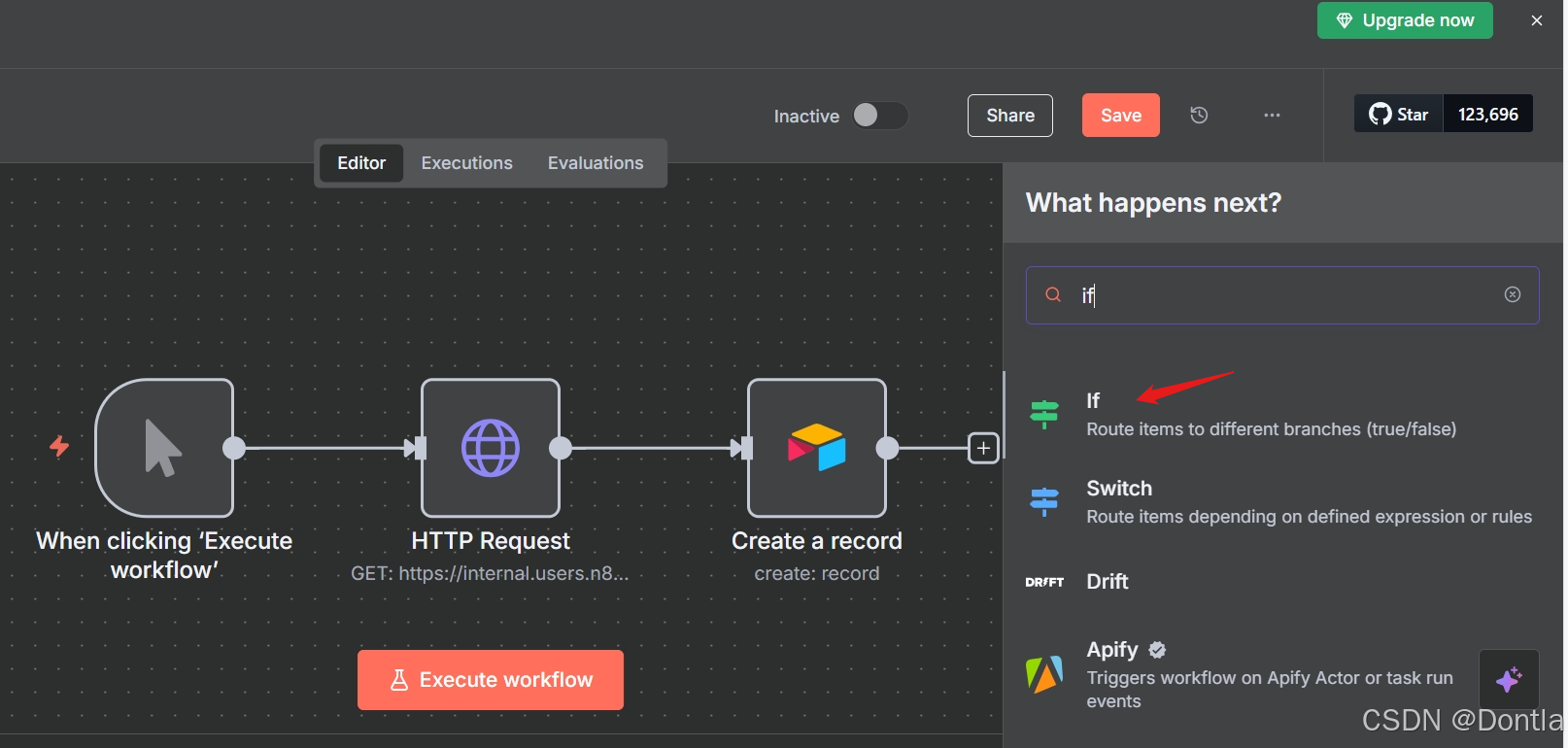
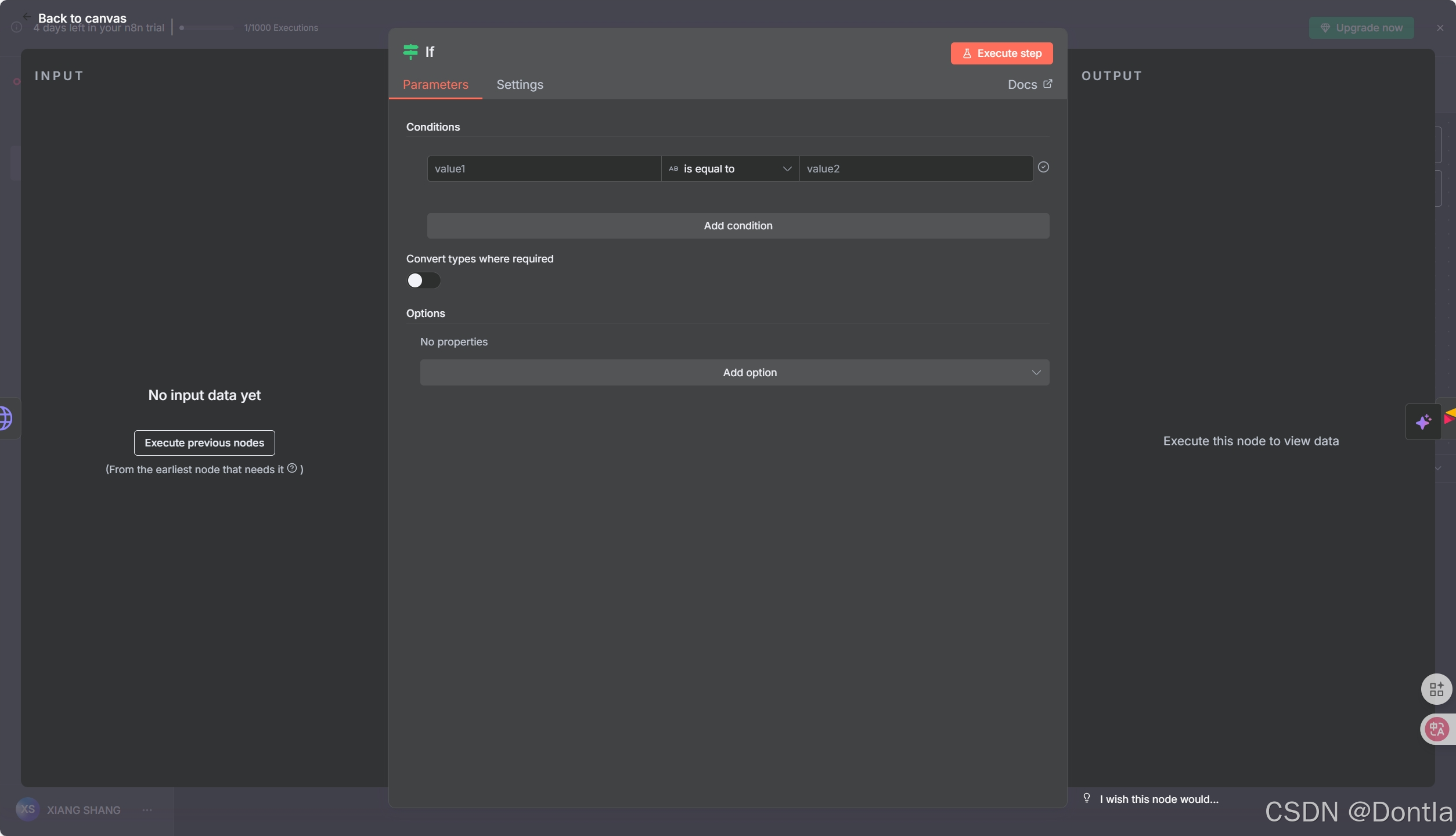
For the If node, we’ll use an expression.
Expressions
An expression is a string of characters and symbols in a programming language that can be evaluated to get a value, often according to its input. In n8n workflows, you can use expressions in a node to refer to another node for input data. In our example, the If node references the data output by the HTTP Request node.
In the If node window, configure the parameters:
-
Set the
value1placeholder to{{ $json.orderStatus }}with the following steps:-
Hover over the value1 field.
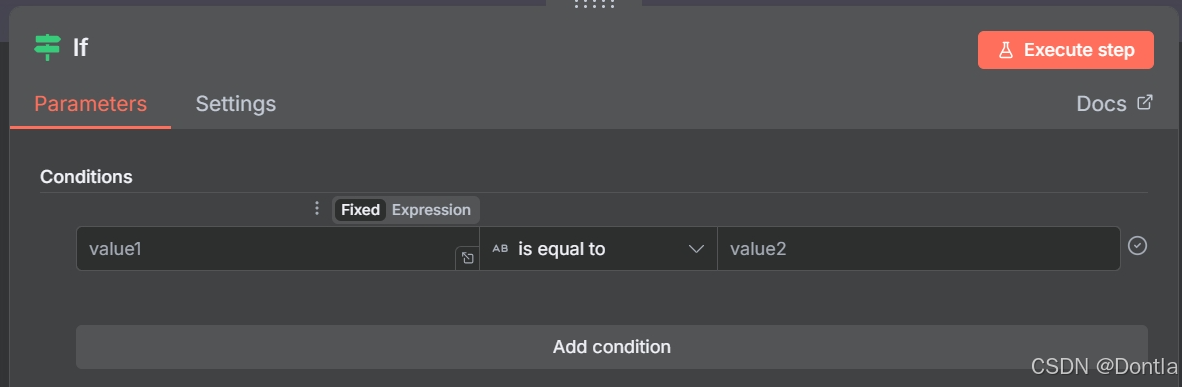
-
Select the Expression tab on the right side of the
value1field.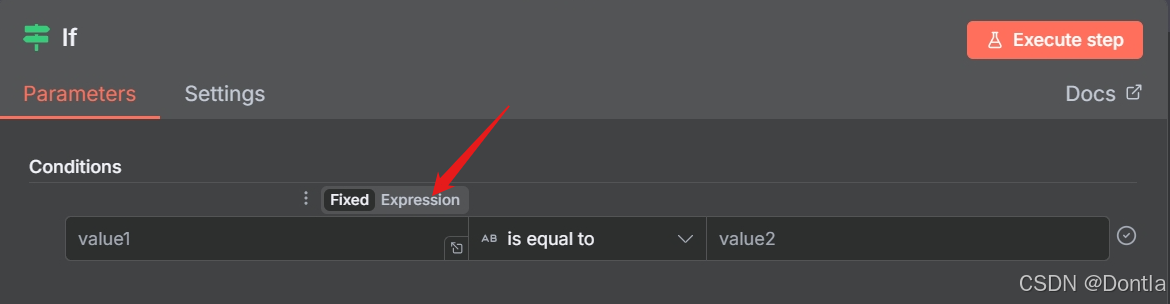
-
Next, open the expression editor by selecting the link icon:
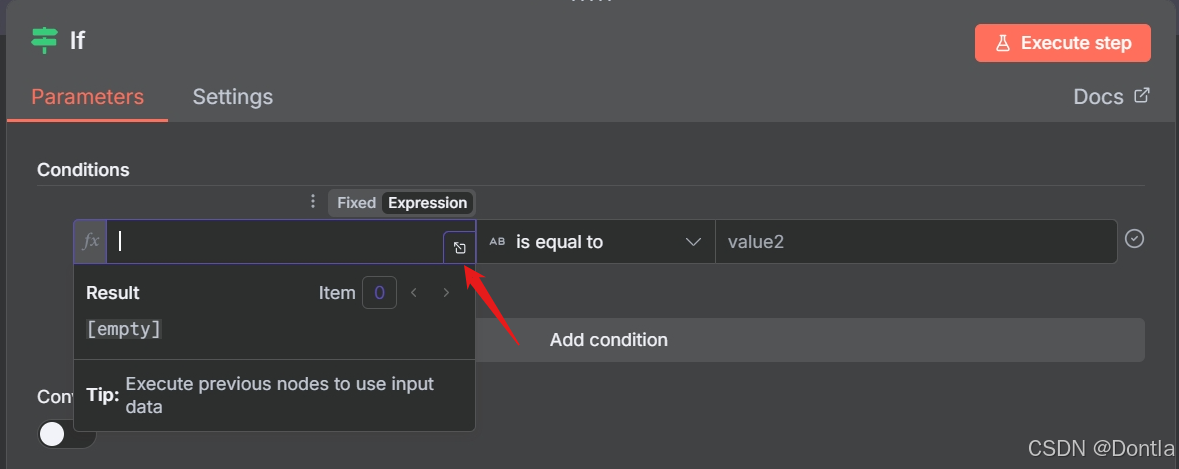
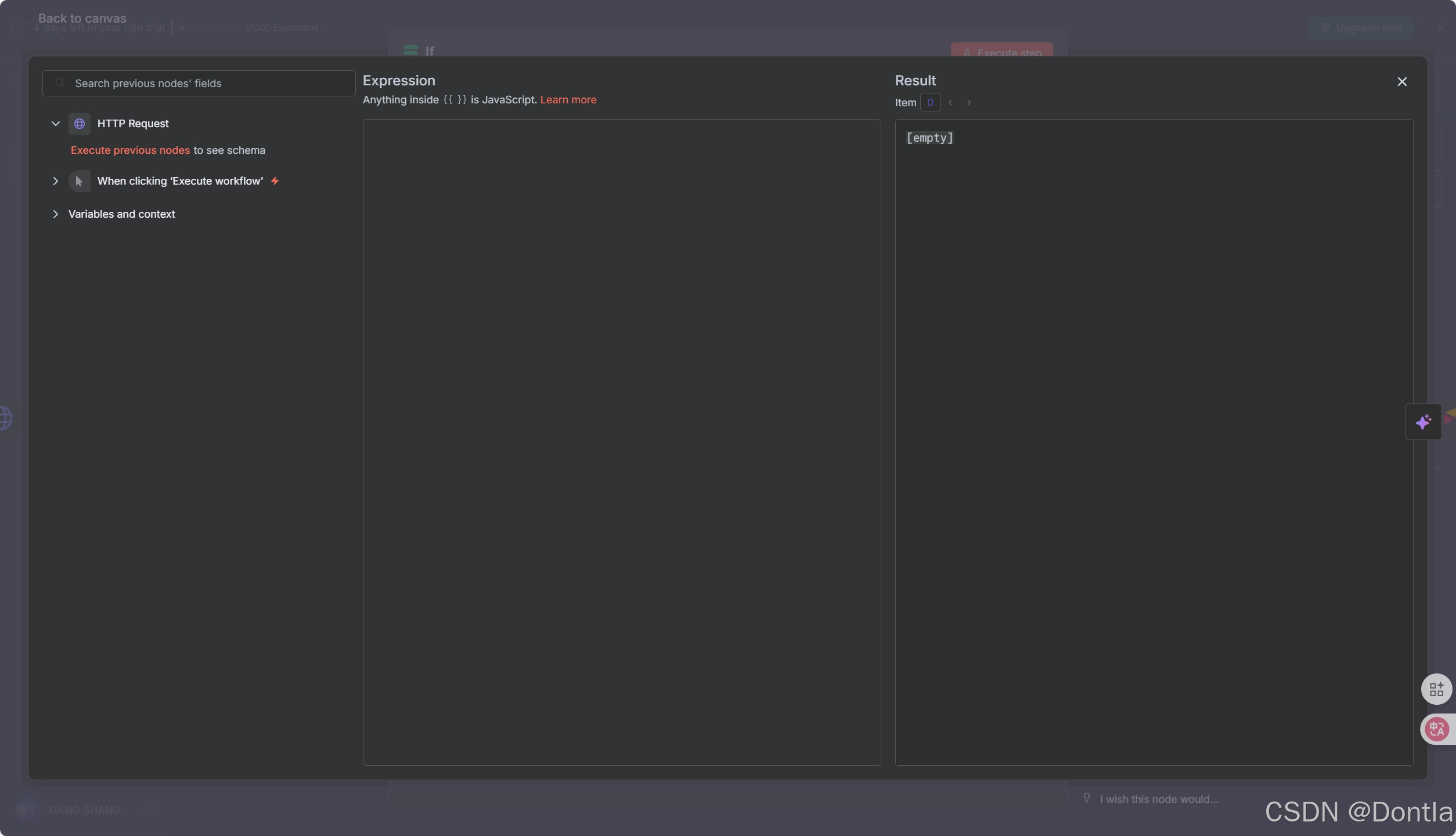
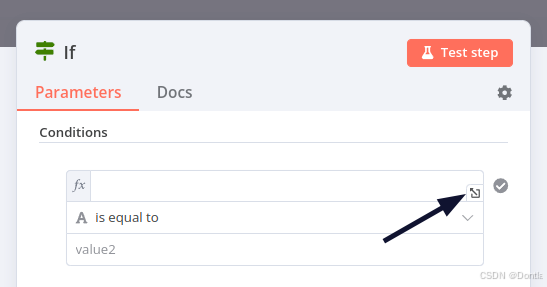
Opening the Expression Editor - Use the left-side panel to select HTTP Request > orderStatus and drag it into the Expression field in the center of the window.
Note: If you haven’t run it before, you need to run it first.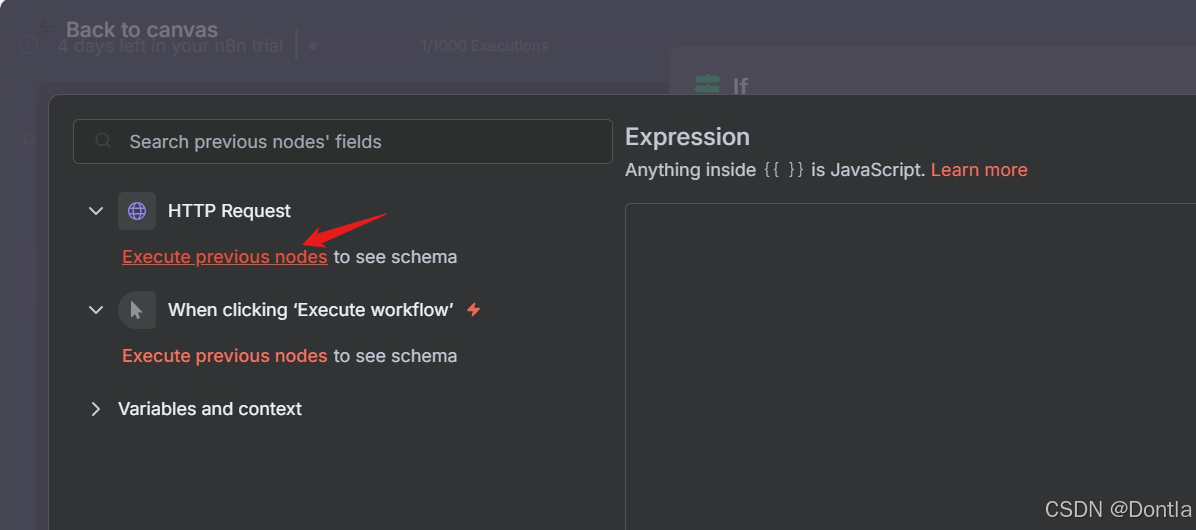
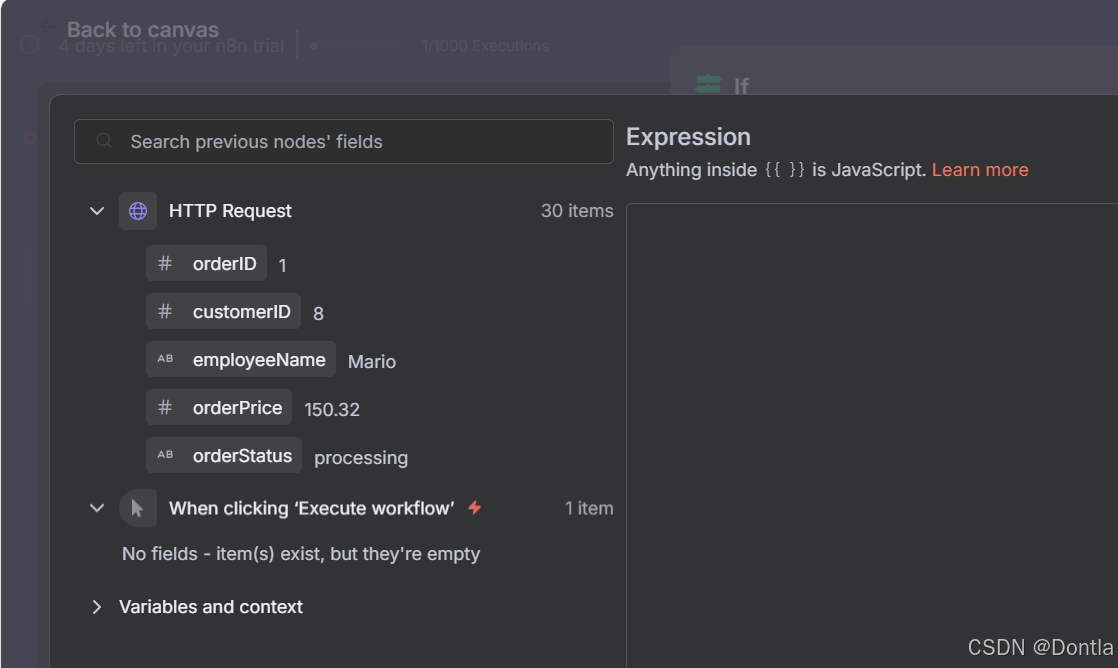
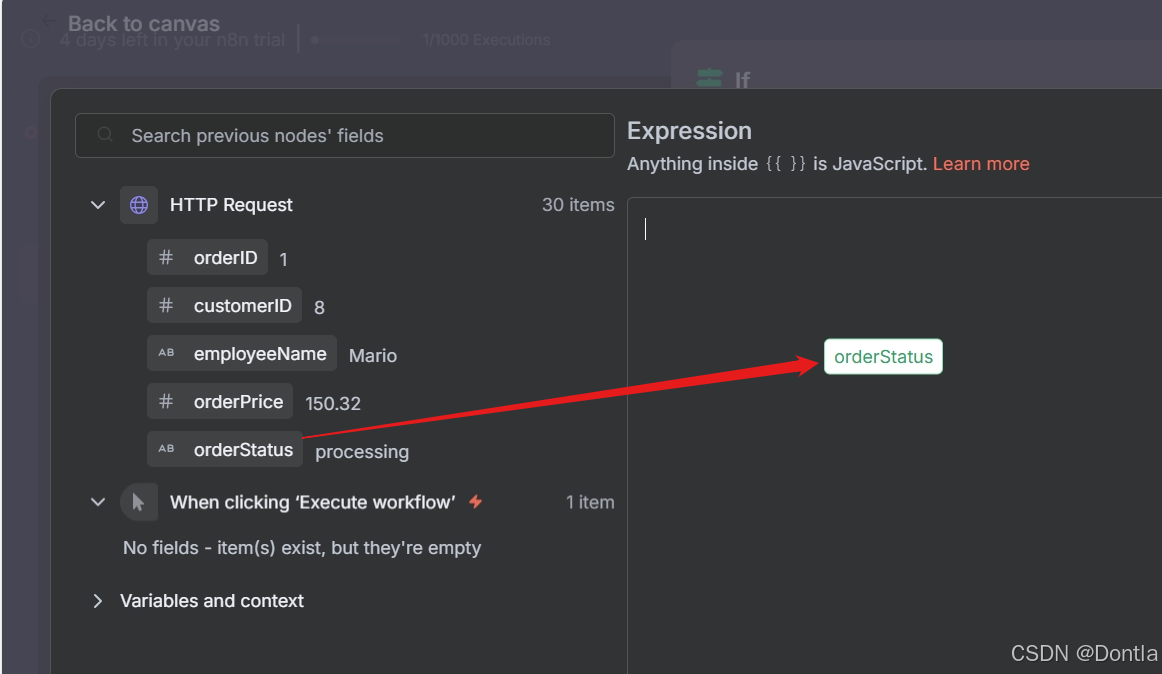
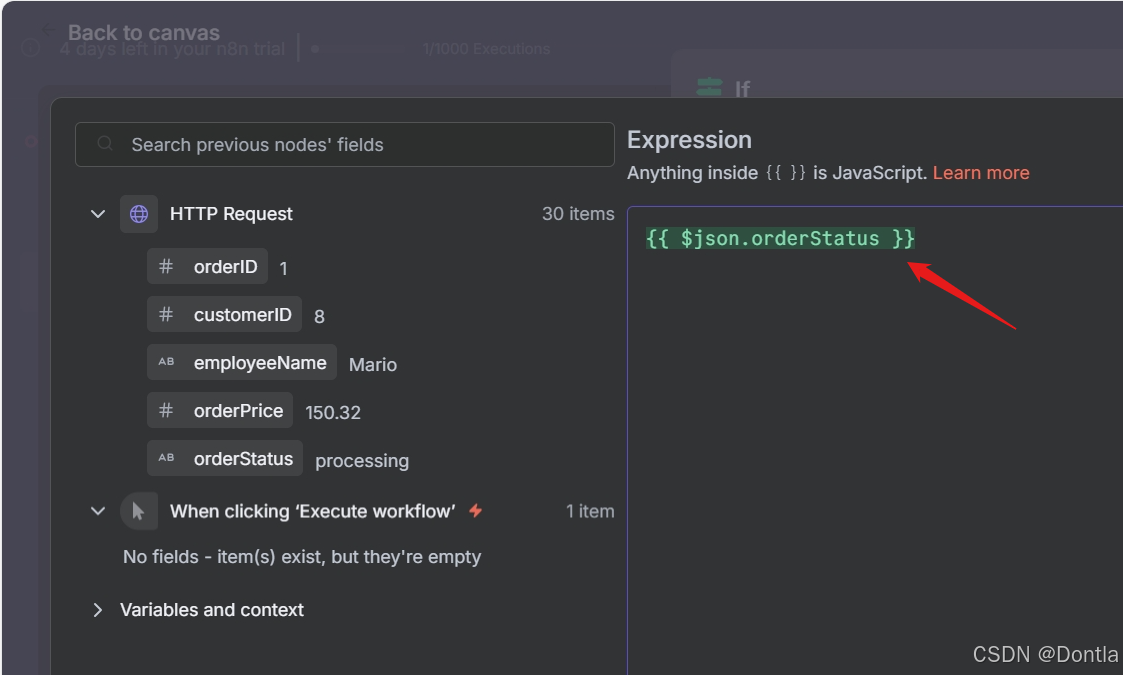
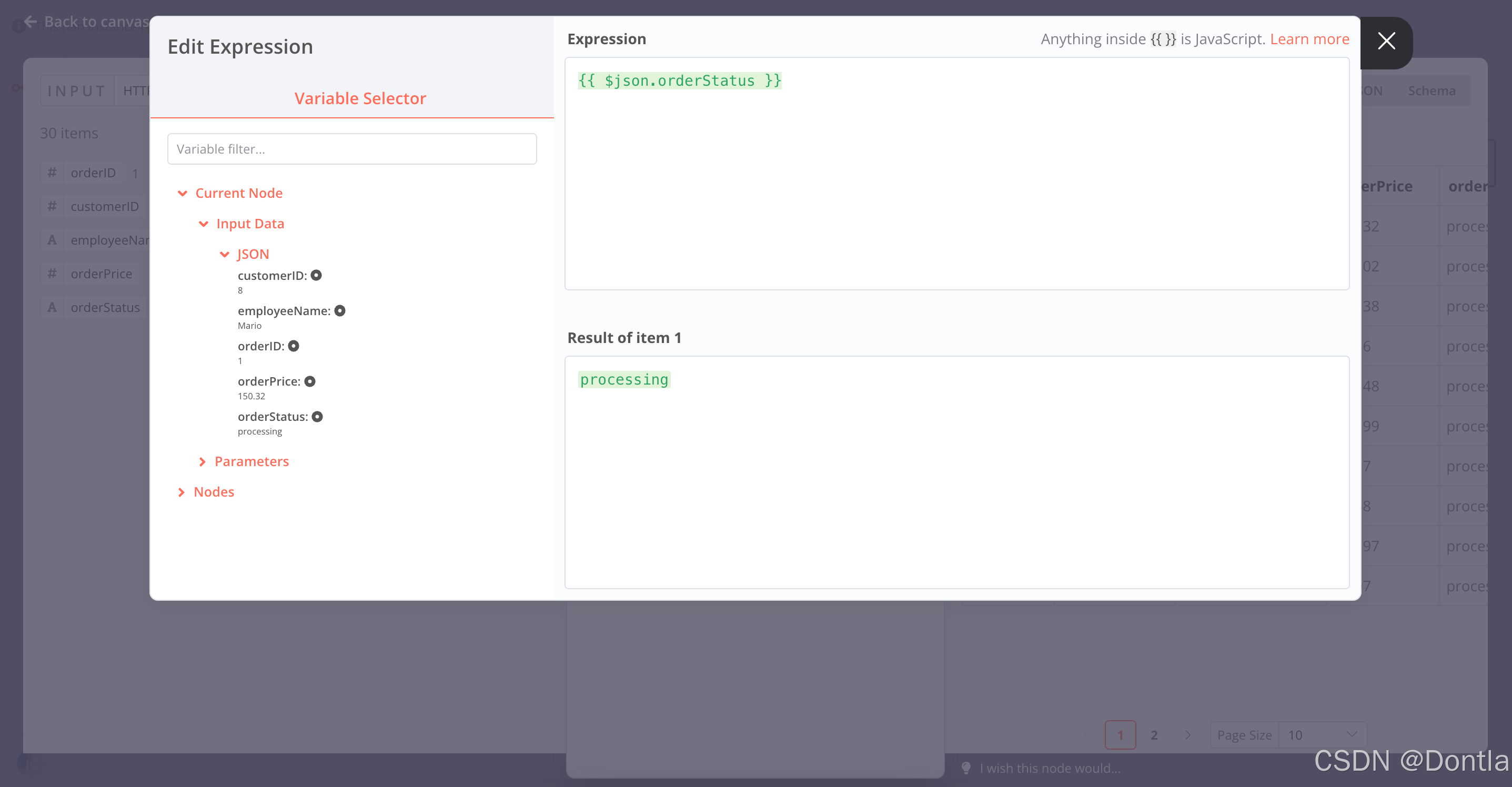
Expression Editor in the If node -
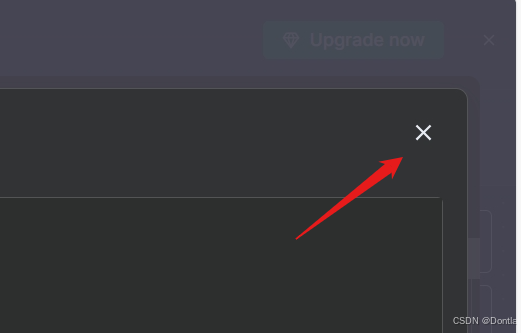
Once you add the expression, close the Edit Expression dialog.
-
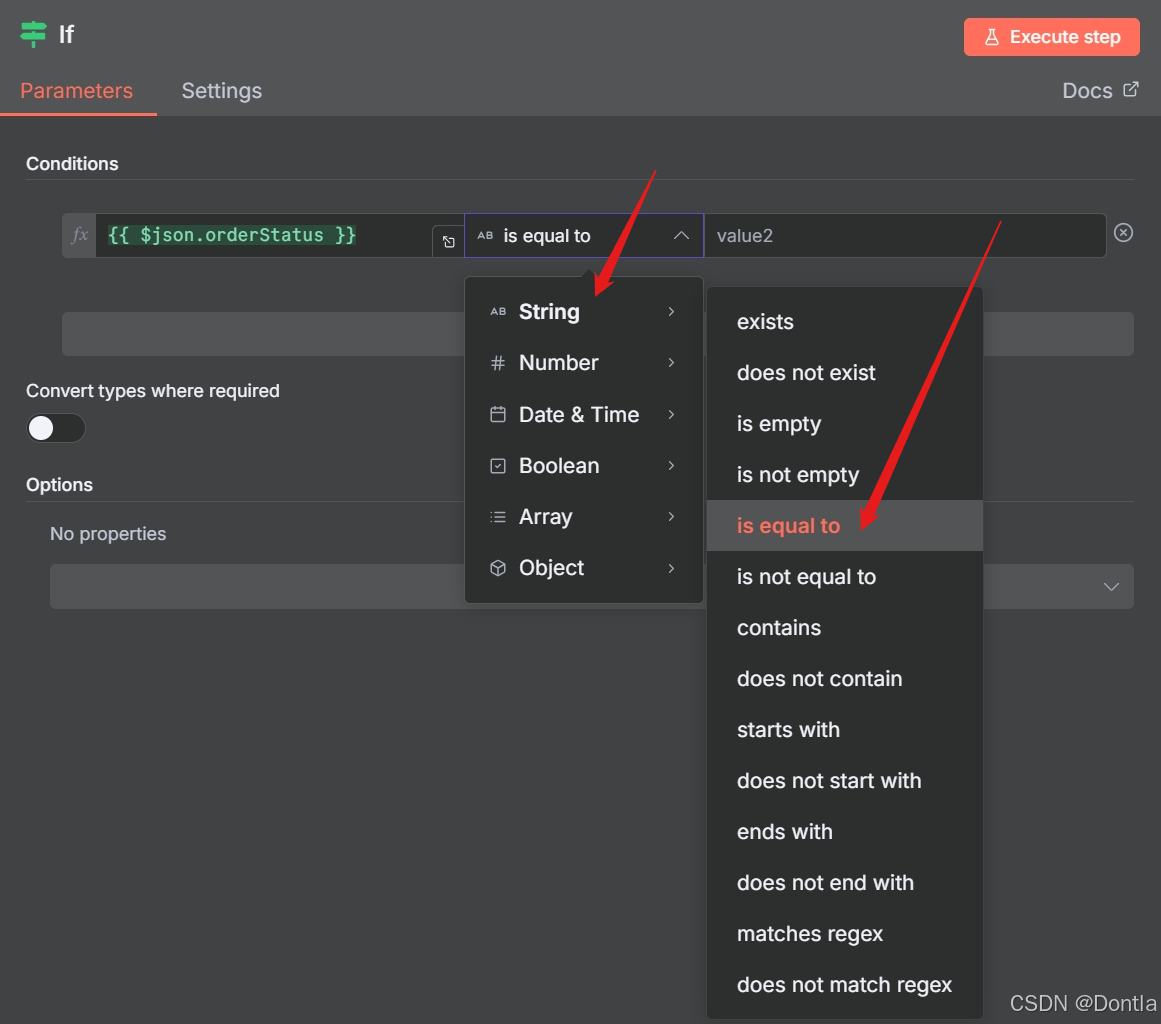
Operation: Select String > is equal to
-
Set the
value2placeholder toprocessing.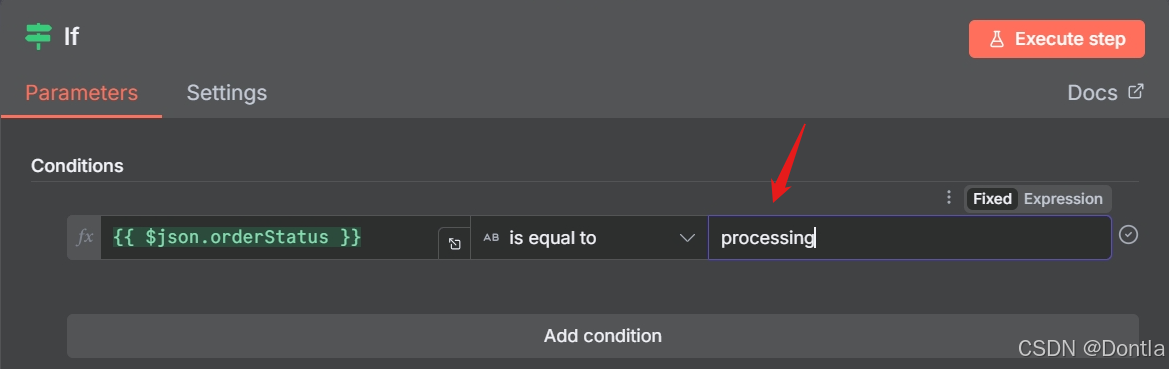
-
-
Data Type
Make sure to select the correct data type (boolean, date & time, number, or string) when you select the Operation.
Select Execute step to test the If node.
Node: You’d better save your workflow before you execute it.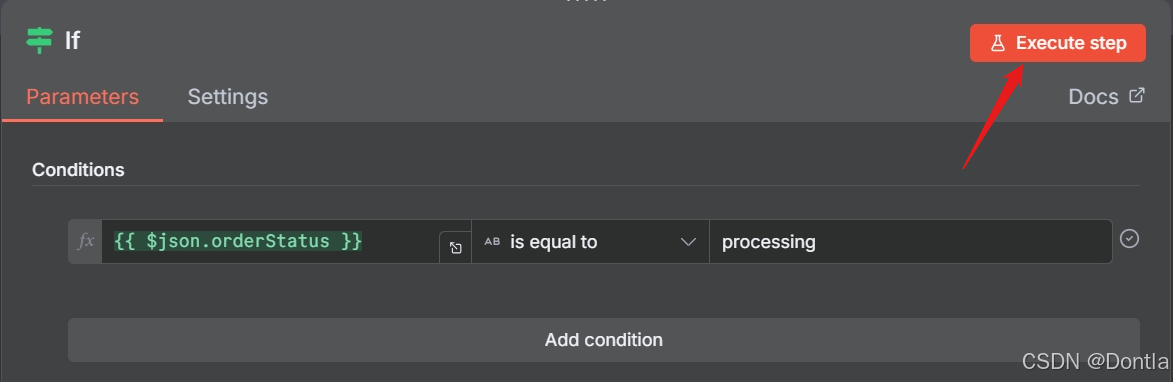
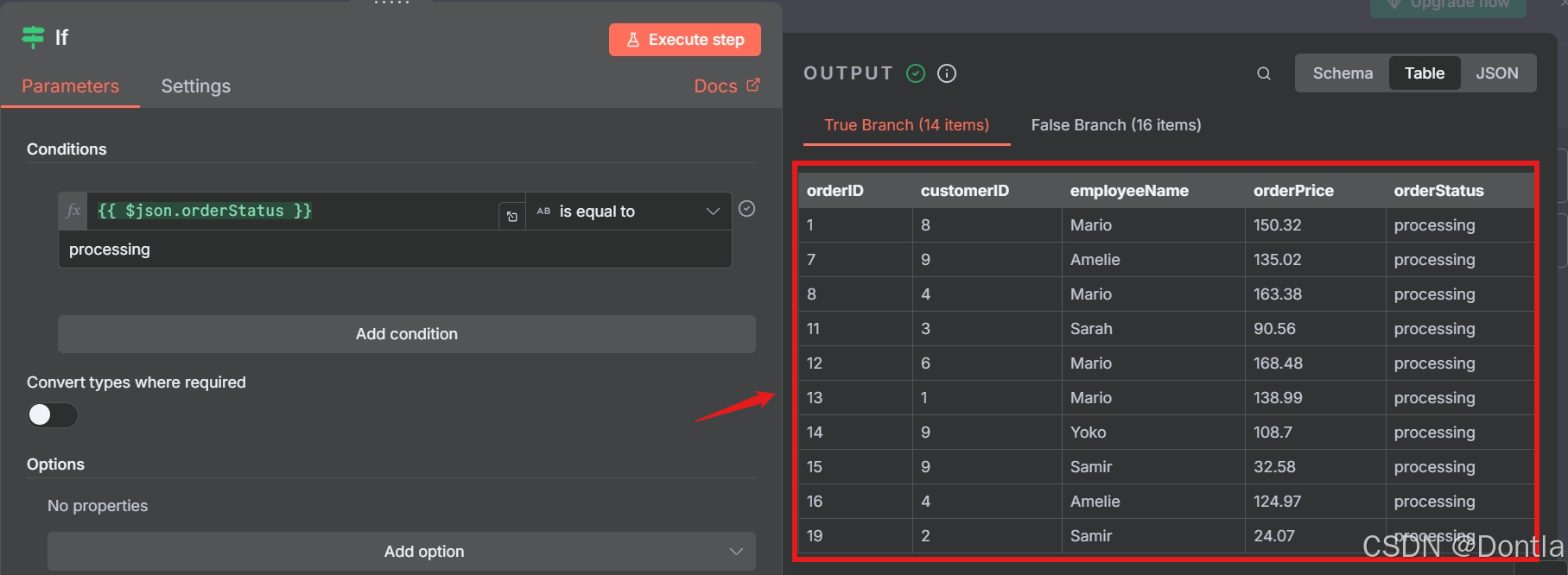
Your results should look like this:
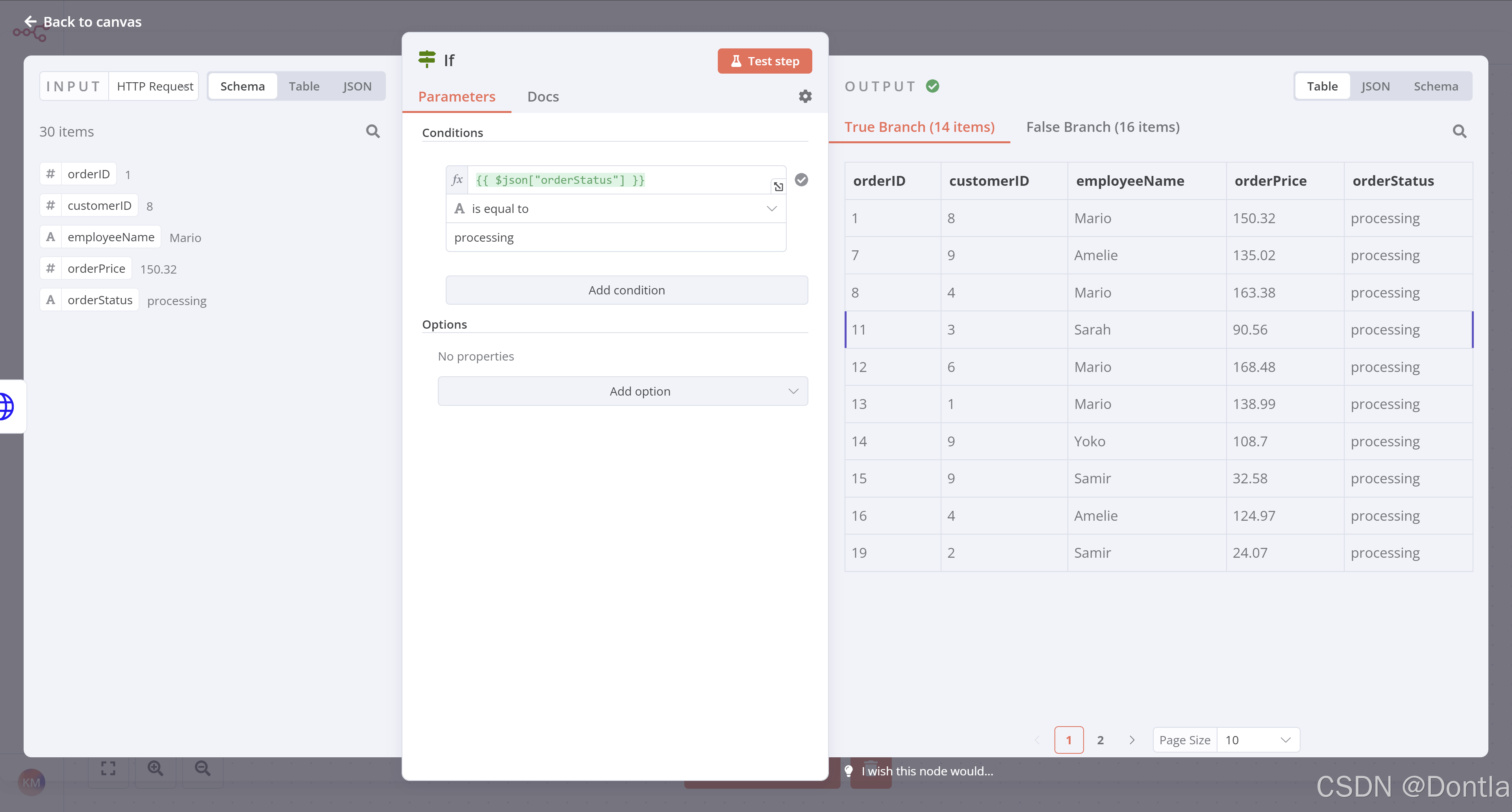
Note that the orders with a processing order status should show for the True Branch output, while the orders with a booked order status should show in the False Branch output.
Close the If node detail view when you’re finished.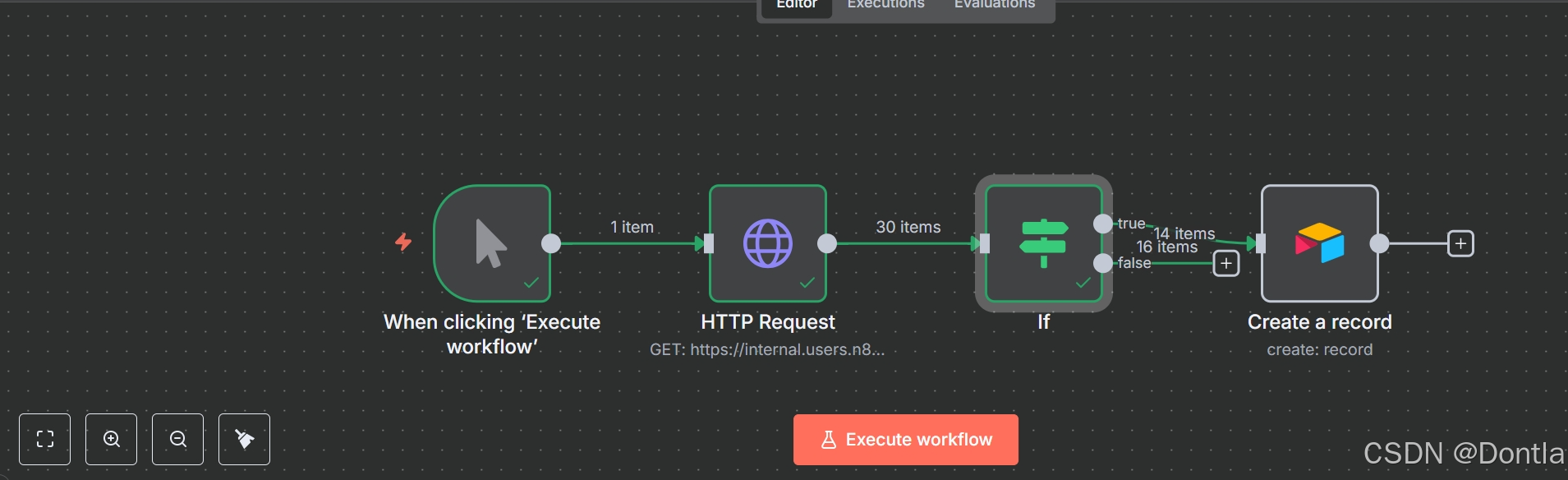
Insert data into Airtable
Next, we want to insert this data into Airtable. Remember what Nathan said at the end of the Inserting data into Airtable lesson?
I actually need to insert only processing orders in the table…
Since Nathan only needs the processing orders in the table, we’ll connect the Airtable node to the If node’s true connector.
In this case, since the Airtable node is already on our canvas, select the If node true connector and drag it to the Airtable node.
It’s a good idea at this point to retest the Airtable node. Before you do, open your table in Airtable and delete all existing rows.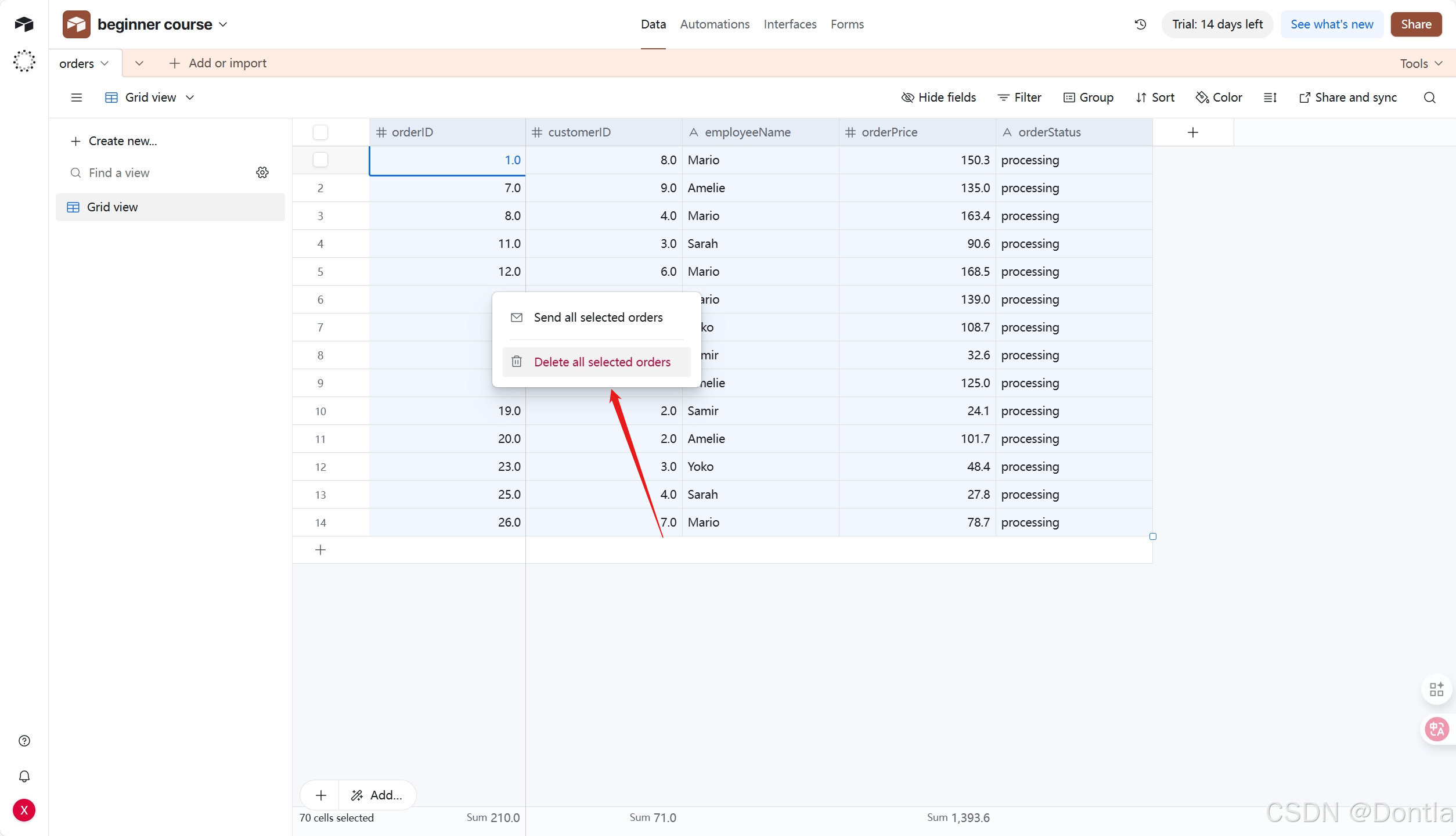
Then open the Airtable node window in n8n and select Execute step.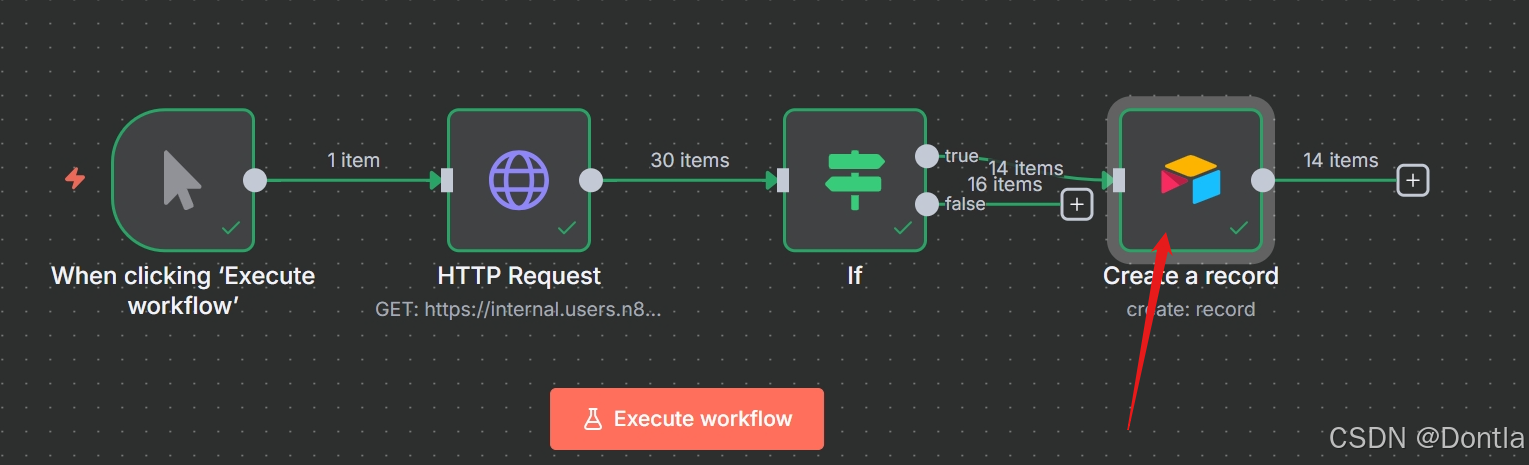
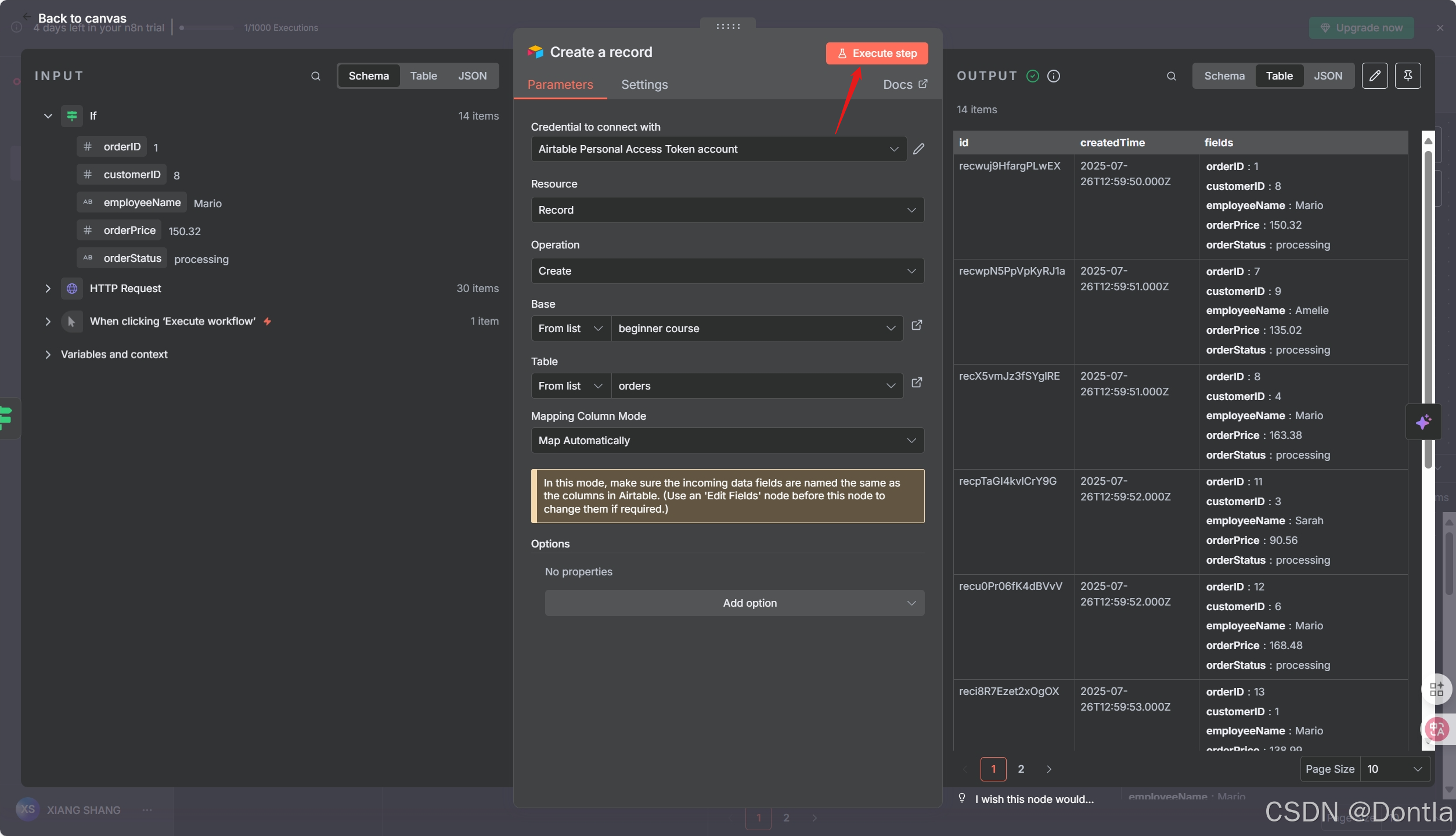
Review your data in Airtable to be sure your workflow only added the correct orders (those with orderStatus of processing). There should be 14 records now instead of 30.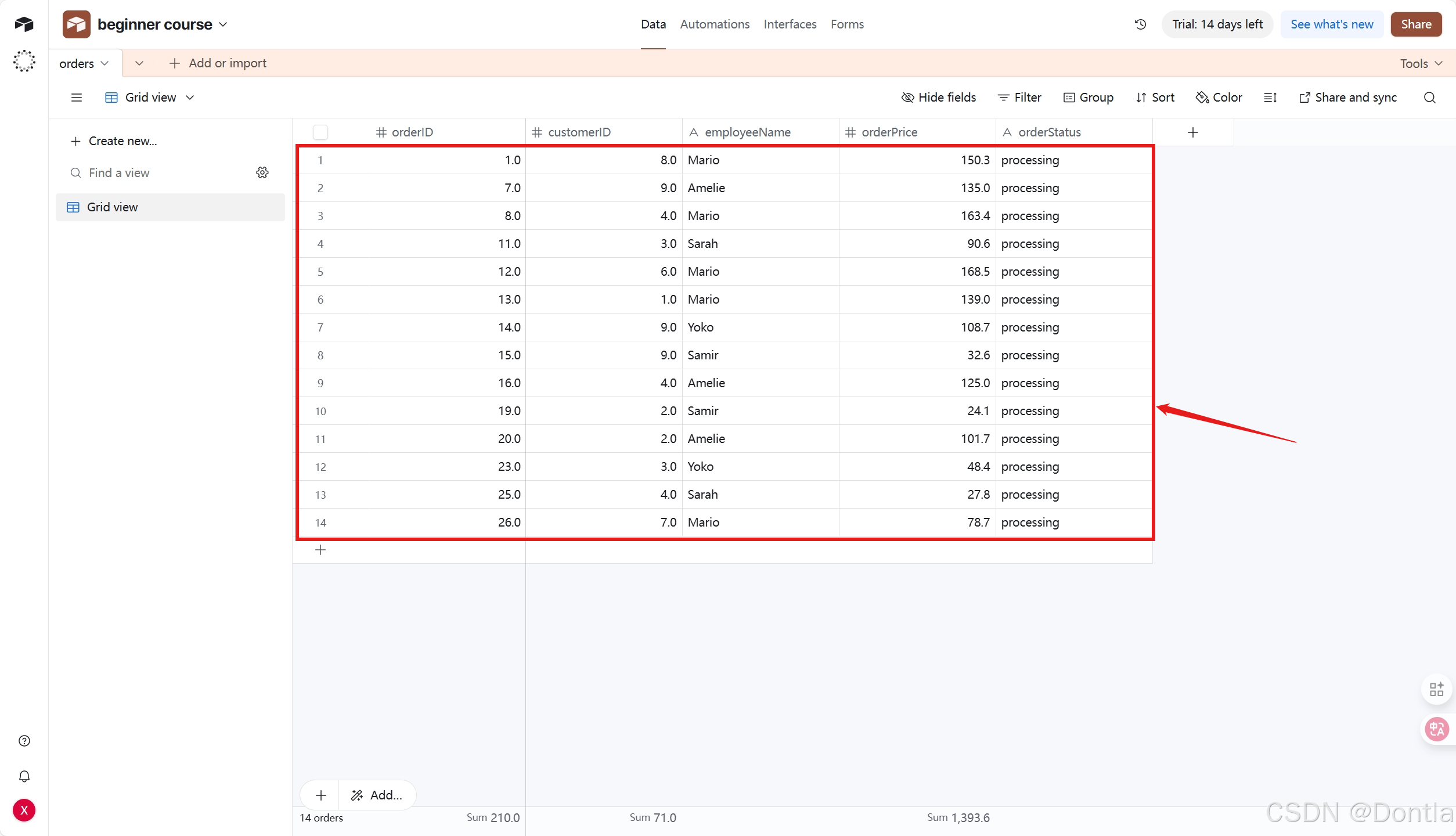
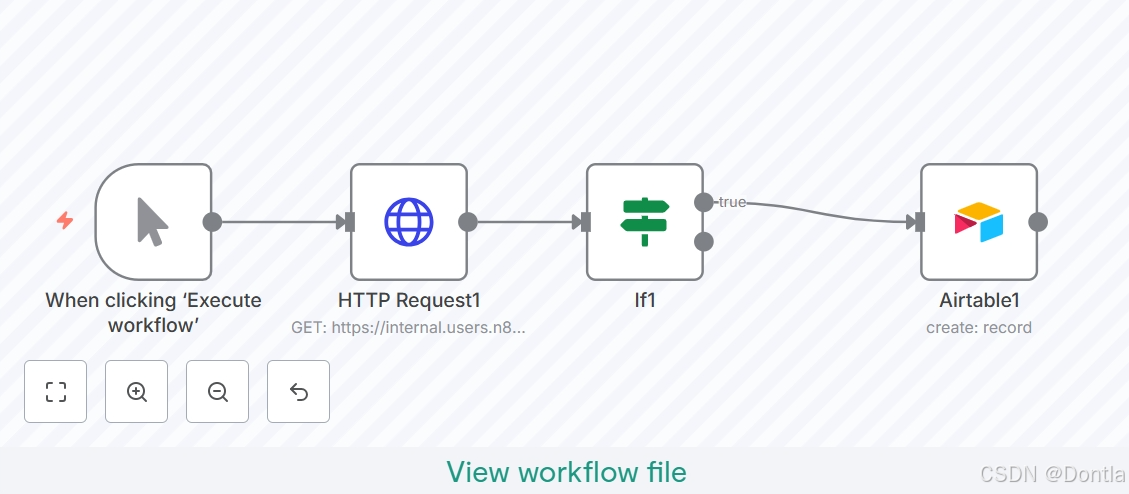
At this stage, your workflow should look like this:
{
  "nodes": [
    {
      "parameters": {
        "url": "https://internal.users.n8n.cloud/webhook/custom-erp",
        "authentication": "genericCredentialType",
        "genericAuthType": "httpHeaderAuth",
        "sendHeaders": true,
        "headerParameters": {
          "parameters": [
            {
              "name": "unique_id",
              "value": "<YOUR_UNIQUE_ID_HERE>"
            }
          ]
        },
        "options": {}
      },
      "type": "n8n-nodes-base.httpRequest",
      "typeVersion": 4.2,
      "position": [
        340,
        -680
      ],
      "id": "ada6becf-c320-41a7-bdca-a842ea3ee769",
      "name": "HTTP Request1",
      "credentials": {
        "httpHeaderAuth": {
          "id": "sMuanZ4xGobAurzY",
          "name": "Nathan's ABCorp data warehouse account"
        }
      }
    },
    {
      "parameters": {
        "operation": "create",
        "base": {
          "__rl": true,
          "value": "app9nOVsRxdypoknP",
          "mode": "list",
          "cachedResultName": "beginner course"
        },
        "table": {
          "__rl": true,
          "value": "tblo2KuMyn5X4jU0s",
          "mode": "list",
          "cachedResultName": "orders"
        },
        "columns": {
          "mappingMode": "autoMapInputData",
          "value": {},
          "matchingColumns": [],
          "schema": [
            {
              "id": "orderID",
              "displayName": "orderID",
              "required": false,
              "defaultMatch": false,
              "canBeUsedToMatch": true,
              "display": true,
              "type": "number",
              "readOnly": false,
              "removed": false
            },
            {
              "id": "customerID",
              "displayName": "customerID",
              "required": false,
              "defaultMatch": false,
              "canBeUsedToMatch": true,
              "display": true,
              "type": "number",
              "readOnly": false,
              "removed": false
            },
            {
              "id": "employeeName",
              "displayName": "employeeName",
              "required": false,
              "defaultMatch": false,
              "canBeUsedToMatch": true,
              "display": true,
              "type": "string",
              "readOnly": false,
              "removed": false
            },
            {
              "id": "orderPrice",
              "displayName": "orderPrice",
              "required": false,
              "defaultMatch": false,
              "canBeUsedToMatch": true,
              "display": true,
              "type": "number",
              "readOnly": false,
              "removed": false
            },
            {
              "id": "orderStatus",
              "displayName": "orderStatus",
              "required": false,
              "defaultMatch": false,
              "canBeUsedToMatch": true,
              "display": true,
              "type": "string",
              "readOnly": false,
              "removed": false
            }
          ],
          "attemptToConvertTypes": false,
          "convertFieldsToString": false
        },
        "options": {}
      },
      "type": "n8n-nodes-base.airtable",
      "typeVersion": 2.1,
      "position": [
        800,
        -680
      ],
      "id": "5e60ca72-d773-439c-b39a-4b14c54f795b",
      "name": "Airtable1",
      "credentials": {
        "airtableTokenApi": {
          "id": "UT32NHUYnp4pn1H3",
          "name": "Airtable Personal Access Token account"
        }
      }
    },
    {
      "parameters": {
        "conditions": {
          "options": {
            "caseSensitive": true,
            "leftValue": "",
            "typeValidation": "strict",
            "version": 2
          },
          "conditions": [
            {
              "id": "526cb30c-0f90-4f66-8f98-b64ceb2e52f2",
              "leftValue": "={{ $json.orderStatus }}",
              "rightValue": "processing",
              "operator": {
                "type": "string",
                "operation": "equals"
              }
            }
          ],
          "combinator": "and"
        },
        "options": {}
      },
      "type": "n8n-nodes-base.if",
      "typeVersion": 2.2,
      "position": [
        540,
        -680
      ],
      "id": "70e4db65-f827-4e4f-8673-b405b7986d6e",
      "name": "If1"
    },
    {
      "parameters": {},
      "type": "n8n-nodes-base.manualTrigger",
      "typeVersion": 1,
      "position": [
        140,
        -680
      ],
      "id": "ffa1a8ce-1a1e-48c4-8a0d-6af28c0447a5",
      "name": "When clicking ‘Execute workflow’"
    }
  ],
  "connections": {
    "HTTP Request1": {
      "main": [
        [
          {
            "node": "If1",
            "type": "main",
            "index": 0
          }
        ]
      ]
    },
    "If1": {
      "main": [
        [
          {
            "node": "Airtable1",
            "type": "main",
            "index": 0
          }
        ],
        []
      ]
    },
    "When clicking ‘Execute workflow’": {
      "main": [
        [
          {
            "node": "HTTP Request1",
            "type": "main",
            "index": 0
          }
        ]
      ]
    }
  },
  "pinData": {},
  "meta": {
    "templateCredsSetupCompleted": true,
    "instanceId": "24789c4d5aa56ca018d140332e7a43fd37dd7af0409453314fff12dc1aeebfa8"
  }
}
What’s next?
Nathan 🙋: This If node is so useful for filtering data! Now I have all the information about processing orders. I actually only need the employeeName and orderID, but I guess I can keep all the other fields just in case.
You 👩🔧: Actually, I wouldn’t recommend doing that. Inserting more data requires more computational power, the data transfer is slower and takes longer, and takes up more storage resources in your table. In this particular case, 14 records with 5 fields might not seem like it’d make a significant difference, but if your business grows to thousands of records and dozens of fields, things add up and even one extra column can affect performance.
Nathan 🙋: Oh, that’s good to know. Can you select only two fields from the processing orders?
You 👩🔧: Sure, I’ll do that in the next step.

火山引擎开发者社区是火山引擎打造的AI技术生态平台,聚焦Agent与大模型开发,提供豆包系列模型(图像/视频/视觉)、智能分析与会话工具,并配套评测集、动手实验室及行业案例库。社区通过技术沙龙、挑战赛等活动促进开发者成长,新用户可领50万Tokens权益,助力构建智能应用。
更多推荐
 9
9 0
0- 0


 已为社区贡献65条内容

所有评论(0)