项目实训(九)——项目代码文档
项目成员:唐嘉乐、穆姿羽、侯素玉、熊蕊、周睿琪该项目是一个基于 Web 的协作开发平台,集成了代码管理、项目协作和学习路径分析等功能。系统通过与 Gitea 代码托管服务的深度集成,为用户提供了完整的代码版本控制、分支管理、代码审查和团队协作功能。平台支持多人协作开发,包括项目创建、团队管理、代码提交、冲突解决和合并请求等核心功能,同时提供了学习路径分析等辅助功能,帮助新成员快速了解项目结构和开发
智码通联——项目技术概述文档
项目成员:唐嘉乐、穆姿羽、侯素玉、熊蕊、周睿琪
一. 项目概述
该项目是一个基于 Web 的协作开发平台,集成了代码管理、项目协作和学习路径分析等功能。系统通过与 Gitea 代码托管服务的深度集成,为用户提供了完整的代码版本控制、分支管理、代码审查和团队协作功能。平台支持多人协作开发,包括项目创建、团队管理、代码提交、冲突解决和合并请求等核心功能,同时提供了学习路径分析等辅助功能,帮助新成员快速了解项目结构和开发流程。
二. 系统架构
2.1 整体架构图
2.2 系统组件
- 用户界面层:提供用户交互界面,包括项目管理、代码编辑、版本控制等功能界面
- 前端应用层:处理用户交互逻辑,状态管理和数据展示
- API网关层:提供统一的API入口,处理请求路由和权限验证
- 后端服务层:实现业务逻辑,包括用户管理、项目管理、代码版本控制等服务
- 数据存储层:管理系统数据,包括用户信息、项目信息、团队信息等
- 外部服务集成层:与第三方服务集成,如Gitea代码托管和DeepSeek AI服务
三. 技术架构
3.1 技术架构图
四. 技术栈详情
4.1 前端技术栈
| 技术/框架 | 版本 | 用途 |
|---|---|---|
| Vue.js | 3.x | 前端框架 |
| Pinia | 最新版 | 状态管理 |
| Element Plus | 最新版 | UI组件库 |
| Axios | 最新版 | HTTP客户端 |
| Monaco Editor | 0.52.2 | 代码编辑器 |
| Mermaid | 11.6.0 | 图表生成 |
| Vue Router | 最新版 | 路由管理 |
| SCSS | 最新版 | 样式预处理器 |
关键前端功能模块:
- 项目管理界面
- 代码编辑器集成
- 分支管理与冲突解决
- 文件树浏览器
- Markdown与富文本编辑器
- 学习路径分析展示
4.2 后端技术栈
| 技术/框架 | 版本 | 用途 |
|---|---|---|
| Java | 17+ | 编程语言 |
| Spring Boot | 3.x | 应用框架 |
| Spring MVC | 最新版 | Web框架 |
| Spring Data | 最新版 | 数据访问 |
| MongoDB | 最新版 | 数据库 |
| RESTful API | - | API设计规范 |
| JWT | 最新版 | 身份验证 |
关键后端服务:
- 用户认证与授权服务
- 项目管理服务
- 团队协作服务
- Gitea集成服务
- 文件系统服务
- DeepSeek AI集成服务
4.3 外部服务集成
| 服务 | 用途 |
|---|---|
| Gitea | 代码托管与版本控制 |
| DeepSeek | AI代码分析与学习路径生成 |
五、核心功能模块和代码说明
(一)代码学习路径生成模块
1. 模块概述
学习路径分析模块是一个用于分析代码目录并生成项目学习路径的功能组件。该模块主要由前端的 BeginnerGuide.vue 组件和后端的 StDeepSeekService 及 StDeepSeekController 组成,通过调用 DeepSeek API 实现代码分析和学习路径生成。
2. 数据结构
2.1 前端数据结构
// 学习路径数据结构
const learningPaths = {
  general: {
    title: '一般化学习路径',
    description: '适合所有开发者的通用学习路径,从项目架构到基本功能逐步了解。',
    steps: [
      {
        title: '步骤1: 项目架构概述',
        description: '了解项目的整体架构和技术栈。',
        content: '...'
      },
      // 更多步骤...
    ]
  },
  custom: {
    title: '角色定制学习路径',
    description: '根据您的团队角色提供定制化的学习内容。',
    steps: [
      // 步骤内容...
    ]
  }
}

// 用户自定义路径数据结构
const customPathData = {
  role: '',           // 用户角色
  customRole: '',     // 自定义角色
  function: '',       // 职能领域
  customFunction: '', // 自定义职能
  experienceLevel: '初学者', // 经验水平
  focusAreas: [],     // 关注点
  learningGoal: '',   // 学习目标
  completedSteps: []  // 已完成步骤
}

// 代码文件结构
const CodeFile = {
  path: '',       // 文件路径
  content: '',    // 文件内容
  extension: ''   // 文件扩展名
}
2.2 后端数据结构
// 分析代码请求
class AnalyzeCodeRequest {
    private String folderPath;    // 文件夹路径
    private String prompt;        // 提示词
    private boolean useMermaidCli; // 是否使用Mermaid CLI
}

// 分析代码响应
class AnalyzeCodeResponse {
    private String content;       // 分析结果内容
    private String error;         // 错误信息
}

// 代码文件类
private static class CodeFile {
    private final String path;     // 文件路径
    private final String content;  // 文件内容
    private final String extension; // 文件扩展名
}
3. 前端重要代码
3.1 学习路径选择
// 选择一般化学习路径
const selectGeneralLearningPath = async () => {
  // 检查是否已选择本地文件夹
  if (!localFolderPath.value) {
    ElMessage.warning('请先选择本地文件夹,以便分析代码');
    return;
  }

  // 询问用户是否使用Mermaid CLI生成图片
  try {
    const { action } = await ElMessageBox.confirm(
      '您希望如何处理Mermaid图表?',
      '图表渲染选项',
      {
        confirmButtonText: '使用Mermaid CLI (推荐)',
        cancelButtonText: '浏览器渲染',
        distinguishCancelAndClose: true,
        type: 'info'
      }
    );

    // 设置使用CLI的标志
    useMermaidCli.value = action === 'confirm';

    // 显示加载指示器
    const loadingInstance = ElLoading.service({
      lock: true,
      text: '正在使用DeepSeek分析代码目录,请稍候...',
      background: 'rgba(0, 0, 0, 0.7)'
    });

    try {
      // 处理Windows路径格式,确保使用正斜杠
      const normalizedPath = localFolderPath.value.replace(/\\/g, '/');

      // 调用Java后端API,分析选中目录的代码
      const response = await axios.post('/api/st/deepseek/analyze-code', {
        folderPath: normalizedPath,
        prompt: "分析目录中的所有代码文件并生成项目介绍和学习路径,解释要详细,指出关键代码并进行辅助说明,分析代码函数方法之间的调用关系",
        useMermaidCli: useMermaidCli.value
      });

      // 关闭加载指示器
      loadingInstance.close();

      if (response.data && response.data.content) {
        // 创建一个虚拟文件节点
        const markdownNode = {
          id: `deepseek-analysis-${Date.now()}`,
          label: "项目学习路径分析.md",
          isFolder: false
        };

        // 显示分析结果,如果使用CLI则跳过浏览器渲染
        displayFileContent(markdownNode, response.data.content, useMermaidCli.value);

        // 更新学习路径,但保留原有的学习路径UI
        selectedPath.value = learningPaths.general;
        activeStep.value = 0;
        isCustomPath.value = false;

        // 设置当前分析结果,以便保存按钮使用
        currentAnalysisResult.value = response.data.content;
        showSaveButton.value = true;
      } else {
        ElMessage.error('未能获取到分析结果');
      }
    } catch (error) {
      // 关闭加载指示器
      loadingInstance.close();

      console.error('Error analyzing code with DeepSeek:', error);
      ElMessage.error('代码分析失败: ' + (error.response?.data?.message || error.message));
    }
  } catch (error) {
    // 用户取消选择
    console.log('用户取消了图表渲染选项选择');
  }
};
3.2 角色定制分析
// 提交自定义路径数据
const submitCustomPathData = async () => {
  // 检查是否已选择本地文件夹
  if (!localFolderPath.value) {
    ElMessage.warning('请先选择本地文件夹,以便分析代码');
    return;
  }

  // 询问用户是否使用Mermaid CLI生成图片
  try {
    const { action } = await ElMessageBox.confirm(
      '您希望如何处理Mermaid图表?',
      '图表渲染选项',
      {
        confirmButtonText: '使用Mermaid CLI (推荐)',
        cancelButtonText: '浏览器渲染',
        distinguishCancelAndClose: true,
        type: 'info'
      }
    );

    // 设置使用CLI的标志
    useMermaidCli.value = action === 'confirm';

    // 显示加载指示器
    const loadingInstance = ElLoading.service({
      lock: true,
      text: '正在根据您的角色生成定制化学习路径,请稍候...',
      background: 'rgba(0, 0, 0, 0.7)'
    });

    try {
      // 处理Windows路径格式,确保使用正斜杠
      const normalizedPath = localFolderPath.value.replace(/\\/g, '/');

      // 构建提示词
      const role = customPathData.value.role === '其他'
        ? customPathData.value.customRole
        : customPathData.value.role;

      const jobFunction = customPathData.value.function === '其他'
        ? customPathData.value.customFunction
        : customPathData.value.function;

      const prompt = `分析目录中的所有代码文件并生成项目介绍和学习路径,针对${role}角色,${jobFunction}职能,${customPathData.value.experienceLevel}经验水平,重点关注${customPathData.value.focusAreas.join('、')},学习目标是:${customPathData.value.learningGoal}。请提供详细的项目架构解释、关键代码分析和个性化学习路径建议。`;

      // 调用Java后端API,分析选中目录的代码
      const response = await axios.post('/api/st/deepseek/analyze-code', {
        folderPath: normalizedPath,
        prompt: prompt,
        useMermaidCli: useMermaidCli.value
      });

      // 关闭加载指示器
      loadingInstance.close();

      if (response.data && response.data.content) {
        // 创建一个虚拟文件节点
        const markdownNode = {
          id: `deepseek-custom-analysis-${Date.now()}`,
          label: `${role}角色定制学习路径分析.md`,
          isFolder: false
        };

        // 显示分析结果,如果使用CLI则跳过浏览器渲染
        displayFileContent(markdownNode, response.data.content, useMermaidCli.value);

        // 成功提示
        ElMessage.success('角色定制分析完成');

        // 设置当前分析结果,以便保存按钮使用
        currentAnalysisResult.value = response.data.content;
        showSaveButton.value = true;
      } else {
        ElMessage.error('未能获取到分析结果');
      }
    } catch (error) {
      // 关闭加载指示器
      loadingInstance.close();

      console.error('Error analyzing code with DeepSeek:', error);
      ElMessage.error('代码分析失败: ' + (error.response?.data?.message || error.message));
    }
  } catch (error) {
    // 用户取消选择
    console.log('用户取消了图表渲染选项选择');
  }
};
3.3 文件内容显示
// 显示文件内容
const displayFileContent = (node, content, skipMermaidRendering = false) => {
  displayedFileContent.value = content

  // 添加到已打开文件列表
  const existingFileIndex = openFiles.value.findIndex(file => file.id === node.id)

  if (existingFileIndex >= 0) {
    // 如果文件已经打开,只激活它
    openFiles.value.forEach((file, index) => {
      file.isActive = index === existingFileIndex
    })
  } else {
    // 如果文件未打开,添加到打开列表并激活
    openFiles.value.forEach(file => {
      file.isActive = false
    })

    openFiles.value.push({
      id: node.id,
      name: node.label,
      isFolder: node.isFolder,
      isActive: true,
      content: content,
      metadata: node.metadata
    })
  }

  activeFileId.value = node.id

  // 在内容显示后,确保布局比例正确
  nextTick(() => {
    updateLayoutProportions();

    // 如果是Markdown文件,且不是使用CLI渲染的,等待渲染完成后手动触发Mermaid渲染
    setTimeout(async () => {
      const activeFile = openFiles.value.find(file => file.id === activeFileId.value);
      if (activeFile && isMarkdownFile(activeFile) && markdownViewerRef.value && !skipMermaidRendering && !useMermaidCli.value) {
        console.log('检测到Markdown文件,尝试渲染Mermaid图表');
        try {
          await markdownViewerRef.value.renderMermaid();
        } catch (error) {
          console.error('手动触发Mermaid渲染失败:', error);
        }
      }
    }, 1000);
  });
};
4. 后端API
4.1 控制器API
@RestController
@RequestMapping("/api/st/deepseek")
public class StDeepSeekController {
@PostMapping("/analyze-code")
public ResponseEntity<AnalyzeCodeResponse> analyzeCode(@RequestBody AnalyzeCodeRequest request) {
logger.info("收到代码分析请求,路径: {}", request != null ? request.getFolderPath() : "null");
try {
if (request == null || request.getFolderPath() == null || request.getFolderPath().trim().isEmpty()) {
logger.warn("请求参数无效:文件夹路径为空");
return ResponseEntity.badRequest().body(new AnalyzeCodeResponse(null, "文件夹路径不能为空"));
}
logger.info("开始分析代码目录: {}, 提示词: {}",
request.getFolderPath(),
request.getPrompt() != null ? request.getPrompt() : "默认提示词");
// 调用DeepSeek API分析代码
String content = deepSeekService.analyzeCodeDirectory(request.getFolderPath(), request.getPrompt());
// 处理Mermaid图表
boolean useMermaidCli = request.isUseMermaidCli();
if (useMermaidCli) {
logger.info("使用Mermaid CLI处理图表");
// 确定图片存储路径
String outputDir = mermaidImagesDir;
if (!outputDir.endsWith("/")) {
outputDir += "/";
}
// 创建唯一的子目录
String uniqueSubDir = "analysis_" + System.currentTimeMillis();
String fullOutputDir = outputDir + uniqueSubDir;
// 处理内容中的Mermaid代码块,生成图片
content = deepSeekService.processMermaidInResponse(content, fullOutputDir);
// 替换图片引用路径
content = content.replaceAll("!\\[(.*?)\\]\\(([^/].*?)\\)", ";
}
logger.info("代码分析完成,结果长度: {} 字符", content.length());
return ResponseEntity.ok(new AnalyzeCodeResponse(content));
} catch (Exception e) {
logger.error("代码分析失败: {}", e.getMessage(), e);
return ResponseEntity.badRequest().body(new AnalyzeCodeResponse(null, "分析代码失败: " + e.getMessage()));
}
}
}
5. 核心功能实现代码
5.1 代码分析处理
public String analyzeCodeDirectory(String folderPath, String prompt) throws Exception {
    logger.info("开始分析代码目录: {}", folderPath);

    if (folderPath == null || folderPath.trim().isEmpty()) {
        logger.error("文件夹路径为空");
        throw new Exception("文件夹路径不能为空");
    }

    // 规范化路径,处理Windows和Unix路径格式差异
    folderPath = folderPath.replace('\\', File.separatorChar).replace('/', File.separatorChar);
    logger.info("规范化后的路径: {}", folderPath);

    // 检查目录是否存在
    File directory = new File(folderPath);
    if (!directory.exists()) {
        logger.error("目录不存在: {}", folderPath);
        throw new Exception("目录不存在: " + folderPath);
    }

    if (!directory.isDirectory()) {
        logger.error("指定路径不是目录: {}", folderPath);
        throw new Exception("指定路径不是目录: " + folderPath);
    }

    if (!directory.canRead()) {
        logger.error("无权限读取目录: {}", folderPath);
        throw new Exception("无权限读取目录: " + folderPath);
    }

    // 获取代码文件
    logger.info("开始扫描代码文件...");
    List<CodeFile> codeFiles = getAllCodeFiles(folderPath);

    if (codeFiles.isEmpty()) {
        logger.warn("未找到任何代码文件");
        throw new Exception("未找到任何代码文件");
    }

    logger.info("找到 {} 个代码文件", codeFiles.size());
    for (int i = 0; i < Math.min(5, codeFiles.size()); i++) {
        logger.info("示例文件 {}: {}", i+1, codeFiles.get(i).getPath());
    }
    if (codeFiles.size() > 5) {
        logger.info("... 以及其他 {} 个文件", codeFiles.size() - 5);
    }

    // 简化文件内容以减少token数量
    logger.info("简化文件内容以减少token数量...");
    List<CodeFile> simplifiedFiles = simplifyFiles(codeFiles);
    logger.info("处理后的文件数量: {}", simplifiedFiles.size());

    // 调用DeepSeek API
    logger.info("准备调用DeepSeek API进行代码分析...");
    String result = callDeepSeekApi(simplifiedFiles, prompt);
    logger.info("DeepSeek API分析完成,结果长度: {} 字符", result.length());

    return result;
}
5.2 DeepSeek API 调用
private String callDeepSeekApi(List<CodeFile> files, String prompt) throws Exception {
    logger.info("准备调用DeepSeek API,文件数量: {}", files.size());

    HttpHeaders headers = new HttpHeaders();
    headers.setContentType(MediaType.APPLICATION_JSON);
    headers.set("Authorization", "Bearer " + deepseekApiKey);
    logger.debug("设置API请求头: Content-Type={}, Authorization=Bearer {}",
               MediaType.APPLICATION_JSON, deepseekApiKey.substring(0, 5) + "...");

    // 构建请求体
    ObjectNode requestBody = objectMapper.createObjectNode();
    requestBody.put("model", "deepseek-chat");
    requestBody.put("temperature", 0.3);
    requestBody.put("max_tokens", 4000);
    logger.debug("设置API参数: model=deepseek-chat, temperature=0.3, max_tokens=4000");

    ArrayNode messagesArray = objectMapper.createArrayNode();

    // 系统消息
    ObjectNode systemMessage = objectMapper.createObjectNode();
    systemMessage.put("role", "system");
    systemMessage.put("content", "你是一个代码分析专家,擅长帮助开发者理解项目架构和推荐学习路径。你的回答应该详细、全面,并且使用纯Markdown格式。不要混合使用HTML和Markdown。你需要分析代码中的函数方法调用关系,并使用Mermaid图表来可视化这些关系。");
    messagesArray.add(systemMessage);
    logger.debug("添加系统消息");

    // 用户消息
    ObjectNode userMessage = objectMapper.createObjectNode();
    userMessage.put("role", "user");

    StringBuilder contentBuilder = new StringBuilder();
    String defaultPrompt = "分析目录中的所有代码文件并生成项目介绍和学习路径,解释要详细,指出关键代码并进行辅助说明,分析代码函数方法之间的调用关系";
    contentBuilder.append(prompt != null && !prompt.isEmpty() ? prompt : defaultPrompt);
    contentBuilder.append("\n\n以下是项目中的代码文件,请分析并生成一个详细的项目介绍和学习路径。请包含以下内容:\n\n");
    contentBuilder.append("1) 项目架构概述:详细说明项目的整体结构、设计模式和架构思想\n");
    contentBuilder.append("2) 关键概念或组件:识别并解释项目中的核心组件和概念,指出它们之间的关系\n");
    contentBuilder.append("3) 技术栈分析:分析项目使用的技术栈,包括框架、库和工具,解释为什么选择这些技术\n");
    contentBuilder.append("4) 关键代码解析:找出项目中最重要的代码片段,详细解释它们的功能和实现原理\n");
    contentBuilder.append("5) 代码调用关系分析:分析代码中的函数方法之间的调用关系,说明数据流和控制流\n");
    contentBuilder.append("6) 推荐的学习顺序:提供一个逻辑清晰的学习路径,帮助新开发者理解项目\n");
    contentBuilder.append("7) 阅读代码的建议:提供实用的建议,帮助开发者高效地阅读和理解代码\n\n");

    logger.info("使用提示词: {}", prompt != null && !prompt.isEmpty() ? prompt : defaultPrompt);

    // 添加文件内容
    for (CodeFile file : files) {
        contentBuilder.append("文件路径: ").append(file.getPath()).append("\n");
        contentBuilder.append("语言: ").append(file.getExtension()).append("\n");
        contentBuilder.append("内容:\n```").append(file.getExtension()).append("\n");
        contentBuilder.append(file.getContent()).append("\n```\n\n");
    }

    // 添加Mermaid图表要求
    contentBuilder.append("\n\n重要:请生成两个Mermaid图表:");
    contentBuilder.append("\n1. 代码函数方法之间的调用关系图,展示主要组件和方法之间的调用关系");
    contentBuilder.append("\n2. 代码学习路径图,以流程图方式展示学习项目代码的最佳路径");

    userMessage.put("content", contentBuilder.toString());
    messagesArray.add(userMessage);

    requestBody.set("messages", messagesArray);

    // 发送请求
    HttpEntity<String> request = new HttpEntity<>(objectMapper.writeValueAsString(requestBody), headers);
    logger.info("开始发送请求到DeepSeek API: {}", deepseekApiUrl);

    String response = restTemplate.postForObject(deepseekApiUrl, request, String.class);

    // 解析响应
    JsonNode responseJson = objectMapper.readTree(response);
    if (responseJson.has("choices") && responseJson.get("choices").isArray() &&
        responseJson.get("choices").size() > 0) {
        JsonNode firstChoice = responseJson.get("choices").get(0);
        if (firstChoice.has("message") && firstChoice.get("message").has("content")) {
            String content = firstChoice.get("message").get("content").asText();

            // 处理内容
            content = sanitizeContent(content);
            content = processMarkdownResponse(content);

            return content;
        }
    }

    throw new Exception("DeepSeek API返回格式异常");
}
5.3 Mermaid 图表处理
public String processMermaidInResponse(String content, String outputDir) {
if (content == null || content.isEmpty()) {
return content;
}
try {
List<String> mermaidBlocks = extractMermaidCodeBlocks(content);
if (mermaidBlocks.isEmpty()) {
logger.info("未在DeepSeek响应中找到Mermaid代码块");
return content;
}
// 创建输出目录
Path outputPath = Paths.get(outputDir);
if (!Files.exists(outputPath)) {
Files.createDirectories(outputPath);
}
// 替换内容中的Mermaid代码块为图片引用
String result = content;
int index = 1;
for (String mermaidCode : mermaidBlocks) {
// 生成唯一的图片文件名
String imageFileName = "mermaid_" + System.currentTimeMillis() + "_" + index + ".png";
String imagePath = outputPath.resolve(imageFileName).toString();
// 生成图片
if (generateMermaidImage(mermaidCode, imagePath)) {
// 构建图片引用的Markdown
String imageReference = "";
// 替换原始的Mermaid代码块
String codeBlockPattern = "```mermaid\\s*\\n" + Pattern.quote(mermaidCode) + "\\s*\\n```";
result = result.replaceFirst(codeBlockPattern, imageReference);
// 也尝试替换不带mermaid标记的代码块
String altCodeBlockPattern = "```\\s*\\n" + Pattern.quote(mermaidCode) + "\\s*\\n```";
result = result.replaceFirst(altCodeBlockPattern, imageReference);
logger.info("成功替换Mermaid代码块为图片引用: {}", imageFileName);
}
index++;
}
return result;
} catch (Exception e) {
logger.error("处理Mermaid代码块失败: {}", e.getMessage(), e);
return content;
}
}
6. 接口调用关系
7. 功能流程图
(二)代码注释生成模块功能
1. 概述
本文档详细说明代码生成模块中的三个核心功能:代码注释生成、代码注释更新和实时代码注释显示。这些功能通过前端的Monaco编辑器组件与后端的代码分析和AI服务相结合,为用户提供智能化的代码注释和实时代码解释服务。
2. 数据结构(Models)
系统中没有专门为代码生成功能设计的数据模型,主要通过服务层处理数据流转。以下是主要的数据传输对象:
2.1 请求/响应数据结构
生成注释请求
{
  "code": "代码内容",
  "language": "编程语言",
  "filePath": "文件路径",
  "currentTime": "当前时间",
  "includeInlineComments": true
}
生成注释响应
{
  "commentedCode": "带注释的代码"
}
代码更新请求
{
  "newCode": "新代码内容",
  "language": "编程语言",
  "filePath": "文件路径",
  "lastCommentTime": "上次注释时间",
  "currentTime": "当前时间",
  "skipGenerateComment": "是否跳过生成注释"
}
代码更新响应
{
  "commentedCode": "更新后的带注释代码",
  "diff": {
    "additions": ["添加的代码行"],
    "deletions": ["删除的代码行"],
    "changes": [
      {
        "old": "原代码行",
        "new": "新代码行"
      }
    ],
    "summary": "变更摘要"
  }
}
实时代码显示请求
{
  "code": "代码片段",
  "language": "编程语言",
  "line": 行号,
  "column": 列号
}
实时代码显示响应
{
  "comment": "代码解释内容"
}
3. 前端重要代码分析
3.1 MonacoEditor.vue 组件
这是代码生成功能的核心前端组件,基于Monaco编辑器实现代码编辑、注释生成和实时显示功能。
主要功能实现:
- 代码编辑器初始化
const initializeEditor = () => {
  if (!editorContainer.value) return;

  // 编辑器配置
  const options = {
    value: props.code,
    language: props.language,
    readOnly: props.readOnly,
    theme: 'vs-dark',
    minimap: { enabled: true },
    scrollBeyondLastLine: false,
    automaticLayout: true,
    fontSize: 14,
    lineNumbers: 'on',
    renderWhitespace: 'selection',
    tabSize: 2,
  };

  // 创建编辑器实例
  editor = monaco.editor.create(editorContainer.value, options);

  // 保存初始代码用于比较
  originalCode.value = props.code;

  // 如果是只读模式,添加鼠标悬停事件处理
  if (props.readOnly) {
    setupHoverHandler();
  }

  // 监听内容变化
  editor.onDidChangeModelContent(() => {
    const value = editor.getValue();
    emit('update:code', value);
  });
}
- 代码注释生成功能
const generateComments = async () => {
  if (!editor) return;

  const currentCode = editor.getValue();
  if (!currentCode.trim()) {
    ElMessage.warning('请先输入代码内容');
    return;
  }

  isGeneratingComments.value = true;

  try {
    // 获取当前时间
    const now = new Date();
    const formattedDate = now.toLocaleString('zh-CN', {...});

    const response = await axios.post('/api/file-system/generate-comments', {
      code: currentCode,
      language: props.language,
      filePath: props.filePath,
      currentTime: formattedDate,
      includeInlineComments: true
    });

    if (response.data && response.data.commentedCode) {
      editor.setValue(response.data.commentedCode);
      emit('update:code', response.data.commentedCode);

      // 更新原始代码和最后注释时间
      originalCode.value = response.data.commentedCode;
      lastCommentTime.value = formattedDate;

      ElMessage.success('注释生成成功');
    } else {
      ElMessage.error('生成注释失败');
    }
  } catch (error) {
    console.error('Error generating comments:', error);
    ElMessage.error('生成注释失败: ' + (error.response?.data?.message || error.message));
  } finally {
    isGeneratingComments.value = false;
  }
}
- 代码注释更新功能
const compareAndUpdateComments = async (skipGenerateComment = false) => {
  if (!editor) return;

  const currentCode = editor.getValue();
  if (!currentCode.trim()) {
    ElMessage.warning('请先输入代码内容');
    return;
  }

  // 检查文件路径是否有效
  if (!props.filePath) {
    ElMessage.warning('无法确定文件路径,请先保存文件');
    return;
  }

  isComparing.value = true;

  try {
    // 获取当前时间
    const now = new Date();
    const formattedDate = now.toLocaleString('zh-CN', {...});

    // 调用后端 API 进行代码比较和注释生成
    const response = await axios.post('/api/file-system/compare-with-file-and-update', {
      newCode: currentCode,
      language: props.language,
      filePath: props.filePath,
      lastCommentTime: lastCommentTime.value,
      currentTime: formattedDate,
      skipGenerateComment: skipGenerateComment.toString()
    });

    if (response.data) {
      // 更新编辑器内容
      if (response.data.commentedCode) {
        editor.setValue(response.data.commentedCode);
        emit('update:code', response.data.commentedCode);

        // 更新原始代码和最后注释时间
        originalCode.value = response.data.commentedCode;
        lastCommentTime.value = formattedDate;

        if (skipGenerateComment) {
          ElMessage.success('代码注释已直接更新');
        } else {
          ElMessage.success('代码注释已使用AI更新');
        }
      }

      // 发送差异信息给父组件
      if (response.data.diff) {
        emit('diff-update', {
          additions: response.data.diff.additions || [],
          deletions: response.data.diff.deletions || [],
          changes: response.data.diff.changes || [],
          summary: response.data.diff.summary || '',
          timestamp: formattedDate
        });
      }
    } else {
      ElMessage.error('更新注释失败');
    }
  } catch (error) {
    console.error('Error comparing and updating comments:', error);
    ElMessage.error('更新注释失败: ' + (error.response?.data?.message || error.message));
  } finally {
    isComparing.value = false;
  }
}
- 实时代码显示功能
// 防抖处理的注释生成函数
const debouncedGenerateHoverComment = debounce(async (code, position) => {
  // 如果不是只读模式或没有代码或正在生成注释,则不执行
  if (!props.readOnly || !code || isGeneratingComments.value) return;

  try {
    isGeneratingComments.value = true;
    console.log('Generating hover comment for position:', position);

    const response = await axios.post('/api/file-system/generate-hover-comment', {
      code: code,
      language: props.language,
      line: position.lineNumber,
      column: position.column
    });

    if (response.data && response.data.comment) {
      console.log('Received comment:', response.data.comment);
      createCommentWidget(response, position);

      // 将注释内容传递给父组件 - 只在只读模式下
      if (props.readOnly) {
        emit('comment-update', response.data.comment);
      }
    } else {
      console.warn('No comment data in response');
      ElMessage.warning('未能获取注释内容');
    }
  } catch (error) {
    console.error('Error generating hover comment:', error);
    ElMessage.error('生成注释失败: ' + (error.response?.data?.message || error.message));
  } finally {
    isGeneratingComments.value = false;
  }
}, 500);
4. 后端API
4.1 FileSystemController
处理代码生成、更新和实时显示的控制器,负责接收前端请求并调用相应服务。
主要API端点:
- 生成代码注释
@PostMapping("/generate-comments")
public ResponseEntity<Map<String, String>> generateComments(@RequestBody Map<String, String> request) {
    String code = request.get("code");
    String language = request.get("language");
    String filePath = request.get("filePath");
    String currentTime = request.get("currentTime");
    boolean includeInlineComments = Boolean.parseBoolean(request.getOrDefault("includeInlineComments", "false"));

    if (code == null || code.isEmpty()) {
        Map<String, String> response = new HashMap<>();
        response.put("error", "代码内容不能为空");
        return ResponseEntity.badRequest().body(response);
    }

    String commentedCode = codeCommentService.generateComments(code, language, includeInlineComments);

    // 如果提供了时间信息,添加到注释中
    if (currentTime != null && !currentTime.isEmpty()) {
        commentedCode = codeCommentService.addCommentWithTimestamp(commentedCode, language, currentTime);
    }

    Map<String, String> response = new HashMap<>();
    response.put("commentedCode", commentedCode);
    return ResponseEntity.ok(response);
}
- 比较代码并更新注释
@PostMapping("/compare-with-file-and-update")
public ResponseEntity<Map<String, Object>> compareWithFileAndUpdateComments(@RequestBody Map<String, String> request) {
    String newCode = request.get("newCode");
    String filePath = request.get("filePath");
    String language = request.get("language");
    String lastCommentTime = request.get("lastCommentTime");
    String currentTime = request.get("currentTime");
    // 新增参数:是否跳过生成注释
    boolean skipGenerateComment = Boolean.parseBoolean(request.getOrDefault("skipGenerateComment", "false"));

    if (newCode == null || newCode.isEmpty() || filePath == null || filePath.isEmpty()) {
        Map<String, Object> response = new HashMap<>();
        response.put("error", "新代码和文件路径不能为空");
        return ResponseEntity.badRequest().body(response);
    }

    try {
        // 从文件系统读取原始文件内容
        String originalCode = fileSystemService.getFileContent(filePath);

        if (originalCode == null || originalCode.startsWith("// 错误:")) {
            Map<String, Object> response = new HashMap<>();
            response.put("error", "无法读取原始文件内容: " + originalCode);
            return ResponseEntity.badRequest().body(response);
        }

        // 调用服务进行代码比较和注释更新
        Map<String, Object> result = codeCommentService.compareAndUpdateComments(
                originalCode, newCode, language, filePath, lastCommentTime, currentTime, skipGenerateComment);

        return ResponseEntity.ok(result);
    } catch (Exception e) {
        logger.error("比较文件内容并更新注释失败", e);
        Map<String, Object> response = new HashMap<>();
        response.put("error", "比较文件内容并更新注释失败: " + e.getMessage());
        return ResponseEntity.badRequest().body(response);
    }
}
- 生成悬停注释
@PostMapping("/generate-hover-comment")
public ResponseEntity<Map<String, String>> generateHoverComment(@RequestBody Map<String, Object> request) {
    String code = (String) request.get("code");
    String language = (String) request.get("language");
    Integer line = (Integer) request.get("line");
    Integer column = (Integer) request.get("column");

    if (code == null || code.isEmpty()) {
        Map<String, String> response = new HashMap<>();
        response.put("error", "代码内容不能为空");
        return ResponseEntity.badRequest().body(response);
    }

    String comment = codeCommentService.generateHoverComment(code, language, line, column);

    Map<String, String> response = new HashMap<>();
    response.put("comment", comment);
    return ResponseEntity.ok(response);
}
4.2 CodeCommentService
提供代码注释生成、更新和分析的核心服务。
主要方法:
- 生成代码注释
public String generateComments(String code, String language, boolean includeInlineComments) {
    // 检查语言支持
    if (!commentTemplate.isLanguageSupported(language)) {
        return String.format("不支持的编程语言: %s\n支持的语言包括: %s",
            language,
            String.join(", ", commentTemplate.getSupportedLanguages()));
    }

    // 分析代码特征
    List<String> patterns = codeAnalyzer.analyzeDesignPatterns(code);
    Map<String, Object> complexity = codeAnalyzer.analyzeComplexity(code, language);
    List<String> dependencies = codeAnalyzer.analyzeDependencies(code, language);
    List<Map<String, String>> parameters = codeAnalyzer.analyzeParameters(code, language);
    Map<String, List<String>> edgeCases = codeAnalyzer.analyzeEdgeCases(code);

    // 构建增强的提示信息
    StringBuilder enhancedPrompt = new StringBuilder();
    // ... 构建提示内容 ...

    // 调用DeepSeek API生成注释
    // ... API调用代码 ...

    return commentedCode;
}
- 比较代码并更新注释
public Map<String, Object> compareAndUpdateComments(String originalCode, String newCode,
                                                   String language, String filePath,
                                                   String lastCommentTime, String currentTime,
                                                   boolean skipGenerateComment) {
    Map<String, Object> result = new HashMap<>();

    try {
        // 分析代码差异
        Map<String, Object> diff = analyzeDiff(originalCode, newCode);

        String commentedCode = "";
        String diffSummary = "";

        // 如果设置了跳过生成注释,则直接从原始代码提取注释并应用到新代码
        if (skipGenerateComment) {
            logger.info("跳过生成注释,直接应用原有注释");
            List<String> comments = extractComments(originalCode, language);
            commentedCode = mergeCommentsToOriginalCode(newCode, originalCode, language);
        } else {
            // 构建增强的提示信息
            StringBuilder enhancedPrompt = new StringBuilder();
            // ... 构建提示内容 ...

            // 调用DeepSeek API生成注释
            // ... API调用代码 ...
        }

        // 添加时间戳注释
        commentedCode = addCommentWithTimestamp(commentedCode, language, currentTime);

        // 准备返回结果
        result.put("commentedCode", commentedCode);
        result.put("diff", diff);

        if (!diffSummary.isEmpty()) {
            ((Map<String, Object>)result.get("diff")).put("summary", diffSummary);
        }

        return result;
    } catch (Exception e) {
        logger.error("Error comparing and updating comments", e);
        result.put("error", "比较和更新注释时发生错误: " + e.getMessage());
        return result;
    }
}
- 生成悬停注释
public String generateHoverComment(String code, String language, Integer line, Integer column) {
    try {
        // 分割代码为行
        String[] lines = code.split("\n");

        // 检查行号是否有效
        if (line < 1 || line > lines.length) {
            return "无法生成注释:行号超出范围";
        }

        // 获取当前行和上下文
        int startLine = Math.max(1, line - 2);
        int endLine = Math.min(lines.length, line + 2);

        StringBuilder contextCode = new StringBuilder();
        for (int i = startLine - 1; i < endLine; i++) {
            contextCode.append(lines[i]).append("\n");
        }

        // 分析当前代码元素类型
        CodeElementType elementType = analyzeCodeElement(contextCode.toString(), language);

        // 构建提示信息
        StringBuilder prompt = new StringBuilder();
        prompt.append("请为以下").append(language).append("代码的第").append(line - startLine + 1)
              .append("行(在上下文中)生成简短的中文解释。这是一个").append(elementType.getDescription()).append("。\n\n");
        prompt.append("代码上下文:\n").append(contextCode.toString()).append("\n\n");
        prompt.append("请提供简洁的解释,重点说明这段代码的功能、目的和重要性。不要包含代码示例,只需解释。");

        // 调用DeepSeek API生成注释
        // ... API调用代码 ...

        return formattedComment;
    } catch (Exception e) {
        logger.error("Error generating hover comment", e);
        return "生成注释时发生错误: " + e.getMessage();
    }
}
5. 功能流程图
5.1 系统架构图
5.2 功能时序图

(三)API文档生成功能技术实现文档
1. 功能概述
API文档生成功能是一个基于DeepSeek大语言模型的自动化工具,用于分析项目中的Java代码文件(特别是Controller类),并生成一个完整的HTML格式的API接口文档。该功能允许用户一键生成项目的API文档,无需手动编写和维护。
2. 系统架构
2.1 整体架构图
2.2 技术栈
- 前端:Vue.js, Element Plus, Axios
- 后端:Spring Boot, RestTemplate
- 外部服务:DeepSeek API
- 文件处理:Java文件系统API
3. 数据结构(Models)
3.1 前端数据结构
// 文件对象
interface FileObject {
  path: string;        // 文件相对路径
  content: string;     // 文件内容
}

// API文档响应
interface ApiDocResponse {
  apiDoc: string;      // 生成的API文档HTML内容
  fileCount: number;   // 处理的文件总数
  controllerCount: number; // Controller文件数量
}

// 打开的文件
interface OpenFile {
  id: string;          // 文件ID
  name: string;        // 文件名
  isFolder: boolean;   // 是否是文件夹
  isActive: boolean;   // 是否是当前激活的文件
  content: string;     // 文件内容
  fullPath: string;    // 文件完整路径
  isHtml?: boolean;    // 是否是HTML文件
}
3.2 后端数据结构
// DeepSeek API请求体
Map<String, Object> requestBody = new HashMap<>();
requestBody.put("model", "deepseek-chat");
requestBody.put("temperature", 0.1);
requestBody.put("max_tokens", 4000);
requestBody.put("messages", messages); // List<Map<String, String>>

// DeepSeek API消息
Map<String, String> message = new HashMap<>();
message.put("role", "system" | "user");
message.put("content", "消息内容");

// 文件对象
Map<String, String> file = new HashMap<>();
file.put("path", "文件路径");
file.put("content", "文件内容");
4. 后端API接口
4.1 API文档生成接口
POST /api/ai/generate-api-doc
请求体:
[
  {
    "path": "src/main/java/com/example/controller/UserController.java",
    "content": "// Java代码内容..."
  },
  {
    "path": "src/main/java/com/example/model/User.java",
    "content": "// Java代码内容..."
  }
]
响应:
{
  "apiDoc": "<!DOCTYPE html><html>...</html>",
  "fileCount": 10,
  "controllerCount": 3
}
4.2 文件系统接口
GET /api/file-system/list-directory
参数:
path: 目录路径
响应:
{
  "success": true,
  "files": [
    {
      "name": "UserController.java",
      "path": "/path/to/UserController.java",
      "isDirectory": false
    }
  ]
}
GET /api/file-system/read-file
参数:
path: 文件路径
响应:
{
  "success": true,
  "content": "// 文件内容..."
}
POST /api/file-system/save-file
请求体:
{
  "path": "/path/to/API.html",
  "content": "<!DOCTYPE html>..."
}
响应:
{
  "success": true
}
5. 核心功能实现代码
5.1 前端文件收集
// 获取所有文件内容
const getAllFiles = async () => {
  const files = [];

  // 递归获取本地文件系统中的所有文件
  const getFilesRecursively = async (path = '') => {
    try {
      const fullPath = path ? `${localProjectPath.value}/${path}` : localProjectPath.value;

      // 检查是否是忽略目录
      if (isIgnoredDir(path)) {
        return;
      }

      // 从本地文件系统获取目录内容
      const response = await axios.get('/api/file-system/list-directory', {
        params: { path: fullPath }
      });

      if (!response.data || !response.data.success) {
        return;
      }

      const items = response.data.files;

      for (const item of items) {
        const relativePath = path ? `${path}/${item.name}` : item.name;

        if (item.isDirectory) {
          if (!isIgnoredDir(relativePath)) {
            await getFilesRecursively(relativePath);
          }
        } else if (isAllowedFile(item.name)) {
          try {
            // 读取文件内容
            const contentResponse = await axios.get('/api/file-system/read-file', {
              params: { path: item.path }
            });

            if (contentResponse.data && contentResponse.data.success) {
              files.push({
                path: relativePath,
                content: contentResponse.data.content
              });
            }
          } catch (error) {
            console.error(`读取文件 ${relativePath} 失败:`, error);
          }
        }
      }
    } catch (error) {
      console.error('获取本地文件失败:', error);
    }
  };

  await getFilesRecursively();
  return files;
};
5.2 后端API文档生成服务
@Service
public class ApiDocService {
    @Autowired
    private OllamaService ollamaService;

    /**
     * 生成API文档
     */
    public String generateApiDoc(List<Map<String, String>> files) {
        // 构建提示词
        String prompt = buildPrompt(files);

        // 调用Ollama生成文档
        String apiDoc = ollamaService.analyzeWithDeepseek(
                convertFilesToString(files),
                prompt);

        // 过滤掉<think></think>之间的内容
        apiDoc = filterThinkContent(apiDoc);

        return apiDoc;
    }

    /**
     * 构建提示词
     */
    private String buildPrompt(List<Map<String, String>> files) {
        return """
                你是一位专业的API文档生成专家。请分析提供的Java代码文件,生成一个完整的API接口文档。

                ## 输出格式
                生成一个完整的HTML文档,包含所有必要的HTML标签和CSS样式。

                ## 分析要求
                1. 专注于Controller类中的API端点
                2. 提取所有带有@RestController、@Controller、@RequestMapping等注解的类
                3. 识别所有@GetMapping、@PostMapping、@PutMapping、@DeleteMapping等HTTP方法注解
                4. 分析参数类型、是否必须、默认值等信息
                5. 提取返回值类型和结构

                ## 文档结构
                1. 标题:API接口文档
                2. 项目概述:简短描述
                3. API列表:按控制器分组
                   - 接口路径
                   - HTTP方法
                   - 请求参数详解
                   - 响应格式
                   - 示例请求/响应
                4. 数据模型:请求和响应中使用的数据结构

                请直接输出完整的HTML文档,不要包含任何Markdown标记或解释性文本。
                """;
    }

    /**
     * 将文件列表转换为字符串
     */
    private String convertFilesToString(List<Map<String, String>> files) {
        StringBuilder sb = new StringBuilder();

        // 添加文件总览
        sb.append("# 项目文件列表\n");
        for (Map<String, String> file : files) {
            sb.append("- ").append(file.get("path")).append("\n");
        }
        sb.append("\n");

        // 优先处理Controller文件
        List<Map<String, String>> controllerFiles = files.stream()
                .filter(file -> {
                    String path = file.get("path");
                    return path != null &&
                            (path.contains("Controller") ||
                                    path.contains("controller") ||
                                    path.contains("Resource"));
                })
                .toList();

        // 先添加Controller文件
        if (!controllerFiles.isEmpty()) {
            sb.append("# Controller文件\n");
            for (Map<String, String> file : controllerFiles) {
                sb.append("## ").append(file.get("path")).append("\n");
                sb.append("```java\n").append(file.get("content")).append("\n```\n\n");
            }
        }

        // 添加模型/实体类
        List<Map<String, String>> modelFiles = files.stream()
                .filter(file -> {
                    String path = file.get("path");
                    return path != null &&
                            !controllerFiles.contains(file) &&
                            (path.contains("model") ||
                                    path.contains("entity") ||
                                    path.contains("dto") ||
                                    path.contains("vo"));
                })
                .toList();

        if (!modelFiles.isEmpty()) {
            sb.append("# 数据模型文件\n");
            for (Map<String, String> file : modelFiles) {
                sb.append("## ").append(file.get("path")).append("\n");
                sb.append("```java\n").append(file.get("content")).append("\n```\n\n");
            }
        }

        return sb.toString();
    }

    /**
     * 过滤掉<think></think>之间的内容
     */
    private String filterThinkContent(String content) {
        if (content == null || content.isEmpty()) {
            return content;
        }

        // 使用正则表达式匹配并移除<think>...</think>之间的内容
        String filteredContent = content.replaceAll("(?s)<think>.*?</think>", "");

        // 移除可能存在的连续空行
        filteredContent = filteredContent.replaceAll("\\n{3,}", "\n\n");

        // 移除结尾的客套话
        String[] commonEndings = {
                "通过以上API接口,您可以.*$",
                "希望这个文档能对您有所帮助.*$",
                "如有问题请联系我们.*$",
                "如需进一步的帮助.*$",
                "感谢您使用.*$"
        };

        for (String ending : commonEndings) {
            filteredContent = filteredContent.replaceAll("(?s)" + ending, "");
        }

        // 移除Markdown格式的代码块标记
        filteredContent = filteredContent.replaceAll("```html\\s*", "");
        filteredContent = filteredContent.replaceAll("```\\s*", "");

        // 检查是否是HTML格式
        boolean isHtml = filteredContent.trim().startsWith("<!DOCTYPE html>") ||
                filteredContent.trim().startsWith("<html>") ||
                filteredContent.trim().startsWith("<HTML>");

        // 如果不是HTML格式,尝试提取可能被包装在其他文本中的HTML部分
        if (!isHtml) {
            int doctypeIndex = filteredContent.indexOf("<!DOCTYPE html>");
            int htmlTagIndex = filteredContent.indexOf("<html>");

            if (doctypeIndex >= 0) {
                // 提取从<!DOCTYPE html>开始的内容
                filteredContent = filteredContent.substring(doctypeIndex);
                isHtml = true;
            } else if (htmlTagIndex >= 0) {
                // 提取从<html>开始的内容
                filteredContent = filteredContent.substring(htmlTagIndex);
                isHtml = true;
            }
        }

        if (!isHtml) {
            return "错误:生成的内容不是有效的HTML格式。请确保输出以<!DOCTYPE html>开头的完整HTML文档。";
        }

        // 再次清理多余空行
        filteredContent = filteredContent.trim();

        return filteredContent;
    }
}
5.3 DeepSeek API调用服务
@Service
public class OllamaService {
    @Value("${deepseek.api.url}")
    private String deepseekApiUrl;

    @Value("${deepseek.api.key}")
    private String deepseekApiKey;

    /**
     * 使用DeepSeek API分析代码
     */
    public String analyzeWithDeepseek(String content, String prompt) {
        HttpHeaders headers = new HttpHeaders();
        headers.setContentType(MediaType.APPLICATION_JSON);
        headers.set("Authorization", "Bearer " + deepseekApiKey);

        Map<String, Object> requestBody = new HashMap<>();
        // 使用DeepSeek模型
        requestBody.put("model", "deepseek-chat");

        // 设置温度参数
        requestBody.put("temperature", 0.1);

        // 构建消息
        List<Map<String, String>> messages = new ArrayList<>();

        Map<String, String> systemMessage = new HashMap<>();
        systemMessage.put("role", "system");
        systemMessage.put("content", "你是一个API文档生成专家,请分析提供的Java代码,生成一个完整的HTML格式API文档。");
        messages.add(systemMessage);

        Map<String, String> userMessage = new HashMap<>();
        userMessage.put("role", "user");
        userMessage.put("content", prompt + "\n\n" + content);
        messages.add(userMessage);

        requestBody.put("messages", messages);

        // 设置最大输出token
        requestBody.put("max_tokens", 4000);

        HttpEntity<Map<String, Object>> request = new HttpEntity<>(requestBody, headers);

        try {
            ResponseEntity<Map> response = restTemplate.postForEntity(deepseekApiUrl, request, Map.class);
            if (response.getBody() != null && response.getBody().containsKey("choices")) {
                List<Map<String, Object>> choices = (List<Map<String, Object>>) response.getBody().get("choices");
                if (!choices.isEmpty()) {
                    Map<String, Object> choice = choices.get(0);
                    Map<String, String> message = (Map<String, String>) choice.get("message");
                    String aiResponse = message.get("content");

                    // 检查是否为HTML格式,如果不是则进行转换
                    if (!isHtmlFormat(aiResponse)) {
                        return convertToHtml(aiResponse);
                    }

                    return aiResponse;
                }
            }
            return "分析失败:无响应内容";
        } catch (Exception e) {
            return "分析失败:" + e.getMessage();
        }
    }
}
5.4 前端API文档生成和显示
// 生成接口文档
const generateApiDoc = async () => {
  try {
    // 创建全屏加载指示器
    const loadingInstance = ElLoading.service({
      lock: true,
      text: '正在使用DeepSeek分析代码并生成API文档,请耐心等待...',
      background: 'rgba(0, 0, 0, 0.7)'
    });

    // 获取当前分支的所有文件内容
    const files = await getAllFiles()

    if (files.length === 0) {
      loadingInstance.close();
      ElMessage.error('未找到任何有效的源代码文件,无法生成API文档')
      return
    }

    // 检查是否有Controller文件
    const controllerFiles = files.filter(file =>
      file.path && (
        file.path.includes('Controller') ||
        file.path.includes('controller') ||
        file.path.includes('Resource')
      )
    )

    // 调用后端AI分析接口
    const response = await axios.post('/api/ai/generate-api-doc', files)

    // 关闭加载指示器
    loadingInstance.close();

    // 创建API文档文件
    const apiDoc = response.data.apiDoc
    const fileName = 'API.html'

    try {
      // 保存到本地项目目录
      await saveApiDoc(fileName, apiDoc)
    } catch (saveError) {
      console.error('保存文件失败:', saveError)
      ElMessage.error(`保存API文档失败: ${saveError.message || '未知错误'}`)
    }

    // 在界面上显示生成的文档内容
    const file = {
      id: 'generated_api_doc',
      name: fileName,
      path: `${localProjectPath.value}/${fileName}`,
      fullPath: `${localProjectPath.value}/${fileName}`,
      content: apiDoc,
      isActive: true,
      isHtml: true // 标记为HTML文件
    }

    // 关闭当前打开的文件
    openFiles.value.forEach(f => f.isActive = false)

    // 添加到打开文件列表或更新已存在的文件
    const existingFileIndex = openFiles.value.findIndex(f => f.name === fileName)
    if (existingFileIndex >= 0) {
      openFiles.value[existingFileIndex] = file
    } else {
      openFiles.value.push(file)
    }

    // 设置为活动文件
    activeFileId.value = file.id
    displayedFileContent.value = apiDoc
    originalFileContent.value = apiDoc
    isReadOnly.value = true // 设置为只读模式,使用HTML渲染器

    ElMessage.success('接口文档生成成功')
  } catch (error) {
    // 确保关闭加载指示器
    ElLoading.service().close();
    console.error('生成接口文档失败:', error)
    ElMessage.error(`生成接口文档失败: ${error.response?.data || error.message || '未知错误'}`)
  }
}
6. 接口调用关系图
7. 前端重要代码分析
7.1 BranchXR.vue组件结构
BranchXR.vue是实现API文档生成功能的主要前端组件,其结构如下:
<template>
  <!-- 页面布局 -->
  <div class="my-branch-page-wrapper">
    <!-- 头部 -->
    <header class="project-header">
      <div class="header-right">
        <el-button type="primary" @click="generateApiDoc">
          API文档生成
        </el-button>
      </div>
    </header>

    <!-- 主体布局 -->
    <div class="project-main-layout">
      <!-- 左侧:项目目录 -->
      <div class="column-left">...</div>

      <!-- 中间:代码显示区域 -->
      <main class="column-middle">
        <!-- 文件选项卡 -->
        <div class="file-tabs">...</div>

        <!-- 代码显示区域 -->
        <div class="code-display-area">
          <!-- HTML渲染器(用于显示API文档) -->
          <HtmlRenderer
            v-if="displayedFileContent !== null && isHtmlFile(activeFile) && isReadOnly"
            :content="displayedFileContent"
            :readOnly="isReadOnly"
            @update:content="updateFileContent"
            class="html-renderer"
          />
        </div>
      </main>

      <!-- 右侧:变更详情 -->
      <div class="column-right">...</div>
    </div>
  </div>
</template>
7.2 关键函数分析
- generateApiDoc: 负责收集文件、调用后端API、保存和显示生成的文档
- getAllFiles: 递归获取项目中的所有文件
- saveApiDoc: 将生成的API文档保存到本地文件系统
- isHtmlFile: 判断文件是否是HTML文件,用于决定是否使用HTML渲染器
- handleNodeClick: 处理文件树节点点击事件,加载文件内容
7.3 状态管理
// 项目和分支信息
const project = ref(null)
const projectName = ref('')
const userBranch = ref('')
const localProjectPath = ref('') // 存储本地项目路径

// 文件树数据
const localFileTreeData = ref([])
const isLoadingFiles = ref(false)

// 打开的文件
const openFiles = ref([])
const displayedFileContent = ref('')
const activeFileId = ref(null)

// 文件编辑相关
const isReadOnly = ref(true)
const isFileEdited = ref(false)
const isSaving = ref(false)
const originalFileContent = ref('')
7.4 HTML渲染器组件
HTML渲染器组件用于显示生成的API文档:
<!-- HtmlRenderer.vue -->
<template>
  <div class="html-renderer-container" v-if="!readOnly">
    <textarea v-model="localContent" @input="updateContent"></textarea>
  </div>
  <div class="html-renderer-container" v-else>
    <div class="html-content" v-html="sanitizedContent"></div>
  </div>
</template>

<script setup>
import { ref, computed, watch } from 'vue'
import DOMPurify from 'dompurify'

const props = defineProps({
  content: {
    type: String,
    required: true
  },
  readOnly: {
    type: Boolean,
    default: true
  }
})

const emit = defineEmits(['update:content'])

const localContent = ref(props.content)

// 监听props.content变化
watch(() => props.content, (newContent) => {
  localContent.value = newContent
})

// 清理HTML内容,防止XSS攻击
const sanitizedContent = computed(() => {
  return DOMPurify.sanitize(localContent.value)
})

// 更新内容
const updateContent = () => {
  emit('update:content', localContent.value)
}
</script>
(四)语言风格检测模块技术文档
1. 概述
语言风格检测模块是一个用于检查代码风格并提供改进建议的功能组件。该模块支持多种编程语言(C/C++、Python、Java),可以通过本地工具或AI模型进行代码风格分析,并提供格式化和改进建议。
2. 数据结构(Models)
2.1 请求/响应数据结构
代码风格检查请求
{
  "code": "代码内容",
  "language": "编程语言",
  "styleOptions": ["驼峰命名法", "缩进一致", "对齐", "空格", "简洁标准"]
}
代码风格检查响应
[
  {
    "originalCode": "原始代码",
    "suggestions": [
      {
        "oldSegment": "原代码段",
        "newSegment": "新代码段",
        "type": "建议类型",
        "source": "工具来源"
      }
    ]
  }
]
2.2 内部数据结构
FileStyleCheckResult
public static class FileStyleCheckResult {
    public String originalCode;           // 原始代码
    public List<StyleSuggestion> suggestions;  // 建议列表

    public FileStyleCheckResult(String originalCode, List<StyleSuggestion> suggestions) {
        this.originalCode = originalCode;
        this.suggestions = suggestions;
    }
}
StyleSuggestion
public static class StyleSuggestion {
    public String oldSegment;  // 原始代码段
    public String newSegment;  // 建议的代码段
    public String type;        // 建议类型
    public String source;      // 建议来源

    public StyleSuggestion(String oldSegment, String newSegment, String type, String source) {
        this.oldSegment = oldSegment;
        this.newSegment = newSegment;
        this.type = type;
        this.source = source;
    }
}
3. 前端重要代码分析
3.1 风格选项设置
<!-- 风格选项面板 -->
<div class="style-panel-body">
  <div class="style-checkbox-title">选择您的代码风格偏好</div>
  <div class="style-checkbox-row">
    <el-checkbox v-model="styleOptions.note">驼峰命名法</el-checkbox>
    <el-checkbox v-model="styleOptions.tab">缩进一致</el-checkbox>
  </div>
  <div class="style-checkbox-row">
    <el-checkbox v-model="styleOptions.alignment">对齐</el-checkbox>
    <el-checkbox v-model="styleOptions.space">空格</el-checkbox>
    <el-checkbox v-model="styleOptions.standard">简洁标准</el-checkbox>
  </div>
  <div class="style-checkbox-row">
    <el-checkbox v-model="styleOptions.other">其他</el-checkbox>
    <el-input v-model="styleOptions.otherText" placeholder="请输入其他风格" size="small" style="width: 120px; margin-left: 8px;" />
    <el-button size="small" style="margin-left: 8px;" @click="handleStyleCheck">修改</el-button>
  </div>

  <!-- 选择引擎:本地库或模型 -->
  <div class="style-engine-selector">
    <span>选择引擎:</span>
    <el-radio-group v-model="styleEngine">
      <el-radio label="local">本地库</el-radio>
      <el-radio label="model">AI模型</el-radio>
    </el-radio-group>
  </div>
</div>
3.2 代码风格检测函数
// 代码风格检测:收集选中文件内容和标签,调用后端接口
const handleStyleCheck = async () => {
  if (selectedFiles.value.length === 0) {
    ElMessage.warning('请先拖入要检测的文件');
    return;
  }

  // 收集风格选项
  const selectedStyleOptions = [];
  if (styleOptions.value.note) selectedStyleOptions.push('驼峰命名法');
  if (styleOptions.value.tab) selectedStyleOptions.push('缩进一致');
  if (styleOptions.value.alignment) selectedStyleOptions.push('对齐');
  if (styleOptions.value.space) selectedStyleOptions.push('空格');
  if (styleOptions.value.standard) selectedStyleOptions.push('简洁标准');
  if (styleOptions.value.other && styleOptions.value.otherText) selectedStyleOptions.push(styleOptions.value.otherText);

  if (selectedStyleOptions.length === 0 && styleEngine.value === 'model') {
    ElMessage.warning('请至少选择一个风格选项');
    return;
  }

  // 清空之前的结果
  styleCheckResults.value = [];

  isLoading.value = true;
  loadingMessage.value = '正在检查代码风格...';
  let hasError = false;

  // 处理每个选中的文件
  for (const file of selectedFiles.value) {
    try {
      // 读取文件内容
      const res = await readFileContent(file);

      // 根据文件类型判断编程语言
      const language = determineLanguage(file.name);

      try {
        let suggestions = [];

        // 根据选择的引擎调用不同的API
        if (styleEngine.value === 'model') {
          // 使用DeepSeek模型或RAG模型进行代码风格检查
          // ...
        } else {
          // 使用本地库进行代码风格检查
          loadingMessage.value = `使用本地库分析文件: ${file.name}...`;

          const localRes = await axios.post('/api/code-style/check', {
            code: res.data.content,
            language: language,
            styleOptions: selectedStyleOptions
          });

          if (!localRes.data) {
            console.error('本地库API返回格式错误:', localRes.data);
            ElMessage.error(`处理文件 ${file.name} 时API返回格式错误`);
            hasError = true;
            continue;
          }

          // 处理本地库返回的结果
          if (Array.isArray(localRes.data) && localRes.data.length > 0) {
            const fileResult = localRes.data[0];
            suggestions = fileResult.suggestions.map(sug => ({
              ...sug,
              status: 'pending',
              selected: false
            }));
          }
        }

        // 添加到结果列表
        styleCheckResults.value.push({
          fileName: file.name,
          language: language,
          originalCode: res.data.content,
          suggestions: suggestions
        });

      } catch (apiError) {
        console.error(`处理文件 ${file.name} 时API调用失败:`, apiError);
        ElMessage.error(`处理文件 ${file.name} 时发生错误: ${apiError.message}`);
        hasError = true;
      }
    } catch (fileError) {
      console.error(`读取文件 ${file.name} 失败:`, fileError);
      ElMessage.error(`读取文件 ${file.name} 失败: ${fileError.message}`);
      hasError = true;
    }
  }

  isLoading.value = false;

  if (styleCheckResults.value.length > 0) {
    currentFileIndex.value = 0;
    showStylePanel.value = true;
  } else if (!hasError) {
    ElMessage.info('没有发现任何代码风格问题');
  }
}
4. 后端API
4.1 CodeStyleCheckController
@RestController
@RequestMapping("/api/code-style")
public class CodeStyleCheckController {
    private static final Logger logger = LoggerFactory.getLogger(CodeStyleCheckController.class);

    @Autowired
    private CodeStyleCheckService codeStyleCheckService;

    @PostMapping("/check")
    public ResponseEntity<?> checkCodeStyle(@RequestBody Map<String, Object> request) {
        try {
            String code = (String) request.get("code");
            String language = (String) request.get("language");
            // List<String> styleOptions = (List<String>) request.get("styleOptions");

            if (code == null || code.trim().isEmpty()) {
                return ResponseEntity.badRequest().body(Map.of("error", "代码不能为空"));
            }

            if (language == null || language.trim().isEmpty()) {
                return ResponseEntity.badRequest().body(Map.of("error", "请指定代码语言"));
            }

            logger.info("接收到代码风格检查请求, 语言: {}", language);

            // 将单个代码和语言包装成列表传递给服务
            List<String> codeList = new ArrayList<>();
            codeList.add(code);

            List<String> languageList = new ArrayList<>();
            languageList.add(language);

            // 调用服务进行代码风格检查
            Object result = codeStyleCheckService.checkCodeStyle(codeList, languageList);

            return ResponseEntity.ok(result);
        } catch (Exception e) {
            logger.error("处理代码风格检查请求时出错: {}", e.getMessage());
            return ResponseEntity.internalServerError().body(Map.of("error", e.getMessage()));
        }
    }
}
4.2 CodeStyleCheckService
public interface CodeStyleCheckService {
    /**
     * 检查代码风格,返回每个文件的diff和建议修改点
     * @param fileContents 选中的文件内容列表
     * @param languageList 文件语言列表(可选)
     * @return 检查结果(每个文件的diff和建议)
     */
    Object checkCodeStyle(List<String> fileContents, List<String> languageList);
}
5. 核心功能实现代码
5.1 CodeStyleCheckServiceImpl
@Service
public class CodeStyleCheckServiceImpl implements CodeStyleCheckService {
    @Override
    public Object checkCodeStyle(List<String> fileContents, List<String> languageList) {
        // 结果列表
        List<FileStyleCheckResult> results = new ArrayList<>();
        for (int i = 0; i < fileContents.size(); i++) {
            String code = fileContents.get(i);
            String lang = languageList != null && languageList.size() > i ? languageList.get(i) : "";
            List<StyleSuggestion> suggestions = new ArrayList<>();

            List<StyleSuggestion> toolSuggestions = callLocalStyleTool(code, lang);
            suggestions.addAll(toolSuggestions);

            results.add(new FileStyleCheckResult(code, suggestions));
        }
        return results;
    }

    private List<StyleSuggestion> callLocalStyleTool(String code, String lang) {
        List<StyleSuggestion> list = new ArrayList<>();
        try {
            if (lang.equalsIgnoreCase("cpp") || lang.equalsIgnoreCase("c++") || lang.equalsIgnoreCase("c")) {
                // C/C++: cppcheck.exe + clang-format.exe
                Path tempDir = Files.createTempDirectory("cppcheck");
                File srcFile = new File(tempDir.toFile(), "test.cpp");
                OutputStreamWriter fw = new OutputStreamWriter(new FileOutputStream(srcFile), "UTF-8");
                fw.write(code);
                fw.flush();
                fw.close();

                // cppcheck
                ProcessBuilder pbCheck = new ProcessBuilder("C:\\Users\\dell\\scoop\\shims\\cppcheck.exe", "--enable=all", "--quiet",srcFile.getAbsolutePath());
                pbCheck.redirectErrorStream(true);
                Process processCheck = pbCheck.start();
                BufferedReader reader = new BufferedReader(new InputStreamReader(processCheck.getInputStream(), "UTF-8"));
                StringBuilder cppcheckOutput = new StringBuilder();
                String line;
                while ((line = reader.readLine()) != null) {
                    cppcheckOutput.append(line).append("\n");
                }
                int exitCode = processCheck.waitFor();
                if (exitCode != 0) {
                    list.add(new StyleSuggestion("", "cppcheck执行失败,exitCode=" + exitCode + ",输出:" + cppcheckOutput, "C++静态分析异常", "cppcheck"));
                } else {
                    String cppcheckResult = cppcheckOutput.toString();
                    if (cppcheckResult.contains("information: Active checkers")) {
                        cppcheckResult = cppcheckResult.replaceAll(".*information: Active checkers.*\\n?", "");
                    }
                    if (!cppcheckResult.trim().isEmpty()) {
                        list.add(new StyleSuggestion("", cppcheckResult, "C++静态分析建议", "cppcheck"));
                    }
                }

                // clang-format - 整体替换
                File fixedFile = new File(tempDir.toFile(), "test_fixed.cpp");
                ProcessBuilder pbFormat = new ProcessBuilder("clang-format.exe", "-style=Google", srcFile.getAbsolutePath());
                pbFormat.redirectOutput(fixedFile);
                int formatExit = pbFormat.start().waitFor();

                String original = new String(Files.readAllBytes(srcFile.toPath()), "UTF-8");
                String fixed = new String(Files.readAllBytes(fixedFile.toPath()), "UTF-8");

                if (!original.equals(fixed)) {
                    list.add(new StyleSuggestion(original, fixed, "C++代码格式化", "clang-format"));
                }
                srcFile.delete();
                fixedFile.delete();
                tempDir.toFile().delete();
            } else if (lang.equalsIgnoreCase("python")) {
                // Python: pylint.exe + autopep8.exe
                // 实现类似于C++的代码检查逻辑
                // ...
            } else if (lang.equalsIgnoreCase("java")) {
                // Java: checkstyle + google-java-format
                // 实现类似于C++的代码检查逻辑
                // ...
            }
        } catch (Exception e) {
            list.add(new StyleSuggestion("", "后端异常:" + e.getMessage(), "后端异常", "java"));
        }
        return list;
    }
}
6. 接口调用关系
6.1 前端到后端
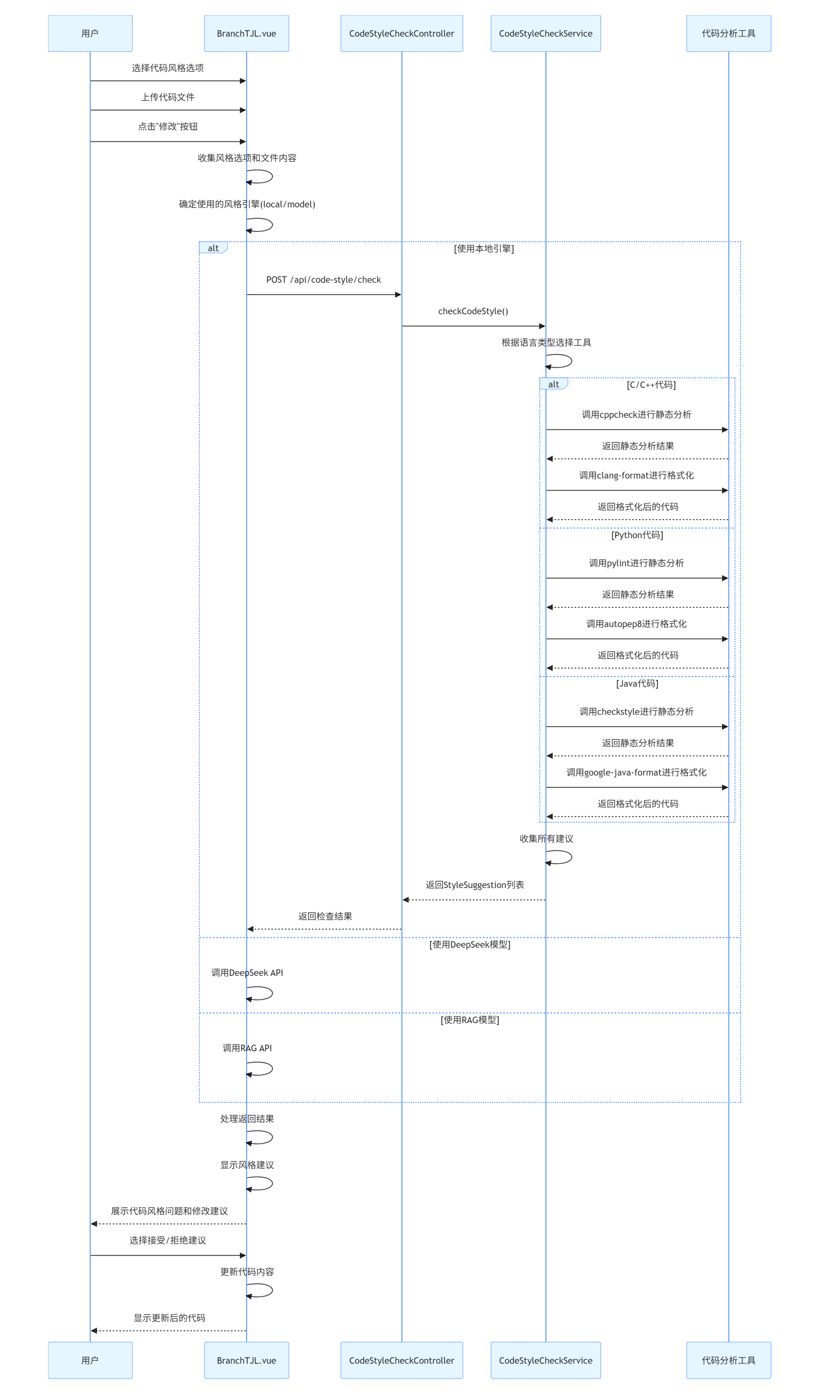
- 用户在前端(BranchTJL.vue)选择代码风格选项并上传文件
- 点击"修改"按钮后,前端根据选择的引擎类型(本地/模型)发起不同的API调用
- 当选择本地引擎时,前端调用
/api/code-style/check接口 - 请求包含代码内容、编程语言和风格选项
- 后端控制器(CodeStyleCheckController)接收请求并调用服务层
6.2 后端内部
- CodeStyleCheckController接收请求并验证参数
- 调用CodeStyleCheckService.checkCodeStyle()方法
- CodeStyleCheckServiceImpl实现类处理请求:
- 根据编程语言选择对应的代码分析工具
- 创建临时文件并写入代码
- 调用外部工具进行代码风格检查和格式化
- 收集分析结果和格式化建议
- 返回结果给控制器
- 控制器将结果返回给前端
6.3 前端处理结果
- 前端接收到后端返回的结果
- 处理结果并在UI中展示代码风格问题和修改建议
- 用户可以选择接受或拒绝建议
- 前端根据用户选择更新代码内容
7. 功能流程图
7.1 系统架构图
7.2 功能时序图
(五)语义化搜索模块
1、数据结构
1.1 搜索结果结构
后端返回的每个搜索结果为:
{
  "name": "script.js",
  "path": "script.js",
  "snippet": "// 格式化消息文本 function formatMessage(text) {...}",
  "explanation": "用于将原始文本消息格式化为带样式的HTML内容...",
  "startLine": 1,
  "endLine": 54
}
name:文件名path:文件路径snippet:相关代码片段explanation:代码片段简要说明startLine/endLine:代码片段在文件中的起止行号
2、前端重要代码
2.1 搜索对话框组件(SemanticSearchDialog.vue)
<template>
  <div>
    <el-input v-model="searchQuery" type="textarea" placeholder="请输入搜索内容" />
    <el-button @click="performSearch" :loading="isSearching">搜索</el-button>
    <el-collapse v-if="searchResults.length > 0">
      <el-collapse-item v-for="(result, idx) in searchResults" :key="idx">
        <template #title>
          <span>{{ result.name }}</span>
          <span>{{ result.path }}</span>
        </template>
        <div>
          <div>{{ result.explanation }}</div>
          <pre><code>{{ result.snippet }}</code></pre>
          <el-button @click="openFile(result)">打开文件</el-button>
        </div>
      </el-collapse-item>
    </el-collapse>
  </div>
</template>

<script setup>
import { ref } from 'vue'
import axios from 'axios'
const emit = defineEmits(['open-file'])

const searchQuery = ref('')
const isSearching = ref(false)
const searchResults = ref([])

const performSearch = async () => {
  isSearching.value = true
  const res = await axios.post('/api/semantic-search/search', { query: searchQuery.value })
  searchResults.value = res.data
  isSearching.value = false
}

const openFile = (result) => {
  emit('open-file', result.path, result.startLine, result.endLine)
}
</script>
2.2 父组件调用高亮
<MonacoEditor3
  v-model="editableFileContent"
  :language="currentFileLanguage"
  :highlight-start-line="highlightStartLine"
  :highlight-end-line="highlightEndLine"
/>
3、后端API设计
3.1 搜索接口
- 接口地址:
POST /api/semantic-search/search - 请求参数:
{
  "query": "查找处理用户登录的代码"
}
- 返回结果:见数据结构
4、核心功能实现代码
4.1 后端主服务(Java)
@Override
public List<Map<String, Object>> search(String owner, String repo, String branch, String query) {
    // 1. 获取所有代码文件
    // 2. 过滤非代码文件
    // 3. 调用AI API或关键词匹配
    // 4. 解析AI返回内容,提取片段、说明、行号
    // 5. 返回结果
}
4.2 代码片段行号查找(模糊匹配)
private int[] findSnippetLineRange(String fileContent, String snippet) {
    String[] fileLines = fileContent.split("\\r?\\n");
    String[] snippetLines = snippet.split("\\r?\\n");
    // 完整匹配
    // 部分匹配
    // 关键行模糊匹配
}
4.3 结果解析
private List<Map<String, Object>> parseAISearchResults(String aiResponse, List<RepositoryFile> allFiles) {
    // 1. 正则提取markdown结构
    // 2. 查找文件路径
    // 3. 查找代码片段在文件中的行号
    // 4. 组装结果
}
5、接口调用关系
6、功能流程图
flowchart TD
  A[用户输入搜索内容] --> B[前端调用API]
  B --> C[后端语义搜索]
  C --> D[AI/关键词匹配]
  D --> E[解析结果,返回前端]
  E --> F[前端展示搜索结果]
  F --> G[用户点击打开文件]
  G --> H[高亮对应代码行]
(六)Gitea API 代码管理功能模块
1. 系统架构概述
Gitea API 代码管理功能是一个基于前后端分离架构的代码版本控制系统,通过与 Gitea 服务集成,实现代码上传、分支管理、冲突解决和版本控制等功能。
架构图
2. 数据结构
2.1 前端数据结构
// 项目信息
const project = {
  id: String,
  name: String,
  description: String,
  giteaRepoCreated: Boolean,
  giteaRepoOwner: String,
  giteaRepoName: String,
  giteaRepoUrl: String
}

// 文件变更信息
const fileChange = {
  filename: String,
  status: String,  // 'added', 'modified', 'removed'
  statusType: String,  // 'success', 'warning', 'danger'
  statusText: String,  // '新增', '修改', '删除'
  additions: Number,
  deletions: Number,
  changes: Number,
  patch: String,
  manuallyDetected: Boolean
}

// 冲突文件信息
const conflictFile = {
  path: String,
  resolution: String,  // 'local', 'remote', 'merge'
  localContent: String,
  remoteContent: String,
  mergedContent: String
}
2.2 后端数据结构
// Gitea服务接口
public interface GiteaService {
    boolean createBranchIfNotExists(String owner, String repo, String baseBranch, String newBranch);
    boolean branchExists(String owner, String repo, String branch);
    Object getRepositoryContents(String owner, String repo, String path, String ref);
    String getFileContent(String owner, String repo, String filePath, String ref);
    List<String> getAllFilesInBranch(String owner, String repo, String branch);
    Map<String, Object> uploadFile(String owner, String repo, String filePath, byte[] content, String commitMessage);
    Map<String, Object> createPullRequest(String owner, String repo, String title, String description, String headBranch, String baseBranch);
    // 更多方法...
}
3. 前端重要代码
3.1 分支管理与文件操作
// 从主分支同步到用户分支
const syncFromMainBranch = async () => {
  if (!localProjectPath.value) {
    ElMessage.warning('请先选择本地项目目录')
    return
  }

  // 弹出确认对话框
  ElMessageBox.confirm(
    `确定要从main分支同步更新到用户分支 ${userBranch.value} 吗?这可能会覆盖您的一些修改。`,
    '同步确认',
    {
      confirmButtonText: '确定同步',
      cancelButtonText: '取消',
      type: 'warning'
    }
  ).then(async () => {
    // 用户确认,执行同步
    await executeSyncFromMain()
  }).catch(() => {
    // 用户取消操作
  })
}

// 智能上传到用户分支
const smartUploadToUserBranch = async () => {
  if (!localProjectPath.value) {
    ElMessage.warning('请先选择本地项目目录')
    return
  }

  // 弹出确认对话框
  ElMessageBox.prompt(
    `请输入提交描述`,
    '智能上传到用户分支',
    {
      confirmButtonText: '确定',
      cancelButtonText: '取消',
      inputPlaceholder: '描述您的更改...',
      inputValue: '更新项目文件'
    }
  ).then(({ value: commitMessage }) => {
    // 提交描述通过,执行智能上传
    executeSmartUpload(commitMessage)
  }).catch(() => {
    // 用户取消操作
  })
}
3.2 冲突解决
// 处理冲突解决
const resolveConflicts = (resolvedFiles) => {
  showConflictDialog.value = false

  // 使用用户解决的冲突继续上传
  if (resolvedFiles && resolvedFiles.length > 0) {
    // 重新执行智能上传,包含已解决的冲突
    executeSmartUpload('解决冲突并上传', resolvedFiles)
  }
}

// 确认解决冲突
const confirmResolveConflicts = () => {
  // 检查是否所有冲突都已解决
  const unresolved = conflictFiles.value.find(file => !file.resolution)
  if (unresolved) {
    ElMessage.warning(`请为所有文件选择解决方案: ${unresolved.path}`)
    return
  }

  // 准备解决后的文件列表
  const resolvedFiles = conflictFiles.value.map(file => {
    const resolved = {
      path: file.path,
      resolution: file.resolution
    }

    // 根据解决方案设置内容
    if (file.resolution === 'local') {
      resolved.content = file.localContent
    } else if (file.resolution === 'remote') {
      resolved.content = file.remoteContent
    } else if (file.resolution === 'merge') {
      resolved.content = file.mergedContent
    }

    return resolved
  })

  // 关闭对话框并返回解决方案
  resolveConflicts(resolvedFiles)
}
3.3 合并请求
// 合并到main分支
const mergeToMasterBranch = () => {
  if (!localProjectPath.value) {
    ElMessage.warning('请先选择本地项目目录')
    return
  }

  // 检查是否有变更
  if (fileChanges.value.length === 0) {
    // 如果没有获取过变更信息,先获取
    getBranchDiff().then(() => {
      if (fileChanges.value.length === 0) {
        ElMessage.warning('当前没有可合并的变更')
        return
      }
      showMergeDialog()
    })
  } else {
    showMergeDialog()
  }
}

// 创建合并请求
const createMergeRequest = async (title) => {
  if (!project.value || !project.value.giteaRepoCreated) {
    ElMessage.error('项目未关联Gitea仓库,无法创建合并请求')
    return
  }

  isMerging.value = true

  try {
    const response = await axios.post('/api/gitea/branches/merge-request', {
      owner: project.value.giteaRepoOwner,
      repo: project.value.giteaRepoName,
      title: title,
      description: `用户 ${userStore.username} 的代码提交`,
      headBranch: userBranch.value,
      baseBranch: 'main'
    })

    if (response.data) {
      ElMessage.success(`成功创建合并请求`)
      if (response.data.html_url) {
        // 提供合并请求链接
        ElMessageBox.alert(
          `<div>合并请求已创建,您可以点击下面的链接查看详情:</div>
           <a href="${response.data.html_url}" target="_blank">${response.data.html_url}</a>`,
          '合并请求创建成功',
          {
            dangerouslyUseHTMLString: true,
            confirmButtonText: '确定'
          }
        )
      }
    }
  } catch (error) {
    console.error('Error creating merge request:', error)
    ElMessage.error('创建合并请求失败: ' + (error.response?.data?.message || error.message))
  } finally {
    isMerging.value = false
  }
}
4. 后端API接口
4.1 GiteaController 接口
| 接口路径 | 方法 | 功能描述 | 参数 |
|---|---|---|---|
/api/gitea/commit-url |
GET | 获取commit查看URL | owner, repo, commitHash |
/api/gitea/clone |
POST | 克隆项目到本地 | projectId, userId, localPath |
/api/gitea/branches/ensure |
POST | 确保分支存在 | owner, repo, baseBranch, newBranch |
/api/gitea/branches/pull |
POST | 从源分支拉取到目标分支 | owner, repo, sourceBranch, targetBranch, commitMessage |
/api/gitea/branches/pull-to-local |
POST | 从远程分支拉取到本地 | owner, repo, branch, localPath |
/api/gitea/branches/smart-upload |
POST | 智能上传本地文件到分支 | owner, repo, branch, localPath, commitMessage, resolvedConflicts |
/api/gitea/branches/diff |
GET | 获取分支差异 | owner, repo, baseBranch, headBranch |
/api/gitea/branches/file-content |
GET | 获取分支中文件内容 | owner, repo, path, ref |
/api/gitea/branches/files |
GET | 获取分支中所有文件 | owner, repo, branch |
/api/gitea/branches/merge-request |
POST | 创建合并请求 | owner, repo, title, description, headBranch, baseBranch |
4.2 GiteaService 接口
public interface GiteaService {
    // 分支管理
    boolean createBranchIfNotExists(String owner, String repo, String baseBranch, String newBranch);
    boolean branchExists(String owner, String repo, String branch);

    // 文件操作
    Object getRepositoryContents(String owner, String repo, String path);
    Object getRepositoryContents(String owner, String repo, String path, String ref);
    String getFileContent(String owner, String repo, String filePath);
    String getFileContent(String owner, String repo, String filePath, String ref);
    List<String> getAllFilesInBranch(String owner, String repo, String branch);

    // 文件上传与更新
    Map<String, Object> uploadFile(String owner, String repo, String filePath, byte[] content, String commitMessage);
    Map<String, Object> updateFile(String owner, String repo, String filePath, byte[] content, String commitMessage);
    Map<String, Object> deleteFile(String owner, String repo, String filePath, String sha, String commitMessage);
    Map<String, Object> uploadFolderToBranch(String owner, String repo, String branch, String localPath, String commitMessage);

    // 合并请求管理
    List<Map<String, Object>> getBranchDiff(String owner, String repo, String baseBranch, String headBranch);
    Map<String, Object> createPullRequest(String owner, String repo, String title, String description, String headBranch, String baseBranch);
    List<Map<String, Object>> getPullRequests(String owner, String repo, String state);
    Map<String, Object> getPullRequest(String owner, String repo, int index);
    Map<String, Object> mergePullRequest(String owner, String repo, int index, String message);
    Map<String, Object> closePullRequest(String owner, String repo, int index);

    // 用户与仓库管理
    Map<String, Object> createGiteaUser(String username, String email, String password);
    Map<String, Object> createGiteaRepository(String username, String repoName, String description);
}
5. 核心功能实现代码
5.1 智能上传实现
// 执行智能上传操作
const executeSmartUpload = async (commitMessage, resolvedConflicts = null) => {
  if (!project.value || !project.value.giteaRepoCreated) {
    ElMessage.error('项目未关联Gitea仓库,无法上传')
    return
  }

  isUploading.value = true
  showChangesPanel.value = true
  uploadStatus.value = {
    title: '正在上传',
    type: 'info',
    description: '正在智能上传本地文件到用户分支,请稍候...'
  }
  uploadErrors.value = [] // 清空错误信息
  conflictFiles.value = [] // 清空冲突文件

  try {
    // 清空之前的变更记录
    fileChanges.value = []

    // 确保用户分支存在
    await ensureUserBranchExists()

    // 执行智能上传
    const requestData = {
      owner: project.value.giteaRepoOwner,
      repo: project.value.giteaRepoName,
      branch: userBranch.value,
      localPath: localProjectPath.value,
      commitMessage: commitMessage
    }

    // 如果有解决的冲突,添加到请求中
    if (resolvedConflicts) {
      requestData.resolvedConflicts = resolvedConflicts
    }

    const response = await axios.post('/api/gitea/branches/smart-upload', requestData)

    // 检查是否需要解决冲突
    if (response.data && response.data.needsResolution) {
      // 有冲突需要解决
      uploadStatus.value = {
        title: '需要解决冲突',
        type: 'warning',
        description: '发现文件冲突,请解决冲突后继续上传'
      }

      // 保存冲突文件
      if (response.data.conflicts) {
        conflictFiles.value = response.data.conflicts
      }

      // 显示冲突解决对话框
      if (conflictFiles.value.length > 0) {
        showConflictDialog.value = true
      }

      return
    }

    if (response.data && response.data.success) {
      uploadStatus.value = {
        title: '上传成功',
        type: 'success',
        description: `成功上传到分支 ${userBranch.value}`
      }

      // 获取变更信息
      await getBranchDiff()
    } else {
      uploadStatus.value = {
        title: '上传失败',
        type: 'error',
        description: response.data.message || '未知错误'
      }
    }
  } catch (error) {
    console.error('Error smart uploading to branch:', error)
    uploadStatus.value = {
      title: '上传失败',
      type: 'error',
      description: error.response?.data?.message || error.message
    }
  } finally {
    isUploading.value = false
    // 调整布局以显示右侧面板
    updateLayoutProportions()
  }
}
5.2 分支差异比较实现
// 获取分支差异
const getBranchDiff = async () => {
  if (!project.value || !project.value.giteaRepoCreated) {
    console.log('项目未关联Gitea仓库,无法获取分支差异');
    return;
  }

  try {
    const response = await axios.get('/api/gitea/branches/diff', {
      params: {
        owner: project.value.giteaRepoOwner,
        repo: project.value.giteaRepoName,
        baseBranch: 'main',
        headBranch: userBranch.value
      }
    });

    if (response.data && response.data.length > 0) {
      // 处理变更列表,添加显示属性
      fileChanges.value = response.data.map(item => {
        return {
          ...item,
          statusType: getChangeStatusType(item.status),
          statusText: getChangeStatusText(item.status)
        };
      });
    } else {
      fileChanges.value = [];
      await checkImportantFilesManually();

      // 如果重要文件检查也没有发现变更,尝试检查所有文件
      if (fileChanges.value.length === 0) {
        await checkAllFiles();
      }
    }
  } catch (error) {
    console.error('获取分支差异失败:', error);
    fileChanges.value = [];
    throw error;
  }
}
6. 接口调用关系
6.1 前端与后端接口调用关系图
7. 功能流程图
7.1 智能上传流程
7.2 合并请求流程
六. 数据流向
七. 部署架构
系统采用前后端分离的部署方式:
- 前端应用部署在静态Web服务器或CDN上
- 后端服务部署在应用服务器上
- 数据库独立部署
- Gitea服务作为独立服务运行
- 所有组件通过HTTP/HTTPS协议通信

火山引擎开发者社区是火山引擎打造的AI技术生态平台,聚焦Agent与大模型开发,提供豆包系列模型(图像/视频/视觉)、智能分析与会话工具,并配套评测集、动手实验室及行业案例库。社区通过技术沙龙、挑战赛等活动促进开发者成长,新用户可领50万Tokens权益,助力构建智能应用。
更多推荐
 12
12 0
0- 0


 已为社区贡献2条内容

所有评论(0)