Rocky 9 安装 Elasticsearch分布式集群
配置文档参考:https://www.elastic.co/docs/deploy-manage/deploy/self-managed/important-settings-configuration#_cluster_name_setting。启动elasticsearch,生成安全配置。停止elasticsearch,新增集群配置。节点生成配置后之前在需要启动就直接。生成的注册节点的令牌,启
Elasticsearch分布式部署
一、 主机
| ip | 主机名 |
|---|---|
| 192.168.25.250 | ES01 |
| 192.168.25.130 | ES02 |
| 192.168.25.131 | ES03 |
二、系统初始化
所有主机执行:
systemctl disable firewalld --now
sed -i 's/SELINUX=enforcing/SELINUX=disabled/g' /etc/selinux/config
setenforce 0
swapoff -a && sed -i "s/^[^#]*swap*/#&/g" /etc/fstab
groupadd elasticsearch
useradd elasticsearch
useradd -g elasticsearch elasticsearch
echo "elasticsearch" | passwd --stdin elasticsearch
echo "elasticsearch    ALL=(ALL)    NOPASSWD: ALL" >> /etc/sudoers.d/elasticsearch
echo "
# 设置elasticsearch用户进程能打开的最大文件句柄
elasticsearch  -  nofile  65535
# 设置elasticsearch用户进程锁定使用物理内存
elasticsearch soft memlock unlimited
elasticsearch hard memlock unlimited
# 设置elasticsearch 用户进程创建的最大线程数
elasticsearch soft nproc 4096
elasticsearch hard  nproc 4096
# 不限制elasticsearch用户创建文件的大小
elasticsearch soft fsize unlimited
elasticsearch hard  fsize unlimited
"  >> /etc/security/limits.conf
# 重新登录shell终端生效
echo "
# 设置个进程可创建的最大内存映射区域数量
vm.max_map_count=262144
# 设置tcp重传个数
net.ipv4.tcp_retries2=5
"  >> /etc/sysctl.conf
# 立即生效
sysctl -p
hosts配置:
echo "192.168.25.250	ES01
192.168.25.130	ES02
192.168.25.131	ES03 " >> /etc/hosts
三、部署Elasticsearch
1. 下载Elasticsearch
所有主机执行:
mkdir /opt/es && cd /opt/es
wget https://artifacts.elastic.co/downloads/elasticsearch/elasticsearch-9.1.5-linux-x86_64.tar.gz
tar -zxvf elasticsearch-9.1.5-linux-x86_64.tar.gz
chown elasticsearch.elasticsearch * -R
su elasticsearch
cd elasticsearch-9.1.5
2. 配置修改
配置文档参考:https://www.elastic.co/docs/deploy-manage/deploy/self-managed/important-settings-configuration#_cluster_name_setting
2.1. JVM参数修改
所有主机执行:
config/jvm.options.d/custom_jvm.options:
# 统一内存堆栈大小,不可超过物理内存50%
-Xms2g
-Xmx2g

# 使用G1 垃圾回收
-XX:+UseG1GC

# es 运行时产生的临时可执行文件
-Djava.io.tmpdir=/home/elasticsearch/es/tmp

# 指定gc参数及日志文件存放地址
-Xlog:gc*,gc+age=trace,safepoint:file=/home/elasticsearch/es/logs/gc.log:utctime,level,pid,tags:filecount=32,filesize=64m

#  JVM 内存溢出时,将日志文件写入指的目录下
-XX:HeapDumpPath=/home/elasticsearch/es/HeapDump
目录文件提前下载:
mkdir -pv /home/elasticsearch/es/tmp
mkdir -pv /home/elasticsearch/es/HeapDump
mkdir -pv /home/elasticsearch/es/data
mkdir -pv /home/elasticsearch/es/logs
2.2. elasticsearch配置修改
ES01:config/elasticsearch.yml:
# 集群名称
cluster.name: elasticsearch-cluster

# 节点角色
node.roles: [master, data]

# 节点名称
node.name: ES01

# 设置日志和数据存储目录,建议是设置到es目录外,应为es升级会删除数据
path.data: /home/elasticsearch/es/data
path.logs: /home/elasticsearch/es/logs

# 锁定es必须使用物理内存
bootstrap.memory_lock: true

# 设置网络接口和端口绑定
network.host: 0.0.0.0
http.port: 9200

# 设置选举使用的9300端口绑定到本地所有接口上
transport.host: 0.0.0.0

# 设置是否允许使用通配符删除索引
action.destructive_requires_name: false

# 客户端通过http接口发送给 Elasticsearch 的请求体最大值
http.max_content_length: 100mb
启动elasticsearch,生成安全配置
./bin/elasticsearch
config/elasticsearch.yml:
停止elasticsearch,新增集群配置
# 集群名称
cluster.name: elasticsearch-cluster

# 节点角色
node.roles: [master, data]

# 节点名称
node.name: ES01

# 设置日志和数据存储目录,建议是设置到es目录外,应为es升级会删除数据
path.data: /home/elasticsearch/es/data
path.logs: /home/elasticsearch/es/logs

# 锁定es必须使用物理内存
bootstrap.memory_lock: true

# 设置网络接口和端口绑定
network.host: 0.0.0.0
http.port: 9200

# 设置选举使用的9300端口绑定到本地所有接口上
transport.host: 0.0.0.0

# 设置是否允许使用通配符删除索引
action.destructive_requires_name: false

# 客户端通过http接口发送给 Elasticsearch 的请求体最大值
http.max_content_length: 100mb

#----------------------- BEGIN SECURITY AUTO CONFIGURATION -----------------------
#
# The following settings, TLS certificates, and keys have been automatically
# generated to configure Elasticsearch security features on 23-10-2025 19:29:37
#
# --------------------------------------------------------------------------------

# Enable security features
xpack.security.enabled: true

xpack.security.enrollment.enabled: true

# Enable encryption for HTTP API client connections, such as Kibana, Logstash, and Agents
xpack.security.http.ssl:
  enabled: true
  keystore.path: certs/http.p12

# Enable encryption and mutual authentication between cluster nodes
xpack.security.transport.ssl:
  enabled: true
  verification_mode: certificate
  keystore.path: certs/transport.p12
  truststore.path: certs/transport.p12
# Create a new cluster with the current node only
# Additional nodes can still join the cluster later
# 节点发现
cluster.initial_master_nodes: ["ES01","ES02","ES03"]
# 哪些节点可以参与主节点选举,当集群所有节点接入后、注释掉。
discovery.seed_hosts: ["192.168.25.250:9300", "192.168.25.130:9300", "192.168.25.131:9300"]
#----------------------- END SECURITY AUTO CONFIGURATION -------------------------
重新启动:
./bin/elasticsearch
获取节点注册令牌:
./bin/elasticsearch-create-enrollment-token -s node
eyJ2ZXIiOiI4LjE0LjAiLCJhZHIiOlsiMTkyLjE2OC4yNS4yNTA6OTIwMCJdLCJmZ3IiOiJiZDVkNzg1MWQwNWYwNjg0NjZjZGJhYmEzZDJhNzcwMWQ4NzAyMmQ5MjZkN2I1YmY4NDRjNDUyNzc1MTkxMzk5Iiwia2V5IjoiWEt1U0Vwb0JPRjNJZlNRQTJ0eXE6dzg0UlZkZEltdTJTcTFnTW1IVVpkQSJ9
其他节点配置文件:
ES02:config/elasticsearch.yml:
# 集群名称
cluster.name: elasticsearch-cluster

# 节点角色
node.roles: [master, data]

# 节点名称
node.name: ES02

# 设置日志和数据存储目录,建议是设置到es目录外,应为es升级会删除数据
path.data: /home/elasticsearch/es/data
path.logs: /home/elasticsearch/es/logs

# 锁定es必须使用物理内存
bootstrap.memory_lock: true

# 设置网络接口和端口绑定
network.host: 0.0.0.0
http.port: 9200

# 设置选举使用的9300端口绑定到本地所有接口上
transport.host: 0.0.0.0

# 设置是否允许使用通配符删除索引
action.destructive_requires_name: false

# 客户端通过http接口发送给 Elasticsearch 的请求体最大值
http.max_content_length: 100mb
ES03:config/elasticsearch.yml:
# 集群名称
cluster.name: elasticsearch-cluster

# 节点角色
node.roles: [master, data]

# 节点名称
node.name: ES03

# 设置日志和数据存储目录,建议是设置到es目录外,应为es升级会删除数据
path.data: /home/elasticsearch/es/data
path.logs: /home/elasticsearch/es/logs

# 锁定es必须使用物理内存
bootstrap.memory_lock: true

# 设置网络接口和端口绑定
network.host: 0.0.0.0
http.port: 9200

# 设置选举使用的9300端口绑定到本地所有接口上
transport.host: 0.0.0.0

# 设置是否允许使用通配符删除索引
action.destructive_requires_name: false

# 客户端通过http接口发送给 Elasticsearch 的请求体最大值
http.max_content_length: 100mb
3. 启动集群
3.1. 注册集群节点
使用ES01生成的注册节点的令牌,启动ES02,ES03节点生成配置:
./bin/elasticsearch --enrollment-token eyJ2ZXIiOiI4LjE0LjAiLCJhZHIiOlsiMTkyLjE2OC4yNS4yNTA6OTIwMCJdLCJmZ3IiOiJiZDVkNzg1MWQwNWYwNjg0NjZjZGJhYmEzZDJhNzcwMWQ4NzAyMmQ5MjZkN2I1YmY4NDRjNDUyNzc1MTkxMzk5Iiwia2V5IjoiWEt1U0Vwb0JPRjNJZlNRQTJ0eXE6dzg0UlZkZEltdTJTcTFnTW1IVVpkQSJ9
生成的配置如下:
节点生成配置后之前在需要启动就直接
./bin/elasticsearch -d启动即可
#----------------------- BEGIN SECURITY AUTO CONFIGURATION -----------------------
#
# The following settings, TLS certificates, and keys have been automatically
# generated to configure Elasticsearch security features on 23-10-2025 19:43:06
#
# --------------------------------------------------------------------------------

# Enable security features
xpack.security.enabled: true

xpack.security.enrollment.enabled: true

# Enable encryption for HTTP API client connections, such as Kibana, Logstash, and Agents
xpack.security.http.ssl:
  enabled: true
  keystore.path: certs/http.p12

# Enable encryption and mutual authentication between cluster nodes
xpack.security.transport.ssl:
  enabled: true
  verification_mode: certificate
  keystore.path: certs/transport.p12
  truststore.path: certs/transport.p12
# Discover existing nodes in the cluster
discovery.seed_hosts: ["192.168.25.250:9300", "192.168.25.130:9300"]

#----------------------- END SECURITY AUTO CONFIGURATION -------------------------
3.2. 查看集群状态
集群模式必须保存两个ES节点正常运行、如果只剩下一个ES集群将无法工作。
./bin/elasticsearch-reset-password -u elastic -i重置elasticsearch密码
访问:https://ip:9200/_cluster/health
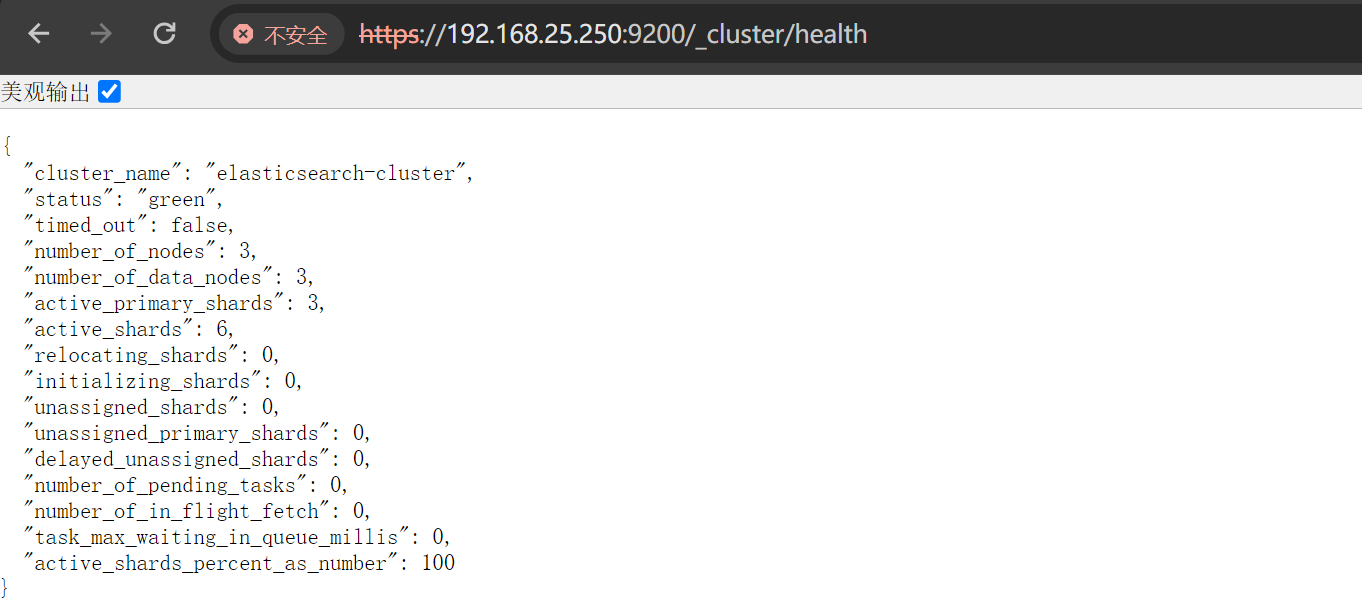
"status": "green":green集群状态正常"number_of_nodes": 3:总节点数为3"active_primary_shards": 3:活动的节点"number_of_data_nodes": 3:数据节点
3.3. 查看主节点
curl -u elastic:Elastic@2025 -k https://localhost:9200/_cat/master?v
id                     host           ip             node
Hhe2U0ksT8WTiwfkKXCrIA 192.168.25.130 192.168.25.130 ES02
当前ES02为主节点
四、部署kibana
1. 下载kibana
cd /opt/es
sudo wget https://artifacts.elastic.co/downloads/kibana/kibana-9.1.5-linux-x86_64.tar.gz
sudo tar -zxvf kibana-9.1.5-linux-x86_64.tar.gz
sudo chown elasticsearch.elasticsearch kibana-9.1.5 -R
cd kibana-9.1.5
2. 配置文件修改
2.1. 创建自签名证书
mkdir ssl && cd ssl
# 创建CA 私钥
openssl genrsa -out ca.key 2048
# 创建CA 自签名证书、即CA 根证书
openssl req -x509 -new -nodes -key ca.key -sha256 -days 36500 -out ca.crt -subj "/C=CN/ST=FUJIAN/L=XIAMEN/O=elastic/CN=elastic"
# 创建服务器 私钥
openssl genrsa -out kibana-server.key 2048
# 创建证书请求
openssl req -new -key kibana-server.key -out kibana-server.csr -subj "/C=CN/ST=FUJIAN/L=XIAMEN/O=elastic-server/CN=elastic-server"
# 使用CA 私钥对证书请求进行签名,并生成kibana-server.crt 证书、信任ca.crt 根证书
openssl x509 -req -in kibana-server.csr -CA ca.crt -CAkey ca.key -CAcreateserial -out kibana-server.crt -days 36500
2.2. 在ES生成kibana注册码
./bin/elasticsearch-create-enrollment-token -s kibana
eyJ2ZXIiOiI4LjE0LjAiLCJhZHIiOlsiMTkyLjE2OC4yNS4yNTA6OTIwMCJdLCJmZ3IiOiI0ZmU3N2YzYjNiNWQyYWNlMGZlZTkwZWRhNTYwN2ZlYjMyNTlhYTczM2RkZTVmNWMzNTIzMTgxMWMzNDc1OWQ0Iiwia2V5IjoiNGc2dElab0J2TDhxN19NSS1LMC06aXhud0V0Zmt3ZV9SbVVUQ2xLOXFHZyJ9
2.3. 主配置文件修改
config/kibana.yml:
# 接口地址和端口号
server.port: 5601
server.host: "0.0.0.0"  # 允许所有IP访问
# 公网域名(若通过域名访问,建议配置,如 "https://kibana.example.com")
# server.publicBaseUrl: ""
# 限制客户端请求体大小(5MB,合理,避免大请求攻击)
server.maxPayload: 5242880
# Kibana服务名(自定义,便于识别)
server.name: "kibana-server"
# =================== System: Logging ===================
# 日志级别(info 适合生产,平衡信息量和性能)
logging.root.level: info
# 日志输出器(仅保留滚动文件配置,支持按大小轮转)
logging.appenders.default:
  type: rolling-file
  fileName: logs/kibana.log  # 日志路径,当前路径下
  policy:
    type: size-limit
    size: 100mb  # 单文件100MB
  strategy:
    type: numeric
    max: 10  # 保留10个历史文件(总约1GB)
  layout:
    type: json  # JSON格式,便于日志分析
# =================== System: Other ===================
# 自定义数据目录
path.data: data  # 数据路径(当前目录下的data)
# 性能指标采样间隔/ms
ops.interval: 5000
# 界面语言
i18n.locale: "zh-CN"
# PID文件路径(系统标准目录,更规范)
# pid.file: kibana.pid             # pid文件路径
# =================== Saved Objects: Migrations ===================
# 迁移配置(生产环境优化)
migrations.batchSize: 500  # 单批迁移500个对象,降低内存压力
migrations.maxBatchSizeBytes: 90mb  # 小于ES的http.max_content_length(默认100mb)
migrations.retryAttempts: 15  # 重试次数

# 新增配置
server.ssl.enabled: true
server.ssl.certificate: /opt/es/kibana-9.1.5/ssl/kibana-server.crt
server.ssl.key: /opt/es/kibana-9.1.5/ssl/kibana-server.key
2.4. 启动kibana
填入ES创建的注册码完成配置
./bin/kibana
访问:https://ip:5601
验证码会在日志中打印出来


五、部署filebeat
1. 下载filebeat
su - root
cd /opt/es
wget https://artifacts.elastic.co/downloads/beats/filebeat/filebeat-9.1.5-linux-x86_64.tar.gz
tar -zxvf filebeat-9.1.5-linux-x86_64.tar.gz
cd filebeat-9.1.5-linux-x86_64
2. 创建用于与ES安全通信的令牌
更多安全连接方式参考官网手册:https://www.elastic.co/docs/reference/beats/filebeat/privileges-to-publish-events
curl -k -u elastic:Elastic@2025 -X POST "https://192.168.25.250:9200/_security/api_key" \
  -H "Content-Type: application/json" \
  -d '{
    "name": "filebeat_user",
    "role_descriptors": {
      "filebeat_writer": {
        "cluster": ["monitor", "read_ilm", "read_pipeline"],
        "index": [
          {
            "names": ["*-9.1.5-*"],
            "privileges": ["view_index_metadata", "create_doc", "auto_configure"]
          }
        ]
      }
    }
  }'
{"id":"d8kGJZoB2dRR1iIVeYXs","name":"filebeat_user","api_key":"oWNGOONJNgf41StRbJjs0A","encoded":"ZDhrR0pab0IyZFJSMWlJVmVZWHM6b1dOR09PTkpOZ2Y0MVN0UmJKanMwQQ=="}
3. 配置修改
filebeat.yml:
filebeat.config.inputs:
  enabled: true
  path: conf.d/*.yml
  reload.enabled: true
  reload.period: 10s
# 输出配置
output.elasticsearch:
  hosts: ["192.168.25.250:9200", "192.168.25.130:9200","192.168.25.131:9200"]
  protocol: https
  path: /
  index: "%{[fields.log_type]}-%{[agent.version]}-%{+yyyy.MM.dd}"
  api_key: "d8kGJZoB2dRR1iIVeYXs:oWNGOONJNgf41StRbJjs0A"		 # 用于与ES安全通信
  ssl.certificate_authorities: ["/opt/es/elasticsearch-9.1.5/config/certs/http_ca.crt"]  # 验证ES的证书
  max_retries: 3                          # 日志发送失败后的最大重试次数(-1 表示无限重试)
  retry_backoff: 1s                       # 重试间隔时间
  bulk_max_size: 2048                     # 批量发送的最大日志条数
  worker: 2                               # 并发发送日志的工作线程数(默认 1)

# 索引模板配置
setup.template.enabled: false
setup.ilm.enabled: false
setup.template.pattern: "%{[fields.log_type]}-%{[agent.version]}-*"
setup.template.overwrite: true
setup.template.settings:
  index.number_of_shards: 3
  index.number_of_replicas: 1

# 定义采集到的日志发送到哪里,这里配置发送到 elasticsearch进行后续处理
logging.level: info                       # 日志级别(可选:trace > debug > info > warn > error > fatal)
logging.to_files: true  # 是否将自身日志写入文件
logging.files:
  path: /opt/es/filebeat-9.1.5-linux-x86_64/logs  # 日志的存储路径
  name: filebeat  # 日志文件名前缀
  keepfiles: 7  # 日志文件的保留天数
  permissions: 0600  # 日志文件的权限
通过外部配置文件获取日志:
mkdir conf.d
conf.d/message.yml:
# 系统日志采集:/var/log/messages
- type: filestream
  id: system-messages
  enabled: true
  paths:
    - /var/log/messages  # 读取的日志路径
  fields:
    log_type: system-log      # 标记日志类型(用于索引名)
  encoding: utf-8
  ignore_older: 24h                                   # 忽略24小时前的日志
  start_position: end                                 # 从文件末尾开始读取
  tags: ["system", "os","linux"]
4. 启动filebeat
如果要调试使用
./filebeat -e -c filebeat.yml -d "output,elasticsearch"
./filebeat
查看ES中是否已经有了索引
curl -k -u elastic:Elastic@2025 'https://192.168.25.250:9200/_cat/indices?v'
green open system-log-9.1.5-2025.10.27 ogebYtcAQ_KYEt1b_wVhHg 1 1 1600 0 454b 227b 227b
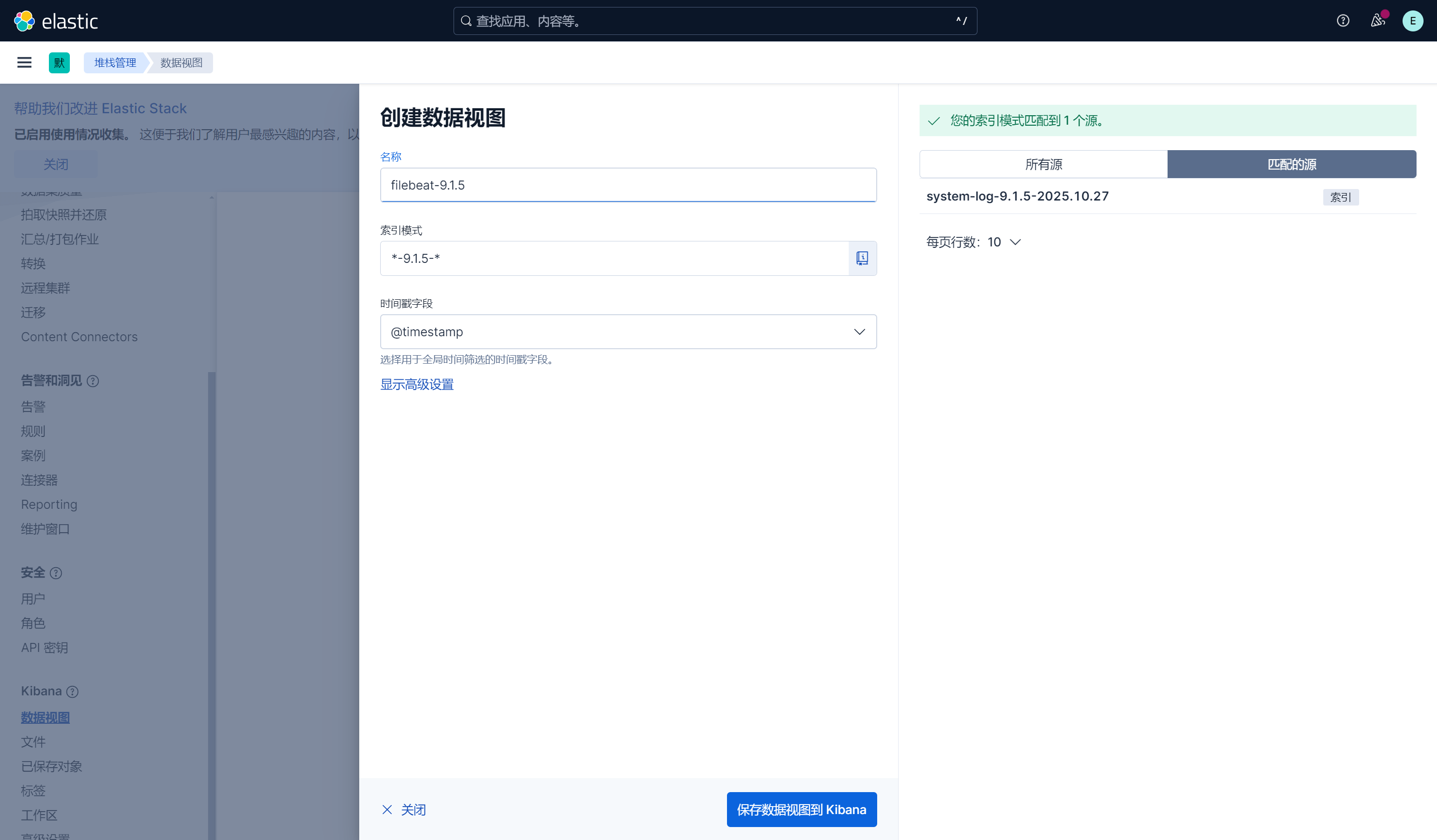
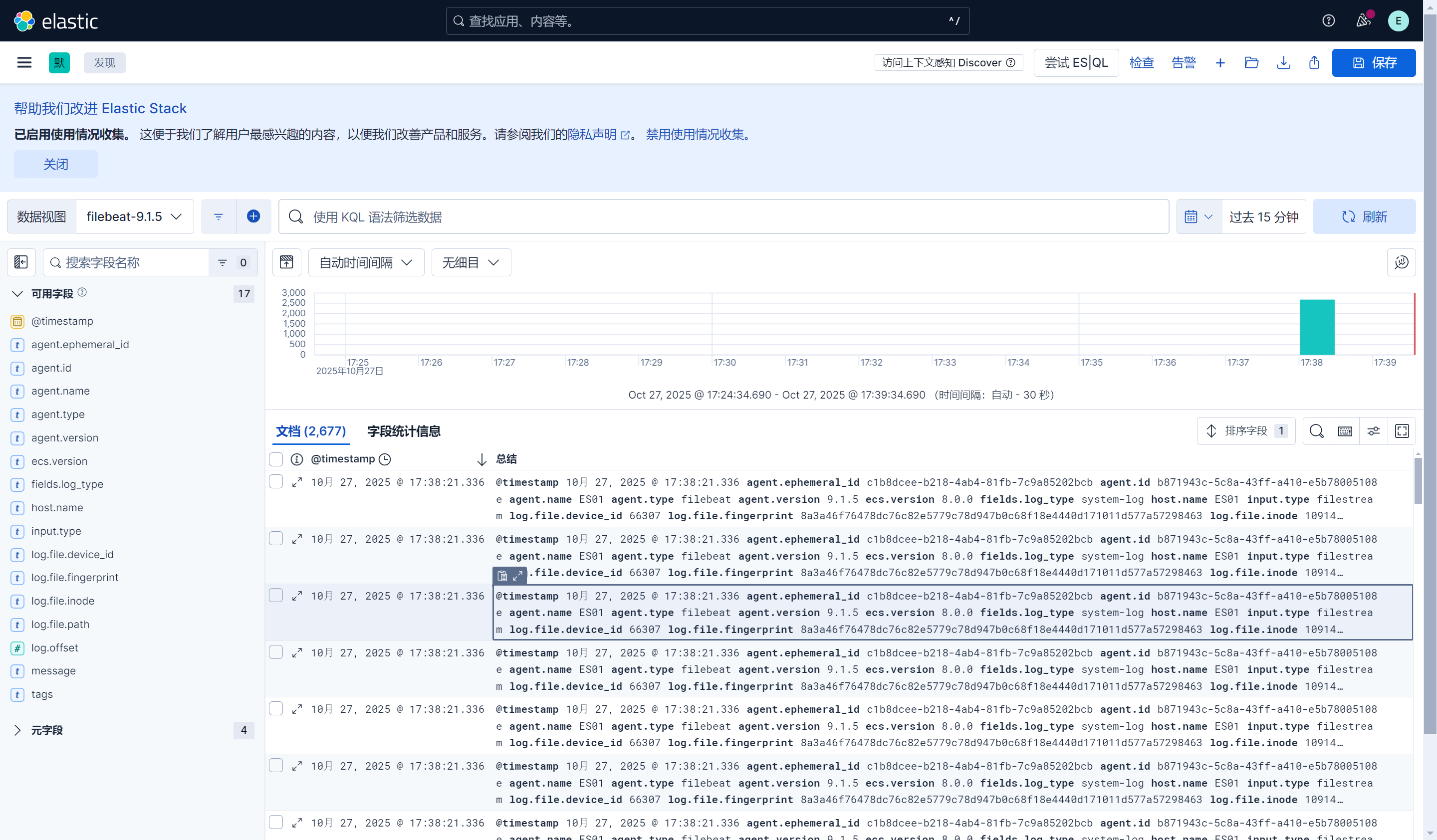
六、配置视图查看日志

火山引擎开发者社区是火山引擎打造的AI技术生态平台,聚焦Agent与大模型开发,提供豆包系列模型(图像/视频/视觉)、智能分析与会话工具,并配套评测集、动手实验室及行业案例库。社区通过技术沙龙、挑战赛等活动促进开发者成长,新用户可领50万Tokens权益,助力构建智能应用。
更多推荐
 15
15 0
0- 0


 已为社区贡献6条内容

所有评论(0)