07-mcp-server案例分享-一文解锁:豆包模型打造中药短视频 MCP 服务全攻略
本文介绍了中药科普 MCP 的制作,包括利用火山引擎模型、API 文档编写代码,配置相关文件,使用 moviepy 和 ImageMagick 处理音视频,还说明了启动及用 Cherry Studio 测试的过程,可生成含文字、语音和视频的中药短视频。
1.前言
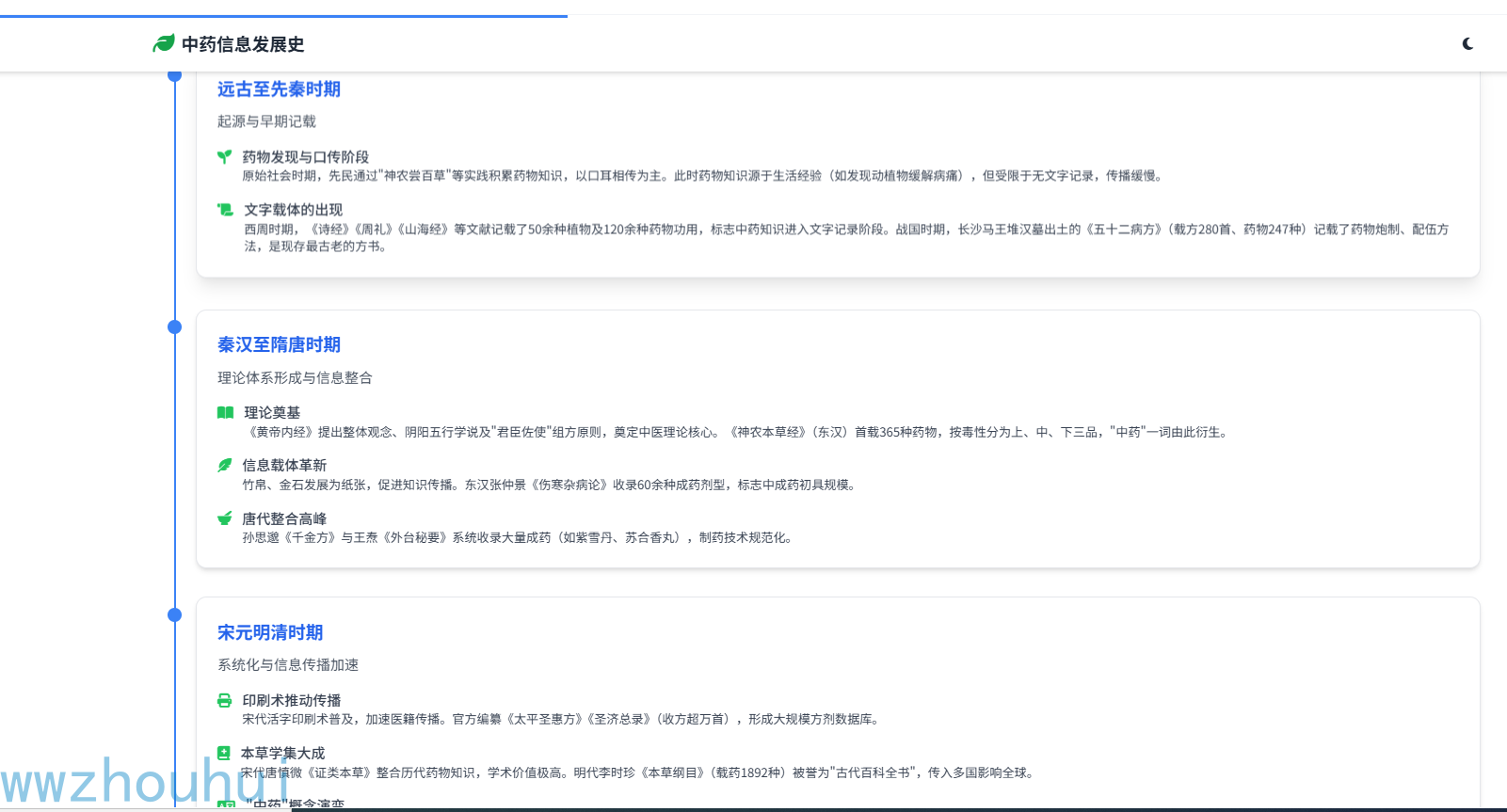
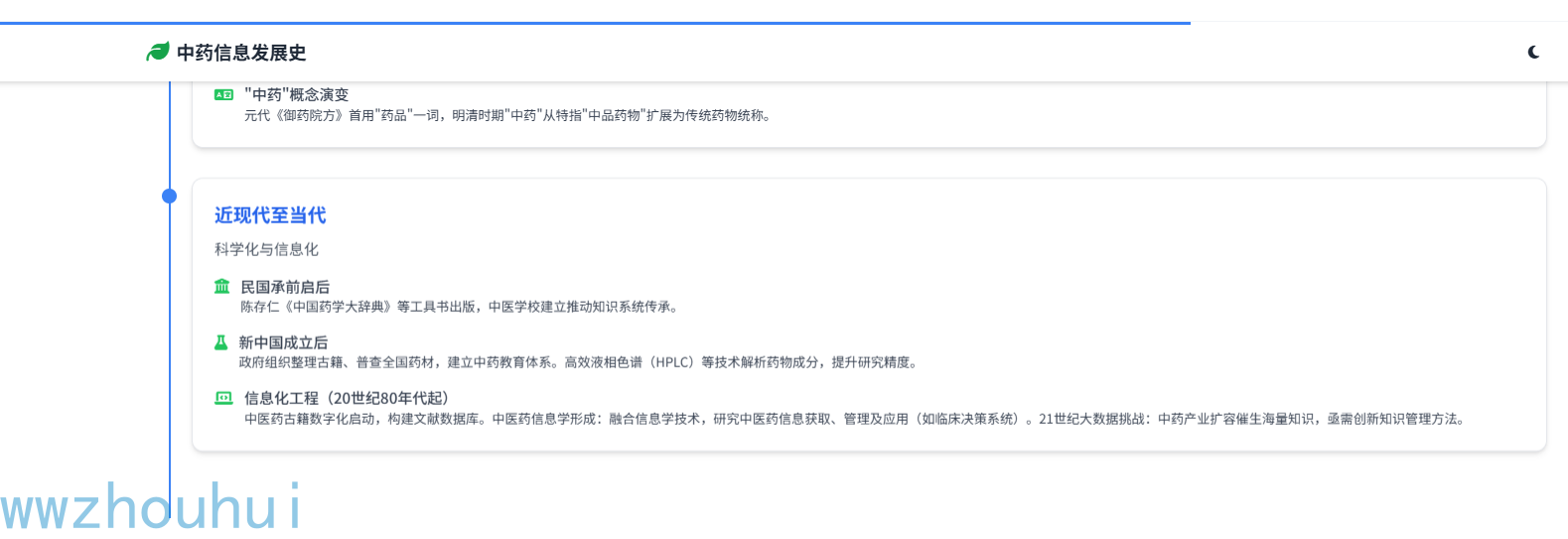
中药信息的发展是一个跨越数千年的演进过程,它不仅反映了中医药学自身的理论体系构建,也体现了人类记录、传播和利用知识方式的变革。从原始社会的口耳相传,到甲骨金石的刻画,再到纸张印刷的普及,直至现代的数字化技术,每一种信息载体的革新都推动了中医药知识的积累与传播。
我这里也有一个中药信息发展时间
然而据广州调查显示,近90%小学生对中医药"一问三不知",仅知"针灸""凉茶"等概念,无法辨识决明子等常用药材。
北京中医药大学调查指出,青少年普遍缺乏中药基础知识。
之前也给大家介绍过一个使用dify来实现的一个中医药的工作流。之前的工作流主要是实现了中药的药理介绍,中药的图片展示。本期我们给大家制作一个短视频的中药介绍MCP。那么我们看一下生成的中药的视频介绍。
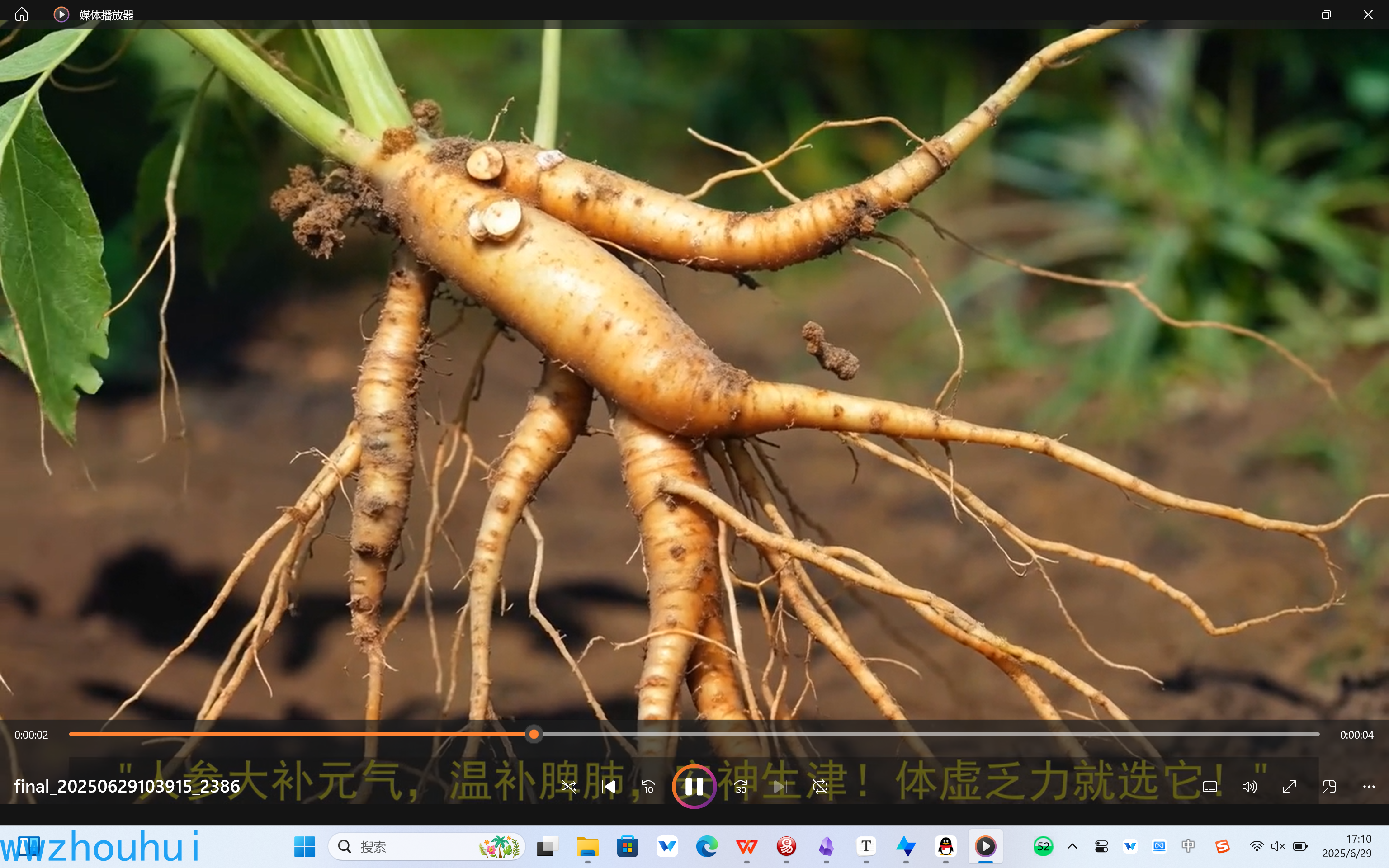
我们看一下cherry studio生成的效果
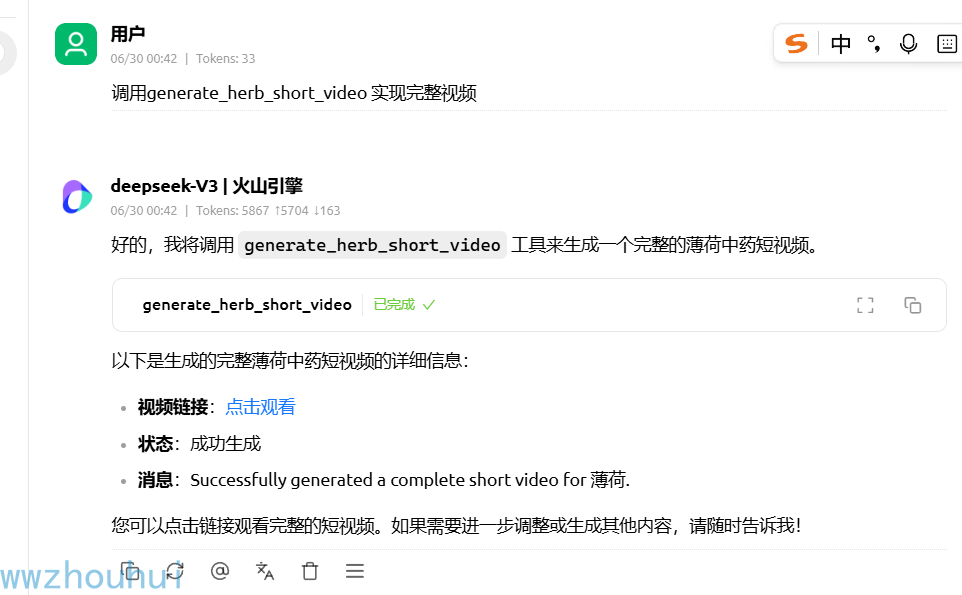
那么这样的MCP 是如何制作的呢?下面给大家介绍一下。
2.MCP-Server
API 代码编写
这里我们用到火山引擎的deepseek-v3模型已经文生视频、文生图模型。我们可以在火山引擎上开通这些模型
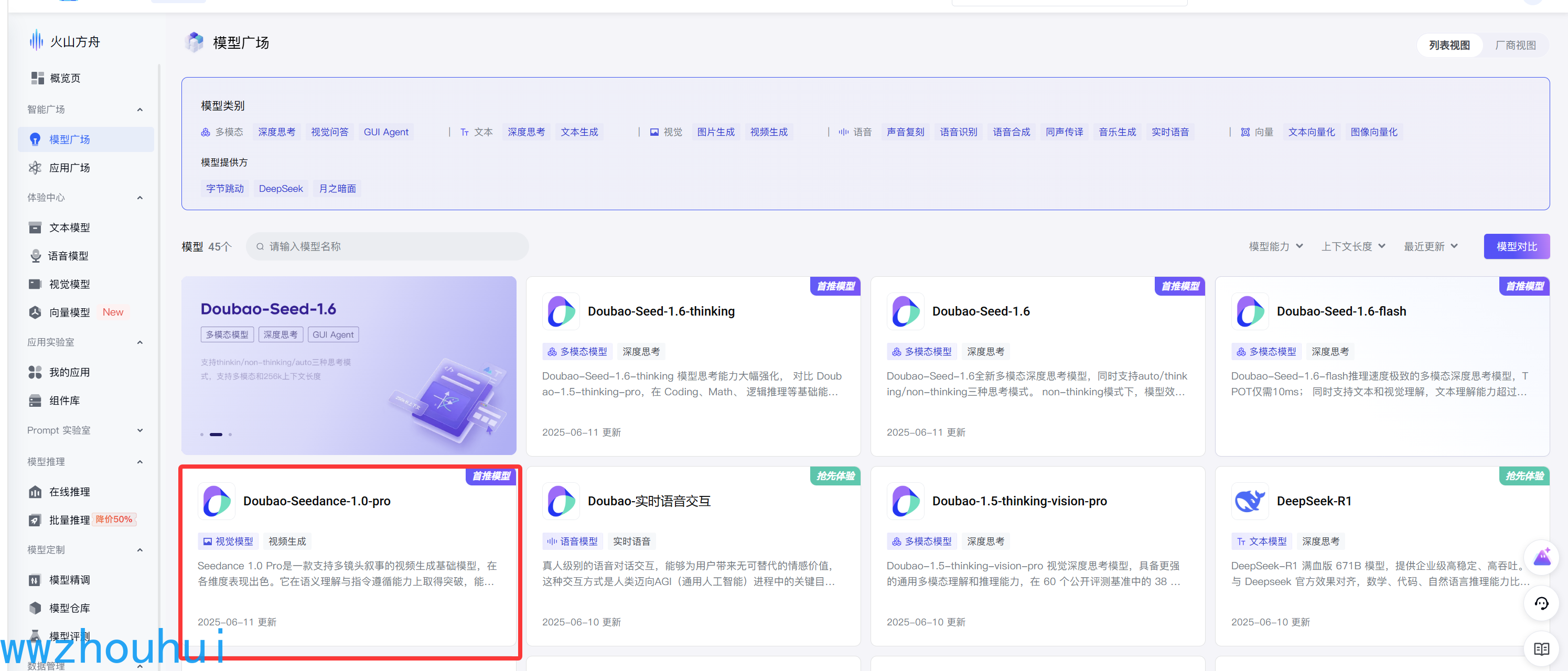
接下来我们找到火山引擎的api 文档 https://www.volcengine.com/docs/82379/1587798 找到最新的模型使用文档
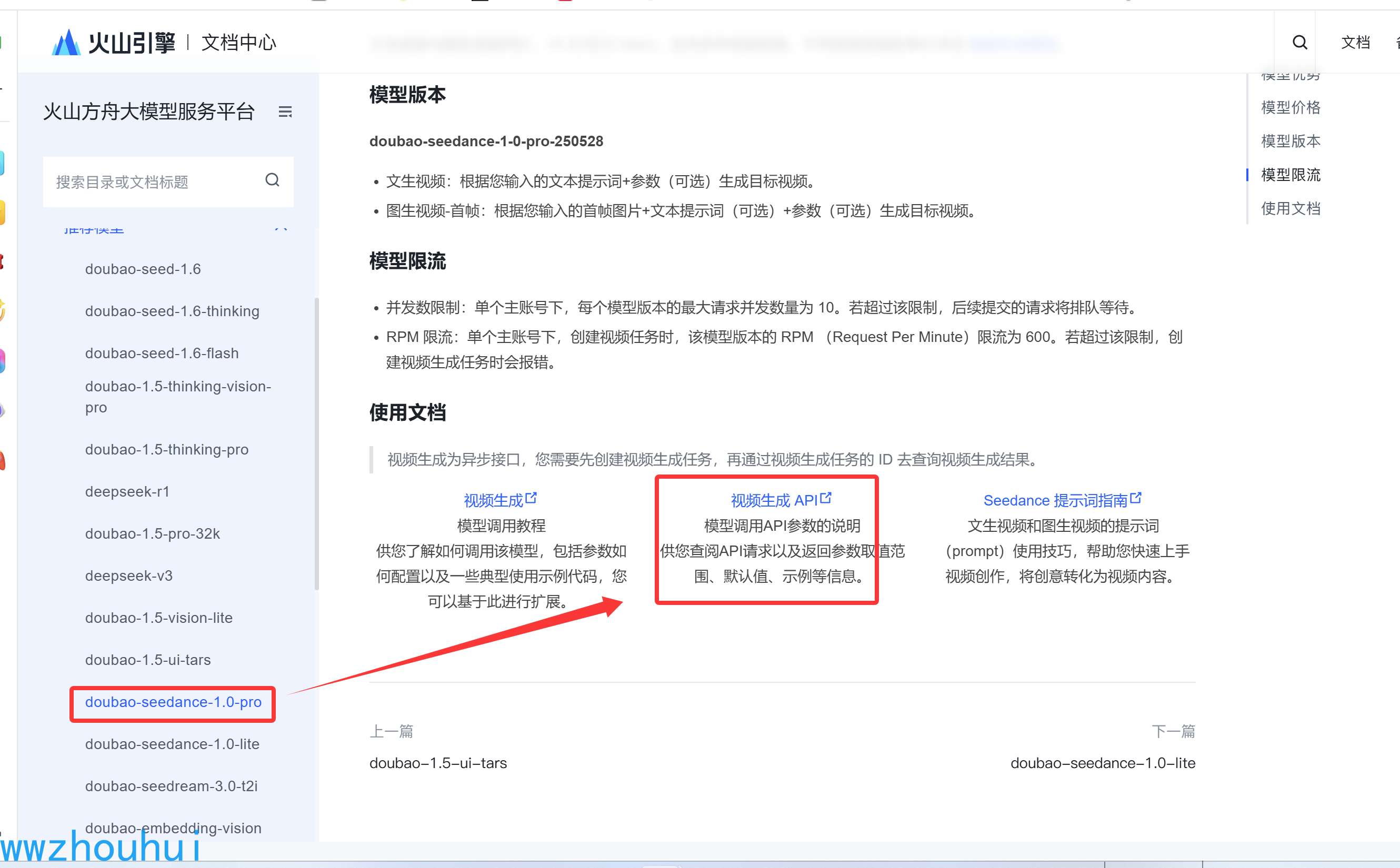
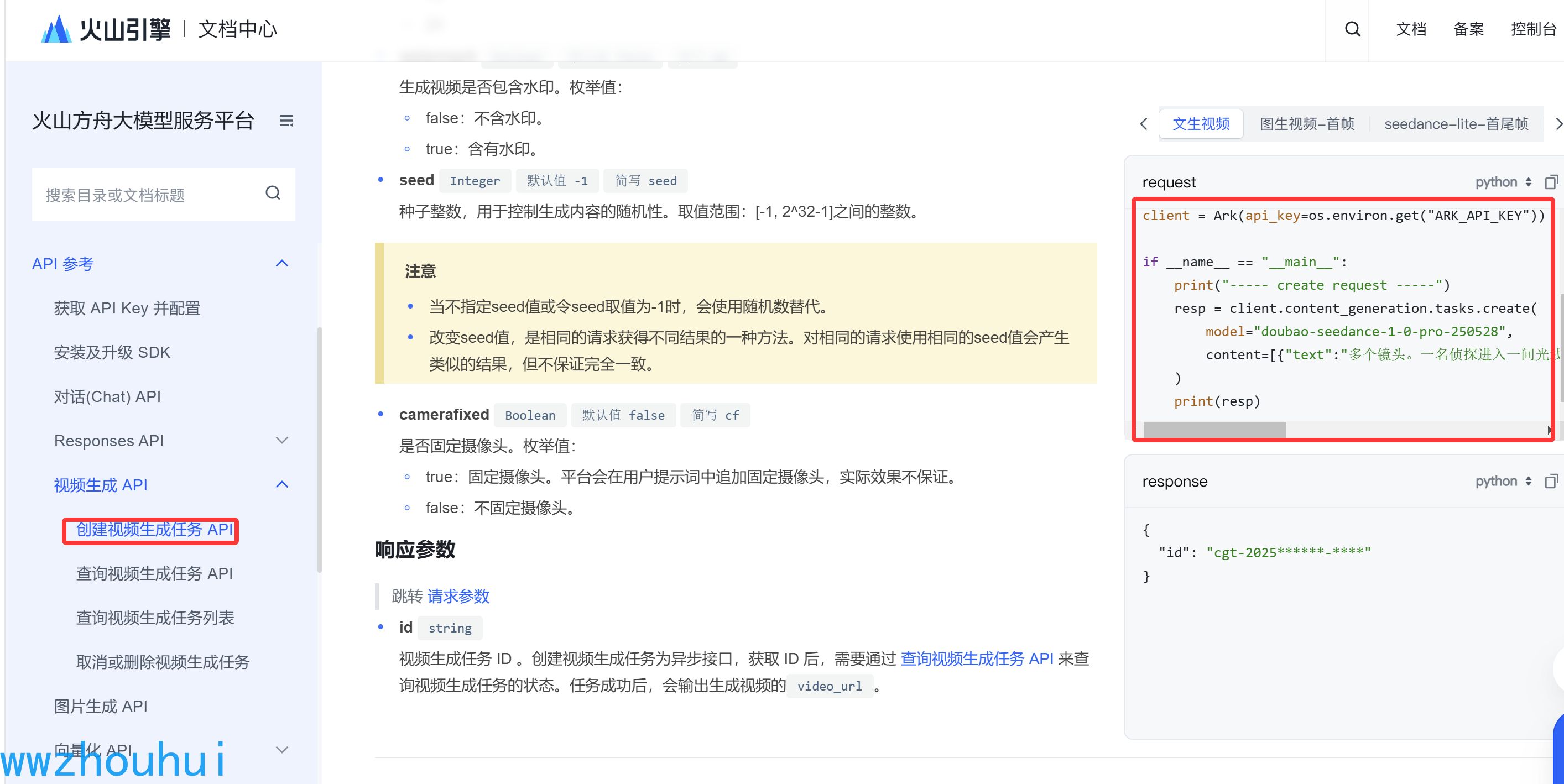
找到对应的API 文件。
文字转语音的我这里就没有使用火山引擎提供的文字转语音。我们用了免费的edgetts,这个免费的TTS 我在Cloudflare 部署了一个edge-tts-openai-cf-worker 代理从而实现免费访问微软的TTS。关于这块大家可以看我之前的文章。【技术分享】Edge-TTS与Cloudflare Worker结合,免费TTS服务轻松搭建!
编写的MCP 代码如下
zhongyao_mcp_server.py
# zhongyao_mcp_server.py
import time
import json
import requests
import configparser
import os
import datetime
import random
import tempfile
import platform
import asyncio # 新增
import httpx # 新增: 用于异步HTTP请求
from typing import Any, Dict
from openai import OpenAI
from mcp.server.fastmcp import FastMCP
from qcloud_cos import CosConfig, CosS3Client

# 导入视频处理库
try:
    import moviepy.editor as mpe
    from moviepy.config import change_settings;
except ImportError:
    print("错误: moviepy 库未安装。请运行 'pip install moviepy' 安装。")
    print("注意: moviepy 依赖 ffmpeg,请确保您的系统中已安装 ffmpeg。")
    mpe = None

# 创建MCP服务器实例
mcp = FastMCP("Zhongyao AI Generation Server")

# --- 全局配置 (将从 config.ini 加载) ---
API_KEY = None
BASE_URL = None
DEFAULT_CHAT_MODEL = None
DEFAULT_IMAGE_MODEL = None
DEFAULT_VIDEO_MODEL = None

TTS_API_KEY = None
TTS_BASE_URL = None
COS_REGION = None
COS_SECRET_ID = None
COS_SECRET_KEY = None
COS_BUCKET = None
IMAGEMAGICK_BINARY = None
FONT_PATH = None

VIDEO_GENERATION_TIMEOUT = None


# --- 加载配置 ---
def load_config():
    """从 config.ini 文件加载配置"""
    global API_KEY, BASE_URL, DEFAULT_CHAT_MODEL, DEFAULT_IMAGE_MODEL, DEFAULT_VIDEO_MODEL
    global TTS_API_KEY, TTS_BASE_URL, COS_REGION, COS_SECRET_ID, COS_SECRET_KEY, COS_BUCKET
    global IMAGEMAGICK_BINARY, FONT_PATH
    global VIDEO_GENERATION_TIMEOUT

    config = configparser.ConfigParser()
    config_file = 'config.ini'

    if not os.path.exists(config_file):
        print(f"错误: 配置文件 '{config_file}' 未找到。请根据文档创建。")
        return

    config.read(config_file)

    try:
        VIDEO_GENERATION_TIMEOUT = config.getint('Models', 'video_generation_timeout', fallback=480)

        API_KEY = config.get('API', 'api_key', fallback=None)
        BASE_URL = config.get('API', 'base_url', fallback='https://ark.cn-beijing.volces.com/api/v3')
        DEFAULT_CHAT_MODEL = config.get('Models', 'chat_model', fallback='deepseek-V3')
        DEFAULT_IMAGE_MODEL = config.get('Models', 'image_model', fallback='doubao-seedream-3-0-t2i-250415')
        DEFAULT_VIDEO_MODEL = config.get('Models', 'video_model', fallback='doubao-seedance-1-0-lite-t2v-250428')

        TTS_API_KEY = config.get('edgetts', 'tts_api_key', fallback=None)
        TTS_BASE_URL = config.get('edgetts', 'tts_base_url', fallback=None)

        COS_REGION = config.get('common', 'cos_region', fallback=None)
        COS_SECRET_ID = config.get('common', 'cos_secret_id', fallback=None)
        COS_SECRET_KEY = config.get('common', 'cos_secret_key', fallback=None)
        COS_BUCKET = config.get('common', 'cos_bucket', fallback=None)

        IMAGEMAGICK_BINARY = config.get('common', 'imagemagick_binary', fallback=None)
        FONT_PATH = config.get('common', 'font_path', fallback=None)

        print("配置已从 config.ini 成功加载。")
        print(f"视频生成任务超时设置为: {VIDEO_GENERATION_TIMEOUT} 秒")

        if not API_KEY or 'YOUR_API_KEY' in API_KEY:
            print("警告: 'config.ini' 中的 [API] api_key 未设置或仍为占位符。")
            API_KEY = None
        if not COS_SECRET_ID or 'YOUR_COS_SECRET_ID' in COS_SECRET_ID:
            print("警告: 'config.ini' 中的 [common] COS配置 未正确设置。TTS和视频合成功能将不可用。")

    except (configparser.NoSectionError, configparser.NoOptionError) as e:
        print(f"读取配置文件时出错: {e}")

# --- 程序执行流程 ---
# 1. 首先加载配置
load_config()

# 2. 根据加载的配置设置 MoviePy
if mpe:
    print(f"当前操作系统: {platform.system()}")
    if IMAGEMAGICK_BINARY:
        IMAGEMAGICK_BINARY = os.path.normpath(IMAGEMAGICK_BINARY)
        change_settings({"IMAGEMAGICK_BINARY": IMAGEMAGICK_BINARY})
        print(f"MoviePy ImageMagick 已配置: {IMAGEMAGICK_BINARY}")
    else:
        print("警告: 'imagemagick_binary' 未在 config.ini 中配置。字幕功能可能失败。")

    if FONT_PATH:
        print(f"MoviePy 字体已配置: {FONT_PATH}")
        if platform.system() != "Windows" and not os.path.exists(FONT_PATH):
             print(f"警告: 字体文件 '{FONT_PATH}' 不存在!请检查 config.ini 中的 'font_path' 配置。")
    else:
        print("警告: 'font_path' 未在 config.ini 中配置。字幕可能使用默认字体或失败。")


# --- 提示词模板 (无变化) ---
PROMPT_TEMPLATES = {
    "info": { "system": "...", "user": "..." }, # 内容省略
    "summary": { "system": "...", "user": "..." }, # 内容省略
    "image": { "prompt": "..." }, # 内容省略
    "video": { "prompt": "..." } # 内容省略
}
# 为了简洁,这里省略了模板的具体内容,实际代码中它们是存在的。
PROMPT_TEMPLATES = {
    "info": {
        "system": "你是一个专业的中医药专家,请提供准确、详细且格式正确的中药材信息。",
        "user": """请以JSON格式返回关于中药材"{herb_name}"的详细信息,必须包含以下字段:
1. "name": 药材名称 (string)
2. "property": 药性, 例如: '寒', '热', '温', '凉' (string)
3. "taste": 药味, 例如: '酸', '苦', '甘', '辛', '咸' (list of strings)
4. "meridian": 归经, 例如: '肝经', '心经' (list of strings)
5. "function": 功效主治 (string)
6. "usage_and_dosage": 用法用量 (string)
7. "contraindications": 使用禁忌 (string)
8. "description": 简要描述,介绍药材来源和形态特征 (string)

请确保返回的是一个结构完整的、合法的JSON对象,不要在JSON前后添加任何多余的文字或解释。
"""
    },
    "summary": {
        "system": "你是一位短视频文案专家,擅长将复杂信息提炼成简洁、精炼、引人入胜的口播稿,严格控制时长。",
        "user": """请根据以下关于中药'{herb_name}'的JSON信息,撰写一段**长度严格控制在20到30字之间**的口播文案,以适配一个10秒左右的短视频。文案需要流畅、易于听懂,并突出该药材最核心的功效。最终输出纯文本,不要包含任何标题或额外说明。

中药信息如下:
{herb_info}
"""
    },
    "image": {
        "prompt": "一张关于中药'{herb_name}'的高清摄影照片,展示其作为药材的真实形态、颜色和纹理细节。背景干净纯白,光线明亮均匀,突出药材本身,具有百科全书式的专业质感。"
    },
    "video": {
        "prompt": "一段关于中药'{herb_name}'的短视频。视频风格:纪录片、特写镜头。画面内容:首先是{herb_name}药材的特写镜头,缓慢旋转展示细节;然后展示其生长的自然环境;最后是它被用于传统中医的场景,比如煎药或者入药。整个视频节奏舒缓,配乐为典雅的中国古典音乐。"
    }
}


# --- 辅助函数 ---
def initialize_client():
    if not API_KEY:
        raise ValueError("豆包 API key (api_key) is required. Please set it in config.ini.")
    return OpenAI(api_key=API_KEY, base_url=BASE_URL)

def _generate_timestamp_filename(extension='mp3'):
    timestamp = datetime.datetime.now().strftime("%Y%m%d%H%M%S")
    random_number = random.randint(1000, 9999)
    filename = f"{timestamp}_{random_number}.{extension}"
    return filename

# 注意: COS 上传仍然是同步阻塞操作,对于大型文件可能也需要优化,但暂时保持原样
def _upload_to_cos_from_memory(file_content: bytes, file_name: str) -> Dict[str, Any]:
    try:
        config = CosConfig(Region=COS_REGION, SecretId=COS_SECRET_ID, SecretKey=COS_SECRET_KEY)
        client = CosS3Client(config)

        response = client.put_object(
            Bucket=COS_BUCKET,
            Body=file_content,
            Key=file_name,
            EnableMD5=False
        )

        if response and response.get('ETag'):
            url = f"https://{COS_BUCKET}.cos.{COS_REGION}.myqcloud.com/{file_name}"
            return {"success": True, "url": url, "etag": response['ETag']}
        else:
            return {"success": False, "error": f"Upload to COS failed. Response: {response}"}

    except Exception as e:
        return {"success": False, "error": f"An error occurred during COS upload: {str(e)}"}

# --- MODIFIED: 将视频合成改为异步函数 ---
async def _combine_video_audio_text(video_url: str, audio_url: str, subtitle_text: str, herb_name: str) -> Dict[str, Any]:
    """
    将视频、音频和文字(字幕)合成为一个新的视频文件,并上传到COS。
    这是 CPU 和 IO 密集型操作,我们将它放在 asyncio 的 executor 中运行以避免阻塞事件循环。
    """
    if not mpe:
        return {"success": False, "error": "MoviePy library is not available. Cannot combine video."}
    if not all([COS_REGION, COS_SECRET_ID, COS_SECRET_KEY, COS_BUCKET]):
        return {"success": False, "error": "COS configuration is missing. Cannot upload final video."}
    if not IMAGEMAGICK_BINARY:
        return {"success": False, "error": "ImageMagick binary path is not configured in config.ini. Cannot generate subtitles."}
    if not FONT_PATH:
        return {"success": False, "error": "Font path is not configured in config.ini. Cannot generate subtitles."}

    loop = asyncio.get_running_loop()

    # 将所有阻塞操作封装在一个函数中,以便在 executor 中运行
    def blocking_operations():
        video_clip = audio_clip = final_clip = None
        try:
            with tempfile.NamedTemporaryFile(suffix=".mp4", delete=False) as temp_video_file, \
                 tempfile.NamedTemporaryFile(suffix=".mp3", delete=False) as temp_audio_file:

                print("Downloading video and audio for processing...")
                # 使用同步的 requests
                video_content = requests.get(video_url, stream=True).content
                temp_video_file.write(video_content)
                temp_video_file.flush()

                audio_content = requests.get(audio_url, stream=True).content
                temp_audio_file.write(audio_content)
                temp_audio_file.flush()

                print("Combining video, audio, and subtitles with MoviePy...")
                video_clip = mpe.VideoFileClip(temp_video_file.name)
                audio_clip = mpe.AudioFileClip(temp_audio_file.name)
                final_clip = video_clip.set_audio(audio_clip)

                if final_clip.duration > audio_clip.duration:
                     final_clip = final_clip.subclip(0, audio_clip.duration)

                txt_clip = mpe.TextClip(
                    subtitle_text, fontsize=40, color='yellow', font=FONT_PATH,
                    bg_color='rgba(0, 0, 0, 0.5)', size=(final_clip.w * 0.9, None), method='caption'
                )
                txt_clip = txt_clip.set_position(('center', 'bottom')).set_duration(final_clip.duration)

                video_with_subs = mpe.CompositeVideoClip([final_clip, txt_clip])

                print("Exporting final video...")
                final_filename = f"final_{_generate_timestamp_filename('mp4')}"
                final_filepath_temp = os.path.join(tempfile.gettempdir(), final_filename)
                video_with_subs.write_videofile(final_filepath_temp, codec="libx264", audio_codec="aac")

                print(f"Uploading final video '{final_filename}' to COS...")
                with open(final_filepath_temp, 'rb') as f_final:
                    final_video_content = f_final.read()

                # COS 上传也是阻塞的
                upload_result = _upload_to_cos_from_memory(final_video_content, final_filename)

                try:
                    os.remove(final_filepath_temp)
                except OSError as e:
                    print(f"Error removing temporary file {final_filepath_temp}: {e}")

                return upload_result

        except Exception as e:
            import traceback
            traceback.print_exc()
            return {"success": False, "error": f"Failed during video combination process: {str(e)}"}
        finally:
            if video_clip: video_clip.close()
            if audio_clip: audio_clip.close()
            if final_clip: final_clip.close()

    # 在默认的 executor (线程池) 中运行阻塞函数
    result = await loop.run_in_executor(None, blocking_operations)
    return result


# --- 核心高层工具 ---
# 注意:工具函数本身不需要是 async,mcp 会处理。
# 但它们调用的底层函数如果是 IO 密集型,最好是 async。
@mcp.tool()
def get_chinese_herb_info(herb_name: str, model: str = None) -> Dict[str, Any]:
    model_to_use = model or DEFAULT_CHAT_MODEL
    try:
        system_prompt = PROMPT_TEMPLATES["info"]["system"]
        user_prompt = PROMPT_TEMPLATES["info"]["user"].format(herb_name=herb_name)
        # _chat_completion 是同步的,对于快速的API调用可以接受
        response = _chat_completion(prompt=user_prompt, system_prompt=system_prompt, model=model_to_use)
        if not response.get("success"): return response
        raw_content = response.get("content", "")
        if "```json" in raw_content:
            raw_content = raw_content.split("```json")[1].split("```")[0].strip()
        try:
            return {"success": True, "data": json.loads(raw_content)}
        except json.JSONDecodeError as e:
            return {"success": False, "error": f"Failed to parse model response as JSON: {e}", "raw_content": raw_content}
    except Exception as e:
        return {"success": False, "error": f"An unexpected error occurred while getting herb info: {str(e)}"}

@mcp.tool()
def get_chinese_herb_image(herb_name: str, size: str = "1024x1024", model: str = None) -> Dict[str, Any]:
    model_to_use = model or DEFAULT_IMAGE_MODEL
    try:
        prompt = PROMPT_TEMPLATES["image"]["prompt"].format(herb_name=herb_name)
        result = _text_to_image(prompt=prompt, size=size, model=model_to_use)
        if result.get("success"):
            return {"success": True, "herb_name": herb_name, "image_url": result.get("image_url")}
        else:
            return result
    except Exception as e:
        return {"success": False, "error": f"An unexpected error occurred while generating herb image: {str(e)}"}

# --- MODIFIED: 将此工具改为 async ---
@mcp.tool()
async def get_chinese_herb_video(herb_name: str, duration: str = "8", ratio: str = "16:9", model: str = None) -> Dict[str, Any]:
    model_to_use = model or DEFAULT_VIDEO_MODEL
    try:
        prompt = PROMPT_TEMPLATES["video"]["prompt"].format(herb_name=herb_name)
        # 调用异步版本的 _text_to_video
        result = await _text_to_video(prompt=prompt, duration=duration, ratio=ratio, model=model_to_use)
        if result.get("success"):
            return {"success": True, "herb_name": herb_name, "video_url": result.get("video_url"), "task_id": result.get("task_id")}
        else:
            return result
    except Exception as e:
        return {"success": False, "error": f"An unexpected error occurred while generating herb video: {str(e)}"}

@mcp.tool()
def generate_audio_from_text(text: str, voice: str = "zh-CN-XiaoxiaoNeural", speed: float = 1.0) -> Dict[str, Any]:
    if not all([TTS_BASE_URL, COS_REGION, COS_SECRET_ID, COS_SECRET_KEY, COS_BUCKET]):
        return {"success": False, "error": "TTS or COS configuration is missing."}
    try:
        tts_client = OpenAI(api_key=TTS_API_KEY, base_url=TTS_BASE_URL)
        response = tts_client.audio.speech.create(model="tts-1", input=text, voice=voice, response_format="mp3", speed=speed)
        upload_result = _upload_to_cos_from_memory(response.content, _generate_timestamp_filename('mp3'))
        if upload_result.get("success"):
            return {"success": True, "audio_url": upload_result.get("url")}
        else:
            return upload_result
    except Exception as e:
        return {"success": False, "error": f"An unexpected error occurred during TTS generation or upload: {str(e)}"}

# --- MODIFIED: 关键修改,将主工具函数改为 async def ---
@mcp.tool()
async def generate_herb_short_video(herb_name: str) -> Dict[str, Any]:
    print(f"--- 开始为 '{herb_name}' 生成完整短视频 ---")
    try:
        print(f"[1/5] 正在获取 '{herb_name}' 的详细信息...")
        # 这个调用是同步的,但通常很快
        info_result = get_chinese_herb_info(herb_name)
        if not info_result.get("success"):
            return {"success": False, "error": f"步骤1失败: {info_result.get('error')}"}
        herb_info_data = info_result["data"]
        print(f"成功获取信息。")

        print(f"[2/5] 正在为 '{herb_name}' 生成口播文案...")
        summary_prompt = PROMPT_TEMPLATES["summary"]["user"].format(herb_name=herb_name, herb_info=json.dumps(herb_info_data, ensure_ascii=False, indent=2))
        # 同步调用
        summary_result = _chat_completion(prompt=summary_prompt, system_prompt=PROMPT_TEMPLATES["summary"]["system"], model=DEFAULT_CHAT_MODEL)
        if not summary_result.get("success"):
            return {"success": False, "error": f"步骤2失败: {summary_result.get('error')}"}
        summary_text = summary_result["content"].strip()
        print(f"成功生成文案: {summary_text[:50]}...")

        print(f"[3/5] 正在为文案生成语音...")
        # 同步调用
        audio_result = generate_audio_from_text(text=summary_text)
        if not audio_result.get("success"):
            return {"success": False, "error": f"步骤3失败: {audio_result.get('error')}"}
        audio_url = audio_result["audio_url"]
        print(f"成功生成语音,URL: {audio_url}")

        print(f"[4/5] 正在生成 '{herb_name}' 的背景视频...")
        # --- MODIFIED: 使用 await 调用异步函数 ---
        video_result = await get_chinese_herb_video(herb_name, duration="8")
        if not video_result.get("success"):
            return {"success": False, "error": f"步骤4失败: {video_result.get('error')}"}
        video_url = video_result["video_url"]
        print(f"成功生成视频,URL: {video_url}")

        print(f"[5/5] 正在合成最终视频...")
        # --- MODIFIED: 使用 await 调用异步函数 ---
        final_video_result = await _combine_video_audio_text(video_url, audio_url, summary_text, herb_name)

        if final_video_result.get("success"):
            print(f"--- 成功为 '{herb_name}' 生成完整短视频 ---")
            return {"success": True, "message": f"Successfully generated a complete short video for {herb_name}.", "final_video_url": final_video_result.get("url")}
        else:
            return {"success": False, "error": f"步骤5失败: {final_video_result.get('error')}"}

    except Exception as e:
        import traceback
        traceback.print_exc()
        return {"success": False, "error": f"生成短视频过程中发生意外错误: {str(e)}"}


# --- 底层API工具 ---
@mcp.tool()
def set_api_key(api_key: str) -> str:
    global API_KEY
    API_KEY = api_key
    return "API key set successfully for this session."

# 同步版本,用于快速调用
def _chat_completion(prompt: str, model: str, system_prompt: str) -> Dict[str, Any]:
    try:
        response = initialize_client().chat.completions.create(model=model, messages=[{"role": "system", "content": system_prompt}, {"role": "user", "content": prompt}])
        return {"success": True, "content": response.choices[0].message.content}
    except Exception as e:
        return {"success": False, "error": f"Text generation failed: {str(e)}"}

# 同步版本
def _text_to_image(prompt: str, size: str, model: str) -> Dict[str, Any]:
    try:
        response = initialize_client().images.generate(model=model, prompt=prompt, size=size, response_format="url", n=1)
        return {"success": True, "image_url": response.data[0].url} if response.data else {"success": False, "error": "No image data returned."}
    except Exception as e:
        return {"success": False, "error": f"Image generation failed: {str(e)}"}

# --- MODIFIED: 视频生成函数改为 async,并使用 httpx ---
async def _text_to_video(prompt: str, duration: str, ratio: str, model: str) -> Dict[str, Any]:
    try:
        if ratio and "--ratio" not in prompt: prompt += f" --ratio {ratio}"
        if duration and "--duration" not in prompt and "--dur" not in prompt: prompt += f" --duration {duration}"

        headers = {"Content-Type": "application/json", "Authorization": f"Bearer {API_KEY}"}
        request_data = {"model": model, "content": [{"type": "text", "text": prompt}]}

        # 使用 httpx 进行异步请求
        async with httpx.AsyncClient() as client:
            create_resp = await client.post(f"{BASE_URL}/contents/generations/tasks", headers=headers, json=request_data, timeout=30.0)

            if create_resp.status_code != 200:
                return {"success": False, "error": f"Failed to create video task. Status: {create_resp.status_code}, Info: {create_resp.text}"}

            task_id = create_resp.json().get("id")
            if not task_id: return {"success": False, "error": "Could not get task ID."}

            polling_interval = 5
            max_retries = VIDEO_GENERATION_TIMEOUT // polling_interval

            for i in range(max_retries):
                await asyncio.sleep(polling_interval)
                print(f"Checking video task status... Attempt {i+1}/{max_retries}")

                task_resp = await client.get(f"{BASE_URL}/contents/generations/tasks/{task_id}", headers=headers, timeout=30.0)

                if task_resp.status_code != 200: continue

                task_data = task_resp.json()
                status = task_data.get("status")

                if status == "succeeded":
                    return {"success": True, "video_url": task_data.get("content", {}).get("video_url"), "task_id": task_id}
                elif status in ("failed", "canceled"):
                    return {"success": False, "error": f"Video task status: {status}, Info: {task_data.get('error')}"}

            return {"success": False, "error": f"Video generation timed out after {VIDEO_GENERATION_TIMEOUT} seconds."}

    except Exception as e:
        return {"success": False, "error": f"Video generation failed: {str(e)}"}

# --- 服务器入口 ---
def main():
    """主函数入口点"""
    print("Zhongyao AI Generation Server is running.")
    mcp.settings.host  = "0.0.0.0"
    mcp.settings.port = 8003
    # 不再需要错误的超时设置
    mcp.run(transport="sse")

if __name__ == "__main__":
    # 在运行前,确保已安装 httpx
    # pip install httpx
    main()
这代码配置文件我们使用config.ini 内容如下
# config.ini
[API]
api_key = YOUR_API_KEY_HERE
base_url = https://ark.cn-beijing.volces.com/api/v3

[Models]
# 语言模型
chat_model = deepseek-v3-250324
# 文生图模型
image_model = doubao-seedream-3-0-t2i-250415
# 文生视频模型
video_model = doubao-seedance-1-0-lite-t2v-250428

[edgetts]
tts_api_key =zhouhuizhou
tts_base_url=https://edgettsapi.duckcloud.fun/v1

[common]
cos_region  = ap-nanjing                                     # 腾讯云OSS存储Region
cos_secret_id  = AKID003XXXXXXgO9qPl                         # 腾讯云OSS存储SecretId
cos_secret_key  = IZhavCXXXXXXXXXXX6i9NXUFqGTUOFvS           # 腾讯云OSS存储SecretKey
cos_bucket =tts-1258720957                                   # 腾讯云OSS存储bucket

# font_path = /usr/share/fonts/truetype/wqy/wqy-zenhei.ttc
# [Windows 用户配置]
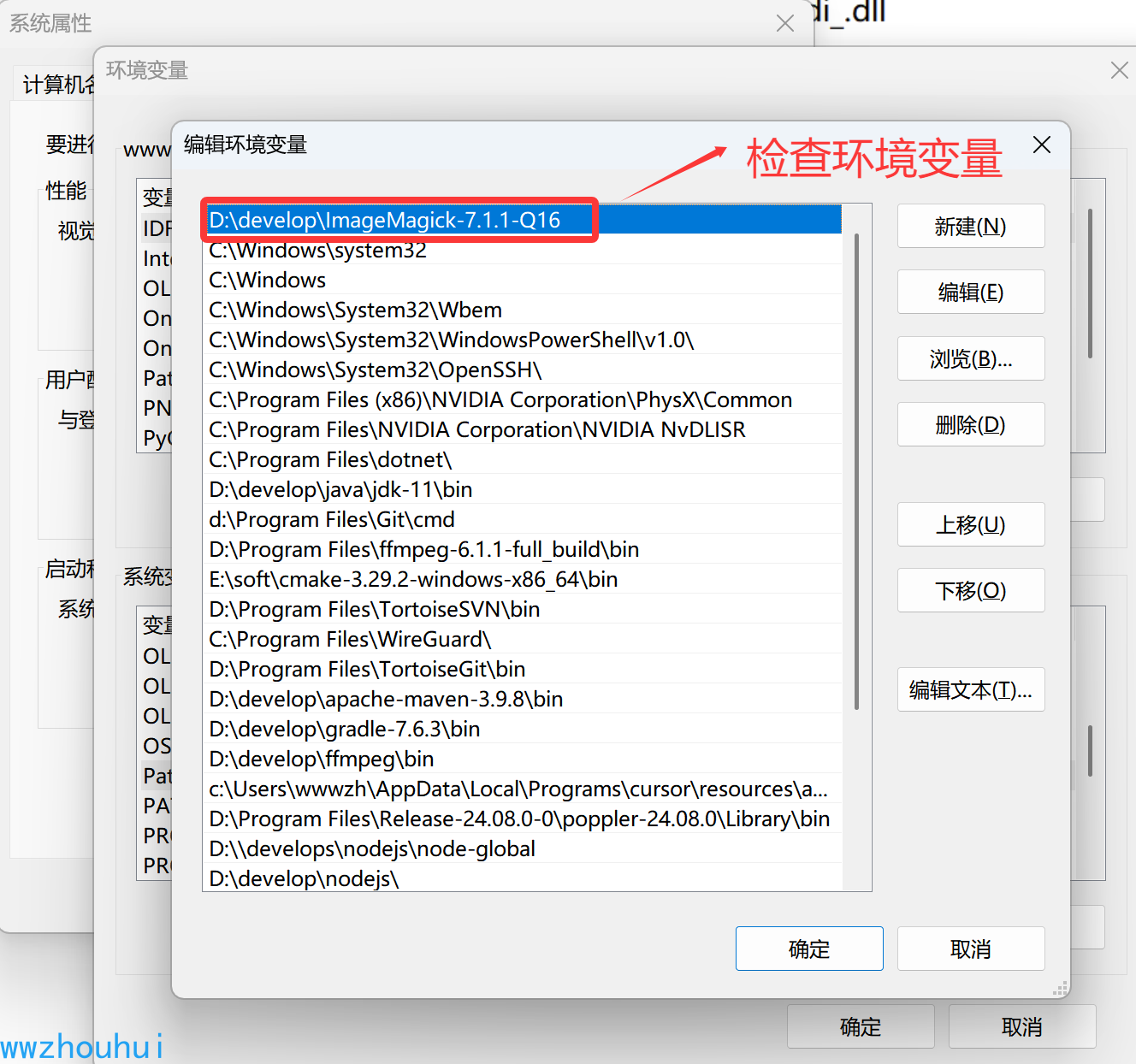
imagemagick_binary = D:\develop\ImageMagick-7.1.1-Q16\magick.exe
font_path = SimHei
# [Linux 用户配置]
# imagemagick_binary = /home/ImageMagick/magick
# font_path = /usr/share/fonts/truetype/wqy/wqy-zenhei.ttc
这个MCP 依赖包我们使用uv 管理所以pyproject.toml
dependencies = [
    "mcp[cli]>=1.9.4", # 添加requests依赖
    "requests>=2.31.0",
    "openai>=1.86.0",
    "cos-python-sdk-v5==1.9.33",
    "moviepy==1.0.3",
    "httpx",
]
ImageMagick
这个程序用到moviepy包,moviepy 是一个用于视频编辑的 Python 库,可处理视频剪辑、拼接、添加音频、特效等操作。它支持多种视频格式,提供了直观的 API,适合自动化视频处理任务。以下是其主要功能:
- 视频剪辑:切割、合并视频片段
- 音频处理:添加背景音乐、调整音量
- 特效添加:文字叠加、滤镜、转场效果
- 格式转换:支持 MP4、AVI、GIF 等格式
- 批处理:自动化处理多个视频文件
此外我们还用到ImageMagick 软件,这个需要我们在本地电脑上安装
在 windows 安装
下载地址 https://imagemagick.org/script/download.php#windows
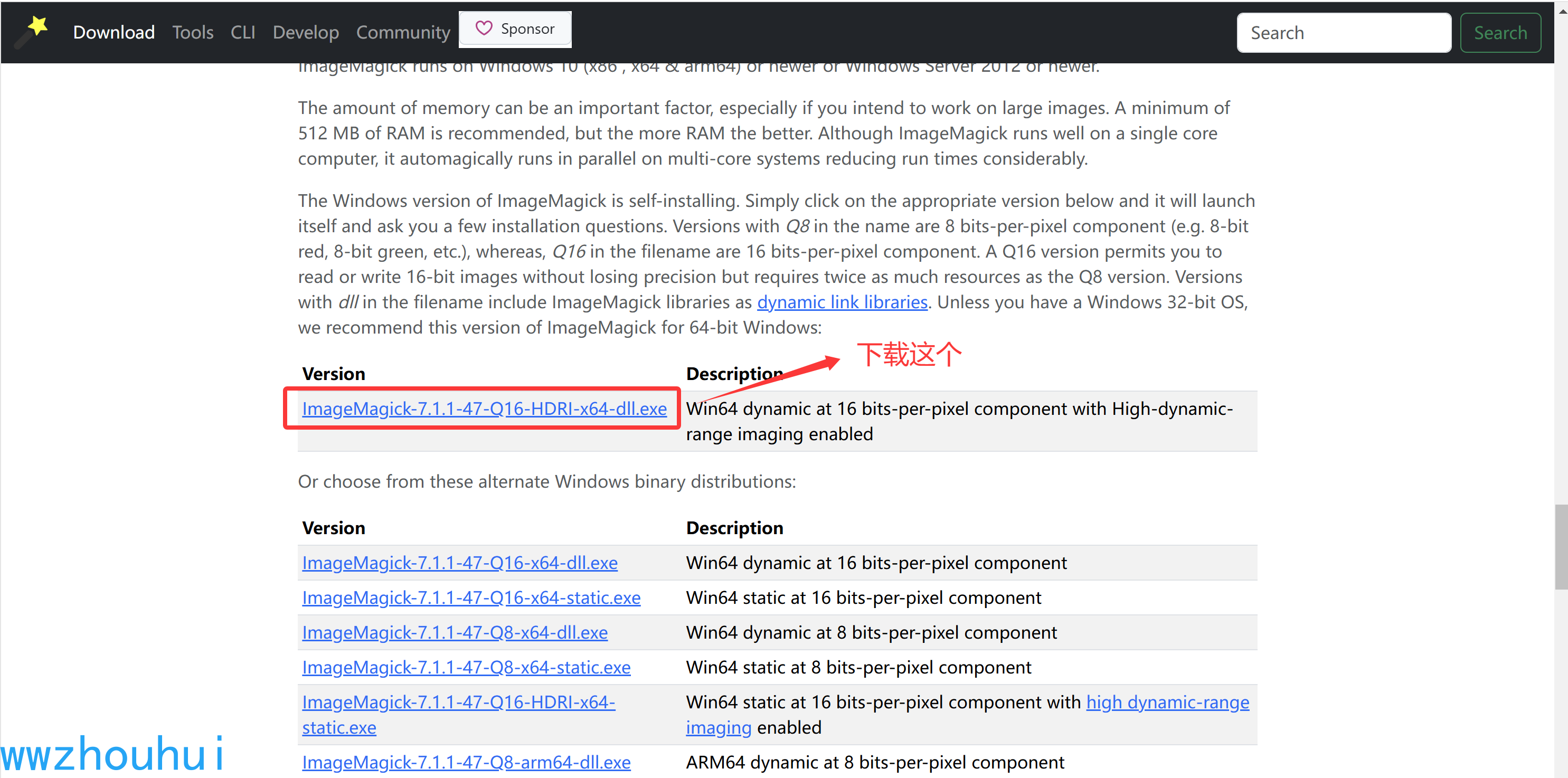
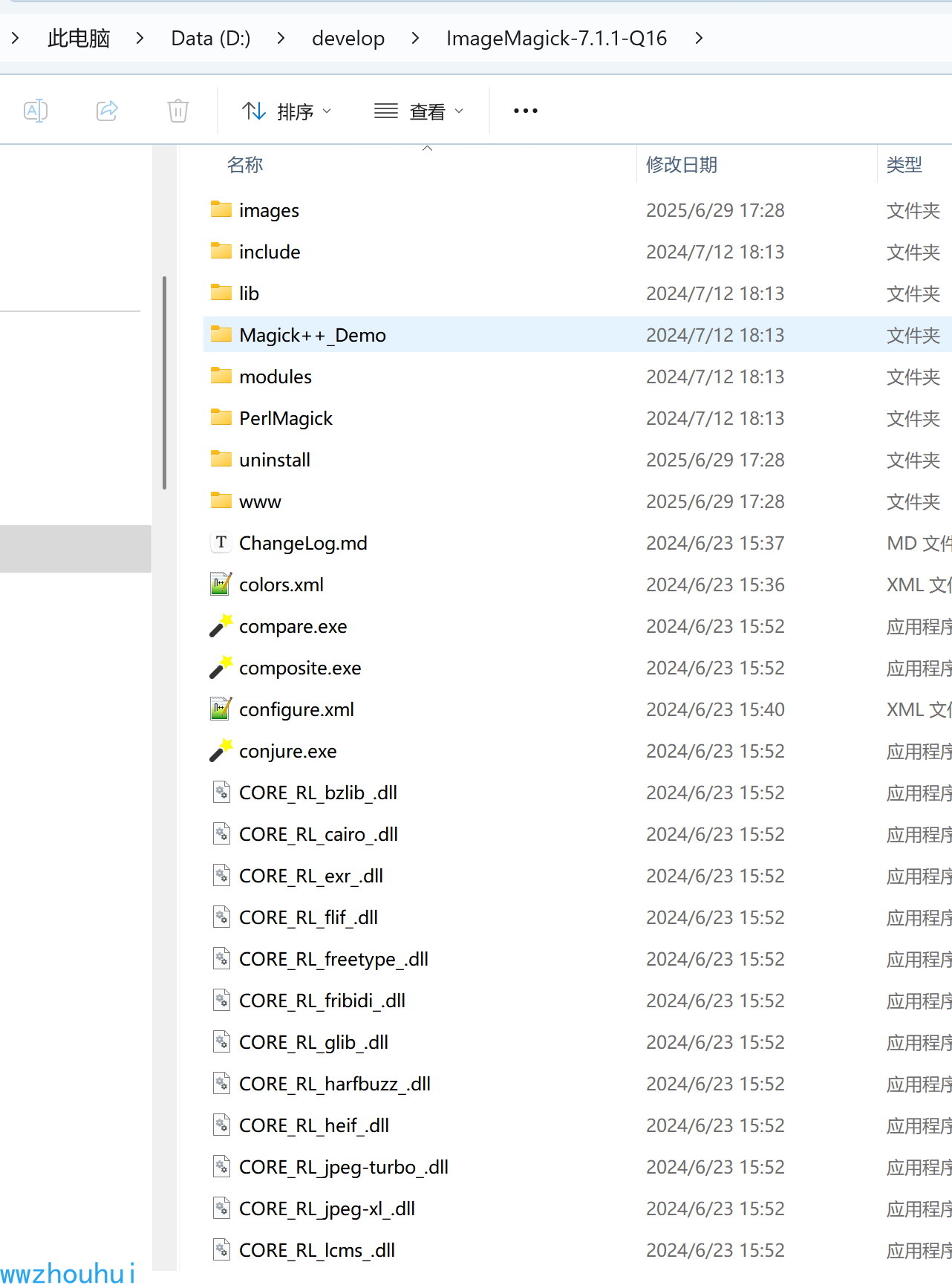
下载本地电脑上安装即可,我的电脑安装到D 盘
安装后我们需要设置或者检查一下环境变量是否设置成功
在linux 安装
下载地址
https://imagemagick.org/script/download.php
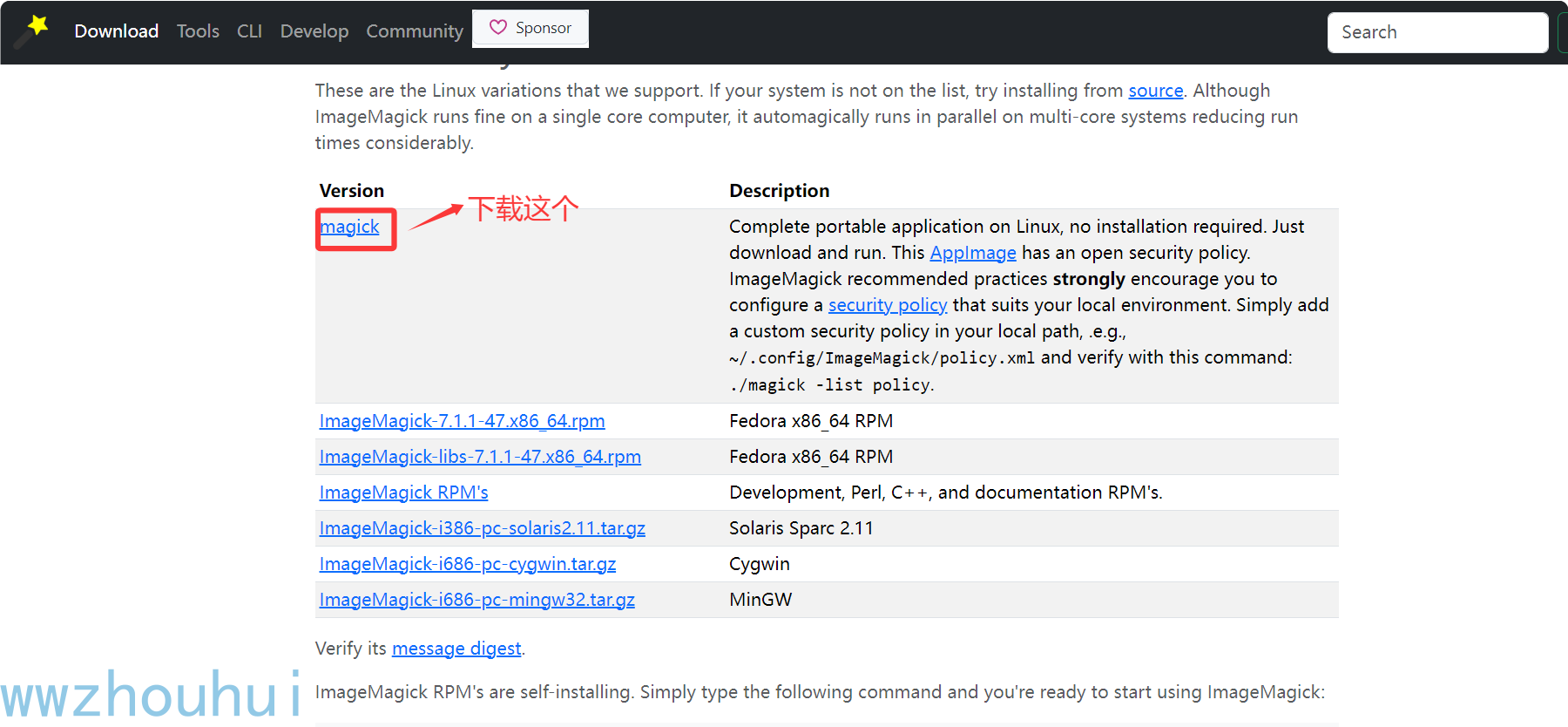
复制magick 文件到linux 服务器上。

然后给它授权
chmod 755 magick

启动
python3 zhongyao_mcp_server.py
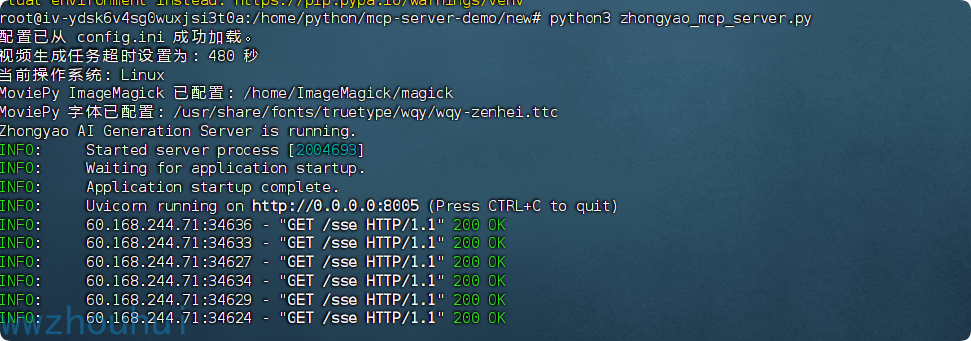
启动运行
我们使用开发工具 trae 或者Visual Studio Code 都是可以 启动程序
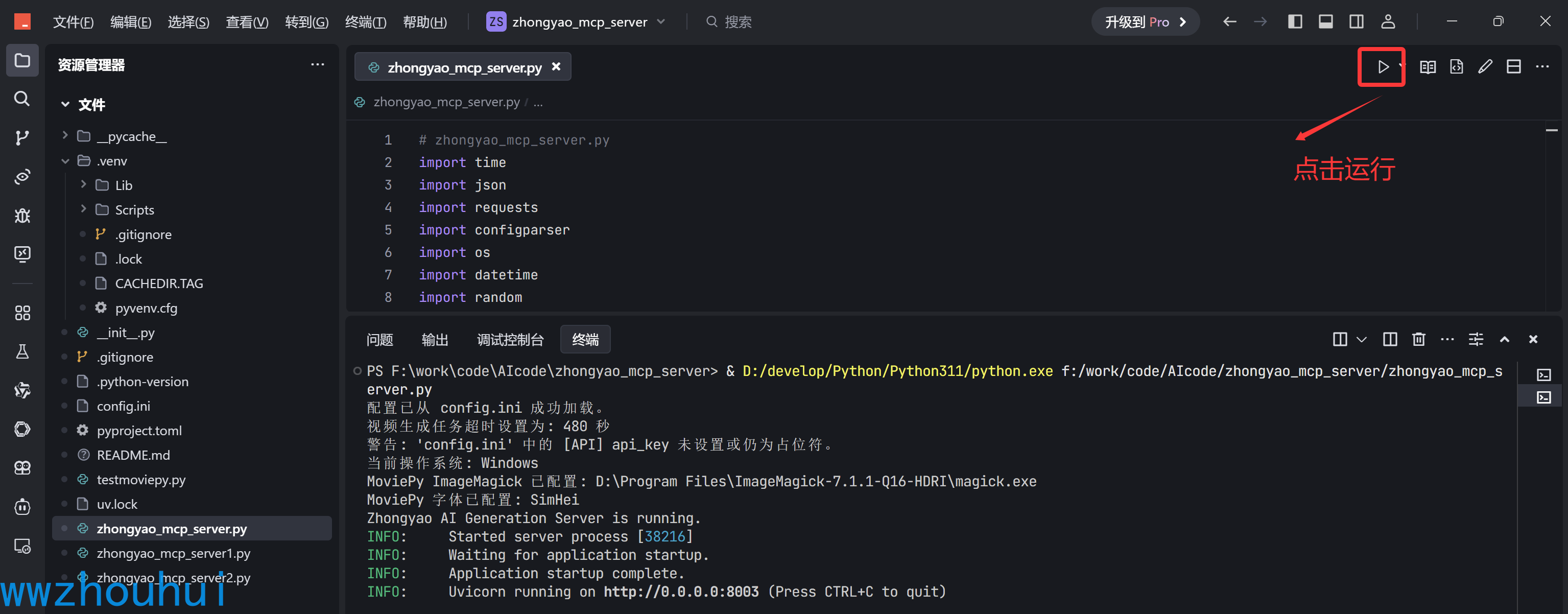
3.验证及测试
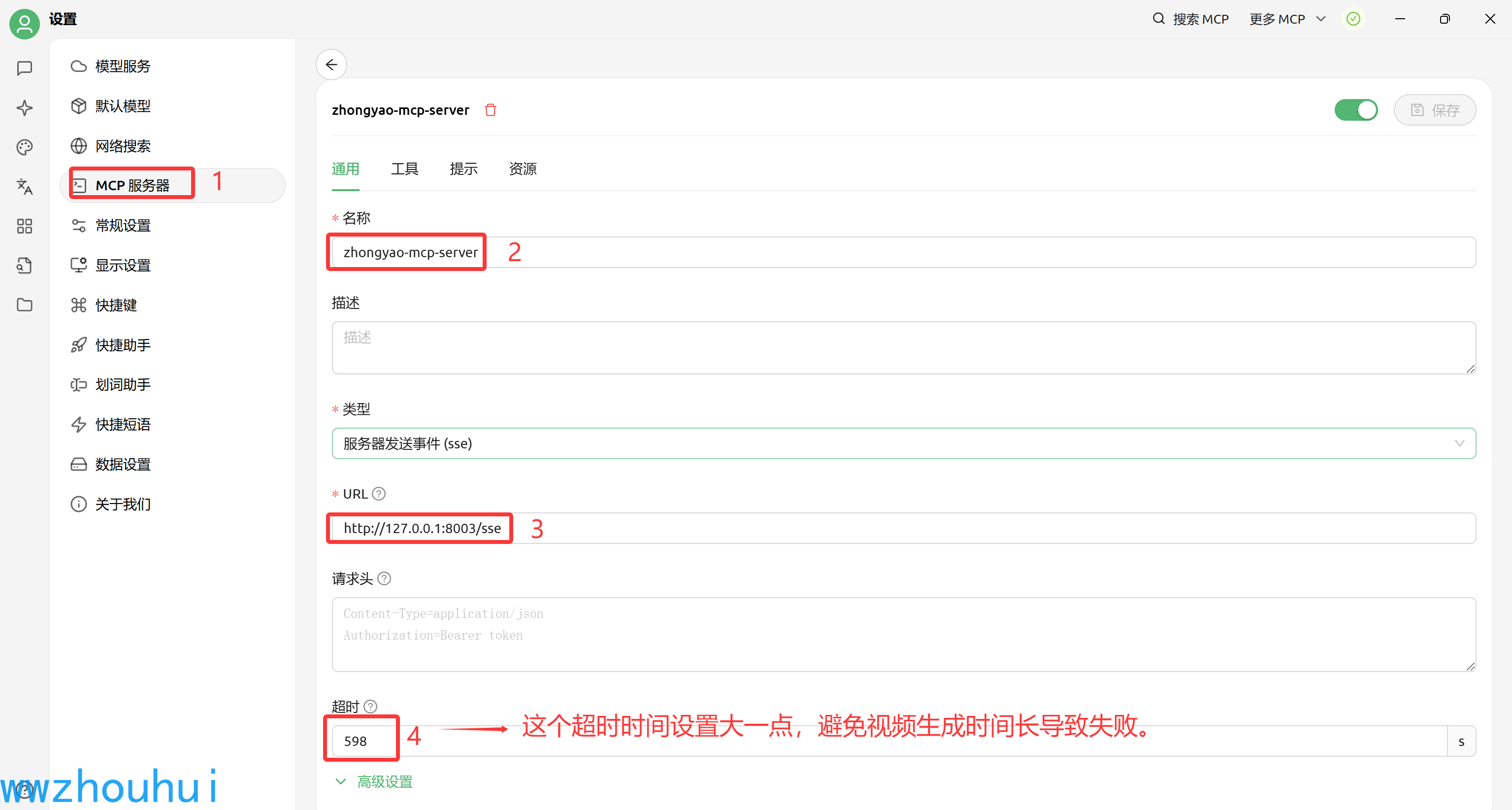
我们这里使用trae 启动,所以我们用Cherry Studio客户端做验证测试。
Cherry Studio 配置
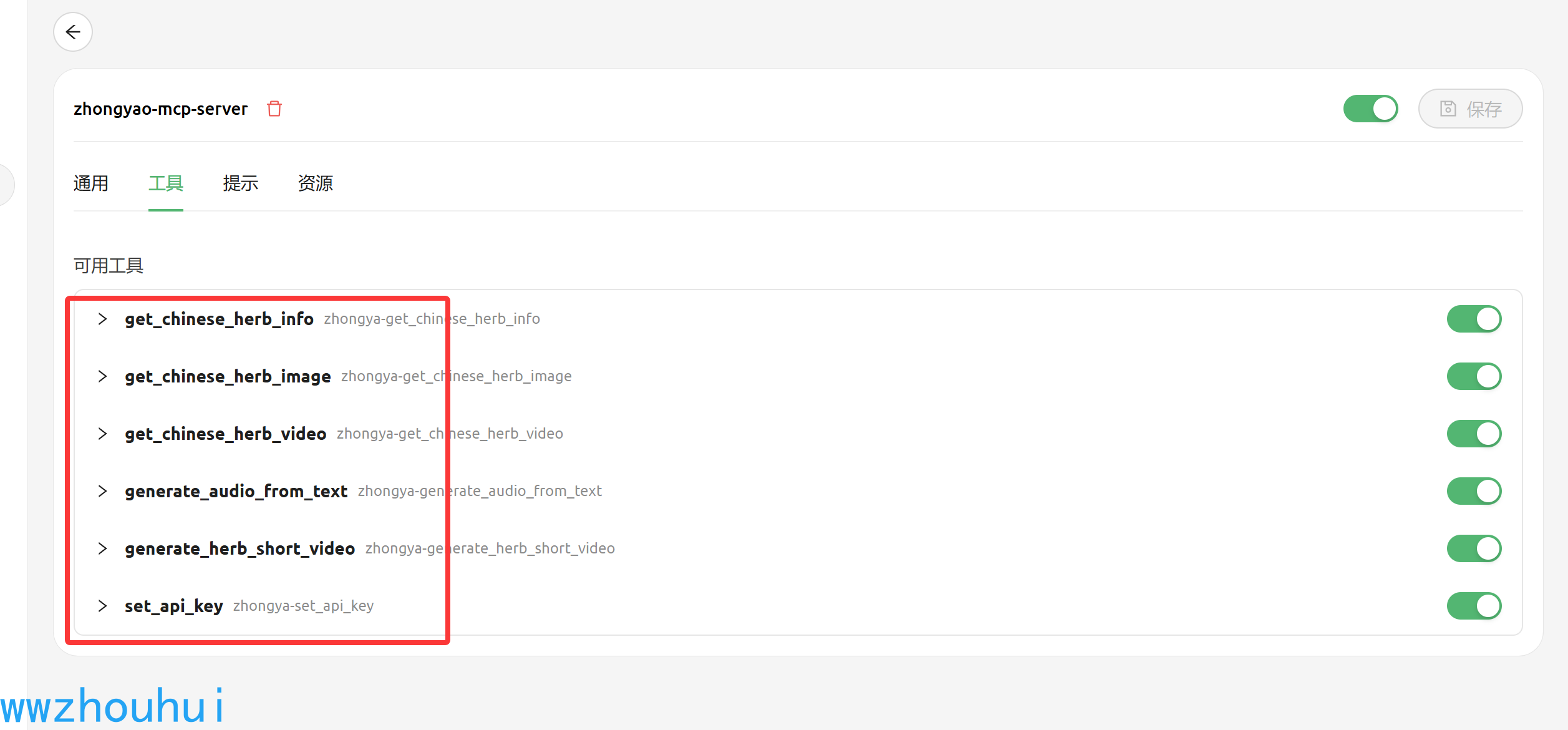
配置完成后我们可以在工具栏查看有6个工具可以调用的
Cherry Studio验证测试
我们在 Cherry Studio聊天窗口中输入 下面问题
请帮我生成一个 薄荷 中药带文字,语音,和视频的短视频,其中 api key ='719f1aec-xxxx-1fc26a95df73'
我们一步到位让它把API key设置好,后面让它自动完成中药短视频生成。
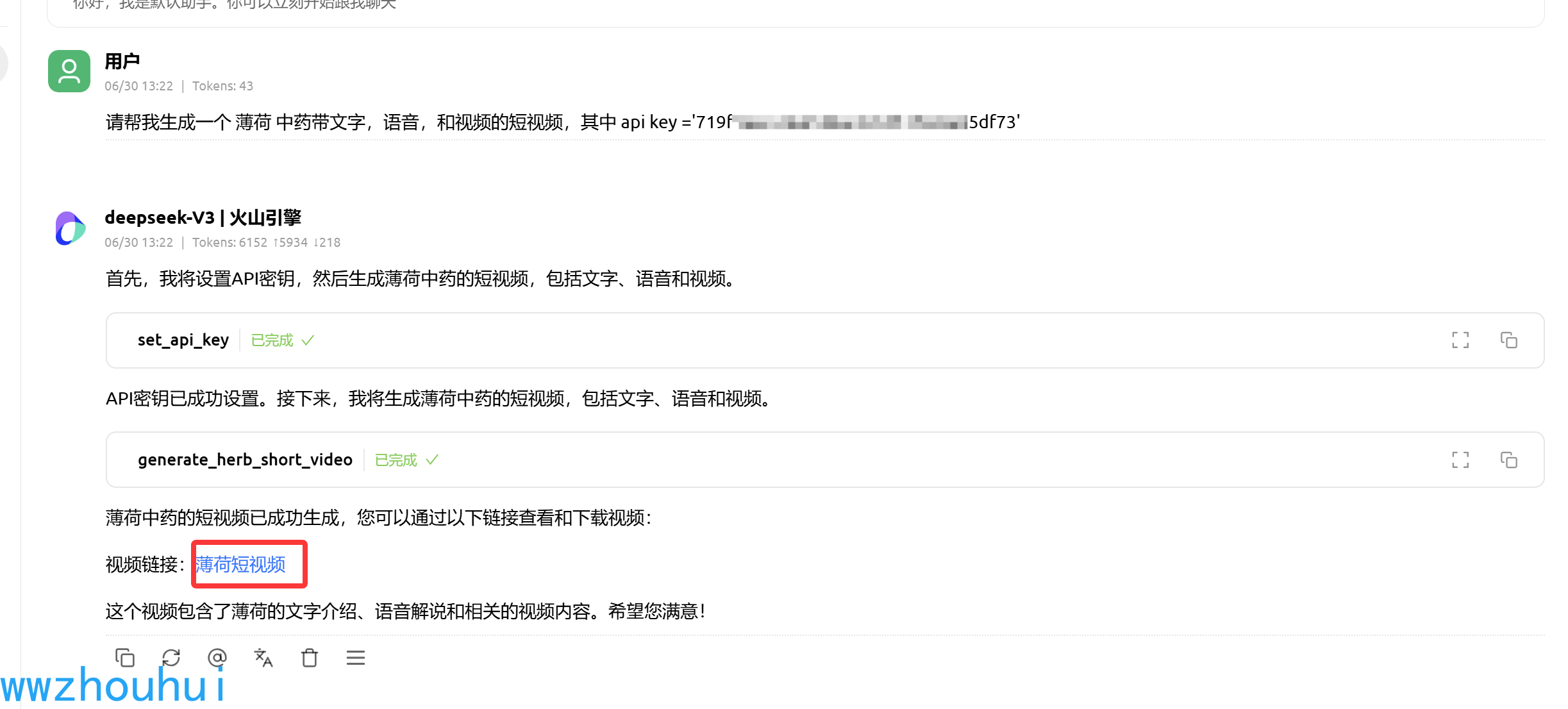
我们点击cherrry studio 生成的视频下载
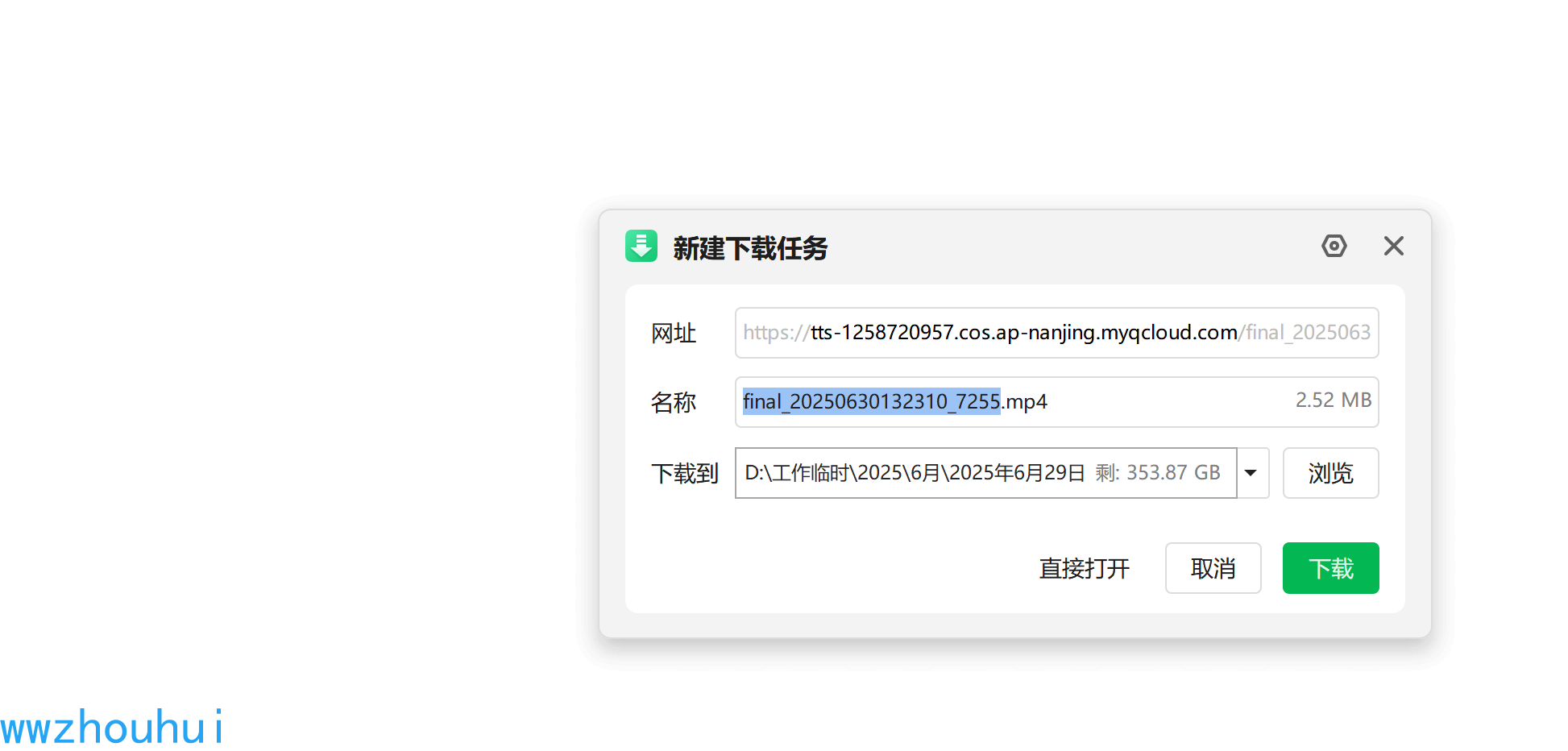
下载后打开视频
程序控制台也打印出视频合成的地址
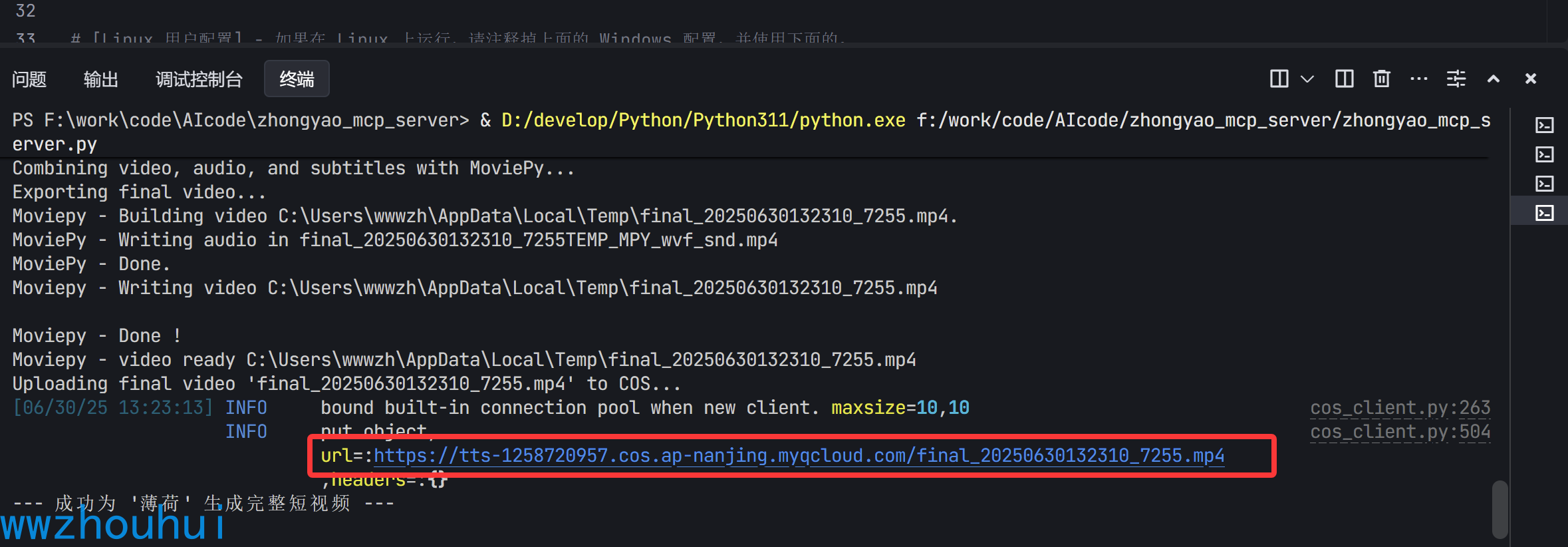
以上我们就完成了中药短视频的MCP 服务了,当然你也可以把这个打包改成studio的方式。关于studio 打包可以看我之前的文章
mcp-server案例分享-用豆包大模型 1.6 手搓文生图视频 MCP-server发布到PyPI官网
4.总结
今天主要带大家了解并实现了使用火山引擎相关模型制作中药短视频 MCP(模型上下文协议)服务的全流程。借助 MCP Server,我们解决了在中药信息展示方面数据分散、展示形式单一等问题,为用户提供了一种集文字、语音和视频于一体的直观、生动的中药科普方式。
我们详细介绍了如何开通火山引擎的 deepseek - v3 等模型,找到对应的 API 文档和文件,编写 MCP 代码,配置 config.ini 文件和 pyproject.toml 文件。同时,还说明了 moviepy 包和 ImageMagick 软件的作用及安装方法,包括在 Windows 和 Linux 系统上的安装步骤。另外,我们也展示了如何使用开发工具启动程序,以及如何利用 Cherry Studio 客户端进行验证测试。
通过本文的方案,开发者可以轻松搭建自己的中药短视频 MCP 服务,为中医药科普和推广添加强大的 AI 能力。感兴趣的小伙伴可以按照本文步骤去尝试制作自己的 MCP 服务,也可以将其打包改成 studio 的方式。今天的分享就到这里结束了,我们下一篇文章见。

火山引擎开发者社区是火山引擎打造的AI技术生态平台,聚焦Agent与大模型开发,提供豆包系列模型(图像/视频/视觉)、智能分析与会话工具,并配套评测集、动手实验室及行业案例库。社区通过技术沙龙、挑战赛等活动促进开发者成长,新用户可领50万Tokens权益,助力构建智能应用。
更多推荐
 20
20 0
0- 0


 已为社区贡献22条内容

所有评论(0)