[Harmony]弹窗在自动退出登录后不关闭的问题
摘要:文章探讨了在HarmonyOS开发中处理弹窗关闭问题的三种解决方案。1) 对于CustomDialog弹窗,建议在aboutToDisappear生命周期中手动关闭弹窗;2) 对于PromptAction弹窗,同样需要在aboutToDisappear中关闭,并保存ComponentContent引用;3) 通过设置levelMode为EMBEDDED可使弹窗随页面关闭,但需注意API15+
·
问题:弹窗的弹窗,在Socket推送退出登录,进入登录页面后,弹窗还没关闭。
示意图
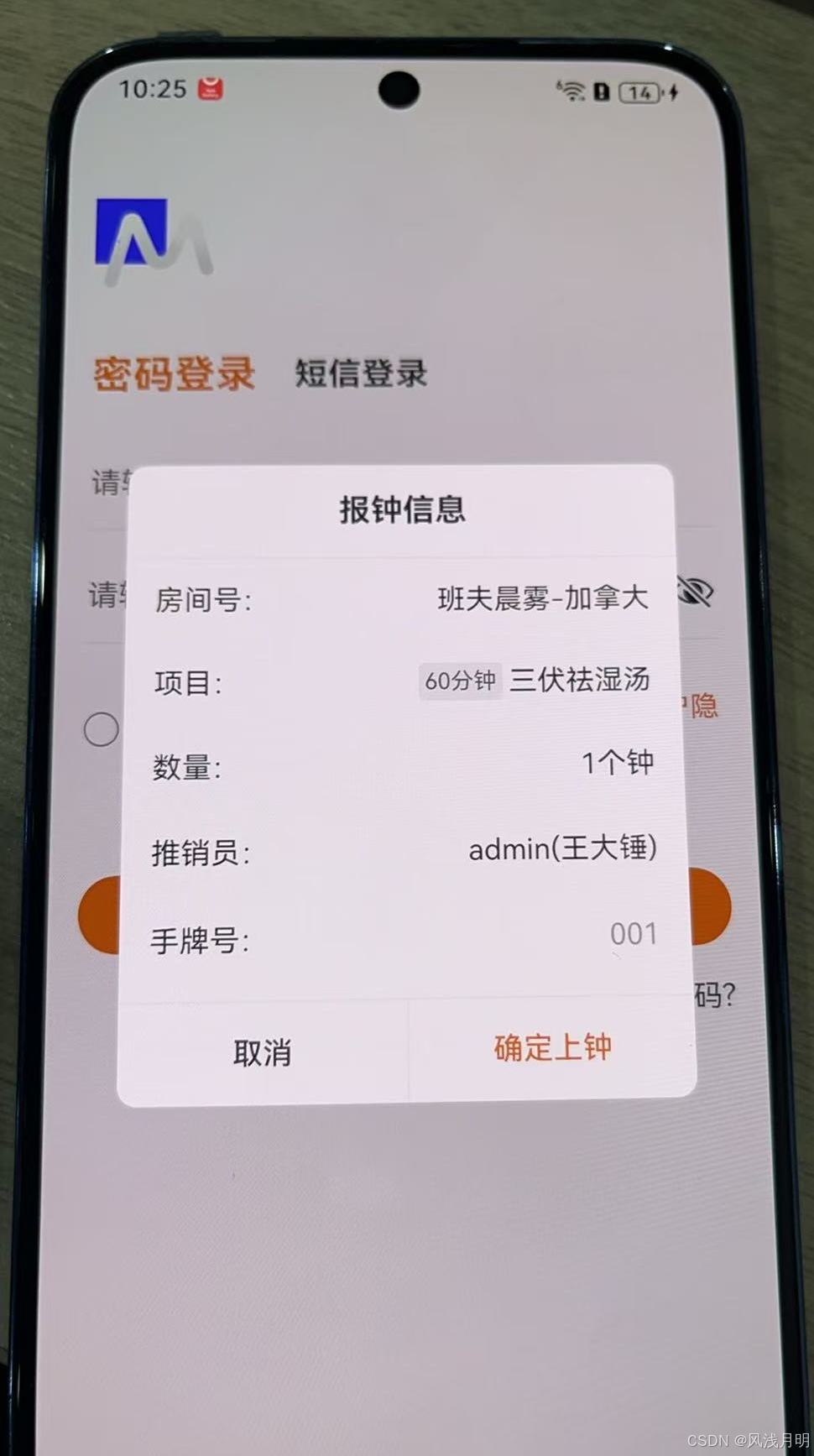
CustomDialog弹窗
离开强行关闭页面时,弹窗不关闭。
@Entry
@Component
struct MFAddConsumeView {

  // 清空购物车
  cleanCartAllData() {
    const dialogGWC: CustomDialogController = new CustomDialogController({
      builder: MFAlertDialog({ titleText: '提示', leftText: '取消', rightText: '确定', msgText: '是否要清空购物车?', resultBlock: (res) => {
        dialogGWC.close() // 通过外层controller关闭
        if (res == true) {
          this.cartListArr = []
        }
      }}),
      alignment: DialogAlignment.Center,
      customStyle: true,
      autoCancel: false,
    })
    dialogGWC.open()
  }

}
离开强行关闭页面时,aboutToDisappear中手动关闭弹窗。
@Entry
@Component
struct MFAddConsumeView {

  private dialogGWC?: CustomDialogController

  aboutToDisappear() {
    this.dialogGWC?.close()
  }

  // 清空购物车 const dialogGWC: CustomDialogController
  cleanCartAllData() {
    this.dialogGWC = new CustomDialogController({
      builder: MFAlertDialog({ titleText: '提示', leftText: '取消', rightText: '确定', msgText: '是否要清空购物车?', resultBlock: (res) => {
        this.dialogGWC?.close() // 通过外层controller关闭
        if (res == true) {
          this.cartListArr = []
        }
      }}),
      alignment: DialogAlignment.Center,
      customStyle: true,
      autoCancel: false,
    })
    this.dialogGWC?.open()
  }

}
PromptAction弹窗
离开强行关闭页面时,弹窗不关闭。
@Entry
@Component
struct MFRechargeMemberDetailsView {
  /// 点击去开卡
  tapGoOpenCard() {
    let ctx: UIContext = this.getUIContext();
    let contentQKKNode = new ComponentContent(ctx, wrapBuilder(MFRechargeSelectCardItemView), new MFRechargeSelectCardItemParams(this.uID, this.infoModel, () => {
      PromptUtils.closeDialog(ctx, contentQKKNode)
    }));
    PromptUtils.openDialog(ctx, contentQKKNode, { alignment: DialogAlignment.Bottom, autoCancel: true, offset: { dx: 0, dy: 0 } })
  }
}
离开强行关闭页面时,aboutToDisappear中手动关闭弹窗。
@Entry
@Component
struct MFRechargeMemberDetailsView {

  private contentQKKNode?: ComponentContent<Object>

  aboutToDisappear() {
    if (this.contentQKKNode != undefined) {
      PromptUtils.closeDialog(this.getUIContext(), this.contentQKKNode)
    }
  }

  /// 点击去开卡
  tapGoOpenCard() {
    let ctx: UIContext = this.getUIContext();
    this.contentQKKNode = new ComponentContent(ctx, wrapBuilder(MFRechargeSelectCardItemView), new MFRechargeSelectCardItemParams(this.uID, this.infoModel, () => {
      if (this.contentQKKNode != undefined) {
        PromptUtils.closeDialog(ctx, this.contentQKKNode)
      }
    }));
    if (this.contentQKKNode != undefined) {
      PromptUtils.openDialog(ctx, this.contentQKKNode, { alignment: DialogAlignment.Bottom, autoCancel: true, offset: { dx: 0, dy: 0 } })
    }
  }
}
另一种方式,通过levelMode属性控制。
但需要注意:PromptUtils.openDialog的levelMode: LevelMode.EMBEDDED这个API 15以上才有,低版本使用会闪退。
@Entry
@Component
struct MFRechargeMemberDetailsView {
  /// 点击去开卡
  tapGoOpenCard() {
    let ctx: UIContext = this.getUIContext();
    let contentQKKNode = new ComponentContent(ctx, wrapBuilder(MFRechargeSelectCardItemView), new MFRechargeSelectCardItemParams(this.uID, this.infoModel, () => {
      PromptUtils.closeDialog(ctx, contentQKKNode)
    }));
    PromptUtils.openDialog(ctx, contentQKKNode, { alignment: DialogAlignment.Bottom, autoCancel: true, levelMode: LevelMode.EMBEDDED, offset: { dx: 0, dy: 0 } })
  }
}

export enum LevelMode {
  OVERLAY = 0, // 显示在所有页面级别之上
  EMBEDDED = 1 // 显示在当前页面内
}
工具
import { BusinessError } from '@kit.BasicServicesKit';
import { ComponentContent, promptAction } from '@kit.ArkUI';
import { UIContext } from '@ohos.arkui.UIContext';

/**
 * 自定义弹窗操作工具类 语法糖
 * 提供弹窗的打开、关闭和更新功能,基于ArkUI的promptAction模块实现
 */
export class PromptUtils {

  /**
   * 打开自定义弹窗
   * 需要先设置context,contentNode,options
   */
  static openDialog(context: UIContext, contentNode: ComponentContent<Object>, options: promptAction.BaseDialogOptions) {
    if (contentNode === null) { return }
    context.getPromptAction().openCustomDialog(contentNode, options)
      .then(() => {
        console.info('OpenCustomDialog complete.')
      })
      .catch((error: BusinessError) => {
        // 错误处理,输出错误码和消息
        let message = (error as BusinessError).message;
        let code = (error as BusinessError).code;
        console.error(`OpenCustomDialog args error code is ${code}, message is ${message}`);
      })
  }

  /**
   * 关闭当前弹窗
   */
  static closeDialog(context: UIContext, contentNode: ComponentContent<Object>) {
    if (contentNode === null) { return }
    context.getPromptAction().closeCustomDialog(contentNode)
      .then(() => {
        console.info('CloseCustomDialog complete.')
      })
      .catch((error: BusinessError) => {
        let message = (error as BusinessError).message;
        let code = (error as BusinessError).code;
        console.error(`CloseCustomDialog args error code is ${code}, message is ${message}`);
      })
  }

  /**
   * 更新弹窗配置
   * @param options - 新的弹窗配置选项
   */
  static updateDialog(context: UIContext, contentNode: ComponentContent<Object>, options: promptAction.BaseDialogOptions) {
    if (contentNode === null) { return }
    context.getPromptAction().updateCustomDialog(contentNode,options)
      .then(() => {
        console.info('UpdateCustomDialog complete.')
      })
      .catch((error: BusinessError) => {
        let message = (error as BusinessError).message;
        let code = (error as BusinessError).code;
        console.error(`UpdateCustomDialog args error code is ${code}, message is ${message}`);
      })
  }
}

中国智能体开发者社区,聚焦智能体与大模型开发,提供前沿资讯、实用工具链、开源项目及行业案例。通过技术沙龙、开发者大赛等活动,促进经验交流与协作,助力开发者快速构建创新智能应用。
更多推荐
 7
7 0
0- 0


 已为社区贡献1条内容

所有评论(0)