vllm v1代码略读-总体框架
vllm v1代码梳理
对vllm v1的代码做了一个阅读的笔记。这篇就是一个总体框架的概览。
1. 总体框架
vllm给用户提供了同步推理(一般用于离线)LLM和异步推理(一般用于在线)AsyncLLM两种模式。从一个简单的离线推理案例开始。
from vllm import LLM, SamplingParams

model_path = "facebook/opt-125m"

# 创建 LLM 对象
llm = LLM(model=model_path)

# 定义 sampling 参数,例如 temperature, top_p 等
sampling_params = SamplingParams(
    temperature=0.8,
    top_p=0.95,
    max_tokens=128,
)

prompts = [
    "What is the capital of France?",
    "Explain the theory of relativity in simple terms.",
]

outputs = llm.generate(prompts, sampling_params)

for i, output in enumerate(outputs):
    print(f"Prompt {i}: {prompts[i]}")
    print(f"Generated: {output.outputs[0].text.strip()}")
    print("-" * 40)
首先,创建一个LLM对象,设置sample参数,然后直接调用LLM的generate函数进行推理,最终输出结果如下:
Prompt 0: What is the capital of France?
Generated: Haiti
----------------------------------------
Prompt 1: Explain the theory of relativity in simple terms.
Generated: It seems to me that the perception of the externalities of matter and the observer's perception of the externalities of matter are based on something much more fundamental. The externalities of matter have already changed, and they are only part of the matter. They are the particles of matter themselves, and cannot be produced by a single force or a single particle. They may or may not be produced by force alone.
What if we did not need the laws of physics to explain our perception of the externalities of matter and the observer's perception of the externalities of matter? This is the concept that physicist Stephen Hawking thought was required to explain
----------------------------------------
1.1 整体框架
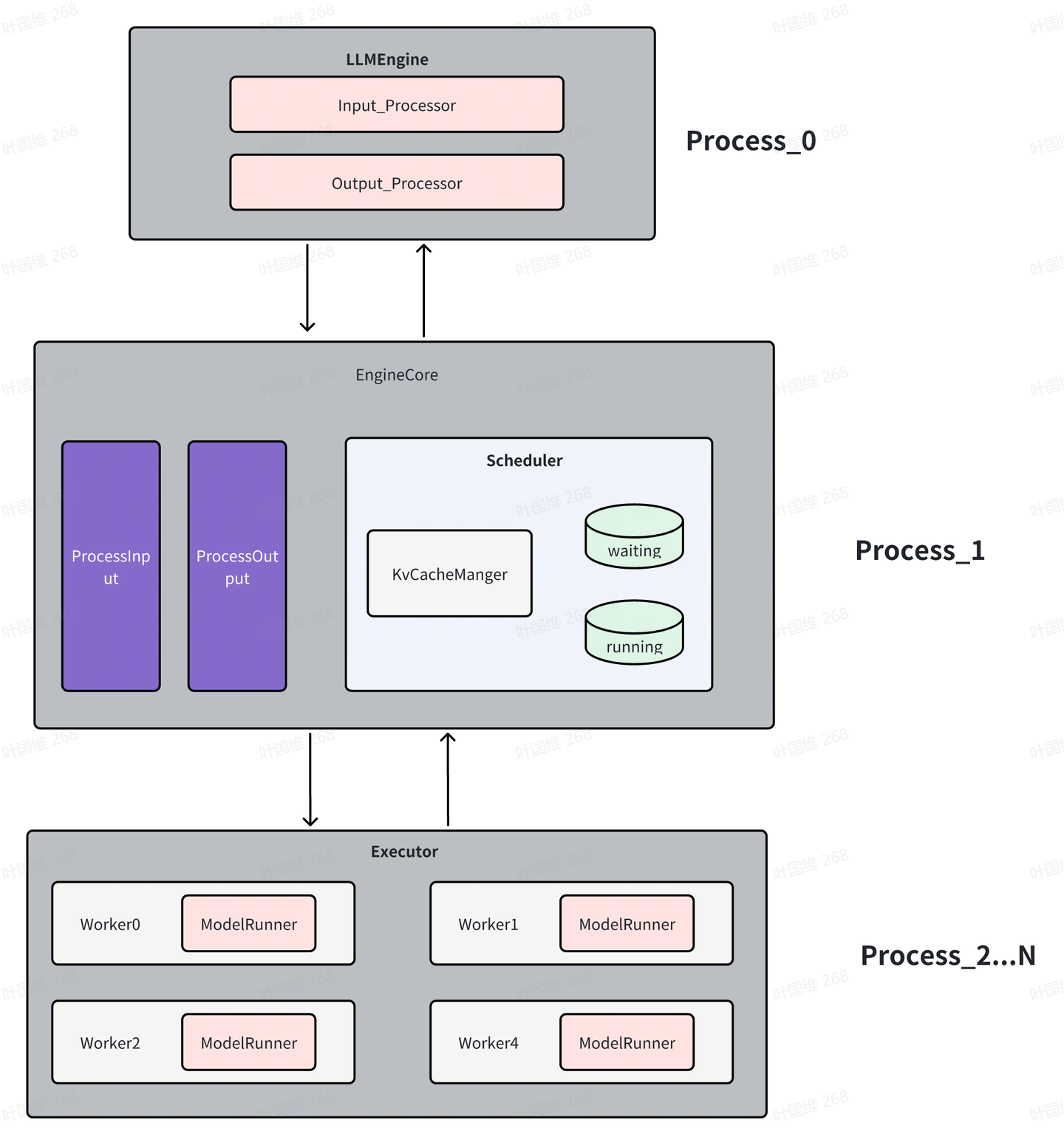
总体看,分三大模块
- LLMEngine:这是一个前台进程,负责将用户输入的promt解码转成EngineCore所需要的输入;同时也将EngineCore产生的输出结果转成token,简单的说该进程的主要任务就是完成tokenlizer和detokenlizer。
- EngineCore:这是vllm的核心引擎模块,也是一个进程,核心完成各个请求的调度,有两个队列,waiting队列是当前等待做prefill的请求,running队列中的是正在做decode的请求;其中KvCacheManager完成对kv cache的管理;这部分是与后端硬件不相关的。
- Executor:模型执行器,在tp并行的情况下,每个gpu都是一个worker,每个worker里都有一个ModelRunner,ModelRunner负责模型的加载和执行,同时每个worker都是一个进程。在没有tp并行的时候,只有一个worker,此时,这个worker不会单独作为一个进程,会在EngineCore进程中。如果要做vllm新的后端的适配,重点也就在于这块。有些由于硬件特殊性,可能kv cache管理和调度也会需要修改适配。
1.2 工作流
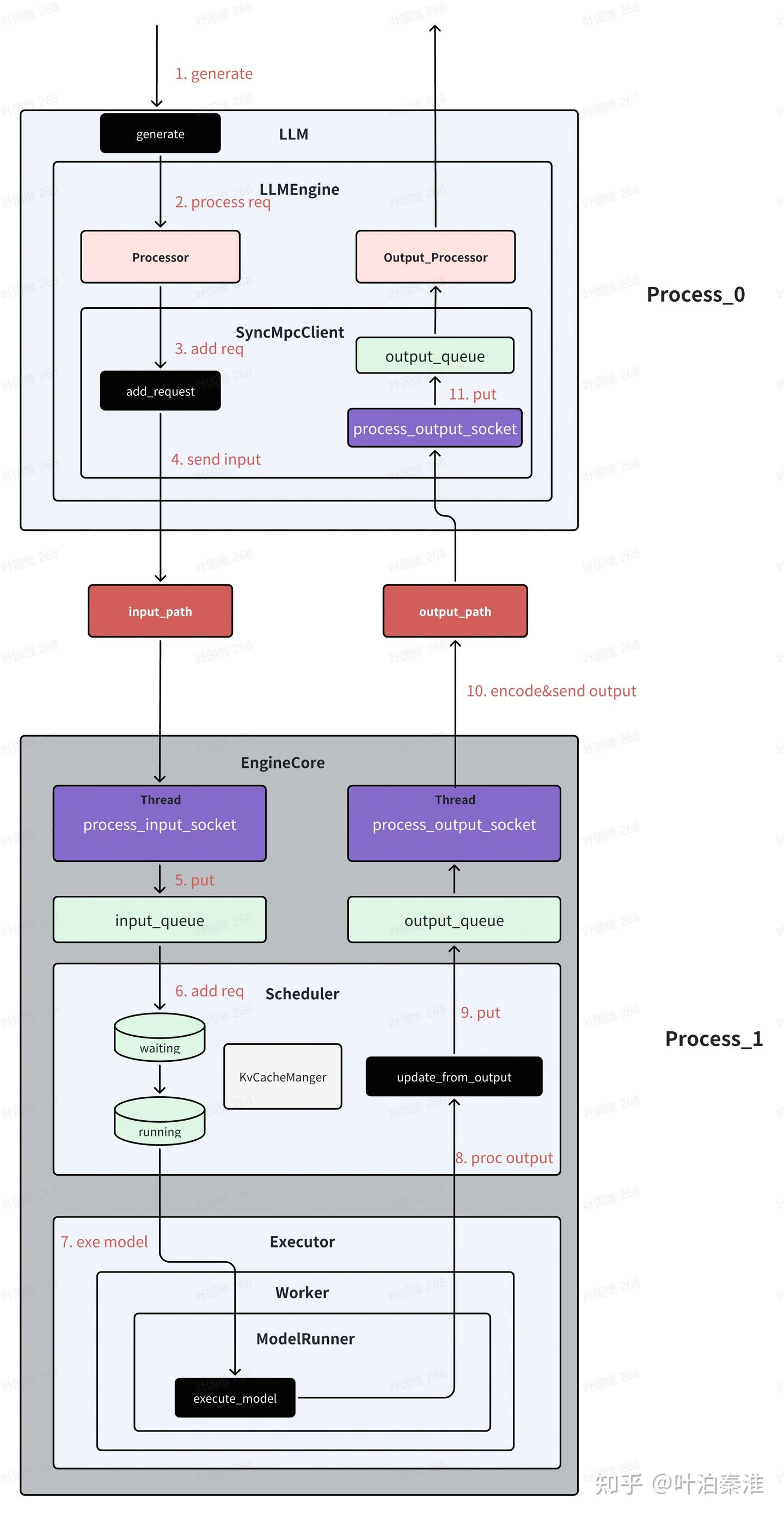
大致了解了总体框架后,我们再来看数据工作流的情况,以上面例子为例,一条请求到来后系统是如何工作的。这里以单gpu为例。(引用图片)
(1)generate
class LLM:
    @deprecate_kwargs(
        "prompt_token_ids",
        is_deprecated=lambda: LLM.DEPRECATE_LEGACY,
        additional_message="Please use the 'prompts' parameter instead.",
    )
    def generate(
        self,
        prompts: Union[Union[PromptType, Sequence[PromptType]],
                       Optional[Union[str, list[str]]]] = None,
        sampling_params: Optional[Union[SamplingParams,
                                        Sequence[SamplingParams]]] = None,
        prompt_token_ids: Optional[Union[list[int], list[list[int]]]] = None,
        use_tqdm: bool = True,
        lora_request: Optional[Union[list[LoRARequest], LoRARequest]] = None,
        prompt_adapter_request: Optional[PromptAdapterRequest] = None,
        guided_options_request: Optional[Union[LLMGuidedOptions,
                                               GuidedDecodingRequest]] = None,
        priority: Optional[list[int]] = None,
    ) -> list[RequestOutput]:
        ......

        self._validate_and_add_requests(
            prompts=parsed_prompts,
            params=sampling_params,
            lora_request=lora_request,
            prompt_adapter_request=prompt_adapter_request,
            guided_options=guided_options_request,
            priority=priority)

        outputs = self._run_engine(use_tqdm=use_tqdm)
        return self.engine_class.validate_outputs(outputs, RequestOutput)
主要两个函数,_validate_and_add_requests完成输入信息处理,_run_engine函数内部实现各个step的调度,每一次step产生一次调度和模型的执行。
(2)process req
class LLMEngine:
    def add_request(
        self,
        request_id: str,
        prompt: PromptType,
        params: Union[SamplingParams, PoolingParams],
        arrival_time: Optional[float] = None,
        lora_request: Optional[LoRARequest] = None,
        trace_headers: Optional[Mapping[str, str]] = None,
        prompt_adapter_request: Optional[PromptAdapterRequest] = None,
        priority: int = 0,
    ) -> None:
        # Process raw inputs into the request.
        request = self.processor.process_inputs(request_id, prompt, params,
                                                arrival_time, lora_request,
                                                trace_headers,
                                                prompt_adapter_request,
                                                priority)

        n = params.n if isinstance(params, SamplingParams) else 1

        if n == 1:
            # Make a new RequestState and queue.
            self.output_processor.add_request(request, None, 0)
            # Add the request to EngineCore.
            self.engine_core.add_request(request)
            return
process_inputs对输入prompt转成token id,构建request
(3)send input
class SyncMPClient(MPClient):
    def _send_input(self, request_type: EngineCoreRequestType, request: Any):
        # (Identity, RequestType, SerializedRequest)
        msg = (self.core_engine.identity, request_type.value,
               *self.encoder.encode(request))
        self.input_socket.send_multipart(msg, copy=False)

    def call_utility(self, method: str, *args) -> Any:
        call_id = uuid.uuid1().int >> 64
        future: Future[Any] = Future()
        self.utility_results[call_id] = future
        self._send_input(EngineCoreRequestType.UTILITY,
                         (call_id, method, args))

        return future.result()

    def add_request(self, request: EngineCoreRequest) -> None:
        # NOTE: text prompt is not needed in the core engine as it has been
        # tokenized.
        request.prompt = None
        self._send_input(EngineCoreRequestType.ADD, request)
add_request将输入encode之后,通过zmq进程间通信发送到EngineCore进程
(4)recv req
class EngineCoreProc(EngineCore):
    """ZMQ-wrapper for running EngineCore in background process."""

    def __init__(
        self,
        input_path: str,
        output_path: str,
        vllm_config: VllmConfig,
        executor_class: type[Executor],
        log_stats: bool,
        engine_index: int = 0,
    ):
        ...

        # Background Threads and Queues for IO. These enable us to
        # overlap ZMQ socket IO with GPU since they release the GIL,
        # and to overlap some serialization/deserialization with the
        # model forward pass.
        # Threads handle Socket <-> Queues and core_busy_loop uses Queue.
        self.input_queue: queue.Queue[tuple[EngineCoreRequestType,
                                            Any]] = queue.Queue()
        self.output_queue: queue.Queue[EngineCoreOutputs] = queue.Queue()
        threading.Thread(target=self.process_input_socket,
                         args=(input_path, engine_index),
                         daemon=True).start()
        threading.Thread(target=self.process_output_socket,
                         args=(output_path, engine_index),
                         daemon=True).start()
EngineCore会创建两个线程,process_input_socket和process_output_socket,process_input_socket线程负责接收来自LLM进程的输入请求,然后将其加入该进程的input_queue队列;线程process_output_socket负责将output_queue中的结果通过zmq发送到LLM进程;
(5)schedule
EngineCore进程中的主线程主要做两件事:将input_queue中的请求加入scheduler的waiting队列,等待做prefill;调用Scheduler的调度函数进行调度各个请求,调度里就会涉及到请求的kv cache申请和释放;
class EngineCoreProc(EngineCore):
    ...
    def run_busy_loop(self):
        """Core busy loop of the EngineCore."""

        # Loop until process is sent a SIGINT or SIGTERM
        while True:
            # 1) Poll the input queue until there is work to do.
            self._process_input_queue()
            # 2) Step the engine core and return the outputs.
            self._process_engine_step()
_process_input_queue里读取input_queue中的request,然后将request加到sheduler的waiting队列。
_process_engine_step里完成核心的step,然后将结果加入output_queue队列。
class EngineCore:
    def step(self) -> EngineCoreOutputs:
        """Schedule, execute, and make output."""

        # Check for any requests remaining in the scheduler - unfinished,
        # or finished and not yet removed from the batch.
        if not self.scheduler.has_requests():
            return EngineCoreOutputs(
                outputs=[],
                scheduler_stats=self.scheduler.make_stats(),
            )
        scheduler_output = self.scheduler.schedule()
        output = self.model_executor.execute_model(scheduler_output)
        engine_core_outputs = self.scheduler.update_from_output(
            scheduler_output, output)  # type: ignore

        return engine_core_outputs
从代码可以看出,每次step完成三个操作,调度所有请求,通过模型执行器执行所有调度的请求,返回执行结果,根据输出结果更新信息后返回。
(6)send output
EngineCore进程中的线程process_output_socket,它负责将output_queue中的结果通过zmq发送到LLM进程
class EngineCoreProc(EngineCore):
    ...
    def process_output_socket(self, output_path: str, engine_index: int):
        """Output socket IO thread."""

        # Msgpack serialization encoding.
        encoder = MsgpackEncoder()
        # Reuse send buffer.
        buffer = bytearray()

        with zmq_socket_ctx(output_path, zmq.constants.PUSH) as socket:
            while True:
                outputs = self.output_queue.get()
                outputs.engine_index = engine_index
                buffers = encoder.encode_into(outputs, buffer)
                socket.send_multipart(buffers, copy=False)
(7) LLM receive output
LLM进程中也有一个process_output_socket线程,负责接收来自EngineCore进程的输出信息,将其加入output_queue队列
class SyncMPClient(MPClient):
    """Synchronous client for multi-proc EngineCore."""

    def __init__(self, vllm_config: VllmConfig, executor_class: type[Executor],
                 log_stats: bool):
        .....

        def process_outputs_socket():
            shutdown_socket = ctx.socket(zmq.PAIR)
            out_socket = make_zmq_socket(ctx, output_path, zmq.constants.PULL)
            try:
                shutdown_socket.bind(shutdown_path)
                poller = zmq.Poller()
                poller.register(shutdown_socket)
                poller.register(out_socket)
                while True:
                    socks = poller.poll()
                    if not socks:
                        continue
                    if len(socks) == 2 or socks[0][0] == shutdown_socket:
                        # shutdown signal, exit thread.
                        break

                    frames = out_socket.recv_multipart(copy=False)
                    outputs = decoder.decode(frames)
                    if outputs.utility_output:
                        _process_utility_output(outputs.utility_output,
                                                utility_results)
                    else:
                        outputs_queue.put_nowait(outputs)
            finally:
                # Close sockets.
                shutdown_socket.close(linger=0)
                out_socket.close(linger=0)

        # Process outputs from engine in separate thread.
        self.output_queue_thread = Thread(target=process_outputs_socket,
                                          name="EngineCoreOutputQueueThread",
                                          daemon=True)
        self.output_queue_thread.start()
(8)output proc
LLM进程的主线程会从output_queue读取输出信息,经过Ouput_Processor处理(主要就是detokenlize),获得最终的输出字符。
def step(self) -> list[RequestOutput]:
    ...

    # 1) Get EngineCoreOutput from the EngineCore.
    outputs = self.engine_core.get_output()

    # 2) Process EngineCoreOutputs.
    processed_outputs = self.output_processor.process_outputs(
        outputs.outputs)

    # 3) Abort any reqs that finished due to stop strings.
    self.engine_core.abort_requests(processed_outputs.reqs_to_abort)

    return processed_outputs.request_outputs
这里的get_output就是从上述的output_queue队列取任务
class SyncMPClient(MPClient):
    ...
    def get_output(self) -> EngineCoreOutputs:
        return self.outputs_queue.get()
1.3 异步工作流
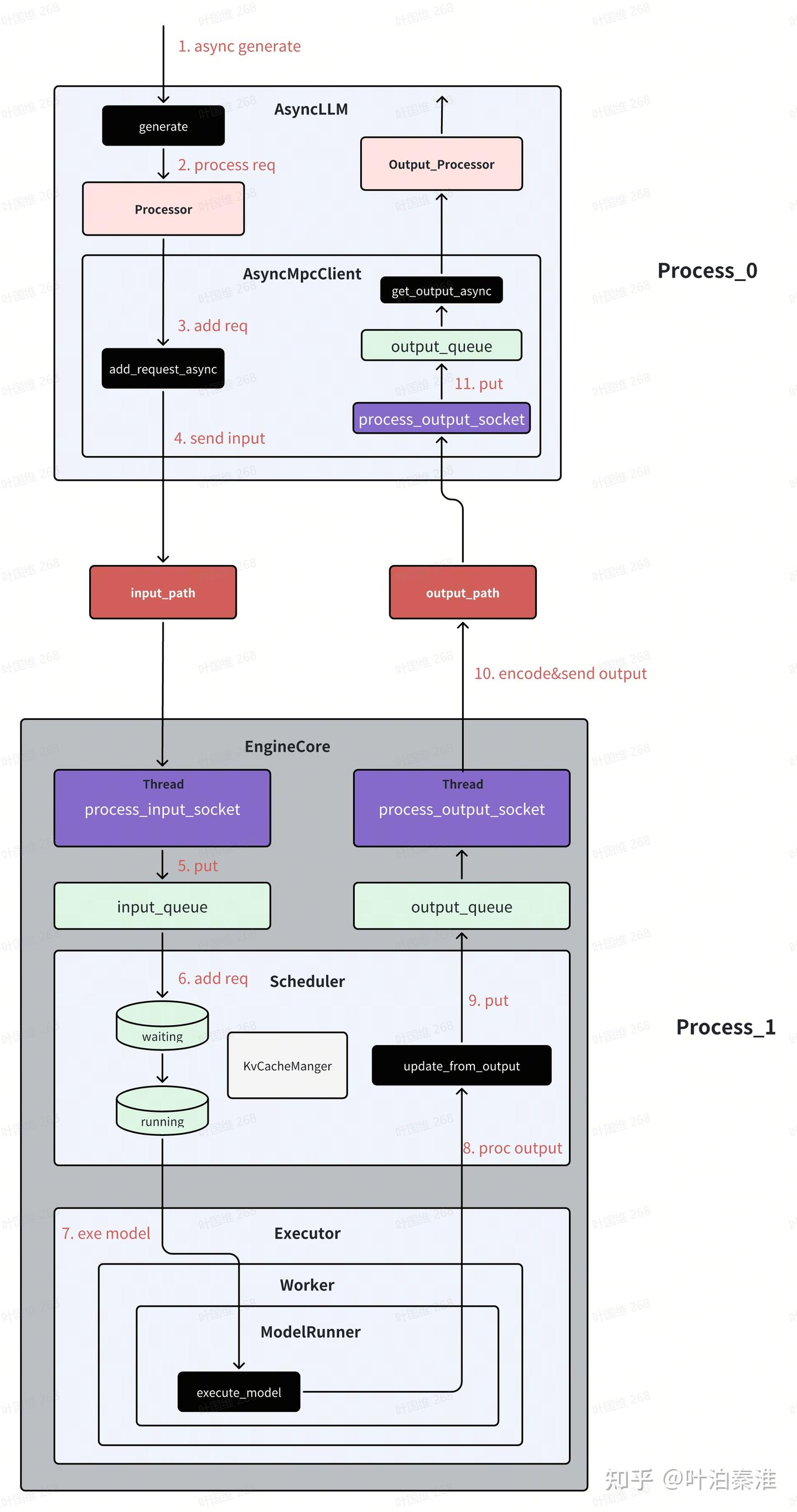
vllm除了支持离线推理外,更多的还是用于在线推理服务,在线推理服务默认使用的是异步模式。
异步模式跟同步模式的主要区别在于LLM进程,EngineCore进程两种模式下都是一样的。vllm在创建LLM前端EngineCoreClient的时候,会根据不同的配置创建不同的Client。
class EngineCoreClient(ABC):
    """
    EngineCoreClient: subclasses handle different methods for pushing
        and pulling from the EngineCore for asyncio / multiprocessing.

    Subclasses:
    * InprocClient: In process EngineCore (for V0-style LLMEngine use)
    * SyncMPClient: ZMQ + background proc EngineCore (for LLM)
    * AsyncMPClient: ZMQ + background proc EngineCore w/ asyncio (for AsyncLLM)
    """

    @staticmethod
    def make_client(
        multiprocess_mode: bool,
        asyncio_mode: bool,
        vllm_config: VllmConfig,
        executor_class: type[Executor],
        log_stats: bool,
    ) -> "EngineCoreClient":

        # TODO: support this for debugging purposes.
        if asyncio_mode and not multiprocess_mode:
            raise NotImplementedError(
                "Running EngineCore in asyncio without multiprocessing "
                "is not currently supported.")

        if multiprocess_mode and asyncio_mode:
            if vllm_config.parallel_config.data_parallel_size > 1:
                return DPAsyncMPClient(vllm_config, executor_class, log_stats)

            return AsyncMPClient(vllm_config, executor_class, log_stats)

        if multiprocess_mode and not asyncio_mode:
            return SyncMPClient(vllm_config, executor_class, log_stats)

        return InprocClient(vllm_config, executor_class, log_stats)
也可以离线用AsyncLLM做推理,下面是一个简单的例子
from vllm.v1.engine.async_llm import AsyncLLM
from vllm.engine.arg_utils import AsyncEngineArgs
from vllm import SamplingParams
import asyncio

async def run_streaming_task(prompt, sampling_params, llm, request_id):
    last_output = ""
    async for output in llm.generate(prompt, sampling_params, request_id):
        full_text = output.outputs[0].text
        delta = full_text[len(last_output):]
        print(delta, end="", flush=True)
        last_output = full_text
    print("\n[Done]")

async def test_async_llm():
    # 初始化异步引擎参数
    engine_args = AsyncEngineArgs(
        model="facebook/opt-125m",  # 模型名称或路径
        tensor_parallel_size=1,                  # 张量并行度
        dtype="auto",                           # 自动选择数据类型
        gpu_memory_utilization=0.9,             # GPU内存利用率
        max_num_seqs=256,                       # 最大序列数
    )

    # 创建异步引擎
    engine = AsyncLLM.from_engine_args(engine_args)

    sampling_params = SamplingParams(
        temperature=0.7,
        top_p=0.9,
        max_tokens=100,
    )

    prompts = [
        "Tell me a story about a robot.",
        "How does a nuclear reactor work?",
        "What's the history of tea in China?",
    ]

    tasks = [
        asyncio.create_task(run_streaming_task(p, sampling_params, engine, f'task{i}'))
        for i, p in enumerate(prompts)
    ]

    await asyncio.gather(*tasks)
大概的工作流如下图所示,基本上和之前的类似,主要的就在于LLM前端进程的接口都是采用异步实现。(引用)
调度器,执行器,kv cache管理另外开篇。

火山引擎开发者社区是火山引擎打造的AI技术生态平台,聚焦Agent与大模型开发,提供豆包系列模型(图像/视频/视觉)、智能分析与会话工具,并配套评测集、动手实验室及行业案例库。社区通过技术沙龙、挑战赛等活动促进开发者成长,新用户可领50万Tokens权益,助力构建智能应用。
更多推荐
 22
22 0
0- 0


 已为社区贡献1条内容

所有评论(0)