csv文件导入到hbase(ImportTsv具体使用)
预先告知⚠️:为之后方便使用 ImportTsv 命令导入数据(其中参数 -Dimporttsv.columns 定义如何将csv列映射到hbase表,例如csv中的school列映射到basic_info列族下的shcool行限定符:school -> basic_info:school),需要为csv文件添加一列 HBASE_ROW_KEY 作为复合行键,为每一行生成唯一的行键。如果字段值内容
在完成大数据大作业中,屡次尝试将csv导入数据到hbase,经验总结以下:
首先,数据集来源来自UCI机器学习存储库(student performance)
数据集基本情况:
1.下载后,在 student 文件夹内有两个csv文件,一个为数学课程表(student-mat.csv),一个为葡萄牙语课程表(student-por.csv)。
2.两张表变量数一样, 33 种。
3.单元格内数据全部都被英文分号连接,如图,只占一个单元格,需要分割。
4.非标准csv文件(因为每个字段值都使用了双引号,ImportTsv 无法处理这种带有多余引号的数据)

扩展知识🧀:csv中有 分隔符 概念,用于区分不同字段。如果字段值内容有逗号,需要用引号包裹住整个字段值(显式添加引号),否则无法正确分割。如果字段值内容没有逗号,则无需引号。例如:
# 错误示例(无引号)
姓名,描述,年龄
张三,学生,爱好编程,25  # 会被解析为4个字段!

# 正确示例(添加引号)
姓名,描述,年龄
张三,"学生,爱好编程",25  # 正确解析为3个字段
在 jupyter notebook 上编写预处理代码:
预先告知⚠️:为之后方便使用 ImportTsv 命令导入数据(其中参数 -Dimporttsv.columns 定义如何将csv列映射到hbase表,例如csv中的school列映射到basic_info列族下的shcool行限定符:school -> basic_info:school),需要为csv文件添加一列 HBASE_ROW_KEY 作为复合行键,为每一行生成唯一的行键。
此处,行键格式:school:sex:age:student_id
import pandas as pd
import numpy as np

file_path_mat = "D:/student+performance/student/student-mat.csv"
mat_df = pd.read_csv(file_path_mat, sep=";") # 分割

# 分割记录
line_mat_number = mat_df.shape[0]
print(line_mat_number)

line_mat_all = []
for i in range(0, line_mat_number - 1):
    line_mat = mat_df.iloc[i,0].split(";")
    line_mat_all.append(line_mat)

# 带上表头
df_mat = pd.DataFrame(line_mat_all)
df_mat.columns = mat_df.columns.tolist()

# 去除字段值的引号
df_mat = df_mat.applymap(lambda x: x.replace('"', '') if isinstance(x, str) else x)

# 检查缺失值
df_mat.isna().sum()

# 重新建表
df_new_mat = pd.DataFrame(df_mat)

# 表头
df_new_mat.columns = df_mat.columns.tolist()
df_new_mat.to_csv("D:/student+performance/student/student-mat-clean.csv", index=False)

import csv

input_file = 'D:/student+performance/student/student-mat-clean.csv'  # 原始CSV文件
output_file = 'D:/student+performance/student/student-mat-clean-with-id.csv'  # 添加行键后的CSV文件

with open(input_file, 'r') as infile, open(output_file, 'w', newline='') as outfile:
    reader = csv.reader(infile)
    writer = csv.writer(outfile)

    # 添加表头
    headers = next(reader)
    headers.insert(0, 'HBASE_ROW_KEY')  # 在表头中添加行键列
    writer.writerow(headers)

    # 为每一行生成行键并写入新文件
    student_id = 1
    for row in reader:
        school = row[0]
        sex = row[1]
        age = row[2]
        row_key = f"{school}:{sex}:{age}:{student_id}"  # 生成行键
        row.insert(0, row_key)  # 将行键添加到行的开头
        writer.writerow(row)
        student_id += 1
结果文件如图:student_mat_clean_with_id.csv

上传文件到 /root/data 目录下,使用 Xfpt 工具
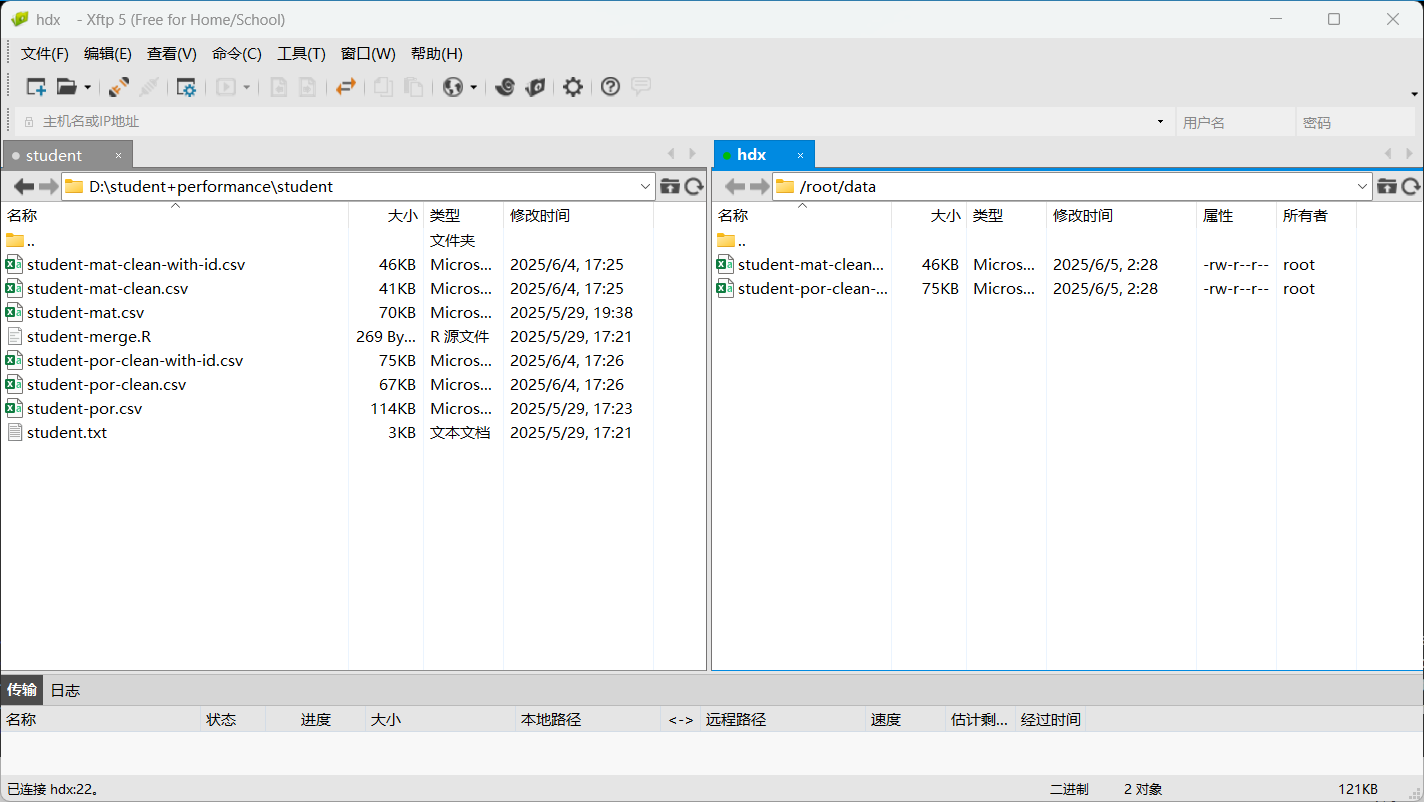
启动hbase,要先启动hdfs
start-dfs.sh
start-hbase.sh
再从本地上传到hdfs在的 /input目录
hdfs dfs -put /root/data/student_mat_clean_with_id.csv /input
hdfs dfs -put /root/data/student_por_clean_with_id.csv /input
hbase shell
创建hbase表格(mat、por)


退出hbase shell(quit),分别导入数据到 mat 和 por 表
(base) [root@hdx data]# hbase org.apache.hadoop.hbase.mapreduce.ImportTsv -Dimporttsv.separator="," -Dimporttsv.columns=HBASE_ROW_KEY,basic_info:school,basic_info:sex,basic_info:age,basic_info:address,basic_info:famsize,basic_info:Pstatus,basic_info:Medu,basic_info:Fedu,basic_info:Mjob,basic_info:Fjob,basic_info:reason,basic_info:guardian,study_info:traveltime,study_info:studytime,study_info:failures,study_info:schoolsup,study_info:famsup,study_info:paid,study_info:activities,study_info:nursery,study_info:higher,study_info:internet,study_info:romantic,social_health_info:famrel,social_health_info:freetime,social_health_info:goout,social_health_info:Dalc,social_health_info:Walc,social_health_info:health,score_info:G1,score_info:G2,score_info:G3,score_info:absence mat hdfs://hdx:9000/input/student-mat-clean-with-id.csv
(base) [root@hdx data]# hbase org.apache.hadoop.hbase.mapreduce.ImportTsv -Dimporttsv.separator="," -Dimporttsv.columns=HBASE_ROW_KEY,basic_info:school,basic_info:sex,basic_info:age,basic_info:address,basic_info:famsize,basic_info:Pstatus,basic_info:Medu,basic_info:Fedu,basic_info:Mjob,basic_info:Fjob,basic_info:reason,basic_info:guardian,study_info:traveltime,study_info:studytime,study_info:failures,study_info:schoolsup,study_info:famsup,study_info:paid,study_info:activities,study_info:nursery,study_info:higher,study_info:internet,study_info:romantic,social_health_info:famrel,social_health_info:freetime,social_health_info:goout,social_health_info:Dalc,social_health_info:Walc,social_health_info:health,score_info:G1,score_info:G2,score_info:G3,score_info:absence por hdfs://hdx:9000/input/student-por-clean-with-id.csv
解释 ImportTsv 命令:
- -Dimporttsv.separator=",": csv文件都以逗号作为分隔符
- -Dimporttsv.columns: 格式为 HBASE_ROW_KEY,列族:列名,...,如果不指定,则默认以第一列为行键。
- mat 和 por:hbase中的表名
- hdfs://hdx:9000/input/student-mat-clean-with-id.csv 和 hdfs://hdx:9000/input/student-por-clean-with-id.csv:两个csv文件在hdfs上的绝对地址
查看表数据是否成功导入
hbase shell
scan 'mat'
scan 'por'

火山引擎开发者社区是火山引擎打造的AI技术生态平台,聚焦Agent与大模型开发,提供豆包系列模型(图像/视频/视觉)、智能分析与会话工具,并配套评测集、动手实验室及行业案例库。社区通过技术沙龙、挑战赛等活动促进开发者成长,新用户可领50万Tokens权益,助力构建智能应用。
更多推荐
 30
30 0
0- 0


 已为社区贡献2条内容

所有评论(0)