Kiro-专为AI Agent打造的集成开发环境
支持自然语言编程(如通过 Kiro Chat 交互修改代码)、自动化修复 Bug、生成代码建议,并集成代理钩子(Agent Hooks)实现事件触发的自动化操作(如测试、部署)。Kiro 强调"先定义需求,后编写代码"的协作模式,通过自动化生成需求文档、设计流程和任务拆解,减少盲目开发带来的混乱,提升开发规范性和效率。总结来看,Kiro 通过规范化的开发流程、AI 自动化能力及团队协作支持,显著提
介绍
Kiro是一款专为AI Agent打造的集成开发环境(agentic IDE),通过简化的开发体验,帮助开发者高效实现从概念构想到生产部署的全过程。
Kiro不仅擅长氛围编程(vibe coding),还具备将原型推进到真正可上线的系统的落地能力,具备包括Specs(Specification)和Hooks(自动化触发器)两大核心能力等功能。
下载
通过网盘分享的文件:kiro安装包
链接: https://pan.baidu.com/s/1wia1pDFuN8z-jmpnE-YAiQ?pwd=6666 提取码: 6666
编写方式
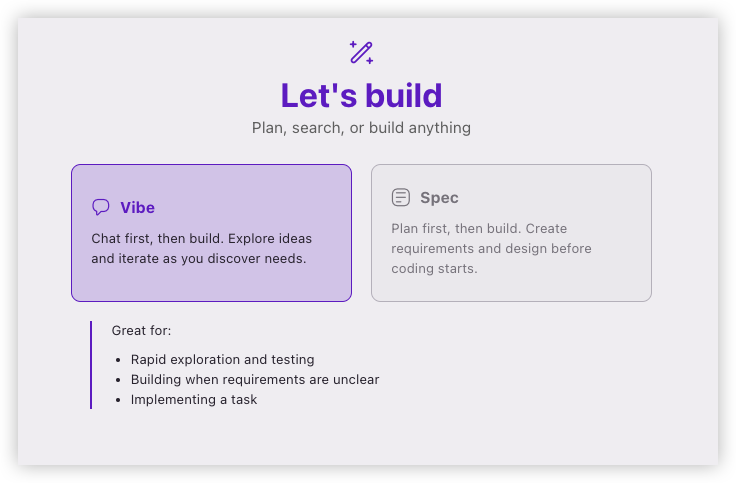
Vibe
Chat first, then build. Explore ideas and iterate as you discover needs.
这个方式和原来的Cursor等AI IDE类似
Spec
Plan first, then build. Create requirements and design before coding starts.
先制定计划后再编写代码
案例
Spec模式,以「优化我的chrome插件代码」为案例进行测试
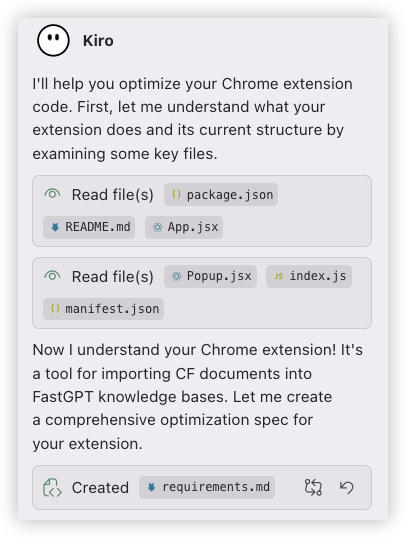
它会先阅读代码后然后编写requirements.md文件
requirements.mdtrue# Requirements Document

## Introduction

This document outlines the requirements for optimizing the CF文档导入FastGPT Chrome extension. The extension currently allows users to import CF documents into FastGPT knowledge bases, but needs optimization in areas of code structure, performance, user experience, error handling, and maintainability.

## Requirements

### Requirement 1: Code Architecture Optimization

**User Story:** As a developer, I want a well-structured codebase with clear separation of concerns, so that the extension is easier to maintain and extend.

#### Acceptance Criteria

1.WHEN reviewing the codebase THEN the code SHALL follow consistent architectural patterns
2.WHEN examining components THENeach component SHALL have a single responsibility
3.WHEN looking at utility functions THEN they SHALL be properly organized and reusable
4.WHEN checking importsTHEN they SHALL use consistent import patterns
5.WHEN reviewing state management THEN it SHALL be centralized and predictable

### Requirement 2: Performance Optimization

**User Story:** As a user, I want the extension to load quickly and respond smoothly, so that my workflow isnot interrupted.

#### Acceptance Criteria

1.WHEN opening the popup THEN it SHALL load within 500ms
2.WHEN fetching knowledge bases THEN the request SHALL include proper caching mechanisms
3.WHEN handling large data sets THEN the extension SHALL implement pagination or virtualization
4.WHEN making API calls THEN they SHALL be debounced to prevent excessive requests
5.WHEN loading components THEN they SHALL use lazy loading where appropriate

### Requirement 3: Error Handling Enhancement

**User Story:** As a user, I want clear and helpful error messages when something goes wrong, so that I can understand and resolve issues quickly.

#### Acceptance Criteria

1.WHEN an API call fails THEN the system SHALL display specific error messages
2.WHEN network connectivity is lost THEN the system SHALL show appropriate offline indicators
3.WHEN invalid data is entered THEN the system SHALL provide validation feedback
4.WHEN errors occur THEN they SHALL be logged for debugging purposes
5.WHEN retryable errors happen THEN the system SHALL offer retry mechanisms

### Requirement 4: User Experience Improvements

**User Story:** As a user, I want an intuitive and efficient interface, so that I can complete my tasks with minimal friction.

#### Acceptance Criteria

1.WHENusing the extension THEN the interface SHALL provide clear visual feedback for all actions
2.WHEN waiting for operations THEN loading states SHALL be informative and non-blocking where possible
3.WHEN selecting options THEN the interface SHALL remember previous selections
4.WHEN performing bulk operations THEN progress indicators SHALL show current status
5.WHEN encountering empty states THEN helpful guidance SHALL be provided

### Requirement 5: Code Quality and Maintainability

**User Story:** As a developer, I want clean, well-documented code with proper testing, so that the extension can be maintained and improved over time.

#### Acceptance Criteria

1.WHEN reviewing code THEN it SHALL follow consistent coding standards
2.WHEN examining functions THEN they SHALL have proper JSDoc documentation
3.WHEN checking for code duplication THEN common logic SHALL be extracted into reusable utilities
4.WHEN looking at component props THEN they SHALL have proper TypeScript types or PropTypes
5.WHEN reviewing the build process THEN it SHALL include linting and formatting checks

### Requirement 6: Security and Privacy Enhancements

**User Story:** As a user, I want my data and credentials to be handled securely, so that my information remains protected.

#### Acceptance Criteria

1.WHEN storing sensitive data THEN it SHALL use Chrome's secure storage APIs
2.WHEN making API requests THEN credentials SHALL be properly encrypted
3.WHEN handling user input THEN it SHALL be sanitized to prevent XSS attacks
4.WHEN accessing external resources THEN permissions SHALL be minimal and specific
5.WHEN logging information THEN sensitive data SHALL be excluded from logs

### Requirement 7: Accessibility and Internationalization

**User Story:** As a user with accessibility needs or different language preferences, I want the extension to be usable and available in my preferred language, so that I can use it effectively.

#### Acceptance Criteria

1.WHENusing keyboard navigation THEN all interactive elements SHALL be accessible
2.WHENusing screen readers THEN proper ARIA labels SHALL be provided
3.WHEN viewing the interfaceTHEN color contrast SHALL meet WCAG guidelines
4.WHEN switching languages THEN the interface SHALL support Chinese and English
5.WHENusing assistive technologies THEN the extension SHALL provide proper semantic markup

### Requirement 8: Testing and Quality Assurance

**User Story:** As a developer, I want comprehensive testing coverage, so that changes can be made confidently without breaking existing functionality.

#### Acceptance Criteria

1.WHEN running tests THEN unit tests SHALL cover all utility functions
2.WHEN testing components THEN integration tests SHALL verify user workflows
3.WHEN checking API interactions THEN mock tests SHALL validate request/response handling
4.WHEN performing end-to-end testing THEN critical user paths SHALL be automated
5.WHEN measuring coverage THEN it SHALL be at least 80% for critical code paths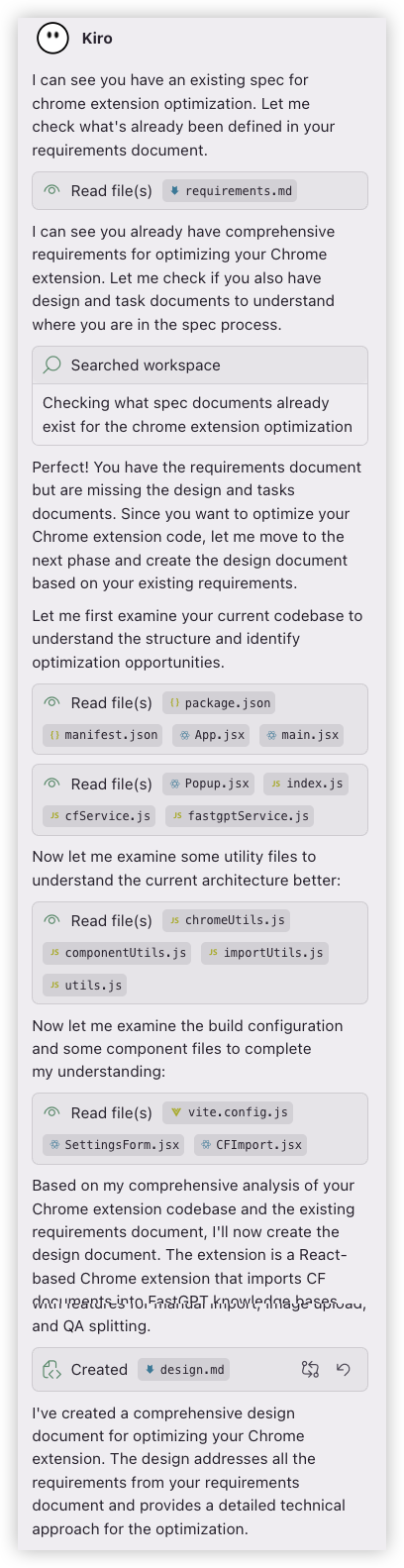
根据requirements.md编写design.md
design.mdtrue# Design Document

## Overview

This document outlines the design for optimizing the CF文档导入FastGPT Chrome extension. The extension currently allows users to import CF documents into FastGPT knowledge bases through multiple methods including direct CF document import, manual text import, and image upload. The optimization focuses on improving code architecture, performance, user experience, error handling, and maintainability.

### Current Architecture Analysis

The extension follows a typical Chrome extension architecture with:
- **Popup UI**: React-based interface using Ant Design components
- **Background Service Worker**: Handles API requests and cross-origin communication
- **Content Scripts**: Minimal implementation for context menu integration
- **Build System**: Vite-based build with React support

### Key Optimization Areas Identified

1. **Code Structure**: Large monolithic components, mixed concerns, inconsistent patterns
2. **Performance**: No caching, excessive re-renders, blocking operations
3. **Error Handling**: Basic error messages, no retry mechanisms, limited user feedback
4. **State Management**: Local component state scattered across components
5. **API Layer**: Duplicated request logic, no request optimization
6. **User Experience**: Limited loading states, no offline handling, minimal accessibility

## Architecture

### Proposed Architecture Improvements

```mermaid
graph TB
    subgraph "Popup UI Layer"
        A[App Component] --> B[Layout Components]
        B --> C[Feature Components]
        C --> D[UI Components]
    end

    subgraph "State Management"
        E[Context Providers] --> F[Custom Hooks]
        F --> G[State Reducers]
    end

    subgraph "Service Layer"
        H[API Service] --> I[Chrome Utils]
        H --> J[Storage Service]
        H --> K[Error Handler]
    end

    subgraph "Background Layer"
        L[Message Router] --> M[Service Handlers]
        M --> N[API Clients]
        N --> O[Utils & Helpers]
    end

    A --> E
    C --> F
    F --> H
    H --> L
```

### Component Hierarchy Restructure

```
App
├── Providers (Settings, Loading, Error)
├── Layout
│   ├── Header
│   └── Content
│       ├── SettingsPanel
│       ├── KnowledgeBaseSelector
│       ├── ImportActions
│       │   ├── CFImport
│       │   ├── ManualImport
│       │   └── ImageUpload
│       └── HistoryPanel
└── Modals
    ├── QASplitter
    ├── QAConfirmModal
    └── ErrorModal
```

## Components and Interfaces

### 1. State Management Layer

#### Context Providers
```typescript
// Settings Context
interface SettingsContextType {
  settings: Settings;
  updateSettings: (settings: Partial<Settings>) => Promise<void>;
  isLoading: boolean;
  error: string | null;
}

// Knowledge Base Context
interface KnowledgeBaseContextType {
  knowledgeBases: KnowledgeBase[];
  selectedKnowledgeBase: string | null;
  collections: Collection[];
  selectedCollection: string | null;
  setSelectedKnowledgeBase: (id: string) => void;
  setSelectedCollection: (id: string) => void;
  refreshKnowledgeBases: () => Promise<void>;
  refreshCollections: () => Promise<void>;
}

// Loading Context
interface LoadingContextType {
  isLoading: boolean;
  loadingMessage: string;
  setLoading: (loading: boolean, message?: string) => void;
}
```

#### Custom Hooks
```typescript
// API hooks
const useKnowledgeBases = () => { /* cached API calls */ };
const useCollections = (datasetId: string) => { /* cached API calls */ };
const useImport = () => { /* import operations */ };

// Storage hooks
const useSettings = () => { /* persistent settings */ };
const useHistory = () => { /* QA history management */ };

// UI hooks
const useModal = () => { /* modal state management */ };
const useNotification = () => { /* notification system */ };
```

### 2. Service Layer Redesign

#### API Service Architecture
```typescript
class APIService {
  private cache: Map<string, CacheEntry>;
  private requestQueue: RequestQueue;

  // Centralized request handling with caching
  async request<T>(config: RequestConfig): Promise<T>;

  // Specific API methods
  async getKnowledgeBases(parentId?: string): Promise<KnowledgeBase[]>;
  async getCollections(datasetId: string): Promise<Collection[]>;
  async importData(data: ImportData): Promise<ImportResult>;
}

// Request queue for batching and deduplication
class RequestQueue {
  private queue: Map<string, Promise<any>>;

  async enqueue<T>(key: string, request: () => Promise<T>): Promise<T>;
  private deduplicateRequests(key: string): boolean;
}
```

#### Error Handling Service
```typescript
interface ErrorHandler {
  handleError(error: Error, context: ErrorContext): void;
  showUserError(error: UserError): void;
  logError(error: Error, metadata: ErrorMetadata): void;
  retryOperation<T>(operation: () => Promise<T>, options: RetryOptions): Promise<T>;
}

interface RetryOptions {
  maxAttempts: number;
  backoffStrategy: 'linear' | 'exponential';
  retryCondition: (error: Error) => boolean;
}
```

### 3. Background Service Optimization

#### Message Router Pattern
```typescript
class MessageRouter {
  private handlers: Map<string, MessageHandler>;

  register(type: string, handler: MessageHandler): void;
  async route(message: Message): Promise<Response>;
  private validateMessage(message: Message): boolean;
}

// Specialized handlers
class CFServiceHandler implements MessageHandler {
  async handle(request: CFRequest): Promise<CFResponse>;
  private parseDocumentId(input: string): string;
  private fetchDocument(id: string, cookies: string): Promise<Document>;
}

class FastGPTServiceHandler implements MessageHandler {
  async handle(request: FastGPTRequest): Promise<FastGPTResponse>;
  private buildRequestData(version: APIVersion, data: any): any;
  private handleAPIResponse(response: Response): Promise<any>;
}
```

### 4. Component Optimization

#### Smart vs Dumb Components
```typescript
// Smart Components (Container Components)
const KnowledgeBaseSelectorContainer = () => {
  const { knowledgeBases, selectedKnowledgeBase, setSelectedKnowledgeBase } = useKnowledgeBase();
  const { collections, refreshCollections } = useCollections(selectedKnowledgeBase);

  return (
    <KnowledgeBaseSelector
      knowledgeBases={knowledgeBases}
      selectedKnowledgeBase={selectedKnowledgeBase}
      onKnowledgeBaseChange={setSelectedKnowledgeBase}
      collections={collections}
      onRefresh={refreshCollections}
    />
  );
};

// Dumb Components (Presentational Components)
const KnowledgeBaseSelector = ({ knowledgeBases, selectedKnowledgeBase, onKnowledgeBaseChange }) => {
  return (
    <Cascader
      options={knowledgeBases}
      value={selectedKnowledgeBase}
      onChange={onKnowledgeBaseChange}
      // ... other props
    />
  );
};
```

## Data Models

### Core Data Types
```typescript
interface Settings {
  fastgptUrl: string;
  apiKey: string;
  datasetId: string;
  collectionId: string;
  theme?: 'light' | 'dark';
  language?: 'zh' | 'en';
}

interface KnowledgeBase {
  _id: string;
  name: string;
  type: 'folder' | 'dataset';
  parentId?: string;
  children?: KnowledgeBase[];
  isLeaf: boolean;
}

interface Collection {
  _id: string;
  name: string;
  type: string;
  datasetId: string;
  createTime: string;
  updateTime: string;
}

interface QAData {
  question: string;
  answer: string;
  metadata?: {
    source?: string;
    timestamp?: number;
    tags?: string[];
  };
}

interface ImportResult {
  success: boolean;
  message: string;
  data?: any;
  errors?: string[];
}
```

### Cache Data Models
```typescript
interface CacheEntry<T = any> {
  data: T;
  timestamp: number;
  ttl: number;
  key: string;
}

interface CacheConfig {
  defaultTTL: number;
  maxSize: number;
  cleanupInterval: number;
}
```

## Error Handling

### Error Classification System
```typescript
enum ErrorType {
  NETWORK = 'network',
  API = 'api',
  VALIDATION = 'validation',
  PERMISSION = 'permission',
  TIMEOUT = 'timeout',
  UNKNOWN = 'unknown'
}

interface AppError extends Error {
  type: ErrorType;
  code?: string;
  context?: Record<string, any>;
  retryable: boolean;
  userMessage: string;
}
```

### Error Recovery Strategies
1. **Network Errors**: Automatic retry with exponential backoff
2. **API Errors**: User-friendly messages with suggested actions
3. **Validation Errors**: Inline form validation with clear guidance
4. **Permission Errors**: Clear instructions for resolution
5. **Timeout Errors**: Option to retry or cancel operation

### Error Boundaries
```typescript
class ErrorBoundary extends React.Component {
  state = { hasError: false, error: null };

  static getDerivedStateFromError(error: Error) {
    return { hasError: true, error };
  }

  componentDidCatch(error: Error, errorInfo: ErrorInfo) {
    this.logError(error, errorInfo);
  }

  render() {
    if (this.state.hasError) {
      return <ErrorFallback error={this.state.error} />;
    }
    return this.props.children;
  }
}
```

## Testing Strategy

### Testing Pyramid Structure

#### Unit Tests (70%)
- **Utilities**: Pure functions, data transformations
- **Hooks**: Custom hooks with mock dependencies
- **Components**: Isolated component behavior
- **Services**: API service methods, error handling

#### Integration Tests (20%)
- **Component Integration**: Component + hooks + context
- **API Integration**: Service layer + background scripts
- **Storage Integration**: Settings persistence, cache behavior
- **Message Passing**: Popup ↔ Background communication

#### End-to-End Tests (10%)
- **Critical User Flows**: Complete import workflows
- **Error Scenarios**: Network failures, API errors
- **Cross-browser**: Chrome, Edge compatibility

### Testing Tools and Setup
```typescript
// Jest configuration for unit tests
export default {
  testEnvironment: 'jsdom',
  setupFilesAfterEnv: ['<rootDir>/src/test/setup.ts'],
  moduleNameMapping: {
    '^@/(.*)$': '<rootDir>/src/$1'
  },
  collectCoverageFrom: [
    'src/**/*.{js,jsx,ts,tsx}',
    '!src/**/*.d.ts',
    '!src/test/**'
  ]
};

// Testing utilities
const renderWithProviders = (component: ReactElement, options?: RenderOptions) => {
  const AllProviders = ({ children }: { children: React.ReactNode }) => (
    <SettingsProvider>
      <KnowledgeBaseProvider>
        <LoadingProvider>
          {children}
        </LoadingProvider>
      </KnowledgeBaseProvider>
    </SettingsProvider>
  );

  return render(component, { wrapper: AllProviders, ...options });
};
```

### Mock Strategies
```typescript
// Chrome API mocks
const mockChrome = {
  storage: {
    sync: {
      get: jest.fn(),
      set: jest.fn()
    },
    local: {
      get: jest.fn(),
      set: jest.fn()
    }
  },
  runtime: {
    sendMessage: jest.fn(),
    onMessage: {
      addListener: jest.fn()
    }
  }
};

// API response mocks
const mockAPIResponses = {
  knowledgeBases: [
    { _id: '1', name: 'Test KB', type: 'dataset', isLeaf: true }
  ],
  collections: [
    { _id: '1', name: 'Test Collection', type: 'file', datasetId: '1' }
  ]
};
```

## Performance Optimization Strategy

### 1. Rendering Optimization
- **React.memo**: Prevent unnecessary re-renders
- **useMemo/useCallback**: Expensive calculations and stable references
- **Code Splitting**: Lazy load modal components
- **Virtual Scrolling**: Large lists (history, knowledge bases)

### 2. API Optimization
- **Request Caching**: Cache knowledge bases and collections
- **Request Deduplication**: Prevent duplicate simultaneous requests
- **Batch Operations**: Group multiple imports
- **Background Prefetching**: Preload likely-needed data

### 3. Bundle Optimization
- **Tree Shaking**: Remove unused Ant Design components
- **Code Splitting**: Separate vendor and app bundles
- **Asset Optimization**: Compress images and icons
- **Service Worker Caching**: Cache static assets

### 4. Memory Management
- **Cleanup Effects**: Proper useEffect cleanup
- **Event Listener Management**: Remove listeners on unmount
- **Cache Size Limits**: Prevent memory leaks from caching
- **Weak References**: For temporary data storage

## Security Considerations

### 1. Data Protection
- **API Key Storage**: Use Chrome's secure storage APIs
- **Input Sanitization**: Prevent XSS in user inputs
- **Content Security Policy**: Restrict resource loading
- **Sensitive Data Logging**: Exclude from error logs

### 2. Permission Management
- **Minimal Permissions**: Only request necessary permissions
- **Host Permissions**: Specific domains only
- **Runtime Permissions**: Request when needed

### 3. Communication Security
- **Message Validation**: Validate all inter-script messages
- **Origin Checking**: Verify message sources
- **Data Encryption**: Encrypt sensitive data in transit

## Accessibility and Internationalization

### Accessibility Features
- **Keyboard Navigation**: Full keyboard support
- **Screen Reader Support**: Proper ARIA labels and roles
- **Color Contrast**: WCAG AA compliance
- **Focus Management**: Logical focus order
- **Error Announcements**: Screen reader error notifications

### Internationalization Support
```typescript
interface I18nConfig {
  defaultLanguage: 'zh' | 'en';
  supportedLanguages: string[];
  fallbackLanguage: string;
}

const useTranslation = (namespace?: string) => {
  const { language } = useSettings();
  const t = (key: string, params?: Record<string, any>) => {
    // Translation logic
  };
  return { t, language };
};
```

### Implementation Strategy
1. **Extract Text**: Move all UI text to translation files
2. **Context-Aware**: Different translations for different contexts
3. **Pluralization**: Handle singular/plural forms
4. **Date/Number Formatting**: Locale-specific formatting
5. **RTL Support**: Right-to-left language support (future)

## Migration Strategy

### Phase 1: Foundation (Weeks 1-2)
- Set up new project structure
- Implement core services and utilities
- Create context providers and custom hooks
- Set up testing infrastructure

### Phase 2: Component Refactoring (Weeks 3-4)
- Break down monolithic components
- Implement new component hierarchy
- Add error boundaries and loading states
- Optimize rendering performance

### Phase 3: Feature Enhancement (Weeks 5-6)
- Implement caching and request optimization
- Add retry mechanisms and better error handling
- Enhance accessibility and user experience
- Add comprehensive testing

### Phase 4: Polish and Documentation (Week 7)
- Performance optimization and bundle analysis
- Security audit and fixes
- Documentation updates
- User acceptance testing

## Backward Compatibility

### Data Migration
- **Settings Migration**: Automatically migrate existing settings
- **History Preservation**: Maintain QA split history
- **Cache Invalidation**: Clear old cache formats

### API Compatibility
- **Version Detection**: Support both old and new FastGPT APIs
- **Graceful Degradation**: Fallback for unsupported features
- **Error Handling**: Clear messages for compatibility issues
让用户确认design是否符合预期
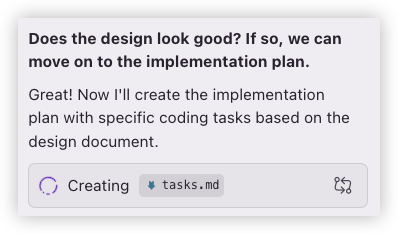
根据design.md编写tasks.md
tasks.mdtrue# Implementation Plan

- [ ] 1. Set up project foundation and core infrastructure
  - Createnewdirectory structure for optimized architecture
  - Set up TypeScript configuration for better type safety
  - Configure testing infrastructure with Jest and React Testing Library
  - _Requirements: 5.1, 5.2, 8.1, 8.2_

- [ ] 2. Implement core service layer
- [ ] 2.1Create centralized API service withcaching
  - Implement APIService classwith request cachingand deduplication
  - Create RequestQueue for batching and managing concurrent requests
  - Addcachemanagementwith TTL andsize limits
  - _Requirements: 2.2, 2.3, 2.4_

- [ ] 2.2Build comprehensive error handling system
  - Create AppError classwitherror classification anduser-friendly messages
  - Implement ErrorHandler service with retry mechanisms andlogging
  - Adderror boundaries for React components
  - _Requirements: 3.1, 3.2, 3.4, 3.5_

- [ ] 2.3Optimize Chrome utilities andstorage services
  - Refactor chromeUtils with better error handling andtimeoutmanagement
  - Create StorageService for secure and efficient data persistence
  - Add request debouncing and throttling utilities
  - _Requirements: 2.4, 6.1, 6.2_

- [ ] 3. Implement state management layer
- [ ] 3.1Create React context providers
  - Implement SettingsProvider with persistent storage integration
  - Create KnowledgeBaseProvider for centralized KB state management
  - Add LoadingProvider forglobal loading state coordination
  - _Requirements: 1.5, 4.3_

- [ ] 3.2Build custom hooks fordatamanagement
  - Create useKnowledgeBases hook withcachinganderror handling
  - Implement useCollections hook withautomaticrefresh capabilities
  - Add useImport hook for streamlined importoperations
  - _Requirements: 2.2, 2.3, 4.1_

- [ ] 3.3Add utility hooks for UI state
  - Create useModal hook for modal state management
  - Implement useNotification hook foruser feedback
  - Add useSettings hook withvalidationand persistence
  - _Requirements: 4.1, 4.2, 4.5_

- [ ] 4. Refactor andoptimize components
- [ ] 4.1 Break down monolithic Popup component
  - Extract KnowledgeBaseSelector as separate component
  - Create ImportActions containerwith individual import components
  - Separate HistoryPanel into its own component
  - _Requirements: 1.1, 1.2, 4.1_

- [ ] 4.2Optimize component rendering performance
  - Add React.memo to prevent unnecessary re-renders
  - Implement useMemo and useCallback for expensive operations
  - Add lazy loading for modal components
  - _Requirements: 2.1, 2.5_

- [ ] 4.3 Enhance SettingsForm component
  - Addformvalidationwithreal-time feedback
  - Implement auto-save functionality withchange detection
  - Addconnection testing for API credentials
  - _Requirements: 3.3, 4.2, 5.4_

- [ ] 4.4 Improve import components (CFImport, ManualImport, DirectImageUpload)
  - Add progress indicators forlong-running operations
  - Implement batch import capabilities with progress tracking
  - Add retry mechanisms forfailed imports
  - _Requirements: 3.5, 4.4, 4.1_

- [ ] 5.Optimize background service architecture
- [ ] 5.1 Implement message router pattern
  - Create MessageRouter classfor centralized message handling
  - Refactor existing handlers touseconsistentinterface
  - Add message validationanderror handling
  - _Requirements: 1.1, 1.3, 3.1_

- [ ] 5.2 Enhance CF service functionality
  - Improve documentID parsing with better URL handling
  - Addcachingfor frequently accessed documents
  - Implement better error messages for CF-specific issues
  - _Requirements: 3.1, 3.2, 2.2_

- [ ] 5.3Optimize FastGPT service integration
  - Consolidate API version handling logic
  - Add request/response transformation layers
  - Implement automatic API version detection
  - _Requirements: 2.3, 3.1, 1.4_

- [ ] 6.Add comprehensive testing coverage
- [ ] 6.1 Write unit tests for core services
  - Test APIService cachinganderror handling logic
  - Create tests for ErrorHandler retry mechanisms
  - Add tests for utility functions anddata transformations
  - _Requirements: 8.1, 8.3_

- [ ] 6.2 Implement component integration tests
  - Test component interactions withcontext providers
  - Create tests for custom hooks with mock dependencies
  - Add tests forformvalidationanduser interactions
  - _Requirements: 8.2, 8.4_

- [ ] 6.3Addend-to-end workflow tests
  - Testcompleteimport workflows fromstarttofinish
  - Create tests forerror scenarios andrecovery
  - Add tests forsettings persistence and restoration
  - _Requirements: 8.4, 8.5_

- [ ] 7. Implement performance optimizations
- [ ] 7.1Add request cachingand optimization
  - Implement intelligent cachingfor knowledge bases and collections
  - Add request deduplication to prevent duplicate API calls
  - Create background prefetching for likely-needed data
  - _Requirements: 2.2, 2.3, 2.4_

- [ ] 7.2Optimize bundle sizeand loading
  - Implement code splitting for modal components
  - Add tree shaking forunused Ant Design components
  - Optimize asset loading and compression
  - _Requirements: 2.1, 2.5_

- [ ] 7.3Addmemorymanagementandcleanup
  - Implement proper cleanupin useEffect hooks
  - Addcachesize limits andautomaticcleanup
  - Creatememory leak detection and prevention
  - _Requirements: 2.1, 5.1_

- [ ] 8. Enhance user experience and accessibility
- [ ] 8.1 Improve loading states anduser feedback
  - Add skeleton loading fordata fetching operations
  - Implement progress bars forlong-running tasks
  - Create informative empty states with guidance
  - _Requirements: 4.1, 4.2, 4.5_

- [ ] 8.2Add accessibility features
  - Implement keyboard navigation for all interactive elements
  - Add proper ARIA labels androlesfor screen readers
  - Ensure color contrast meets WCAG guidelines
  - _Requirements: 7.1, 7.2, 7.3_

- [ ] 8.3 Implement internationalization support
  - Extract all UI texttotranslation files
  - Createtranslationsystemwithcontext support
  - Addlanguage switching functionality
  - _Requirements: 7.4, 7.5_

- [ ] 9.Securityanddataprotection enhancements
- [ ] 9.1 Implement secure data handling
  - Migrate sensitive datato Chrome's secure storage APIs
  - Add input sanitization to prevent XSS attacks
  - Implement proper credential encryption
  - _Requirements: 6.1, 6.2, 6.3_

- [ ] 9.2 Add security validation and monitoring
  - Implement message validation for inter-script communication
  - Add origin checking for security
  - Create security audit logging (excluding sensitive data)
  - _Requirements: 6.4, 6.5_

- [ ] 10. Code quality and documentation improvements
- [ ] 10.1 Add comprehensive code documentation
  - Write JSDoc documentation for all public functions
  - Create TypeScript interfaces for all data structures
  - Add inline comments for complex business logic
  - _Requirements: 5.2, 5.4_

- [ ] 10.2 Implement code quality tools
  - Set up ESLint with strict rules and auto-fixing
  - Add Prettier for consistent code formatting
  - Create pre-commit hooks for quality checks
  - _Requirements: 5.1, 5.5_

- [ ] 10.3 Create development and deployment documentation
  - Write setup and development guide
  - Create troubleshooting documentation
  - Add performance monitoring and debugging guides
  - _Requirements: 5.2, 8.5_

- [ ] 11. Integration and final optimization
- [ ] 11.1 Integrate all optimized components
  - Wire together all refactored components and services
  - Test complete application flow with new architecture
  - Resolve any integration issues and conflicts
  - _Requirements: 1.1, 1.2, 1.3_

- [ ] 11.2 Performance testing and optimization
  - Run performance benchmarks against original version
  - Optimize any remaining performance bottlenecks
  - Validate memory usage and cleanup effectiveness
  - _Requirements: 2.1, 2.2, 2.3_

- [ ] 11.3 Final testing and quality assurance
  - Run complete test suite and ensure all tests pass
  - Perform manual testing of all user workflows
  - Validate accessibility and internationalization features
  - _Requirements: 8.1, 8.2, 8.4, 8.5_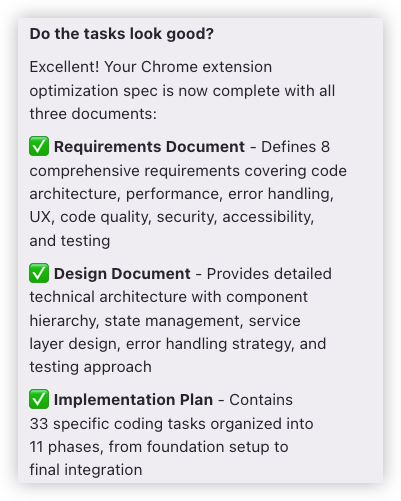
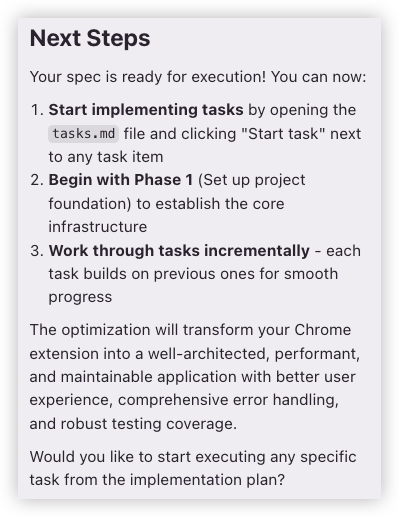
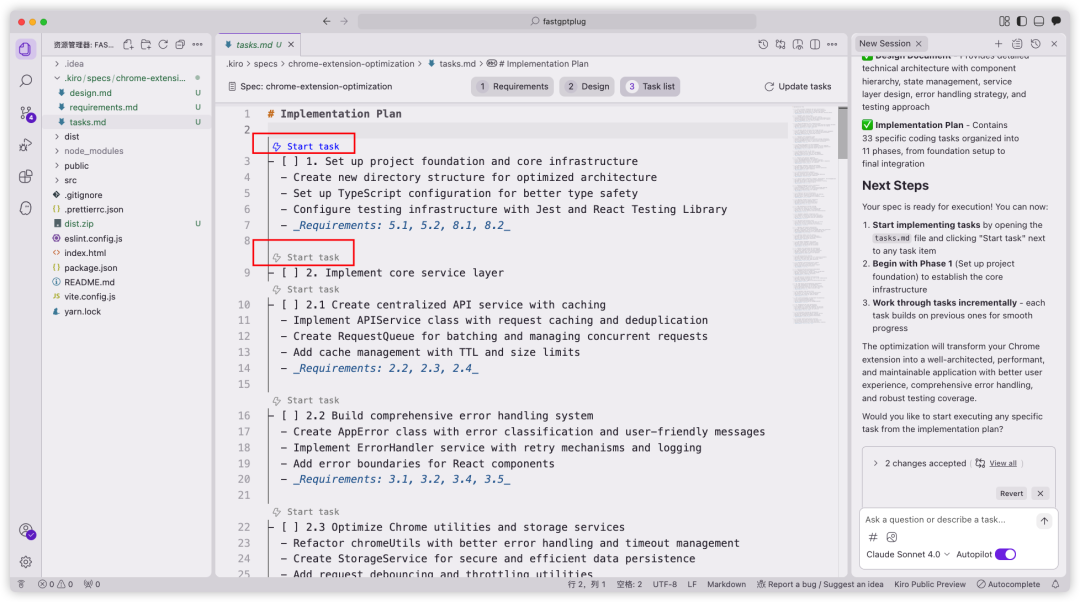
在tasks.md中点击Start task开始任务
Kiro 的核心优势
1、规范驱动开发(Spec-driven Development)Kiro 强调"先定义需求,后编写代码"的协作模式,通过自动化生成需求文档、设计流程和任务拆解,减少盲目开发带来的混乱,提升开发规范性和效率 。
2、自动化与多模态交互能力支持自然语言编程(如通过 Kiro Chat 交互修改代码)、自动化修复 Bug、生成代码建议,并集成代理钩子(Agent Hooks)实现事件触发的自动化操作(如测试、部署)。
3、续作性与项目连续性开发者可基于历史记录延续开发进度,例如中断后重启时自动恢复上下文,减少重复沟通和文档整理成本 。
4、降低 AI 编程门槛通过智能化引导和模块化设计,即使是初学者也能快速上手并参与实际项目开发 。
5、企业级项目管理与协作在团队协作中,Kiro 通过统一的规范文档和设计流程减少沟通成本,适合需要高效管理需求、设计和任务拆解的团队 。
6、对比传统工具的优势相比其他 AI 编程工具(如 Cursor),Kiro 在企业级项目管理和自动化流程上更突出,而 Cursor 更侧重日常编码体验 。
总结来看,Kiro 通过规范化的开发流程、AI 自动化能力及团队协作支持,显著提升了开发效率和代码质量,尤其适合复杂项目和团队协作场景 。

火山引擎开发者社区是火山引擎打造的AI技术生态平台,聚焦Agent与大模型开发,提供豆包系列模型(图像/视频/视觉)、智能分析与会话工具,并配套评测集、动手实验室及行业案例库。社区通过技术沙龙、挑战赛等活动促进开发者成长,新用户可领50万Tokens权益,助力构建智能应用。
更多推荐
 20
20 0
0- 0


 已为社区贡献17条内容

所有评论(0)