基于 OpenAI Function Calling 的工具调用实践解析交互流程
本文介绍了OpenAI Function Calling功能,它使大语言模型(LLM)能够与外部函数和API协同工作。文章通过天气查询的完整示例,详细讲解了Function Calling的实现流程:首先定义工具函数和JSON Schema参数结构,然后让模型判断是否调用函数并生成结构化参数,最后执行真实函数并返回结果给模型生成自然回复。Function Calling拓展了LLM的实用性,使其从
近年来,随着大语言模型(LLM)的快速发展,我们已经不再满足于让模型只是“说话”——我们希望它能动手做事。OpenAI 推出的 Function Calling 能力,正是为了解决 LLM 与外部函数、工具、API 协同工作的需求。
本文通过一个天气查询的完整示例,深入讲解 Function Calling 的使用流程以及如何用代码实现 LLM + 函数协作的闭环。
一、什么是 Function Calling?
传统 LLM 响应是“静态”的,无法访问外部数据。但现实中,我们希望模型能够:
- 查询数据库
- 调用接口
- 计算表达式
- 控制机器人/服务
Function Calling 的机制允许开发者预定义函数(带 JSON Schema 参数),模型在推理时决定是否调用,并生成结构化参数,开发者据此调用真实函数,并把返回结果再交给模型生成最终回复。
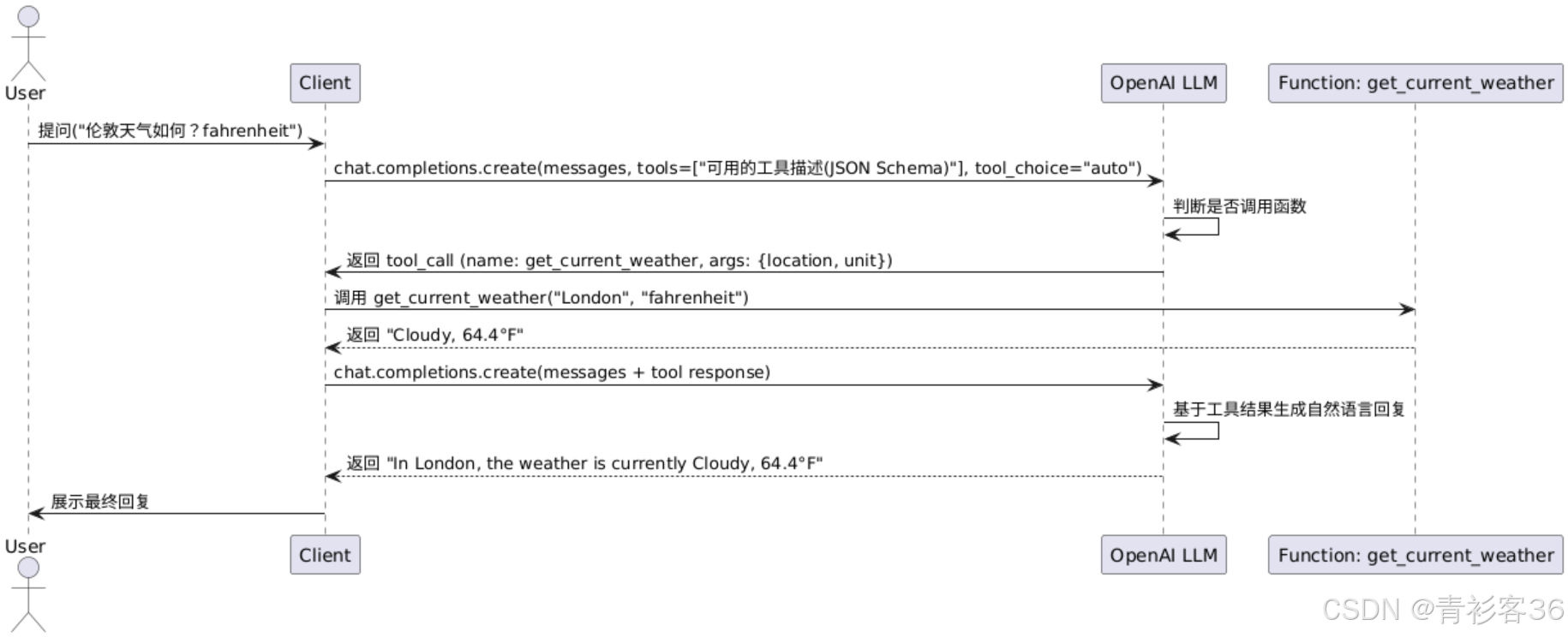
二、LLM Function Calling 交互流程
我们以查询“某地当前天气”为例,实现如下交互闭环:
- 用户提问天气情况
- 向大模型发送消息时附带当前可用工具的Schema描述
- LLM 判断是否调用
get_current_weather工具 - 模型生成结构化参数,如
{"location": "London", "unit": "fahrenheit"} - 实际调用本地函数返回结果
- 模型根据结果生成自然语言回答
三、代码解析
1. 定义工具函数
def get_current_weather(location: str, unit: str = "celsius") -> str:
    ...
实际开发中可对接第三方API。
2. 构造工具描述(Function Schema)
tools = [
    {
        "type": "function",
        "function": {
            "name": "get_current_weather",
            "description": "Get the current weather in a given location",
            "parameters": {
                "type": "object",
                "properties": {
                    "location": {
                        "type": "string",
                        "description": "The city and state, e.g. San Francisco, CA",
                    },
                    "unit": {
                        "type": "string",
                        "enum": ["celsius", "fahrenheit"],
                        "description": "Temperature unit"
                    },
                },
                "required": ["location", "unit"],
            },
        },
    }
]
这段 tools 配置定义了一个可被大语言模型调用的函数工具 get_current_weather,其作用是提供指定城市的当前天气信息。它采用 OpenAI Function Calling 所需的标准格式,包括函数名称、描述、以及基于 JSON Schema 的参数定义。通过设置参数类型、枚举范围和必填项,模型能够精准理解如何构造函数调用请求,并在对话中自动生成结构化调用,从而实现智能体自动执行外部函数的能力。这是实现“语言控制函数执行”的关键桥梁。
✅ 重点:Schema 采用 JSON Schema 标准,模型会基于这些结构自动生成参数。
3. 向模型发送请求
def get_completion(messages, tools=None):
    response = client.chat.completions.create(
        model="qwen-turbo",
        messages=messages,
        tools=tools,
        tool_choice="auto"
    )
    return response.choices[0].message
关键参数:
tools: 提供所有可用工具tool_choice="auto": 让模型自动判断是否调用工具
4. 模拟用户发起对话
messages = [
    {"role": "user", "content": "What is the weather like in London? (fahrenheit)"}
]

first_response = get_completion(messages, tools=tools)
此时 first_response.tool_calls 中,若模型决定调用函数,会返回如下结构:
ChatCompletionMessage(content='', refusal=None, role='assistant', annotations=None, audio=None, function_call=None, tool_calls=[ChatCompletionMessageToolCall(id='call_5b2c751c5eb743689175b1', function=Function(arguments='{"location": "London", "unit": "fahrenheit"}', name='get_current_weather'), type='function', index=0)])
重点是其中的tool_calls字段,
tool_calls=[ChatCompletionMessageToolCall(id='call_5b2c751c5eb743689175b1', function=Function(arguments='{"location": "London", "unit": "fahrenheit"}', name='get_current_weather'), type='function', index=0)]
5. 执行函数 & 构造工具响应
for tool_call in first_response.tool_calls:
    tool_args = json.loads(tool_call.function.arguments)
    result = get_current_weather(**tool_args)

    messages.append({
        "role": "assistant",
        "tool_calls": [tool_call]
    })
    messages.append({
        "role": "tool",
        "tool_call_id": tool_call.id,
        "content": result
    })
⚙️ 重点说明:
- ToolMessage 必须带上
tool_call_id role=tool是 Function Calling 特有的角色,代表函数返回结果
6. 最终生成回答
final_response = get_completion(messages)
print(final_response.content)
现在模型已经拿到真实的天气结果,会基于它自动生成自然语言回复,如:
The weather in London is currently cloudy, with a temperature of 64.4°F.
四、Function Calling 的典型应用场景
- 知识库问答:模型调用数据库/API 检索
- 运维自动化:调用运维脚本/诊断工具
- 任务助理:发邮件、查日程、执行脚本
- Agent 框架:配合 LangChain / LangGraph 构建多工具智能体
五、开发建议与实践经验
- 💡 工具函数的 描述越清晰,模型调用越精准
- ⚠️ 工具参数结构应严格符合 JSON Schema,否则模型调用失败
- 🧪 建议通过
tool_choice="none"与"auto"做 A/B 测试,掌握调用边界 - 🔄 可引入缓存策略,加速工具返回结果(特别是 API 类函数)
六、总结
Function Calling 是将大语言模型从“只说不做”变成“会说还会做”的关键一步。它不仅提升了 LLM 的实用性,也为我们构建智能体(AI Agent)提供了核心能力。
附完整代码
from openai import OpenAI
import json

client = OpenAI(base_url="https://dashscope.aliyuncs.com/compatible-mode/v1",
                api_key="your_secret_key")


# 模拟的天气函数,真实项目中可调用 OpenWeatherMap、WeatherAPI 等服务
def get_current_weather(location: str, unit: str = "celsius") -> str:
    dummy_weather_data = {
        "London": {
            "celsius": "Cloudy, 18°C",
            "fahrenheit": "Cloudy, 64.4°F"
        },
        "New York": {
            "celsius": "Sunny, 25°C",
            "fahrenheit": "Sunny, 77°F"
        }
    }
    return dummy_weather_data.get(location, {}).get(unit, "Weather data not available.")


tools = [
    {
        "type": "function",
        "function": {
            "name": "get_current_weather",
            "description": "Get the current weather in a given location",
            "parameters": {
                "type": "object",
                "properties": {
                    "location": {
                        "type": "string",
                        "description": "The city and state, e.g. San Francisco, CA",
                    },
                    "unit": {
                        "type": "string",
                        "enum": ["celsius", "fahrenheit"],
                        "description": "Temperature unit"
                    },
                },
                "required": ["location", "unit"],
            },
        },
    }
]


def get_completion(messages, model="qwen-turbo", temperature=0, max_tokens=300, tools=None):
    response = client.chat.completions.create(
        model=model,
        messages=messages,
        temperature=temperature,
        max_tokens=max_tokens,
        tools=tools,
        tool_choice="auto"
    )
    return response.choices[0].message


# 用户消息
messages = [
    {"role": "user", "content": "What is the weather like in London? (fahrenheit)"}
]

# 第一次请求,让模型选择是否调用工具
first_response = get_completion(messages, tools=tools)
print("LLM:")
print(first_response)

# 如果模型想调用工具
if first_response.tool_calls:
    for tool_call in first_response.tool_calls:
        tool_name = tool_call.function.name
        tool_args = json.loads(tool_call.function.arguments)

        # 实际调用天气函数
        if tool_name == "get_current_weather":
            result = get_current_weather(**tool_args)

            # 添加 ToolMessage 回复
            messages.append({
                "role": "assistant",
                "tool_calls": [tool_call]
            })
            messages.append({
                "role": "tool",
                "tool_call_id": tool_call.id,
                "content": result
            })

# 最终调用模型生成答案
final_response = get_completion(messages)
print(final_response.content)

火山引擎开发者社区是火山引擎打造的AI技术生态平台,聚焦Agent与大模型开发,提供豆包系列模型(图像/视频/视觉)、智能分析与会话工具,并配套评测集、动手实验室及行业案例库。社区通过技术沙龙、挑战赛等活动促进开发者成长,新用户可领50万Tokens权益,助力构建智能应用。
更多推荐
 40
40 0
0- 0


 已为社区贡献30条内容

所有评论(0)