c# OpenCV入门基础 FindContours 查找轮廓
OpenCV中的FindContours函数用于检测二值图像中的轮廓。该函数需要输入8位单通道二值图像,并输出轮廓点集和层次结构信息。主要参数包括:轮廓检索模式(控制轮廓层次关系)、轮廓近似方法(控制轮廓点存储方式)和可选偏移量。示例代码展示了完整流程:从读取图像、灰度转换、二值化、Canny边缘检测到轮廓查找,最后绘制检测到的轮廓。典型应用时需注意原图会被修改,必要时应先复制图像。
public static void FindContours(
InputArray image,
out Point[][] contours,
out HierarchyIndex[] hierarchy,
RetrievalModes mode,
ContourApproximationModes method,
Point? offset = null)
{

}
参数详细说明
-
image (InputOutputArray)
-
输入图像,必须是8位单通道二值图像
-
注意:此图像会被函数修改,如果需要保留原图,请先复制
-
白色物体(255)会被检测为前景,黑色背景(0)
-
-
contours (out Point[][])
-
输出参数,检测到的轮廓
-
每个轮廓存储为 Point 数组
-
所有轮廓组成一个数组的数组
-
-
hierarchy (out HierarchyIndex[])
-
输出参数,轮廓的层次结构信息
-
包含每个轮廓的父子关系信息
-
如果不需层次信息,可传入
RetrievalModes.External模式
-
-
mode (RetrievalModes)
-
轮廓检索模式,枚举值:
-
RetrievalModes.External- 只检测最外层轮廓 -
RetrievalModes.List- 检测所有轮廓,不建立层次关系 -
RetrievalModes.CComp- 检测所有轮廓,并组织为两级层次结构 -
RetrievalModes.Tree- 检测所有轮廓,并重建嵌套轮廓的完整层次结构 -
RetrievalModes.FloodFill- 基于洪水填充法的轮廓检索
-
-
-
method (ContourApproximationModes)
-
轮廓近似方法,枚举值:
-
ContourApproximationModes.ChainApproxNone- 存储所有轮廓点 -
ContourApproximationModes.ChainApproxSimple- 压缩水平、垂直和对角线段,只保留端点 -
ContourApproximationModes.ChainApproxTC89L1- 应用 Teh-Chin 链近似算法 L1 版本 -
ContourApproximationModes.ChainApproxTC89KCOS- 应用 Teh-Chin 链近似算法 KCOS 版本
-
-
-
offset (Point?)
-
可选参数,轮廓点的偏移量
-
默认 null 表示无偏移
-
举例:
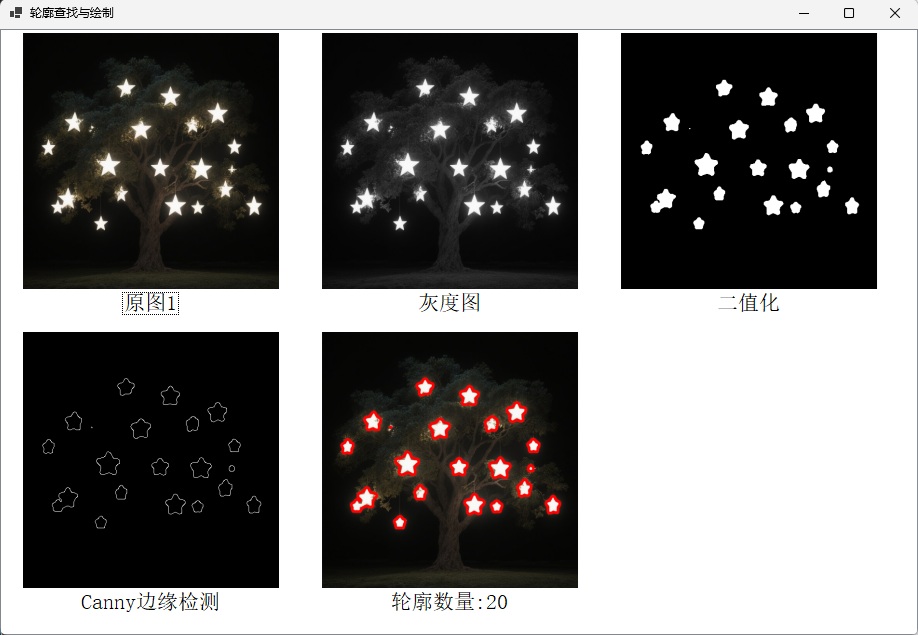
代码如下:
 listView1 = new ListView(); ;
 imageList1 = new ImageList();

 this.Text = "轮廓查找与绘制";

 imageList1.ColorDepth = ColorDepth.Depth32Bit;
 imageList1.ImageSize = new System.Drawing.Size(256, 256);
 imageList1.TransparentColor = Color.Transparent;


 listView1.Dock = DockStyle.Fill;
 listView1.LargeImageList = imageList1;
 listView1.Font = new Font("SimSun", 16f);          // 使用宋体

 string sourceFile1 = Path.Combine(Path.GetDirectoryName(Application.ExecutablePath), "img", "1.jpg");

 Mat src = Cv2.ImRead(sourceFile1, ImreadModes.Unchanged);
 ShowImg("原图1", src);

 //灰度图
 Mat gray = new Mat();
 Cv2.CvtColor(src, gray, ColorConversionCodes.BGR2GRAY);
 ShowImg("灰度图", gray);

 int ksize = 9;
 double thresh = 110;
 //均值滤波
 Cv2.Blur(gray, gray, new OpenCvSharp.Size(ksize, ksize));

 //二值化
 Mat thresholdMat = new Mat();
 Cv2.Threshold(gray, thresholdMat, thresh, 255, ThresholdTypes.Binary);
 ShowImg("二值化", thresholdMat);

 //Canny边缘检测
 Mat canny = new Mat();
 Cv2.Canny(thresholdMat, canny, thresh, 255);
 ShowImg("Canny边缘检测", canny);

 //获得轮廓,将结果画出
 OpenCvSharp.Point[][] contours;
 HierarchyIndex[] hierarchly;

 Cv2.FindContours(canny, out contours, out hierarchly,   RetrievalModes.External, ContourApproximationModes.ApproxNone);
 Cv2.DrawContours(src, contours, -1, Scalar.Red  ,  3 , LineTypes.AntiAlias, hierarchly);
 int contourCount = contours.Length;
 ShowImg($"轮廓数量:{contourCount}", src);

 this.Controls.Add(listView1);
private void ShowImg(string imgText, Mat imgMat)
{
string key = System.Guid.NewGuid().ToString().Replace("-", "");
imageList1.Images.Add(key, imgMat.ToBitmap());
listView1.Items.Add(imgText, key);
}顶部点击【下载】按钮,可以获取源代码。

火山引擎开发者社区是火山引擎打造的AI技术生态平台,聚焦Agent与大模型开发,提供豆包系列模型(图像/视频/视觉)、智能分析与会话工具,并配套评测集、动手实验室及行业案例库。社区通过技术沙龙、挑战赛等活动促进开发者成长,新用户可领50万Tokens权益,助力构建智能应用。
更多推荐
 4
4 0
0- 0


 已为社区贡献8条内容

所有评论(0)