vue3单页面连接多个websocket并实现断线重连功能
本文介绍了在Vue3+Pinia项目中封装WebSocket的实现方案,支持单页面创建多个独立WebSocket连接并实现断线重连机制。通过创建WebSocketStore存储管理多个连接,每个连接可配置不同的重连次数(默认3次)和间隔(默认5秒)。方案包含连接创建、消息收发、自动重连和连接管理等功能,解决了常见插件无法支持多连接的问题。关键实现包括:1) 使用key区分不同连接;2) 维护连接状
·
需求:需要在单页面中创建多个websocket并且互不影响,并实现断线重连机制,在网上看了很多文章,也下了几个插件,最后实现,在这里我不推荐使用vue-native-websocket-vue3,我看官方文档和案例,没看到怎么连接多个的,所以放弃了,socket.io-client也试过了,是需要后端要下载socket.io?放弃了,最后实现如下要求:
- vue3+pinia实现封装websocket
- 单页面可调用多个websocke连接并互不影响
- 设置重连机制,并设置最大重连数
1.效果
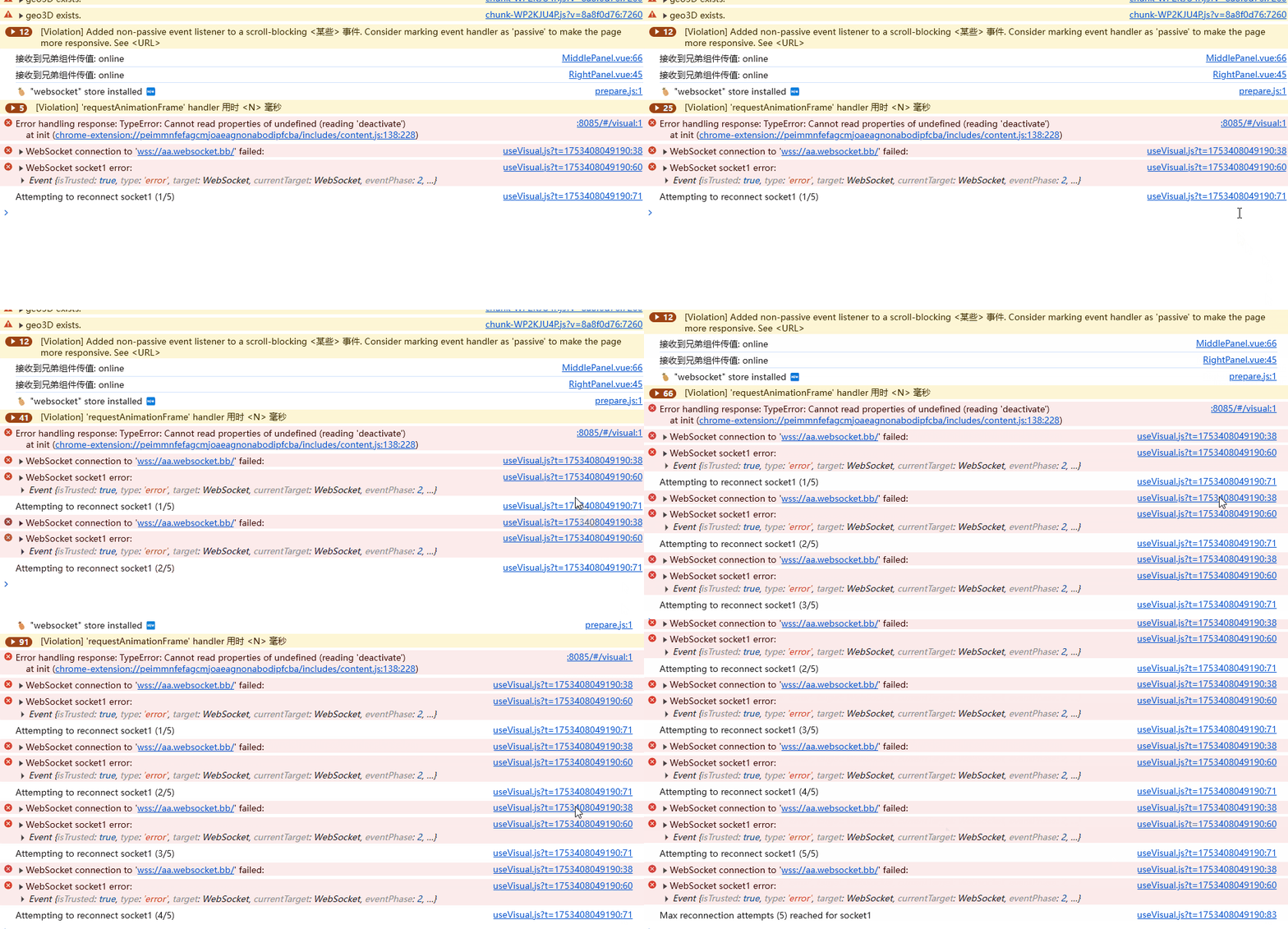
1.1设置断线重连(设置最大重连数为5),效果如下
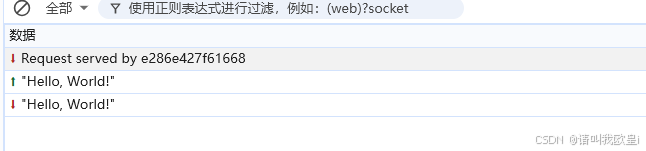
1.2发送消息
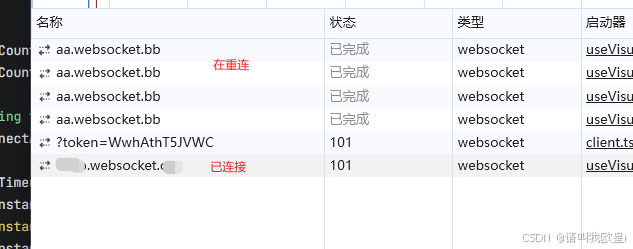
1.3连接多个
2.完整代码
2.1封装websocke
// stores/websocketStore.js
import { defineStore } from 'pinia'

export const useWebSocketStore = defineStore('websocket', {
    state: () => ({
        connections: {},
        defaultReconnectAttempts: 3,//默认最大重连次数
        defaultReconnectInterval: 5000,//重连间隔
    }),
    actions: {
        // 连接
        connect({ key, url, onMessage, options = {} }) {
            // 如果已存在相同key的连接,先关闭
            if (this.connections[key]) {
                this.disconnect(key)
            }

            const reconnectAttempts = options.reconnectAttempts ?? this.defaultReconnectAttempts
            const reconnectInterval = options.reconnectInterval ?? this.defaultReconnectInterval

            const connection = {
                instance: null,
                url,
                onMessage,
                options,
                reconnectCount: 0, // 当前重连次数
                maxReconnectAttempts: reconnectAttempts,
                reconnectInterval,
                reconnectTimer: null
            }

            this.createWebSocket(key, connection)
            this.connections[key] = connection
        },

        // 创建WebSocket实例(用于初始连接和重连)
        createWebSocket(key, connection) {
            connection.instance = new WebSocket(connection.url)

            connection.instance.onopen = () => {
                console.log(`WebSocket ${key} connected`)
                connection.reconnectCount = 0 // 重置重连计数器
            }

            connection.instance.onmessage = (event) => {
                if (typeof connection.onMessage === 'function') {
                    connection.onMessage(event.data)
                }
            }

            connection.instance.onclose = (event) => {
                if (event.wasClean) {
                    console.log(`WebSocket ${key} closed cleanly`)
                } else {
                    this.handleReconnect(key)
                }
            }

            connection.instance.onerror = (error) => {
                console.error(`WebSocket ${key} error:`, error)
                connection.instance.close() // 触发onclose
            }
        },
        // 处理重连
        handleReconnect(key) {
            const connection = this.connections[key]
            if (!connection) return

            if (connection.reconnectCount < connection.maxReconnectAttempts) {
                connection.reconnectCount++
                // 尝试重新连接日志
                console.log(`Attempting to reconnect ${key} (${connection.reconnectCount}/${connection.maxReconnectAttempts})`)

                connection.reconnectTimer = setTimeout(() => {
                    if (connection.instance) {
                        connection.instance.close()
                        connection.instance = null
                    }
                    // 重新创建WebSocket实例而不重置计数器
                    this.createWebSocket(key, connection)
                }, connection.reconnectInterval)
            } else {
                // 最大重连尝试次数 reached
                console.log(`Max reconnection attempts (${connection.maxReconnectAttempts}) reached for ${key}`)
            }
        },
        // 关闭单个连接
        disconnect(key) {
            if (this.connections[key]) {
                const connection = this.connections[key]
                if (connection.instance) {
                    connection.instance.close()
                }
                if (connection.reconnectTimer) {
                    clearTimeout(connection.reconnectTimer)
                }
                delete this.connections[key]
                console.log(`WebSocket ${key} disconnected`)
            }
        },
        // 发送消息
        send(key, data) {
            const connection = this.connections[key]
            if (connection?.instance?.readyState === WebSocket.OPEN) {
                connection.instance.send(JSON.stringify(data))
            } else {
                console.error(`WebSocket ${key} is not connected`)
            }
        },
        // 关闭所有连接
        disconnectAll() {
            Object.keys(this.connections).forEach(key => {
                this.disconnect(key)
            })
        }
    }
})
2.2页面调用
调用多个websocke连接
import { useWebSocketStore } from "@/stores/websocketStore.js";

// // 获取store
const websocketStore = useWebSocketStore();
const messages1 = ref([]);
const messages2 = ref([]);
const connectSocket1 = () => {
  websocketStore.connect({
    key: "socket1",
    url: "wss://aa.websocket.bb", // 测试用的WebSocket服务
    onMessage: (data) => {
      messages1.value.push(data);
      console.log("Socket1 received:", data);
    },
    options: {
      reconnectAttempts: 5, // 自定义重试次数
      reconnectInterval: 3000, // 自定义重试间隔
    },
  });
};

const connectSocket2 = () => {
  websocketStore.connect({
    key: "socket2",
    url: "wss://bb.websocket.cc", // 另一个WebSocket服务
    onMessage: (data) => {
      messages2.value.push(data);
      console.log("Socket2 连接状态:", data);
    },
  });
};
// 生命周期钩子
onMounted(() => {
  connectSocket1();
  connectSocket2();
});
2.3断开所有连接
const disconnectAll = () => {
  websocketStore.disconnectAll();
};
// 组件卸载时断开所有连接
onUnmounted(() => {
  disconnectAll();
});
2.4断开单个连接
const disconnectSocket1 = () => {
  websocketStore.disconnect("socket1");
};
2.5发送消息
const sendDataWebsocket = () => {
  websocketStore.send("socket1", "Hello, World!");
};
文章到此结束,希望对你有所帮助~

火山引擎开发者社区是火山引擎打造的AI技术生态平台,聚焦Agent与大模型开发,提供豆包系列模型(图像/视频/视觉)、智能分析与会话工具,并配套评测集、动手实验室及行业案例库。社区通过技术沙龙、挑战赛等活动促进开发者成长,新用户可领50万Tokens权益,助力构建智能应用。
更多推荐
 7
7 0
0- 0


 已为社区贡献1条内容

所有评论(0)