2.Three.js 中 Fog(雾效)详解与实战示例
雾效可以让场景中的物体根据距离相机的远近被逐渐“吞没”于雾中。主要目的包括:模拟自然界大气透视现象;缓解远距离模型贴图粗糙问题;提升沉浸感和美术表现力。// 自动注入雾效 uniforms 和代码#endif如果使用// 在 gl_FragColor 混合前加 #include雾效作为 Three.js 中的一项基础但非常重要的视觉增强手段,使用简单、效果直观,适合各种场景。通过合理设置Fog或F
在 WebGL 三维可视化中,雾效(Fog) 是一种常见的渲染技巧,用来模拟远处物体因空气中的颗粒而变得模糊、朦胧的视觉效果。在 Three.js 中,雾效不仅能增强画面的真实感,还能增加空间层次,优化视觉体验。
本文将深入介绍 Three.js 中的雾效,包括 Fog 与 FogExp2 的区别、使用方式、参数解析、注意事项,并附带完整示例代码。
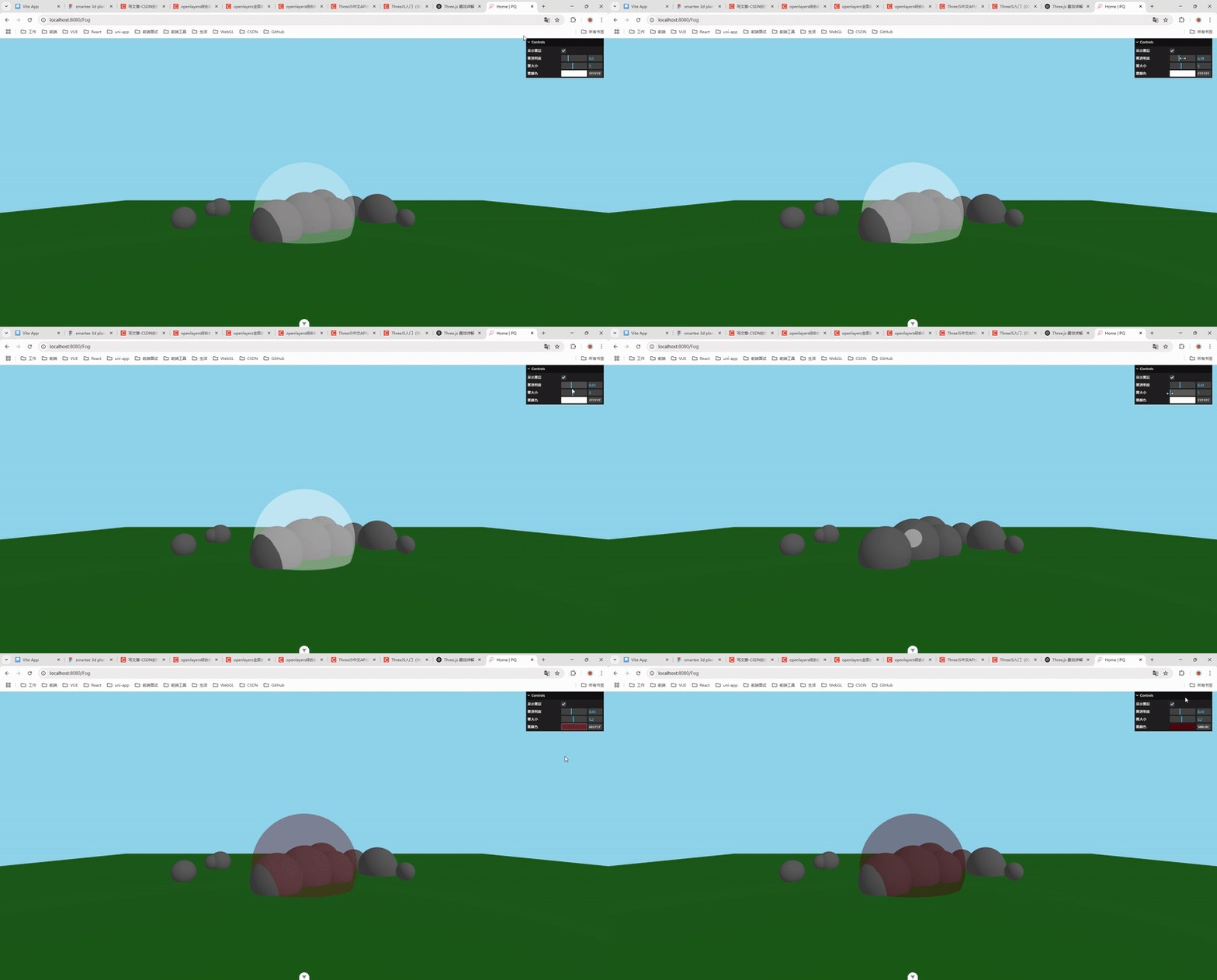
🧠一、什么是雾效(Fog)?
雾效可以让场景中的物体根据距离相机的远近被逐渐“吞没”于雾中。主要目的包括:
-
模拟自然界大气透视现象;
-
缓解远距离模型贴图粗糙问题;
-
提升沉浸感和美术表现力。
📊二、Three.js 中的雾类型
Three.js 提供了两种雾类型,分别是:
| 类别 | 类名 | 特点说明 |
|---|---|---|
| 线性雾 | THREE.Fog |
雾的密度随距离线性增加 |
| 指数雾 | THREE.FogExp2 |
雾的密度随距离指数级增加,更自然柔和 |
🔁三、Fog 和 FogExp2 参数详解
1. Fog 构造函数
const fog = new THREE.Fog(color, near, far);
| 参数 | 说明 |
|---|---|
color |
雾的颜色(可与背景一致或略有差异) |
near |
雾效开始距离(距离相机) |
far |
雾效结束距离(超过该距离的物体完全被雾遮挡) |
2. FogExp2 构造函数
const fogExp = new THREE.FogExp2(color, density);
| 参数 | 说明 |
|---|---|
color |
雾的颜色 |
density |
雾的密度,值越大雾越浓,通常设置在 0.001~0.05 |
🧪四、如何在场景中添加雾效?
只需要将雾对象赋值给 scene.fog 即可:
scene.fog = new THREE.Fog(0xffffff, 10, 100);或者使用指数雾:
scene.fog = new THREE.FogExp2(0xcccccc, 0.02);✅五、配合背景颜色使用
为了达到更自然的效果,建议将渲染器的背景色与雾的颜色保持一致:
renderer.setClearColor(scene.fog.color);📁六、雾对哪些材质生效?
雾效默认对以下材质生效(内置支持):
-
MeshBasicMaterial -
MeshLambertMaterial -
MeshPhongMaterial -
MeshStandardMaterial -
ShaderMaterial(需自行实现雾相关 shader)
注意:对使用自定义 ShaderMaterial 的材质,需手动处理雾的混合逻辑。
📦七、Fog 与相机距离配合建议
-
near太小 → 近处物体也被雾覆盖,画面变灰; -
far太大 → 雾效不明显; -
可根据相机远裁剪面 (
camera.far) 的值做合理分布。
🔧八、Fog vs FogExp2 的区别
| 特性 | Fog(线性雾) | FogExp2(指数雾) |
|---|---|---|
| 控制粒度 | 更精确 | 更柔和 |
| 表现自然程度 | 稍显突兀 | 更自然、渐变平滑 |
| 使用场景 | 工业建筑、可控雾效 | 游戏、影视、自然场景 |
🌀九、完整示例代码(Fog)
<!--
 * @Author: 彭麒
 * @Date: 2025/4/20
 * @Email: 1062470959@qq.com
 * @Description: 此源码版权归吉檀迦俐所有,可供学习和借鉴或商用。
 -->
<template>
  <div ref="containerRef" class="w-full h-full"></div>
</template>

<script setup>
import { ref, onMounted, onBeforeUnmount } from 'vue'
import * as THREE from 'three'
import { GUI } from 'three/addons/libs/lil-gui.module.min.js';

const containerRef = ref()
let scene, camera, renderer, animationId, gui
let fogMesh

const fogParams = {
  showFog: true,
  fogOpacity: 0.3,
  fogScale: 5,
  fogColor: '#ffffff',
}

onMounted(() => {
  const container = containerRef.value
  const width = container.clientWidth
  const height = container.clientHeight

  scene = new THREE.Scene()

  renderer = new THREE.WebGLRenderer({ antialias: true, alpha: false })
  renderer.setSize(width, height)
  renderer.setClearColor(0x87ceeb) // 蓝天背景
  container.appendChild(renderer.domElement)

  camera = new THREE.PerspectiveCamera(60, width / height, 0.1, 1000)
  camera.position.set(0, 5, 20)

  // 环境光
  scene.add(new THREE.AmbientLight(0xffffff, 0.5))

  // 平行光
  const light = new THREE.DirectionalLight(0xffffff, 0.8)
  light.position.set(10, 10, 10)
  scene.add(light)

  // 地面
  const ground = new THREE.Mesh(
    new THREE.PlaneGeometry(100, 100),
    new THREE.MeshStandardMaterial({ color: 0x228822 })
  )
  ground.rotation.x = -Math.PI / 2
  ground.position.y = 0
  scene.add(ground)

  // 山体(球体)
  for (let i = 0; i < 10; i++) {
    const mountain = new THREE.Mesh(
      new THREE.SphereGeometry(1 + Math.random() * 2, 32, 32),
      new THREE.MeshStandardMaterial({ color: 0x888888 })
    )
    mountain.position.set(
      Math.random() * 30 - 15,
      1,
      Math.random() * -20
    )
    scene.add(mountain)
  }

  // 局部雾层:使用透明材质的球体模拟
  const fogGeo = new THREE.SphereGeometry(1, 32, 32)
  const fogMat = new THREE.MeshBasicMaterial({
    color: fogParams.fogColor,
    transparent: true,
    opacity: fogParams.fogOpacity,
    depthWrite: false,
  })
  fogMesh = new THREE.Mesh(fogGeo, fogMat)
  fogMesh.scale.set(fogParams.fogScale, fogParams.fogScale, fogParams.fogScale)
  fogMesh.position.set(0, 2, -5)
  scene.add(fogMesh)

  // GUI
  gui = new GUI()
  gui.add(fogParams, 'showFog').name('显示雾层').onChange(() => {
    fogMesh.visible = fogParams.showFog
  })
  gui.add(fogParams, 'fogOpacity', 0.05, 1).step(0.01).name('雾透明度').onChange(val => {
    fogMesh.material.opacity = val
  })
  gui.add(fogParams, 'fogScale', 1, 10).step(0.1).name('雾大小').onChange(val => {
    fogMesh.scale.set(val, val, val)
  })
  gui.addColor(fogParams, 'fogColor').name('雾颜色').onChange(val => {
    fogMesh.material.color.set(val)
  })

  // 动画
  const animate = () => {
    animationId = requestAnimationFrame(animate)
    fogMesh.rotation.y += 0.002
    renderer.render(scene, camera)
  }

  animate()
})

onBeforeUnmount(() => {
  cancelAnimationFrame(animationId)
  renderer.dispose()
  gui.destroy()
})
</script>

<style scoped>
div {
  width: 100%;
  height: 100vh;
  overflow: hidden;
}
</style>
🎨十、FogExp2 示例代码(指数雾)
只需替换:
scene.fog = new THREE.FogExp2(0xaabbcc, 0.04);即可实现指数雾,变化更加平滑。
🌄十一、常见问题及优化建议
-
材质无效? 检查是否是支持雾的材质;
-
雾太浓或看不到? 合理调整
near/far或density; -
背景色突兀? 使用
renderer.setClearColor同步背景; -
性能问题? 雾本身性能开销小,但如果场景过大应考虑 LOD 机制结合雾优化;
📐十二、自定义 Shader 如何支持雾效?
Three.js 提供内置雾的宏定义和代码片段:
#ifdef USE_FOG
// 自动注入雾效 uniforms 和代码
#endif
如果使用 ShaderMaterial,需手动添加:
#include <fog_pars_fragment>
// 在 gl_FragColor 混合前加 #include
<fog_fragment>
📝总结
雾效作为 Three.js 中的一项基础但非常重要的视觉增强手段,使用简单、效果直观,适合各种场景。通过合理设置 Fog 或 FogExp2,可以让三维画面更具空间层次与真实感,尤其在大型地图、游戏场景、科幻模拟等项目中尤为重要。
如果你觉得本文有帮助,欢迎点赞、收藏、评论支持 👇
也欢迎关注我,后续将持续更新更多 Three.js 实战系列文章!
如有问题或建议,也欢迎留言交流!

火山引擎开发者社区是火山引擎打造的AI技术生态平台,聚焦Agent与大模型开发,提供豆包系列模型(图像/视频/视觉)、智能分析与会话工具,并配套评测集、动手实验室及行业案例库。社区通过技术沙龙、挑战赛等活动促进开发者成长,新用户可领50万Tokens权益,助力构建智能应用。
更多推荐
 27
27 0
0- 0


 已为社区贡献5条内容

所有评论(0)