DeepSeek-OCR:重新定义视觉文本压缩的边界
摘要: DeepSeek-OCR提出了一种基于视觉模态的文本压缩新范式,通过图像实现高效文本信息压缩。该模型采用端到端视觉语言架构,包含创新的DeepEncoder(3.8亿参数)和30亿参数MoE解码器。DeepEncoder结合SAM-base与CLIP-large,支持多分辨率输入,实现约10倍压缩比下96%+的OCR精度。实验证明,视觉token能显著降低LLMs处理长文本的计算复杂度,为
DeepSeek-OCR:重新定义视觉文本压缩的边界
引言:视觉模态的革命性突破
在当今大语言模型(LLMs)时代,处理长文本内容面临着巨大的计算挑战,这主要源于序列长度带来的二次方复杂度增长。探索了一个潜在的解决方案:利用视觉模态作为文本信息的高效压缩媒介。一张包含文档文本的图像可以用比等效数字文本少得多的token表示丰富信息,这表明通过视觉token进行光学压缩可以实现更高的压缩比。
这一洞见促使从以LLM为中心的视角重新审视视觉语言模型(VLMs),重点关注视觉编码器如何提高LLMs处理文本信息的效率,而不仅仅是人类擅长的基本视觉问答(VQA)。OCR任务作为连接视觉和语言的中间模态,为这种视觉文本压缩范式提供了理想的试验场,因为它们在视觉和文本表示之间建立了自然的压缩-解压缩映射,同时提供了定量评估指标。
DeepSeek-OCR应运而生,这是一个旨在为高效视觉文本压缩提供初步概念验证的VLM。的工作不仅展示了在约10倍文本压缩下实现96%+的OCR解码精度,更开创了通过视觉方式进行上下文压缩的全新研究方向。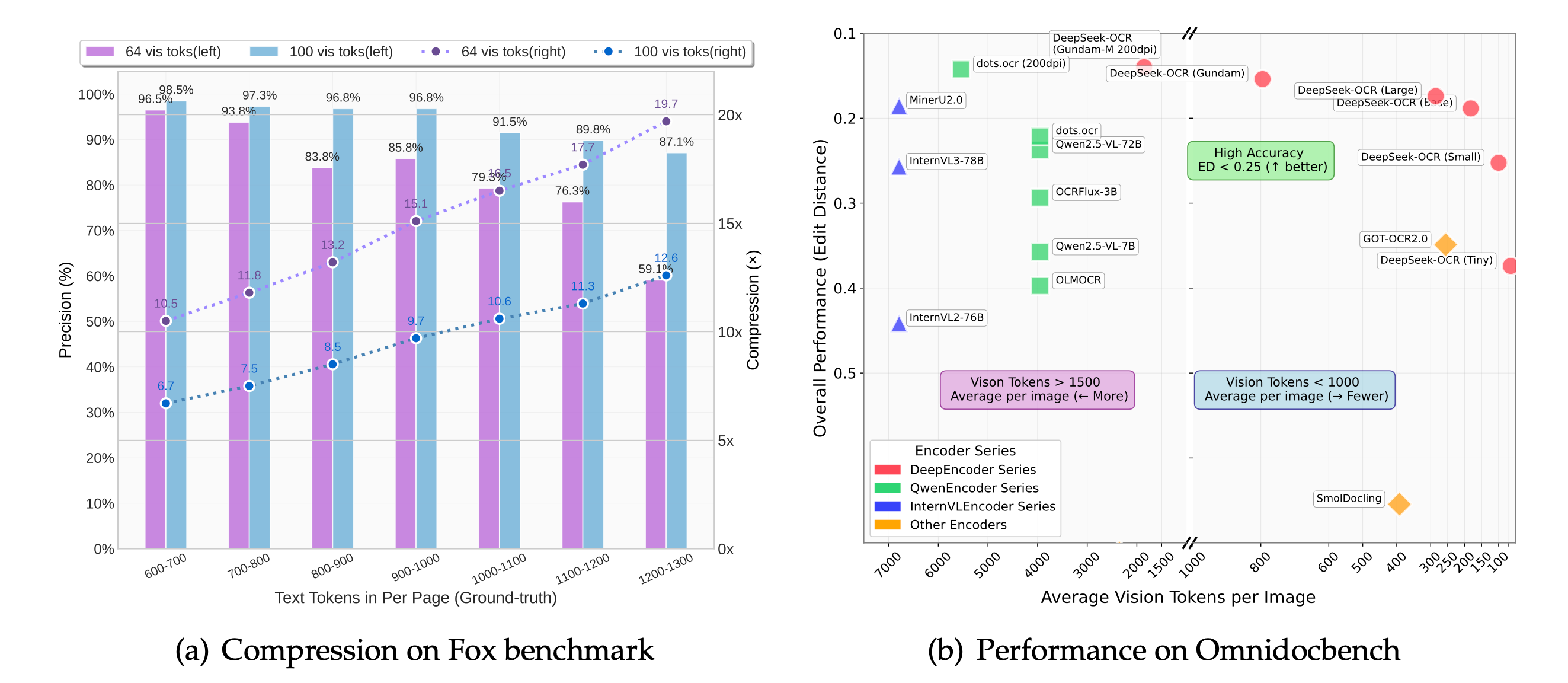
一、DeepSeek-OCR核心架构解析
1.1 整体架构设计
DeepSeek-OCR采用统一的端到端VLM架构,由编码器和解码器两部分组成。编码器(即DeepEncoder)负责提取图像特征并对视觉表示进行标记化和压缩,解码器则基于图像token和提示生成所需结果。
import torch
import torch.nn as nn
from transformers import AutoModel, AutoTokenizer
import os

class DeepSeekOCRInference:
    def __init__(self, model_name='deepseek-ai/DeepSeek-OCR'):
        # 设置环境变量,指定使用的GPU
        os.environ["CUDA_VISIBLE_DEVICES"] = '0'

        # 加载tokenizer和模型
        self.tokenizer = AutoTokenizer.from_pretrained(
            model_name,
            trust_remote_code=True
        )

        # 使用flash_attention_2实现高效注意力计算
        self.model = AutoModel.from_pretrained(
            model_name,
            _attn_implementation='flash_attention_2',
            trust_remote_code=True,
            use_safetensors=True
        )

        # 设置为评估模式,并使用bfloat16精度加速推理
        self.model = self.model.eval().cuda().to(torch.bfloat16)

    def prepare_prompt(self, mode='free_ocr'):
        """准备不同模式的提示词"""
        prompts = {
            'free_ocr': "<image>\nFree OCR.",
            'markdown': "<image>\n<|grounding|>Convert the document to markdown.",
            'parse_figure': "<image>\nParse the figure.",
            'detailed_caption': "<image>\nDescribe this image in detail."
        }
        return prompts.get(mode, prompts['free_ocr'])
DeepSeek-OCR的参数配置体现了精心设计的平衡策略。DeepEncoder大约有3.8亿参数,主要由一个8000万参数的SAM-base和一个3亿参数的CLIP-large串联组成。解码器采用30亿参数的MoE架构,激活参数约为5.7亿。这种设计在保持强大表达能力的同时,确保了推理效率。
1.2 DeepEncoder:革命性的视觉编码器
为了探索上下文光学压缩的可行性,需要一个具备以下特征的视觉编码器:能够处理高分辨率输入、在高分辨率下保持低激活、产生少量视觉token、支持多分辨率输入以及适中的参数数量。然而,现有的开源编码器无法完全满足所有这些条件,因此设计了全新的视觉编码器——DeepEncoder。
class DeepEncoderArchitecture:
    def __init__(self):
        self.sam_base_params = 80e6  # SAM-base参数数量
        self.clip_large_params = 300e6  # CLIP-large参数数量
        self.conv_compressor_ratio = 16  # 卷积压缩比率

    def calculate_vision_tokens(self, input_resolution=1024):
        """计算给定输入分辨率下的视觉token数量"""
        patch_size = 16  # SAM的patch大小
        patches_per_side = input_resolution // patch_size
        total_patches = patches_per_side * patches_per_side

        # 经过16倍压缩后的token数量
        compressed_tokens = total_patches // self.conv_compressor_ratio

        return {
            'initial_tokens': total_patches,
            'compressed_tokens': compressed_tokens,
            'compression_ratio': self.conv_compressor_ratio
        }

    def process_high_resolution_image(self, image_tensor):
        """处理高分辨率图像的完整流程"""
        # 第一阶段:基于窗口注意力的视觉感知特征提取
        window_attention_features = self.sam_encoder(image_tensor)

        # 卷积压缩模块:16倍下采样
        compressed_features = self.conv_compressor(window_attention_features)

        # 第二阶段:基于全局注意力的视觉知识特征提取
        global_attention_features = self.clip_encoder(compressed_features)

        return global_attention_features
DeepEncoder主要由两个组件组成:以窗口注意力为主的视觉感知特征提取组件和具有密集全局注意力的视觉知识特征提取组件。为了受益于先前工作的预训练成果,分别使用SAM-base(patch大小为16)和CLIP-large作为这两个组件的主要架构。
对于CLIP,移除了第一个patch嵌入层,因为其输入不再是图像,而是来自前一个管道的输出token。在两个组件之间,借鉴了Vary的方法,使用一个2层卷积模块对视觉token进行16倍下采样。每个卷积层的内核大小为3,步长为2,填充为1,通道数从256增加到1024。
假设输入一个1024×1024的图像,DeepEncoder会将其分割为1024/16×1024/16=4096个patch token。由于编码器的前半部分以窗口注意力为主且只有8000万参数,激活量是可接受的。在进入全局注意力之前,4096个token经过压缩模块,token数量变为4096/16=256,从而使整体激活内存可控。
1.3 多分辨率支持机制
DeepEncoder通过位置编码的动态插值来满足多分辨率需求,并设计了多种分辨率模式进行同步模型训练,以实现单个DeepSeek-OCR模型支持多分辨率的能力。
class MultiResolutionSupport:
    def __init__(self):
        self.supported_modes = {
            'tiny': {'resolution': 512, 'tokens': 64, 'process': 'resize'},
            'small': {'resolution': 640, 'tokens': 100, 'process': 'resize'},
            'base': {'resolution': 1024, 'tokens': 256, 'process': 'padding'},
            'large': {'resolution': 1280, 'tokens': 400, 'process': 'padding'},
            'gundam': {'resolution': '640+1024', 'tokens': 'n×100+256', 'process': 'resize+padding'},
            'gundam_m': {'resolution': '1024+1280', 'tokens': 'n×256+400', 'process': 'resize+padding'}
        }

    def calculate_valid_tokens(self, original_width, original_height, mode='base'):
        """计算有效视觉token数量"""
        config = self.supported_modes[mode]

        if config['process'] == 'resize':
            return config['tokens']

        # 对于padding模式,计算有效token比例
        max_dim = max(original_width, original_height)
        min_dim = min(original_width, original_height)

        valid_ratio = 1 - ((max_dim - min_dim) / max_dim)
        actual_tokens = config['tokens']
        valid_tokens = int(actual_tokens * valid_ratio)

        return valid_tokens

    def dynamic_resolution_processing(self, image_tensor, local_size=640, global_size=1024):
        """动态分辨率处理(Gundam模式)"""
        batch_size, channels, height, width = image_tensor.shape

        # 计算需要的切片数量
        n_tiles_h = (height + local_size - 1) // local_size
        n_tiles_w = (width + local_size - 1) // local_size
        n_tiles = n_tiles_h * n_tiles_w

        # 处理局部视图(切片)
        local_views = []
        for i in range(n_tiles_h):
            for j in range(n_tiles_w):
                h_start = i * local_size
                w_start = j * local_size
                h_end = min(h_start + local_size, height)
                w_end = min(w_start + local_size, width)

                local_view = image_tensor[:, :, h_start:h_end, w_start:w_end]
                local_views.append(local_view)

        # 处理全局视图
        global_view = self.resize_to_square(image_tensor, global_size)

        return {
            'local_views': local_views,
            'global_view': global_view,
            'num_tiles': n_tiles
        }
本地分辨率支持四个子模式:Tiny、Small、Base和Large,对应的分辨率和token数量分别为512×512(64)、640×640(100)、1024×1024(256)和1280×1280(400)。由于Tiny和Small模式的分辨率相对较小,为了避免浪费视觉token,图像通过直接调整原始形状来处理。对于Base和Large模式,为了保留原始图像的宽高比,图像被填充到相应的大小。
动态分辨率可以由两个本地分辨率组成。例如,Gundam模式由n×640×640切片(局部视图)和一个1024×1024全局视图组成。支持动态分辨率主要是出于应用考虑,特别是对于超高分辨率输入(如报纸图像)。切片是一种二次窗口注意力的形式,可以进一步有效减少激活内存。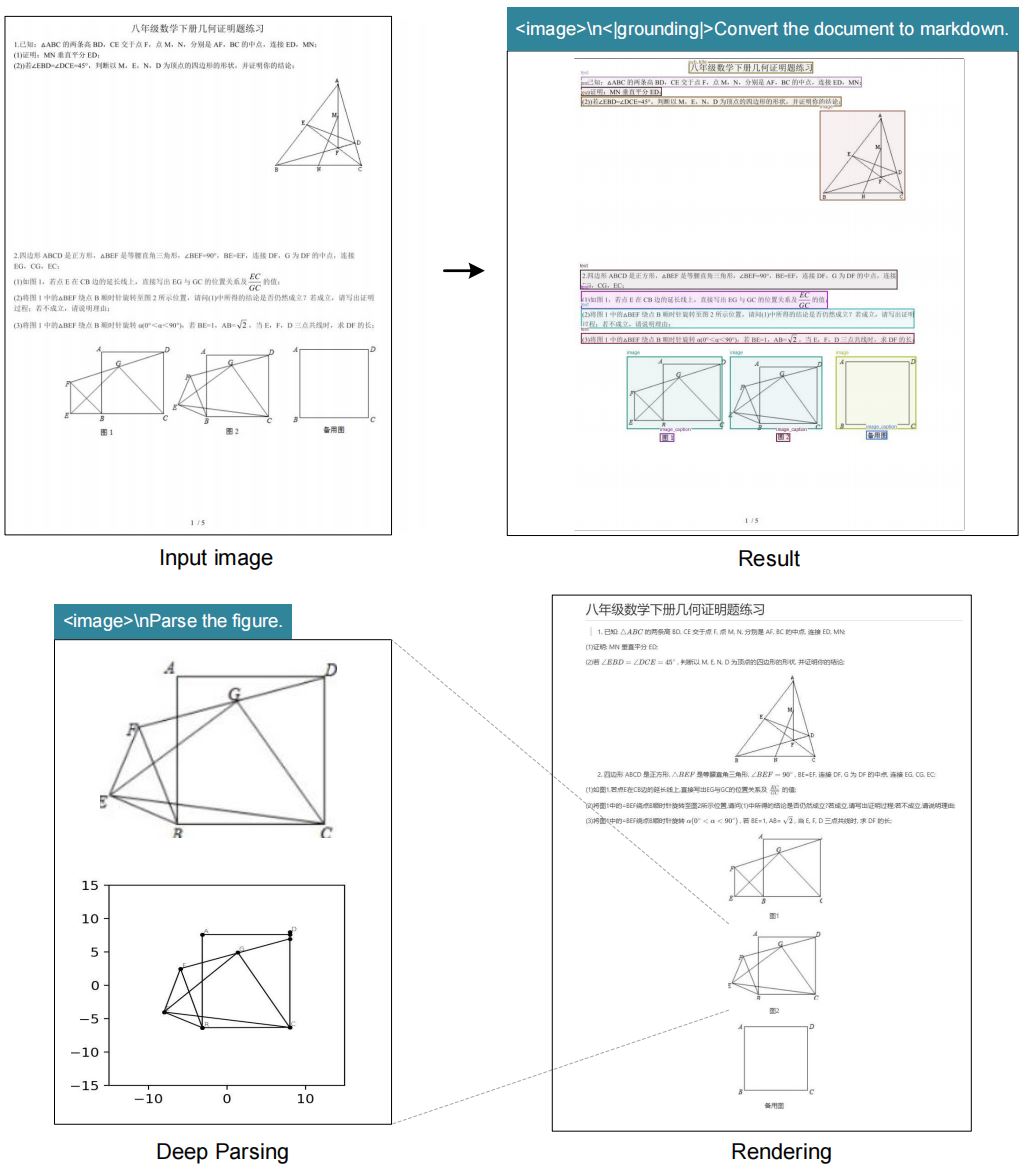
二、MoE解码器:高效的文本重建引擎
2.1 混合专家架构设计
的解码器使用DeepSeekMoE,具体来说是DeepSeek-3B-MoE。在推理过程中,模型从64个路由专家中激活6个和2个共享专家,激活参数约为5.7亿。3B的DeepSeekMoE非常适合以领域为中心(对来说是OCR)的VLM研究,因为它获得了3B模型的表达能力,同时享受5亿小模型的推理效率。
class MoEDecoder:
    def __init__(self, total_experts=64, activated_experts=6, shared_experts=2):
        self.total_experts = total_experts
        self.activated_experts = activated_experts
        self.shared_experts = shared_experts
        self.activated_params = 570e6  # 5.7亿激活参数

    def expert_routing(self, hidden_states):
        """专家路由机制"""
        # 计算每个token与各个专家的匹配分数
        expert_scores = self.routing_network(hidden_states)

        # 选择top-k专家
        topk_scores, topk_indices = torch.topk(
            expert_scores,
            self.activated_experts,
            dim=-1
        )

        # 应用softmax获得路由权重
        routing_weights = torch.softmax(topk_scores, dim=-1)

        return topk_indices, routing_weights

    def moe_forward(self, hidden_states):
        """MoE前向传播"""
        batch_size, seq_len, hidden_dim = hidden_states.shape

        # 专家路由
        expert_indices, routing_weights = self.expert_routing(hidden_states)

        # 初始化输出
        final_output = torch.zeros_like(hidden_states)

        # 处理每个被选中的专家
        for expert_idx in range(self.activated_experts):
            # 获取当前专家处理的token掩码
            expert_mask = (expert_indices == expert_idx).any(dim=-1)

            if expert_mask.any():
                # 获取对应token
                expert_tokens = hidden_states[expert_mask]

                # 通过专家网络处理
                expert_output = self.experts[expert_idx](expert_tokens)

                # 应用路由权重
                current_weights = routing_weights[expert_mask, expert_idx]
                weighted_output = expert_output * current_weights.unsqueeze(-1)

                # 累加到最终输出
                final_output[expert_mask] += weighted_output

        # 添加共享专家的贡献
        shared_output = self.shared_experts(hidden_states)
        final_output += shared_output

        return final_output

    def reconstruct_text(self, compressed_vision_tokens):
        """从压缩的视觉token重建文本表示"""
        # compressed_vision_tokens: [batch_size, num_vision_tokens, latent_dim]
        # 返回: [batch_size, num_text_tokens, text_dim]

        # 通过MoE解码器进行文本重建
        text_representation = self.moe_forward(compressed_vision_tokens)

        return text_representation
解码器从DeepEncoder的压缩潜在视觉token重建原始文本表示。这个重建过程可以形式化地表示为从压缩的潜在空间到文本空间的非线性映射。紧凑的语言模型可以通过OCR风格的训练有效地学习这种映射函数。可以合理地推测,通过专门的预训练优化,LLMs将更自然地集成这种能力。
2.2 文本生成与格式控制
DeepSeek-OCR支持多种输出格式,包括自由OCR、Markdown转换、图表解析等,这些都可以通过不同的提示词来控制。
class TextGenerationController:
    def __init__(self, tokenizer):
        self.tokenizer = tokenizer
        self.special_tokens = {
            'grounding_start': '<|grounding|>',
            'grounding_end': '<|/grounding|>',
            'ref_start': '<|ref|>',
            'ref_end': '<|/ref|>'
        }

    def format_layout_output(self, text_regions, coordinates, labels):
        """格式化布局输出"""
        formatted_output = ""

        for i, (text, coord, label) in enumerate(zip(text_regions, coordinates, labels)):
            # 添加坐标和标签信息
            bbox_info = f"[{coord[0]},{coord[1]},{coord[2]},{coord[3]},{label}]"
            formatted_output += f"{bbox_info}\n{text}\n\n"

        return formatted_output.strip()

    def generate_markdown(self, document_structure):
        """生成Markdown格式输出"""
        markdown_content = ""

        for element in document_structure:
            if element['type'] == 'title':
                markdown_content += f"# {element['content']}\n\n"
            elif element['type'] == 'heading':
                markdown_content += f"## {element['content']}\n\n"
            elif element['type'] == 'paragraph':
                markdown_content += f"{element['content']}\n\n"
            elif element['type'] == 'table':
                markdown_content += self.format_table_to_markdown(element['content'])
            elif element['type'] == 'list':
                markdown_content += self.format_list_to_markdown(element['content'])

        return markdown_content

    def parse_chart_to_html(self, chart_data):
        """将图表数据解析为HTML表格格式"""
        if chart_data['type'] == 'bar_chart':
            return self.bar_chart_to_html(chart_data)
        elif chart_data['type'] == 'line_chart':
            return self.line_chart_to_html(chart_data)
        elif chart_data['type'] == 'pie_chart':
            return self.pie_chart_to_html(chart_data)

    def bar_chart_to_html(self, chart_data):
        """将柱状图转换为HTML表格"""
        html_table = "<table>\n<thead>\n<tr>\n"

        # 表头
        for category in chart_data['categories']:
            html_table += f"<th>{category}</th>\n"
        html_table += "</tr>\n</thead>\n<tbody>\n<tr>\n"

        # 数据行
        for value in chart_data['values']:
            html_table += f"<td>{value}</td>\n"
        html_table += "</tr>\n</tbody>\n</table>"

        return html_table
三、数据引擎:构建多样化训练数据
3.1 OCR 1.0数据构建
文档数据是DeepSeek-OCR的重中之重。从互联网收集了3000万页多样化的PDF数据,覆盖约100种语言,其中中文和英文约占2500万页,其他语言约占500万页。对于这些数据,创建了两种类型的真实标签:粗粒度标注和细粒度标注。
class OCRDataEngine:
    def __init__(self):
        self.language_distribution = {
            'chinese': 25e6,  # 2500万页中文
            'english': 25e6,  # 2500万页英文
            'other_languages': 5e6  # 500万页其他语言
        }

    def extract_coarse_annotations(self, pdf_path):
        """使用fitz提取粗粒度标注"""
        import fitz  # PyMuPDF

        doc = fitz.open(pdf_path)
        coarse_data = []

        for page_num in range(len(doc)):
            page = doc[page_num]

            # 提取文本和基本布局信息
            text_blocks = page.get_text("dict")["blocks"]

            for block in text_blocks:
                if "lines" in block:  # 文本块
                    for line in block["lines"]:
                        for span in line["spans"]:
                            annotation = {
                                'text': span["text"],
                                'bbox': span["bbox"],
                                'page': page_num,
                                'type': 'text'
                            }
                            coarse_data.append(annotation)

        return coarse_data

    def create_fine_annotations(self, pdf_path, layout_model, ocr_model):
        """创建细粒度标注"""
        fine_data = []

        # 使用布局模型进行精细布局分析
        layout_results = layout_model.predict(pdf_path)

        for region in layout_results['regions']:
            # 使用OCR模型进行文本识别
            ocr_result = ocr_model.recognize(region['image'])

            fine_annotation = {
                'coordinates': region['bbox'],
                'label': region['type'],  # text, title, table, figure等
                'text': ocr_result['text'],
                'confidence': ocr_result['confidence'],
                'formatting': self.extract_formatting(region)
            }
            fine_data.append(fine_annotation)

        return fine_data

    def process_minority_languages(self, pdf_data, language):
        """处理少数民族语言数据"""
        # 利用布局模型的泛化能力
        layout_regions = self.layout_model.detect(pdf_data)

        minority_data = []
        for region in layout_regions:
            # 使用专门训练的GOT-OCR2.0进行小patch识别
            patch_text = self.minority_ocr_model.recognize(region)

            if patch_text['confidence'] > 0.8:
                minority_data.append({
                    'text': patch_text['content'],
                    'bbox': region['bbox'],
                    'language': language
                })

        return minority_data
粗粒度标注直接使用fitz从完整数据集中提取,旨在教模型识别光学文本,特别是少数民族语言。细粒度标注包括每种语言200万页的中文和英文,使用先进的布局模型(如PP-DocLayout)和OCR模型(如MinuerU和GOT-OCR2.0)进行标注,构建检测和识别交错的数据。
对于少数民族语言,在检测部分,发现布局模型具有一定的泛化能力。在识别部分,使用fitz创建小patch数据来训练GOT-OCR2.0,然后使用训练好的模型对布局处理后的小patch进行标注,采用模型飞轮创建60万个数据样本。
3.2 OCR 2.0数据生成
遵循GOT-OCR2.0,将图表、化学公式和平面几何解析数据称为OCR 2.0数据。对于图表数据,遵循OneChart的方法,使用pyecharts和matplotlib渲染1000万张图像,主要包括常用的折线图、柱状图、饼图和复合图表。
class OCR20DataGenerator:
    def __init__(self):
        self.chart_types = ['line', 'bar', 'pie', 'composite']
        self.chemical_toolkit = 'RDKit'
        self.geometry_generator = 'SlowPerception'

    def generate_chart_data(self, num_samples=10e6):
        """生成图表数据"""
        chart_data = []

        for i in range(int(num_samples)):
            chart_type = random.choice(self.chart_types)

            if chart_type == 'bar':
                chart_info = self.generate_bar_chart()
            elif chart_type == 'line':
                chart_info = self.generate_line_chart()
            elif chart_type == 'pie':
                chart_info = self.generate_pie_chart()
            else:
                chart_info = self.generate_composite_chart()

            # 渲染图表图像
            chart_image = self.render_chart(chart_info)

            # 生成HTML表格格式的标签
            html_table = self.chart_to_html(chart_info)

            chart_data.append({
                'image': chart_image,
                'ground_truth': html_table,
                'type': chart_type,
                'metadata': chart_info
            })

        return chart_data

    def generate_chemical_data(self, num_samples=5e6):
        """生成化学公式数据"""
        chemical_data = []

        # 从PubChem获取SMILES格式数据
        smiles_list = self.fetch_pubchem_smiles(num_samples)

        for smiles in smiles_list:
            # 使用RDKit渲染化学结构
            mol_image = self.rdkit_render(smiles)

            chemical_data.append({
                'image': mol_image,
                'ground_truth': smiles,
                'type': 'chemical_formula'
            })

        return chemical_data

    def generate_geometry_data(self, num_samples=1e6):
        """生成平面几何数据"""
        geometry_data = []

        for i in range(int(num_samples)):
            # 使用Slow Perception方法生成几何图形
            geometric_figure = self.slow_perception_generate(
                perception_ruler_size=4
            )

            # 应用几何平移不变数据增强
            augmented_figures = self.geometric_augmentation(geometric_figure)

            for fig in augmented_figures:
                geometry_dict = {
                    'line_segments': fig['segments'],
                    'endpoints': fig['points'],
                    'segment_types': fig['types'],
                    'relationships': fig['relations']
                }

                geometry_data.append({
                    'image': fig['rendered_image'],
                    'ground_truth': json.dumps(geometry_dict, ensure_ascii=False),
                    'type': 'plane_geometry'
                })

        return geometry_data

    def chart_to_html(self, chart_info):
        """将图表信息转换为HTML表格格式"""
        html_output = "<table>\n"

        # 添加表头
        html_output += "<thead>\n<tr>\n"
        for column in chart_info['columns']:
            html_output += f"<th>{column}</th>\n"
        html_output += "</tr>\n</thead>\n"

        # 添加数据行
        html_output += "<tbody>\n"
        for row in chart_info['data']:
            html_output += "<tr>\n"
            for value in row:
                html_output += f"<td>{value}</td>\n"
            html_output += "</tr>\n"
        html_output += "</tbody>\n</table>"

        return html_output
将图表解析定义为图像到HTML表格的转换任务。对于化学公式,利用PubChem的SMILES格式作为数据源,并使用RDKit将它们渲染成图像,构建500万个图像-文本对。对于平面几何图像,遵循Slow Perception进行生成。具体来说,使用感知标尺大小为4来建模每个线段。
为了增加渲染数据的多样性,引入了几何平移不变数据增强,其中相同的几何图像在原始图像中进行平移,对应于在坐标系中心位置绘制的相同真实标签。基于此,构建了总共100万个平面几何解析数据。
3.3 通用视觉与纯文本数据
DeepEncoder可以从CLIP的预训练收益中受益,并具有足够的参数来融入通用视觉知识。因此,也为DeepSeek-OCR准备了一些相应的数据。遵循DeepSeek-VL2,为标题生成、检测和定位等任务生成相关数据。
class GeneralVisionData:
    def __init__(self):
        self.data_sources = {
            'caption': 'LAION+Wukong',
            'detection': 'COCO+Objects365',
            'grounding': 'RefCOCO+VisualGenome'
        }

    def generate_caption_data(self, image_paths):
        """生成图像描述数据"""
        caption_pairs = []

        for img_path in image_paths:
            # 使用现有的caption模型生成描述
            caption = self.caption_model.predict(img_path)

            caption_pairs.append({
                'image': img_path,
                'text': f"<image>\n{caption}",
                'type': 'image_caption'
            })

        return caption_pairs

    def generate_detection_data(self, image_annotations):
        """生成目标检测数据"""
        detection_data = []

        for ann in image_annotations:
            objects_info = []
            for obj in ann['objects']:
                obj_str = f"[{obj['bbox'][0]},{obj['bbox'][1]},{obj['bbox'][2]},{obj['bbox'][3]},{obj['category']}]"
                objects_info.append(obj_str)

            detection_text = "<image>\n<|grounding|>" + " ".join(objects_info)

            detection_data.append({
                'image': ann['image_path'],
                'text': detection_text,
                'type': 'object_detection'
            })

        return detection_data

    def prepare_text_only_data(self, text_corpus, target_length=8192):
        """准备纯文本数据"""
        processed_texts = []

        for text in text_corpus:
            # 使用DeepSeek-OCR的tokenizer进行分词
            tokens = self.tokenizer.encode(text)

            # 分割成长度为8192的序列
            for i in range(0, len(tokens), target_length):
                chunk = tokens[i:i+target_length]
                processed_text = self.tokenizer.decode(chunk)

                processed_texts.append({
                    'text': processed_text,
                    'type': 'text_only',
                    'length': len(chunk)
                })

        return processed_texts
需要注意的是,DeepSeek-OCR不是一个通用的VLM模型,这部分数据仅占总数据的20%。引入这类数据主要是为了保留通用视觉接口,以便对模型和通用视觉任务感兴趣的研究人员将来可以方便地推进他们的工作。
为了确保模型的语言能力,引入了10%的内部纯文本预训练数据,所有数据处理为8192个token的长度,这也是DeepSeek-OCR的序列长度。总之,在训练DeepSeek-OCR时,OCR数据占70%,通用视觉数据占20%,纯文本数据占10%。
四、训练流程:分阶段优化策略
4.1 DeepEncoder独立训练
遵循Vary的方法,利用一个紧凑的语言模型并使用下一个token预测框架来训练DeepEncoder。在这个阶段,使用前面提到的所有OCR 1.0和2.0数据,以及从LAION数据集中采样的1亿通用数据。
class DeepEncoderTrainer:
    def __init__(self, model, optimizer, scheduler):
        self.model = model
        self.optimizer = optimizer
        self.scheduler = scheduler
        self.train_config = {
            'batch_size': 1280,
            'learning_rate': 5e-5,
            'seq_length': 4096,
            'epochs': 2
        }

    def train_epoch(self, dataloader):
        """训练一个epoch"""
        self.model.train()
        total_loss = 0

        for batch_idx, batch in enumerate(dataloader):
            # 准备输入数据
            images = batch['images'].cuda()
            text_tokens = batch['text_tokens'].cuda()
            attention_mask = batch['attention_mask'].cuda()

            # 前向传播
            outputs = self.model(
                images=images,
                input_ids=text_tokens,
                attention_mask=attention_mask,
                labels=text_tokens
            )

            loss = outputs.loss

            # 反向传播
            self.optimizer.zero_grad()
            loss.backward()

            # 梯度裁剪
            torch.nn.utils.clip_grad_norm_(self.model.parameters(), 1.0)

            self.optimizer.step()
            self.scheduler.step()

            total_loss += loss.item()

            if batch_idx % 100 == 0:
                current_lr = self.scheduler.get_last_lr()[0]
                print(f'Batch {batch_idx}, Loss: {loss.item():.4f}, LR: {current_lr:.2e}')

        avg_loss = total_loss / len(dataloader)
        return avg_loss

    def training_pipeline(self, train_loader, val_loader):
        """完整的训练流程"""
        best_val_loss = float('inf')

        for epoch in range(self.train_config['epochs']):
            print(f'Epoch {epoch+1}/{self.train_config["epochs"]}')

            # 训练阶段
            train_loss = self.train_epoch(train_loader)

            # 验证阶段
            val_loss = self.validate(val_loader)

            print(f'Epoch {epoch+1}: Train Loss: {train_loss:.4f}, Val Loss: {val_loss:.4f}')

            # 保存最佳模型
            if val_loss < best_val_loss:
                best_val_loss = val_loss
                self.save_checkpoint(epoch, val_loss)

    def validate(self, dataloader):
        """验证函数"""
        self.model.eval()
        total_loss = 0

        with torch.no_grad():
            for batch in dataloader:
                images = batch['images'].cuda()
                text_tokens = batch['text_tokens'].cuda()
                attention_mask = batch['attention_mask'].cuda()

                outputs = self.model(
                    images=images,
                    input_ids=text_tokens,
                    attention_mask=attention_mask,
                    labels=text_tokens
                )

                total_loss += outputs.loss.item()

        return total_loss / len(dataloader)
所有数据训练2个epoch,批大小为1280,使用AdamW优化器和余弦退火调度器,学习率为5e-5。训练序列长度为4096。这种训练配置确保了DeepEncoder能够有效地学习从视觉输入到文本表示的映射。
4.2 DeepSeek-OCR完整训练
在DeepEncoder准备就绪后,使用第3.4节中提到的数据训练DeepSeek-OCR。整个训练过程在HAI-LLM平台上进行。整个模型使用流水线并行(PP)并分为4个部分,DeepEncoder占用两个部分,解码器占用两个部分。
class DeepSeekOCRFullTrainer:
    def __init__(self, deepencoder, decoder, training_config):
        self.deepencoder = deepencoder
        self.decoder = decoder
        self.config = training_config

        # 设置流水线并行
        self.setup_pipeline_parallelism()

    def setup_pipeline_parallelism(self):
        """设置流水线并行"""
        # PP0: SAM和压缩器(作为视觉tokenizer,参数冻结)
        self.pp0 = torch.nn.Sequential(
            self.deepencoder.sam_encoder,
            self.deepencoder.conv_compressor
        )

        # PP1: CLIP部分(作为输入嵌入层,权重未冻结)
        self.pp1 = self.deepencoder.clip_encoder

        # PP2和PP3: 语言模型部分
        total_layers = len(self.decoder.layers)
        self.pp2_layers = self.decoder.layers[:total_layers//2]
        self.pp3_layers = self.decoder.layers[total_layers//2:]

        # 冻结PP0的参数
        for param in self.pp0.parameters():
            param.requires_grad = False

    def training_step(self, batch):
        """训练步骤"""
        images = batch['images']
        text_tokens = batch['text_tokens']
        attention_mask = batch['attention_mask']

        # 前向传播通过流水线并行
        # PP0: 视觉tokenization(冻结)
        with torch.no_grad():
            visual_features_0 = self.pp0(images)

        # PP1: 视觉特征提取
        visual_features_1 = self.pp1(visual_features_0)

        # PP2: 解码器前半部分
        hidden_states_2 = self.pp2_layers(visual_features_1)

        # PP3: 解码器后半部分
        outputs = self.pp3_layers(hidden_states_2)

        # 计算损失
        loss = self.compute_loss(outputs, text_tokens, attention_mask)

        return loss

    def setup_distributed_training(self):
        """设置分布式训练"""
        # 数据并行度40,全局批大小640
        self.data_parallel_degree = 40
        self.global_batch_size = 640

        # 优化器配置
        self.optimizer = torch.optim.AdamW(
            self.get_trainable_parameters(),
            lr=3e-5,
            weight_decay=0.01
        )

        # 步进调度器
        self.scheduler = torch.optim.lr_scheduler.StepLR(
            self.optimizer,
            step_size=1000,
            gamma=0.9
        )

    def get_trainable_parameters(self):
        """获取可训练参数"""
        trainable_params = []

        # PP1(CLIP部分)的参数
        trainable_params.extend(self.pp1.parameters())

        # 解码器的参数
        trainable_params.extend(self.decoder.parameters())

        return trainable_params

    def compute_training_throughput(self):
        """计算训练吞吐量"""
        # 纯文本数据:900亿token/天
        text_throughput = 90e9

        # 多模态数据:700亿token/天
        multimodal_throughput = 70e9

        return {
            'text_data': f"{text_throughput/1e9:.0f}B tokens/day",
            'multimodal_data': f"{multimodal_throughput/1e9:.0f}B tokens/day"
        }
对于DeepEncoder,将SAM和压缩器视为视觉tokenizer,将它们放在PP0中并冻结其参数,而将CLIP部分视为输入嵌入层并放在PP1中,权重未冻结进行训练。对于语言模型部分,由于DeepSeek3B-MoE有12层,在PP2和PP3上各放置6层。
使用20个节点(每个节点有8个A100-40G GPU)进行训练,数据并行度(DP)为40,全局批大小为640。使用AdamW优化器,采用基于步长的调度器,初始学习率为3e-5。对于纯文本数据,训练速度为每天900亿token,而对于多模态数据,训练速度为每天700亿token。
五、性能评估与实验结果
5.1 视觉文本压缩研究
选择Fox基准测试来验证DeepSeek-OCR对文本丰富文档的压缩-解压缩能力,以初步探索上下文光学压缩的可行性和边界。使用Fox的英文文档部分,用DeepSeek-OCR的tokenizer(词汇量约为12.9万)对真实文本进行分词,并选择具有600-1300个token的文档进行测试,正好是100页。
class CompressionStudy:
    def __init__(self, model, tokenizer):
        self.model = model
        self.tokenizer = tokenizer

    def evaluate_compression_ratio(self, document_images, ground_truth_texts):
        """评估压缩比率"""
        results = []

        for img, gt_text in zip(document_images, ground_truth_texts):
            # 计算文本token数量
            text_tokens = self.tokenizer.encode(gt_text)
            num_text_tokens = len(text_tokens)

            # 使用不同模式处理图像
            for mode in ['tiny', 'small', 'base', 'large']:
                vision_tokens = self.process_image_with_mode(img, mode)
                num_vision_tokens = vision_tokens.shape[1]

                # 计算压缩比率
                compression_ratio = num_text_tokens / num_vision_tokens

                # 进行OCR解码
                decoded_text = self.model.decode(vision_tokens)

                # 计算精度
                precision = self.calculate_precision(gt_text, decoded_text)

                results.append({
                    'mode': mode,
                    'text_tokens': num_text_tokens,
                    'vision_tokens': num_vision_tokens,
                    'compression_ratio': compression_ratio,
                    'precision': precision
                })

        return results

    def calculate_precision(self, ground_truth, prediction):
        """计算OCR精度"""
        # 使用编辑距离相似度
        edit_distance = self.levenshtein_distance(ground_truth, prediction)
        max_length = max(len(ground_truth), len(prediction))

        if max_length == 0:
            return 1.0

        precision = 1 - (edit_distance / max_length)
        return precision

    def levenshtein_distance(self, s1, s2):
        """计算Levenshtein编辑距离"""
        if len(s1) < len(s2):
            return self.levenshtein_distance(s2, s1)

        if len(s2) == 0:
            return len(s1)

        previous_row = range(len(s2) + 1)
        for i, c1 in enumerate(s1):
            current_row = [i + 1]
            for j, c2 in enumerate(s2):
                insertions = previous_row[j + 1] + 1
                deletions = current_row[j] + 1
                substitutions = previous_row[j] + (c1 != c2)
                current_row.append(min(insertions, deletions, substitutions))
            previous_row = current_row

        return previous_row[-1]

    def analyze_compression_boundaries(self, results):
        """分析压缩边界"""
        boundaries = {}

        for mode_results in results:
            mode = mode_results['mode']
            precision = mode_results['precision']
            ratio = mode_results['compression_ratio']

            if precision >= 0.97:
                boundaries['near_lossless'] = ratio
            elif precision >= 0.90:
                boundaries['high_quality'] = ratio
            elif precision >= 0.60:
                boundaries['acceptable'] = ratio

        return boundaries
在10倍压缩比内,模型的解码精度可以达到约97%,这是一个非常有希望的结果。未来,通过文本到图像的方法,可能实现近10倍的无损上下文压缩。当压缩比超过10倍时,性能开始下降,这可能有两个原因:一是长文档的布局变得更加复杂,另一个原因可能是长文本在512×512或640×640分辨率下变得模糊。
第一个问题可以通过将文本渲染到单一布局页面来解决,而相信第二个问题将成为遗忘机制的一个特征。当以近20倍压缩token时,发现精度仍然可以接近60%。这些结果表明,光学上下文压缩是一个非常有望且值得研究的方向,而且这种方法不会带来任何开销,因为它可以利用VLM基础设施,而多模态系统本身就需要额外的视觉编码器。
5.2 OCR实际性能
DeepSeek-OCR不仅是一个实验模型,它具有强大的实际能力,可以为LLM/VLM预训练构建数据。为了量化OCR性能,在OmniDocBench上测试DeepSeek-OCR。
class PracticalPerformanceEvaluator:
    def __init__(self, benchmark_datasets):
        self.datasets = benchmark_datasets
        self.metrics = ['edit_distance', 'token_efficiency', 'speed']

    def evaluate_omnidocbench(self, model, tokenizer):
        """在OmniDocBench上评估性能"""
        results = {}

        for dataset_name, dataset in self.datasets.items():
            dataset_results = []

            for sample in dataset:
                # 准备输入
                image = sample['image']
                ground_truth = sample['ground_truth']

                # 使用不同模式进行推理
                for mode in ['tiny', 'small', 'base', 'large', 'gundam']:
                    start_time = time.time()

                    # 模型推理
                    output = model.infer(
                        tokenizer=tokenizer,
                        image_file=image,
                        mode=mode
                    )

                    inference_time = time.time() - start_time

                    # 计算编辑距离
                    edit_dist = self.calculate_edit_distance(
                        ground_truth,
                        output
                    )

                    # 计算视觉token数量
                    vision_tokens = self.get_vision_tokens_count(model, mode)

                    dataset_results.append({
                        'mode': mode,
                        'edit_distance': edit_dist,
                        'vision_tokens': vision_tokens,
                        'inference_time': inference_time,
                        'token_efficiency': edit_dist / vision_tokens
                    })

            results[dataset_name] = dataset_results

        return results

    def compare_with_baselines(self, our_results, baseline_results):
        """与基线模型比较"""
        comparison = {}

        for model_name, baseline_perf in baseline_results.items():
            comparison[model_name] = {}

            for metric in self.metrics:
                our_best = self.get_our_best_performance(our_results, metric)
                baseline_value = baseline_perf[metric]

                improvement = (baseline_value - our_best) / baseline_value * 100
                comparison[model_name][metric] = {
                    'ours': our_best,
                    'baseline': baseline_value,
                    'improvement': improvement
                }

        return comparison

    def analyze_document_categories(self, results):
        """分析不同文档类别的性能"""
        categories = {
            'book': {'expected_tokens': 800, 'complexity': 'low'},
            'slides': {'expected_tokens': 300, 'complexity': 'low'},
            'newspaper': {'expected_tokens': 4000, 'complexity': 'high'},
            'academic_paper': {'expected_tokens': 1500, 'complexity': 'medium'}
        }

        category_performance = {}

        for category, info in categories.items():
            category_data = [r for r in results if r['category'] == category]

            # 找到最佳模式
            best_mode = min(category_data, key=lambda x: x['edit_distance'])

            category_performance[category] = {
                'best_mode': best_mode['mode'],
                'min_edit_distance': best_mode['edit_distance'],
                'required_tokens': best_mode['vision_tokens'],
                'compression_ratio': info['expected_tokens'] / best_mode['vision_tokens']
            }

        return category_performance
仅需100个视觉token(640×640分辨率),DeepSeek-OCR就超过了使用256个token的GOT-OCR2.0;使用400个token(285个有效token,1280×1280分辨率),它在该基准测试上达到了与最先进技术相当的性能。使用少于800个token(Gundam模式),DeepSeek-OCR优于需要近7000个视觉token的MinerU2.0。这些结果表明,的DeepSeek-OCR模型在实际应用中非常强大,并且由于更高的token压缩,它具有更高的研究上限。
六、高级功能与应用场景
6.1 深度解析能力
DeepSeek-OCR兼具布局和OCR 2.0能力,使其能够通过二次模型调用进一步解析文档中的图像,这一功能称之为"深度解析"。
class DeepParsingCapability:
    def __init__(self, base_model, specialized_parsers):
        self.base_model = base_model
        self.specialized_parsers = specialized_parsers

    def deep_parse_document(self, document_image, parsing_requests):
        """深度解析文档"""
        # 首先进行基础OCR
        base_ocr_result = self.base_model.ocr(document_image)

        # 识别文档中的图像区域
        image_regions = self.detect_figures(base_ocr_result)

        parsing_results = {}

        for region in image_regions:
            region_image = self.extract_region(document_image, region['bbox'])
            region_type = self.classify_region_type(region_image)

            # 根据区域类型使用专门的解析器
            if region_type in self.specialized_parsers:
                parser = self.specialized_parsers[region_type]
                parsed_content = parser.deep_parse(region_image)

                parsing_results[region['id']] = {
                    'type': region_type,
                    'content': parsed_content,
                    'position': region['bbox']
                }

        return {
            'text_content': base_ocr_result,
            'parsed_figures': parsing_results
        }

    def parse_chart_structured(self, chart_image):
        """解析图表结构"""
        # 识别图表类型
        chart_type = self.classify_chart_type(chart_image)

        # 提取数据系列
        data_series = self.extract_data_series(chart_image, chart_type)

        # 提取坐标轴信息
        axis_info = self.extract_axis_information(chart_image)

        # 生成结构化表示
        structured_data = {
            'type': chart_type,
            'data_series': data_series,
            'axes': axis_info,
            'metadata': self.extract_chart_metadata(chart_image)
        }

        return structured_data

    def parse_chemical_formula(self, formula_image):
        """解析化学公式"""
        # 使用RDKit进行分子结构识别
        mol_structure = self.rdkit_parser.parse(formula_image)

        # 提取SMILES表示
        smiles_notation = self.structure_to_smiles(mol_structure)

        # 提取官能团信息
        functional_groups = self.identify_functional_groups(mol_structure)

        return {
            'smiles': smiles_notation,
            'molecular_formula': self.calculate_molecular_formula(mol_structure),
            'functional_groups': functional_groups,
            'molecular_weight': self.calculate_molecular_weight(mol_structure)
        }

    def parse_geometry_figure(self, geometry_image):
        """解析几何图形"""
        # 检测线段和角度
        line_segments = self.detect_line_segments(geometry_image)
        angles = self.measure_angles(line_segments)

        # 识别几何关系
        geometric_relations = self.identify_geometric_relations(
            line_segments, angles
        )

        # 构建几何约束系统
        constraint_system = self.build_constraint_system(
            line_segments, geometric_relations
        )

        return {
            'line_segments': line_segments,
            'angles': angles,
            'relations': geometric_relations,
            'constraints': constraint_system
        }
的模型可以对图表、几何图形、化学公式甚至自然图像进行深度解析,只需要统一的提示词。这种能力在金融研究报告、科学文献分析等场景中具有重要价值,能够自动提取结构化信息,为后续的数据分析和知识发现提供支持。
6.2 多语言识别能力
互联网上的PDF数据不仅包含中文和英文,还包含大量多语言数据,这在训练LLMs时也至关重要。对于PDF文档,DeepSeek-OCR可以处理近100种语言。与中文和英文文档一样,多语言数据也支持布局和非布局OCR格式。
class MultilingualOCR:
    def __init__(self, language_models, script_detector):
        self.language_models = language_models
        self.script_detector = script_detector
        self.supported_languages = self.load_supported_languages()

    def detect_language_and_script(self, text_region):
        """检测语言和文字系统"""
        # 使用文字系统检测器
        script_type = self.script_detector.predict(text_region)

        # 对于混合文字区域,进行细粒度检测
        if script_type == 'mixed':
            return self.fine_grained_script_detection(text_region)

        # 确定具体语言
        language = self.identify_language(text_region, script_type)

        return script_type, language

    def process_multilingual_document(self, document_image):
        """处理多语言文档"""
        # 检测文档中的文本区域
        text_regions = self.detect_text_regions(document_image)

        ocr_results = []

        for region in text_regions:
            region_image = self.extract_region(document_image, region['bbox'])

            # 检测语言和文字
            script_type, language = self.detect_language_and_script(region_image)

            # 选择相应的OCR模型
            if language in self.language_models:
                ocr_model = self.language_models[language]
                text_result = ocr_model.recognize(region_image)
            else:
                # 使用通用OCR模型
                text_result = self.generic_ocr_model.recognize(region_image)

            ocr_results.append({
                'text': text_result,
                'language': language,
                'script': script_type,
                'position': region['bbox'],
                'confidence': text_result.get('confidence', 0.0)
            })

        return ocr_results

    def handle_right_to_left_languages(self, text_regions):
        """处理从右到左书写的语言"""
        rtl_languages = ['arabic', 'hebrew', 'persian', 'urdu']

        for region in text_regions:
            if region['language'] in rtl_languages:
                # 应用RTL文字处理
                region['text'] = self.process_rtl_text(region['text'])
                region['direction'] = 'rtl'

        return text_regions

    def load_supported_languages(self):
        """加载支持的语言列表"""
        # 从配置文件加载语言支持信息
        language_config = {
            'chinese': {'script': 'hanzi', 'direction': 'ltr'},
            'english': {'script': 'latin', 'direction': 'ltr'},
            'arabic': {'script': 'arabic', 'direction': 'rtl'},
            'japanese': {'script': 'kanji+kana', 'direction': 'ltr'},
            'korean': {'script': 'hangul', 'direction': 'ltr'},
            'russian': {'script': 'cyrillic', 'direction': 'ltr'},
            'hindi': {'script': 'devanagari', 'direction': 'ltr'}
            # ... 其他95种语言
        }

        return language_config
多语言处理能力使得DeepSeek-OCR能够处理全球范围内的各种文档,为构建真正多语言的LLM训练数据集提供了可能。无论是阿拉伯语从右到左的书写系统,还是包含多种文字混合的复杂文档,DeepSeek-OCR都能够准确识别和处理。
6.3 实际应用与部署
DeepSeek-OCR具有强大的实际应用价值,特别是在大规模LLM/VLM预训练数据生成方面。
class ProductionDeployment:
    def __init__(self, model, config):
        self.model = model
        self.config = config
        self.scaling_config = self.load_scaling_config()

    def batch_processing_pipeline(self, input_directory, output_directory):
        """批量处理管道"""
        # 扫描输入目录中的所有文档
        document_files = self.scan_documents(input_directory)

        processing_results = []

        for doc_file in document_files:
            try:
                # 根据文件类型选择处理方式
                if doc_file.endswith('.pdf'):
                    result = self.process_pdf_document(doc_file)
                elif doc_file.endswith(('.jpg', '.png', '.jpeg')):
                    result = self.process_image_document(doc_file)
                else:
                    print(f"Unsupported file format: {doc_file}")
                    continue

                # 保存结果
                output_path = self.generate_output_path(
                    output_directory, doc_file
                )
                self.save_results(result, output_path)

                processing_results.append({
                    'file': doc_file,
                    'status': 'success',
                    'output_path': output_path
                })

            except Exception as e:
                processing_results.append({
                    'file': doc_file,
                    'status': 'error',
                    'error': str(e)
                })

        return processing_results

    def calculate_throughput(self, processing_results):
        """计算处理吞吐量"""
        successful_processing = [r for r in processing_results
                               if r['status'] == 'success']

        total_pages = len(successful_processing)
        processing_time = self.get_total_processing_time(processing_results)

        pages_per_second = total_pages / processing_time if processing_time > 0 else 0
        pages_per_day = pages_per_second * 24 * 3600

        return {
            'total_pages': total_pages,
            'processing_time_seconds': processing_time,
            'pages_per_second': pages_per_second,
            'pages_per_day': pages_per_day,
            'estimated_monthly_throughput': pages_per_day * 30
        }

    def load_scaling_config(self):
        """加载扩展配置"""
        return {
            'single_a100_throughput': 200000,  # 单A100每天处理20万页
            'scaling_factor': 0.85,  # 扩展效率因子
            'max_gpu_per_node': 8,
            'optimal_batch_size': 32
        }

    def estimate_infrastructure_requirements(self, target_throughput):
        """估算基础设施需求"""
        single_gpu_capacity = self.scaling_config['single_a100_throughput']
        scaling_factor = self.scaling_config['scaling_factor']

        # 计算所需的GPU数量
        required_gpus = math.ceil(
            target_throughput / (single_gpu_capacity * scaling_factor)
        )

        # 计算所需的节点数量
        gpus_per_node = self.scaling_config['max_gpu_per_node']
        required_nodes = math.ceil(required_gpus / gpus_per_node)

        return {
            'target_throughput_pages_per_day': target_throughput,
            'required_gpus': required_gpus,
            'required_nodes': required_nodes,
            'estimated_daily_capacity': required_gpus * single_gpu_capacity * scaling_factor
        }
在生产环境中,DeepSeek-OCR可以使用20个节点(每个节点有8个A100-40G GPU)每天为LLMs或VLMs生成3300万页数据。这种高吞吐量使得它成为构建大规模多模态训练数据集的理想工具。
七、未来发展方向与展望
7.1 光学上下文压缩的潜力
的工作代表了视觉文本压缩边界的初步探索,研究了需要多少视觉token来解码N个文本token。初步结果令人鼓舞:DeepSeek-OCR在大约10倍压缩比下实现了接近无损的OCR压缩,而20倍压缩仍然保持60%的准确率。
class FutureResearchDirections:
    def __init__(self, current_capabilities):
        self.current_capabilities = current_capabilities
        self.research_areas = self.define_research_areas()

    def define_research_areas(self):
        """定义未来研究方向"""
        return {
            'compression_optimization': {
                'description': '优化视觉文本压缩算法',
                'target_compression_ratio': 50,
                'target_accuracy': 0.95,
                'key_techniques': [
                    'adaptive_resolution_selection',
                    'content_aware_compression',
                    'progressive_encoding'
                ]
            },
            'multimodal_pretraining': {
                'description': '数字-光学文本交错预训练',
                'target_tokens': 10e12,
                'modalities': ['digital_text', 'optical_text', 'images'],
                'key_techniques': [
                    'contrastive_learning',
                    'cross_modal_alignment',
                    'unified_representation'
                ]
            },
            'long_context_processing': {
                'description': '超长上下文处理',
                'target_context_length': 1e6,
                'applications': [
                    'book_level_understanding',
                    'multi_document_analysis',
                    'extended_dialogue'
                ]
            }
        }

    def optical_memory_management(self, conversation_history):
        """光学记忆管理"""
        compressed_history = []

        for i, turn in enumerate(conversation_history):
            if i < self.current_capabilities['recent_turns']:
                # 最近对话保持高分辨率
                compression_ratio = 10
            else:
                # 较早对话使用渐进压缩
                age_factor = i - self.current_capabilities['recent_turns']
                compression_ratio = 10 + (age_factor * 2)

            # 将文本渲染为图像并进行压缩
            rendered_image = self.render_text_to_image(turn['text'])
            compressed_turn = self.compress_optical_representation(
                rendered_image, compression_ratio
            )

            compressed_history.append({
                'content': compressed_turn,
                'compression_ratio': compression_ratio,
                'timestamp': turn['timestamp']
            })

        return compressed_history

    def progressive_context_compression(self, context_windows):
        """渐进式上下文压缩"""
        compressed_context = []

        for i, window in enumerate(context_windows):
            # 根据时间距离确定压缩级别
            time_distance = len(context_windows) - i - 1

            if time_distance == 0:
                # 当前上下文:无损压缩
                compression_level = 'lossless'
                resolution = 'original'
            elif time_distance <= 3:
                # 近期上下文:高质量压缩
                compression_level = 'high_quality'
                resolution = 'medium'
            elif time_distance <= 10:
                # 中期上下文:标准压缩
                compression_level = 'standard'
                resolution = 'low'
            else:
                # 远期上下文:高压缩比
                compression_level = 'high_compression'
                resolution = 'minimal'

            compressed_window = self.apply_compression_policy(
                window, compression_level, resolution
            )

            compressed_context.append(compressed_window)

        return compressed_context
这些发现为未来应用指明了有希望的方向,例如在多轮对话中对k轮以上的对话历史实施光学处理,以实现10倍的压缩效率。对于较旧的上下文,可以逐渐调整渲染图像的大小以进一步减少token消耗。
7.2 技术演进路线
class TechnicalRoadmap:
    def __init__(self, current_version):
        self.current_version = current_version
        self.roadmap = self.define_roadmap()

    def define_roadmap(self):
        """定义技术演进路线图"""
        return {
            'v1.0': {
                'focus': 'Basic OCR Compression',
                'compression_ratio': '7-20×',
                'accuracy': '60-97%',
                'key_features': [
                    'multi_resolution_support',
                    'basic_vision_text_compression',
                    'multilingual_ocr'
                ]
            },
            'v2.0': {
                'focus': 'Advanced Context Management',
                'compression_ratio': '20-50×',
                'accuracy': '80-99%',
                'key_features': [
                    'adaptive_compression',
                    'optical_memory_management',
                    'cross_modal_understanding'
                ]
            },
            'v3.0': {
                'focus': 'Universal Compression',
                'compression_ratio': '50-100×',
                'accuracy': '90-99.9%',
                'key_features': [
                    'neural_compression',
                    'semantic_preservation',
                    'universal_modality_support'
                ]
            }
        }

    def research_challenges(self):
        """研究挑战与解决方案"""
        challenges = {
            'information_preservation': {
                'challenge': '在高压缩比下保持语义信息',
                'potential_solutions': [
                    'semantic_aware_compression',
                    'importance_based_encoding',
                    'hierarchical_representation'
                ]
            },
            'computational_efficiency': {
                'challenge': '平衡压缩效率与计算开销',
                'potential_solutions': [
                    'hardware_aware_optimization',
                    'adaptive_computation',
                    'progressive_processing'
                ]
            },
            'generalization': {
                'challenge': '泛化到未知文档类型和语言',
                'potential_solutions': [
                    'meta_learning',
                    'few_shot_adaptation',
                    'self_supervised_learning'
                ]
            }
        }

        return challenges
虽然的初步探索显示了可扩展超长上下文处理的潜力,其中最近的上下文保持高分辨率而较旧的上下文消耗更少的资源,但承认这是需要进一步研究的早期工作。这种方法为理论上无限上下文架构指明了一条道路,在信息保留和计算约束之间取得平衡,尽管这种视觉文本压缩系统的实际影响和局限性需要在未来研究中更深入地研究。
结论
在这份技术报告中,提出了DeepSeek-OCR,并通过该模型初步验证了上下文光学压缩的可行性,证明模型可以从少量视觉token中有效解码超过10倍数量的文本token。相信这一发现将促进VLMs和LLMs未来的发展。
此外,DeepSeek-OCR是一个高度实用的模型,能够进行大规模预训练数据生产,是LLMs不可或缺的助手。当然,仅靠OCR不足以完全验证真正的上下文光学压缩,将在未来进行数字-光学文本交错预训练、大海捞针测试和其他评估。从另一个角度来看,光学上下文压缩仍然提供了巨大的研究和改进空间,代表了一个有希望的新方向。
随着模型规模的扩大和训练方法的创新,DeepSeek-OCR所代表的视觉文本压缩技术将继续引领AI技术革命,为通用人工智能的实现奠定基础。从文本理解到多模态推理,从有限上下文到无限记忆,这一技术路线图展现了一个充满可能性的未来。
参考资源:
致谢:
要感谢Vary、GOT-OCR2.0、MinerU、PaddleOCR、OneChart、Slow Perception提供的宝贵模型和想法。也感谢基准测试:Fox、OminiDocBench。

火山引擎开发者社区是火山引擎打造的AI技术生态平台,聚焦Agent与大模型开发,提供豆包系列模型(图像/视频/视觉)、智能分析与会话工具,并配套评测集、动手实验室及行业案例库。社区通过技术沙龙、挑战赛等活动促进开发者成长,新用户可领50万Tokens权益,助力构建智能应用。
更多推荐
 27
27 0
0- 0


 已为社区贡献177条内容

所有评论(0)