实现React Table(SearchTable2.0)复杂筛选功能的封装组件
·
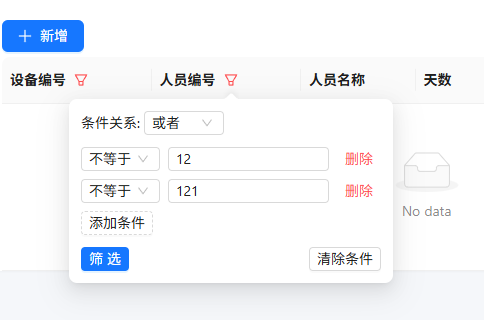
通过封装FilterPopover组件实现表格头部的高级筛选功能,支持多条件组合查询。该组件采用受控模式设计,可灵活集成到各类表格组件中。
核心功能实现原理
FilterPopover组件接收field(字段名)、onFilterChange(回调函数)和existingFilters(已有筛选条件)三个主要props。内部使用useState管理条件组和逻辑关系,通过useEffect处理已有条件的回显。
条件存储结构采用数组形式:
[
  { operator: 'eq', value: '', logic: 'and' }
]
多条件组合查询实现
组件支持动态添加/删除条件项,每个条件包含运算符选择器和值输入框。运算符支持等于、不等于、包含等多种匹配方式。通过Radio.Group组件提供"且"/"或"的逻辑关系选择。
条件更新采用immutable方式:
const updateCondition = (index, key, value) => {
  const newConditions = [...conditions];
  newConditions[index][key] = value;
  setConditions(newConditions);
};
与表格的集成方式
在表格列配置中通过render函数集成筛选图标:
const processedColumns = columns.map(column => {
  if (column.filter) {
    return {
      ...column,
      title: (
        <FilterPopover
          field={column.dataIndex}
          onFilterChange={handleFilterChange}
        />
      )
    }
  }
  return column;
});
筛选结果处理逻辑
点击筛选按钮时进行验证并格式化参数:
const filters = validConditions.map(cond => ({
  field,
  operator: cond.operator,
  value: cond.value
}));

onFilterChange({
  field,
  logic: fieldLogic,
  filters
});
实际应用场景
该组件特别适合需要复杂查询的后台管理系统,例如:
- 电商平台订单多条件筛选
- CRM系统的客户高级查询
- 数据分析平台的多维度过滤
组件设计考虑了扩展性,可通过修改operators配置支持更多比较运算符,或通过customRender支持自定义输入组件。
完整代码如下
const FilterPopover = ({ field, onFilterChange, existingFilters = [] }) => {
const [conditions, setConditions] = useState([
{ operator: 'eq', value: '', logic: 'and' }
]);
const [fieldLogic, setFieldLogic] = useState('and');
useEffect(() => {
// 回显已有筛选条件
if (existingFilters.length > 0) {
const fieldFilter = existingFilters.find(f => f.field === field);
if (fieldFilter) {
setFieldLogic(fieldFilter.logic);
setConditions(fieldFilter.filters.map(f => ({
operator: f.operator,
value: f.value,
logic: 'and' // 初始逻辑关系
})));
}
}
}, [existingFilters, field]);
const addCondition = () => {
setConditions([...conditions, { operator: 'eq', value: '', logic: 'and' }]);
};
const removeCondition = (index) => {
const newConditions = [...conditions];
newConditions.splice(index, 1);
setConditions(newConditions);
};
const updateCondition = (index, key, value) => {
const newConditions = [...conditions];
newConditions[index][key] = value;
setConditions(newConditions);
};
const handleFilter = () => {
const validConditions = conditions.filter(cond => cond.value.trim() !== '');
if (validConditions.length === 0) {
message.warning('请至少输入一个有效的筛选条件');
return;
}
const filters = validConditions.map(cond => ({
field,
operator: cond.operator,
value: cond.value
}));
onFilterChange({
field,
logic: fieldLogic,
filters
});
};
const handleClear = () => {
setConditions([{ operator: 'eq', value: '', logic: 'and' }]);
setFieldLogic('and');
onFilterChange(null, field);
};
return (
<div style={{ width: 300 }}>
<div style={{ marginBottom: 12 }}>
<span>条件关系: </span>
<Select
value={fieldLogic}
onChange={setFieldLogic}
size="small"
style={{ width: 80 }}
>
<Option value="and">并且</Option>
<Option value="or">或者</Option>
</Select>
</div>
{conditions.map((condition, index) => (
<div key={index} style={{ marginBottom: 8, display: 'flex', alignItems: 'center' }}>
<Select
value={condition.operator}
onChange={value => updateCondition(index, 'operator', value)}
size="small"
style={{ width: 100, marginRight: 8 }}
>
<Option value="eq">等于</Option>
<Option value="neq">不等于</Option>
<Option value="startswith">开始包含</Option>
<Option value="contains">包含</Option>
<Option value="endswith">结束包含</Option>
</Select>
<Input
value={condition.value}
onChange={e => updateCondition(index, 'value', e.target.value)}
size="small"
style={{ marginRight: 8 }}
placeholder="输入值"
/>
{conditions.length > 1 && (
<Button
type="link"
danger
size="small"
onClick={() => removeCondition(index)}
>
删除
</Button>
)}
</div>
))}
<Button type="dashed" size="small" onClick={addCondition} style={{ marginBottom: 12 }}>
添加条件
</Button>
<div style={{ display: 'flex', justifyContent: 'space-between' }}>
<Button type="primary" size="small" onClick={handleFilter}>
筛选
</Button>
<Button size="small" onClick={handleClear}>
清除条件
</Button>
</div>
</div>
);
};
const SearchTable = forwardRef((props, ref) => {
const {
searchFields = [],
operations,
columns = [],
style = {},
tableHeight = 400,
onRowClick,
watchData = undefined,
TableUrl = null,
initialFetch = true,
rowKey = 'id',
initialWatch = false,
emptyText = '暂无数据',
showSearch = true,
showPagination = true,
render = null,
renderStyle = null,
clearSelection = true,
onSelectionChange = null,
params = null,
} = props;
const [form] = Form.useForm();
const [data, setData] = useState([]);
const [loading, setLoading] = useState(false);
const [pagination, setPagination] = useState({
current: 1,
pageSize: 10,
total: 0,
});
const [selectedRowKeys, setSelectedRowKeys] = useState([]);
const [filters, setFilters] = useState([]);
const filtersRef = useRef(filters);
const [selectedRow, setSelectedRow] = useState(null);
// 抛出的 方法
useImperativeHandle(ref, () => ({
getFilters: () => filters,
setFilters: (newFilters) => setFilters(newFilters),
clearFilters: () => setFilters([]),
/**
* table 搜索查询 page 默认为1
**/
handleSearch,
/**
* table 重置 查询
**/
handleReset,
/**
* 前置查询 ,page,pagesize 为之前的查询条件
**/
getData,
/**
* 查询当前table search 需配合注入search
**/
getFormValues: () => form.getFieldsValue(),
/**
* 更改当前table search 需配合注入search
**/
setFormValues: (values) => form.setFieldsValue(values),
getSelectedRow: () => selectedRow,
getSelectedRowKeys: () => selectedRowKeys,
/**
* table search 查询 指定page,pagesize,
**/
refresh: () => getData(pagination.current, pagination.pageSize),
/**
* 分页更改
**/
setPagination: (newPagination) => setPagination(newPagination),
/**
* 获取当前form
**/
getFormInstance: () => form
}));
// 使用ref标记是否已初始化
const initializedRef = useRef(false);
// 使用ref存储上一次的watchData值
const prevWatchDataRef = useRef(null);
const handleFilterChange = (filterData, fieldToRemove) => {
let newFilters;
if (filterData === null && fieldToRemove) {
// 清除指定字段的筛选
newFilters = filtersRef.current.filter(f => f.field !== fieldToRemove);
} else {
// 更新或添加筛选条件
const otherFilters = filtersRef.current.filter(f => f.field !== filterData.field);
newFilters = [...otherFilters, filterData];
}
// 立即更新状态和ref
setFilters(newFilters);
filtersRef.current = newFilters; // 手动更新ref
// 调用getData,此时getData内部使用filtersRef.current就是最新的
getData(1, pagination.pageSize);
};
const fetchData = async (data) => {
try {
// 调用 API 服务
console.log(data);
console.log(data);
const result = await getAllTable(TableUrl, data);
return result
} catch (error) {
console.error('获取数据失败:', error);
return {
data: [],
total: 0,
};
}
};
// 获取数据
const getData = async (page = pagination.current, pageSize = pagination.pageSize, data = null) => {
setLoading(true);
try {
const values = form.getFieldsValue();
const filterParams = filtersRef.current.length > 0
? { filters: filtersRef.current }
: {};
const result = await fetchData({
...values,
...data,
...filterParams,
page,
pageSize
})
if (result) {
const { items, total } = result
console.log(items);
setData(items || []);
setPagination({
current: page,
pageSize: pageSize,
total: total || 0,
});
// 数据刷新后清空选择
if (clearSelection && typeof onSelectionChange === 'function') {
setSelectedRowKeys([]);
onSelectionChange([], []);
}
}
} catch (error) {
if (error.name !== 'AbortError') {
console.error('获取数据失败:', error);
message.error('数据加载失败,请稍后重试');
}
} finally {
setLoading(false);
}
};
// 初始化加载数据
useEffect(() => {
if (initialFetch && !initializedRef.current) {
initializedRef.current = true;
getData();
}
}, [initialFetch]);
const getCurrentWatchData = () => {
if (typeof watchData === 'function') {
return watchData();
}
return watchData;
};
const hasWatchDataChanged = () => {
const currentWatchData = getCurrentWatchData();
const prevWatchData = prevWatchDataRef.current;
return JSON.parse(JSON.stringify(currentWatchData)) !== JSON.parse(JSON.stringify(prevWatchData))
};
// 监听watchData变化
useEffect(() => {
// 如果watchData未定义或为null,则不触发
if (watchData === undefined) return;
// 如果是初始化且不需要初始化监听,则跳过
if (!initializedRef.current && !initialWatch) {
prevWatchDataRef.current = getCurrentWatchData();
initializedRef.current = true;
return;
}
// 检查watchData是否变化
const hasChanged = hasWatchDataChanged();
if (hasChanged) {
// 重置分页到第一页
setSelectedRow(null)
setPagination(prev => ({
...prev,
current: 1,
}));
getData(1);
}
// 更新上一次的值
prevWatchDataRef.current = getCurrentWatchData();
}, [watchData]);
// 处理分页变化
const handlePageChange = (page, pageSize) => {
getData(page, pageSize);
};
// 处理查询
const handleSearch = (data = null) => {
console.log(data);
getData(1, 10, data);
};
// 处理重置
const handleReset = () => {
form.resetFields();
getData(1);
};
// 处理行点击
const handleRowClick = (record) => {
// 设置当前选中的行
setSelectedRow(record);
// 调用父组件回调函数
if (onRowClick) {
onRowClick(record);
}
};
useEffect(() => {
}, [params])
// 修改columns渲染,添加筛选图标
const processedColumns = columns.map(column => {
if (column.filter) {
const hasActiveFilter = filters.some(f => f.field === column.dataIndex);
return {
...column,
title: (
<div style={{ display: 'flex', alignItems: 'center' }}>
<span>{column.title}</span>
<Popover
content={
<FilterPopover
field={column.dataIndex}
onFilterChange={handleFilterChange}
existingFilters={filters}
/>
}
trigger="click"
placement="bottom"
>
<FilterOutlined
style={{
color: hasActiveFilter ? '#ff4d4f' : undefined,
marginLeft: 8,
cursor: 'pointer'
}}
/>
</Popover>
</div>
)
};
}
return column;
});
// 渲染查询表单
const renderSearchForm = () => {
if (!showSearch || searchFields.length === 0) return null;
return (
<div className="search-form-container">
<Form
form={form}
layout="horizontal"
labelAlign="right"
>
<Row gutter={16} align="middle">
{searchFields.map(field => (
<Col key={field.name} span={6}>
<Form.Item
name={field.name}
label={field.label}
rules={field.rules || []}
style={{ marginBottom: 12 }}
>
{
field.type === 'SearchSelect' &&
// 使用 SearchSelect 组件
<SearchSelect
fetchData={field.fetchData}
placeholder={field.placeholder || `请选择${field.label}`}
style={{ width: '100%' }}
debounceTime={field.debounceTime || 300}
loadOnEmpty={field.loadOnEmpty !== false}
initialLoad={field.initialLoad || false}
/>
}
{
field.type === 'select' &&
// 使用 SearchSelect 组件
<Select {...field}></Select>
}
{
field.type === undefined && <Input
placeholder={field.label ? `请输入${field.label}` : field.placeholder || ''}
{...field?.config}
size="middle"
/>
}
{/* <Input
placeholder={field.label ? `请输入${field.label}` : field.placeholder || ''}
{...field?.config}
size="middle"
/> */}
</Form.Item>
</Col>
))}
{/* 操作按钮紧跟最后一个搜索条件 */}
<Col span={6}>
<Space style={{ height: '44px', alignItems: 'start' }}>
<Button
type="primary"
icon={<SearchOutlined />}
onClick={() => {
handleSearch()
}}
>
查询
</Button>
<Button onClick={handleReset} icon={<ReloadOutlined />}>
重置
</Button>
</Space>
</Col>
</Row>
</Form>
</div>
);
};
// 渲染操作按钮区域
const renderOperations = () => {
if (!operations) return null;
return (
<div className="operations-container">
{operations}
</div>
);
};
// 渲染表格
const renderTable = () => {
// 计算表格滚动区域高度
const scrollY = tableHeight - (showPagination ? 55 : 0) - 55; // 减去表头高度和分页高度
let rowSelectionConfig = null;
if (typeof onSelectionChange === 'function') {
rowSelectionConfig = {
selectedRowKeys,
onChange: (selectedKeys, selectedRows) => {
setSelectedRowKeys(selectedKeys);
if (onSelectionChange) {
onSelectionChange(selectedKeys, selectedRows);
}
},
};
}
return (
<div className="table-container">
<Spin spinning={loading} tip="加载中...">
<Table
rowKey={record => record[rowKey]}
rowSelection={rowSelectionConfig}
// columns={columns}
columns={processedColumns}
dataSource={data}
pagination={false}
loading={loading}
scroll={{
x: 'max-content',
y: scrollY
}}
size="middle"
style={{ flex: 1 }}
bordered={false}
onRow={(record) => ({
onClick: (event) => {
// @ts-ignore
if (event.target.closest('.ant-table-selection-column')) {
return;
}
console.log(selectedRow);
handleRowClick(record)
}
})}
rowClassName={(record) =>
selectedRow && selectedRow[rowKey] === record[rowKey] ? 'highlight-row' : ''
}
/>
</Spin>
{showPagination && data.length > 0 && (
<div className="pagination-container">
<Pagination
current={pagination.current}
pageSize={pagination.pageSize}
total={pagination.total}
showSizeChanger
showQuickJumper
showTotal={(total, range) => (
`第 ${range[0]}-${range[1]} 条,共 ${total} 条`
)}
onChange={handlePageChange}
onShowSizeChange={handlePageChange}
size="small"
/>
<div className='pagination-iocn'>
<ReloadOutlined onClick={() => {
getData(1)
}} />
</div>
</div>
)}
</div>
);
};
const renderCust = () => {
return (
<div className="table-container" style={{ height: tableHeight, overflow: 'hidden', overflowY: 'scroll', ...renderStyle }}>
<Spin spinning={loading} tip="加载中...">
{render()}
</Spin>
</div>
);
};
return (
<div className="search-table-wrapper" style={style}>
{renderSearchForm()}
{renderOperations()}
{!render ? renderTable() : renderCust()}
</div>
);
})
export default SearchTable;
中国智能体开发者社区,聚焦智能体与大模型开发,提供前沿资讯、实用工具链、开源项目及行业案例。通过技术沙龙、开发者大赛等活动,促进经验交流与协作,助力开发者快速构建创新智能应用。
更多推荐


 7
7 0
0- 0


 已为社区贡献1条内容

所有评论(0)