薄样板插值法(TPS)---多图像全景拼接
多图顺序拼接,全景图像拼接,薄样板插值法(TPS),单应性矩阵应用,黑边剪裁,后处理增强清晰度。
TPS(Thin Plate Spline,薄板样条)是一种非刚性形变,一种插值方法,该方法的输入是两张图像中的多组匹配点对,常见的获取匹配点对算法为SIFT、SURF、ORB,以及光流跟踪等。 TPS的基本思想是让这些匹配点精确对齐,其他地方的自动、平滑的‘弯曲’过渡,同时‘弯曲能量’最小。
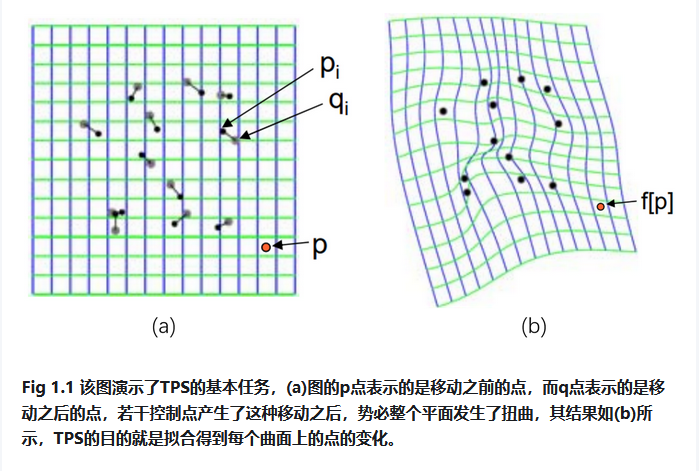
我们重新假设已经获取到两张图像的n组匹配点对:(P1(x1,y1),P1’(x1’,y1’))、P2((x2,y2),P2’(x2’,y2’))、…、(Pn(xn,yn), Pn’(xn’,yn’))。P1为变换前的点,P1’为变换后的点。TPS形变的目标是求解一个函数f,使得f(Pi)=Pi’ (1≤i≤n),并且弯曲能量函数最小,同时图像上的其它点也可以通过插值得到很好的校正。那么使用TPS变换计算图A与图B的坐标对应关系的过程如下。
样条函数形式:

上式中只要求出 a1,a2,a3和wi(1≤i≤n),就可以确定f(x,y),其中U是基函数,在样条函数中的前三项是仿射变换部分(负责整体的平移、缩放、旋转等线性操作),后面一项是对局部形变的描述。
基函数U的形式:
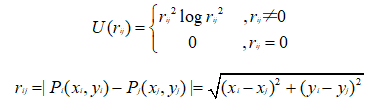
由上述可见r为欧氏距离,(xi,yi)是空间中任意一个待变形的点,控制点(xj,yj)也是事先规定变形目标的点(是一开始输入的图A图B的匹配点对,也就是控制点对)
记矩阵K、L、Y为:
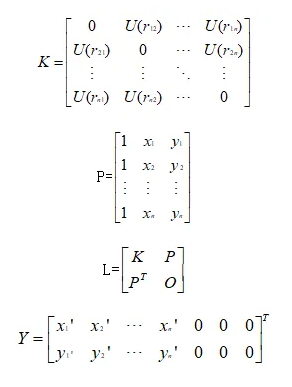
K:记录着控制点与待形变点的距离(决定着点与点之间形变程度),弯曲约束。
P:提供控制点的位置信息,用来算整体挪动旋转,仿射约束。
L :组合K、P,其中包含了如何弯曲、移动旋转。
Y:上半部分说明控制点需要被移动到的新位置的坐标数据,下半部分全0是用于仿射部分的约束条件(确保权重w的加权和为0)。
由LW=Y解得W矩阵:
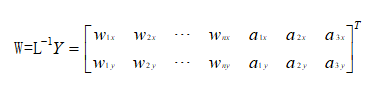
权重w:是n*1的列向量,n为控制点个数
仿射参数a:是TPS插值函数中的前三项的系数,a1:常数项(控制平移)、a2:x方向的线性系数、a3:y方向的线性系数。
从而有A的任意坐标(xi,yi)到B的任意坐标(xi’,yi’)的映射:
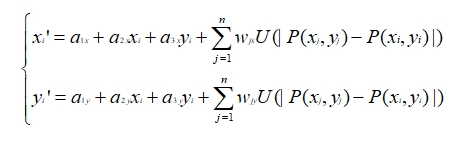
以下是基于TPS的多图全景拼接代码:
# 推荐在 conda 环境下执行以下命令,确保 numpy/opencv/imutils 版本兼容:
# conda install numpy opencv imutils --force-reinstall
# 若 imutils 没有 conda 包,可用 pip 安装:pip install --force-reinstall imutils
import sys
import site
# 屏蔽用户目录 site-packages,防止 ABI 冲突
if hasattr(site, 'getusersitepackages'):
user_site = site.getusersitepackages()
if user_site in sys.path:
sys.path.remove(user_site)
import numpy as np
import imutils
import cv2
import time
import os
import logging
import random
random.seed(42)
np.random.seed(42)
# 配置日志记录
logging.basicConfig(level=logging.INFO, format='%(asctime)s - %(levelname)s - %(message)s')
# =============== TPS 模块(薄板样条变换,非刚性图像变形对齐) ===============
class TPS:
@staticmethod
def tps_theta_from_points(source_points, target_points, reduced=False):
"""
计算TPS变换参数θ
:param source_points: 源控制点
:param target_points: 目标控制点
:param reduced: 是否返回简化参数
:return: TPS变换参数矩阵θ
"""
n = source_points.shape[0] #控制点数量
K = np.zeros((n, n)) #初始化核矩阵
#计算核矩阵K
for i in range(n):
for j in range(n):
r = np.linalg.norm(source_points[i] - source_points[j])
if r > 0:
# 使用径向基函数:r² * log(r)
K[i, j] = r ** 2 * np.log(r + 1e-6) # 添加小量避免log(0)
#仿射部分-添加齐次坐标(统一几何变换
P = np.hstack([np.ones((n, 1)), source_points])
#构建完整的L矩阵
L_top = np.hstack([K, P])
L_bottom = np.hstack([P.T, np.zeros((3, 3))])
L = np.vstack([L_top, L_bottom])
#目标矩阵
Y = np.vstack([target_points, np.zeros((3, 2))])
try:
#求解线性方程组
theta = np.linalg.solve(L, Y)
except np.linalg.LinAlgError:
# 如果无法求解,使用伪逆作为备选
theta = np.linalg.pinv(L) @ Y
if reduced:
return theta[:n] #返回简化参数
return theta
@staticmethod
def tps_grid(theta, c_dst, dshape):
"""
生成TPS变换网格
:param theta: TPS变换的参数矩阵,控制变形程度
:param c_dst: 目标控制点(目标图像的关键点坐标
:param dshape: 目标图像形状
:return: 变形后的网格(源图经过TPS变换后的像素坐标
"""
#创建坐标网络
grid = np.mgrid[0:dshape[0], 0:dshape[1]].transpose(1, 2, 0)
grid = grid.reshape(-1, 2).astype(np.float32)
# 归一化坐标[0,1]范围
grid[:, 0] /= dshape[1] - 1
grid[:, 1] /= dshape[0] - 1
n = c_dst.shape[0]
points = grid
#就散U矩阵 - 径向基函数值
U = np.zeros((points.shape[0], n))
for i in range(n):
r = np.linalg.norm(points - c_dst[i], axis=1)
U[:, i] = r ** 2 * np.log(r + 1e-6) # 添加小量避免log(0)
#添加齐次坐标
P = np.hstack([np.ones((points.shape[0], 1)), points])
L = np.hstack([U, P])
# 确保theta的维度与L匹配
if theta.shape[0] != L.shape[1]:
# 如果维度不匹配,调整theta
if theta.shape[0] > L.shape[1]:
theta = theta[:L.shape[1], :] #截断
else:
# 如果theta太小,填充零
padding = np.zeros((L.shape[1] - theta.shape[0], 2))
theta = np.vstack([theta, padding]) #填充
#应用TPS变换
warped = L @ theta
warped = warped.reshape(dshape[0], dshape[1], 2)
# 将归一化坐标转换回像素坐标
warped[:, :, 0] *= dshape[1] - 1
warped[:, :, 1] *= dshape[0] - 1
return warped
@staticmethod
def tps_grid_to_remap(grid, src_shape):
"""
将TPS网格转换为重映射表
:param grid: TPS网格
:param src_shape: 源图像形状
:return: x,y方向的重映射表
"""
mapx = grid[:, :, 0].astype(np.float32)
mapy = grid[:, :, 1].astype(np.float32)
return mapx, mapy
@staticmethod
def warp_image_tps(img, c_src, c_dst, dshape=None):
"""
应用TPS变换扭曲图像
:param img: 输入图像
:param c_src: 源控制点
:param c_dst: 目标控制点
:param dshape: 目标形状
:return: 变形后的图像
"""
#默认目标形状与输入相同
dshape = dshape or img.shape
# 归一化控制点
h, w = img.shape[:2]
c_src_norm = c_src.copy().astype(np.float32)
c_src_norm[:, 0] /= w
c_src_norm[:, 1] /= h
c_dst_norm = c_dst.copy().astype(np.float32)
c_dst_norm[:, 0] /= dshape[1]
c_dst_norm[:, 1] /= dshape[0]
# 计算TPS参数
theta = TPS.tps_theta_from_points(c_src_norm, c_dst_norm, reduced=True)
# 生成网格
grid = TPS.tps_grid(theta, c_dst_norm, (dshape[0], dshape[1]))
# 转换为重映射表
mapx, mapy = TPS.tps_grid_to_remap(grid, img.shape)
# 执行图像重映射
return cv2.remap(img, mapx, mapy, cv2.INTER_CUBIC)
def show_image(winname, image, wait_key=True):
"""显示图像,可选择是否等待按键"""
cv2.namedWindow(winname, cv2.WINDOW_NORMAL)
cv2.imshow(winname, image)
if wait_key is not None:
cv2.waitKey()
cv2.destroyWindow(winname)
class Stitcher:
"""全景图像拼接器"""
def __init__(self, feature_detector='sift'):
"""
初始化拼接器,支持多种特征检测器
:param feature_detector: 可选 'orb', 'sift', 'surf'
"""
self.feature_cache = {} #特征点缓存
self.feature_detector = feature_detector
self.matcher_type = "BruteForce" #默认匹配器类型
self.progress_images = [] # 存储拼接进度图像
# 设置特征检测器
if feature_detector == 'sift':
try:
self.descriptor = cv2.SIFT_create(nfeatures=2000)
logging.info("使用SIFT特征检测器")
except:
logging.warning("SIFT不可用,将使用ORB特征检测器")
self.feature_detector = 'orb'
self.descriptor = cv2.ORB_create(nfeatures=2000)
self.matcher_type = "BruteForce-Hamming"
elif feature_detector == 'surf':
try:
self.descriptor = cv2.xfeatures2d.SURF_create(hessianThreshold=2000)
logging.info("使用SURF特征检测器")
except:
logging.warning("SURF不可用,将使用ORB特征检测器")
self.feature_detector = 'orb'
self.descriptor = cv2.ORB_create(nfeatures=2000)
self.matcher_type = "BruteForce-Hamming"
else:
self.descriptor = cv2.ORB_create(nfeatures=2000)
logging.info("使用ORB特征检测器")
self.matcher_type = "BruteForce-Hamming"
def compute_sharpness(self, image):
"""计算图像局部清晰度(拉普拉斯算子 梯度能量)
:param image: 输入图像
return: 清晰度图
"""
gray = cv2.cvtColor(image, cv2.COLOR_BGR2GRAY)
laplacian = cv2.Laplacian(gray, cv2.CV_32F)
return cv2.GaussianBlur(np.abs(laplacian), (15, 15), 0) # 高斯平滑处理
def stitch(self, images, ratio=0.6, reprojThresh=4.0, showMatches=False, debug=False, feature_vis_dir=None, pair_idx=None):
"""
拼接两幅图像
:param images: 图像列表 [右侧图像, 左侧图像]
:param ratio: Lowe's ratio 测试比例
:param reprojThresh: RANSAC重投影阈值
:param showMatches: 是否显示匹配点
:param debug: 是否输出调试信息
:param feature_vis_dir: 特征点可视化保存目录
:param pair_idx: 图像对索引,用于命名保存文件
:return: 拼接结果图像
"""
(imageB, imageA) = images #约定:imageB是右侧图像,imageA是左侧图像
start = time.time()
# 使用缓存的特征点 - 提高性能
cache_keyA = str(imageA.shape) + str(imageA.sum())
cache_keyB = str(imageB.shape) + str(imageB.sum())
if cache_keyA in self.feature_cache:
(kpsA, featuresA) = self.feature_cache[cache_keyA]
else:
(kpsA, featuresA) = self.detectAndDescribe(imageA)
self.feature_cache[cache_keyA] = (kpsA, featuresA)
if cache_keyB in self.feature_cache:
(kpsB, featuresB) = self.feature_cache[cache_keyB]
else:
(kpsB, featuresB) = self.detectAndDescribe(imageB)
self.feature_cache[cache_keyB] = (kpsB, featuresB)
# 新增:保存特征点可视化
if feature_vis_dir is not None and pair_idx is not None:
self.save_feature_points(imageA, kpsA, imageB, kpsB, feature_vis_dir, pair_idx)
end = time.time()
if debug:
logging.info(f'特征检测时间: {end - start:.5f}s | 特征点: A={len(kpsA)} B={len(kpsB)}')
# 特征匹配
start = time.time()
M = self.matchKeypoints(kpsA, kpsB, featuresA, featuresB, ratio, reprojThresh)
end = time.time()
if debug:
logging.info(f'特征匹配时间: {end - start:.5f}s')
if M is None:
logging.warning("匹配失败: 未找到足够特征点")
return None
(matches, H, status) = M
start = time.time()
# 确保单应性矩阵是浮点类型
if H.dtype != np.float32:
H = H.astype(np.float32)
# 计算拼接后图像尺寸
hA, wA = imageA.shape[:2]
hB, wB = imageB.shape[:2]
pts = np.float32([[0, 0], [0, hA], [wA, hA], [wA, 0]]).reshape(-1, 1, 2)
dst = cv2.perspectiveTransform(pts, H) #变换角点
# 计算拼接后图像的边界
min_x = int(min(0, np.min(dst[:, 0, 0])))
max_x = int(max(wB, np.max(dst[:, 0, 0])))
min_y = int(min(0, np.min(dst[:, 0, 1])))
max_y = int(max(hB, np.max(dst[:, 0, 1])))
# 计算平移矩阵 - 将图像移动到正坐标区域
translation = np.array([[1, 0, -min_x], [0, 1, -min_y], [0, 0, 1]], dtype=np.float32)
full_H = translation.dot(H) #组合变换
# 确保变换矩阵是浮点类型
if full_H.dtype != np.float32:
full_H = full_H.astype(np.float32)
# 应用全局变换 - 扭曲右侧图像
warped_global = cv2.warpPerspective(imageB, full_H,
(max_x - min_x, max_y - min_y))
# 将第二张图像叠加到结果上,创建重叠区域掩码
mask = np.zeros_like(warped_global, dtype=np.uint8)
# 计算整数坐标
start_y = -min_y
start_x = -min_x
end_y = start_y + hB
end_x = start_x + wB
# 确保坐标在有效范围内
start_y = max(0, start_y)
start_x = max(0, start_x)
end_y = min(warped_global.shape[0], end_y)
end_x = min(warped_global.shape[1], end_x)
# 创建ROI区域 - 右侧图像位置
mask[start_y:end_y, start_x:end_x] = 255
# 创建右侧图像的变换版本
warpedB = cv2.warpPerspective(imageB, translation,
(warped_global.shape[1], warped_global.shape[0]))
# ===================== 局部TPS调整 =====================
# 提取匹配点用于局部TPS调整
ptsA = np.float32([kpsA[i] for (_, i) in matches])
ptsB = np.float32([kpsB[i] for (i, _) in matches])
# 使用单应性矩阵将图像B的点映射到目标空间
ptsB_warped = cv2.perspectiveTransform(ptsB.reshape(-1, 1, 2), full_H).reshape(-1, 2)
# 创建TPS控制点 - 只使用重叠区域内的点
c_src = [] #源点(全局变换后)
c_dst = [] #目标点(右侧图像位置)
for i in range(len(ptsA)):
# 检查点是否在重叠区域内
x, y = ptsB_warped[i]
if (start_x <= x < end_x) and (start_y <= y < end_y):
# 获取该点在第二张图像中的位置(在拼接空间)
xB, yB = ptsB[i]
ptB_homo = np.array([xB, yB, 1.0])
ptB_warped = translation.dot(ptB_homo)
ptB_warped = ptB_warped[:2] / ptB_warped[2]
# 确保点坐标有效
if not np.isnan(ptB_warped).any() and not np.isinf(ptB_warped).any():
c_src.append([x, y])
c_dst.append(ptB_warped)
#应用局部TPS调整
if len(c_src) >= 4: # 至少需要4个点进行TPS变换
c_src = np.array(c_src, dtype=np.float32)
c_dst = np.array(c_dst, dtype=np.float32)
# 定义重叠区域边界
overlap_region = (min_x, min_y, max_x - min_x, max_y - min_y)
# 对重叠区域应用局部TPS调整
warped_local = self.apply_local_tps(warped_global, warpedB, mask, c_src, c_dst, overlap_region)
if warped_local is not None:
result = warped_local
if debug:
logging.info(f"应用局部TPS调整,使用{len(c_src)}个控制点")
else:
result = warped_global
if debug:
logging.warning("局部TPS调整失败,使用全局变换")
else:
result = warped_global
if debug:
logging.warning(f"重叠区域控制点不足({len(c_src)}), 跳过局部TPS调整")
# ===================== 基于清晰度的融合 =====================
# 计算两张图像的清晰度图
sharpness_base = self.compute_sharpness(result)
sharpness_new = self.compute_sharpness(warpedB)
# 创建权重图(清晰度高的区域权重更大)
weight_base = np.zeros_like(sharpness_base, dtype=np.float32)
weight_new = np.zeros_like(sharpness_new, dtype=np.float32)
overlap_mask = (mask[..., 0] > 0) # 重叠区域
#计算权重比例
weight_base[overlap_mask] = sharpness_base[overlap_mask] / (
sharpness_base[overlap_mask] + sharpness_new[overlap_mask] + 1e-7)
weight_new[overlap_mask] = 1 - weight_base[overlap_mask]
# 非重叠区域权重设为1
weight_base[~overlap_mask] = 1
weight_new[~overlap_mask] = 0
# 避免模糊区域残留(设置清晰度阈值)
min_sharpness = 5.0 # 可调整的清晰度阈值
weight_new[overlap_mask & (sharpness_new < min_sharpness)] = 0
weight_base[overlap_mask & (sharpness_base < min_sharpness)] = 0
# 归一化权重
total_weight = weight_base + weight_new
weight_base[overlap_mask] /= total_weight[overlap_mask] + 1e-7
weight_new[overlap_mask] = 1 - weight_base[overlap_mask]
# 扩展权重图为3通道
weight_base = cv2.merge([weight_base] * 3)
weight_new = cv2.merge([weight_new] * 3)
# 加权平均融合(更稳定)
result = (result * weight_base + warpedB * weight_new).astype(np.uint8)
# ===================== 融合结束 =====================
end = time.time()
if debug:
logging.info(f'图像变换与融合时间: {end - start:.5f}s')
# 可视化匹配点
if showMatches:
vis = self.drawMatches(imageA, imageB, kpsA, kpsB, matches, status)
return (result, vis, full_H)
return (result, full_H)
def apply_local_tps(self, warpedA, warpedB, mask, c_src, c_dst, overlap_region, max_tps_points=300):
"""
在重叠区域应用局部TPS调整
:param warpedA: 全局变换后的图像A
:param warpedB: 变换后的图像B
:param mask: 重叠区域掩码
:param c_src: 源控制点(在warpedA坐标系中)
:param c_dst: 目标控制点(在warpedB坐标系中)
:param overlap_region: 重叠区域 (x, y, width, height)
:param max_tps_points: TPS最大控制点数
:return: 调整后的图像
"""
try:
# 限制TPS控制点数量,防止内存溢出
if len(c_src) > max_tps_points:
idx = np.random.choice(len(c_src), max_tps_points, replace=False)
c_src = c_src[idx]
c_dst = c_dst[idx]
# 提取重叠区域
x, y, w, h = overlap_region
# 修复重叠区域超出图像范围的问题
# 确保重叠区域在图像范围内
y = max(0, y)
h = min(h, warpedA.shape[0] - y)
x = max(0, x)
w = min(w, warpedA.shape[1] - x)
if h <= 0 or w <= 0:
logging.warning(f"调整后的重叠区域无效: x={x}, y={y}, w={w}, h={h}")
return None
roi_A = warpedA[y:y + h, x:x + w].copy()
# 调整控制点坐标到局部坐标系
c_src_local = c_src.copy()
c_src_local[:, 0] -= x
c_src_local[:, 1] -= y
c_dst_local = c_dst.copy()
c_dst_local[:, 0] -= x
c_dst_local[:, 1] -= y
# 确保控制点坐标在ROI范围内
valid_indices = []
for i in range(len(c_src_local)):
if (0 <= c_src_local[i, 0] < w and 0 <= c_src_local[i, 1] < h and
0 <= c_dst_local[i, 0] < w and 0 <= c_dst_local[i, 1] < h):
valid_indices.append(i)
if len(valid_indices) < 4:
logging.warning(f"有效控制点不足: {len(valid_indices)} < 4")
return None
c_src_local = c_src_local[valid_indices]
c_dst_local = c_dst_local[valid_indices]
# 应用TPS变换到重叠区域
roi_A_adjusted = TPS.warp_image_tps(roi_A, c_src_local, c_dst_local, dshape=roi_A.shape[:2])
# 创建羽化蒙版以平滑过渡
feather_mask = np.zeros((h, w), dtype=np.float32)
feather_mask[:, :] = 1.0
# 边缘羽化处理 - 减少接缝
feather_width = 20
for i in range(feather_width):
alpha = i / feather_width
feather_mask[i, :] *= alpha
feather_mask[-i - 1, :] *= alpha
feather_mask[:, i] *= alpha
feather_mask[:, -i - 1] *= alpha
# 扩展为3通道
feather_mask = cv2.merge([feather_mask, feather_mask, feather_mask])
# 将调整后的区域融合回原图像
warpedA_adjusted = warpedA.copy()
warpedA_adjusted[y:y + h, x:x + w] = (
roi_A_adjusted *feather_mask +
warpedA[y:y + h, x:x + w] * (1.0 - feather_mask)
).astype(np.uint8)
return warpedA_adjusted
except Exception as e:
logging.error(f"局部TPS调整失败: {e}")
return None
def multi_stitch(self, images, ratio=0.6, reprojThresh=4.0, debug=True):
"""
多图顺序拼接主函数(改进版:按清晰度排序)
:param images: 图像列表
:param ratio: Lowe's ratio测试比例
:param reprojThresh: RANSAC重投影阈值
:param debug: 是否输出调试信息
:return: 全景图
"""
if len(images) < 2:
logging.error("需要至少2张图像进行拼接")
return None
logging.info(f"开始拼接{len(images)}张图像...")
total_start = time.time()
# 存储拼接进度图像
self.progress_images = []
# 1. 按清晰度排序图像(清晰度高的优先)
sharpness_scores = [self.compute_global_sharpness(img) for img in images]
sorted_indices = np.argsort(sharpness_scores)[::-1] # 从高到低排序
sorted_images = [images[i] for i in sorted_indices]
if debug:
logging.info("图像清晰度排序:")
for i, idx in enumerate(sorted_indices):
logging.info(f"图像 {idx + 1}: 清晰度 {sharpness_scores[idx]:.2f}")
# 2. 初始化:从最清晰的图像开始拼接
base_img = sorted_images[0]
self.progress_images.append(base_img.copy()) # 添加第一张图像
# 3. 顺序拼接图像
feature_vis_dir = os.path.join(os.path.dirname(output_dir), 'show_feature_point')
for i in range(1, len(sorted_images)):
next_img = sorted_images[i]
if debug:
logging.info(
f"\n拼接图像 {i + 1}/{len(images)} | 当前尺寸: {base_img.shape} | 清晰度: {sharpness_scores[sorted_indices[i]]:.2f}")
# 只尝试一次拼接,不再反向
result = self.stitch([base_img, next_img], ratio, reprojThresh, debug=debug, feature_vis_dir=feature_vis_dir, pair_idx=i)
if result is None:
logging.warning(f"拼接图像 {i + 1}/{len(images)} 失败!")
logging.warning(f"警告: 图像 {i + 1} 拼接失败,尝试调整参数重新拼接...")
# 尝试更宽松的参数重新拼接
result = self.stitch([base_img, next_img], ratio=0.5, reprojThresh=4.0, debug=debug, feature_vis_dir=feature_vis_dir, pair_idx=i)
if result is None:
logging.warning(f"拼接图像 {i + 1}/{len(images)} 失败(宽松参数)!")
logging.error(f"拼接图像 {i + 1}/{len(images)} 彻底失败,跳过该图像!")
continue
else:
logging.info(f"拼接图像 {i + 1}/{len(images)} 宽松参数拼接成功!")
base_img = result[0] # 更新基础图像
else:
logging.info(f"拼接图像 {i + 1}/{len(images)} 成功!")
base_img = result[0] # 更新基础图像
# 保存当前拼接结果
self.progress_images.append(base_img.copy())
# 计算并输出当前拼接结果的清晰度
sharpness_val = self.compute_global_sharpness(base_img)
logging.info(f"当前拼接结果清晰度: {sharpness_val:.2f}")
# 4. 每次都显示进度
display_img = imutils.resize(base_img.copy(), width=1000)
cv2.putText(display_img, f"进度: {i + 1}/{len(images)}",
(20, 40), cv2.FONT_HERSHEY_SIMPLEX, 1, (0, 0, 255), 2)
cv2.putText(display_img, f"当前尺寸: {base_img.shape[1]}x{base_img.shape[0]}",
(20, 80), cv2.FONT_HERSHEY_SIMPLEX, 0.7, (0, 255, 0), 2)
show_image(f"拼接进度", display_img, wait_key=False) # 每次都显示,无需判断
# 5. 最终裁剪黑边
final_result = self.crop_black_borders(base_img)
# 计算最终合成图像的清晰度
final_sharpness = self.compute_global_sharpness(final_result)
logging.info(f"最终合成图像清晰度: {final_sharpness:.2f}")
# 6. 合并最终合成图像与基础图像到RGB三个通道(红蓝对比)
h, w = final_result.shape[:2]
base_img_resized = cv2.resize(sorted_images[0], (w, h))
merged_rgb = np.zeros_like(final_result)
merged_rgb[..., 0] = 0 # B通道:0
merged_rgb[..., 1] = base_img_resized[..., 0] # G通道:基础图
merged_rgb[..., 2] = final_result[..., 2] # R通道:最终合成
# 保存并显示合并后的RGB图像
rgb_compare_path = os.path.join(os.path.dirname(output_dir), 'final_rgb_compare.jpg')
cv2.imwrite(rgb_compare_path, merged_rgb)
logging.info(f"红绿对比RGB图已保存至: {rgb_compare_path}")
show_image('最终合成与基础图像红绿对比', imutils.resize(merged_rgb, width=1200))
# 保存最终结果
self.progress_images.append(final_result.copy())
total_time = time.time() - total_start
logging.info(f"\n拼接完成! 总时间: {total_time:.2f}s")
logging.info(f"最终尺寸: {final_result.shape[1]}x{final_result.shape[0]}")
return final_result
def compute_global_sharpness(self, image):
"""计算整张图像的清晰度评分(拉普拉斯方差)"""
gray = cv2.cvtColor(image, cv2.COLOR_BGR2GRAY)
return cv2.Laplacian(gray, cv2.CV_64F).var()
def enhance_sharpness(self, image):
"""后处理:增强图像清晰度"""
# 使用CLAHE增强对比度
lab = cv2.cvtColor(image, cv2.COLOR_BGR2LAB)
l, a, b = cv2.split(lab)
# 应用自适应直方图均衡化
clahe = cv2.createCLAHE(clipLimit=2.0, tileGridSize=(8, 8))
l_enhanced = clahe.apply(l)
# 合并通道并转换回BGR
lab_enhanced = cv2.merge([l_enhanced, a, b])
enhanced = cv2.cvtColor(lab_enhanced, cv2.COLOR_LAB2BGR)
# 轻度锐化
kernel = np.array([[-1, -1, -1],
[-1, 9, -1],
[-1, -1, -1]])
sharpened = cv2.filter2D(enhanced, -1, kernel)
return sharpened
def detectAndDescribe(self, image):
"""检测图像特征点和描述符"""
gray = cv2.cvtColor(image, cv2.COLOR_BGR2GRAY)
kps, features = self.descriptor.detectAndCompute(gray, None)
kps = np.float32([kp.pt for kp in kps]) if kps else np.array([])
return (kps, features)
def matchKeypoints(self, kpsA, kpsB, featuresA, featuresB, ratio=0.6, reprojThresh=3.0, min_inlier_ratio=0.5, min_ratio=0.4, max_ratio=0.8, min_reproj=1.0):
"""匹配特征点并计算单应性矩阵,自动优化参数减少坏点"""
# 先判断特征点数量
if len(kpsA) < 4 or len(kpsB) < 4:
return None
matcher = cv2.DescriptorMatcher_create(self.matcher_type)
rawMatches = matcher.knnMatch(featuresA, featuresB, 2)
matches = []
# Lowe's ratio测试
for m in rawMatches:
if len(m) == 2 and m[0].distance < m[1].distance * ratio:
matches.append((m[0].trainIdx, m[0].queryIdx))
if len(matches) < 4:
return None
#准备匹配点
ptsA = np.float32([kpsA[i] for (_, i) in matches])
ptsB = np.float32([kpsB[i] for (i, _) in matches])
#计算单应性矩阵(RANSAC)
(H, status) = cv2.findHomography(ptsA, ptsB, cv2.RANSAC, reprojThresh)
if H is None or np.isnan(H).any():
return None
if H.dtype != np.float32:
H = H.astype(np.float32)
# 统计内点比例,自动优化参数
inlier_ratio = np.sum(status) / len(status)
# 若内点比例过低,自动收紧参数重试(递减ratio和reprojThresh)
if inlier_ratio < min_inlier_ratio:
if ratio > min_ratio and reprojThresh > min_reproj:
return self.matchKeypoints(kpsA, kpsB, featuresA, featuresB, ratio=max(min_ratio, ratio-0.05), reprojThresh=max(min_reproj, reprojThresh-0.5), min_inlier_ratio=min_inlier_ratio, min_ratio=min_ratio, max_ratio=max_ratio, min_reproj=min_reproj)
else:
# 已到最严格参数,返回当前结果
return (matches, H, status)
return (matches, H, status)
def drawMatches(self, imageA, imageB, kpsA, kpsB, matches, status):
"""绘制特征点匹配可视化"""
(hA, wA) = imageA.shape[:2]
(hB, wB) = imageB.shape[:2]
vis = np.zeros((max(hA, hB), wA + wB, 3), dtype="uint8")
vis[0:hA, 0:wA] = imageA
vis[0:hB, wA:] = imageB
#绘制匹配线
for ((trainIdx, queryIdx), s) in zip(matches, status):
if s == 1:
ptA = (int(kpsA[queryIdx][0]), int(kpsA[queryIdx][1]))
ptB = (int(kpsB[trainIdx][0]) + wA, int(kpsB[trainIdx][1]))
cv2.line(vis, ptA, ptB, (0, 255, 0), 1)
return vis
def crop_black_borders(self, image):
"""裁剪图像中的黑色边框"""
gray = cv2.cvtColor(image, cv2.COLOR_BGR2GRAY)
_, thresh = cv2.threshold(gray, 1, 255, cv2.THRESH_BINARY) #阈值处理
contours = cv2.findContours(thresh, cv2.RETR_EXTERNAL, cv2.CHAIN_APPROX_SIMPLE)
contours = imutils.grab_contours(contours)
if not contours:
return image
#找到最大轮廓
cnt = max(contours, key=cv2.contourArea)
x, y, w, h = cv2.boundingRect(cnt)
return image[y:y + h, x:x + w] #裁剪有效区域
def save_progress_images(self, output_dir):
"""保存拼接过程中的所有进度图像"""
if not os.path.exists(output_dir):
os.makedirs(output_dir)
for i, img in enumerate(self.progress_images):
output_path = os.path.join(output_dir, f'progress_{i + 1}.jpg')
cv2.imwrite(output_path, img)
logging.info(f"已保存进度图像: {output_path}")
def save_feature_points(self, imageA, kpsA, imageB, kpsB, out_dir, pair_idx):
"""保存两张图像的特征点可视化到指定目录"""
if not os.path.exists(out_dir):
os.makedirs(out_dir)
imgA_vis = imageA.copy()
imgB_vis = imageB.copy()
# 绘制特征点(加类型和长度判断)
if kpsA is not None and len(kpsA) > 0:
for pt in kpsA:
if len(pt) == 2:
cv2.circle(imgA_vis, (int(pt[0]), int(pt[1])), 3, (0, 0, 255), -1)
if kpsB is not None and len(kpsB) > 0:
for pt in kpsB:
if len(pt) == 2:
cv2.circle(imgB_vis, (int(pt[0]), int(pt[1])), 3, (255, 0, 0), -1)
cv2.imwrite(os.path.join(out_dir, f'pair{pair_idx}_A.jpg'), imgA_vis)
cv2.imwrite(os.path.join(out_dir, f'pair{pair_idx}_B.jpg'), imgB_vis)
if __name__ == '__main__':
# 读取图像
image_dir = r'C:\IFan\IFan\code\1\test_picture\orignal_data' # 修改为你的图像目录
output_dir = r"C:\IFan\IFan\code\1\test_result_SIFT_ratio__0.6_ransac__4.0" # 输出目录
progress_dir = os.path.join(output_dir, 'progress') # 进度图像目录
images = []
# 按文件名排序读取图像
for fname in sorted(os.listdir(image_dir)):
if fname.lower().endswith(('.png', '.jpg', '.jpeg')):
path = os.path.join(image_dir, fname)
img = cv2.imread(path)
if img is not None:
# 预处理:筛选清晰图像
gray = cv2.cvtColor(img, cv2.COLOR_BGR2GRAY)
sharpness = cv2.Laplacian(gray, cv2.CV_64F).var() #清晰度评分
# 清晰度阈值(可根据需要调整)
if sharpness > 0:
img = imutils.resize(img, width=800) #统一宽度
images.append(img)
logging.info(f"已加载: {fname} | 尺寸: {img.shape[1]}x{img.shape[0]} | 清晰度: {sharpness:.2f}")
else:
logging.warning(f"跳过模糊图像: {fname} | 清晰度: {sharpness:.2f}")
if len(images) < 2:
logging.error("需要至少2张清晰图像进行拼接")
else:
logging.info(f"\n成功加载 {len(images)} 张图像,开始拼接...")
# 使用SURF特征检测器
stitcher = Stitcher(feature_detector='sift')
# 推荐参数:ratio=0.5, reprojThresh=2.0
panorama = stitcher.multi_stitch(images, ratio=0.5, reprojThresh=2.0, debug=True)
if panorama is not None:
output_path = os.path.join(output_dir, '1.5_surf_with_local_tps.jpg')
cv2.imwrite(output_path, panorama)
logging.info(f"全景图已保存至: {output_path}")
# 保存进度图像
stitcher.save_progress_images(progress_dir)
# 显示最终结果
show_image('全景图结果', imutils.resize(panorama, width=1200))
else:
logging.error("拼接失败")
火山引擎开发者社区是火山引擎打造的AI技术生态平台,聚焦Agent与大模型开发,提供豆包系列模型(图像/视频/视觉)、智能分析与会话工具,并配套评测集、动手实验室及行业案例库。社区通过技术沙龙、挑战赛等活动促进开发者成长,新用户可领50万Tokens权益,助力构建智能应用。
更多推荐
 8
8 0
0- 0


 已为社区贡献1条内容

所有评论(0)