成本↓90%,延迟↓85%!提示词缓存功能正式可用
要计算潜在的成本节省额度,您首先应通过Amazon Bedrock响应中的缓存写入或读取指标了解自身的提示词缓存使用模式,然后您可根据每1000个输入token(缓存写入)的价格和每1000个输入token(缓存读取)的价格,来计算潜在的成本节省额度。您可以使用缓存检查点来标记提示词中的相关部分,检查点之前的整个提示词便成为缓存的提示词前缀。在该用例中,文档包含在提示词中。然而,对于涉及长达200

Amazon Bedrock提示词缓存功能现已正式可用,这一功能适用于Anthropic的Claude 3.5 Haiku和Claude 3.7 Sonnet模型,以及Amazon Nova Micro、Amazon Nova Lite和Amazon Nova Pro模型。该功能通过缓存多次API调用中的常用提示词,将响应延迟降低多达85%,成本降低高达90%。
借助提示词缓存功能,您可以标记提示词中需要缓存的特定连续部分(称为提示词前缀)。当使用指定的提示词前缀发出请求时,模型会处理输入内容,并缓存与该前缀相关的内部状态。在后续使用相同提示词前缀的请求中,模型会从缓存中读取数据,跳过处理输入token所需的计算步骤,缩短首个token生成时间(TTFT),并更高效地利用硬件资源,从而能够与您共享节省的成本。
本文将详细介绍Amazon Bedrock上的提示词缓存功能,就如何有效利用该功能来降低延迟和节省成本提供指导。
提示词缓存功能的工作原理
大语言模型(LLM)处理过程主要包含两个阶段:输入token处理和输出token生成。Amazon Bedrock上的提示词缓存功能可对输入token处理阶段进行优化。
您可以使用缓存检查点来标记提示词中的相关部分,检查点之前的整个提示词便成为缓存的提示词前缀。当您发送更多带有由缓存检查点标记的相同提示词前缀的请求时,LLM会检查该提示词前缀是否已存储在缓存中。如果找到匹配的前缀,LLM就可以从缓存中读取,以便从最后一个缓存前缀开始恢复输入处理,这样可以节省重新计算提示词前缀所需的时间和成本。
请注意,提示词缓存功能是针对特定模型而设计的,您应查看所支持的模型,以及每个缓存检查点的最少token数和每个请求的最大缓存检查点数的详细信息。
支持模型:
https://docs.aws.amazon.com/bedrock/latest/userguide/prompt-caching.html#prompt-caching-models
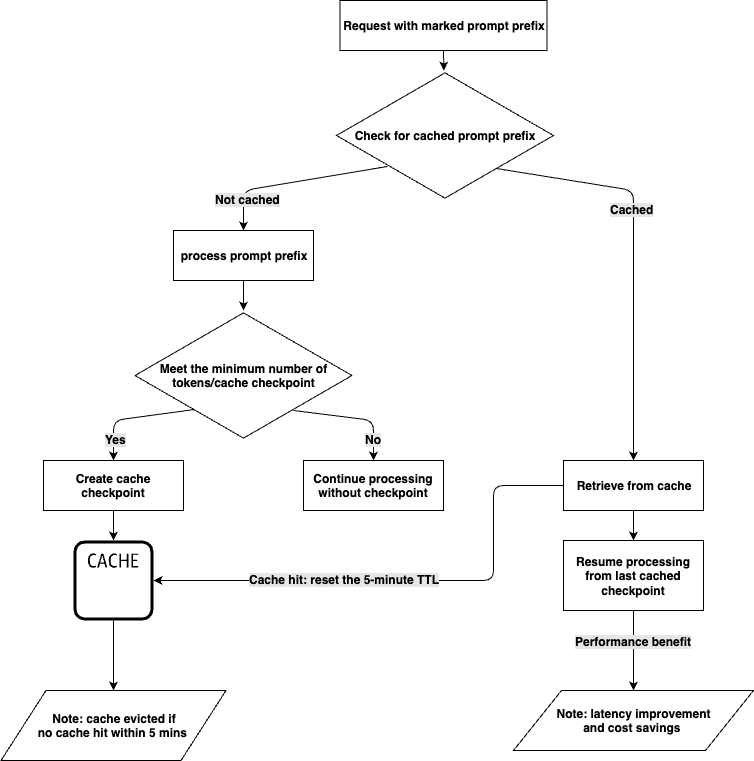
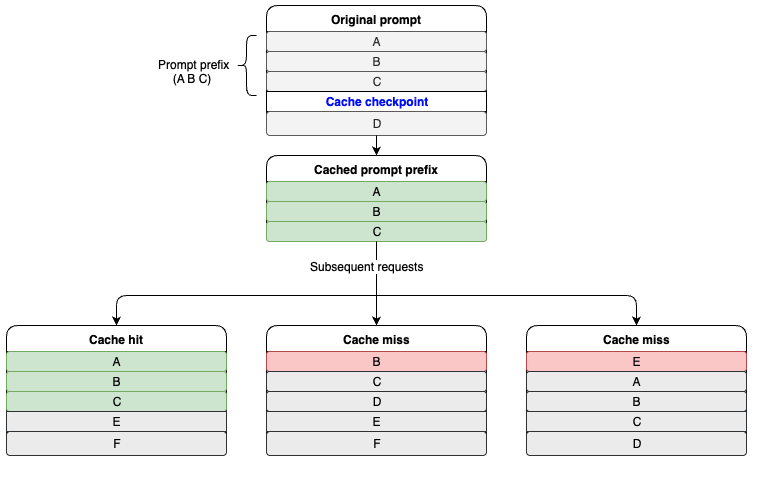
只有当提示词前缀完全匹配时,才会触发缓存命中。为了充分发挥提示词缓存功能的优势,建议您将诸如说明和示例等静态内容置于提示词开头,而将用户特定信息等动态内容置于提示词末尾。这一原则同样适用于图像和工具,即为了实现缓存,它们在多次请求中必须保持一致。
下图介绍了缓存命中的工作原理。A、B、C、D代表提示词的不同部分,其中A、B和C被标记为提示词前缀。当后续请求包含相同的A、B、C提示词前缀时,就会触发缓存命中。
何时使用提示词缓存功能
Amazon Bedrock的提示词缓存功能特别适用于在多个API调用中频繁重复使用长上下文提示词的工作负载。该功能最高可将响应延迟降低85%,推理成本降低90%,因此非常适合使用重复性长输入上下文的应用程序。若要确定提示词缓存功能是否适合您的使用场景,您需要估算计划缓存的token数量、重复使用的频率以及请求之间的间隔时间。
以下使用场景非常适合采用提示词缓存功能:
-
与文档对话:在首次请求时将文档作为输入上下文进行缓存,从而使用户每次查询都会变得更加高效,从而能够采用更简单的架构,避免使用向量数据库等更复杂解决方案。
-
代码辅助工具:在提示词中重复使用长代码文件,可实现近乎实时的内联建议,从而大大减少重新处理代码文件所花费的时间。
-
Agent工作流:可使用更长的系统提示词信息来优化Agent行为,而不会降低终端用户体验。通过缓存系统提示词信息和复杂的工具定义,可以减少Agent流程中每个步骤的处理时间。
-
小样本学习:包含大量高质量示例和复杂指令的用例,例如用于客户服务或技术故障排除,都可从提示词缓存功能中受益。
如何使用提示词缓存功能
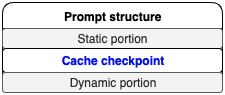
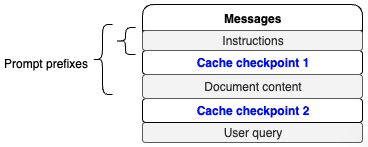
在评估某一使用场景是否适用提示词缓存功能时,关键是将给定提示词的组件划分为两个不同部分:一是静态且重复的部分,二是动态部分。提示词模板应遵循下图所示的结构。
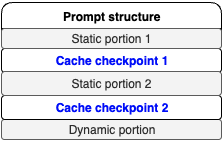
您可以在单个请求中创建多个缓存检查点,具体受限于特定模型的规定。其结构应遵循下图所示的相同模式,即“静态部分、缓存检查点、动态部分”的结构。
使用场景示例
“与文档对话”这一场景非常适合使用提示词缓存功能。在该用例中,文档包含在提示词中。在此示例中,提示词的静态部分包括响应格式说明和文档正文,动态部分则是用户的查询内容,这部分会随每次请求而变化。
在此用例中,应将提示词的静态部分标记为提示词前缀,以启用提示词缓存功能。以下代码片段展示了如何使用调用模型API来实现这种方法。本例在请求中创建了两个缓存检查点,一个用于说明,另一个用于文档内容,具体如图所示。
调用模型API:
https://docs.aws.amazon.com/bedrock/latest/APIReference/API_runtime_InvokeModel.html
使用如下提示词。
def chat_with_document(document, user_query):    instructions = (    "I will provide you with a document, followed by a question about its content. "    "Your task is to analyze the document, extract relevant information, and provide "    "a comprehensive answer to the question. Please follow these detailed instructions:"
    "\n\n1. Identifying Relevant Quotes:"    "\n   - Carefully read through the entire document."    "\n   - Identify sections of the text that are directly relevant to answering the question."    "\n   - Select quotes that provide key information, context, or support for the answer."    "\n   - Quotes should be concise and to the point, typically no more than 2-3 sentences each."    "\n   - Choose a diverse range of quotes if multiple aspects of the question need to be addressed."    "\n   - Aim to select between 2 to 5 quotes, depending on the complexity of the question."
    "\n\n2. Presenting the Quotes:"    "\n   - List the selected quotes under the heading 'Relevant quotes:'"    "\n   - Number each quote sequentially, starting from [1]."    "\n   - Present each quote exactly as it appears in the original text, enclosed in quotation marks."    "\n   - If no relevant quotes can be found, write 'No relevant quotes' instead."    "\n   - Example format:"    "\n     Relevant quotes:"    "\n     [1] \"This is the first relevant quote from the document.\""    "\n     [2] \"This is the second relevant quote from the document.\""
    "\n\n3. Formulating the Answer:"    "\n   - Begin your answer with the heading 'Answer:' on a new line after the quotes."    "\n   - Provide a clear, concise, and accurate answer to the question based on the information in the document."    "\n   - Ensure your answer is comprehensive and addresses all aspects of the question."    "\n   - Use information from the quotes to support your answer, but do not repeat them verbatim."    "\n   - Maintain a logical flow and structure in your response."    "\n   - Use clear and simple language, avoiding jargon unless it's necessary and explained."
    "\n\n4. Referencing Quotes in the Answer:"    "\n   - Do not explicitly mention or introduce quotes in your answer (e.g., avoid phrases like 'According to quote [1]')."    "\n   - Instead, add the bracketed number of the relevant quote at the end of each sentence or point that uses information from that quote."    "\n   - If a sentence or point is supported by multiple quotes, include all relevant quote numbers."    "\n   - Example: 'The company's revenue grew by 15% last year. [1] This growth was primarily driven by increased sales in the Asian market. [2][3]'"
    "\n\n5. Handling Uncertainty or Lack of Information:"    "\n   - If the document does not contain enough information to fully answer the question, clearly state this in your answer."    "\n   - Provide any partial information that is available, and explain what additional information would be needed to give a complete answer."    "\n   - If there are multiple possible interpretations of the question or the document's content, explain this and provide answers for each interpretation if possible."
    "\n\n6. Maintaining Objectivity:"    "\n   - Stick to the facts presented in the document. Do not include personal opinions or external information not found in the text."    "\n   - If the document presents biased or controversial information, note this objectively in your answer without endorsing or refuting the claims."
    "\n\n7. Formatting and Style:"    "\n   - Use clear paragraph breaks to separate different points or aspects of your answer."    "\n   - Employ bullet points or numbered lists if it helps to organize information more clearly."    "\n   - Ensure proper grammar, punctuation, and spelling throughout your response."    "\n   - Maintain a professional and neutral tone throughout your answer."
    "\n\n8. Length and Depth:"    "\n   - Provide an answer that is sufficiently detailed to address the question comprehensively."    "\n   - However, avoid unnecessary verbosity. Aim for clarity and conciseness."    "\n   - The length of your answer should be proportional to the complexity of the question and the amount of relevant information in the document."
    "\n\n9. Dealing with Complex or Multi-part Questions:"    "\n   - For questions with multiple parts, address each part separately and clearly."    "\n   - Use subheadings or numbered points to break down your answer if necessary."    "\n   - Ensure that you've addressed all aspects of the question in your response."
    "\n\n10. Concluding the Answer:"    "\n    - If appropriate, provide a brief conclusion that summarizes the key points of your answer."    "\n    - If the question asks for recommendations or future implications, include these based strictly on the information provided in the document."
    "\n\nRemember, your goal is to provide a clear, accurate, and well-supported answer based solely on the content of the given document. "    "Adhere to these instructions carefully to ensure a high-quality response that effectively addresses the user's query."    )
    document_content =  f"Here is the document:  <document> {document} </document>"
    messages_API_body = {    "anthropic_version": "bedrock-2023-05-31",    "max_tokens": 4096,    "messages": [        {            "role": "user",            "content": [                {                    "type": "text",                    "text": instructions,                    "cache_control": {                        "type": "ephemeral"                    }                },                {                    "type": "text",                    "text": document_content,                    "cache_control": {                        "type": "ephemeral"                    }                },                {                    "type": "text",                    "text": user_query                },            ]        }    ]    }
    response = bedrock_runtime.invoke_model(        body=json.dumps(messages_API_body),        modelId="us.anthropic.claude-3-7-sonnet-20250219-v1:0",        accept="application/json",        contentType="application/json"    )    response_body = json.loads(response.get("body").read())print(json.dumps(response_body, indent=2))    response = requests.get("https://aws.amazon.com/blogs/aws/reduce-costs-and-latency-with-amazon-bedrock-intelligent-prompt-routing-and-prompt-caching-preview/")blog = response.textchat_with_document(blog, "What is the blog writing about?")
左右滑动查看完整示意
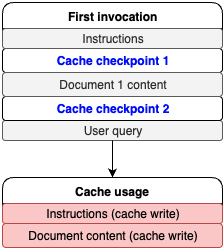
上述代码片段的响应中,有一个使用情况部分提供了有关缓存读取和写入的指标数据。首次调用模型时返回的示例响应如下。
{ "id": "msg_bdrk_01BwzJX6DBVVjUDeRqo3Z6GL", "type": "message", "role": "assistant", "model": "claude-3-7-sonnet-20250219”, "content": [ { "type": "text", "text": "Relevant quotes:\n[1] \"Today, Amazon Bedrock has introduced in preview two capabilities that help reduce costs and latency for generative AI applications\"\n\n[2] \"Amazon Bedrock Intelligent Prompt Routing \u2013 When invoking a model, you can now use a combination of foundation models (FMs) from the same model family to help optimize for quality and cost... Intelligent Prompt Routing can reduce costs by up to 30 percent without compromising on accuracy.\"\n\n[3] \"Amazon Bedrock now supports prompt caching \u2013 You can now cache frequently used context in prompts across multiple model invocations... Prompt caching in Amazon Bedrock can reduce costs by up to 90% and latency by up to 85% for supported models.\"\n\nAnswer:\nThe article announces two new preview features for Amazon Bedrock that aim to improve cost efficiency and reduce latency in generative AI applications [1]:\n\n1. Intelligent Prompt Routing: This feature automatically routes requests between different models within the same model family based on the complexity of the prompt, choosing more cost-effective models for simpler queries while maintaining quality. This can reduce costs by up to 30% [2].\n\n2. Prompt Caching: This capability allows frequent reuse of cached context across multiple model invocations, which is particularly useful for applications that repeatedly use the same context (like document Q&A systems). This feature can reduce costs by up to 90% and improve latency by up to 85% [3].\n\nThese features are designed to help developers build more efficient and cost-effective generative AI applications while maintaining performance and quality standards." } ], "stop_reason": "end_turn", "stop_sequence": null, "usage": { "input_tokens": 9, "cache_creation_input_tokens": 37209, "cache_read_input_tokens": 0, "output_tokens": 357 }}左右滑动查看完整示意
如下图所示,根据cache_creation_input_tokens这一值可知,缓存检查点已成功创建,并缓存了37209个token。
对于后续请求,可以提出另一个问题。
chat_with_document(blog, "what are the use cases?")左右滑动查看完整示意
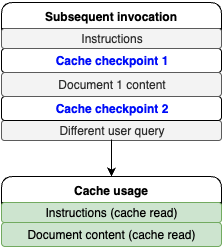
提示词的动态部分已更改,但静态部分和提示词前缀保持不变。因此,可以期待在后续调用中实现缓存命中,参考以下代码。
{ "id": "msg_bdrk_01HKoDMs4Bmm9mhzCdKoQ8bQ", "type": "message", "role": "assistant", "model": "claude-3-7-sonnet-20250219", "content": [ { "type": "text", "text": "Relevant quotes:\n[1] \"This is particularly useful for applications such as customer service assistants, where uncomplicated queries can be handled by smaller, faster, and more cost-effective models, and complex queries are routed to more capable models.\"\n\n[2] \"This is especially valuable for applications that repeatedly use the same context, such as document Q&A systems where users ask multiple questions about the same document or coding assistants that need to maintain context about code files.\"\n\n[3] \"During the preview, you can use the default prompt routers for Anthropic's Claude and Meta Llama model families.\"\n\nAnswer:\nThe document describes two main features with different use cases:\n\n1. Intelligent Prompt Routing:\n- Customer service applications where query complexity varies\n- Applications needing to balance between cost and performance\n- Systems that can benefit from using different models from the same family (Claude or Llama) based on query complexity [1][3]\n\n2. Prompt Caching:\n- Document Q&A systems where users ask multiple questions about the same document\n- Coding assistants that need to maintain context about code files\n- Applications that frequently reuse the same context in prompts [2]\n\nBoth features are designed to optimize costs and reduce latency while maintaining response quality. Prompt routing can reduce costs by up to 30% without compromising accuracy, while prompt caching can reduce costs by up to 90% and latency by up to 85% for supported models." } ], "stop_reason": "end_turn", "stop_sequence": null, "usage": { "input_tokens": 10, "cache_creation_input_tokens": 0, "cache_read_input_tokens": 37209, "output_tokens": 324 }}左右滑动查看完整示意
如下图所示,37209个token用于从缓存中读取的文档和说明内容,10个输入token则用于用户查询。
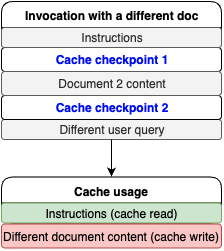
现在将文档换成另一篇博文,说明内容保持不变。由于在请求中说明提示词前缀位于文档正文之前,因此可以期待在说明提示词前缀部分实现缓存命中,参考以下代码。
response = requests.get(https://aws.amazon.com/blogs/machine-learning/enhance-conversational-ai-with-advanced-routing-techniques-with-amazon-bedrock/)blog = response.textchat_with_document(blog, "What is the blog writing about?"){ "id": "msg_bdrk_011S8zqMXzoGHABHnXX9qSjq", "type": "message", "role": "assistant", "model": "claude-3-7-sonnet-20250219", "content": [ { "type": "text", "text": "Let me analyze this document and provide a comprehensive answer about its main topic and purpose.\n\nRelevant quotes:\n[1] \"When you're designing a security strategy for your organization, firewalls provide the first line of defense against threats. Amazon Web Services (AWS) offers AWS Network Firewall, a stateful, managed network firewall that includes intrusion detection and prevention (IDP) for your Amazon Virtual Private Cloud (VPC).\"\n\n[2] \"This blog post walks you through logging configuration best practices, discusses three common architectural patterns for Network Firewall logging, and provides guidelines for optimizing the cost of your logging solution.\"\n\n[3] \"Determining the optimal logging approach for your organization should be approached on a case-by-case basis. It involves striking a balance between your security and compliance requirements and the costs associated with implementing solutions to meet those requirements.\"\n\nAnswer:\nThis document is a technical blog post that focuses on cost considerations and logging options for AWS Network Firewall. The article aims to help organizations make informed decisions about implementing and managing their firewall logging solutions on AWS. Specifically, it:\n\n1. Explains different logging configuration practices for AWS Network Firewall [1]\n2. Discusses three main architectural patterns for handling firewall logs:\n - Amazon S3-based solution\n - Amazon CloudWatch-based solution\n - Amazon Kinesis Data Firehose with OpenSearch solution\n3. Provides detailed cost analysis and comparisons of different logging approaches [3]\n4. Offers guidance on balancing security requirements with cost considerations\n\nThe primary purpose is to help AWS users understand and optimize their firewall logging strategies while managing associated costs effectively. The article serves as a practical guide for organizations looking to implement or improve their network security logging while maintaining cost efficiency [2]." } ], "stop_reason": "end_turn", "stop_sequence": null, "usage": { "input_tokens": 9, "cache_creation_input_tokens": 37888, "cache_read_input_tokens": 1038, "output_tokens": 385 }}左右滑动查看完整示意
从响应中可以看到,有1038个缓存读取token用于说明部分,有37888个缓存写入token用于新的文档内容,具体如图所示。
成本节省
当缓存命中时,Amazon Bedrock会针对已缓存的上下文内容,为每个token提供相应折扣,从而将节省的计算成本让利给客户。要计算潜在的成本节省额度,您首先应通过Amazon Bedrock响应中的缓存写入或读取指标了解自身的提示词缓存使用模式,然后您可根据每1000个输入token(缓存写入)的价格和每1000个输入token(缓存读取)的价格,来计算潜在的成本节省额度。有关价格详情,请参阅Amazon Bedrock定价。
Amazon Bedrock定价:
https://aws.amazon.com/bedrock/pricing/
延迟基准测试
提示词缓存功能经过优化,能够有效提升在处理重复提示信息时的TTFT性能。提示词缓存功能适合涉及多轮交互的会话式应用程序,其使用体验与聊天场景颇为相似。此外,对于需要反复引用大型文档的使用场景,提示词缓存功能同样能够发挥显著作用。
然而,对于涉及长达2000个token的系统提示词信息,且后续有大量动态变化文本的工作负载而言,提示词缓存功能的效果可能并不理想。在这种情况下,提示词缓存功能带来的优势相对有限。
GitHub存储库上发布了一篇关于如何使用提示词缓存并对其进行基准测试的笔记。基准测试结果取决于具体使用场景:输入token数量、缓存token数量或输出token数量。
GitHub存储库:
https://github.com/aws-samples/amazon-bedrock-samples/blob/main/introduction-to-bedrock/prompt-caching/getting_started_with_prompt_caching.ipynb
Amazon Bedrock跨区域推理
提示词缓存功能可与跨区域推理(CRIS)结合使用。跨区域推理会自动选择您所在地区内的最佳亚马逊云科技区域来处理您的推理请求,从而最大程度地利用可用资源并提高模型的可用性。在需求高峰期,这些优化措施可能会导致缓存写入量增加。
跨区域推理:
https://docs.aws.amazon.com/bedrock/latest/userguide/cross-region-inference.html
指标与可观测性
在使用Amazon Bedrock的应用程序中,提示词缓存的可观测性对于优化成本节约和降低延迟至关重要。通过监控关键性能指标,开发者可以显著提升效率,例如将TTFT缩短高达85%,并将冗长提示词的成本降低高达90%。这些指标能够助力开发者准确评估缓存性能,并就缓存管理做出战略性决策。
使用Amazon Bedrock进行监控
Amazon Bedrock通过API响应的使用部分公开缓存性能数据,使开发者能够跟踪缓存命中率、token消耗量(读取和写入)以及延迟改善情况等重要指标。通过利用这些见解信息,团队可以有效管理缓存策略,从而提高应用程序的响应速度并降低运营成本。
使用Amazon CloudWatch进行监控
Amazon CloudWatch为监控亚马逊云科技服务的健康状况和性能提供了强大服务,包括专为Amazon Bedrock模型定制的全新自动仪表盘,这些仪表盘可快速访问关键指标,并有助于深入了解模型性能。
要创建自定义可观测性仪表盘,请完成以下步骤。
1.在Amazon CloudWatch控制台上,创建一个新的仪表盘。有关完整示例,请参阅《使用Amazon CloudWatch提高Amazon Bedrock使用情况和性能的可见性》。
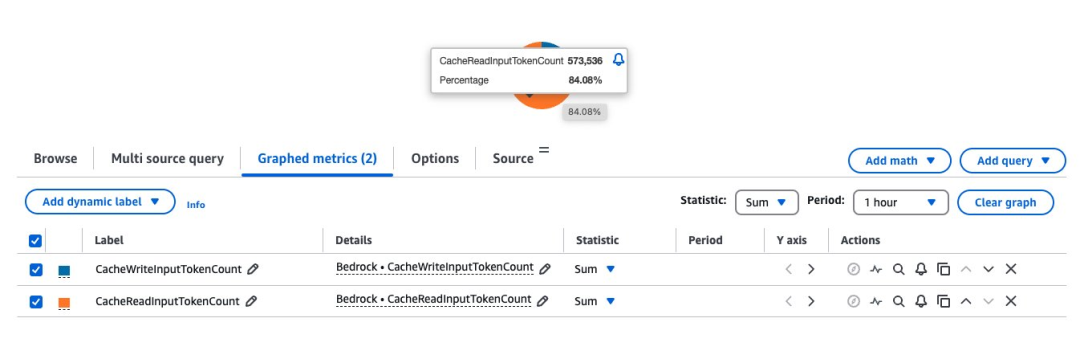
2.选择Amazon CloudWatch作为数据源,并为初始部件类型选择为Pie(可稍后调整)。
3.根据监控需求,更新指标的时间范围,例如1小时、3小时或1天。
4.在亚马逊云科技命名空间下选择Amazon Bedrock。
5.在搜索框中输入“cache”,过滤与缓存相关的指标。
6.查找anthropic.claude-3-7-sonnet-20250219-v1:0模型,并选择CacheWriteInputTokenCount和CacheReadInputTokenCount。
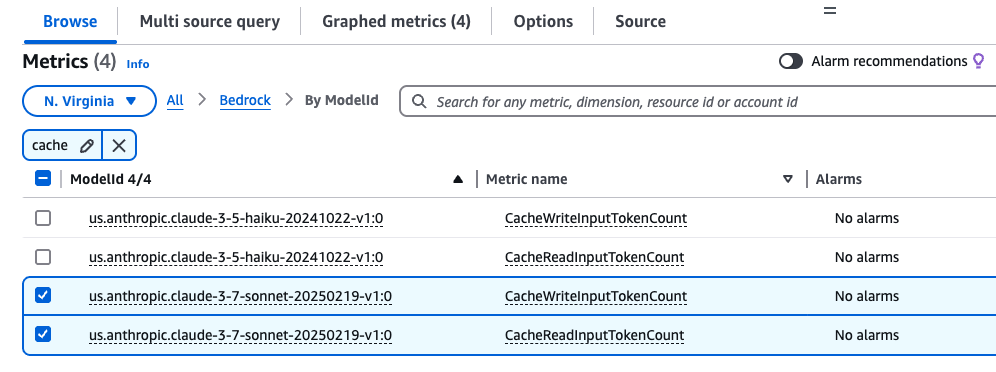
7.选择“创建部件”,然后选择“保存”以保存仪表盘。
以下是用于创建此部件的示例.json配置。
{ "view": "pie", "metrics": [ [ "AWS/Bedrock", "CacheReadInputTokenCount" ], [ ".", "CacheWriteInputTokenCount" ] ], "region": "us-west-2", "setPeriodToTimeRange": true}左右滑动查看完整示意
理解缓存命中率
分析缓存命中率需要同时观察CacheReadInputTokens和CacheWriteInputTokens。
通过汇总特定时间内的这些指标,开发者可以深入了解缓存策略的效率。此外,Amazon Bedrock定价页面上公布了针对特定模型每1000个输入token(缓存写入)和每1000个输入token(缓存读取)的价格,您可根据具体使用场景估算潜在的成本节省额度。
总结
本文探讨了Amazon Bedrock中的提示词缓存功能,详细阐述了其工作原理、适用场景以及有效使用方法。
在决定采用此功能前,仔细评估使用场景是否能从中获益至关重要。这取决于合理的提示词结构设计、对静态和动态内容的区分理解,以及针对具体需求选择恰当的缓存策略。
通过使用Amazon CloudWatch指标来监控缓存性能,并遵循本文介绍的实施模式,您将能在保持系统高性能的同时,构建更高效且更具成本效益的AI应用程序。
有关在Amazon Bedrock上使用提示词缓存功能的更多信息,请参阅《使用提示词缓存功能加速模型推理》用户指南。
《使用提示词缓存功能加速模型推理》用户指南:
https://docs.aws.amazon.com/bedrock/latest/userguide/prompt-caching.html
本篇作者

Sharon Li
亚马逊云科技人工智能与机器学习专家解决方案架构师,热衷于利用前沿技术,在亚马逊云科技云服务上开发和部署创新的生成式AI解决方案。

Shreyas Subramanian
首席数据科学家,通过使用生成式AI和深度学习,来帮助客户利用亚马逊云科技服务解决业务挑战。Shreyas在大规模优化和机器学习领域拥有丰富经验,并擅长使用机器学习和强化学习加速优化任务。

Satveer Khurpa
亚马逊云科技全球高级解决方案架构师,专注于Amazon Bedrock。Satveer利用基于云架构方面的专业知识,为各行各业的客户开发创新的生成式AI解决方案。基于对生成式AI技术的深刻理解,Satveer能够设计出可扩展、安全且负责任的应用程序,从而开辟新的商机并创造实际价值。

Kosta Belz
亚马逊云科技生成式AI创新中心的高级应用科学家,致力于帮助客户设计和构建生成式AI解决方案,解决客户关键业务问题。

Sean Eichenberger
亚马逊云科技高级产品经理。

星标不迷路,开发更极速!
关注后记得星标「亚马逊云开发者」
听说,点完下面4个按钮
就不会碰到bug了!

点击阅读原文查看博客!获得更详细内容!

火山引擎开发者社区是火山引擎打造的AI技术生态平台,聚焦Agent与大模型开发,提供豆包系列模型(图像/视频/视觉)、智能分析与会话工具,并配套评测集、动手实验室及行业案例库。社区通过技术沙龙、挑战赛等活动促进开发者成长,新用户可领50万Tokens权益,助力构建智能应用。
更多推荐
 0
0 0
0- 0


 已为社区贡献103条内容

所有评论(0)