MCP Server开发与调试进阶实践
在AI工程化浪潮中,MCP(Model Context Protocol)作为开返回的模型上下文管理协议,它规范了应用程序如何向LLM提供上下文。MCP服务器是轻量级程序,通过标准化的MCP协议,暴露了特定的功能(或工具)。本文基于采用Python的MCP Server研发工作的实践,分享了应对MCP Server开发、测试与调试工作的解决方案。
MCP Server开发
以官方展示的MCP Server weather为例,介绍MCP server的开发工作。
开发准备
参照MCP官方Server开发者指南页面进行环境设置,包括:
- 确保系统具备Python,已安装uv
- 使用uv 创建项目
# Create a new directory for our project
uv init weather
cd weather

# Create virtual environment and activate it
uv venv
source .venv/bin/activate
uv add "mcp"
MCP Serverg官方weather
官方原生MCP Server weather代码如下,client与server采用了stdio协议,需要同机部署、采用本地管道通讯。
from typing import Any
import httpx
from mcp.server.fastmcp import FastMCP

# Initialize FastMCP server
mcp = FastMCP("weather")

# Constants
NWS_API_BASE = "https://api.weather.gov"
USER_AGENT = "weather-app/1.0"

async def make_nws_request(url: str) -> dict[str, Any] | None:
    """Make a request to the NWS API with proper error handling."""
    headers = {
        "User-Agent": USER_AGENT,
        "Accept": "application/geo+json"
    }
    async with httpx.AsyncClient() as client:
        try:
            response = await client.get(url, headers=headers, timeout=30.0)
            response.raise_for_status()
            return response.json()
        except Exception:
            return None

def format_alert(feature: dict) -> str:
    """Format an alert feature into a readable string."""
    props = feature["properties"]
    return f"""
Event: {props.get('event', 'Unknown')}
Area: {props.get('areaDesc', 'Unknown')}
Severity: {props.get('severity', 'Unknown')}
Description: {props.get('description', 'No description available')}
Instructions: {props.get('instruction', 'No specific instructions provided')}
"""

@mcp.tool()
async def get_alerts(state: str) -> str:
    """Get weather alerts for a US state.

    Args:
        state: Two-letter US state code (e.g. CA, NY)
    """
    url = f"{NWS_API_BASE}/alerts/active/area/{state}"
    data = await make_nws_request(url)

    if not data or "features" not in data:
        return "Unable to fetch alerts or no alerts found."

    if not data["features"]:
        return "No active alerts for this state."

    alerts = [format_alert(feature) for feature in data["features"]]
    return "\n---\n".join(alerts)

@mcp.tool()
async def get_forecast(latitude: float, longitude: float) -> str:
    """Get weather forecast for a location.

    Args:
        latitude: Latitude of the location
        longitude: Longitude of the location
    """
    # First get the forecast grid endpoint
    points_url = f"{NWS_API_BASE}/points/{latitude},{longitude}"
    points_data = await make_nws_request(points_url)

    if not points_data:
        return "Unable to fetch forecast data for this location."

    # Get the forecast URL from the points response
    forecast_url = points_data["properties"]["forecast"]
    forecast_data = await make_nws_request(forecast_url)

    if not forecast_data:
        return "Unable to fetch detailed forecast."

    # Format the periods into a readable forecast
    periods = forecast_data["properties"]["periods"]
    forecasts = []
    for period in periods[:5]:  # Only show next 5 periods
        forecast = f"""
{period['name']}:
Temperature: {period['temperature']}°{period['temperatureUnit']}
Wind: {period['windSpeed']} {period['windDirection']}
Forecast: {period['detailedForecast']}
"""
        forecasts.append(forecast)

    return "\n---\n".join(forecasts)

if __name__ == "__main__":
    # Initialize and run the server
    mcp.run(transport='stdio')
MCP也支持SSE(Server-Sent Events)通讯协议,可以通过远程或云端Web提供服务。对以上代码进行改造,支持SSE:
from typing import Any
import httpx
from mcp.server.fastmcp import FastMCP

# Initialize FastMCP server
mcp = FastMCP("weather")

# 核心未变动代码掠过
# ···

if __name__ == "__main__":
    # Initialize and run the server
    mcp.run(transport='sse')
采用SSE通信协议的MCP Server默认host地址为0.0.0.0,默认端口为8000。
可配置的MCP Server通信协议
经过对上述代码进行修改,可以实现MCP server通信协议(transport)、host、port可配置。
from typing import Any
import httpx
from mcp.server.fastmcp import FastMCP


from mcp.server.sse import SseServerTransport
from mcp.server import Server

from starlette.applications import Starlette
from starlette.requests import Request
from starlette.routing import Mount, Route
import uvicorn
import argparse

import sys

# Initialize FastMCP server
mcp = FastMCP("weather")

# 核心未变动代码掠过
# ···

def create_starlette_app(mcp_server: Server, *, debug: bool = False) -> Starlette:
    """Create a Starlette application that can server the provied mcp server with SSE."""
    sse = SseServerTransport("/messages/")

    async def handle_sse(request: Request) -> None:
        async with sse.connect_sse(
                request.scope,
                request.receive,
                request._send,  # noqa: SLF001
        ) as (read_stream, write_stream):
            await mcp_server.run(
                read_stream,
                write_stream,
                mcp_server.create_initialization_options(),
            )

    return Starlette(
        debug=debug,
        routes=[
            Route("/sse", endpoint=handle_sse),
            Mount("/messages/", app=sse.handle_post_message),
        ],
    )

if __name__ == "__main__":
    # Initialize and run the server
    import sys
    parser = argparse.ArgumentParser(description='Run MCP SSE-based server')
    parser.add_argument('--host', default='127.0.0.1', help='Host to bind to')
    parser.add_argument('--port', type=int, default=8008, help='Port to listen on')
    parser.add_argument('--transport', default='sse', help='MCP transport protocol')
    args = parser.parse_args()
    # Initialize and run the server
    if len(sys.argv)>2:
        mcp_server = mcp._mcp_server  # noqa: WPS437
        # Bind SSE request handling to MCP server
        starlette_app = create_starlette_app(mcp_server, debug=True)
        uvicorn.run(starlette_app, host=args.host, port=args.port)
    elif len(sys.argv)==1:
        mcp.run(transport='stdio')
运行调试可配置的MCP Server wether:
hbu@Pauls-MacBook-Air 05.AI % python3 server.py --transport sse
INFO:     Started server process [29567]
INFO:     Waiting for application startup.
INFO:     Application startup complete.
INFO:     Uvicorn running on http://127.0.0.1:8008 (Press CTRL+C to quit)
INFO:     127.0.0.1:55998 - "GET /sse HTTP/1.1" 200 OK
INFO:     127.0.0.1:56059 - "POST /messages/?session_id=29ff41b830394f7889ac540143680c06 HTTP/1.1" 202 Accepted
INFO:     127.0.0.1:56059 - "POST /messages/?session_id=29ff41b830394f7889ac540143680c06 HTTP/1.1" 202 Accepted
可配置的MCP Server通信协议的优化
其实,我们也可以通过使用FastMCP模块的方案,在原生weather示例基础上,通过启动时运行不同命令,快速实现MCP server通信协议(transport)、host、port可配置。这样对代码改动量少,并且后续还能支持流式传输(transport=)协议
from typing import Any
import httpx
from fastmcp import FastMCP


# Initialize FastMCP server
mcp = FastMCP("weather")

# 核心未变动代码掠过
# ···

if __name__ == "__main__":
    # Initialize and run the server
    mcp.run()
- 以默认的
stdio通信协议启动
hbu@Pauls-MacBook-Air 05.AI %  fastmcp run server.py
[05/26/25 11:09:16] INFO     Starting MCP server 'weather' with transport 'stdio'
- 以
sse通信协议在本地启动,并侦听8080端口
hbu@Pauls-MacBook-Air 05.AI %   fastmcp run server.py --transport sse --port 8080
[05/26/25 11:12:30] INFO     Starting MCP server 'weather' with transport 'sse' on http://127.0.0.1:8080/sse                                    server.py:796
INFO:     Started server process [40012]
INFO:     Waiting for application startup.
INFO:     Application startup complete.
INFO:     Uvicorn running on http://127.0.0.1:8080 (Press CTRL+C to quit)
- 以
streamable-http通信协议在本地启动,并侦听8080端口
hbu@Pauls-MacBook-Air 05.AI % fastmcp run server.py --transport streamable-http --port 8080
[05/26/25 11:14:45] INFO     Starting MCP server 'weather' with transport 'streamable-http' on http://127.0.0.1:8080/mcp                        server.py:796
INFO:     Started server process [41054]
INFO:     Waiting for application startup.
INFO:     Application startup complete.
INFO:     Uvicorn running on http://127.0.0.1:8080 (Press CTRL+C to quit)
MCP Server测试与调试
在MCP Server开发工作中,可以使用python fastmcp的dev命令运行MCP Inspector运行MCP Server,并展开开发与调试
Fastmcp帮助文档
(scorpio) hbu@Pauls-MacBook-Air weather-server-python % fastmcp --help

 Usage: fastmcp [OPTIONS] COMMAND [ARGS]...

 FastMCP CLI


──────────────────────────────────────────────────────────────────────────────────────────────────╮
│ --help          Show this message and exit.                                                     │
──────────────────────────────────────────────────────────────────────────────────────────────────╯
╭─ Commands ──────────────────────────────────────────────────────────────────────────────────────╮
│ version                                                                                         │
│ dev       Run a MCP server with the MCP Inspector.                                              │
│ run       Run a MCP server or connect to a remote one.                                          │
│ install   Install a MCP server in the Claude desktop app.                                       │
╰─────────────────────────────────────────────────────────────────────────────────────────────────╯
stdio传输类型
针对stdio类型的调试,需要通过调试命令fastmcp dev,启动MCP server,运行结果如下:
(scorpio) hbu@Pauls-MacBook-Air weather-server-python % fastmcp dev server.py
Starting MCP inspector...
⚙️ Proxy server listening on port 6277
🔍 MCP Inspector is up and running at http://127.0.0.1:6274 🚀
New connection
Query parameters: [Object: null prototype] {
  command: 'uv',
  args: 'run --with fastmcp fastmcp run server.py',
  env: '{"HOME":"/Users/hbu"}',
  transportType: 'stdio'
}
Stdio transport: command=/opt/homebrew/bin/uv, args=run,--with,fastmcp,fastmcp,run,server.py
Spawned stdio transport
Connected MCP client to backing server transport
Created web app transport
Set up MCP proxy
Received message for sessionId 4842712d-4cdc-4bb6-ac6d-7c5baafb04ae
Received message for sessionId 4842712d-4cdc-4bb6-ac6d-7c5baafb04ae
打开MCP Inspector,显示结果如下
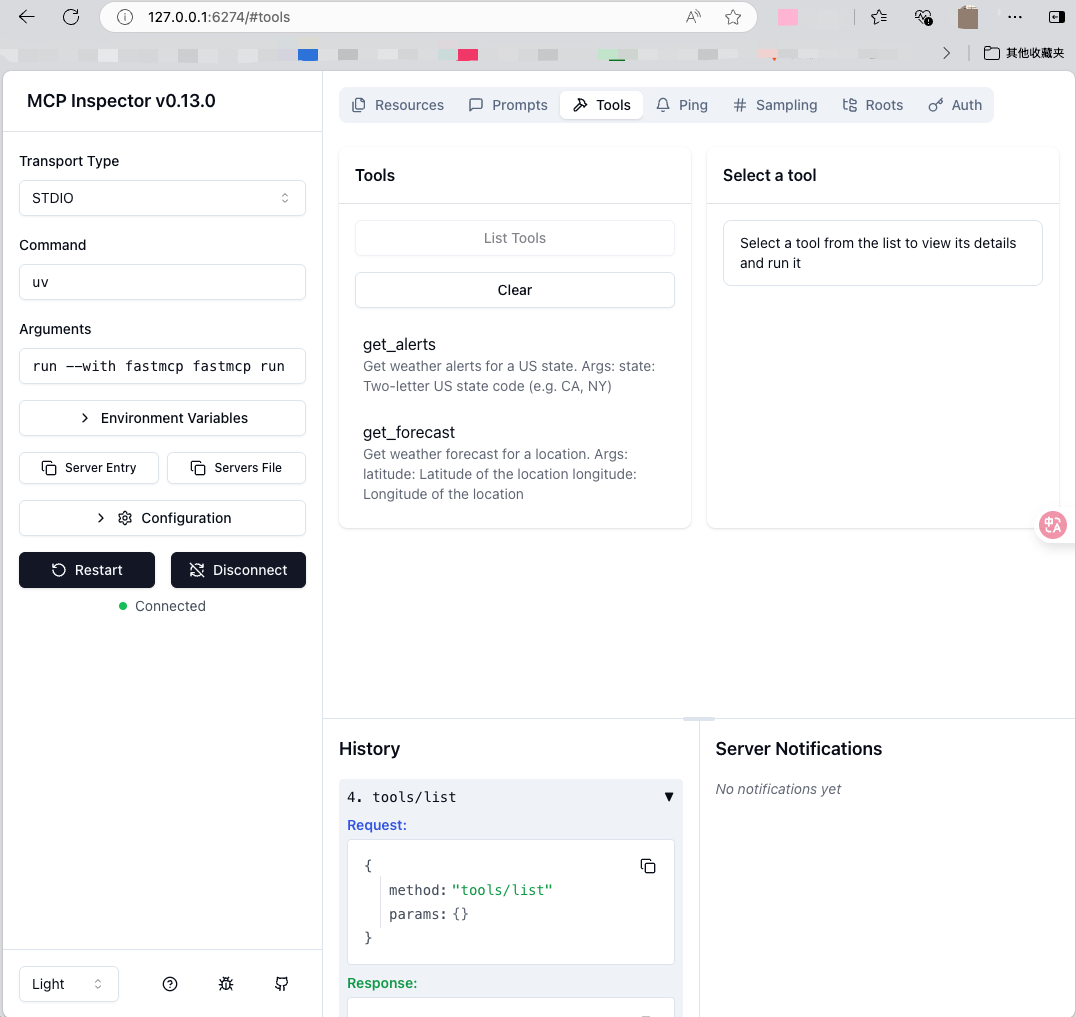
可以在MCP Inspector页面,选Resouce、Prompts、Tools等选项,展示MCP Server对应API返回的数据(JSON格式),帮助更好的与MCP Client和LLM进行集成。
sse传输类型
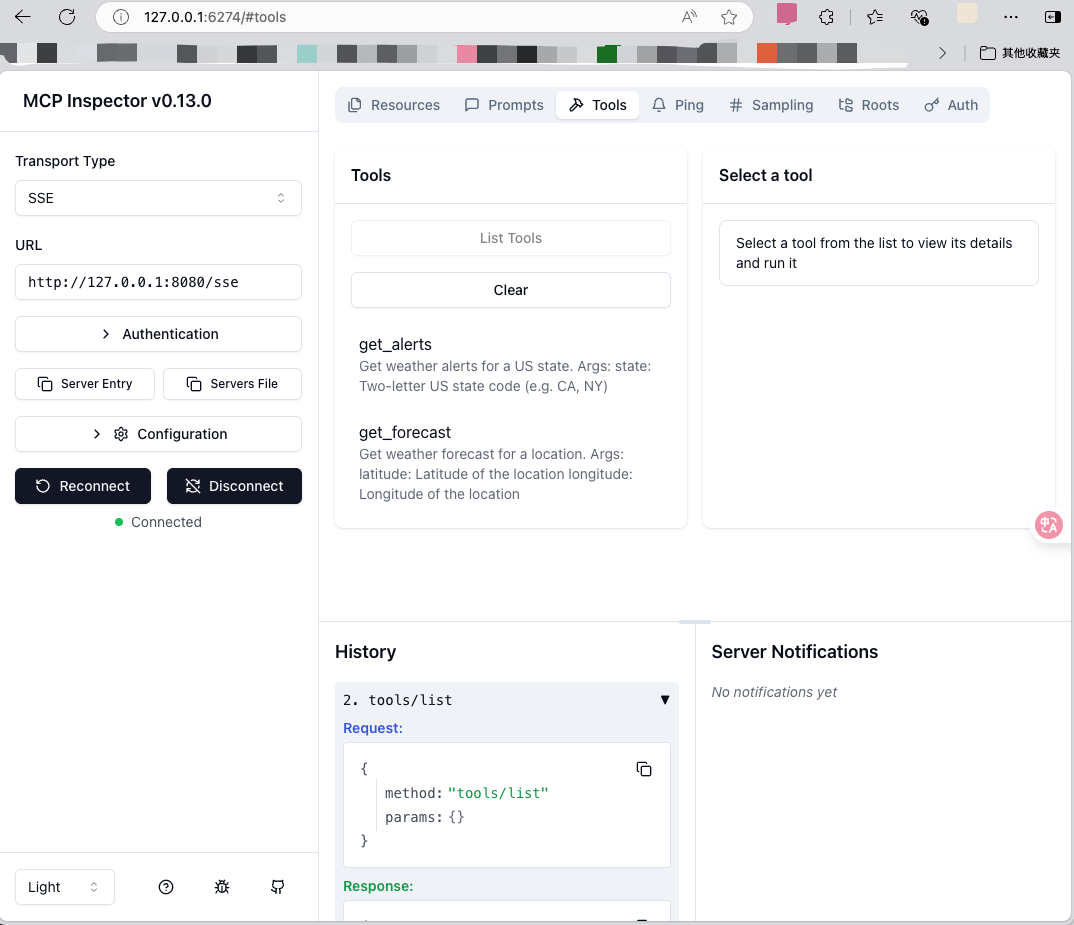
sse类型的MCP Server调试,可以通过fastmcp run启动MCP server,然后在MCP Inspector页面填入对应的MCP Server链接,点击Connect按钮进行连接Server。运行结果如下:
命令行:
(scorpio) hbu@Pauls-MacBook-Air weather-server-python % fastmcp run server.py --transport sse --port 8080
[05/26/25 14:57:35] INFO     Starting MCP server 'weather' with transport 'sse' on http://127.0.0.1:8080/sse                                    server.py:796
INFO:     Started server process [72323]
INFO:     Waiting for application startup.
INFO:     Application startup complete.
INFO:     Uvicorn running on http://127.0.0.1:8080 (Press CTRL+C to quit)
INFO:     127.0.0.1:58832 - "GET /sse HTTP/1.1" 200 OK
INFO:     127.0.0.1:58834 - "POST /messages/?session_id=8c29532c7e65425eb1a4f2ac0fdad78e HTTP/1.1" 202 Accepted
INFO:     127.0.0.1:58834 - "POST /messages/?session_id=8c29532c7e65425eb1a4f2ac0fdad78e HTTP/1.1" 202 Accepted
MCP Inspector页面,按一下步骤进行操作
- 在Tansport Type下拉可选框中选择SSE
- URL框填入连接
http://127.0.0.1:8080/sse - 点击链接Connect
- 点击Tools,然后点击List Tools
结果如下
streamable-http传输类型
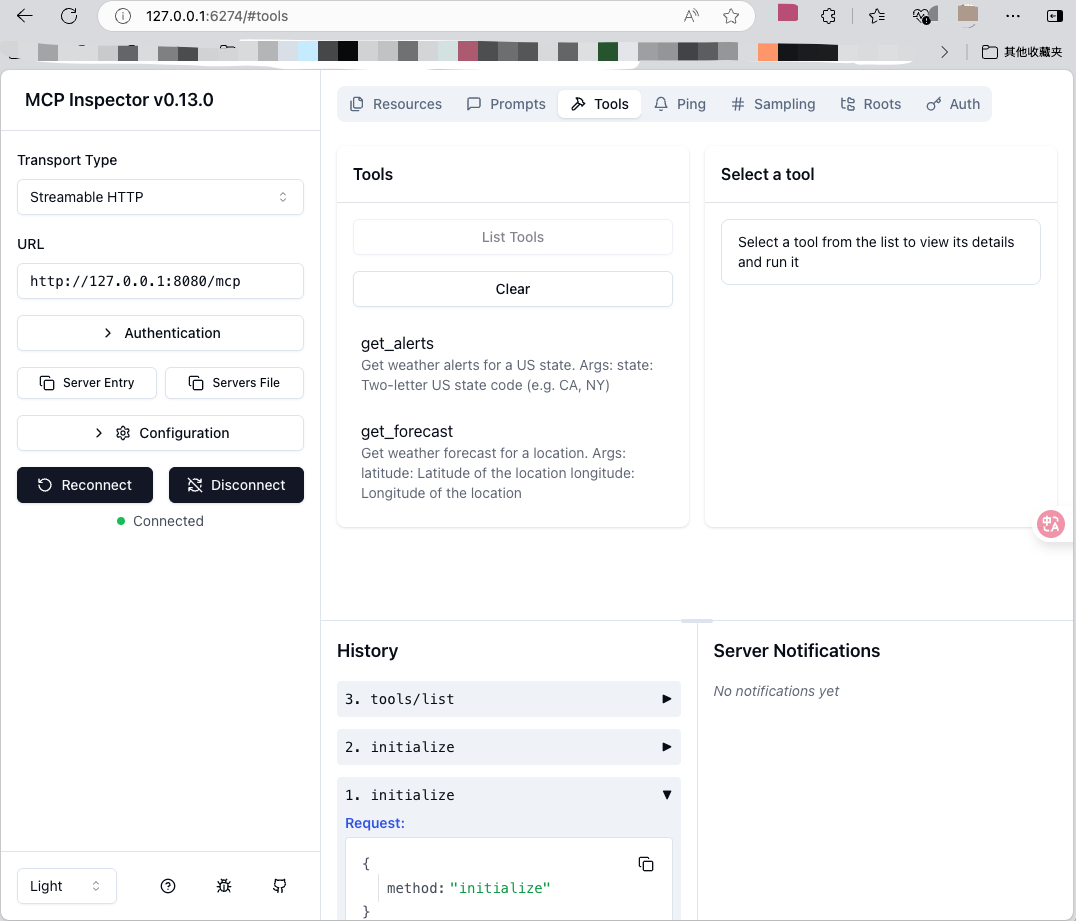
通过fastmcp run以Stream HTTP类型启动MCP server,并Inspector页面进行如下操作:
- 在Tansport Type下拉可选框中选择Streamable HTTP
- URL框填入连接
http://127.0.0.1:8080/mcp - 点击链接Connect
- 点击Tools,然后点击List Tools
命令行运行结果:
(scorpio) hbu@Pauls-MacBook-Air weather-server-python % fastmcp run server.py --transport streamable-http --port 8080
[05/26/25 15:17:28] INFO     Starting MCP server 'weather' with transport 'streamable-http' on http://127.0.0.1:8080/mcp                        server.py:796
INFO:     Started server process [77660]
INFO:     Waiting for application startup.
INFO:     Application startup complete.
INFO:     Uvicorn running on http://127.0.0.1:8080 (Press CTRL+C to quit)
MCP Inspector页面运行结果:
总结
1. 开发更好用的MCP Server?
最初展开MCP Server到Clinet的调试工作时,也是从传输类型为stdio的官方weather server入手,这也是Claud Desktop、VScode Cline插件使用的一种交互方式。stdio类型的交互类型,决定了client与server在交互时,需要进行耦合绑定。
Server Sent Event(sse)类型,可以通过url操作MCP Server,client和server可以实现解耦合,并且在Server到Client可以实现一对多(server:client=1:n)。尽管给予原生mcp模块中FsatMCP对象,添加定制类型代码,可以同一Server代码,通过配置实现支持stdio和sse传输类型。该方案存在这对FastMCP对象进行了更多侵入性改造的问题,因此本人找到了FastMCP模块,能够更好的兼容mcp模块用法,通过运行不同命令支持stdio、sse以及streamable-http。
FastMCP模块时,还支持启动MCP Inspector进行开发与调试,对MCP Server与Client的开发者更为友好。
2. MCP Client-Server不同传输(Transport)方式比较:
以下是MCP Client-Server传输方式的比较,帮助您为自己开发的MCP Server选择适合的传输方式:
| Transport(传输) | Use Cases(使用案例) | Recommendation(建议) |
|---|---|---|
| STDIO | Local tools, command-line scripts, and integrations with clients like Claude Desktop 本地工具、命令行脚本以及与 Claude Desktop 等客户端的集成 | Best for local tools and when clients manage server processes 最适合本地工具和客户端管理服务器进程时 |
| Streamable HTTP | Web-based deployments, microservices, exposing MCP over a network 基于Web的部署、微服务、通过网络公开 MCP | Recommended choice for web-based deployments 基于 Web 的部署的推荐选择 |
| SSE | Existing web-based deployments that rely on SSE 依赖于 SSE 的现有基于 Web 的部署 | Deprecated - prefer Streamable HTTP for new projects 已弃用 - 新项目首选 Streamable HTTP |
备注: 译自https://gofastmcp.com/deployment/running-server#transport-options
参考

中国智能体开发者社区,聚焦智能体与大模型开发,提供前沿资讯、实用工具链、开源项目及行业案例。通过技术沙龙、开发者大赛等活动,促进经验交流与协作,助力开发者快速构建创新智能应用。
更多推荐


 28
28 0
0- 0


 已为社区贡献1条内容

所有评论(0)