系列教程八 | Gemma-3-4B 高效微调指南
一.项目介绍
在自然语言处理和对话系统等领域,模型的性能直接影响着交互体验和任务完成质量。现有模型在处理特定任务时,往往难以满足多样化和精细化的需求。本项目旨在利用Unsloth库,在BitaHub 平台上,针对编程任务和通用对话任务,对gemma-3-4b-it模型进行微调训练。该任务的目标是使模型能够更高效地理解和处理编程相关指令,生成高质量的代码解答,同时在日常对话中表现更加智能流畅,从而提升在编程辅助、智能问答等场景中的应用效果。
二.创建Bitahub项目
1.进入BitaHub官网,完成注册后点击右上角进入工作台。

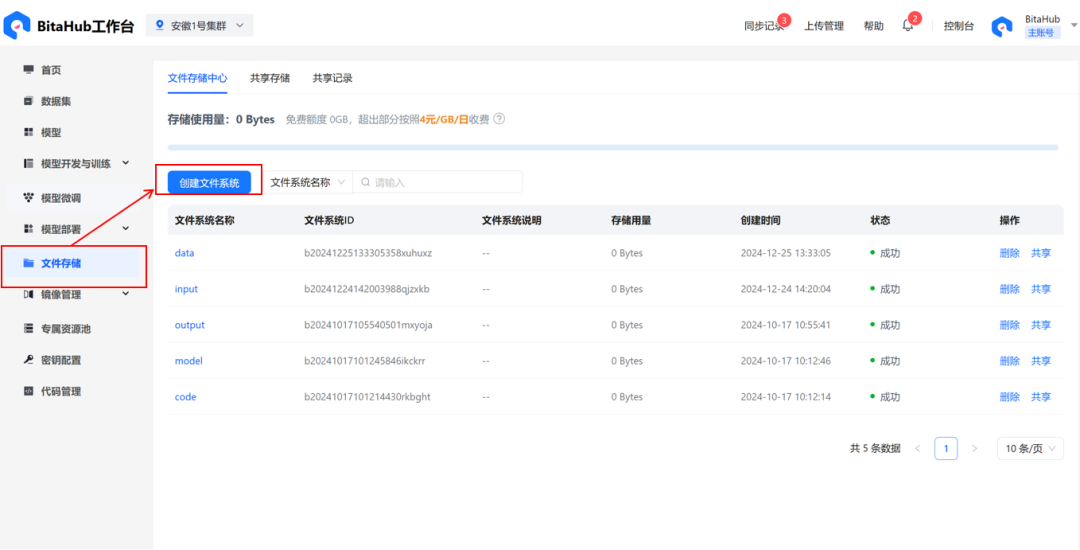
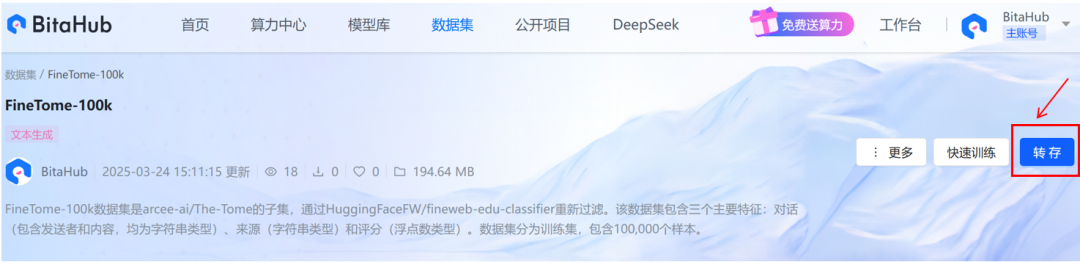
2.在文件存储中创建文件系统。可以在BitaHub主页下载此次训练所需要数据集,并将其存入刚刚创建的文件系统当中。这里给出模型的下载地址:https://hf-mirror.com/unsloth/gemma-3-4b-it-GGUF(可先将模型下载至本地,再上传至文件系统)
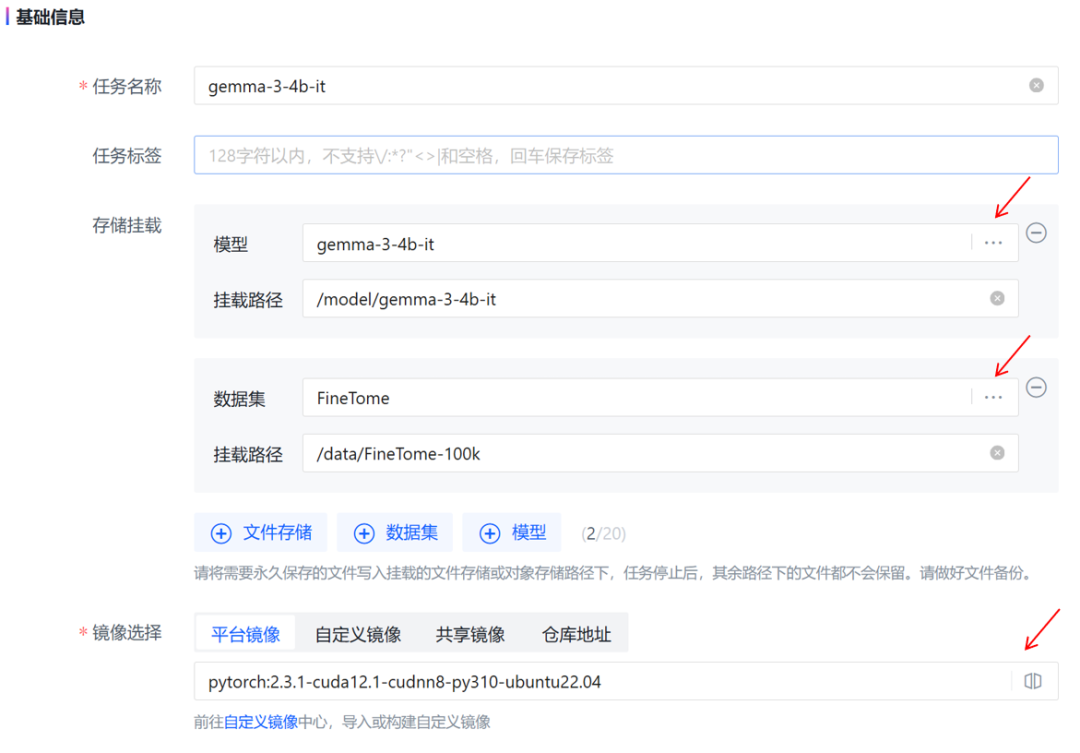
3.在「模型开发和训练」中,创建新的开发环境。
-
在「存储挂载」中添加模型和数据集;选择平台镜像。
-
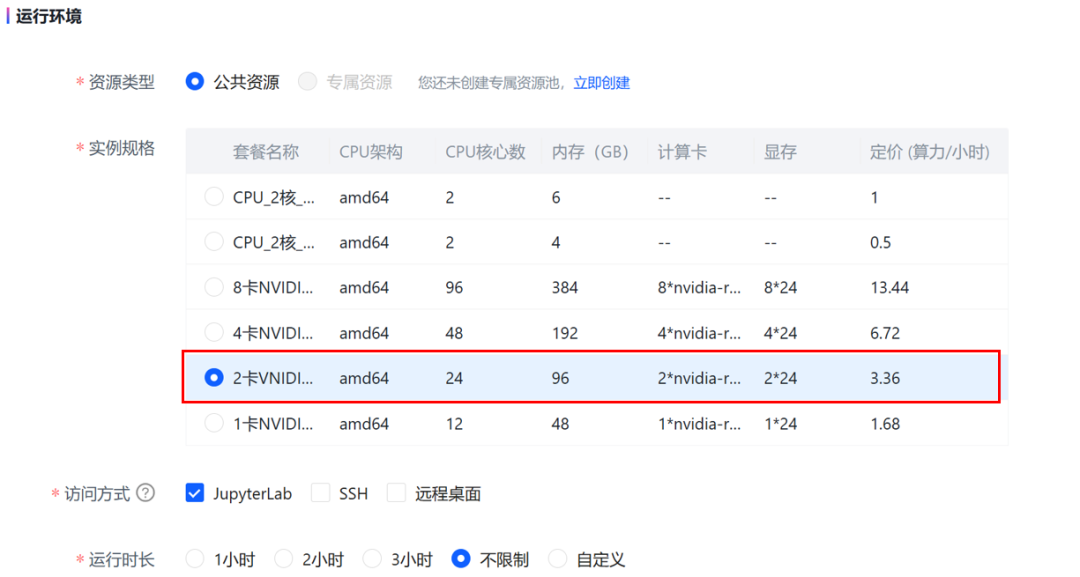
选择 JupyterLab访问方式,2卡4090GPU套餐。
三.项目步骤详解
1.环境准备
首先,项目需要安装一些必要的 Python 库,包括用unsloth和vllm辅助模型微调与推理;安装transformers支持gemma-3-4b-it模型;bitsandbytes等库实现模型量化、加速训练与微调;sentencepiece等用于文本处理、数据管理 。
!pip install unsloth vllm!pip install git+https://github.com/huggingface/transformers@v4.49.0-Gemma-3!pip install bitsandbytes accelerate xformers==0.0.29.post3 peft trl triton cut_cross_entropy unsloth_zoo!pip install sentencepiece protobuf datasets huggingface_hub hf_transfer
2.模型加载
gemma - 3 - 4b - it 是谷歌推出的 Gemma 3 系列中的一款模型,具有参数适中、多模态、多语言支持、上下文窗口大、推理高效精准等特性,在多种任务场景有广泛应用,且有开源和免费试用的优势,为开发者和研究人员提供了便利。从本地路径加载gemma - 3 - 4b - it模型和分词器,并对模型进行 4 位量化处理,以减少内存占用。加载完成后,使用tokenizer对输入文本进行分词处理。
from unsloth import FastModelimport torchlocal_model_path = "/model/gemma-3-4b-it"model, tokenizer = FastModel.from_pretrained(local_model_path,max_seq_length = 2048,load_in_4bit = True,load_in_8bit = False,full_finetuning = False,)
3. 模型微调配置
使用unsloth库中的FastModel.get_peft_model方法,对已经加载好的model应用参数高效微调(PEFT, Parameter-Efficient Fine-Tuning)技术,通过设置不同的微调参数,让模型能在特定任务上进行更高效的微调,同时减少需要训练的参数数量,降低计算成本和内存需求。
model = FastModel.get_peft_model(model,finetune_vision_layers = False,finetune_language_layers = True,finetune_attention_modules = True,finetune_mlp_modules = True,r = 8,lora_alpha = 8,lora_dropout = 0,bias = "none",random_state = 3407,)
为分词器(Tokenizer)配置适用于 Gemma-3 模型的对话模板,确保输入数据格式与模型训练时的结构一致。
from unsloth.chat_templates import get_chat_templatetokenizer = get_chat_template(tokenizer,chat_template = "gemma-3",)
4. 数据准备
从本地加载数据集、对数据集格式进行标准化处理,将设置好的聊天模板应用到数据集的每个样本上,使得数据集中的对话内容符合特定的格式并查看处理后的数据集样本,为后续模型进行微调做准备。
from datasets import load_datasetdataset = load_dataset("./data/FineTome-100k", split = "train")
from unsloth.chat_templates import standardize_data_formatsdataset = standardize_data_formats(dataset)
def apply_chat_template(examples):texts = tokenizer.apply_chat_template(examples["conversations"])return { "text" : texts }passdataset = dataset.map(apply_chat_template, batched = True)
Map: 100%|██████████| 100000/100000 [00:05<00:00, 18398.69 examples/s]
dataset[99]["text"]'<bos><start_of_turn>user\nWrite Python code to solve the task:\nIntroduction to Disjunctions\nIn logic and mathematics, a disjunction is an operation on 2 or more propositions. A disjunction is true if and only if 1 or more of its operands is true. In programming, we typically denote a disjunction using "||", but in logic we typically use "v".\nExample of disjunction:\np = 1 > 2 = false\nq = 2 < 3 = true\ntherefore p v q is true\nIn a programming language, we might write this as:\nvar p = 1 > 2; // false\nvar q = 2 < 3; // true\nvar result = p || q; // true\nThe above example demonstrates an inclusive disjunction (meaning it includes cases where both operands are true). Disjunctions can also be exlusive. An exclusive disjunction is typically represented by "⊻" and is true if and only if both operands have opposite values.\np = 1 < 2 = true\nq = 2 < 3 = true\ntherefore p ⊻ q is false\nThis can become confusing when dealing with more than 2 operands.\nr = 3 < 4 = true\np ⊻ q ⊻ r = ???\nWe handle these situations by evaluating the expression from left to right.\np ⊻ q = false\n(p ⊻ q) ⊻ r = true\nDirections:\nFor this kata, your task is to implement a function that performs a disjunction operation on 2 or more propositions.\n\nShould take a boolean array as its first parameter and a single boolean as its second parameter, which, if true, should indicate that the disjunction should be exclusive as opposed to inclusive.\nShould return true or false.<end_of_turn>\n<start_of_turn>model\nStep 1: We need to implement a function that performs a disjunction operation on multiple propositions.\nStep 2: We\'ll start by checking if the `operands` parameter is a non-empty list.\nStep 3: Then, we\'ll iterate over the `operands` list to calculate the disjunction.\nStep 4: If `is_exclusive` is `True`, we\'ll perform an exclusive disjunction, otherwise, we\'ll perform an inclusive disjunction.\nStep 5: We\'ll return the final disjunction value.```python\n# Step 6: Define a function to perform a disjunction operation on multiple propositions. The function parameters are operands and is_exclusive. The function should return true or false.\ndef disjunction(operands, is_exclusive):\n # Step 7: Check if the operands parameter is a non-empty list\n \n if not isinstance(operands, list) or not operands:\n # Step 8: Raise a TypeError with a custom error message if the condition is met\n \n raise TypeError("operands must be a non-empty list")\n \n # Step 9: Initialize the disjunction variable to False for inclusive disjunction\n \n disjunction = False\n \n # Step 10: Iterate over the operands list\n \n for operand in operands:\n # Step 11: Check if the operand is not a boolean\n \n if not isinstance(operand, bool):\n # Step 12: Raise a TypeError with a custom error message if the condition is met\n \n raise TypeError("all elements in operands must be booleans")\n \n # Step 13: Perform the disjunction operation\n \n if is_exclusive:\n # Step 14: If is_exclusive is True, perform an exclusive disjunction\n \n disjunction = disjunction ^ operand\n else:\n # Step 15: If is_exclusive is False, perform an inclusive disjunction\n \n disjunction = disjunction or operand\n \n # Step 16: Return the final disjunction value\n \n return disjunction```<end_of_turn>\n'5. 模型训练
创建一个 SFTTrainer 实例,并配置训练所需的各种参数。
from trl import SFTTrainer, SFTConfigtrainer = SFTTrainer(model = model,tokenizer = tokenizer,train_dataset = dataset,eval_dataset = None,args = SFTConfig(dataset_text_field = "text",per_device_train_batch_size = 2,gradient_accumulation_steps = 4,warmup_steps = 5,max_steps = 30,learning_rate = 2e-4,logging_steps = 1,optim = "adamw_8bit",weight_decay = 0.01,lr_scheduler_type = "linear",seed = 3407,report_to = "none",),)
Unsloth: Tokenizing ["text"] (num_proc=128): 100%|██████████| 100000/100000 [00:39<00:00, 2543.47 examples/s]
使用 unsloth 库中的 train_on_responses_only 函数对之前创建的 SFTTrainer 进行进一步处理,目的是让模型仅在对话的回复部分进行训练,忽略指令部分,从而更聚焦于模型生成回复的能力。
from unsloth.chat_templates import train_on_responses_onlytrainer = train_on_responses_only(trainer,instruction_part = "<start_of_turn>user\n",response_part = "<start_of_turn>model\n",)
Map (num_proc=128): 100%|██████████| 100000/100000 [00:02<00:00, 42117.46 examples/s]
通过选择执行以下代码,查看训练数据集中某个样本的输入文本和标签文本,检查数据处理的结果是否符合预期。这有助于我们发现数据处理过程中可能存在的问题,如分词错误、标签设置不当等,为后续的模型训练提供数据验证和调试的依据。
tokenizer.decode(trainer.train_dataset[99]["input_ids"])tokenizer.decode([tokenizer.pad_token_id if x == -100 else x for x in trainer.train_dataset[99]["labels"]]).replace(tokenizer.pad_token, " ")执行这行代码后,模型会按照之前的配置开始进行监督微调训练。
trainer_stats = trainer.train()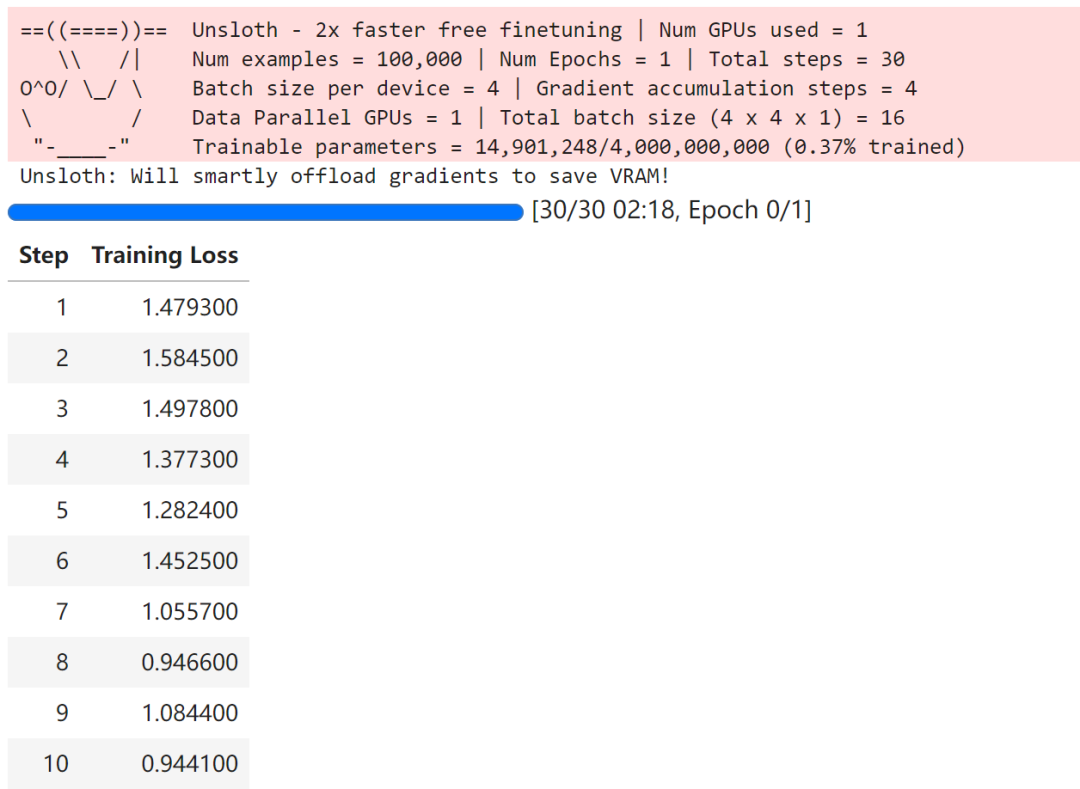
6. 模型推理
使用微调后的 gemma - 3 - 4b - it 模型进行推理,包括设置聊天模板、构建用户消息、应用模板、生成输入张量、调用模型生成回复,最后解码输出。
from unsloth.chat_templates import get_chat_templatetokenizer = get_chat_template(tokenizer,chat_template = "gemma-3",)messages = [{"role": "user","content": [{"type" : "text","text" : "Continue the sequence: 1, 1, 2, 3, 5, 8,",}]}]text = tokenizer.apply_chat_template(messages,add_generation_prompt = True,)outputs = model.generate(**tokenizer([text], return_tensors = "pt").to("cuda"),max_new_tokens = 64,temperature = 1.0, top_p = 0.95, top_k = 64,)tokenizer.batch_decode(outputs)
['user\nContinue the sequence: 1, 1, 2, 3, 5, 8,\nmodel\n13, 21, 34, 55, 89, 144, 233, 377, 610, 987, 1597, 2584, 4181, 7']
四.总结
Gemma - 3 模型微调项目旨在提升模型在自然语言处理和对话系统等任务上的性能。项目涵盖环境搭建、模型加载与量化、参数微调设置、聊天模板应用、数据集处理、模型训练与推理等环节,通过一系列操作,实现资源高效利用和模型性能优化,为开发者提供清晰的模型微调指南。

中国智能体开发者社区,聚焦智能体与大模型开发,提供前沿资讯、实用工具链、开源项目及行业案例。通过技术沙龙、开发者大赛等活动,促进经验交流与协作,助力开发者快速构建创新智能应用。
更多推荐


 10
10 0
0- 0


 已为社区贡献5条内容

所有评论(0)