Java调用deepseek接口实现自动生成word和excel文档
基于 Spring Boot 开发的 AI 文档生成系统,通过调用 DeepSeek 大模型接口生成结构化内容,并将内容转换为 Word 或 Excel 文件供用户下载。支持自定义文档类型、标题及具体要求,适用于快速生成报告、表格等场景。
目录
一、引言
1、自动生成文档的需求背景
在现代软件开发中,文档是项目成功的关键因素之一。随着项目规模的扩大和复杂性的增加,手动编写和维护文档变得耗时且容易出错。自动生成文档的需求应运而生,旨在通过自动化工具减少人工干预,提高文档的准确性和一致性。自动生成文档不仅能够节省开发者的时间,还能确保文档与代码保持同步,提升项目的可维护性和可读性。
2、DeepSeek接口的功能和优势
DeepSeek接口是一种先进的自动化文档生成工具,专为现代软件开发设计。其主要功能包括:
- 代码解析与注释提取:DeepSeek能够自动解析代码,提取关键注释和函数说明,生成结构化的文档。
- 多语言支持:支持多种编程语言,如Python、Java、C++等,满足不同开发环境的需求。
- 实时同步:当代码发生变化时,DeepSeek能够自动更新文档,确保文档与代码的一致性。
- 自定义模板:用户可以根据项目需求自定义文档模板,生成符合特定风格的文档。
DeepSeek接口的优势在于其高效性和灵活性。通过自动化流程,开发者可以专注于代码编写,而无需担心文档的维护。此外,DeepSeek的实时同步功能确保了文档的及时更新,减少了因文档滞后带来的问题。
3、简介
基于 Spring Boot 开发的 AI 文档生成系统,通过调用 DeepSeek 大模型接口生成结构化内容,并将内容转换为 Word 或 Excel 文件供用户下载。支持自定义文档类型、标题及具体要求,适用于快速生成报告、表格等场景。
二、环境准备
主包用的JDK17、maven3.9.9
JDK 11+
Maven 3.6+应该都可以
后端:Spring Boot、OkHttp、Jackson、Apache POI、Lombok
前端:HTML、JavaScript
第三方服务:DeepSeek 大模型 API
application.yml更换自己的API_KEY,获取方法下面有。
pom.xml放这里了
<?xml version="1.0" encoding="UTF-8"?>
<project xmlns="http://maven.apache.org/POM/4.0.0"
         xmlns:xsi="http://www.w3.org/2001/XMLSchema-instance"
         xsi:schemaLocation="http://maven.apache.org/POM/4.0.0 https://maven.apache.org/xsd/maven-4.0.0.xsd">
    <modelVersion>4.0.0</modelVersion>

    <parent>
        <groupId>org.springframework.boot</groupId>
        <artifactId>spring-boot-starter-parent</artifactId>
        <version>3.1.5</version>
        <relativePath/>
    </parent>

    <groupId>com.example</groupId>
    <artifactId>ai-document-generator</artifactId>
    <version>0.0.1-SNAPSHOT</version>
    <name>ai-document-generator</name>
    <description>AI Document Generator Application</description>
    <properties>
        <java.version>17</java.version>
        <project.build.sourceEncoding>UTF-8</project.build.sourceEncoding>
        <project.reporting.outputEncoding>UTF-8</project.reporting.outputEncoding>
        <docx4j.version>8.3.8</docx4j.version>
        <joda-time.version>2.12.5</joda-time.version>
    </properties>

    <dependencies>
        <!-- Spring Boot 核心依赖 -->
        <dependency>
            <groupId>org.springframework.boot</groupId>
            <artifactId>spring-boot-starter-web</artifactId>
        </dependency>
        <dependency>
            <groupId>org.springframework.boot</groupId>
            <artifactId>spring-boot-starter-validation</artifactId>
        </dependency>

        <dependency>
            <groupId>org.springframework.boot</groupId>
            <artifactId>spring-boot-starter-test</artifactId>
            <scope>test</scope>
        </dependency>


        <!-- Word 处理库 -->
        <dependency>
            <groupId>org.docx4j</groupId>
            <artifactId>docx4j-JAXB-ReferenceImpl</artifactId>
            <version>${docx4j.version}</version>
        </dependency>
        <dependency>
            <groupId>org.docx4j</groupId>
            <artifactId>docx4j-export-fo</artifactId>
            <version>${docx4j.version}</version>
        </dependency>
        <dependency>
            <groupId>org.docx4j</groupId>
            <artifactId>docx4j-openxml-objects</artifactId>
            <version>${docx4j.version}</version>
        </dependency>

        <!-- Excel 处理库 -->
        <dependency>
            <groupId>org.apache.poi</groupId>
            <artifactId>poi</artifactId>
            <version>5.2.3</version>
        </dependency>
        <dependency>
            <groupId>org.apache.poi</groupId>
            <artifactId>poi-ooxml</artifactId>
            <version>5.2.3</version>
        </dependency>
        <dependency>
            <groupId>org.apache.poi</groupId>
            <artifactId>poi-ooxml-schemas</artifactId>
            <version>4.1.2</version>
        </dependency>

        <!-- 日期时间处理 -->
        <dependency>
            <groupId>joda-time</groupId>
            <artifactId>joda-time</artifactId>
            <version>${joda-time.version}</version>
        </dependency>

        <!-- HTTP客户端 -->
        <dependency>
            <groupId>org.apache.httpcomponents</groupId>
            <artifactId>httpclient</artifactId>
            <version>4.5.14</version>
        </dependency>
        <dependency>
            <groupId>com.squareup.okhttp3</groupId>
            <artifactId>okhttp</artifactId>
            <version>4.9.3</version>
        </dependency>


        <!-- JSON处理 -->
        <dependency>
            <groupId>com.fasterxml.jackson.core</groupId>
            <artifactId>jackson-databind</artifactId>
        </dependency>

        <!-- 其他工具库 -->
        <dependency>
            <groupId>org.apache.commons</groupId>
            <artifactId>commons-lang3</artifactId>
            <version>3.12.0</version>
        </dependency>
        <dependency>
            <groupId>org.projectlombok</groupId>
            <artifactId>lombok</artifactId>
            <optional>true</optional>
        </dependency>
    </dependencies>

    <build>
        <plugins>
            <plugin>
                <groupId>org.springframework.boot</groupId>
                <artifactId>spring-boot-maven-plugin</artifactId>
                <configuration>
                    <excludes>
                        <exclude>
                            <groupId>org.projectlombok</groupId>
                            <artifactId>lombok</artifactId>
                        </exclude>
                    </excludes>
                </configuration>
            </plugin>
            <plugin>
                <groupId>org.apache.maven.plugins</groupId>
                <artifactId>maven-compiler-plugin</artifactId>
                <configuration>
                    <source>${java.version}</source>
                    <target>${java.version}</target>
                    <encoding>UTF-8</encoding>
                </configuration>
            </plugin>
            <plugin>
                <groupId>org.apache.maven.plugins</groupId>
                <artifactId>maven-resources-plugin</artifactId>
                <configuration>
                    <encoding>UTF-8</encoding>
                </configuration>
            </plugin>
        </plugins>
    </build>

</project>
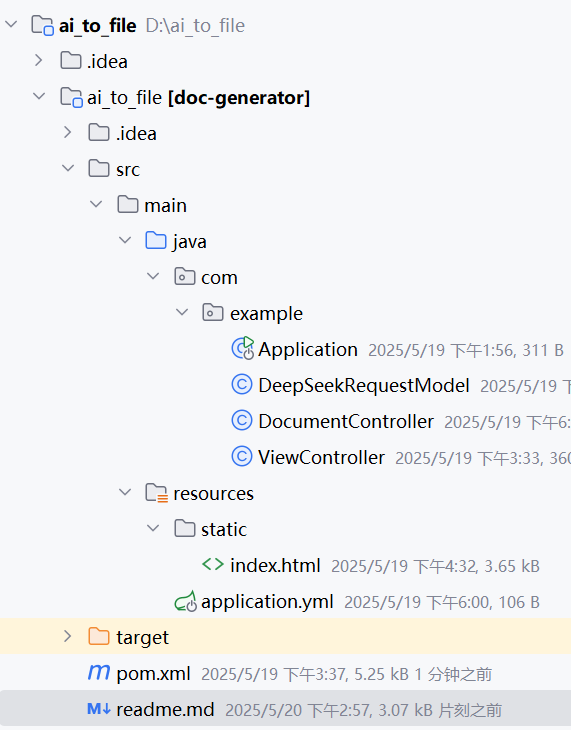
项目结构就放这里了
plaintext
src/main/java/com/example/
├── Application.java # 启动类
├── controller/
│ ├── DocumentController.java # 文档生成接口
│ └── ViewController.java # 前端页面控制器
├── model/
│ └── DeepSeekRequestModel.java # DeepSeek请求模型
└── utils/
# 工具类(Markdown处理、文件生成等)
plaintext
src/main/resources/
└── static/
└── index.html # 前端页面
三、DeepSeek接口简介
这部分就不用我多说了,deepseek官网API,跟着文档获取KEY和URL,正常应该都能看懂,网上也有很多教程,实在不会也可以看看。然后,记得一定要充值,没必要充很多,如果只是搭着玩一下一块钱都多了。主包充了五块用到现在还有4.78。
四、实现步骤
1、前端
简单的html,ai生成的,直接创建就好,感兴趣的也能自己去改改。
<!DOCTYPE html>
<html lang="zh-CN">
<head>
    <meta charset="UTF-8">
    <meta name="viewport" content="width=device-width, initial-scale=1.0">
    <title>智能文档生成系统</title>
    <style>
        body {
            font-family: '微软雅黑', sans-serif;
            max-width: 800px;
            margin: 20px auto;
            padding: 20px;
        }
        .form-group {
            margin-bottom: 15px;
        }
        label {
            display: block;
            margin-bottom: 50px;
        }
        input, select, textarea {
            width: 100%;
            padding: 8px;
            margin-bottom: 10px;
            border: 1px solid #ddd;
            border-radius: 4px;
        }
        button {
            background-color: #4CAF50;
            color: white;
            padding: 10px 20px;
            border: none;
            border-radius: 4px;
            cursor: pointer;
        }
        button:hover {
            background-color: #45a049;
        }
    </style>
</head>
<body>
<h1>智能文档生成系统</h1>

<div class="form-group">
    <label>文档类型:</label>
    <select id="docType">
        <option value="word">Word文档</option>
        <option value="excel">Excel表格</option>
    </select>
</div>

<div class="form-group">
    <label>文档标题:</label>
    <input type="text" id="topic" placeholder="请输入文档标题" value="长沙理工大学介绍">
</div>

<div class="form-group">
    <label>具体要求(每行一条):</label>
    <textarea id="fields" rows="5">
包含一级标题、二级标题
至少3个段落
使用列表呈现要点</textarea>
</div>

<button onclick="generateDocument()">立即生成</button>

<script>
    function generateDocument() {
        const docType = document.getElementById('docType').value;
        const topic = document.getElementById('topic').value;
        const fields = document.getElementById('fields').value.split('\n').filter(f => f.trim());
        console.log('docType:', docType);
        console.log('topic:', topic);
        console.log('fields:', fields);

        const data = {
            documentType: docType,
            topic: topic,
            fields: fields
        };

        fetch('/generate', {
            method: 'POST',
            headers: {
                'Content-Type': 'application/json'
            },
            body: JSON.stringify(data)
        })
            .then(response => {
                if (!response.ok) {
                    return response.text().then(err => {
                        throw new Error(err);
                    });
                }
                return response.blob();
            })
            .then(blob => {
                const ext = data.documentType === 'word' ? 'docx' : 'xlsx';
                const safe_topic = topic.replace(/[^a-zA-Z0-9]/g, '_');
                const filename = `${safe_topic}_${new Date().toISOString().slice(0, 16).replace(/[-T:]/g, '')}.${ext}`;

                const url = window.URL.createObjectURL(blob);
                const a = document.createElement('a');
                a.href = url;
                a.download = filename;
                document.body.appendChild(a);
                a.click();
                window.URL.revokeObjectURL(url);
                document.body.removeChild(a);
            })
            .catch(error => {
                alert('生成失败: ' + error.message);
                console.error('Error:', error);
            });
    }
</script>
</body>
</html>
2、后端
A、前端页面控制器
package com.example;

import org.springframework.stereotype.Controller;
import org.springframework.web.bind.annotation.GetMapping;

@Controller
public class ViewController {
    @GetMapping("/") // 访问 http://localhost:8080 时触发
    public String index() {
        return "index.html"; // 直接返回 static 目录下的 HTML 文件
    }
}
B、启动类
package com.example;

import org.springframework.boot.SpringApplication;
import org.springframework.boot.autoconfigure.SpringBootApplication;

@SpringBootApplication
public class Application {
    public static void main(String[] args) {
        SpringApplication.run(Application.class, args);
    }
}
C、Deepseek请求模型
package com.example;

import lombok.Builder;
import lombok.Data;
import java.util.List;

@Data
@Builder
public class DeepSeekRequestModel {
    /**
     * 所用DeepSeek模型
     */
    private String model;
    private List<Message> messages;

    /**
     * 消息体
     */
    @Data
    @Builder
    public static class Message {
        private String role;
        private String content;
    }
}
D、文档生成接口
package com.example;

import com.fasterxml.jackson.databind.JsonNode;
import org.apache.poi.ss.usermodel.*;
import org.apache.poi.wp.usermodel.HeaderFooterType;
import org.apache.poi.xssf.usermodel.XSSFWorkbook;
import org.apache.poi.xwpf.usermodel.*;
import org.openxmlformats.schemas.wordprocessingml.x2006.main.CTSectPr;
import org.springframework.beans.factory.annotation.Value;
import org.springframework.http.HttpHeaders;
import org.springframework.http.HttpStatus;
import org.springframework.http.MediaType;
import org.springframework.http.ResponseEntity;

//import okhttp3.RequestBody;

import org.springframework.web.bind.annotation.*;
import okhttp3.*;
import com.fasterxml.jackson.databind.ObjectMapper;
import org.springframework.web.bind.annotation.RequestBody;
import org.springframework.stereotype.Controller;
import org.springframework.web.bind.annotation.GetMapping;
import java.io.ByteArrayOutputStream;
import java.io.IOException;
import java.net.URLEncoder;
import java.nio.charset.StandardCharsets;
import java.time.LocalDateTime;
import java.time.format.DateTimeFormatter;
import java.util.*;
import java.util.concurrent.TimeUnit;

@RestController
@RequestMapping("/generate")
public class DocumentController {

    @Value("${DEEPSEEK_URL}")
    private String DEEPSEEK_URL;
    @Value("${API_KEY}")
    private String API_KEY;

    // 修改 DocumentController 中的 client 初始化代码
    private final OkHttpClient client = new OkHttpClient.Builder()
            .connectTimeout(60, TimeUnit.SECONDS)   // 连接超时时间
            .readTimeout(120, TimeUnit.SECONDS)      // 读写超时时间(处理长响应)
            .writeTimeout(60, TimeUnit.SECONDS)      // 写入超时时间
            .build();
    private final ObjectMapper objectMapper = new ObjectMapper();


    @PostMapping(consumes = MediaType.APPLICATION_JSON_VALUE)
    public ResponseEntity<?> generateDocument(@RequestBody DocumentRequest request){
        try {

            // 生成内容
            String content = generateContent(request);

            // 生成文件
            ByteArrayOutputStream outputStream;
            //todo 修改文件名有bug
            String filename;
            String contentType;

            if ("word".equalsIgnoreCase(request.getDocumentType())) {
                outputStream = createWordDocument(content);
                filename = generateFilename("docx");
                contentType = "application/vnd.openxmlformats-officedocument.wordprocessingml.document";
            } else {
                outputStream = createExcelDocument(content);
                filename = generateFilename("xlsx");
                contentType = "application/vnd.openxmlformats-officedocument.spreadsheetml.sheet";
            }

            // 构建响应
            HttpHeaders headers = new HttpHeaders();
            headers.setContentType(MediaType.parseMediaType(contentType));
            headers.setContentDispositionFormData("attachment", filename);

            return new ResponseEntity<>(outputStream.toByteArray(), headers, HttpStatus.OK);

        } catch (Exception e) {
            return ResponseEntity.status(HttpStatus.INTERNAL_SERVER_ERROR)
                    .body(Map.of("error", "文档生成失败: " + e.getMessage()));
        }
    }

    private String generateContent(DocumentRequest request) throws IOException {
        //构建
        String prompt = buildPrompt(request);

        //构造请求体
        okhttp3.RequestBody body = buildRequestBody(prompt, request.getDocumentType());

        Request httpRequest = new Request.Builder()
                .url(DEEPSEEK_URL)
                .post(body)
                .addHeader("Authorization", "Bearer " + API_KEY)
                .build();

        try (Response response = client.newCall(httpRequest).execute()) {
            if (response.isSuccessful()&& response.body() != null) {
                String responseBody = response.body().string();
                // 使用 Jackson 解析 JSON
                JsonNode rootNode = objectMapper.readTree(responseBody);
                // 获取content字段
                JsonNode contentNode = rootNode.path("choices").get(0).path("message").path("content");
                if (contentNode.isMissingNode()) {
                    throw new IOException("响应中缺少content字段");
                }
                return contentNode.asText();
            }
            throw new IOException("请求失败: " + response.code() + " " + response.body().string());
        }
    }

    private String buildPrompt(DocumentRequest request) {
        String typeDesc = "word".equals(request.getDocumentType()) ?
                "Word文档" : "excel表格";

        return String.format("请以Markdown格式为主题 '%s' 生成%s,要求:\n%s",
                request.getTopic(),
                typeDesc,
                String.join("\n", request.getFields()));
    }

    private okhttp3.RequestBody buildRequestBody(String prompt, String docType) throws IOException {
        // 构建系统提示消息
        String systemRoleContent = "你是一个专业" + ("word".equals(docType) ? "文档生成" : "数据分析") + "生成助手,请始终使用Markdown格式响应";

        // 构建消息列表
        List<DeepSeekRequestModel.Message> messages = Arrays.asList(
                DeepSeekRequestModel.Message.builder()
                        .role("system")
                        .content(systemRoleContent)
                        .build(),
                DeepSeekRequestModel.Message.builder()
                        .role("user")
                        .content(prompt)
                        .build()
        );

        // 构建完整请求体对象
        DeepSeekRequestModel requestBody = DeepSeekRequestModel.builder()
                .model("deepseek-chat")
                .messages(messages)
                .build();

        // 序列化为JSON字符串
        String jsonBody = new ObjectMapper().writeValueAsString(requestBody);

        // 创建OkHttp请求体
        return okhttp3.RequestBody.create(
                jsonBody,
                okhttp3.MediaType.parse("application/json; charset=utf-8")
        );
    }

    private ByteArrayOutputStream createWordDocument(String content) throws IOException {
        // 创建新的 Word 文档对象
        XWPFDocument doc = new XWPFDocument();

        // 预处理内容:去除 ```markdown 标记和结尾注解
        content = preprocessMarkdown(content);

        // 解析处理后的 Markdown 内容
        String[] lines = content.split("\n");
        for (String line : lines) {
            // 去除行首尾空白字符
            line = line.trim();

            // 处理一级标题(# 标题)
            if (line.startsWith("# ")) {
                createHeading(doc, line, 1, 16);
            }
            // 处理二级标题(## 标题)
            else if (line.startsWith("## ")) {
                createHeading(doc, line, 2, 14);
            }
            // 处理列表项(- 内容)
            else if (line.startsWith("- ")) {
                createBulletListItem(doc, line);
            }
            // 处理非空普通段落
            else if (!line.isEmpty()) {
                createNormalParagraph(doc, line);
            }
        }

        // 添加页脚
        addFooter(doc);

        // 保存文档到输出流
        ByteArrayOutputStream out = new ByteArrayOutputStream();
        doc.write(out);
        doc.close();
        return out;
    }

    /**
     * 预处理 Markdown 内容:
     * 1. 去除开头的 ```markdown 标记
     * 2. 去除结尾以 "注:" 开头的注解行
     */
    private String preprocessMarkdown(String content) {
        // 按行分割内容
        List<String> lines = Arrays.asList(content.split("\n"));
        StringBuilder processedContent = new StringBuilder();

        // 标记是否已跳过开头的 ```markdown
        boolean startProcess = false;

        for (String line : lines) {
            String trimmedLine = line.trim();

            // 跳过开头的 ```markdown
            if (trimmedLine.equals("```markdown")) {
                startProcess = true;
                continue;
            }

            // 跳过结尾的注解(以"注:"或"Note:"开头)
            if (trimmedLine.startsWith("注:") || trimmedLine.startsWith("Note:")) {
                break;
            }

            if (startProcess) {
                processedContent.append(line).append("\n");
            }
        }

        return processedContent.toString().trim();
    }

    /**
     * 创建标题段落(支持一级/二级标题)
     * @param doc         Word文档对象
     * @param line        标题行内容(已去除首尾空格)
     * @param level       标题级别(1=一级标题,2=二级标题)
     * @param fontSize    字体大小
     */
    private void createHeading(XWPFDocument doc, String line, int level, int fontSize) {
        XWPFParagraph paragraph = doc.createParagraph();
        XWPFRun run = paragraph.createRun();

        // 设置标题样式
        paragraph.setStyle(level == 1 ? "Heading1" : "Heading2");
        run.setText(line.substring(level + 1)); // 去除标题符号(# 或 ##)
        run.setBold(true);
        run.setFontSize(fontSize);
    }

    /**
     * 创建无序列表项(- 内容 → • 内容)
     */
    private void createBulletListItem(XWPFDocument doc, String line) {
        XWPFParagraph paragraph = doc.createParagraph();
        XWPFRun run = paragraph.createRun();
        run.setText("• " + line.substring(2)); // 替换列表符号并保留内容
    }

    /**
     * 创建普通段落
     */
    private void createNormalParagraph(XWPFDocument doc, String text) {
        XWPFParagraph paragraph = doc.createParagraph();
        paragraph.createRun().setText(text);
    }

    /**
     * 添加页脚(居中显示生成时间和系统信息)
     */
    private void addFooter(XWPFDocument doc) {
        CTSectPr sectPr = doc.getDocument().getBody().addNewSectPr();
        XWPFFooter footer = doc.createFooter(HeaderFooterType.DEFAULT);
        XWPFParagraph footerPara = footer.createParagraph();

        footerPara.setAlignment(ParagraphAlignment.CENTER);
        String timestamp = LocalDateTime.now().format(DateTimeFormatter.ofPattern("yyyy-MM-dd HH:mm"));
        footerPara.createRun().setText("生成时间:" + timestamp + "  生成系统:AI文档生成系统");
    }

/*


 */

    private ByteArrayOutputStream createExcelDocument(String content) throws IOException {
        Workbook workbook = new XSSFWorkbook();
        Sheet sheet = workbook.createSheet("数据表");

        // 解析表格数据
        List<List<String>> tableData = new ArrayList<>();
        for (String line : content.split("\n")) {
            if (line.contains("|") && !line.startsWith("|-")) {
                String[] cells = line.split("\\|");
                List<String> row = new ArrayList<>();
                for (String cell : cells) {
                    String cleaned = cell.trim();
                    if (!cleaned.isEmpty()) {
                        row.add(cleaned);
                    }
                }
                if (!row.isEmpty()) {
                    tableData.add(row);
                }
            }
        }

        // 创建样式
        CellStyle headerStyle = workbook.createCellStyle();
        Font headerFont = workbook.createFont();
        headerFont.setBold(true);
        headerFont.setColor(IndexedColors.WHITE.getIndex());
        headerStyle.setFont(headerFont);
        headerStyle.setFillForegroundColor(IndexedColors.DARK_BLUE.getIndex());
        headerStyle.setFillPattern(FillPatternType.SOLID_FOREGROUND);
        headerStyle.setAlignment(HorizontalAlignment.CENTER);

        // 写入数据
        int rowNum = 0;
        for (List<String> rowData : tableData) {
            Row row = sheet.createRow(rowNum++);
            int cellNum = 0;
            for (String cellValue : rowData) {
                Cell cell = row.createCell(cellNum++);

                if (rowNum == 1) { // 表头
                    cell.setCellStyle(headerStyle);
                    cell.setCellValue(cellValue);
                } else {
                    // 尝试解析数字
                    try {
                        if (cellValue.contains(".")) {
                            cell.setCellValue(Double.parseDouble(cellValue));
                        } else {
                            cell.setCellValue(Long.parseLong(cellValue));
                        }
                    } catch (NumberFormatException e) {
                        cell.setCellValue(cellValue);
                    }
                }
            }
        }

        // 自动调整列宽
        for (int i = 0; i < tableData.get(0).size(); i++) {
            sheet.autoSizeColumn(i);
        }

        ByteArrayOutputStream out = new ByteArrayOutputStream();
        workbook.write(out);
        workbook.close();
        return out;
    }

    private String generateFilename(String extension) {
        String timestamp = LocalDateTime.now().format(DateTimeFormatter.ofPattern("yyyyMMddHHmm"));
        return String.format("%s.%s", timestamp, extension);
    }

    static class DocumentRequest {
        private String documentType;
        private String topic;
        private List<String> fields;

        // getters and setters
        public String getDocumentType() { return documentType; }
        public void setDocumentType(String documentType) { this.documentType = documentType; }
        public String getTopic() { return topic; }
        public void setTopic(String topic) { this.topic = topic; }
        public List<String> getFields() { return fields; }
        public void setFields(List<String> fields) { this.fields = fields; }
    }
}
3、启动步骤
搭好环境后,直接运行启动类。
4、效果展示
主包电脑有点卡,然后deepseek生成也比较慢,耐心等一下。
word
excel
六、错误处理与优化
写的比较仓促,还有很多问题。
生成的也比较慢,然后生成的文件名有bug。
感兴趣的小伙伴可以帮忙优化一下。

火山引擎开发者社区是火山引擎打造的AI技术生态平台,聚焦Agent与大模型开发,提供豆包系列模型(图像/视频/视觉)、智能分析与会话工具,并配套评测集、动手实验室及行业案例库。社区通过技术沙龙、挑战赛等活动促进开发者成长,新用户可领50万Tokens权益,助力构建智能应用。
更多推荐
 27
27 0
0- 0


 已为社区贡献1条内容

所有评论(0)