MCP Server 开发实战指南(Python版)
MCP(Model Context Protocol,模型上下文协议) ,2024年11月底,由 Anthropic 推出的一种开放标准,旨在统一大型语言模型(LLM)与外部数据源和工具之间的通信协议。MCP 的主要目的在于解决当前 AI 模型因数据孤岛限制而无法充分发挥潜力的难题,MCP 使得 AI 应用能够安全地访问和操作本地及远程数据,为 AI 应用提供了连接万物的接口。
原文链接:MCP Server 开发实战指南(Python版)
资料
MCP 官方文档
Introduction - Model Context Protocol
各个 clients 对 MCP 的支持情况
Example Clients - Model Context Protocol
MCP Python SDK:MCP Client 和 Server 官方 SDK
前言
MCP(Model Context Protocol,模型上下文协议) ,2024年11月底,由 Anthropic 推出的一种开放标准,旨在统一大型语言模型(LLM)与外部数据源和工具之间的通信协议。MCP 的主要目的在于解决当前 AI 模型因数据孤岛限制而无法充分发挥潜力的难题,MCP 使得 AI 应用能够安全地访问和操作本地及远程数据,为 AI 应用提供了连接万物的接口。
Function Calling是AI模型调用函数的机制,MCP是一个标准协议,使AI模型与API无缝交互,而AI Agent是一个自主运行的智能系统,利用Function Calling和MCP来分析和执行任务,实现特定目标。
MCP 核心架构
- MCP 主机(MCP Hosts):发起请求的 LLM 应用程序(例如 Claude Desktop、IDE 或 AI 工具)。
- MCP 客户端(MCP Clients):在主机程序内部,与 MCP server 保持 1:1 的连接。
- MCP 服务器(MCP Servers):为 MCP client 提供上下文、工具和 prompt 信息。
- 本地资源(Local Resources):本地计算机中可供 MCP server 安全访问的资源(例如文件、数据库)。
- 远程资源(Remote Resources):MCP server 可以连接到的远程资源(例如通过 API)。
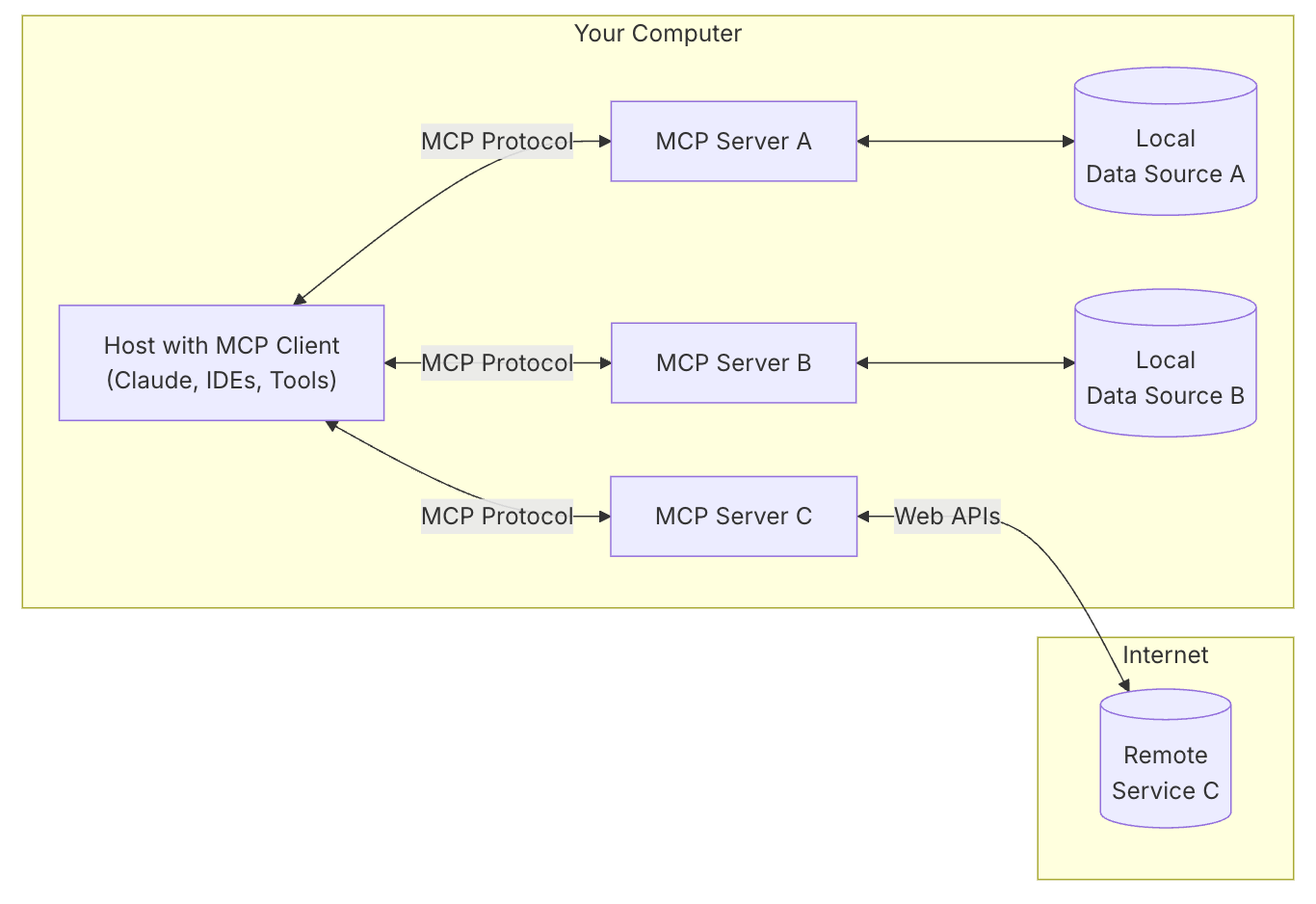
MCP client 充当 LLM 和 MCP server 之间的桥梁,MCP client 的工作流程如下:
- MCP client 首先从 MCP server 获取可用的工具列表。
- 将用户的查询连同工具描述通过 function calling 一起发送给 LLM。
- LLM 决定是否需要使用工具以及使用哪些工具。
- 如果需要使用工具,MCP client 会通过 MCP server 执行相应的工具调用。
- 工具调用的结果会被发送回 LLM。
- LLM 基于所有信息生成自然语言响应。
- 最后将响应展示给用户。
MCP 通信机制
MCP 协议支持两种主要的通信机制:基于标准输入输出 stdio 的本地通信和基于SSE(Server-Sent Events)的远程通信。这两种机制都使用 JSON-RPC 2.0 格式进行消息传输,确保了通信的标准化和可扩展性。
- 本地通信:通过 stdio 传输数据,适用于在同一台机器上运行的客户端和服务器之间的通信。
- 远程通信:利用 SSE 与 HTTP 结合,实现跨网络的实时数据传输,适用于需要访问远程资源或分布式部署的场景。
MCP Server
MCP Server 是 MCP 架构中的关键组件,它可以提供 3 种主要类型的功能:
- 资源(Resources):类似文件的数据,可以被客户端读取,如 API 响应或文件内容。
- 工具(Tools):可以被 LLM 调用的函数(需要用户批准)。
- 提示(Prompts):预先编写的模板,帮助用户完成特定任务。
这些功能使 MCP server 能够为 AI 应用提供丰富的上下文信息和操作能力,从而增强 LLM 的实用性和灵活性。
MCP Server Demo 开发
开发语言:Python 3.13.2
环境:MacOS
MCP 客户端:Cursor、Cline、Claude Desktop
一、环境配置
安装 uv 命令
curl -LsSf https://astral.sh/uv/install.sh | sh初始化项目
# 给项目创建一个文件夹
uv init weather
cd weather

# 创建一个虚拟环境并激活
uv venv
source .venv/bin/activate

# 安装依赖
uv add "mcp[cli]" httpx

# 创建 server 文件
touch weather.py
二、编写Server 代码
from typing import Any
import httpx
from mcp.server.fastmcp import FastMCP

# Initialize FastMCP server
mcp = FastMCP("weather")

# Constants
NWS_API_BASE = "https://api.weather.gov"
USER_AGENT = "weather-app/1.0"

async def make_nws_request(url: str) -> dict[str, Any] | None:
    """Make a request to the NWS API with proper error handling."""
    headers = {
        "User-Agent": USER_AGENT,
        "Accept": "application/geo+json"
    }
    async with httpx.AsyncClient() as client:
        try:
            response = await client.get(url, headers=headers, timeout=30.0)
            response.raise_for_status()
            return response.json()
        except Exception:
            return None

def format_alert(feature: dict) -> str:
    """Format an alert feature into a readable string."""
    props = feature["properties"]
    return f"""
Event: {props.get('event', 'Unknown')}
Area: {props.get('areaDesc', 'Unknown')}
Severity: {props.get('severity', 'Unknown')}
Description: {props.get('description', 'No description available')}
Instructions: {props.get('instruction', 'No specific instructions provided')}
"""

@mcp.tool()
async def get_alerts(state: str) -> str:
    """Get weather alerts for a US state.

    Args:
        state: Two-letter US state code (e.g. CA, NY)
    """
    url = f"{NWS_API_BASE}/alerts/active/area/{state}"
    data = await make_nws_request(url)

    if not data or "features" not in data:
        return "Unable to fetch alerts or no alerts found."

    if not data["features"]:
        return "No active alerts for this state."

    alerts = [format_alert(feature) for feature in data["features"]]
    return "\n---\n".join(alerts)

@mcp.tool()
async def get_forecast(latitude: float, longitude: float) -> str:
    """Get weather forecast for a location.

    Args:
        latitude: Latitude of the location
        longitude: Longitude of the location
    """
    # First get the forecast grid endpoint
    points_url = f"{NWS_API_BASE}/points/{latitude},{longitude}"
    points_data = await make_nws_request(points_url)

    if not points_data:
        return "Unable to fetch forecast data for this location."

    # Get the forecast URL from the points response
    forecast_url = points_data["properties"]["forecast"]
    forecast_data = await make_nws_request(forecast_url)

    if not forecast_data:
        return "Unable to fetch detailed forecast."

    # Format the periods into a readable forecast
    periods = forecast_data["properties"]["periods"]
    forecasts = []
    for period in periods[:5]:  # Only show next 5 periods
        forecast = f"""
{period['name']}:
Temperature: {period['temperature']}°{period['temperatureUnit']}
Wind: {period['windSpeed']} {period['windDirection']}
Forecast: {period['detailedForecast']}
"""
        forecasts.append(forecast)

    return "\n---\n".join(forecasts)

if __name__ == "__main__":
    # Initialize and run the server
    mcp.run(transport='stdio')
三、运行服务
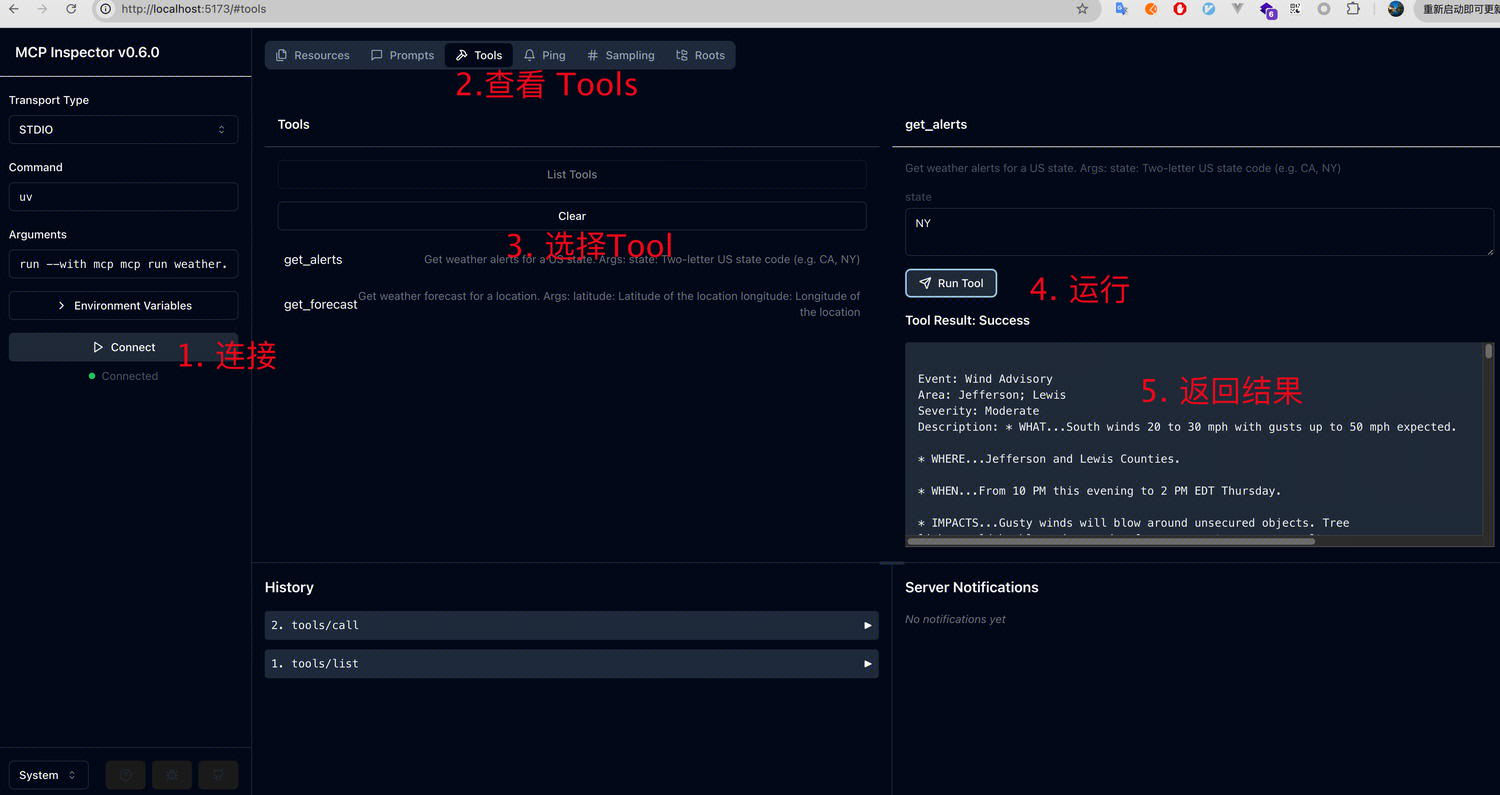
MCP Inspector
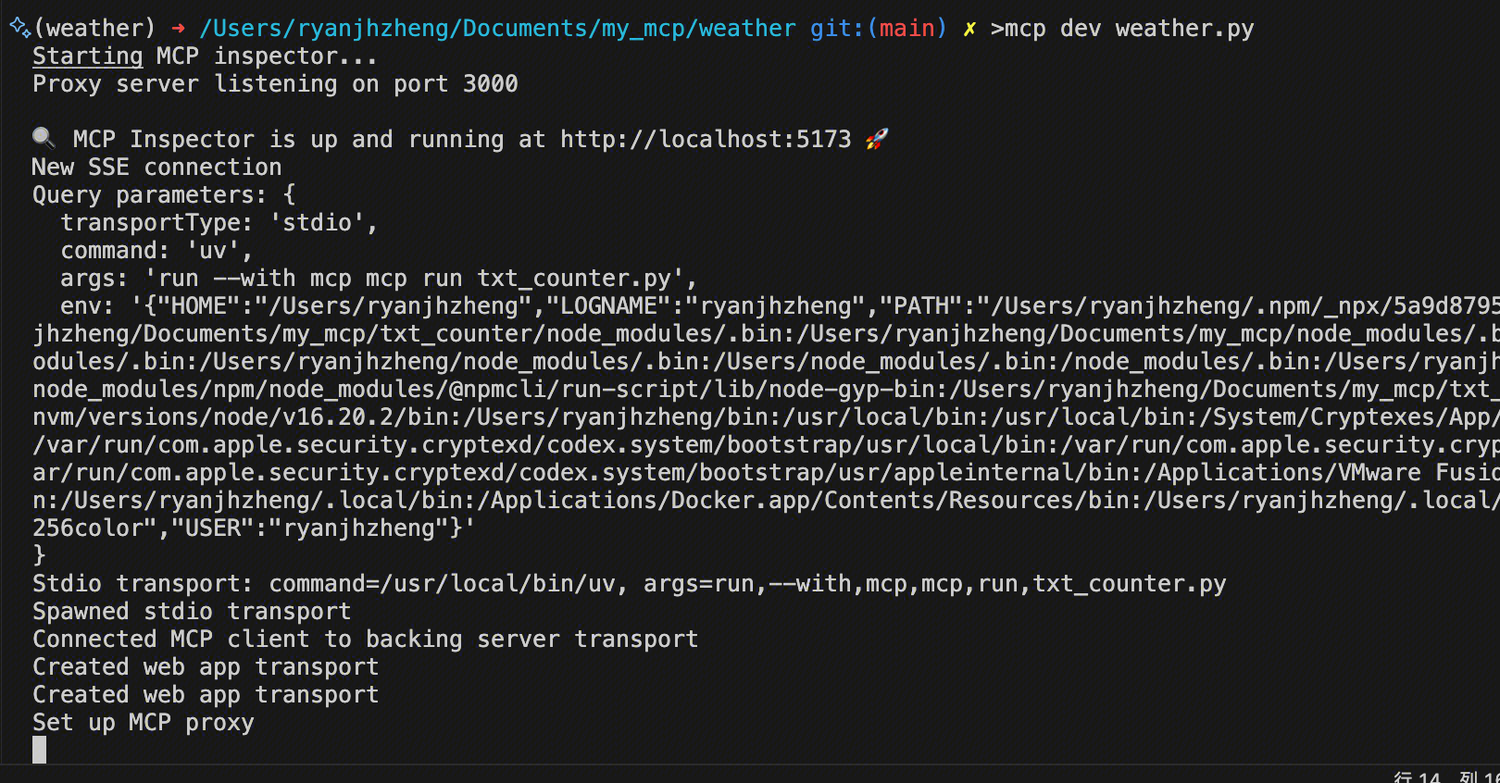
mcp dev weather.py
当看到以下界面,说明服务运行成功。打开 http://localhost:5173/ 即可进行功能测试
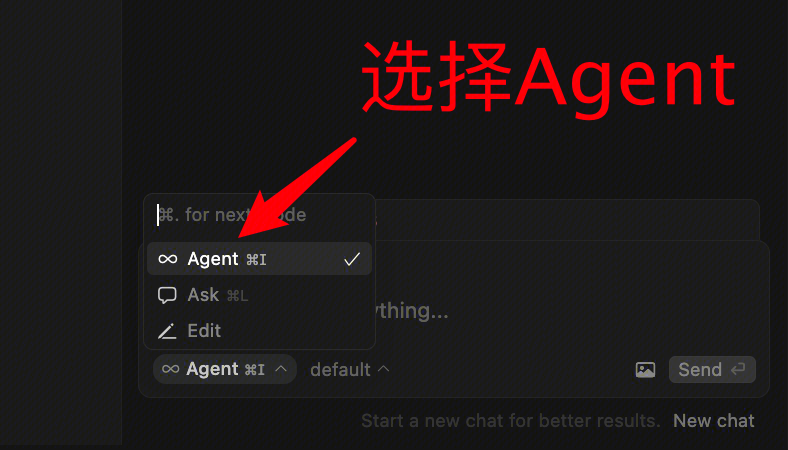
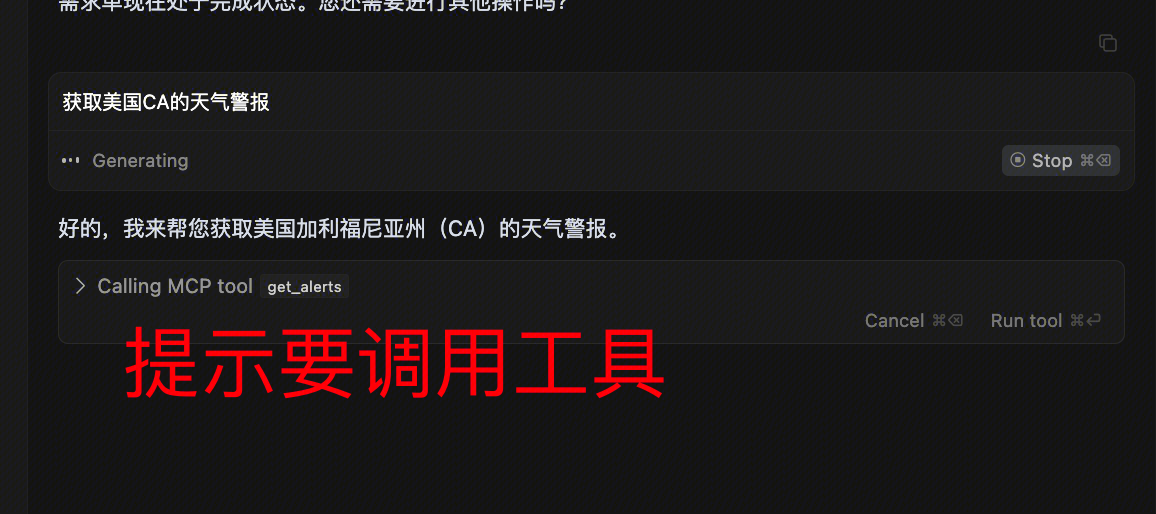
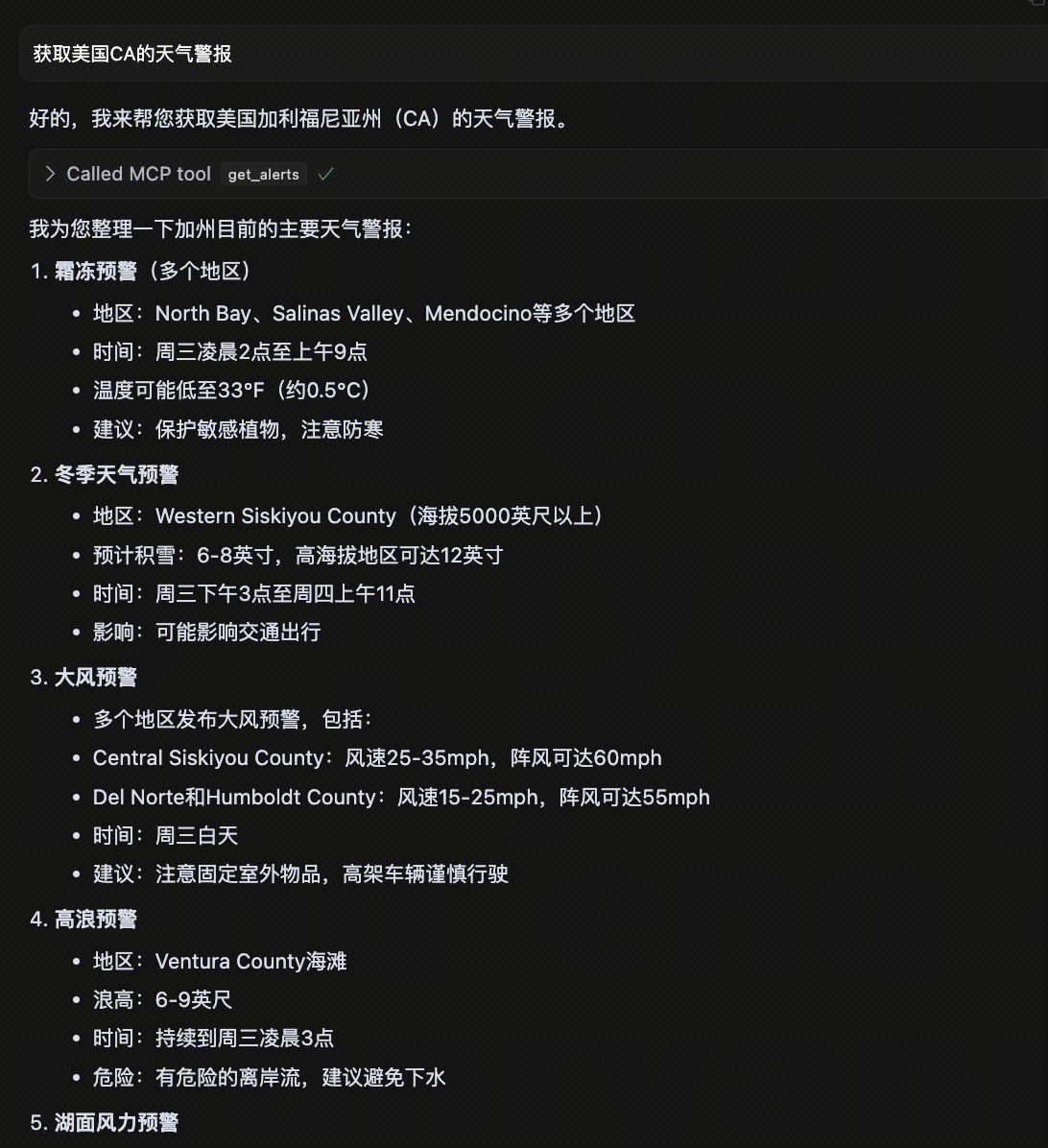
Cursor
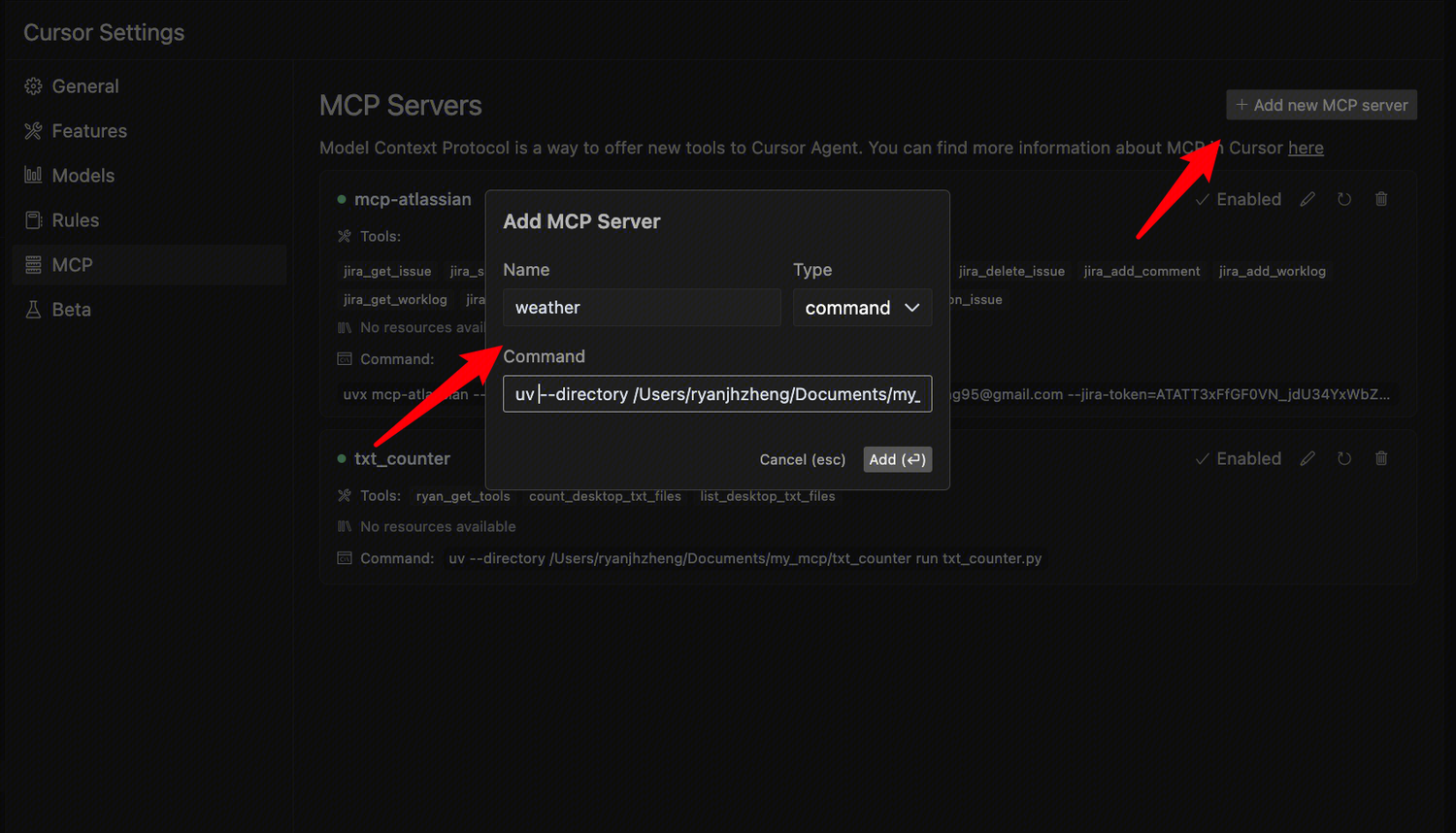
也可以通过一些支持 MCP Server 的客户端进行调试
设置 -> MCP → Add new MCP server
类型选择 command,名称可以自定义,执行的命令如下,需要指定路径
uv --directory /Users/ryanjhzheng/Documents/my_mcp/weather run weather.py

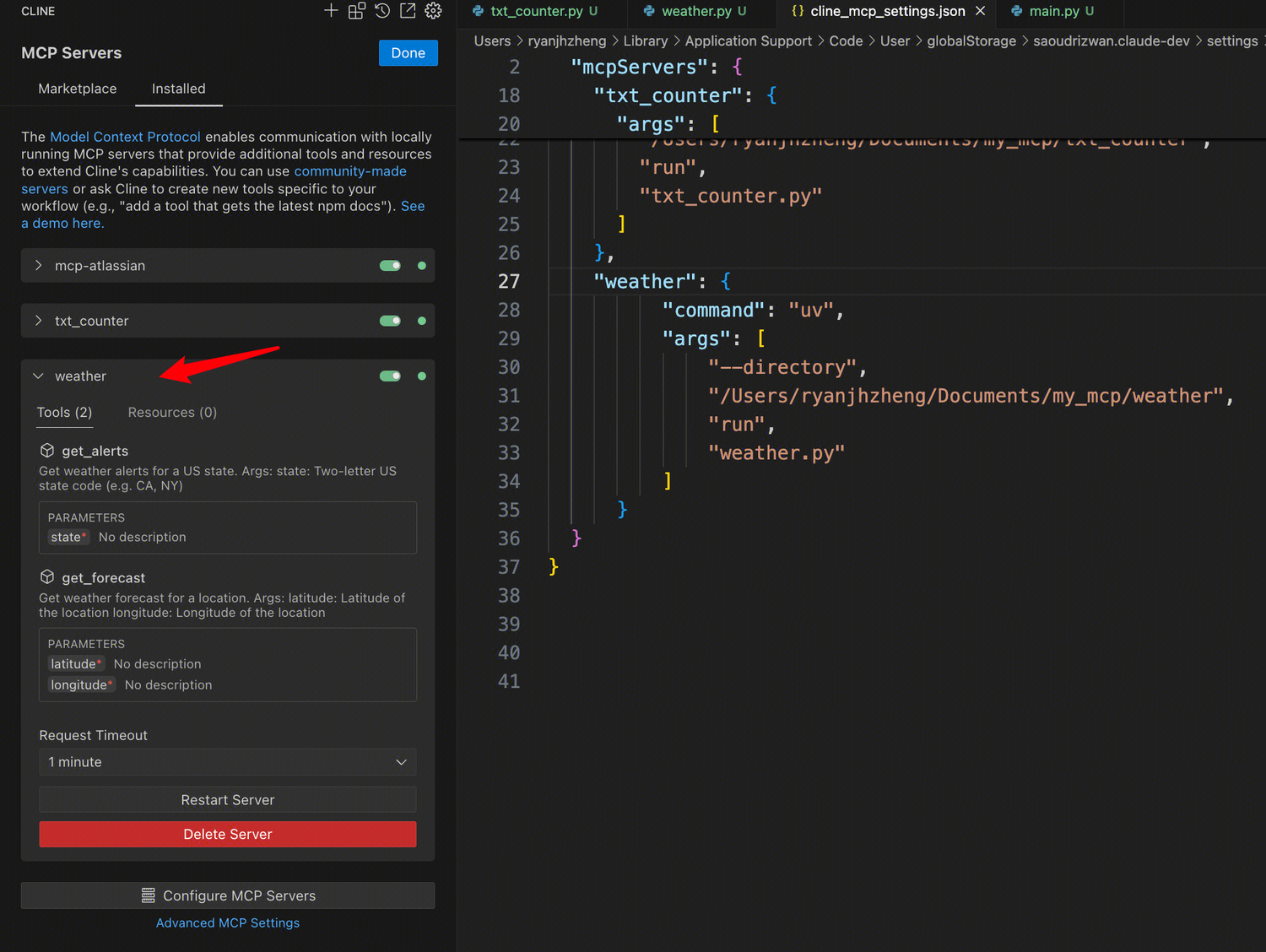
Cline
{
    "mcpServers": {
        "weather": {
            "command": "uv",
            "args": [
                "--directory",
                "/ABSOLUTE/PATH/TO/PARENT/FOLDER/weather",
                "run",
                "weather.py"
            ]
        }
    }
}
调试
Debugging - Model Context Protocol
调试工具
-
MCP Inspector Inspector - Model Context Protocol
-
Claude Desktop Developer Tools
-
Server Logging
MCP Python SDK
创建 Tools
-
提供清晰、描述性的名称和说明
-
使用详细的 JSON Schema 定义参数
-
在工具描述中包含示例,告诉模型应如何使用它们
-
实施适当的错误处理和验证
-
对长时间操作使用进度报告
-
保持工具操作集中且原子化
-
记录预期返回结果
-
实施适当的超时
-
考虑对资源密集型操作进行速率限制
-
用于调试和监控的日志工具使用情况
常见问题
版本不兼容
ERROR: npm v11.2.0 is known not to run on Node.js v14.21.3. This version of npm supports the following node versions: `^20.17.0 || >=22.9.0`. You can find the latest version at https://nodejs.org/.
遇到的错误表明当前使用的 npm 版本(v11.2.0)与 Node.js 版本(v14.21.3)不兼容。当前的 npm 版本仅支持 Node.js 版本 ^20.17.0 || >=22.9.0。将 Node.js 版本更新到支持的版本,如 ^20.17.0 || >=22.9.0
# 安装最新的 Node.js 版本
nvm install node

# 或者安装指定的 Node.js 版本
nvm install 20.17.0

# 使用已安装的 Node.js 版本
nvm use 20.17.0
关于 MCP 的具体场景和玩法,可以查看这篇文章

中国智能体开发者社区,聚焦智能体与大模型开发,提供前沿资讯、实用工具链、开源项目及行业案例。通过技术沙龙、开发者大赛等活动,促进经验交流与协作,助力开发者快速构建创新智能应用。
更多推荐
 29
29 0
0- 0


 已为社区贡献2条内容

所有评论(0)