如何在websocket连接握手的同时完成对用户token的解析?
设想这样一个场景,用户在非首次连接的时候,已经携带了我们发放的token,我们应该如何在用户连接的同时完成对用户的身份检验。在以往的场景中,我们登录的流程如下,先建立websocket连接,然后携带token向服务端进行身份认证。我们能不能做到如下图所示的流程,建立websocket连接的时候就带上token,从而完成对用户的身份认证?
一、前言
设想这样一个场景,用户在非首次连接的时候,已经携带了我们发放的token,我们应该如何在用户连接的同时完成对用户的身份检验。
在以往的场景中,我们登录的流程如下,先建立websocket连接,然后携带token向服务端进行身份认证。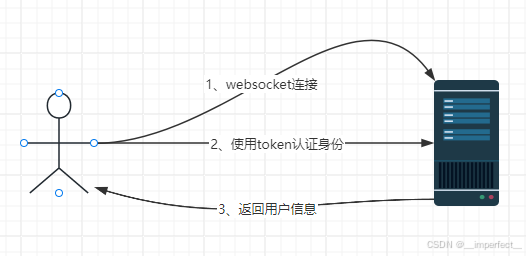
我们能不能做到如下图所示的流程,建立websocket连接的时候就带上token,从而完成对用户的身份认证?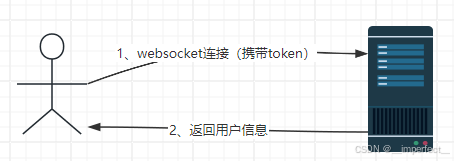
二、WebSocket子协议
在开始编码之前,我们先了解一下什么是websocket子协议。
WebSocket子协议(Subprotocol)是指在使用WebSocket协议进行通信时,客户端和服务器之间协商的一种附加协议。WebSocket子协议允许客户端和服务器在WebSocket连接上使用特定的应用层协议,以处理特定的数据格式或功能。
WebSocket子协议是通过在WebSocket握手过程中协商的。客户端和服务器在握手过程中会发送一个包含子协议名称的Sec-WebSocket-Protocol头字段,服务器选择一个子协议并返回给客户端。一旦协商完成,客户端和服务器就可以使用该子协议进行通信。
WebSocket子协议的协商过程如下:
- 客户端在WebSocket握手请求中包含一个Sec-WebSocket-Protocol头字段,该字段包含客户端支持的子协议列表。
- 服务器在WebSocket握手响应中包含一个Sec-WebSocket-Protocol头字段,该字段包含服务器选择的子协议。
- 如果服务器没有选择任何子协议,则连接将关闭。
- 一旦协商完成,客户端和服务器就可以使用选定的子协议进行通信。
从上述的过程可以看出,我们在后端第一时间建立websocket连接时,可以在请求头中取出Sec-WebSocket-Protocol字段,从而获取到token。
这也是我们的第一种方法,protocol传参。
三、两种传参方案
1、protocol传参
不会搭建websocket的可以参考我的另一篇文章 从零到一使用netty搭建websocket
我们首先启动我们的后端服务,在创建连接的时候我们可以看到,出来websocket的目标网址我们还可以传入一个protocols参数。
这里我们随便传入一个字符串假设是用户的token,这里可以看到我们按照之前的代码运行无法建立websocket连接:
在第二部分讲到,这是因为我们传入了参数但是我们没有从端将该协议传回前端。
首先我们来看一下websocket协议握手的逻辑代码,在WebSocketServerProtocolHandler类中的handlerAdded方法中,有一个WebSocketServerProtocolHandshakeHandler处理器,在这个处理器的channelRead方法中我们可以看到默认的处理逻辑:
class WebSocketServerProtocolHandshakeHandler extends ChannelInboundHandlerAdapter {

    private final String websocketPath;
    private final String subprotocols;
    private final boolean checkStartsWith;
    private final long handshakeTimeoutMillis;
    private final WebSocketDecoderConfig decoderConfig;
    private ChannelHandlerContext ctx;
    private ChannelPromise handshakePromise;

	// ...

    @Override
    public void channelRead(final ChannelHandlerContext ctx, Object msg) throws Exception {
        final FullHttpRequest req = (FullHttpRequest) msg;
        if (isNotWebSocketPath(req)) {
            ctx.fireChannelRead(msg);
            return;
        }

        try {
            if (!GET.equals(req.method())) {
                sendHttpResponse(ctx, req, new DefaultFullHttpResponse(HTTP_1_1, FORBIDDEN, ctx.alloc().buffer(0)));
                return;
            }

            final WebSocketServerHandshakerFactory wsFactory = new WebSocketServerHandshakerFactory(
                    getWebSocketLocation(ctx.pipeline(), req, websocketPath), subprotocols, decoderConfig);
            final WebSocketServerHandshaker handshaker = wsFactory.newHandshaker(req);
            final ChannelPromise localHandshakePromise = handshakePromise;
            if (handshaker == null) {
                WebSocketServerHandshakerFactory.sendUnsupportedVersionResponse(ctx.channel());
            } else {
                // Ensure we set the handshaker and replace this handler before we
                // trigger the actual handshake. Otherwise we may receive websocket bytes in this handler
                // before we had a chance to replace it.
                //
                // See https://github.com/netty/netty/issues/9471.
                WebSocketServerProtocolHandler.setHandshaker(ctx.channel(), handshaker);
                ctx.pipeline().replace(this, "WS403Responder",
                        WebSocketServerProtocolHandler.forbiddenHttpRequestResponder());

                final ChannelFuture handshakeFuture = handshaker.handshake(ctx.channel(), req);
                handshakeFuture.addListener(new ChannelFutureListener() {
                    @Override
                    public void operationComplete(ChannelFuture future) throws Exception {
                        if (!future.isSuccess()) {
                            localHandshakePromise.tryFailure(future.cause());
                            ctx.fireExceptionCaught(future.cause());
                        } else {
                            localHandshakePromise.trySuccess();
                            // Kept for compatibility
                            ctx.fireUserEventTriggered(
                                    WebSocketServerProtocolHandler.ServerHandshakeStateEvent.HANDSHAKE_COMPLETE);
                            ctx.fireUserEventTriggered(
                                    new WebSocketServerProtocolHandler.HandshakeComplete(
                                            req.uri(), req.headers(), handshaker.selectedSubprotocol()));
                        }
                    }
                });
                applyHandshakeTimeout();
            }
        } finally {
            req.release();
        }
    }
    // ...
}
在代码中可以看到这里没有对 subprotocols子协议做任何的定义,所以返回给前端的子协议是null,导致无法正确连接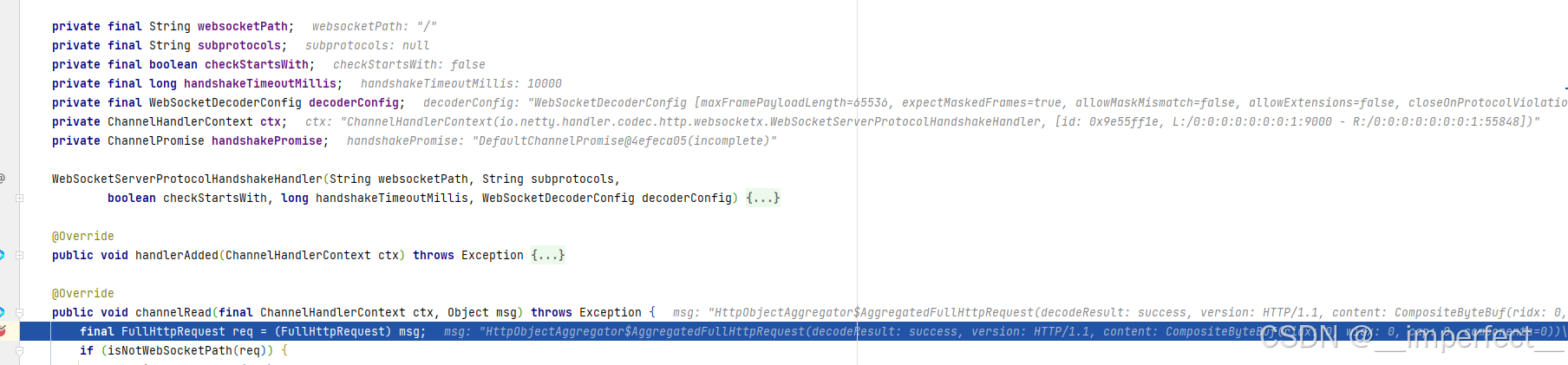
所以我们需要在这里自定义处理器来对其进行处理,保证我们子协议正确的返回给前端,从而可以正常的建立websocket连接。
我们把该方法复制到我们自定义处理器中在略加修改:
package com.wang.common.websocket;

import io.netty.channel.*;
import io.netty.handler.codec.http.FullHttpRequest;
import io.netty.handler.codec.http.websocketx.WebSocketServerHandshaker;
import io.netty.handler.codec.http.websocketx.WebSocketServerHandshakerFactory;
import io.netty.handler.codec.http.websocketx.WebSocketServerProtocolHandler;
import io.netty.util.Attribute;
import io.netty.util.AttributeKey;
import lombok.NoArgsConstructor;
import org.apache.catalina.User;


/**
 * @ClassDescription:
 * @Author:Wangzd
 * @Date: 2025/1/25
 **/
@NoArgsConstructor
public class MyHandShakeHandler extends ChannelInboundHandlerAdapter {

    @Override
    public void channelRead(ChannelHandlerContext ctx, Object msg) throws Exception {

        final FullHttpRequest req = (FullHttpRequest) msg;

        String token = req.headers().get("Sec-Websocket-Protocol");
        // 将token和channel绑定
        Attribute<Object> userToken = ctx.channel().attr(AttributeKey.valueOf("token"));
        userToken.set(token);

        try {
            final WebSocketServerHandshakerFactory wsFactory = new WebSocketServerHandshakerFactory(
                    req.getUri(), token, false);
            final WebSocketServerHandshaker handshaker = wsFactory.newHandshaker(req);
            if (handshaker == null) {
                WebSocketServerHandshakerFactory.sendUnsupportedVersionResponse(ctx.channel());
            } else {

                // 使用完将自己移除
                ctx.pipeline().remove(this);

                final ChannelFuture handshakeFuture = handshaker.handshake(ctx.channel(), req);
                handshakeFuture.addListener(new ChannelFutureListener() {
                    @Override
                    public void operationComplete(ChannelFuture future) throws Exception {
                        if (!future.isSuccess()) {
                            ctx.fireExceptionCaught(future.cause());
                        } else {
                            // 发送握手完成事件,接收到后可以执行后续逻辑
                            ctx.fireUserEventTriggered(
                                    WebSocketServerProtocolHandler.ServerHandshakeStateEvent.HANDSHAKE_COMPLETE);
                        }
                    }
                });
            }
        } finally {
            req.release();
        }


    }

}
定义完之后需要将该处理器添加到我们的pipeline中:
package com.wang.common.websocket;

import io.netty.channel.ChannelInitializer;
import io.netty.channel.ChannelPipeline;
import io.netty.channel.socket.SocketChannel;
import io.netty.handler.codec.http.HttpObjectAggregator;
import io.netty.handler.codec.http.HttpServerCodec;
import io.netty.handler.codec.http.websocketx.WebSocketServerProtocolHandler;
import io.netty.handler.stream.ChunkedWriteHandler;
import io.netty.handler.timeout.IdleStateHandler;

/**
 * @ClassDescription:
 * @Author:Wangzd
 * @Date: 2024/12/23
 **/
public class WebSocketServerInitializer extends ChannelInitializer<SocketChannel> {


    public static final WebSocketServerHandler WEB_SOCKET_SERVER_HANDLER = new WebSocketServerHandler();

    @Override
    protected void initChannel(SocketChannel socketChannel) throws Exception {
        ChannelPipeline pipeline = socketChannel.pipeline();
        // //30秒客户端没有向服务器发送心跳则关闭连接
        pipeline.addLast(new IdleStateHandler(30, 0, 0));
        // 处理HTTP协议的编解码
        pipeline.addLast(new HttpServerCodec());
        // 处理大数据块的写操作
        pipeline.addLast(new ChunkedWriteHandler());
        // 将HTTP消息的多个部分组合成一个完整的HTTP消息
        pipeline.addLast(new HttpObjectAggregator(1024*8));
        //
        pipeline.addLast(new MyHandShakeHandler());
        // 用于将HTTP协议升级为WebSocket协议,并保持长连接
        pipeline.addLast(new WebSocketServerProtocolHandler("/"));
        //
        pipeline.addLast(WEB_SOCKET_SERVER_HANDLER);
    }
}
在websocket的处理器中,我们可以对握手完成事件进行监听,从而完成后续任务:
/**
 * @ClassDescription:
 * @Author:Wangzd
 * @Date: 2024/12/23
 **/
@Slf4j
@Sharable
public class WebSocketServerHandler extends SimpleChannelInboundHandler<TextWebSocketFrame> {

	@Override
    public void userEventTriggered(ChannelHandlerContext ctx, Object evt) throws Exception {
        if (evt instanceof WebSocketServerProtocolHandler.HandshakeComplete){   // 握手事件
            // ...
        }else if (evt == WebSocketServerProtocolHandler.ServerHandshakeStateEvent.HANDSHAKE_COMPLETE){  // 握手结束事件,在我们的自定义处理器中我们最后发送了这样一个事件
            Attribute<Object> userToken = ctx.channel().attr(AttributeKey.valueOf("token"));
            String token = userToken.get().toString();
            // 用户信息检验
        }else {
            // 其他事件处理逻辑...
        }
    }
}
再次建立websocket连接发现我们正常连接并且获取到正确的token: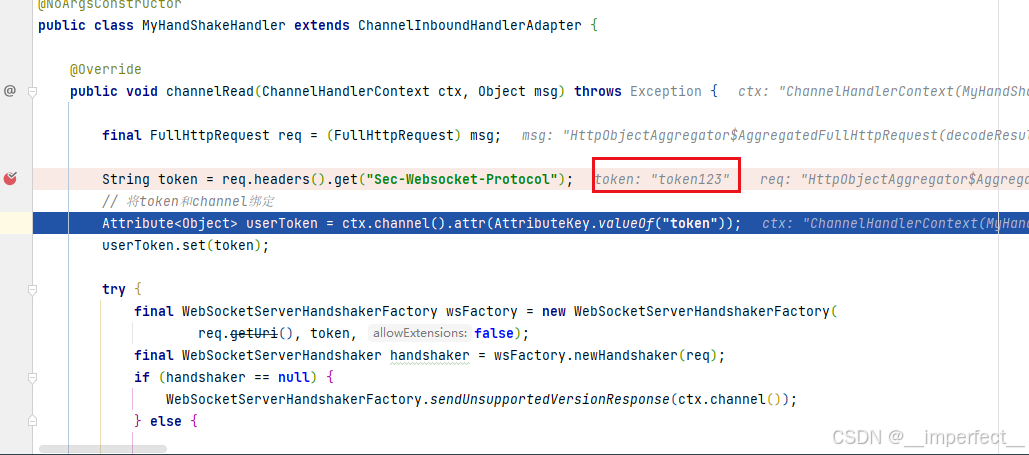
后续也可以正确的使用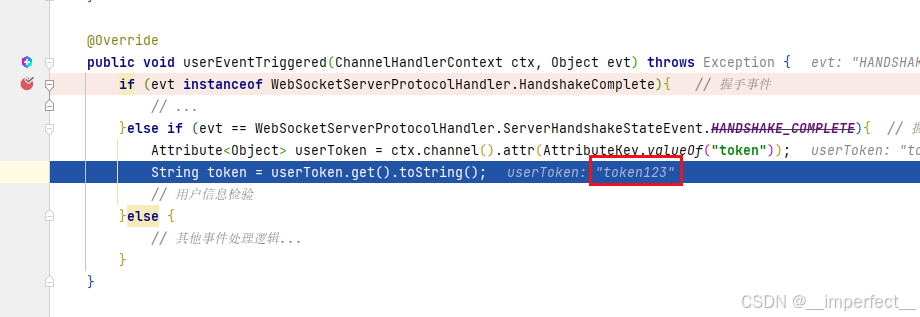
2、url传参
这种和http传参的方式类似,可以直接在我们访问的路径后面加上变量,例如ws://xxxx.xxxx?token=token123
其他的地方和protocol传参一样,我们只需要修改我们的自定义处理器MyHandShakeHandler,以表示区分,这里用MyHandShakeHandler1。
package com.wang.common.websocket;

import cn.hutool.core.net.url.UrlBuilder;
import io.netty.channel.ChannelFuture;
import io.netty.channel.ChannelFutureListener;
import io.netty.channel.ChannelHandlerContext;
import io.netty.channel.ChannelInboundHandlerAdapter;
import io.netty.handler.codec.http.FullHttpRequest;
import io.netty.handler.codec.http.websocketx.WebSocketServerHandshaker;
import io.netty.handler.codec.http.websocketx.WebSocketServerHandshakerFactory;
import io.netty.handler.codec.http.websocketx.WebSocketServerProtocolHandler;
import io.netty.util.Attribute;
import io.netty.util.AttributeKey;
import lombok.NoArgsConstructor;

import java.util.Optional;


/**
 * @ClassDescription:
 * @Author:Wangzd
 * @Date: 2025/1/25
 **/
@NoArgsConstructor
public class MyHandShakeHandler1 extends ChannelInboundHandlerAdapter {

    @Override
    public void channelRead(ChannelHandlerContext ctx, Object msg) throws Exception {

        final FullHttpRequest req = (FullHttpRequest) msg;
        UrlBuilder urlBuilder = UrlBuilder.ofHttp(req.getUri());
        Optional<String> tokenOptional = Optional.ofNullable(urlBuilder)
                .map(UrlBuilder::getQuery)
                .map(a -> a.get("token"))
                .map(CharSequence::toString);
        tokenOptional.ifPresent(token -> {
            Attribute<Object> userToken = ctx.channel().attr(AttributeKey.valueOf("token"));
            userToken.set(token);
        });

        // 移除后面拼接的所有参数
        req.setUri(urlBuilder.getPath().toString());

        // 处理器只需要使用一次
        ctx.pipeline().remove(this);
        // 将请求抛向责任链下游处理器
        ctx.fireChannelRead(msg);
    }

}
这里移除我们后面拼接的参数的目的是让默认处理器WebSocketServerProtocolHandshakeHandler在路径校验的时候生效,这里我们配置的是"/"路径下,这里不移除后面拼接的参数会导致路径为"/?token=token123"
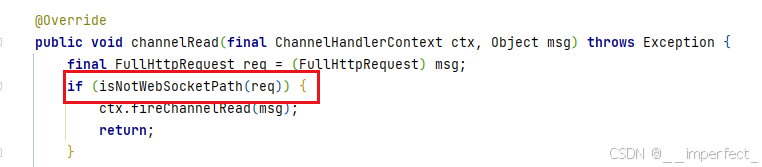
以上就是两种在握手时就直接带上用户token的两个方案。

火山引擎开发者社区是火山引擎打造的AI技术生态平台,聚焦Agent与大模型开发,提供豆包系列模型(图像/视频/视觉)、智能分析与会话工具,并配套评测集、动手实验室及行业案例库。社区通过技术沙龙、挑战赛等活动促进开发者成长,新用户可领50万Tokens权益,助力构建智能应用。
更多推荐
 22
22 0
0- 0



 已为社区贡献1条内容

所有评论(0)