RK3588平台部署MNN和OPENCL
MNN/build/libMNN.so,MNN/build/express/libMNN_Express.so,MNN/build/tools/cv/libMNNOpenCV.so ,MNN-3.3.0/build/source/backend/opencl/libMNN_CL.so添加到libs,在CPU中耗时是1600ms,在opencl耗时是5ms,就是加载模型创建session稍微慢点,反
1、检查本地opencl的库的位置,我的如下:
/lib/aarch64-linux-gnu/libOpenCL.so.1另外opencl的头文件都是公用的,去git下载,或者在MNN编译过程中,打开-DMNN_OPENCL=ON,也会自动去下载。测试opencl硬件:
#include <stdio.h>
#include <stdlib.h>
#include <CL/cl.h>

#define MAX_PLATFORMS 10
#define MAX_DEVICES 10

int main() {
    cl_platform_id platforms[MAX_PLATFORMS];
    cl_device_id devices[MAX_DEVICES];
    cl_uint num_platforms, num_devices;
    cl_context context;
    cl_command_queue command_queue;
    cl_program program;
    cl_kernel kernel;
    cl_int ret;

    // 获取平台数量
    ret = clGetPlatformIDs(MAX_PLATFORMS, platforms, &num_platforms);
    if (ret != CL_SUCCESS) {
        printf("Failed to get platform IDs\n");
        return -1;
    }

    printf("Number of platforms: %u\n", num_platforms);

    // 遍历打印平台信息
    for (cl_uint i = 0; i < num_platforms; i++) {
        char platform_name[128];
        char platform_vendor[128];

        ret = clGetPlatformInfo(platforms[i], CL_PLATFORM_NAME, sizeof(platform_name), platform_name, NULL);
        if (ret != CL_SUCCESS) {
            printf("Failed to get platform name for platform %u\n", i);
        }

        ret = clGetPlatformInfo(platforms[i], CL_PLATFORM_VENDOR, sizeof(platform_vendor), platform_vendor, NULL);
        if (ret != CL_SUCCESS) {
            printf("Failed to get platform vendor for platform %u\n", i);
        }

        printf("Platform %u:\n", i);
        printf("    Name: %s\n", platform_name);
        printf("    Vendor: %s\n", platform_vendor);
        printf("\n");
    }

    // 获取设备数量
    ret = clGetDeviceIDs(platforms[0], CL_DEVICE_TYPE_GPU, MAX_DEVICES, devices, &num_devices);
    if (ret != CL_SUCCESS) {
        printf("Failed to get device IDs\n");
        return -1;
    }

    // 创建OpenCL上下文
    context = clCreateContext(NULL, num_devices, devices, NULL, NULL, &ret);
    if (ret != CL_SUCCESS) {
        printf("Failed to create context\n");
        return -1;
    }

    // 创建命令队列
    command_queue = clCreateCommandQueue(context, devices[0], 0, &ret);
    if (ret != CL_SUCCESS) {
        printf("Failed to create command queue\n");
        return -1;
    }

    // 定义和构建OpenCL内核
    const char *kernel_source = "__kernel void hello_world() {\n"
                                "    printf(\"Hello, World!\\n\");\n"
                                "}\n";
    program = clCreateProgramWithSource(context, 1, &kernel_source, NULL, &ret);
    if (ret != CL_SUCCESS) {
        printf("Failed to create program\n");
        return -1;
    }

    ret = clBuildProgram(program, num_devices, devices, NULL, NULL, NULL);
    if (ret != CL_SUCCESS) {
        printf("Failed to build program\n");
        return -1;
    }

    // 创建OpenCL内核对象
    kernel = clCreateKernel(program, "hello_world", &ret);
    if (ret != CL_SUCCESS) {
        printf("Failed to create kernel\n");
        return -1;
    }

    // 执行内核函数
    ret = clEnqueueTask(command_queue, kernel, 0, NULL, NULL);
    if (ret != CL_SUCCESS) {
        printf("Failed to enqueue task\n");
        return -1;
    }

    // 等待执行完成
    ret = clFinish(command_queue);
    if (ret != CL_SUCCESS) {
        printf("Failed to finish execution\n");
        return -1;
    }

    printf("Kernel executed successfully\n");

    // 清理资源
    ret = clReleaseKernel(kernel);
    ret = clReleaseProgram(program);
    ret = clReleaseCommandQueue(command_queue);
    ret = clReleaseContext(context);

    return 0;
}
这里plat.cpp和CL头文件在同一级目录下,编译如下:
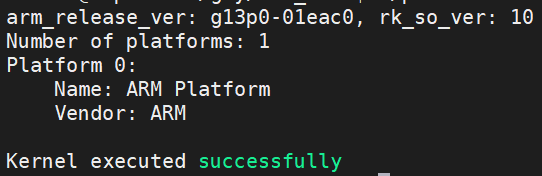
g++ plat.cpp -o platform /lib/aarch64-linux-gnu/libOpenCL.so.1 -I./结果如下,表示正常
2、编译MNN
首先需要修改代码,或者自己建立软链接
MNN-3.3.0\source\backend\opencl\core\runtime\OpenCLWrapper.cpp,在58行附近修改
#elif defined(__linux__)
        // ARM64 (aarch64) specific paths
        "/lib/aarch64-linux-gnu/libOpenCL.so.1",
        "/lib/aarch64-linux-gnu/libOpenCL.so",
        "/usr/lib/aarch64-linux-gnu/libOpenCL.so.1",
        "/usr/lib/aarch64-linux-gnu/libOpenCL.so",

        "/usr/lib/libOpenCL.so",
        "/usr/local/lib/libOpenCL.so",
        "/usr/local/lib/libpocl.so",
        "/usr/lib64/libOpenCL.so",
        "/usr/lib32/libOpenCL.so",
        "libOpenCL.so"
添加OpenCL的库文件,然后进行编译和安装
cmake .. -DCMAKE_INSTALL_PREFIX=/home/linaro/gzy/ -DCMAKE_BUILD_TYPE=Release -DMNN_BUILD_CONVERTER=ON -DMNN_BUILD_OPENCV=ON -DMNN_IMGCODECS=ON -DBUILD_SHARED_LIBS=ON -DMNN_OPENMP=ON -DMNN_USE_THREAD_POOL=OFF -DMNN_OPENCL=ON -DMNN_VULKAN=ON -DMNN_BUILD_BENCHMARK=ON MNN/build/libMNN.so,MNN/build/express/libMNN_Express.so,MNN/build/tools/cv/libMNNOpenCV.so ,MNN-3.3.0/build/source/backend/opencl/libMNN_CL.so添加到libs,
另外头文件CL、cv、MNN都拷贝放在一起,方便添加和使用
3、代码动态加载libMNN_CL.so的库,可以在构造函数中添加,
void* handle = dlopen("./lib/libMNN_CL.so", RTLD_LAZY | RTLD_LOCAL);
if (!handle) {
        std::cout << "无法加载libMNN_CL.so: " << dlerror() << std::endl;
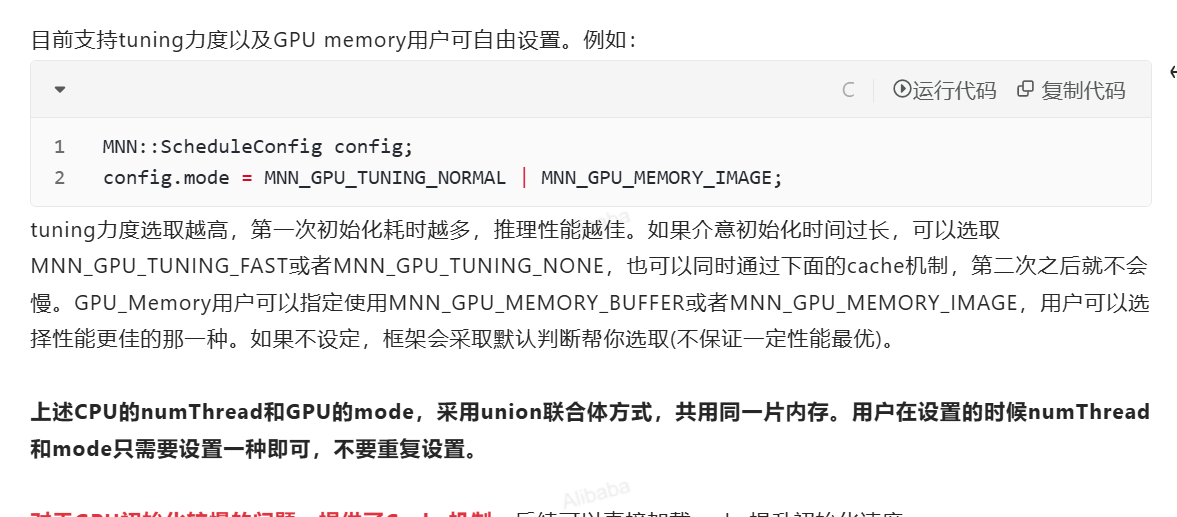
}第二个在参数配置中,否则opencl中初始化,创建session就很慢很慢,官方给出建议要修改如下配置(https://www.yuque.com/mnn/cn/create_session)
    MNN::ScheduleConfig sConfig;
    sConfig.type = MNN_FORWARD_OPENCL;
    sConfig.numThread = thread;
    // https://www.yuque.com/mnn/cn/create_session
    sConfig.mode=MNN_GPU_TUNING_NORMAL | MNN_GPU_MEMORY_IMAGE;
    MNN::BackendConfig bConfig;
    bConfig.precision = MNN::BackendConfig::PrecisionMode::Precision_Normal;
    bConfig.power = MNN::BackendConfig::Power_High;         // 高性能模式
    bConfig.memory = MNN::BackendConfig::Memory_High;
    sConfig.backendConfig = &bConfig;
4、实际测试:
在CPU中耗时是1600ms,在opencl耗时是5ms,就是加载模型创建session稍微慢点,反正就是一次没啥关系,耗时很短。
5、降低session创建耗时
MNN支持cache进行序列化保存,降低session创建耗时显著
inline bool fileExists(const std::string& path) {
    std::ifstream f(path.c_str());
    return f.good();
}
inline std::string getCachePath(const std::string& modelPath) {
    size_t dotPos = modelPath.find_last_of('.');
    return (dotPos != std::string::npos) ? modelPath.substr(0, dotPos) + ".bin" : modelPath + ".bin";
}

interpreter = MNN::Interpreter::createFromFile(modelPath.c_str());
    if (!interpreter) {
        MNN_PRINT("Error: Failed to create interpreter from model file.\n");
        return false;
    }
    std::string cachePath = getCachePath(modelPath);
    if (fileExists(cachePath)) {
        MNN_PRINT("Load cache file: %s\n", cachePath.c_str());
        interpreter->setCacheFile(cachePath.c_str());
    } else {
        MNN_PRINT("Cache file not found, will save to: %s after inference\n", cachePath.c_str());
        interpreter->setCacheFile(cachePath.c_str());
    }
火山引擎开发者社区是火山引擎打造的AI技术生态平台,聚焦Agent与大模型开发,提供豆包系列模型(图像/视频/视觉)、智能分析与会话工具,并配套评测集、动手实验室及行业案例库。社区通过技术沙龙、挑战赛等活动促进开发者成长,新用户可领50万Tokens权益,助力构建智能应用。
更多推荐
 4
4 0
0- 0


 已为社区贡献2条内容

所有评论(0)