如何用logprobs衡量LLM输出置信度&场景应用示例
LLM输出token,理论上可以返回输出当前token的logprobs,用户可借此衡量输出内容置信度。LLM输出logprobs是一项重要的功能,在分类、检索、自动补全场景下有广泛应用。这里首先介绍logprobs,然后通过ollama示例LLM输出logprobs过程,并通过场景示例其应用。所用代码和案例,均参考和修改自网络参考资料。
LLM输出token,理论上可以返回输出当前token的logprobs,用户可借此衡量输出内容置信度。
LLM输出logprobs是一项重要的功能,在分类、检索、自动补全场景下有广泛应用。
这里首先介绍logprobs,然后通过ollama示例LLM输出logprobs过程,并通过场景示例其应用。
所用代码和案例,均参考和修改自网络参考资料。
1 logprobs
1.1 logprobs说明
模型输出token的对数概率指,当前token上下文中,该token在该序列中出现的概率。
比如 "i eat apple",输出的是P(apple|i eat)的对数概率。
logprob是log(p),其中p是给定句子序列中其它token,当前token出现在当前位置的概率。
对数概率越高,意味着当前上下文中token的似然性越高,用户可借此衡量模型对其输出内容的置信度,或者探索模型给出的其它选项。
可以对序列中的token的对数概率求和,计算序列的整体概率,可以用于对模型输出的评分和排序,一种常见的用法是计算一句话平均的对数概率,选择最好的答案。
另外,还可以检查对数概率,从模型角度了解哪些选项是合理的,哪些是难以置信的。
1.2 logprobs参数
目前,OpenAI、Ollama、Deepseek均提供了logprobs和top_logprobs相关参数。
logprobs表示是否返回所输出 token 的对数概率。如果为 true,则在 message 的 content 中返回每个输出 token 的对数概率。
top_logprobs是一个介于 0 到 20 之间的整数 N,指定每个输出位置返回输出概率 top N 的 token,且返回这些 token 的对数概率。指定此参数时,logprobs 必须为 true。
1.3 应用场景探索
logprobs有多种应用场景。
分类任务,LLM在分类任务中表现出色,但没有办法评估模型输出结果的置信度。
logprobs为每个分类预测输出提供了关联概率,以便自行设置分类任务的置信阈值。
检索评估,logprobs可以在检索应用中辅助自主评估。
比如在问答中,模型最后输出一个布尔型标识,has_sufficient_context_for_answer,待选项为True/False。通过该标识对应的logprob关联概率作为置信分数,判断答案是否真包含在上下文中。
这种评估方式可以减少检索产生的幻觉,提高准确性。
自动补全,top_logprobs帮决定在用户打字时候提示补全什么内容。
需要注意的是,模式是否能完成任务,与模型自身规模和能力也是密切相关的。
2 ollama实现
目前(25.11.26),ollama只有较新版本才支持logprobs,比如v0.12.11。
详情参考 https://github.com/ollama/ollama/releases/tag/v0.12.11
这里首先更新ollama镜像并启动,然后下载模型。
1.1 ollama更新
docker更新ollama镜像,
docker pull ollama/ollama
然后,删除旧的ollama容器
docker stop ollama
docker rm ollama
重新启动新的ollama
docker run -d -v ollama:/root/.ollama -p 11434:11434 --name ollama ollama/ollama
docker ps | grep ollama
如果观察到类似如下的信息,说明docker启动成功。
3734479bd699 ollama/ollama "/bin/ollama serve" 13 seconds ago Up 12 seconds 0.0.0.0:11434->11434/tcp ollama
登录ollama镜像检查ollama版本,显示版本为0.13.0。
docker exec -it ollama bash
root@3734479bd699:/# ollama -v
ollama version is 0.13.0
1.2 ollama模型下载
由于这里仅更新ollama镜像,原始容器中的ollama模型不会被删除。
如果需要下载,可以运行如下命令,比如
ollama pull gemma3n:e2b
1.3 logprobs测试
curl测试logprobs是否生效
url http://localhost:11434/api/generate -d '{
> "model": "gemma3n:e2b",
> "prompt": "Why is the sky blue?",
> "logprobs": true
> }'
输出如下
{"model":"gemma3n:e2b","created_at":"2025-11-26T03:03:10.992960325Z","response":"The","done":false,"logprobs":[{"token":"The","logprob":-0.000014324841686175205,"bytes":[84,104,101]}]}
...
top_logprobs
curl http://localhost:11434/api/generate -d '{
"model": "gemma3n:e2b",
"prompt": "Why is the sky blue?",
"logprobs": true,
"top_logprobs": 3
}'
输出如下所示,除输出logprobs项外,还输出top_logprobs待选项信息。
{"model":"gemma3n:e2b","created_at":"2025-11-26T03:08:03.634230193Z","response":"The","done":false,"logprobs":[{"token":"The","logprob":-0.000008935307050705887,"bytes":[84,104,101],"top_logprobs":[{"token":"The","logprob":-0.000008935307050705887,"bytes":[84,104,101]},{"token":"Okay","logprob":-11.691359519958496,"bytes":[79,107,97,121]},{"token":"That","logprob":-14.97728443145752,"bytes":[84,104,97,116]}]}]}
3 场景示例
以下是开启logprobs的LLM调用函数示例。
import os

model_name = "gemma3n:e2b"
os.environ['OPENAI_API_KEY'] = "ollama"
os.environ['OPENAI_BASE_URL'] = "http://localhost:11434/v1"

from openai import OpenAI
from math import exp
import numpy as np
from IPython.display import display, HTML

client = OpenAI()

def get_completion(
    messages: list[dict[str, str]],
    model: str = "model_name",
    max_tokens=500,
    temperature=0,
    stop=None,
    seed=123,
    tools=None,
    logprobs=None,  # whether to return log probabilities of the output tokens or not. If true, returns the log probabilities of each output token returned in the content of message..
    top_logprobs=None,
) -> str:
    print(f"model: {model}")
    params = {
        "model": model,
        "messages": messages,
        "max_tokens": max_tokens,
        "temperature": temperature,
        "stop": stop,
        "seed": seed,
        "logprobs": logprobs,
        "top_logprobs": top_logprobs,
    }
    if tools:
        params["tools"] = tools

    completion = client.chat.completions.create(**params)
    return completion
这里通过分类、QA幻觉减少等多个场景,探索如何应用logprobs解决实际问题。
3.1 分类场景
模型任务是将新闻资讯按照预设类别进行分类,预定义四个类别:科技、政治、体育和艺术。
未启用logprobs,通过会话补全API能完成分类任务,不过难以评价模型对该分类的置信度。
启用logprobs后,可以准确地知道模型对自己给出的分类结果的置信度。
如果某个选定的类别的对数概率很高,说明模型对这个结果十分有信心;反之,则说明模型对这个结果信心不足。
当模型给出的结果与预期不符合,或者模型结果还需要人工校验情况下,logprobs是很有用的。
这里任务定义prompt如下所示
CLASSIFICATION_PROMPT = """You will be given a headline of a news article.
Classify the article into one of the following categories: Technology, Politics, Sports, and Art.
Return only the name of the category, and nothing else.
MAKE SURE your output is one of the four categories stated.
Article headline: {headline}"""
为应用logprobs
headlines = [
    "Tech Giant Unveils Latest Smartphone Model with Advanced Photo-Editing Features.",
    "Local Mayor Launches Initiative to Enhance Urban Public Transport.",
    "Tennis Champion Showcases Hidden Talents in Symphony Orchestra Debut",
]

for headline in headlines:
    API_RESPONSE = get_completion(
        [{"role": "user", "content": CLASSIFICATION_PROMPT.format(headline=headline)}],
        model=model_name,
    )
    print(f"Category: {API_RESPONSE.choices[0].message.content}\n")
输出如下
model: gemma3n:e2b
Category: Technology
model: gemma3n:e2b
Category: Politics
model: gemma3n:e2b
Category: Art
应用logprobs
for headline in headlines:
    print(f"\nHeadline: {headline}")
    API_RESPONSE = get_completion(
        [{"role": "user", "content": CLASSIFICATION_PROMPT.format(headline=headline)}],
        model=model_name,
        logprobs=True,
        top_logprobs=2,
    )
    top_two_logprobs = ""
    if API_RESPONSE.choices[0].logprobs:
        top_two_logprobs = API_RESPONSE.choices[0].logprobs.content[0].top_logprobs
    html_content = ""
    for i, logprob in enumerate(top_two_logprobs, start=1):
        html_content += (
            f"<span style='color: cyan'>Output token {i}:</span> {logprob.token}, "
            f"<span style='color: darkorange'>logprobs:</span> {logprob.logprob}, "
            f"<span style='color: magenta'>linear probability:</span> {np.round(np.exp(logprob.logprob)*100,2)}%<br>"
        )
    display(HTML(html_content))
    print("\n")
输出如下,llm不仅输出了分类,还显示了该分类的第一选择、第二选择的置信度,
Headline: Tech Giant Unveils Latest Smartphone Model with Advanced Photo-Editing Features.
model: gemma3n:e2b
Output token 1: Technology, logprobs: -1.4782671087232302e-07, linear probability: 100.0%
Output token 2: Technology, logprobs: -15.739057540893555, linear probability: 0.0%Headline: Local Mayor Launches Initiative to Enhance Urban Public Transport.
model: gemma3n:e2b
Output token 1: Politics, logprobs: -6.59967213323398e-07, linear probability: 100.0%
Output token 2: Politics, logprobs: -14.422626495361328, linear probability: 0.0%Headline: Tennis Champion Showcases Hidden Talents in Symphony Orchestra Debut
model: gemma3n:e2b
Output token 1: Art, logprobs: -0.0003868553030770272, linear probability: 99.96%
Output token 2: Sports, logprobs: -8.023032188415527, linear probability: 0.03%
3.2 QA幻觉减少
为QA应用构建了一套RAG检索系统,但是不好确定答案是模型臆造的,还是依据检索结果生成。
这里尝试让模型回答这些问题,并评价回答的结果。
首先是定义任务,代码示例如下,包括
1)检索到的文本ada_lovelace_article
2)用户问题easy_questions、medium_question。
# Article retrieved
ada_lovelace_article = """Augusta Ada King, Countess of Lovelace (née Byron; 10 December 1815 – 27 November 1852) was an English mathematician and writer, chiefly known for her work on Charles Babbage's proposed mechanical general-purpose computer, the Analytical Engine. She was the first to recognise that the machine had applications beyond pure calculation.
Ada Byron was the only legitimate child of poet Lord Byron and reformer Lady Byron. All Lovelace's half-siblings, Lord Byron's other children, were born out of wedlock to other women. Byron separated from his wife a month after Ada was born and left England forever. He died in Greece when Ada was eight. Her mother was anxious about her upbringing and promoted Ada's interest in mathematics and logic in an effort to prevent her from developing her father's perceived insanity. Despite this, Ada remained interested in him, naming her two sons Byron and Gordon. Upon her death, she was buried next to him at her request. Although often ill in her childhood, Ada pursued her studies assiduously. She married William King in 1835. King was made Earl of Lovelace in 1838, Ada thereby becoming Countess of Lovelace.
Her educational and social exploits brought her into contact with scientists such as Andrew Crosse, Charles Babbage, Sir David Brewster, Charles Wheatstone, Michael Faraday, and the author Charles Dickens, contacts which she used to further her education. Ada described her approach as "poetical science" and herself as an "Analyst (& Metaphysician)".
When she was eighteen, her mathematical talents led her to a long working relationship and friendship with fellow British mathematician Charles Babbage, who is known as "the father of computers". She was in particular interested in Babbage's work on the Analytical Engine. Lovelace first met him in June 1833, through their mutual friend, and her private tutor, Mary Somerville.
Between 1842 and 1843, Ada translated an article by the military engineer Luigi Menabrea (later Prime Minister of Italy) about the Analytical Engine, supplementing it with an elaborate set of seven notes, simply called "Notes".
Lovelace's notes are important in the early history of computers, especially since the seventh one contained what many consider to be the first computer program—that is, an algorithm designed to be carried out by a machine. Other historians reject this perspective and point out that Babbage's personal notes from the years 1836/1837 contain the first programs for the engine. She also developed a vision of the capability of computers to go beyond mere calculating or number-crunching, while many others, including Babbage himself, focused only on those capabilities. Her mindset of "poetical science" led her to ask questions about the Analytical Engine (as shown in her notes) examining how individuals and society relate to technology as a collaborative tool.
"""

# Questions that can be easily answered given the article
easy_questions = [
    "What nationality was Ada Lovelace?",
    "What was an important finding from Lovelace's seventh note?",
]

# Questions that are not fully covered in the article
medium_questions = [
    "Did Lovelace collaborate with Charles Dickens",
    "What concepts did Lovelace build with Charles Babbage",
]
让模型输出一个布尔型变量has_sufficient_context_for_answer,待选项为True/False。
通过对应的logprobs,判断模型对于上下文是否包含答案有多少把握。
对应代码示例如下。
PROMPT = """You retrieved this article: {article}. The question is: {question}.
Before even answering the question, consider whether you have sufficient information in the article to answer the question fully.
Your output should JUST be the boolean true or false, of if you have sufficient information in the article to answer the question.
Respond with just one word, the boolean true or false. You must output the word 'True', or the word 'False', nothing else.
"""
html_output = ""
html_output += "Questions clearly answered in article"

for question in easy_questions:
    API_RESPONSE = get_completion(
        [
            {
                "role": "user",
                "content": PROMPT.format(
                    article=ada_lovelace_article, question=question
                ),
            }
        ],
        model=model_name,
        logprobs=True,
    )
    html_output += f'<p style="color:green">Question: {question}</p>'
    for logprob in API_RESPONSE.choices[0].logprobs.content:
        html_output += f'<p style="color:cyan">has_sufficient_context_for_answer: {logprob.token}, <span style="color:darkorange">logprobs: {logprob.logprob}, <span style="color:magenta">linear probability: {np.round(np.exp(logprob.logprob)*100,2)}%</span></p>'

html_output += "Questions only partially covered in the article"

for question in medium_questions:
    API_RESPONSE = get_completion(
        [
            {
                "role": "user",
                "content": PROMPT.format(
                    article=ada_lovelace_article, question=question
                ),
            }
        ],
        model=model_name,
        logprobs=True,
        top_logprobs=3,
    )
    html_output += f'<p style="color:green">Question: {question}</p>'
    for logprob in API_RESPONSE.choices[0].logprobs.content:
        html_output += f'<p style="color:cyan">has_sufficient_context_for_answer: {logprob.token}, <span style="color:darkorange">logprobs: {logprob.logprob}, <span style="color:magenta">linear probability: {np.round(np.exp(logprob.logprob)*100,2)}%</span></p>'

display(HTML(html_output))
输出如下所示
Questions clearly answered in article
Question: What nationality was Ada Lovelace?has_sufficient_context_for_answer: True, logprobs: -0.00018310641462448984, linear probability: 99.98%
has_sufficient_context_for_answer: , logprobs: -0.3289823532104492, linear probability: 71.97%
Question: What was an important finding from Lovelace's seventh note?
has_sufficient_context_for_answer: False, logprobs: -0.072273850440979, linear probability: 93.03%
Questions only partially covered in the article
Question: Did Lovelace collaborate with Charles Dickenshas_sufficient_context_for_answer: False, logprobs: -0.0001523192331660539, linear probability: 99.98%
Question: What concepts did Lovelace build with Charles Babbage
has_sufficient_context_for_answer: True, logprobs: -0.02448541484773159, linear probability: 97.58%
has_sufficient_context_for_answer: , logprobs: -0.5085415840148926, linear probability: 60.14%
第1个问题,模型有100%的信心上下文包含了完整的答案。
但对于哪些比较棘手问题,比如medium_question,模型对于上下文完整度的信心就不是那么强。
这对于判断检索得到的上下文是否足够是有帮助的。
当置信度低于某个阈值时,限制回答内容避免生成幻觉内容,或与用户进一步交互。
当然,这里采用的小模型gemma3n:e2b,打分跟实际情况还是有些出入。
如果要实际应用,需要采用与deepseek-r1、GPT4能力差不多的模型。
3.3 自动补全
logprobs的另一个使用场景是自动补全。
来看一个例句:“My least favorite TV show is Breaking Bad.”。
在打字的过程中,系统可以动态地提示下一个单词,不过这种提示需要有把握的时候才提示。
sentence_list = [
    "My",
    "My least",
    "My least favorite",
    "My least favorite TV",
    "My least favorite TV show",
    "My least favorite TV show is",
    "My least favorite TV show is Breaking Bad",
]
让模型扮演自动补全引擎,接受各种输入。
启用logprobs,查看模型预测输出token置信度,以及这些token是否与句子的下一个单词匹配。
high_prob_completions = {}
low_prob_completions = {}
html_output = ""

for sentence in sentence_list:
    PROMPT = """Complete this sentence. You are acting as auto-complete. Simply complete the sentence to the best of your ability, make sure it is just ONE sentence: {sentence}"""
    API_RESPONSE = get_completion(
        [{"role": "user", "content": PROMPT.format(sentence=sentence)}],
        model=model_name,
        logprobs=True,
        top_logprobs=3,
    )
    html_output += f'<p>Sentence: {sentence}</p>'
    first_token = True
    for token in API_RESPONSE.choices[0].logprobs.content[0].top_logprobs:
        html_output += f'<p style="color:cyan">Predicted next token: {token.token}, <span style="color:darkorange">logprobs: {token.logprob}, <span style="color:magenta">linear probability: {np.round(np.exp(token.logprob)*100,2)}%</span></p>'
        if first_token:
            if np.exp(token.logprob) > 0.95:
                high_prob_completions[sentence] = token.token
            if np.exp(token.logprob) < 0.60:
                low_prob_completions[sentence] = token.token
        first_token = False
    html_output += "<br>"

display(HTML(html_output))
输出如下所示
model: gemma3n:e2b
model: gemma3n:e2b
model: gemma3n:e2b
model: gemma3n:e2b
model: gemma3n:e2b
model: gemma3n:e2b
model: gemma3n:e2b
Sentence: MyPredicted next token: My, logprobs: -2.6613773229655635e-07, linear probability: 100.0%
Predicted next token: ..., logprobs: -15.881699562072754, linear probability: 0.0%
Predicted next token: my, logprobs: -16.871944427490234, linear probability: 0.0%
Sentence: My leastPredicted next token: My, logprobs: -7.071351433296513e-07, linear probability: 100.0%
Predicted next token: my, logprobs: -15.31190299987793, linear probability: 0.0%
Predicted next token: ..., logprobs: -15.400629997253418, linear probability: 0.0%
Sentence: My least favoritePredicted next token: My, logprobs: -2.722266799537465e-06, linear probability: 100.0%
Predicted next token: ..., logprobs: -13.502143859863281, linear probability: 0.0%
Predicted next token: my, logprobs: -14.825623512268066, linear probability: 0.0%
Sentence: My least favorite TVPredicted next token: My, logprobs: -5.854753453604644e-06, linear probability: 100.0%
Predicted next token: ..., logprobs: -12.674138069152832, linear probability: 0.0%
Predicted next token: my, logprobs: -14.524882316589355, linear probability: 0.0%
Sentence: My least favorite TV showPredicted next token: My, logprobs: -1.5657979020033963e-05, linear probability: 100.0%
Predicted next token: ..., logprobs: -11.930177688598633, linear probability: 0.0%
Predicted next token: is, logprobs: -12.370462417602539, linear probability: 0.0%
Sentence: My least favorite TV show isPredicted next token: My, logprobs: -9.030718501890078e-06, linear probability: 100.0%
Predicted next token: ..., logprobs: -11.75324821472168, linear probability: 0.0%
Predicted next token: my, logprobs: -14.382649421691895, linear probability: 0.0%
Sentence: My least favorite TV show is Breaking BadPredicted next token: My, logprobs: -2.3388103727484122e-05, linear probability: 100.0%
Predicted next token: Breaking, logprobs: -11.748649597167969, linear probability: 0.0%
Predicted next token: Okay, logprobs: -12.929163932800293, linear probability: 0.0%
虽然,模型高概率待预测了下一个词,然而预测的这个词并不是句子实际期望的词。
这可能与小模型的能力有限有关。
3.4 高亮提示
1)高亮提示
基于logprobs实现简单的token高亮提示。
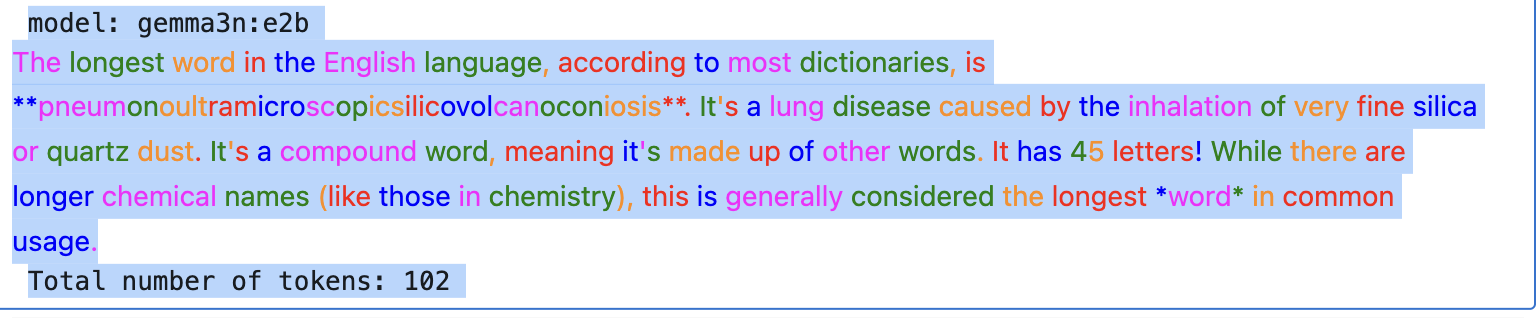
创建函数计算并高亮每个token,这里未用到logprobs,但用到了logprobs的内置token化机制。
PROMPT = """What's the longest word in the English language?"""

API_RESPONSE = get_completion(
    [{"role": "user", "content": PROMPT}], model=model_name, logprobs=True, top_logprobs=5
)


def highlight_text(api_response):
    colors = [
        "#FF00FF",  # Magenta
        "#008000",  # Green
        "#FF8C00",  # Dark Orange
        "#FF0000",  # Red
        "#0000FF",  # Blue
    ]
    tokens = api_response.choices[0].logprobs.content

    color_idx = 0  # Initialize color index
    html_output = ""  # Initialize HTML output
    for t in tokens:
        token_str = bytes(t.bytes).decode("utf-8")  # Decode bytes to string

        # Add colored token to HTML output
        html_output += f"<span style='color: {colors[color_idx]}'>{token_str}</span>"

        # Move to the next color
        color_idx = (color_idx + 1) % len(colors)
    display(HTML(html_output))  # Display HTML output
    print(f"Total number of tokens: {len(tokens)}")

highlight_text(API_RESPONSE)
输出如下所示
2)byte重构
通过byte参数重新构造一句话。
启用logprobs之后,不仅得到每个token,还有其对应的utf-8编码(按字节)。
这些编码在处理文字颜色和特殊字符的时候有帮助,比如如下blue heart emoji生成示例。
PROMPT = """Output the blue heart emoji and its name."""
API_RESPONSE = get_completion(
    [{"role": "user", "content": PROMPT}], model=model_name, logprobs=True
)

aggregated_bytes = []
joint_logprob = 0.0

# Iterate over tokens, aggregate bytes and calculate joint logprob
for token in API_RESPONSE.choices[0].logprobs.content:
    print("Token:", token.token)
    print("Log prob:", token.logprob)
    print("Linear prob:", np.round(exp(token.logprob) * 100, 2), "%")
    print("Bytes:", token.bytes, "\n")
    aggregated_bytes += token.bytes
    joint_logprob += token.logprob

# Decode the aggregated bytes to text
aggregated_text = bytes(aggregated_bytes).decode("utf-8")

# Assert that the decoded text is the same as the message content
assert API_RESPONSE.choices[0].message.content == aggregated_text

# Print the results
print("Bytes array:", aggregated_bytes)
print(f"Decoded bytes: {aggregated_text}")
print("Joint prob:", np.round(exp(joint_logprob) * 100, 2), "%")
输出如下。
第一个输出token是💙,得到其ASCII编码后追加aggregate_bytes数组中 。
最后将这个aggregate_bytes中的内容解码为一个完整句子,其与模型原本补全的文本内容一致。
另外一个点就是补全内的联合概率joint_logprob的计算,就是每个token的对数概率logprob累加,等效为所有token的对数概率换算为指数后的乘积,实现了模型补全内容的“似然性”的计算。
Joint prob: 0.54 %,由于gemma:e2b能力有限,所以预测不准。
在实际任务中,应该使用规模较大能力较强的模型。
model: gemma3n:e2b
Token: 💙
Log prob: -0.0001930001308210194
Linear prob: 99.98 %
Bytes: [240, 159, 146, 153]Token:
Log prob: -0.02772401086986065
Linear prob: 97.27 %
Bytes: [10, 10]Token: **
Log prob: -0.5284159183502197
Linear prob: 58.95 %
Bytes: [42, 42]Token: 💙
Log prob: -0.13172519207000732
Linear prob: 87.66 %
Bytes: [240, 159, 146, 153]Token: **
Log prob: -0.003939750604331493
Linear prob: 99.61 %
Bytes: [42, 42]Token: is
Log prob: -0.7213881611824036
Linear prob: 48.61 %
Bytes: [32, 105, 115]Token: the
Log prob: -0.028448214754462242
Linear prob: 97.2 %
Bytes: [32, 116, 104, 101]Token: blue
Log prob: -0.0022493787109851837
Linear prob: 99.78 %
Bytes: [32, 98, 108, 117, 101]Token: heart
Log prob: -4.096831958122493e-07
Linear prob: 100.0 %
Bytes: [32, 104, 101, 97, 114, 116]Token: emoji
Log prob: -4.017694664071314e-05
Linear prob: 100.0 %
Bytes: [32, 101, 109, 111, 106, 105]Token: .
Log prob: -6.29959104117006e-05
Linear prob: 99.99 %
Bytes: [46]Token: It
Log prob: -0.34885454177856445
Linear prob: 70.55 %
Bytes: [32, 73, 116]Token: '
Log prob: -0.09066871553659439
Linear prob: 91.33 %
Bytes: [39]Token: s
Log prob: -1.254427672847669e-10
Linear prob: 100.0 %
Bytes: [115]Token: a
Log prob: -0.17906376719474792
Linear prob: 83.61 %
Bytes: [32, 97]Token: variation
Log prob: -0.9112554788589478
Linear prob: 40.2 %
Bytes: [32, 118, 97, 114, 105, 97, 116, 105, 111, 110]Token: of
Log prob: -7.134435691114049e-07
Linear prob: 100.0 %
Bytes: [32, 111, 102]Token: the
Log prob: -5.43950136489002e-07
Linear prob: 100.0 %
Bytes: [32, 116, 104, 101]Token: standard
Log prob: -0.14305759966373444
Linear prob: 86.67 %
Bytes: [32, 115, 116, 97, 110, 100, 97, 114, 100]Token: heart
Log prob: -0.40922611951828003
Linear prob: 66.42 %
Bytes: [32, 104, 101, 97, 114, 116]Token: emoji
Log prob: -0.012203282676637173
Linear prob: 98.79 %
Bytes: [32, 101, 109, 111, 106, 105]Token: ,
Log prob: -0.00026717103901319206
Linear prob: 99.97 %
Bytes: [44]Token: often
Log prob: -0.06647158414125443
Linear prob: 93.57 %
Bytes: [32, 111, 102, 116, 101, 110]Token: used
Log prob: -0.01572427898645401
Linear prob: 98.44 %
Bytes: [32, 117, 115, 101, 100]Token: to
Log prob: -5.262520971882623e-06
Linear prob: 100.0 %
Bytes: [32, 116, 111]Token: express
Log prob: -0.03397935628890991
Linear prob: 96.66 %
Bytes: [32, 101, 120, 112, 114, 101, 115, 115]Token: love
Log prob: -0.5354803800582886
Linear prob: 58.54 %
Bytes: [32, 108, 111, 118, 101]Token: ,
Log prob: -3.4089651990143466e-08
Linear prob: 100.0 %
Bytes: [44]Token: affection
Log prob: -0.0017597847618162632
Linear prob: 99.82 %
Bytes: [32, 97, 102, 102, 101, 99, 116, 105, 111, 110]Token: ,
Log prob: -5.242695166884914e-12
Linear prob: 100.0 %
Bytes: [44]Token: or
Log prob: -0.01494593359529972
Linear prob: 98.52 %
Bytes: [32, 111, 114]Token: support
Log prob: -0.21730656921863556
Linear prob: 80.47 %
Bytes: [32, 115, 117, 112, 112, 111, 114, 116]Token: .
Log prob: -0.004438539035618305
Linear prob: 99.56 %
Bytes: [46]Token:
Log prob: -0.7979373335838318
Linear prob: 45.03 %
Bytes: [10, 10, 10, 10]Bytes array: [240, 159, 146, 153, 10, 10, 42, 42, 240, 159, 146, 153, 42, 42, 32, 105, 115, 32, 116, 104, 101, 32, 98, 108, 117, 101, 32, 104, 101, 97, 114, 116, 32, 101, 109, 111, 106, 105, 46, 32, 73, 116, 39, 115, 32, 97, 32, 118, 97, 114, 105, 97, 116, 105, 111, 110, 32, 111, 102, 32, 116, 104, 101, 32, 115, 116, 97, 110, 100, 97, 114, 100, 32, 104, 101, 97, 114, 116, 32, 101, 109, 111, 106, 105, 44, 32, 111, 102, 116, 101, 110, 32, 117, 115, 101, 100, 32, 116, 111, 32, 101, 120, 112, 114, 101, 115, 115, 32, 108, 111, 118, 101, 44, 32, 97, 102, 102, 101, 99, 116, 105, 111, 110, 44, 32, 111, 114, 32, 115, 117, 112, 112, 111, 114, 116, 46, 10, 10, 10, 10]
Decoded bytes: 💙**💙** is the blue heart emoji. It's a variation of the standard heart emoji, often used to express love, affection, or support.
Joint prob: 0.54 %
reference
---
ollama v0.12.11 release
https://github.com/ollama/ollama/releases/tag/v0.12.11
docker ollama部署轻量级嵌入模型 - EmbeddingGemma
https://blog.csdn.net/liliang199/article/details/152125310
Provide logits or logprobs in the API #2415
https://github.com/ollama/ollama/issues/2415
对话补全
https://api-docs.deepseek.com/zh-cn/api/create-chat-completion/
【OpenAI中文文档】如何使用Logprobs

中国智能体开发者社区,聚焦智能体与大模型开发,提供前沿资讯、实用工具链、开源项目及行业案例。通过技术沙龙、开发者大赛等活动,促进经验交流与协作,助力开发者快速构建创新智能应用。
更多推荐
 20
20 0
0- 0


 已为社区贡献111条内容

所有评论(0)