海康摄像机SDK获取视频流并使用yolo进行实时检测
海康摄像机SDK获取视频流转码显示
实现效果
转码+检测+显示 时延控制在1s以内
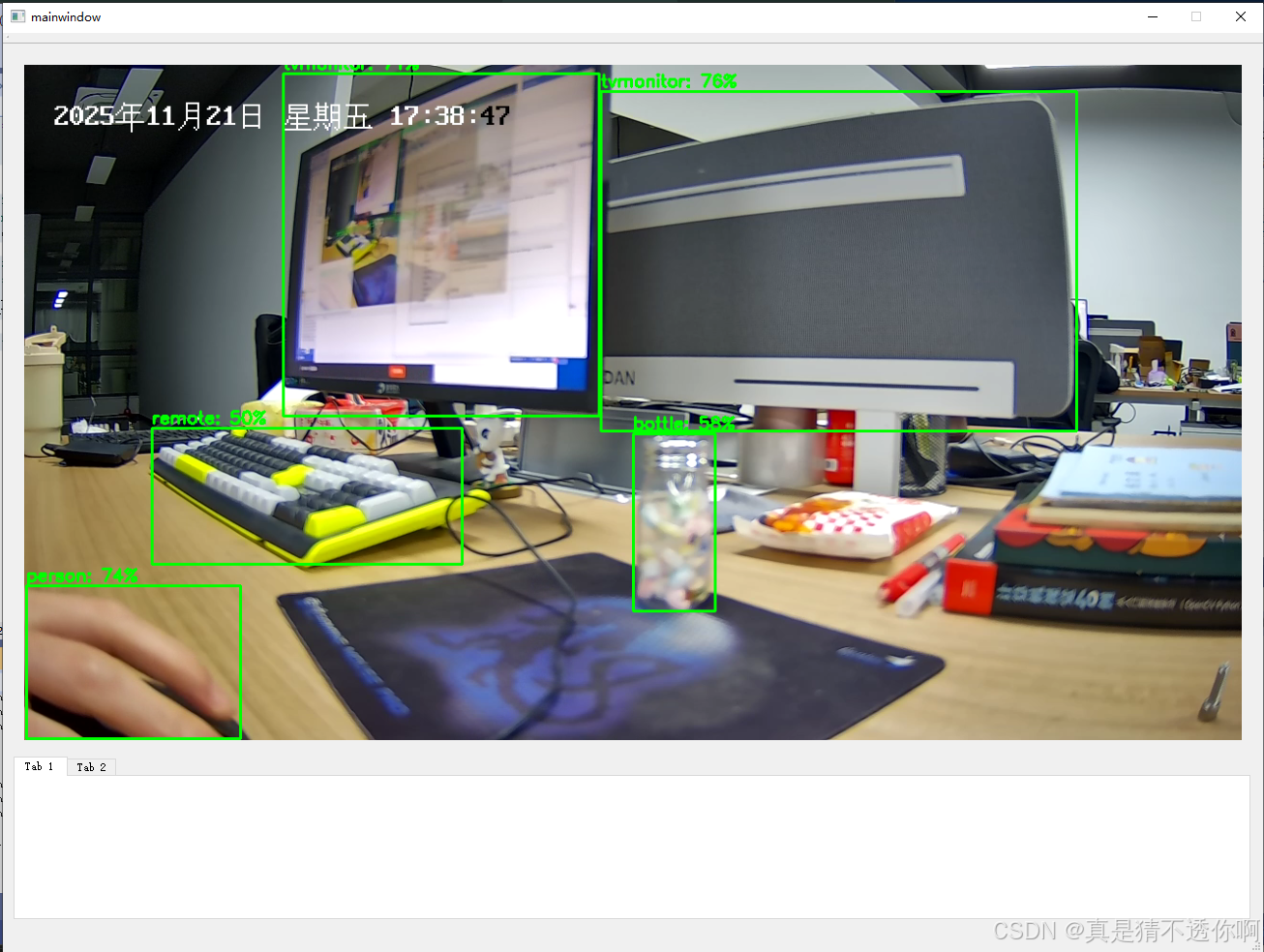
低延迟实现方式
- 通过hkSDK获取转码的视频流,比通过RTSP协议获取的视频流延迟低很多
- yolo使用v5版本,input参数640*640。yolov8检测头会导致最后有上万的检测框,不适用实时监测
- 使用自己编译的opencv4.5 cuda版本
- onnxruntime-win-x64-gpu-1.14.1部署
- qt显示使用OpenGL显卡加速
开发环境
vs2019+QT5.9+海康威视SDK+opencv4.5.5cuda+onnxruntime+cuda11.6
参考代码
该博主代码略加修改即可运行,存在问题:cpu占用率达50%;拖动窗口明显延迟
 https://blog.csdn.net/2501_90502174/article/details/146361878?fromshare=blogdetail&sharetype=blogdetail&sharerId=146361878&sharerefer=PC&sharesource=weixin_44965579&sharefrom=from_link
准备工作
安装cuda环境
依据cuda版本编译opencv4.5。如果你的cuda版本不是11.6,可能需要你自行编译
下载onnxruntime-win-x64-gpu-1.14.1
配置vs2019环境
注意我配置的时release的编译环境,因为我的opencv编译的时候opencv_img_hash455d.dll生成失败,所以我只能使用opencv_img_hash455.lib即release的库进行编译
另注:
编译时选择:调试->开始调试 很大概率会在PlayM4_InputData(camera->m_playPort, pBuffer, dwBufSize);处异常访问崩溃,这个不是我的原因,根据chatgpt解释,这个原因时因为海康sdk内部在调试模式编译时会有访问线程不安全的问题,并且海康官方以承认
编译时选择:调试->开始执行(不调试) 则不会出现崩溃问题
后续编译好的opencv和onnxruntime会贴出来
将官方yolov5.pt转成yolov5.onnx(后续贴出来)
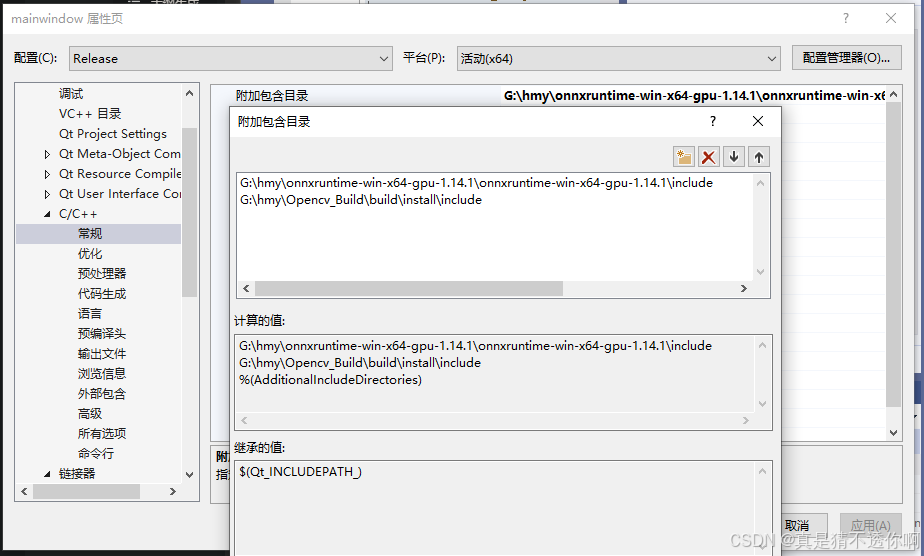
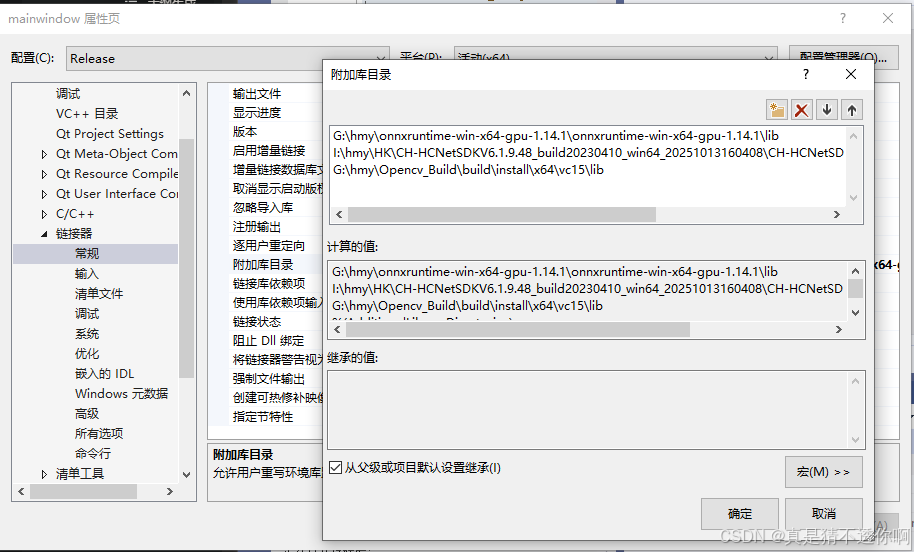
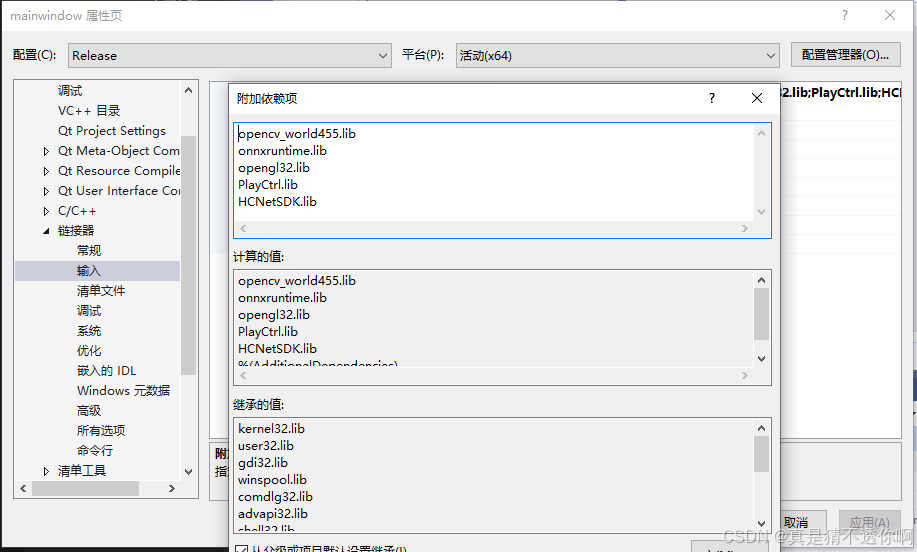
项目完整代码
暂时先贴在这,后续贴GitHub
main.cpp
#include "mainwindow.h"
#include <QtWidgets/QApplication>


int main(int argc, char *argv[])
{
    QApplication a(argc, argv);

    mainwindow w;
    w.show();
    return a.exec();
}
mainwindow.h
#pragma once

#include <QtWidgets/QMainWindow>
#include "ui_mainwindow.h"
#include "GLVideoWidget.h"
#include "camerathread.h"
#include <QCloseEvent>

class mainwindow : public QMainWindow
{
    Q_OBJECT

public:
    mainwindow(QWidget *parent = nullptr);
    ~mainwindow();
    void sendStatueBar(const QString& msg);

protected:
    void closeEvent(QCloseEvent* event) override;

private slots:
    void handleError(const QString& msg);
    // void updateStatus();
private:
    Ui::mainwindowClass *ui;
    CameraThread* m_cameraThread = nullptr;
    GLVideoWidget* m_glWidget = nullptr;

    void init();
};
mainwindow.cpp
//指定文件的编码为UTF-8
#pragma execution_character_set("utf-8")
#include "mainwindow.h"
#include <qDebug>


mainwindow::mainwindow(QWidget *parent)
    : QMainWindow(parent), ui(new Ui::mainwindowClass)
{
    ui->setupUi(this);


    m_cameraThread = new CameraThread(this);

    // 用 OpenGL 控件替换 UI 上的 Video
    m_glWidget = new GLVideoWidget(this);

    if (ui->videoLayout) {
        ui->videoLayout->addWidget(m_glWidget);
    }
    else {
        // 如果没有 layout,可以设为中心窗口测试
        // setCentralWidget(m_glWidget);
    }

    connect(m_cameraThread, &CameraThread::frameReady, m_glWidget, &GLVideoWidget::updateFrame);
    connect(m_cameraThread, &CameraThread::errorMessage, this, &mainwindow::handleError);

    // 启动摄像头
    sendStatueBar("正在初始化相机线程...");
    m_cameraThread->initialize("192.168.1.64", "admin", "ck145236");
    m_cameraThread->start();
}

//程序关闭阶段
mainwindow::~mainwindow()
{
    sendStatueBar("主窗口正在关闭,正在清理资源...");
    if (m_cameraThread) {
        // 1. 告诉线程停止循环
        m_cameraThread->stopCapture();

        // 2. 告诉线程退出事件循环 (虽然 run 里面没有 exec,但以防万一)
        m_cameraThread->quit();

        // 3. 【最重要】阻塞等待线程彻底结束
        // 如果不 wait,线程还在跑,但 UI (glWidget) 已经被 delete ui 销毁了,
        // 线程再发信号就会导致 "Access Violation"
        if (!m_cameraThread->wait(3000)) {
            // 如果3秒还没退出来,强制终止(极端情况)
            qDebug() << "线程响应超时,强制终止";
            m_cameraThread->terminate();
            m_cameraThread->wait();
        }
    }

    delete ui;

    qDebug() << "主窗口资源清理完毕";
}

void mainwindow::init()
{
    //setWindowFlags(Qt::FramelessWindowHint);
}

//提示错误
void mainwindow::handleError(const QString &msg)
{
    sendStatueBar("ERROR: " + msg);
}
void mainwindow::closeEvent(QCloseEvent* event)
{
    // 目前直接接受关闭
    event->accept();
}

void mainwindow::sendStatueBar(const QString &msg)
{
    if (ui->statusBar && !msg.isEmpty()) {
        ui->statusBar->showMessage(msg, 5000);
    }
}
hikcamera.h
#pragma once
#include <QObject>
#include <opencv2/opencv.hpp>
#include "HCNetSDK.h"
#include <QMutex>
#include <QReadWriteLock>
#include <QMap>
#include "plaympeg4.h"
#include <QTime>
#include <atomic>
//#include "YoloProcessor.h"

class HikCamera : public QObject
{
    Q_OBJECT
public:
    explicit HikCamera(QObject *parent = nullptr);
    ~HikCamera();

    //YoloProcessor* m_yolo = nullptr; // YOLO 处理对象

    bool init(const QString& ip, const QString& user,
        const QString& pwd, int port = 8000);
    void startPreview();
    void stopPreview();
    bool getLatestFrame(cv::Mat& yuvFrame);

signals:
    void errorOccurred(const QString& error);
    //void frameUpdated(const QImage& frame);
//private slots:
//    void onFrameReady(const QImage& img);

private:
    static void CALLBACK DecodeCallback(long nPort, char* pBuf, long nSize,
        FRAME_INFO* pFrameInfo, long nUser, long nReserved2);
    static void CALLBACK RealDataCallback(LONG lPlayHandle, DWORD dwDataType,
        BYTE* pBuffer, DWORD dwBufSize, void* pUser);

    // 添加静态映射表和互斥锁
    static QMap<LONG, HikCamera*> s_portMap;
    //static QMutex s_mapMutex;
    static QReadWriteLock s_mapLock;  // 使用 QReadWriteLock 替换 QMutex

    std::atomic<qint64> m_lastEmitMs{ 0 };
    int m_frameInterval = 32;

    LONG m_userId = -1;
    LONG m_playHandle = -1;
    LONG m_playPort = -1;
    QMutex m_mutex;
    QString m_ip;
    QString m_user;
    QString m_password;
    int m_port;

    QMutex m_frameMutex;        // 专用的帧锁
    cv::Mat m_latestYUV;        // 存放 YV12 原始数据
    std::atomic<bool> m_hasNewFrame{ false }; // 标记是否有新帧
};
hikcamera.cpp
//指定文件的编码为UTF-8
#pragma execution_character_set("utf-8")

#include "hikcamera.h"

#include <QDebug>
#include <QImage>
#include <QMutex>
#include <QThread>

// 初始化静态成员
QMap<LONG, HikCamera*> HikCamera::s_portMap;
QReadWriteLock  HikCamera::s_mapLock;

//HikCamera构造函数
HikCamera::HikCamera(QObject *parent) : QObject(parent)
{
    /*NET_DVR_Init();*/        //3.调用NET_DVR_Init()
    if (NET_DVR_Init()) {
        qDebug() << "[NET_DVR_Init]sdk初始化成功";
    }
    else {
        qDebug() << "sdk初始化出错,错误提示:" << NET_DVR_GetLastError;
    }
    //QThread::msleep(3000);  // 给 PlayM4 DLL 时间初始化
    NET_DVR_SetConnectTime(2000, 1);
    NET_DVR_SetReconnect(10000, true);

}

HikCamera::~HikCamera()
{
    if (m_playPort != -1) {
        s_mapLock.lockForWrite();
        s_portMap.remove(m_playPort);
        s_mapLock.unlock();
    }

    // 2. 第二步:停止预览和播放
    stopPreview();

    // 关闭播放端口
    if (m_playPort != -1) {
        PlayM4_Stop(m_playPort);
        PlayM4_CloseStream(m_playPort);
        PlayM4_FreePort(m_playPort);
        m_playPort = -1; // 重置端口
        qDebug() << "[调试] 析构函数中释放 m_playPort(重置为0)";
    }
    // 注销用户
    if (m_userId != -1) {
        NET_DVR_Logout(m_userId);
        m_userId = -1;
    }
    NET_DVR_Cleanup();
}

//4.sdk初始化,调用信号连接:errorMessage/newFrame
bool HikCamera::init(const QString &ip, const QString &user, const QString &pwd, int port)
{
    QMutexLocker locker(&m_mutex);
    m_ip = ip;
    m_user = user;
    m_password = pwd;
    m_port = port;

    NET_DVR_USER_LOGIN_INFO loginInfo = { 0 };
    loginInfo.bUseAsynLogin = 0;
    strncpy(loginInfo.sDeviceAddress, ip.toUtf8().constData(), NET_DVR_DEV_ADDRESS_MAX_LEN);
    strncpy(loginInfo.sUserName, user.toUtf8().constData(), NAME_LEN);
    strncpy(loginInfo.sPassword, pwd.toUtf8().constData(), PASSWD_LEN);
    loginInfo.wPort = port;

    NET_DVR_DEVICEINFO_V40 deviceInfo = { {0} };
    m_userId = NET_DVR_Login_V40(&loginInfo, &deviceInfo);  //5.获取登录句柄
    qDebug() << "[NET_DVR_Login_V40]登录句柄为:" << m_userId;

    if (m_userId < 0) {
        emit errorOccurred(QString("登录失败,错误码:%1").arg(NET_DVR_GetLastError()));
        if (m_playPort != -1) PlayM4_FreePort(m_playPort);
        m_playPort = -1; // 清理已分配的资源
        return false;
    }


    //6.解码初始化
    //海康PlayM4(Playback SDK)存在历史遗留问题
    //debug模式下SDK内部线程不安全概率导致资源访问冲突
    if (!PlayM4_GetPort(&m_playPort)) {
        emit errorOccurred("获取播放端口失败");
        return false;
    }
    qDebug() << "[PlayM4_GetPort] 解码端口获取m_playPort为:" << m_playPort;

    {
        //QMutexLocker mapLocker(&s_mapMutex);
        s_mapLock.lockForWrite();
        s_portMap[m_playPort] = this;
        s_mapLock.unlock();
    }

    if (!PlayM4_SetStreamOpenMode(m_playPort, STREAME_REALTIME) ||
        !PlayM4_OpenStream(m_playPort, nullptr, 0, 1920 * 1088 * 2) ||
        !PlayM4_SetDecCallBackExMend(m_playPort, DecodeCallback, 0, 0, 0) ||
        !PlayM4_Play(m_playPort, nullptr)) {
        emit errorOccurred("播放器初始化失败");
        return false;
    }
    else {
        qDebug() << "【PlayM4_SetDecCallBackExMend】注册的this指针原始地址:" << reinterpret_cast<LONG_PTR>(this);
    }
    // 替代方案:使用 PlayM4_SetDecCallBackEx


    return true;
}

//7.启动预览
void HikCamera::startPreview()
{
    QMutexLocker locker(&m_mutex);
    NET_DVR_PREVIEWINFO previewInfo = { 0 };
    previewInfo.lChannel = 1;
    previewInfo.dwStreamType = 0;
    previewInfo.dwLinkMode = 0;
    previewInfo.bBlocked = 1;

    m_playHandle = NET_DVR_RealPlay_V40(m_userId, &previewInfo, RealDataCallback, this);     //8.获取窗口句柄    9.注册RealDataCallback回调
    qDebug() << "【NET_DVR_RealPlay_V40】注册的this指针原始地址:" << this;

    qDebug() << "[NET_DVR_RealPlay_V40]初始窗口句柄:" << m_playHandle;
    if (m_playHandle < 0) {
        emit errorOccurred(QString("启动预览失败,错误码:%1").arg(NET_DVR_GetLastError()));
    }
}

// 实时数据回调(SDK内部线程)
void CALLBACK HikCamera::RealDataCallback(LONG, DWORD dwDataType,
    BYTE* pBuffer, DWORD dwBufSize, void* pUser)
{
    //qDebug() << "【RealDataCallback】pUser值:" << pUser;

    HikCamera* camera = reinterpret_cast<HikCamera*>(pUser);
    if (camera && dwDataType == NET_DVR_STREAMDATA) {
        //qDebug() << "[RealDataCallback]接受到的视频流数据不为空且满足格式要求!";
    }
    if (!camera || dwDataType != NET_DVR_STREAMDATA) return;
    //qDebug() << "[RealDataCallback]pBuffer地址为:" << pBuffer << " 大小为:" << dwBufSize;
    QMutexLocker locker(&camera->m_mutex); // 加锁
    if (camera->m_playPort == -1) {
        qDebug() << "资源已释放";
        return;
    }

    //10.收到视频流数据,发送到解码回调DecodeCallback
    if (dwBufSize > 0) {
        PlayM4_InputData(camera->m_playPort, pBuffer, dwBufSize);
    }
    //qDebug() << "[RealDataCallback] m_playPort:" << camera->m_playPort;
}

// 解码回调:将YUV数据转换为BGR格式,并生成QImage发送frameUpdated信号
void CALLBACK HikCamera::DecodeCallback(long nPort, char* pBuf, long nSize,
    FRAME_INFO* pFrameInfo, long, long)
{
    // 1. 查找实例
    s_mapLock.lockForRead();
    HikCamera* camera = s_portMap.value(nPort, nullptr);
    s_mapLock.unlock();
    if (!camera) return;

    // 2. 仅处理 YV12 (海康 SDK 默认输出)
    if (pFrameInfo->nType != T_YV12) return;

    int w = pFrameInfo->nWidth;
    int h = pFrameInfo->nHeight;

    // 3. 【关键】只做内存拷贝,不做耗时操作
    // YV12 的大小是 w * h * 1.5
    // 我们构建一个 cv::Mat 来 wrap 这块内存,然后 deep copy 到 m_latestYUV
    // 注意:pBuf 是临时的,必须 clone
    {
        QMutexLocker locker(&camera->m_frameMutex);

        // 构造一个临时的 Mat 头指向 pBuf (不拷贝数据)
        // YV12 在 OpenCV 中可以看作是高度为 h * 1.5 的单通道图
        cv::Mat tempYUV(h + h / 2, w, CV_8UC1, (uchar*)pBuf);

        // 拷贝到成员变量 (Deep Copy)
        tempYUV.copyTo(camera->m_latestYUV);

        camera->m_hasNewFrame.store(true, std::memory_order_release);
    }

    // 结束!不发信号,不转 RGB,不做 QImage。耗时 < 1ms。
}
#if 0:
void HikCamera::onFrameReady(const QImage &img)
{
    //if (m_yolo) {
    //    m_yolo->detect(img);  // 异步调用 YOLO
    //}
    //else {
        emit frameUpdated(img); // 如果没有 YOLO,直接发给显示
    //}
}
#endif

// 【新增】获取最新帧
bool HikCamera::getLatestFrame(cv::Mat& outYUV)
{
    if (!m_hasNewFrame.load(std::memory_order_acquire)) return false;

    QMutexLocker locker(&m_frameMutex);
    if (m_latestYUV.empty()) return false;

    // 拷贝出去供处理 (Deep Copy)
    m_latestYUV.copyTo(outYUV);

    // 标记已读取,避免重复处理同一帧(可选,看你是否需要丢帧策略)
    // 如果希望尽量高帧率,可以设为 false
    m_hasNewFrame.store(false, std::memory_order_release);

    return true;
}

void HikCamera::stopPreview()
{
    if (m_playHandle != -1) {
        NET_DVR_StopRealPlay(m_playHandle);
        m_playHandle = -1;
        qDebug() << "[调试] 停止实时预览";
    }
}
cameraThread.h
#pragma once

#include <QThread>
#include "hikcamera.h"
#include "YoloV5Detector.h"
//#include "YoloProcessor.h"

class CameraThread : public QThread
{
    Q_OBJECT
public:
    explicit CameraThread(QObject *parent = nullptr);
    ~CameraThread();

    void initialize(const QString& ip, const QString& user,
        const QString& pwd, int port = 8000);
    void stopCapture();

signals:
    void errorMessage(const QString& msg);
    void frameReady(const QImage& image); // 发送给 UI 显示 (带框)


protected:
    void run() override;

private:
    HikCamera* m_camera = nullptr;
    YoloV5Detector* m_detector = nullptr; // 使用你的新类
    QString m_ip;
    QString m_user;
    QString m_pwd;
    int m_port;
    QMutex m_mutex;
    bool m_stopFlag = false;
};
cameraThread.cpp
#include "camerathread.h"
#include <QDebug>
#include <QImage>

std::vector<std::string> class_names = {
    "person", "bicycle", "car", "motorbike", "aeroplane", "bus", "train",
    "truck", "boat", "traffic light", "fire hydrant", "stop sign", "parking meter",
    "bench", "bird", "cat", "dog", "horse", "sheep", "cow",
    "elephant", "bear", "zebra", "giraffe", "backpack", "umbrella",
    "handbag", "tie", "suitcase", "frisbee", "skis", "snowboard",
    "sports ball", "kite", "baseball bat", "baseball glove", "skateboard",
    "surfboard", "tennis racket", "bottle", "wine glass", "cup", "fork",
    "knife", "spoon", "bowl", "banana", "apple", "sandwich", "orange",
    "broccoli", "carrot", "hot dog", "pizza", "donut", "cake", "chair",
    "sofa", "pottedplant", "bed", "diningtable", "toilet", "tvmonitor",
    "laptop", "mouse", "remote", "keyboard", "cell phone", "microwave",
    "oven", "toaster", "sink", "refrigerator", "book", "clock", "vase",
    "scissors", "teddy bear", "hair drier", "toothbrush"
};

CameraThread::CameraThread(QObject *parent) : QThread(parent) {}

CameraThread::~CameraThread()
{
    if (m_camera) {
        stopCapture();
        quit();
        wait(); // 等待线程结束

    }

}

void CameraThread::initialize(const QString& ip, const QString& user,
    const QString& pwd, int port)
{
    QMutexLocker locker(&m_mutex);
    m_ip = ip;
    m_user = user;
    m_pwd = pwd;
    m_port = port;
    m_stopFlag = false;
}

void CameraThread::stopCapture()
{
    QMutexLocker locker(&m_mutex);
    m_stopFlag = true;
}

//1.摄像头线程启动阶段
void CameraThread::run()
{
    m_camera = new HikCamera();    //2.创建HikCamera对象--->转到hikcamera

    // 创建 YOLO 对象
    // 加载 YOLO (确保 .onnx 文件路径正确)
    m_detector = new YoloV5Detector("yolov5s.onnx", cv::Size(640, 640), true);
    // 连接 YOLO 检测完成信号到 CameraThread::newFrame
    //connect(m_yolo, &YoloProcessor::processedFrame, this, &CameraThread::newFrame);
    //用于显示状态
    connect(m_camera, &HikCamera::errorOccurred, this, [this](const QString& err) { emit errorMessage(err); });

    //14(2).信号传递到CameraThread::newFrame
    //connect(m_camera, &HikCamera::frameUpdated, this, &CameraThread::newFrame);

    QString ip, user, pwd;
    int port;
    {
        QMutexLocker locker(&m_mutex);
        ip = m_ip;
        user = m_user;
        pwd = m_pwd;
        port = m_port;
    }

     if (!m_camera->init(ip, user, pwd, port)) {
        delete m_camera;
        m_camera = nullptr;
        return;
        }

    m_camera->startPreview();
    // 3. 开始处理循环 (替代原来的 exec())
    cv::Mat yuvFrame;
    cv::Mat bgrFrame;

    while (!m_stopFlag) {
        // A. 主动去取最新帧
        if (m_camera->getLatestFrame(yuvFrame)) {

            // B. 格式转换 YUV -> BGR (必须做,YOLO 需要 BGR)
            //    cv::COLOR_YUV2RGB_YV12 会转成 RGB,注意 OpenCV 默认是 BGR
            //    YOLO通常是用 BGR 训练的 (cv::imread),所以这里最好转 BGR
            cv::cvtColor(yuvFrame, bgrFrame, cv::COLOR_YUV2BGR_YV12);

            // C. YOLO 推理
            //    直接把 bgrFrame 传进去
            auto detections = m_detector->detect(bgrFrame, 0.45f, 0.45f);

            // D. 绘制框 (在 bgrFrame 上直接画)
            for (const auto& det : detections) {
                cv::rectangle(bgrFrame, det.box, cv::Scalar(0, 255, 0), 2);
                std::string label = class_names[det.class_id] + ": " + std::to_string((int)(det.confidence * 100)) + "%";
                cv::putText(bgrFrame, label, cv::Point(det.box.x, det.box.y - 5), cv::FONT_HERSHEY_SIMPLEX, 0.6, cv::Scalar(0, 255, 0), 2);
            }

            // E. 转 QImage 发给 UI
            //    注意:QImage 格式是 RGB888,而 bgrFrame 是 BGR
            //    为了显示颜色正确,需要 cvtColor BGR2RGB,或者在 QImage 里交换 RB
            cv::cvtColor(bgrFrame, bgrFrame, cv::COLOR_BGR2RGB);

            QImage img((const uchar*)bgrFrame.data, bgrFrame.cols, bgrFrame.rows, bgrFrame.step, QImage::Format_RGB888);
            // 必须 deep copy,因为 bgrFrame 在下一次循环会被覆盖
            emit frameReady(img.copy());
        }
        else {
            // 如果没有新帧,稍微睡一下,避免 CPU 100%
            QThread::msleep(5);
        }
    }

    // 4. 清理
    if (m_camera) {
        m_camera->stopPreview();
        delete m_camera;
        m_camera = nullptr;
    }
    if (m_detector) {
        delete m_detector;
        m_detector = nullptr;
    }
}
GLvideoWidget.h
在设计界面添加一个GLWidget并提升至GLVideoWidget
#pragma once
#include <QOpenGLWidget>
#include <QOpenGLFunctions>
#include <QMutex>
class GLVideoWidget :
    public QOpenGLWidget, protected QOpenGLFunctions
{
    Q_OBJECT
public:
    explicit GLVideoWidget(QWidget *parent = nullptr);
    ~GLVideoWidget();

public slots:
    void updateFrame(const QImage &img);

protected:
    void initializeGL() override;
    void paintGL() override;
    void resizeGL(int w, int h) override;

private:
    QImage m_frame;       // 最新帧(RGB)
    GLuint m_textureId;   // OpenGL 纹理
    QMutex m_mutex;
};
GLvideoWidget.cpp
#include "GLVideoWidget.h"
#include <QOpenGLTexture>

GLVideoWidget::GLVideoWidget(QWidget *parent)
    : QOpenGLWidget(parent), m_textureId(0)
{
    //setFixedSize(1280, 720);   // 固定为 720p 显示窗口(适合 1080p 视频输入)

}

GLVideoWidget::~GLVideoWidget()
{
    makeCurrent();
    if (m_textureId)
        glDeleteTextures(1, &m_textureId);
    doneCurrent();
}

void GLVideoWidget::initializeGL()
{
    initializeOpenGLFunctions();
    glEnable(GL_TEXTURE_2D);
}

void GLVideoWidget::updateFrame(const QImage &img)
{
    if (img.isNull()) return;

    QMutexLocker locker(&m_mutex);
    m_frame = img.copy();
    update();   // 触发 paintGL()
}

void GLVideoWidget::paintGL()
{
    glClear(GL_COLOR_BUFFER_BIT);

    QMutexLocker locker(&m_mutex);
    if (m_frame.isNull()) return;

    // 第一次创建纹理
    if (!m_textureId) {
        glGenTextures(1, &m_textureId);
    }

    glBindTexture(GL_TEXTURE_2D, m_textureId);

    // 上传纹理到 GPU
    glTexImage2D(GL_TEXTURE_2D,
        0,
        GL_RGB,
        m_frame.width(),
        m_frame.height(),
        0,
        GL_RGB,
        GL_UNSIGNED_BYTE,
        m_frame.bits());

    glTexParameteri(GL_TEXTURE_2D, GL_TEXTURE_MIN_FILTER, GL_LINEAR);
    glTexParameteri(GL_TEXTURE_2D, GL_TEXTURE_MAG_FILTER, GL_LINEAR);

    // 自适应填满窗口
    glBegin(GL_QUADS);

    glTexCoord2f(0, 1); glVertex2f(-1, -1);
    glTexCoord2f(1, 1); glVertex2f(1, -1);
    glTexCoord2f(1, 0); glVertex2f(1, 1);
    glTexCoord2f(0, 0); glVertex2f(-1, 1);

    glEnd();
}

void GLVideoWidget::resizeGL(int w, int h)
{
    glViewport(0, 0, w, h);
}
YoloV5Detector.h
#pragma once
#include <qobject.h>
#include <iostream>
#include <vector>
#include <thread>
#include <mutex>
#include <atomic>
#include <opencv2/opencv.hpp>
#include <opencv2/dnn.hpp>
#include <onnxruntime_cxx_api.h>
//#include <cuda_runtime.h>


class YoloV5Detector :
    public QObject
{
    Q_OBJECT

public:
    struct Detection {
        int class_id;
        float confidence;
        cv::Rect box;
    };

    // 构造函数:加载模型
    explicit YoloV5Detector(const std::string& modelPath, const cv::Size& inputSize = cv::Size(640, 640), bool useGPU = true, QObject* parent = nullptr);

    // 核心检测函数
    std::vector<Detection> detect(const cv::Mat& rawImage, float confThreshold = 0.4f, float nmsThreshold = 0.45f);

private:
    cv::Mat blob;
    std::vector<float> input_tensor_values;
    std::vector<Detection> results;

    size_t input_tensor_size;
    std::vector<int64_t> input_node_dims;

    Ort::Env env;
    std::unique_ptr<Ort::Session> session;
    std::string input_name;
    std::string output_name;
    cv::Size input_geometry;

    void initSession(const std::string& modelPath, bool useGPU);
};
YoloV5Detector.cpp
#include "YoloV5Detector.h"
#include <iostream>
using namespace cv;
using namespace std;
using namespace Ort;


// 构造函数实现
YoloV5Detector::YoloV5Detector(const string& modelPath, const Size& inputSize, bool useGPU, QObject* parent)
    : QObject(parent), // 初始化 QObject
    env(ORT_LOGGING_LEVEL_WARNING, "YoloV5"),
    input_geometry(inputSize)
{
    input_node_dims = { 1, 3, inputSize.height, inputSize.width };
    input_tensor_size = 1 * 3 * inputSize.height * inputSize.width;
    results.reserve(200);
    initSession(modelPath, useGPU);
}


vector<YoloV5Detector::Detection> YoloV5Detector::detect(const Mat& rawImage, float confThreshold, float nmsThreshold) {
    results.clear();
    if (rawImage.empty()) return results;

    // --- 1. 预处理 (Resize + Normalize) ---
    //Mat blob;
    // 将 1920x1088 缩放到 640x640
    // 这里的 swapRB=true (BGR->RGB), crop=false
    dnn::blobFromImage(rawImage, blob, 1.0 / 255.0, input_geometry, Scalar(0, 0, 0), true, false);

    // 创建输入 Tensor
    // 1 x 3 x 640 x 640 = 1,228,800 元素
    //size_t inputTensorSize = 1 * 3 * input_geometry.width * input_geometry.height;
    //vector<int64_t> inputDims = { 1, 3, input_geometry.height, input_geometry.width };

    MemoryInfo memoryInfo = MemoryInfo::CreateCpu(OrtArenaAllocator, OrtMemTypeDefault);
    Value inputTensor = Value::CreateTensor<float>(
        memoryInfo, blob.ptr<float>(), input_tensor_size, input_node_dims.data(), input_node_dims.size()
        );

    // --- 2. 推理 (Inference) ---
    // 获取输入输出节点名
    const char* input_names[] = { input_name.c_str() };
    const char* output_names[] = { output_name.c_str() };

    auto outputTensors = session->Run(
        RunOptions{ nullptr }, input_names, &inputTensor, 1, output_names, 1
    );

    // --- 3. 后处理 (Post-Process) ---
    // YOLOv5 输出通常是 [1, 25200, 85] (对于640输入)
    // 85 = x, y, w, h, obj_conf, class0, class1, ...
    float* rawOutput = outputTensors[0].GetTensorMutableData<float>();
    auto outputShape = outputTensors[0].GetTensorTypeAndShapeInfo().GetShape();

    int batchSize = outputShape[0];
    int num_anchors = outputShape[1]; // 25200
    int channels = outputShape[2];    // 85 (如果只有1类则是 6)

    // 计算缩放因子:从 640x640 还原回 1920x1088
    // 这里我们使用的是直接 Resize,所以 x 和 y 的缩放比例不同
    float scale_x = (float)rawImage.cols / input_geometry.width;
    float scale_y = (float)rawImage.rows / input_geometry.height;

    vector<int> classIds;
    vector<float> confidences;
    vector<Rect> boxes;

    // 遍历所有框
    for (int i = 0; i < num_anchors; ++i) {
        // 指针偏移到当前框的起始位置
        float* pdata = rawOutput + (i * channels);

        // 优化:先看 Object Confidence (index 4)
        float obj_conf = pdata[4];
        if (obj_conf < confThreshold) continue; // 快速过滤背景

        // 找最大类别分数
        // 类别分数从 index 5 开始
        float* classes_scores = pdata + 5;
        int classId = -1;
        float maxClassScore = 0.0f;

        // 简单循环找最大值
        int num_classes = channels - 5;
        for (int c = 0; c < num_classes; ++c) {
            if (classes_scores[c] > maxClassScore) {
                maxClassScore = classes_scores[c];
                classId = c;
            }
        }

        // 最终置信度
        float final_score = obj_conf * maxClassScore;

        if (final_score > confThreshold) {
            // 解析坐标 (x, y, w, h) 都是相对于 640x640 的
            float cx = pdata[0];
            float cy = pdata[1];
            float w = pdata[2];
            float h = pdata[3];

            // 还原到原图坐标
            int left = int((cx - 0.5 * w) * scale_x);
            int top = int((cy - 0.5 * h) * scale_y);
            int width = int(w * scale_x);
            int height = int(h * scale_y);

            boxes.push_back(Rect(left, top, width, height));
            confidences.push_back(final_score);
            classIds.push_back(classId);
        }
    }

    // NMS (非极大值抑制)
    vector<int> indices;
    dnn::NMSBoxes(boxes, confidences, confThreshold, nmsThreshold, indices);

    for (int idx : indices) {
        Detection det;
        det.class_id = classIds[idx];
        det.confidence = confidences[idx];
        det.box = boxes[idx];
        results.push_back(det);
    }

    return results;
}

void YoloV5Detector::initSession(const string& modelPath, bool useGPU) {
    SessionOptions sessionOptions;
    sessionOptions.SetIntraOpNumThreads(1); // 减少CPU争抢
    sessionOptions.SetGraphOptimizationLevel(GraphOptimizationLevel::ORT_ENABLE_ALL);

    if (useGPU) {
        try {
            // ORT 1.14 写法
            OrtCUDAProviderOptions cuda_options;
            cuda_options.device_id = 0;
            // 显存不够时可调:cuda_options.gpu_mem_limit = 2UL * 1024 * 1024 * 1024;
            sessionOptions.AppendExecutionProvider_CUDA(cuda_options);
            cout << "[ORT] CUDA Provider Enabled." << endl;
        }
        catch (const exception& e) {
            cerr << "[ORT] Warning: Failed to enable CUDA. " << e.what() << endl;
        }
    }

    // 宽字符路径支持 (Windows)
    wstring w_modelPath(modelPath.begin(), modelPath.end());
    session = make_unique<Session>(env, w_modelPath.c_str(), sessionOptions);

    // 自动获取节点名称
    AllocatorWithDefaultOptions allocator;
    input_name = session->GetInputNameAllocated(0, allocator).get();
    output_name = session->GetOutputNameAllocated(0, allocator).get();

    cout << "[ORT] Model loaded: " << input_name << " -> " << output_name << endl;
}
中国智能体开发者社区,聚焦智能体与大模型开发,提供前沿资讯、实用工具链、开源项目及行业案例。通过技术沙龙、开发者大赛等活动,促进经验交流与协作,助力开发者快速构建创新智能应用。
更多推荐
 18
18 0
0- 0


 已为社区贡献4条内容

所有评论(0)